Learn Python
Scrimba's free beginner Python course, taught by Treasure Porth, runs about 4.1 hours across three modules and three terminal apps: an expense splitter, a word-scramble game and a karaoke queue manager. Each module ends in a working program, and the challenge-per-scrim rhythm makes this a strong, slow-paced first language for someone who has never written code.
Reviewed inside the course with a Pro account, September 2026: all 61 scrims read from transcript.
This page is part of our Scrimba Python courses catalog. Scrimba's course page does not list it under any career path; it is a standalone course.
Quick answer
It fits complete beginners who want a first language with immediate feedback and three finished programs in a weekend. The catch: it stops at functions and try/except, so dictionaries, classes and file handling are not here. From here, the natural next step is Scrimba's free Python docs for the topics this course skips, or Learn JavaScript if you want the same challenge-first format applied to the language Scrimba is built around.
Learn Python
FreeTaught by Treasure Porth (opens in a new tab)
A free, project-based beginner Python course: three modules, three terminal apps, a challenge in nearly every scrim, no prior coding required.
Start free on Scrimba (opens in a new tab)Is it worth your time?
For a first language, yes, and the reason is the challenge density. A scrim is Scrimba's name for one interactive lesson: a recording you can pause and type into. The table of contents marks scrims that contain a challenge with a small icon, and that icon sits on nearly every lesson that is not an intro, an outro or a housekeeping clip. By my count from the transcripts, 50 of the 61 scrims end with a brief for you to solve.
A typical scrim is three to six minutes. Treasure explains one idea, applies it to the current project, then pastes a numbered brief into the file and tells you to go. Then she solves it, usually with a typo or a forgotten f on the way. That loop is what you are paying for with your time, and it is the same loop that makes Learn JavaScript work.
Two caveats. First, this course replaced Olof Paulson's 5.6 hour Python course in August 2026, and it covers less ground. The old course reached dictionaries, file handling and classes; this one ends at functions, for loops and try/except. The old course is still online at a separate URL, and Scrimba's own About section links to it as "the old course". Second, Python sits at the edge of a JavaScript-first catalog, and anyone heading for data science will outgrow Scrimba's Python quickly.
What you'll learn
Course curriculum
3 modules · 60 lessons
- Python Fundamentals
- Python Logic and Loops
- Python Functions and Error Handling
Lesson counts are the scrims I counted in each expanded module in September 2026: 60 in total, plus a one-minute "How to Utilize Your Certificate" scrim before the certificate entry. Scrimba's own figures differ in both directions. The module headers show 13, 20 and 17, because they leave out the intro, outro and housekeeping scrims. The course listing and its structured data say 133 lessons, which counts the clips inside scrims rather than the scrims you click.
Inside the course, module by module
1. Python Fundamentals (62 min, 19 scrims)
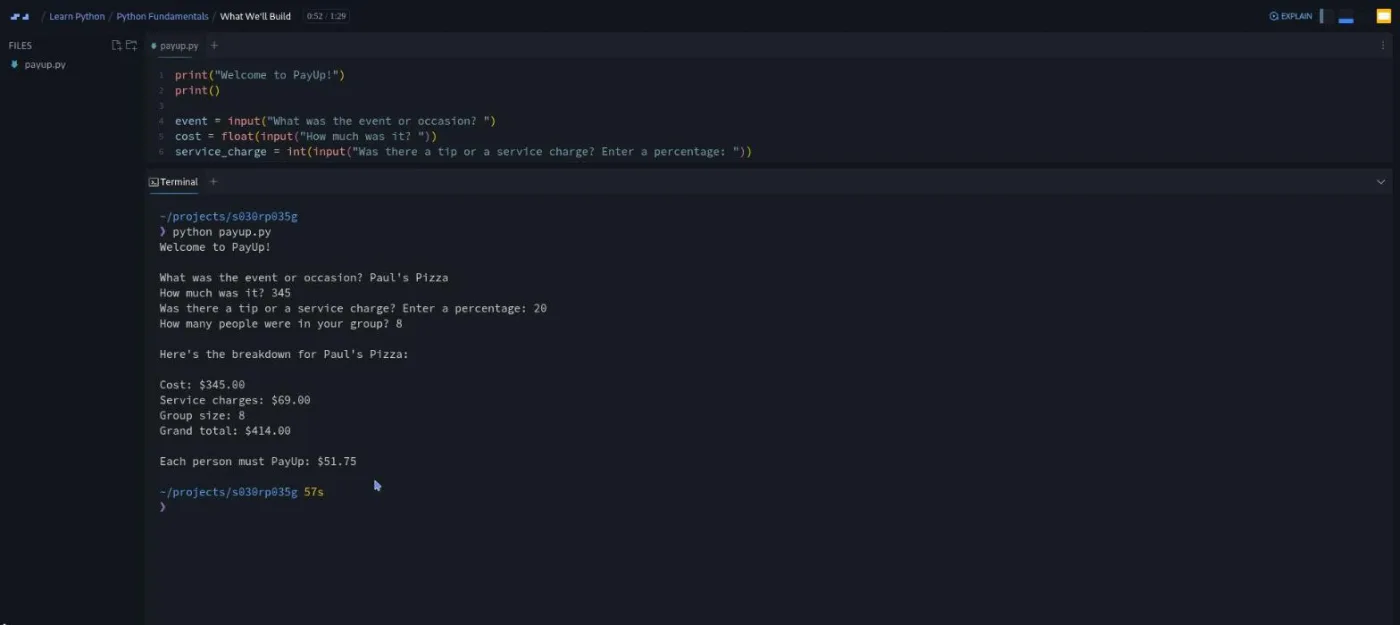
Two short intros, both free previews. The first is a pitch for the language (NASA, OpenAI and Netflix get name-checked). It ends with the one promise the course makes: "everything we'll build will run right here in the Scrimba editor where Python is already set up and ready to go." The second shows the finished PayUp app running and lays out the plan. As Treasure puts it in that lesson, "by the time we start writing the app, nothing will be new. You'll just be putting the pieces together."
The pieces come one per scrim. "Python: First Look" hands you a working party-invitation script and asks you to change its variables, which is also where you meet code comments and python script.py. Then variables get two scrims, strings one, and f-strings one. An f-string is a string with an f in front and variables in curly braces, and the course uses it for every line of output from here on.
The practice briefs are small and domestic. You track a restaurant party that grows by two, build a three-line daily planner, and write an excuse generator ("Sorry, Jim. I can't go to the concert. I have 3,432 saucepans to scrub"). The excuse generator comes back in "Capture User Input", where you replace its hard-coded values with input() prompts. Then arithmetic operators (three word problems about songs, movie tickets and stickers) and a paycheck calculator that teaches int(), float() and type().
Every second or third scrim is titled "PayUp App: ..." and spends the concept you just learned on the project. "Display a Summary" gives you an example_output.md file and asks you to print it with f-strings. "Get Input from Users" swaps the hard-coded values for prompts, with a lecture on writing prompts specific enough to get a whole number back. "Convert User Input" wraps those prompts in float() and int(). There is also a 78-second "Scrimba Docs" clip, narrated by Tom Chant rather than Treasure, pointing you at the text reference.
The expense-split challenge is the module's real test. The file opens with the four input() lines already written and a three-step brief in comments: compute the service charge from a whole-number percentage, add it to the cost, divide by the group size. A hints.md file appears in the explorer if the percentage maths is unfamiliar.
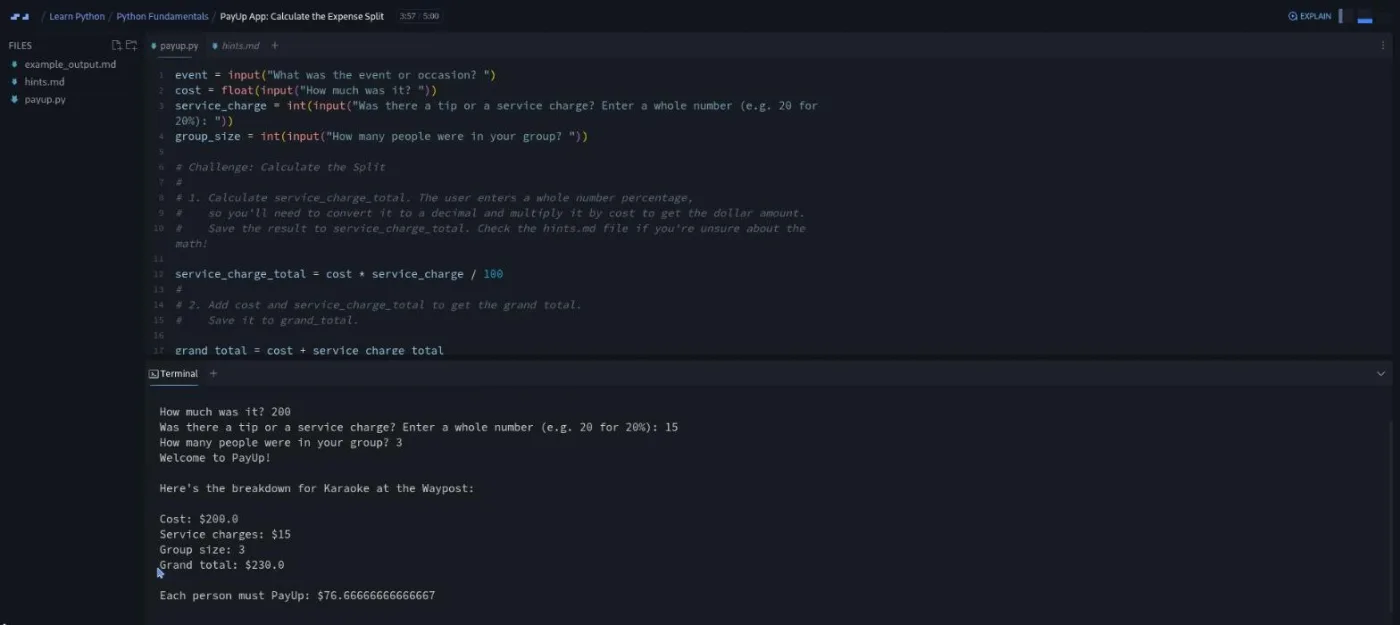
She lets the second bug stand on purpose: "if you're thinking that displaying a number followed by a dozen decimal points is not the way to go, you are exactly correct. We're going to fix that very soon." The fix is :.2f inside the braces. "Finishing Touches" then moves the welcome line to the top of the file and adds .strip("%") to the service-charge prompt, so typing "20%" no longer crashes the app.
The module closes with a Scrimbassador (affiliate program) clip from Per Borgen and a congratulations scrim. Neither teaches anything. The congratulations clip still says the course "will be released module by module, and module two is already in the works", a line left over from before modules 2 and 3 existed.
2. Python Logic and Loops (96 min, 22 scrims)
The longest module and the one where the course starts to feel like programming. The intro runs the finished game, Jargon Jumble, in the terminal: five rounds, a scrambled tech word each round, and three commands (hint, skip, quit), with a final score and a line of commentary at the end. Treasure's pitch for it is that "you'll be able to make it completely your own by swapping in your own word bank and doing your own theming."
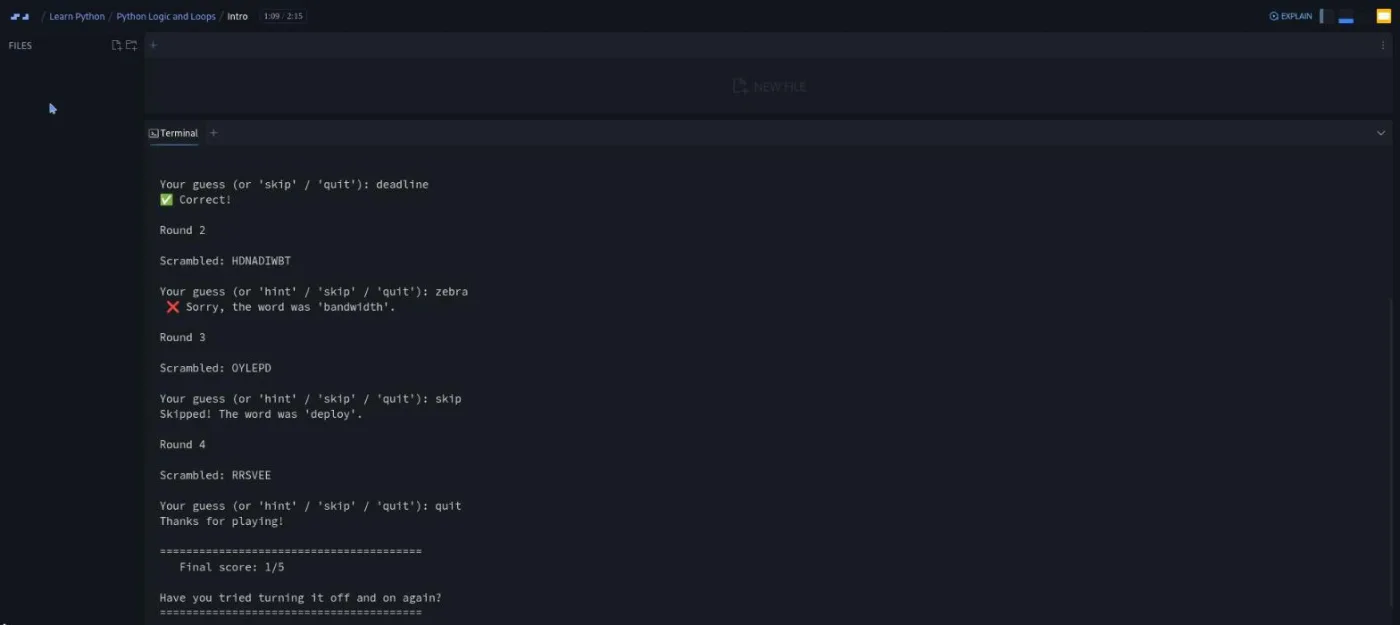
The first six scrims exist to scramble one word. Lists get two scrims: one to make them (a skills list, a years list, an "about me" list of emojis), one to index them, including the -1 shortcut for the last item. list("listen") splits a word into letters, and the challenge is an anagram check with sorted(). Then the random module, where Treasure is careful to show that random.shuffle() changes a list in place while sorted() hands back a copy.
join puts the letters back. The "Scrambler Project" scrim has you create jargon_jumble.py and wire those four steps together.
The next six add the guess. The equality operator scrim opens Python's REPL in the terminal (a prompt where you type one line at a time) to show == and != returning True and False, then has you build a promo-code checker that fails on lowercase input. Comparison operators, if/else (with a proper explanation of why indentation matters in Python) and if/elif/else follow, each with a small brief: a quiz pass mark, a coffee-shop Wi-Fi discount. "String Methods" covers upper(), lower(), title() and strip() and how to chain them, then "Check Guess Project" uses .strip().lower() on the guess so capitalisation and spaces do not matter.
Tuples come in so that each word can travel with its hint. A tuple is a fixed pair (or triple) in parentheses, and the scrim teaches unpacking with an RGB colour before "Project: Add Hints" swaps the word list for a word_bank of (word, hint) pairs. This is the biggest brief in the module: unpack the random pair, add hint to the prompt, and check for it in a separate if above the skip/correct/wrong chain, because a hint should not end the turn.
While loops get two scrims, and both matter later. The first covers the counter pattern, break, constants in capitals, and the accidental infinite loop ("you can usually stop an infinite loop by using the keyboard shortcut control C"). The second uses a bingo caller to teach the in keyword and the repick-until-fresh pattern. Between them sits the game loop challenge, then append, "Avoid Repeat Words" and "Track the Score".
The game loop challenge is a good example of the course's style. The brief is three lines at the top of the file: wrap the game in a loop that runs five rounds, print the round number, let the player type quit. The solution introduces the counter pattern (ROUNDS = 5, round_num = 1, while round_num <= ROUNDS:) and then runs it before adding the increment, so you watch "Round 1" print twice.
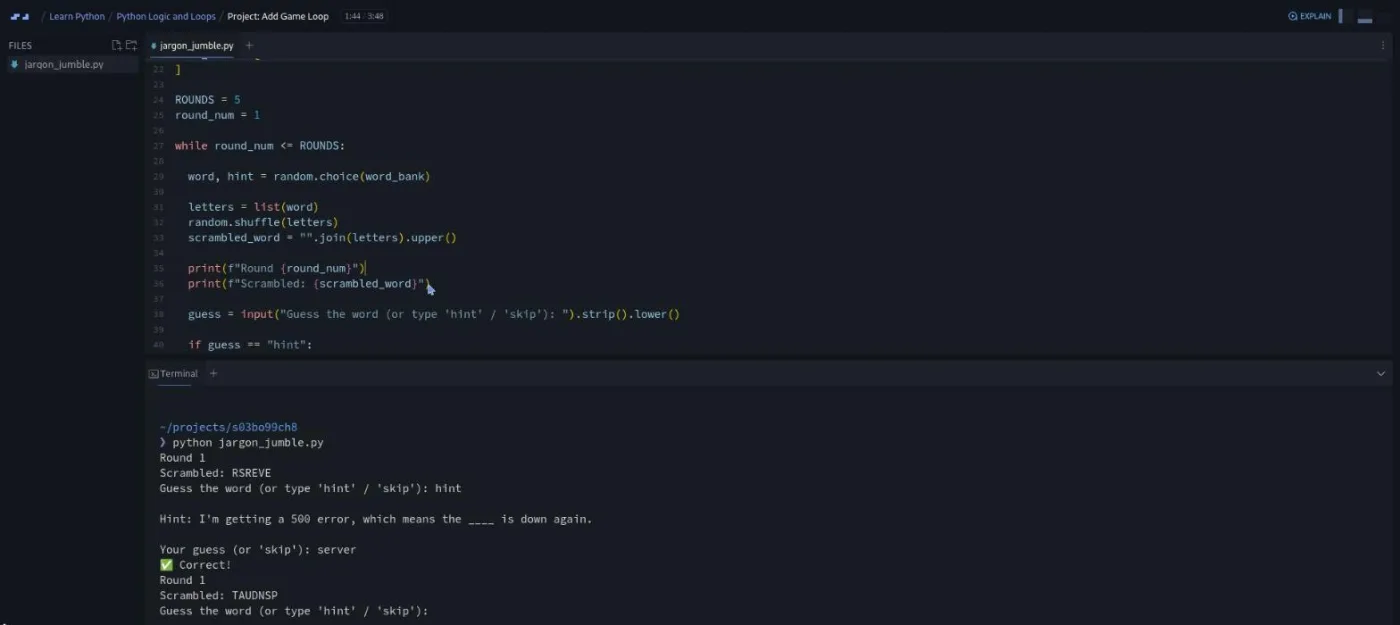
She also flags the next problem before you hit it: "random choice picks randomly each round with no awareness of what it's already picked. We're gonna fix that a little bit later." That fix is "Avoid Repeat Words", which adds a used list and an inner while (word, hint) in used: loop. It ends with the one real warning in the module: this pattern hangs forever if the word bank is not bigger than the number of rounds. "Track the Score" adds a welcome screen, score += 1 on a correct guess, and an if/elif/else chain of end-of-game commentary.
One loose end: the append scrim says persisting data "is a whole subject in and of itself, which we'll get to much later in the course." That lesson never comes. The outro suggests re-theming the game, and even asking "your favorite chatbot to generate hundreds of word and hint pairs".
3. Python Functions and Error Handling (89 min, 19 scrims)
The intro opens with a scene rather than a slide: a karaoke night where "some beg to be bumped to the top of the queue," and the host has to keep track. The finished app, Sing Out, is a numbered queue with five commands (add, next, top, remove, quit). Treasure spends half a minute of the demo on the guardrails: typing a word where a number is expected does not crash it, and calling next on an empty queue repeats "the queue is empty" instead of raising an error.
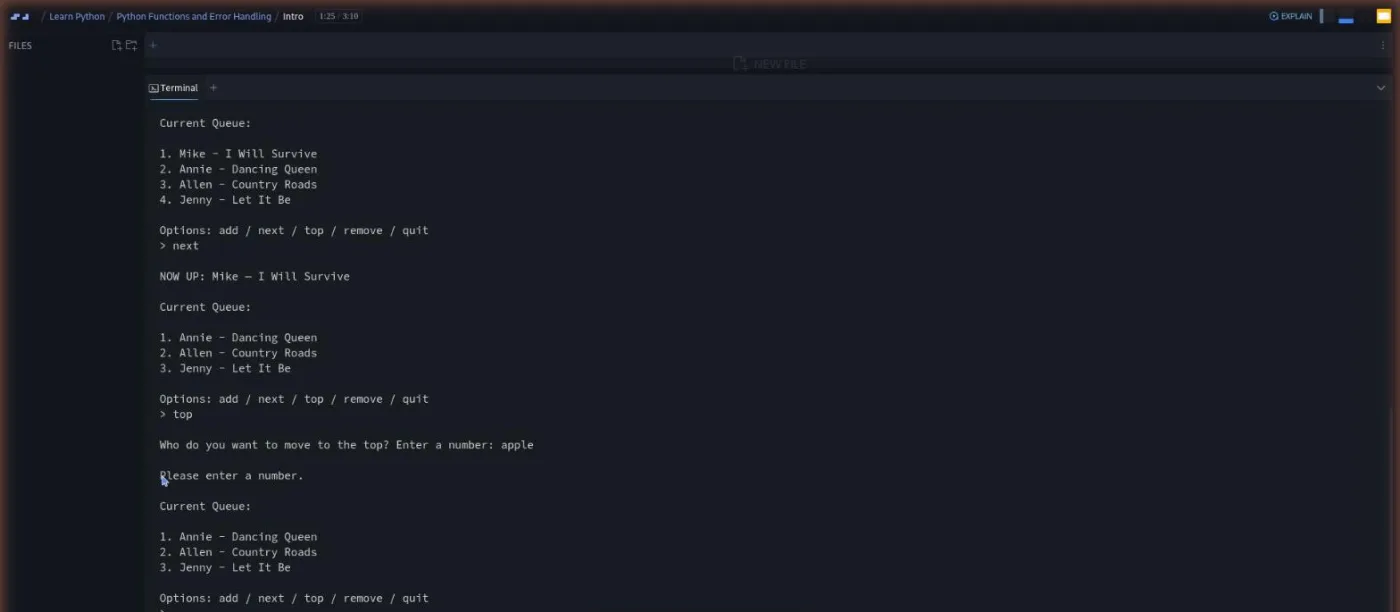
Functions take three scrims and nearly twenty minutes. The first defines roll_dice() with random.randint() and nests functions inside a play_game(); the challenge is a coffee run for six coworkers. "Function Parameters" explains the difference between a parameter and an argument, then local and global scope, and has you turn the module 2 scrambler into a reusable scramble(word) function. "Return Values" uses a pizza-ordering example with math.ceil(), which makes math the second module the course imports, and ends with a full_name() function whose test output is "Welcome, Per Borgen".
"Project: Get Up and Running" is the longest teaching scrim at 8:50, and it is about planning rather than syntax. Treasure builds an is_running loop, stubs show_queue() with a docstring (the description string under a def line) and a placeholder print, and calls the approach scaffolding. As she puts it: "you get a skeleton up and running first so that you're able to build a more complex app while still making sure that everything works along the way." Your brief is to stub add_singer and remove_singer the same way and finish the if/elif/else chain with an "I don't know that command" fallback.
For loops take two scrims and are applied immediately. The first loops over a guest list, the second over a list of tuples (a festival line-up), and "Display The Queue" uses the same unpacking to print each singer and song.
Then one command per scrim. "Add Singer" has you write a prompt_for_singer() that returns two values, cleaned with .strip().title(). "Remove Singer" is the longest command scrim because list.remove() raises an error on a missing item, so you loop, compare singer[0] to the name, and use a bare return to stop after the match (a hints.md file is provided). "Number Queue" introduces enumerate() (which numbers items as you loop) and the off-by-one error (starting the count at 0 when the host expects 1), "Call Next" introduces pop(), and "Move to Top" combines pop() and insert().
The last five scrims harden the app. "Logical Operators" covers and, or and not with a houseplant, a party hat and a cat on a keyboard. "Guard Clauses" defines the term (a check at the top of a function that returns early on a bad case) with len() on an empty coffee order. Then "Guard Against Crashes and Bad Output", at just under eleven minutes, is the longest scrim in the course. It demonstrates six ways to break Sing Out and hands you five guard clauses to write, with the expected output for each in a separate file. As she says in the intro, "every command the host types in the karaoke queue app is going to be a function that you write," and the module also names separation of concerns (one job per function) as the reason for doing so.
The try/except scrim is representative of the late course. It starts with int("42") working and int("banana") raising a ValueError, wraps the second in try/except ValueError, and then hands you a challenge (a sign-up for a hot dog eating contest that has to cope with someone typing "a lot"). The advice that sticks: "you're almost always going to use try except around an input." "Validate User Input" applies it to the top command, and the outro suggests a clear command and a swap command if you want to go further.
A 56-second "How to Utilize Your Certificate" clip from Per Borgen and the certificate entry close the course.
What a lesson feels like
Every scrim in this course is a Python file on the left and a terminal underneath, not a browser preview. Treasure types into the file, runs python payup.py (or jargon_jumble.py, or sing_out.py) in the terminal, and the program's prompts and output appear there. Two scrims in module 2 also use the REPL, typing single lines at a >>> prompt to test operators.
When a scrim is a challenge, the brief is a numbered comment block at the top of the file, sometimes with a hints.md or example_output.md file alongside. The recording pauses so you can edit the same file and run it in the same terminal. Then you press play and she solves it.
Scrims run from about a minute (intros, outros) to just under eleven minutes (the crash-guarding lesson); most are three to six. Every scrim has captions, a timestamped transcript under the settings menu, and subtitles in ten languages. The voice is calm and unhurried, with a habit of running code before it is finished so you see the wrong output first. Across the course she did that with the raw service charge, the fourteen-decimal split, the stuck round counter, a remove() that printed both "removed" and "not found", and an extra quote mark in the try/except challenge. It is a slower teaching rhythm than Per Borgen's JavaScript course, and it suits a first language.
Free or Pro: exactly what is gated
The three modules, all 60 scrims, every challenge and the three projects are free. Unlike Learn JavaScript, this course has no "Solo Project (PRO)" items in its table of contents, so there is nothing inside it that a free account cannot open. The first two scrims are marked as free samples in the table of contents; the rest need a free account.
What Pro adds around it: the certificate of completion (Scrimba's pricing page lists course certificates under Pro), the career paths (none of which include this course), and the Pro-only channels on Scrimba's Discord (basic access to the Discord community is listed as free, so the server itself is not gated). If Python is the only thing you want from Scrimba, there is no reason to pay. See current plans (opens in a new tab) if you later want the web-development paths.
How long it takes
The 4.1 hours is video runtime. Because 50 of the scrims stop for a challenge, budget two to three times that: 8 to 12 hours, which is a long weekend or two weeks at under an hour a day. Module 2 is the one to plan around; at 96 minutes of video and 22 scrims it will take most people a solid four hours. Add another hour or two if you take Treasure up on re-theming the word game with your own word bank, which is the closest thing the course has to a solo project.
Who it's for, and who should skip it
It fits complete beginners who want a first language with immediate feedback, and anyone on the beginners track who is still deciding whether they enjoy programming at all. Three finished programs in four hours is a fair test of that. By the end you can write a program that asks questions, does maths on the answers, loops, stores things in lists, and refuses bad input without crashing. It also suits people who learn better by reading: the transcript panel is complete and the companion docs cover the same ground in text.
Skip it if you already program in another language; the pacing is deliberately slow and you will hit the end of the material in an afternoon. Skip it if you need dictionaries, file handling or classes, which are not here (Scrimba's older Python course still covers them, and so do the free docs). And skip Scrimba entirely if your goal is data science, Django or automation at scale.
Start Learn Python for free (opens in a new tab)Prerequisites
None. The course assumes you have never written code, explains print() and code comments in the first lesson that touches a file, and nothing needs installing; Python runs inside the scrim. The only assumptions are that you can follow English (or one of the nine other subtitle languages) and that you will type the challenges rather than skip to the solutions.
Where it fits
Two ways to keep going after the last scrim. The Python section of Scrimba's free documentation site (opens in a new tab) has a Beginner/Intermediate/Deep Dive switcher and covers dictionaries, classes and modules in text. The previous Python course (opens in a new tab), still free, covers the chapters this one skips. If you are still choosing a first course, the Best Python Courses for Beginners guide compares the options.
Strengths and limits
What it does well: it is free with nothing gated inside it. Every module ends in a program you ran yourself, and the challenge-per-scrim rhythm keeps you typing. The terminal format means the Python you learn looks like the Python you will write locally. Treasure runs buggy code on purpose, so you see errors before you cause them, and module 3 teaches scaffolding and guard clauses, which most beginner courses skip.
Where it is limited: it stops at functions and try/except. Dictionaries, sets, file I/O, classes, modules beyond random and math, comprehensions and lambdas are all missing, and any Python tutorial you read next will assume the first of those. Two lines in the transcripts promise more (data persistence "much later in the course", and a module-by-module release), which suggests the course was cut short or is still growing. There is no solo project and no path to continue into. The per-module lesson counts on Scrimba's page understate the work (the headers say 50 lessons, there are 60 scrims), while housekeeping scrims (the affiliate pitch, the certificate video) pad it a little.
Related courses and comparisons
- All Python courses, the category hub
- Best Python Courses for Beginners, a curated guide to where to start
- Learn JavaScript, the same challenge-first format applied to the language Scrimba is built around
- For beginners, if you are new to coding entirely
- Scrimba vs freeCodeCamp, if you are choosing a platform
Yes. All three modules, every challenge and all three projects are free, and there are no Pro-only items inside the course. The first two scrims are marked as free samples; the rest need a free sign-in. Pro adds the certificate and the Pro-only Discord channels, not lessons.
Treasure Porth, who also teaches Scrimba's CSS Challenges and JavaScript Interview Challenges. She replaced Olof Paulson's earlier course at this URL in August 2026; his course is still available on its own page. Three short housekeeping clips (Scrimba Docs, the Scrimbassador pitch and the certificate video) are voiced by Tom Chant and Per Borgen.
Three terminal apps: PayUp, an expense splitter that reads an occasion, cost, tip percentage and group size and prints what each person owes; Jargon Jumble, a five-round word scramble game with hints, skips, quitting and a final score; and Sing Out, a karaoke queue manager with add, next, top, remove and quit commands that survives bad input.
Yes. Every scrim has captions, a timestamped transcript panel under the settings menu, and subtitles in ten languages. I read the transcript of every scrim for this review.
I counted 60 scrims across the three modules (19, 22 and 19) plus a short certificate scrim. Scrimba's module headers say 13, 20 and 17, and its listing says 133 lessons, which counts the clips inside scrims. 50 of the scrims end with a challenge.
No. Each scrim has a Python file and a terminal, and you run the program with python filename.py inside the lesson. The course never asks you to set up a local environment.
4.1 hours of video, but plan for 8 to 12 hours including the challenges: a long weekend, or two weeks at under an hour a day.
No. It ends at functions, for loops, guard clauses and try/except. Dictionaries, sets, file handling, classes and modules beyond random and math are not covered. Scrimba's free docs and the older Python course both cover them.
Yes. It is rated Beginner, assumes no prior programming, and the challenge in almost every scrim means you write code from the first module. It is slow-paced by design, which is a plus for a first language and a minus if you already code.