Scrimba Fullstack Developer Path
The Scrimba Fullstack Path runs 108.4 hours across 20 modules and 2,055 lessons, taking you from HTML and CSS through React, Node, Express, SQL, TypeScript, Next.js, and a short AI Engineering block. It's the longest track on Scrimba, bundling frontend and backend in one Pro subscription.
Most learners finish in 3 to 4 months at 12 to 15 hrs/week. Full-time learners take 6 to 10 weeks; weekend-only learners take 6+ months. See the realistic time budget below.
For context on the job market, ZipRecruiter places average U.S. back end developer pay around $120k as of May 2026, and the BLS bundles related roles under Software Developers and Web Developers with national medians above $80k (BLS Software Developers, BLS Web Developers). Scrimba Pro costs far less than a bootcamp covering the same ground; check current pricing (opens in a new tab) for the exact number, and see the student discount if you qualify.
Completing the path is a nice-to-have. Your portfolio is the hiring signal, and in a tight 2026 junior market you will need projects beyond the ones here. What the path gives you to build on: the Hometown Homepage solo project, the Blackjack and Chrome extension builds, Build a Node API and Build a Fullstack Node App, then 5.3 hours of Launching Your Career. See what learners report.
Reviewed inside the path with a Pro account, September 2026: all 20 modules expanded.
 Free sample lessonPress play to open "Welcome to the Fullstack Path," the two-minute sample lesson that opens the path. (opens in a new tab)
What you'll learn
Twenty modules covering web fundamentals, then a Frontend-style React arc, then servers, databases, TypeScript, testing, Next.js, and a short LLM-and-RAG block. Instructors listed for the path: Per Borgen, Tom Chant, Kevin Powell, Treasure Porth, Rachel Johnson, Bob Ziroll, and Shant Dashjian.
Complete module breakdown
| Module | Topics Covered | Why it matters in 2026 |
|---|---|---|
| Introduction | Path overview and setup | Tooling and expectations. |
| HTML and CSS Fundamentals | Semantic HTML, CSS basics, layouts | Base layer before JS. |
| JavaScript Fundamentals | Variables, functions, DOM manipulation | Same language client and server. |
| Tools of the Trade | Git, command line, Vite | What teams expect daily. |
| Accessible Development | ARIA, keyboard nav, screen readers | Shows up in PR reviews and audits. |
| Essential CSS | Grid, Flexbox, animations, variables | Layout without hacks. |
| Essential JavaScript | Closures, promises, modules, ES6+ | React and Node both lean on this. |
| Responsive Design | Media queries, mobile-first, fluid layouts | Real traffic skews mobile. |
| APIs and Async JavaScript | Fetch, REST, async/await | Frontend talking to backends you'll build. |
| AI Engineering | LLMs, agents, RAG fundamentals | Short intro to how apps wire in models and retrieval. |
| Node.js | Server-side JavaScript, modules | JS off the browser. |
| Databases | SQL, Supabase, data modeling | Persistence and queries. |
| Express.js | Routing, middleware, REST APIs | Typical Node API shape in job posts. |
| User Interface Design | UI/UX principles | Polish without a design degree. |
| React.js Fundamentals | Components, state, hooks | Same React story as the Frontend path. |
| Testing | Unit testing, TDD basics | Catches regressions before users do. |
| Advanced React.js | Context, routing, patterns | Bigger apps than a single page. |
| TypeScript | Types, interfaces, generics | Many teams default to TS for new code. |
| Next.js | SSR, routing, full-stack React | Common production choice for React. |
| Launching Your Career | Portfolio, interviews, job search | Same career closure as Frontend, with full-stack angles. |
Total: 108.4 hours across 2,055 lessons. When I expanded every group on the path page with a Pro account on 21 September 2026, 1,684 scrim rows rendered across the 20 modules and their 60-odd sub-modules; the listing's larger number counts clips inside scrims. The module names and hours above are Scrimba's.
What I found inside (21 September 2026)
The table is Scrimba's. This is what the expanded table of contents contains, and where the path differs from the Frontend path it shares most of its first half with.
- Nested, not flat. Almost every module is two or three sub-modules that map to a standalone course: HTML and CSS Fundamentals is Intro to HTML, Intro to CSS, Business Card, Space Exploration Layout, Birthday Website and the Hometown Homepage solo project; JavaScript Fundamentals is the counter app, Blackjack and Chrome extension builds with "JavaScript challenges" drills nested inside each. Node.js is "Build a Node API" (19 scrims) and "Build a Fullstack Node App" (26 scrims:
writeHead(), routing and paths, thepathandfsmodules, serving the frontend, a JSON API, an explainer on adding POST). - Tools of the Trade (2.2 hrs) is path-only in this form: Command Line Fundamentals (9 scrims), Command Line Power Tools (13) and Essential Git and GitHub Skills (8), with a "Welcome to Tools of the Trade" intro.
- Testing (56 min, 12 scrims) is a module the Frontend path does not have: set up the tooling, write your first test, test user interactions, mock external services, view code coverage, "Accessibility testing with a side of TDD", types of testing. The app under test is the Meme Generator from Essential JavaScript.
- Express.js (3.9 hrs) ends in a 24-scrim Authentication sub-module: users table,
/registerroute, validation, hashing with bcryptjs,express-session, environment variables, login. This is where the path stops being "frontend plus a bit of Node". - Advanced React.js (16.4 hrs) is bigger here than in the Frontend path (13.2 hrs) because it adds Persistence (10 scrims) and Authentication (36 scrims) on top of Reusability, Performance and Routing.
- Launching Your Career (5.3 hrs) has different framing from the Frontend path's Getting hired: General Tips and Strategies (five scrims, including the same Bob Ziroll "What are hiring managers looking for?" talk and two "Proven Tactics" scrims), Improving Your Online Presence (the twelve LinkedIn scrims plus resume and GitHub), then JavaScript, React and Frontend interview challenges.
- AI Engineering (5.9 hrs) is three sub-modules: AI Engineering Fundamentals (updated, 32 scrims), RAG and Vector Databases (18) and AI Agents (27). That is the same material as the Intro to AI Engineering, Learn RAG and Learn AI Agents courses, so if you have done those you can skip the module.
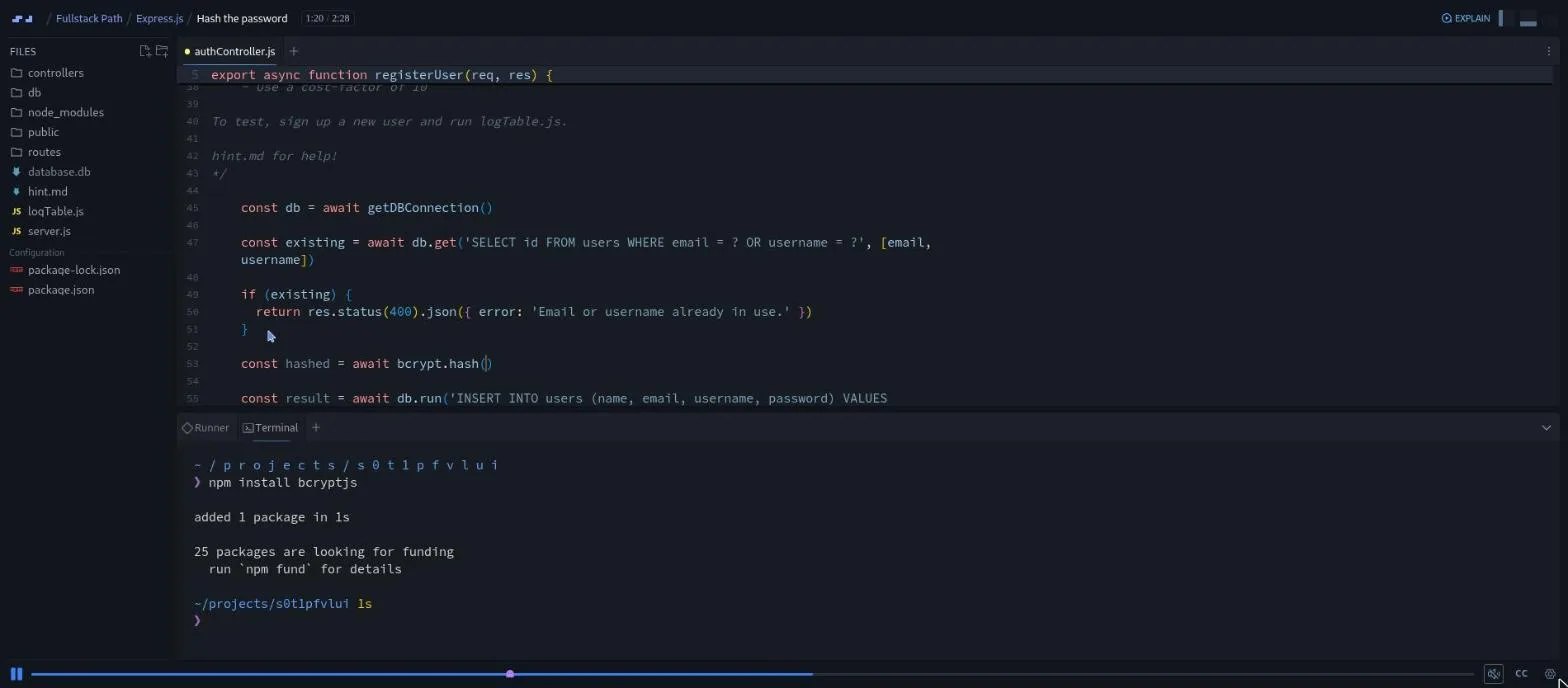
The later backend scrims run in a Node environment with a terminal pane, a file tree with node_modules and a database.db, which is a different experience from the browser-only HTML and JavaScript lessons at the start of the path. The "Hash the password" scrim above is typical: a challenge brief in a comment, a hint.md if you forget the syntax, then the instructor's solution.
Realistic time budget
108 hours of lessons is lesson time only. Add builds, debugging, side projects, and the hours where a concept needs a second pass. A workable mental model:
- Weekend learner, 6 to 8 hrs/week: roughly 6 months of calendar, longer if you build extras.
- Evenings + weekends, 12 to 15 hrs/week: 3 to 4 months.
- Full-time, 30+ hrs/week: 6 to 10 weeks if nothing else competes for attention.
No cohort, no deadline. The study plan gives a week-by-week skeleton if you want one.
Who this is for
- Beginners who want browser and server in one subscription and accept the longer calendar.
- Career changers aiming at full-stack titles rather than UI-only.
- People who would rather not stitch five separate courses together.
- Anyone who specifically wants AI topics bundled with the JS stack (thin slice, not a replacement for a dedicated AI path).
Pros and cons
Pros
- One ordered line through frontend, backend, DB, TS, Next, tests, and a taste of AI.
- TypeScript and Next.js included; both common in job ads.
- AI module covers LLMs, agents, RAG at intro depth.
- Single Pro subscription covers the whole sequence.
Cons
- Long. 108+ hours of lessons; builds and repetition add more.
- Easy to feel buried if you rush; pace matters.
- No cohort or deadlines; you supply accountability.
- JavaScript-only backend: no Python, Java, Go, or Rust. The SQL module is a working intro, not a full database course, and auth and security coverage is baseline, enough to interview for full-stack JS roles, not a substitute for a CS curriculum.
What learners report
Reddit and the Scrimba forum threads agree on three things: the scrim format holds attention better than recorded video, the path takes longer than the marketing implies, and the people who land junior roles paired it with extra projects, not just completion (Scrimba forum: Backend Path discussion, DonTheDeveloper review of Scrimba's career path). Treat the path as the spine, not the whole job hunt. We rounded up more of these accounts in Scrimba Fullstack Path reviews.
Fullstack vs Frontend vs Backend
| Feature | Fullstack Path | Frontend Path | Backend Path |
|---|---|---|---|
| Duration | 108.4 hrs | 81.6 hrs | 36.2 hrs |
| Starts from zero | Yes | Yes | No (intermediate) |
| React | Yes | Yes | No |
| Node / Express | Yes | No | Yes |
| SQL / Databases | Yes | No | Yes |
| TypeScript | Yes | No | Yes |
| Next.js | Yes | No | No |
| AI Engineering module | Yes | No | No |
| Cybersecurity module | No | No | Yes |
Read more: Frontend vs Fullstack.
Courses in this path
The path folds these standalone courses into one ordered sequence, roughly the order they appear:
- Learn HTML and CSS (Free, 5.7 hrs)
- Learn JavaScript (Free, 9.4 hrs)
- Advanced JavaScript (Pro, 9.8 hrs)
- Learn React (Free, 15.1 hrs)
- Advanced React (Pro, 13.2 hrs)
- Learn UI Design (Pro, 8.6 hrs)
- Learn Node.js (Free, 3.5 hrs)
- Learn Express.js (Free, 4.0 hrs)
- Learn SQL (Free, 3.8 hrs)
- Learn Firebase (Pro, 3.4 hrs)
- Learn TypeScript (Free, 4.2 hrs)
- Learn Next.js (Free, 4.4 hrs)
- Intro to NestJS (Free, 1.4 hrs)
- JavaScript Interview Challenges (Pro, 2.3 hrs)
and more, see the full catalog.
Choose this if
You want one track that covers UI and servers and you accept the longest path on the site. If you only care about shipping React and CSS faster, take Frontend. If you already built UIs and just need APIs and data, Backend is shorter.
The Fullstack Developer Path
ProJavaScript end to end: React, Node, Express, SQL, TypeScript, Next.js, testing, deployment, plus an AI module, all in one Pro path.
Start the Fullstack Path (opens in a new tab)Related pages
- All Learning Paths
- Backend Developer Path
- Frontend Developer Path
- AI Engineer Path
- React Courses
- Backend Courses
- TypeScript Courses
- 6-Month Study Plan
- How Scrims Work
- Tutorial Hell FAQ
- Scrimba Pricing
- Scrimba for absolute beginners
- Scrimba vs Boot.dev
Sources
- Scrimba: The Fullstack Developer Path (opens in a new tab)
- BLS: Software Developers, QA Analysts, and Testers
- BLS: Web Developers and Digital Designers
- ZipRecruiter: Back End Developer Salary (May 2026)
- Scrimba forum: C# course and Backend Dev Path
- DonTheDeveloper: Honest review of Scrimba's Frontend career path
- Scrimba: How to become a backend developer in 2026
108.4 hours of interactive lessons. At 10 to 15 hours a week most learners finish in 3 to 4 months; weekend-only learners often take 6+ months.
Fullstack if you want Node, SQL, TypeScript, Next.js, testing, and the AI module in the same long track. Frontend if you want to get hireable on React and the browser sooner.
Yes. The Fullstack Path includes an AI Engineering module covering LLMs, agents, and RAG fundamentals.
No. The path starts with basic HTML and CSS, assuming no prior coding knowledge.