Intro to Supabase
Jonathan Hill's free Intro to Supabase runs about 4.8 hours and puts you inside a React sales dashboard: you query a live Postgres database, chart the results in real time, then add sign up, sign in, and row level security policies that lock rows down by account type.
Reviewed inside the course with a Pro account, September 2026: all 49 scrims and the 46 that carry a transcript.
Quick answer
It suits React developers who have never wired up a backend, not Supabase newcomers who still need to learn hooks and forms. The catch: it's a Postgres course in disguise, with SQL policies and a plpgsql trigger by the second half, so pair it with Learn SQL if your SQL is shaky. Free unlocks the whole thing; only the certificate needs Pro.
Intro to Supabase
FreeTaught by Jonathan Hill (opens in a new tab)
A free, project-based course building a React sales dashboard on Supabase: queries, realtime updates, auth, row level security, and a database trigger.
Start free on Scrimba (opens in a new tab)Is it worth your time?
Yes, if you are a React developer who stalls the moment an app needs data that survives a refresh. The course is short, free, and built around one app that grows in a sensible order. By the end you can create a table, query it from React, and keep a chart in sync with the database. You can also sign users up and in, and lock rows down with policies that live in the database rather than in your JavaScript.
The part that earned my respect is the second half. Most Supabase tutorials stop at "auth works." This one keeps going: it shows you that a logged-out visitor can still type /dashboard and pull data, explains why, and then fixes it in two layers (a protected route in React and row level security in Postgres). It then hits a real design problem, storing a user's account type somewhere a user cannot edit, and solves it with a separate profiles table and a trigger. That is the kind of thing you normally learn by getting it wrong in production.
Two caveats. First, the course is a Postgres course in disguise: you will read SQL, write EXISTS subqueries in policies, and paste a plpgsql function into the SQL editor. Jonathan warns you about this and says it is fine not to understand every line, but if SQL scares you, do Learn SQL first. Second, most of the React is written for you. The router, the context provider, and the form markup arrive ready-made, and you fill in the Supabase calls. If you want to practise React, this is not the place.
What you'll learn
Course curriculum
2 modules · 48 lessons
- Persistence
- Authentication
Lesson counts are the scrims I counted in each expanded section in September 2026, plus one course-level "How to utilize your certificate" scrim, for 49 in total. Scrimba's section headers show 6 and 21, which skip intros, recaps, and theory scrims, and its listing says 57 lessons, which counts the clips inside scrims rather than the scrims you click.
Inside the course, module by module
1. Persistence (60 min, 11 scrims)
The first two scrims are near duplicates: a course introduction (the free sample lesson) and a section introduction that repeats it. Both set up the "user story": the sales team wants a bar chart of each rep's total sales for the quarter, updating in real time, plus a form to add a deal. Jonathan also states the prerequisites plainly at 3:33: "Some SQL basics, some essential JavaScript concepts, some React basics ... and, hopefully, you've worked with APIs before."
The eleven-minute "Supabase project setup" scrim is the one you cannot skip. You create your own Supabase project and a sales_deals table (name and value columns), turn row level security off for now, enable realtime, and seed a few rows by hand. Back in the Vite app you install @supabase/supabase-js and create the client with createClient(url, key). The URL and anon key go into environment variables inside Scrimba, and because the app is Vite you read them as import.meta.env.VITE_SUPABASE_URL. From here on, every challenge runs against your database, not the instructor's.
The querying scrims are where the course finds its rhythm. Jonathan writes SQL in Supabase's SQL-to-JavaScript translator, pastes the generated .from().select().order() chain into the app, and then hands you the next one. Your challenge in "Query with aggregate function" is to enable aggregate functions in the SQL editor (Supabase disables them by default) and write sum(value) ... group by name yourself. "Storing the data in state" adds useState, try/catch, and setMetrics(data).
"Format data for chart" is the one React-heavy scrim, and Jonathan says at 0:16 that it is "more data manipulation and creating the bar chart than pure Supabase, so feel free to skip if you want." It installs react-charts@beta and maps your rows into the { primary, secondary } shape the library wants. Then "Realtime subscription" adds supabase.channel('deal-changes').on('postgres_changes', ...) inside the same useEffect, and you test it by inserting a row in the Supabase table editor and watching the console. The solution just refetches everything on any change, and he flags the cost: "if you had a really large dataset, this would not be very performant."
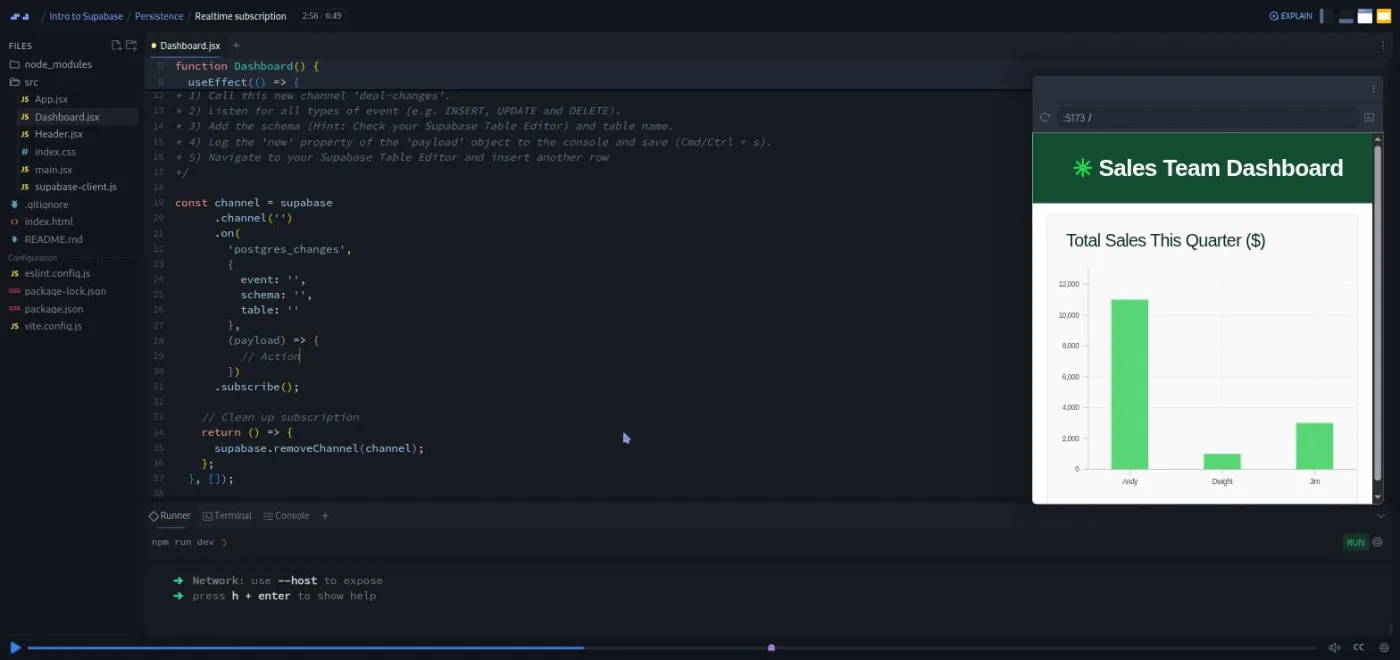
The last three scrims (the new deal form, inserting data, and a 37-second recap) have no transcript, which is unusual for Scrimba. From the code, the form uses React 19's useActionState, and the insert is one line: supabase.from('sales_deals').insert(newDeal).
2. Authentication (3.8 hrs, 37 scrims)
A second user story opens the section: users sign up as a rep or an admin, reps can only add their own deals, logged-out visitors must not see the chart, and the header should show who is signed in. Jonathan lists what that means at 0:39: "setting up a router and context, listening for a session, learning about JSON Web Tokens, signing users up and in and, I guess, out as well, and writing some low level security policies and a database trigger."
The first four scrims are React plumbing. "Router setup" installs React Router, and Jonathan says at 1:16, "since this is mainly a Supabase course, not a React course, I'll be doing the majority for you." You do get one challenge (write the route objects for / and /dashboard). "Context API" builds an AuthContext with a session state and a useAuth hook. Then "Auth Session state" parts 1 and 2 add supabase.auth.getSession() on first render and onAuthStateChange to keep session current. The part 1 challenge is the first hard one: write getInitialSession with proper error handling. Then check the browser's own dev tools, because "there's a little bit of a quirk in the Scrimba environment" that logs undefined where the real value is null.
Two theory scrims follow, "JSON Web Tokens (anon)" and "JWTs (authenticated)". This is where the course's central metaphor arrives: your Supabase project is a castle, tables are rooms, and requests are letters. A JWT is a certificate signed with "the castle's unique magic secret pen," which is the project secret. The anon key is "a basic visitor's pass," a logged-in user's token is "a full member badge." It sounds twee written down, and it works: when policies arrive later you already know why the database can trust a token. The second scrim ends in a five-question multiple-choice challenge you answer by deleting the wrong options in the editor.
Sign in, sign out, and sign up take nine scrims, and they share one teaching pattern. Jonathan writes each auth function once, deletes the Supabase call, and makes you retype it: signInWithPassword, then signOut, then signUp. As he puts it in "Sign in auth function, part 2": "The better you are using the docs, the better you will be with using Supabase." The form logic is split the same way: he writes the sign-in handler and you write the sign-up handler from it.
Around those you add the routing pieces: useNavigate after a successful sign in, Link between the two forms, a RouteRedirect that sends signed-in users away from the login page, and a ProtectedRoute that wraps the dashboard.
Then row level security. "Row Level Security" starts with a demonstration: signed out, Jonathan types /dashboard and the chart still loads, because the request carries the anon key and the table has no policies. Policies, in the metaphor, are "the bouncers stationed at each room or table's door." In "RLS: Authenticated users only" you enable RLS in your own project and write a policy with auth.role() = 'authenticated'; the network tab then shows a 404 for anonymous requests and data once you sign in.
The refactor is the course's best stretch, and it is eleven scrims long. "Database refactor, part 1" is pure reasoning: you could store the account type in the JWT's user_metadata, but a user can rewrite that with auth.update. His conclusion: "this user metadata is not a good place to store authentication data like account type if we plan to base RLS policies on it." Part 2 draws the fix: a user_profiles table with name and account_type, a user_id foreign key on sales_deals, and a trigger to copy sign-up data across. He weighs a plain insert against a trigger and picks the trigger because "we do have an opportunity to learn more about Supabase."
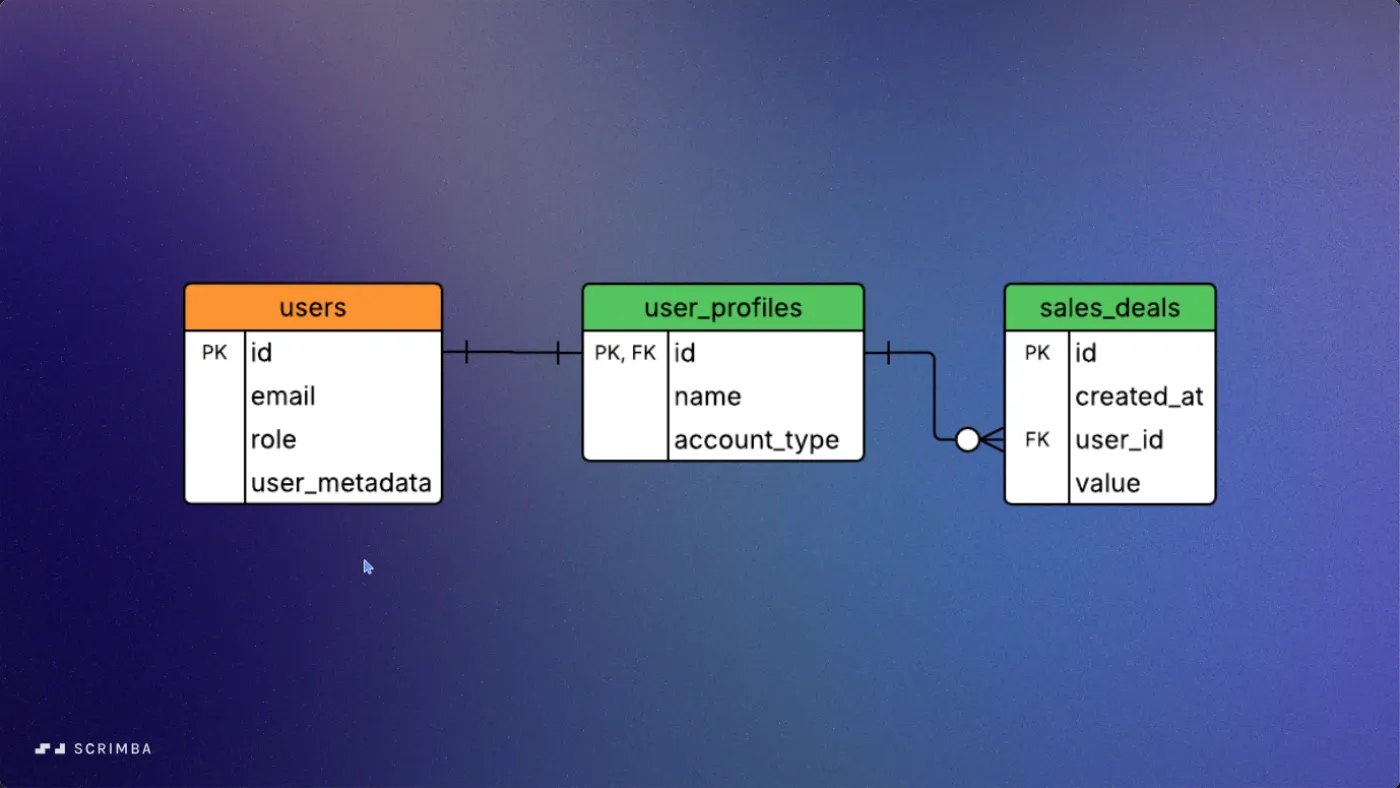
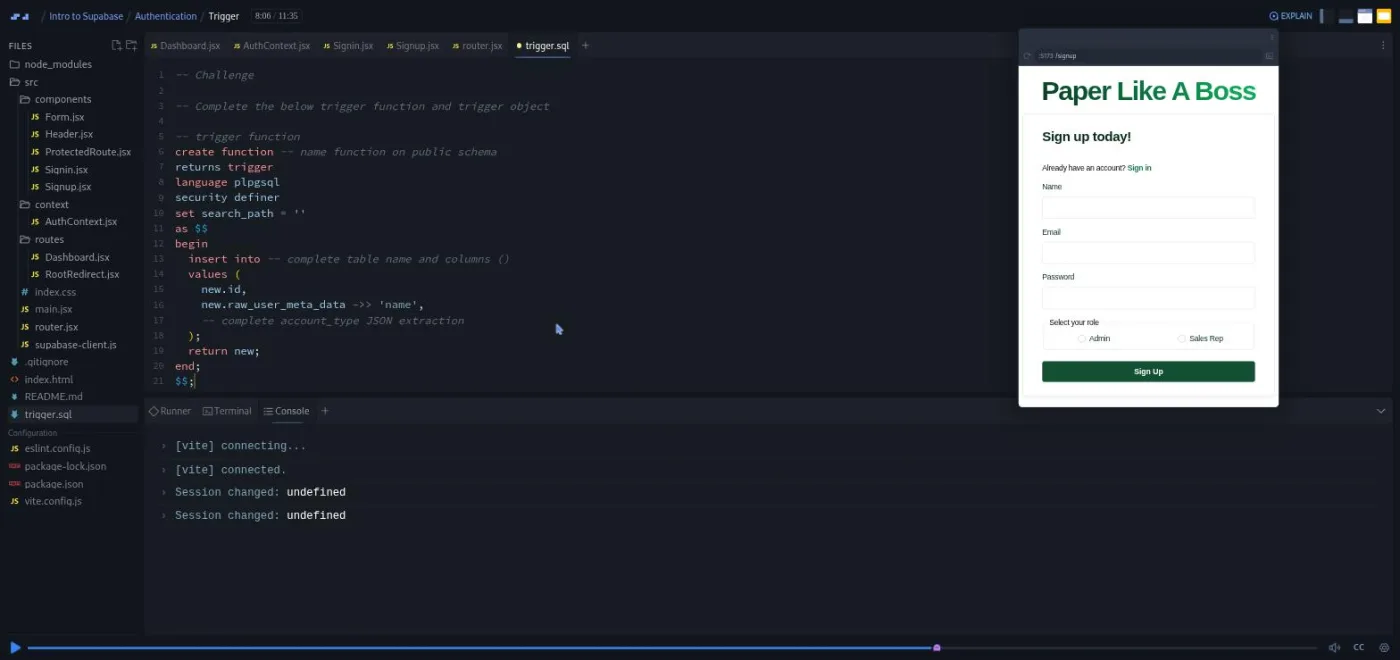
"Trigger" is the longest scrim at 11:35. You write create function public.handle_new_user() returns trigger language plpgsql security definer, insert new.id, new.raw_user_meta_data ->> 'name', and the account type into user_profiles. Then you create trigger on_auth_user_created after insert on auth.users. The challenge blanks out the names and the JSON extraction for you to fill in. After that you paste the whole thing into your SQL editor, delete your test users, and sign up "Pam" as an admin and "Dwight" as a rep to prove the profile row appears.
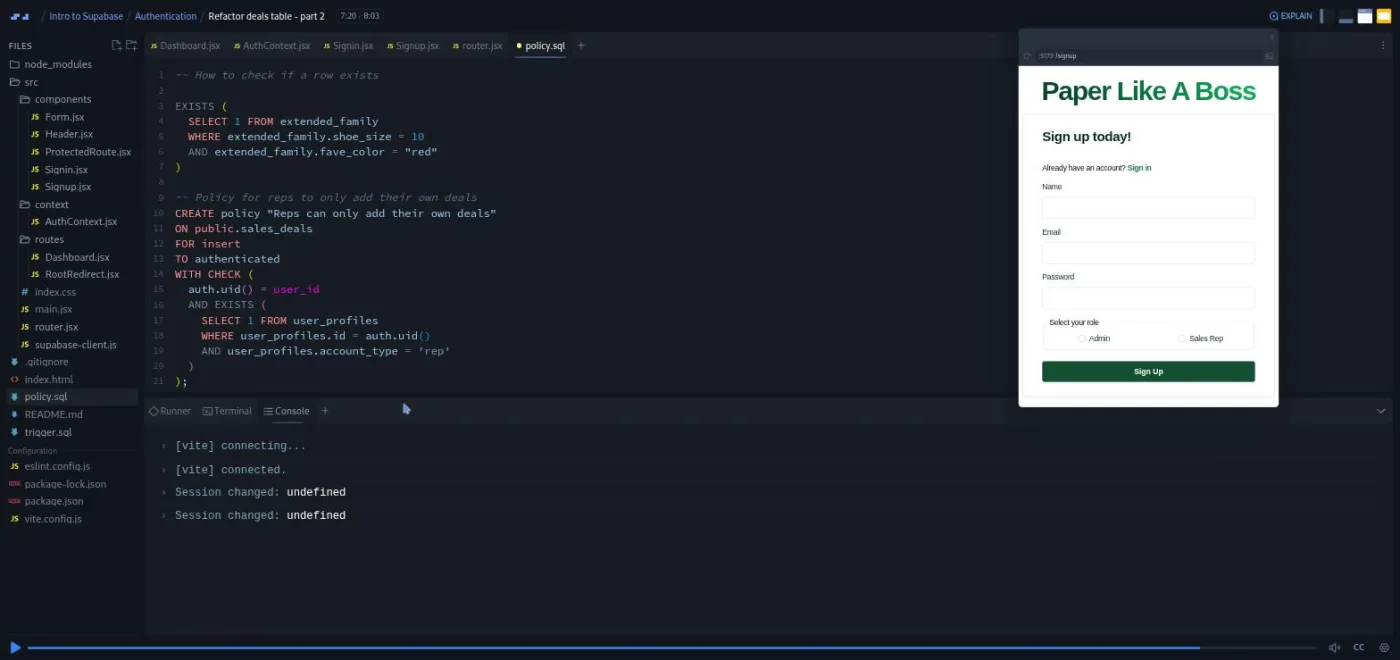
The three "Refactor deals table" scrims replace the broad policy with three narrow ones. Because Supabase policies are additive ("combined with an or"), the old allow-everything policy has to go. The rep policy checks auth.uid() = user_id and EXISTS (select 1 from user_profiles where id = auth.uid() and account_type = 'rep'); your challenge is the admin version.
"Update new deal form, part 1" then tests it live: signed in as Dwight the rep, adding a deal for someone else fails with "Failed to add deal," and Jonathan says at 10:20, "So the RLS is working."
"Fetch all profiles, part 2" is a small, useful debugging lesson. The new fetchUsers call returns an empty array because it runs inside a useEffect with an empty dependency array, before anyone is signed in, and RLS blocks the anonymous request. The fix is a second effect keyed on [session] with an early return when there is no session.
"Update fetchMetrics, part 2" finishes the refactor with a join: you write from sales_deals inner join user_profiles on sales_deals.user_id = user_profiles.id, and the translator turns it into select('value.sum(), ...user_profiles!inner(name)'), with the join inferred from the foreign key. The chart comes back, now grouped by profile name. "Account type in Header" renders "Dwight (Sales Rep)", and the recap suggests a stretch goal: a read-only manager account type.
The section ends with a "Want to become a Scrimbassador?" referral pitch from Per Borgen and a one-minute certificate scrim. Neither is course content.
What a lesson feels like
Scrims here are longer than in Scrimba's beginner courses: the median is about six minutes and seven of them pass nine. Jonathan talks over slides for the theory, then switches to the editor. About half the scrims end in a written challenge: numbered instructions in a comment, the recording pauses, you type, then you press play and watch his solution. He usually leaves a hint ("you could copy and paste this and modify a few bits") and often admits when he is being generous: "I was gonna get you to try and remember it, but I'm just too nice."
A lot of the work happens outside the editor. You will spend real time in the Supabase dashboard: creating tables, ticking "enable realtime," writing policies in the policy editor, pasting SQL, deleting users. Jonathan narrates each click ("the thumb up, it's the fifth icon down on the left"), and his slides are screenshots of the same screens, but the course cannot check that work for you. If your policy has a typo, you find out when the chart is empty.
The voice is dry British humour. He names the company "Paper Like a Boss," seeds the table with characters from The Office, and promises in the first minute that "Supa excited" is "the first and last supa joke you will hear from me." He also stops to correct himself, as in "Update new deal form, part 1," where he spends a minute untangling his own use of "ID" versus "user ID" and apologises for the confusion. Every scrim I opened has captions and a transcript panel, except the three noted above, which have neither.
Free or Pro: exactly what is gated
The whole course is free: both sections, all 49 scrims, and every challenge. There are no Solo Projects marked PRO in this course, so there is nothing inside it that a free account cannot open. The one thing behind Pro is the certificate of completion at the end of the table of contents.
Jonathan also says twice that the Discord is "available to free and pro members," which matches Scrimba's pricing page: basic Discord access is free, and only the Pro-only channels are gated. See current plans (opens in a new tab) if you want the certificate or the career paths around this course.
One cost that is not Scrimba's: you need a Supabase account. Everything the course does fits the free tier, and Jonathan says so up front: "no need to dig out those credit cards."
How long it takes
The 4.8 hours is video runtime. Plan on 10 to 14 hours. The Persistence section is a two-hour evening if your Supabase account is ready. Authentication is where the time goes. The refactor alone asks you to create a table, write four policies, run a trigger, delete and recreate users, and clear out old rows. Each of those is a trip to the Supabase dashboard with a chance to mistype something. Four or five sittings of two to three hours is realistic, and more if you stop to read the Supabase docs when Jonathan points at them, which he does often.
Who it's for, and who should skip it
It fits React developers who want a first backend without writing a server. It also suits people who took Learn React and want their next project to have real users, and anyone who has used Firebase and wants to see the Postgres alternative. Busy professionals get a bonus: the sections are self-contained and the app is small.
Skip it if you have not written React: the course assumes hooks, context, and forms, and only explains them in passing. Skip it too if you want Supabase's other services (storage, edge functions, OAuth providers, vectors); they get a slide in the introduction and nothing else. And if your goal is to understand Postgres itself, Learn SQL is the better first stop.
Start Intro to Supabase for free (opens in a new tab)Prerequisites
Working React (components, useState, useEffect, forms) and comfortable JavaScript (async/await, destructuring, map, find, filter). Basic SQL helps a lot from the Authentication section onward: you will write GROUP BY, INNER JOIN, and an EXISTS subquery. You also need a free Supabase account, and the course expects you to set environment variables in Scrimba, which it explains.
Where it fits
Scrimba does not place this course in a career path. It sits naturally after Learn React. The routing and context sections are easier if you have seen React Router or Advanced React, both of which Jonathan links to from his slides. The forms use useActionState, so What's new in React 19 is a useful companion. For the database side, Learn SQL is the prerequisite it quietly assumes.
Strengths and limits
What it does well:
- It is free, and it runs against your own database rather than a sandbox.
- It teaches row level security by first showing the hole and then closing it.
- The JWT explanation is the clearest I have seen in a course at this level.
- The refactor teaches a real schema design lesson (profiles table plus trigger) instead of hand-waving it.
Where it is limited:
- The React is mostly done for you.
- A lot of the work is clicking through the Supabase dashboard, where nothing checks your result.
- Three scrims have no transcript.
- The chart library is a beta package.
- The course never leaves the happy path of email-and-password auth.
Related courses and comparisons
- All Scrimba backend courses, the full category hub
- Learn React, the prerequisite for the frontend half
- Learn SQL, the database language under Supabase
- Build a Mobile App with Firebase, the other backend-as-a-service in the catalog
- Intro to Vite, the build tool this project uses
- Scrimba vs freeCodeCamp, if you are choosing a platform
Yes. All 49 scrims and every challenge are free, and there are no Pro-only Solo Projects in this course. Only the certificate of completion needs Pro.
Yes. In the third scrim you create your own Supabase project and table, and every challenge after that runs against your database. Everything fits Supabase's free tier.
Yes. The app is a React 19 project built with Vite, and the course assumes hooks, context, and forms. Most of the React is written for you, but you need to read it comfortably.
More than the title suggests. You write aggregate queries, a join, row level security policies with EXISTS subqueries, and paste a plpgsql trigger function into the SQL editor. Basic SQL is enough, but zero SQL will hurt.
A sales dashboard: a bar chart of each rep's total deals that updates in real time, a form to add deals, sign up and sign in with email and password, a profiles table with rep and admin account types, and policies so reps can only add their own deals.
Jonathan Hill. He teaches every scrim except the Scrimbassador referral pitch near the end, which is by Per Borgen.
Yes for 46 of the 49 scrims, with captions and a transcript panel. The new deal form scrim, the insert scrim, and the Section 1 recap had no transcript when I checked.
4.8 hours of video, but plan on 10 to 14 hours because much of the work happens in the Supabase dashboard, where you create tables, write policies, and run SQL yourself.
No. They are mentioned on one slide in the introduction. The course covers the database, realtime subscriptions, email-and-password auth, row level security, and triggers.