Learn SQL
Gregor Thomson teaches this free SQL course in about 3.8 hours, having you run a vintage car dealership's database and write queries to answer its owner's requests. It is a strong first grounding in SQL: free, short, and heavy on practice, though it stops before schema design or connecting a database to an app.
Reviewed inside the course with a Pro account, September 2026.
This page is part of our Scrimba backend courses catalog. Scrimba's course page lists it under the Backend Developer Path and the Fullstack Developer Path.
Quick answer
Take it if you have never written SQL, or want a hands-on refresher before touching a real backend: every lesson pauses for a challenge on the same classic-car dealership database, and the browser runs Postgres for you, so there's nothing to install. The catch is scope, not depth: this is the query language only, with no schema design, indexing, transactions, or app integration. If you already write joins and subqueries without thinking, skip ahead to Intro to Supabase, which puts a hosted Postgres database behind a real app.
Learn SQL
FreeTaught by Gregor Thomson (opens in a new tab)
A free, beginner SQL course: queries, joins, subqueries and CASE, all practiced on a classic car dealership's database in the browser.
Start free on Scrimba (opens in a new tab)Is it worth your time?
Yes, if SQL is new to you. The whole course is free, the runtime is under four hours, and almost every scrim stops at least once and hands you a query to write. That is the right way to learn a language whose entire difficulty is in the details: which table comes first in a join, what happens when a value is null, where the brackets go in a WHERE clause.
Two things surprised me. First, it goes further than the "free beginner course" label suggests. Module 2 has you writing CREATE TABLE statements with primary and foreign keys, adding constraints to an existing table, and reading the error Postgres throws when a constraint is violated. Module 3 covers subqueries with ANY, ALL and EXISTS, then CASE inside SELECT, WHERE and UPDATE. Those are the topics that separate "I can select rows" from "I can answer a question with SQL".
Second, it is friendlier than it looks. Gregor writes a mistake first and then fixes it. At the start of Challenges 1 he says: "these are gonna be a bit more difficult than the challenges we've completed already, so don't worry if you struggle with these." And every exercise is tied to someone at the dealership asking for something. The story is thin, but it means you always know why you are writing a query.
This is the query language only. Designing a schema, indexing, transactions, performance, and connecting a database to a real app are out of scope. Gregor says so in lesson two: "setting up tables and building a database could be a whole course in itself."
What you'll learn
Course curriculum
3 modules · 49 lessons
- Fundamentals of SQL
- Creating and Joining Tables
- Advanced Logic and Conditions
Lesson counts are the scrims I counted in each expanded module in September 2026. Scrimba's module headers say 33, 17 and 11, and its listing says 50 lessons; the header numbers match the number of challenges per module (I tallied 33, 17 and 12 challenge markers), not the number of scrims you click through. The module durations add up to about 3.4 hours of video, while the course header rounds to 3.8.
Inside the course, module by module
1. Fundamentals of SQL (92 min, 27 scrims)
The intro is the only lesson you can watch without signing in. Gregor spends it on what SQL is and why it is worth learning; he cites the 2024 Stack Overflow survey, where SQL was the second most used language among professional developers. Then he shows the project: one cars table with 41 classic cars. Each car has a brand, model, year, price, color, a condition score from 0 to 5, and a sold flag. He also introduces himself: a full stack developer at the University of Greenwich who spent three years at the Founders and Coders bootcamp in London as a developer, mentor and program manager.
Lesson two, Project setup, shows the mechanics. Every scrim has a query.sql file you type into and an index.js file you rarely touch (module 2 has you add a few lines to it). Saving runs node index.js in a Runner pane, which creates the database, runs your query, and prints the result as a table. That loop is the whole course.
From there the sequence is one keyword per scrim, each two to four minutes long: SELECT *, then choosing columns, then WHERE. Then the filters pile up: numerical comparisons, !=, NOT and LIKE with % and _ wildcards, AND, BETWEEN, OR, and IN. Each scrim has a customer with a request ("a customer who had a bad time in 1965" and wants no cars from that year), you write the query, and Gregor shows his.
The OR lesson is the one to pay attention to. Gregor adds AND condition > 3 to the end of a query that already has an OR, runs it, and nothing changes. The explanation of why (AND binds tighter than OR, so you need brackets) is the first real gotcha in the course, and it is shown rather than told.
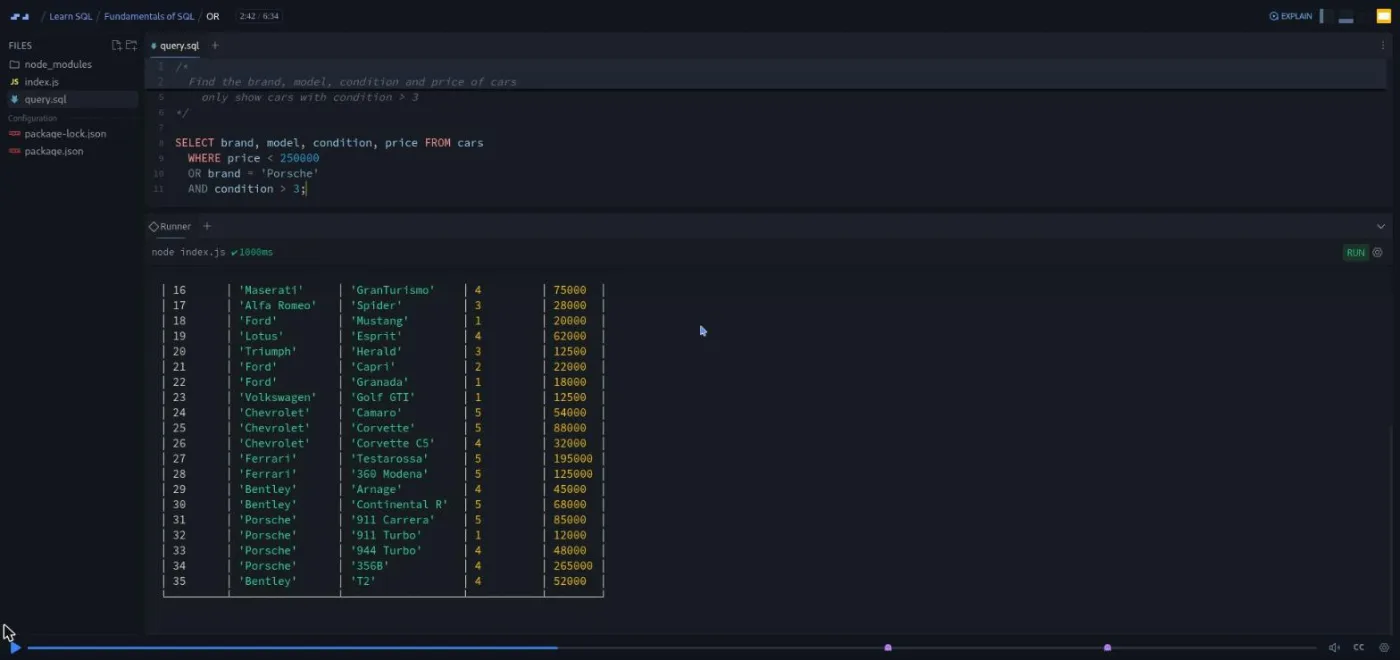
The same lesson ends with a rule I had not seen stated so plainly in a beginner course: "we'll use equals for strings and numbers, and we'll use is for boolean or null values." Then come two scrims of harder challenges, then ORDER BY, LIMIT, and the aggregates, functions that turn a whole column into one number (COUNT, SUM, MAX, MIN, AVG, plus FLOOR and CEIL to tidy up decimals), GROUP BY, and HAVING. The HAVING challenge asks for a count, a max and a min per year, filtered to years with more than one sale and ordered by the count, which is a real report.
The last stretch is INSERT, UPDATE and DELETE (Gregor calls them CRUD commands and explains the term), a 10 minute standalone lesson on SQL injection, a recap, and a short "learning in public" talk by Scrimba's Per Borgen. The SQL injection lesson is worth the detour: a new developer at Retro Rides builds queries by string replacement, Gregor types ' OR 1=1 as the user input and gets every row back, then fixes it with a parameterized query ($1). It refers to "the databases chapter of this course", which does not exist here, so I suspect it was made for another Scrimba course and reused.
One oddity: the Section 1 recap says "you've reached the end of this course". Module 1 was clearly the whole course at some point. Modules 2 and 3 were added later, and it shows in their longer, more ambitious scrims.
2. Creating and Joining Tables (68 min, 12 scrims)

Retro Rides has had a good year, so the story expands: new dealerships in Atlanta, Detroit and Philadelphia, a staff table, and a sold_cars table that records the price, date and seller of each sale. The whole module is about relating those tables to each other.
Creating tables (10:37) is the longest lesson in the course and the most conceptual. Gregor draws the four tables and their relationships, explains one-to-one, one-to-many and many-to-many with examples from the dealership, and defines primary keys, foreign keys and constraints (rules a column must obey, such as NOT NULL). Then you write CREATE TABLE IF NOT EXISTS dealerships together and create staff and sold_cars on your own, foreign keys included. Populating tables makes you write the INSERT statements yourself, and shows how each new .sql file gets wired into index.js so it runs before your query.
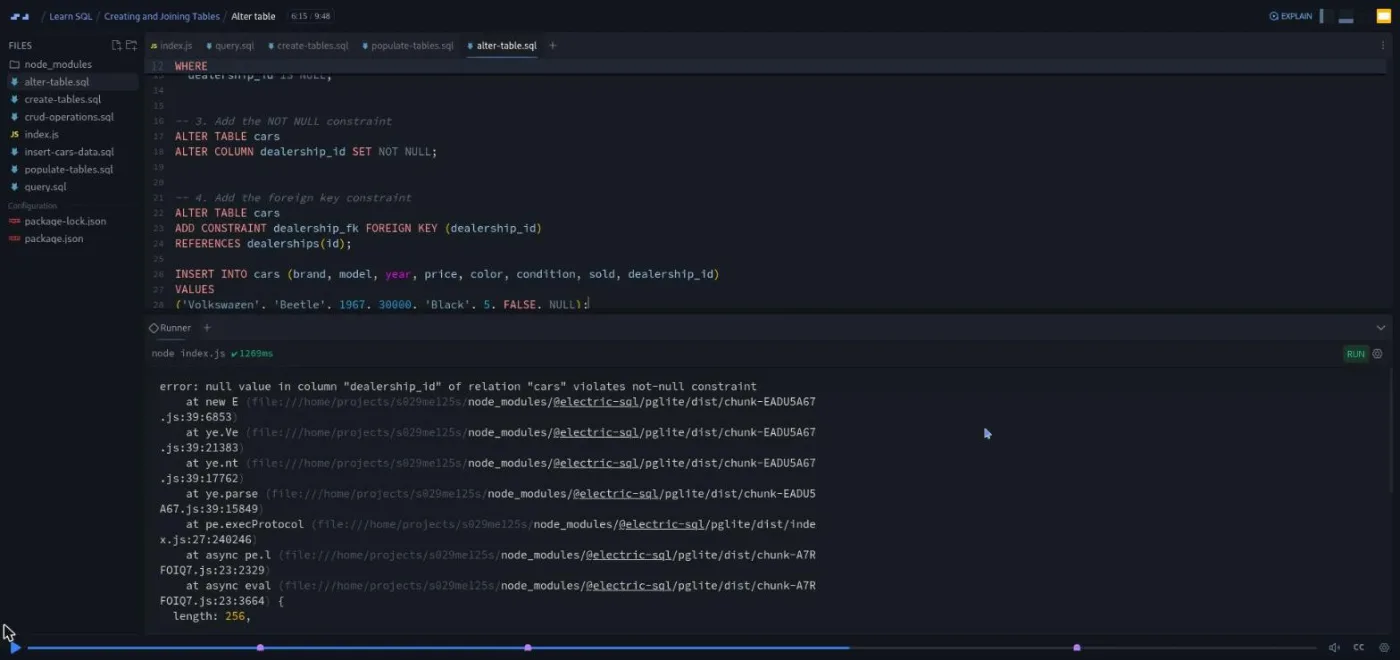
Alter table (9:48) is the lesson I would point a skeptic at. Adding a dealership_id column to a table that already has data takes four steps: add the column, backfill it, add NOT NULL, add the foreign key constraint. Gregor then deliberately inserts a car with a null dealership and a car with a dealership that does not exist, and reads both error messages out loud.
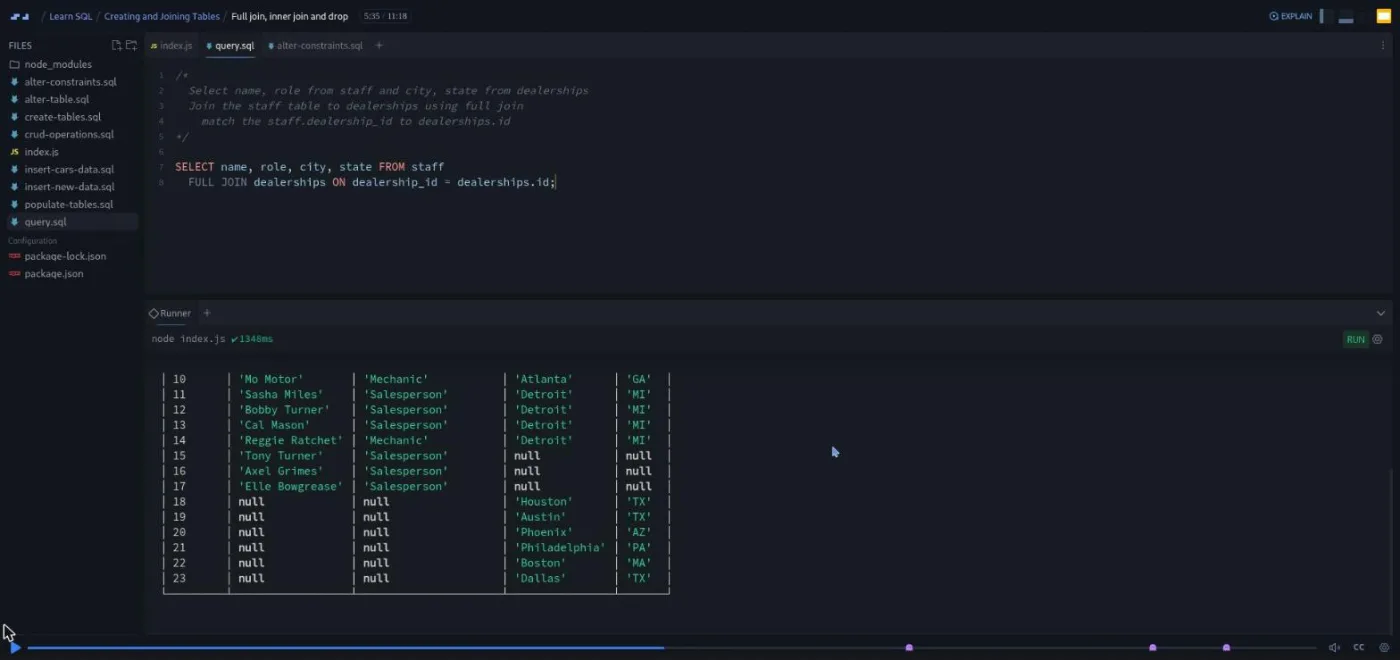
Joins get four scrims. A two minute explainer introduces inner, left, right and full joins ("this meme might help you visualize how the different joins work", over the usual Venn diagram), then Left and Right Join (8:50) works through them on sold_cars and cars, covering table aliases and why you must write cars.id when both tables have an id. Full join, inner join and drop (11:18) first has you drop a NOT NULL constraint so that some staff have no dealership, because otherwise a full join and an inner join would return the same rows. The challenge in that scrim is to fire a salesperson called Frankie Fender: drop a constraint, null out his sales, delete his row.
Aggregates (7:04) is three challenges in a row combining joins with GROUP BY: average price per dealership, total sales per salesperson, unsold cars per dealership including dealerships with none. That last one needs WHERE sold IS NOT TRUE rather than sold IS FALSE, and Gregor explains why in one line: "this has to do with something called three value logic in SQL, which considers null as neither true nor false." Joining multiple tables (7:59) chains three joins to pull the car, the seller, the city and a formatted sale date (TO_CHAR) into one result, then hands you two harder reports to build alone.
The module ends with a 36 second recap and a two minute Scrimba affiliate program ad by Per, which you can skip.
3. Advanced Logic and Conditions (45 min, 10 scrims)
The shortest module, and the one with the highest ratio of challenge to explanation. It covers four things: ANY, ALL, EXISTS, and CASE. A subquery, in case the word is new, is a query inside the brackets of another query; the first three keywords compare a value against whatever the inner query returns.
ANY (8:51) starts with a definition that clears up the word's odd meaning: "if I say I am taller than any of my classmates, what we would usually interpret that as is that I am taller than all of my classmates. In this case, any is being used to say, so long as there is one single match, then return true." The three challenges escalate quickly. The last asks whether any car in stock is worth more than the total sales of an entire dealership, which needs a join and a GROUP BY inside the subquery. ALL (3:03) is the mirror image. EXISTS (8:02) adds DISTINCT, NOT EXISTS, and a final challenge that combines two EXISTS clauses to find the one salesperson who has made a sale but never a big one.
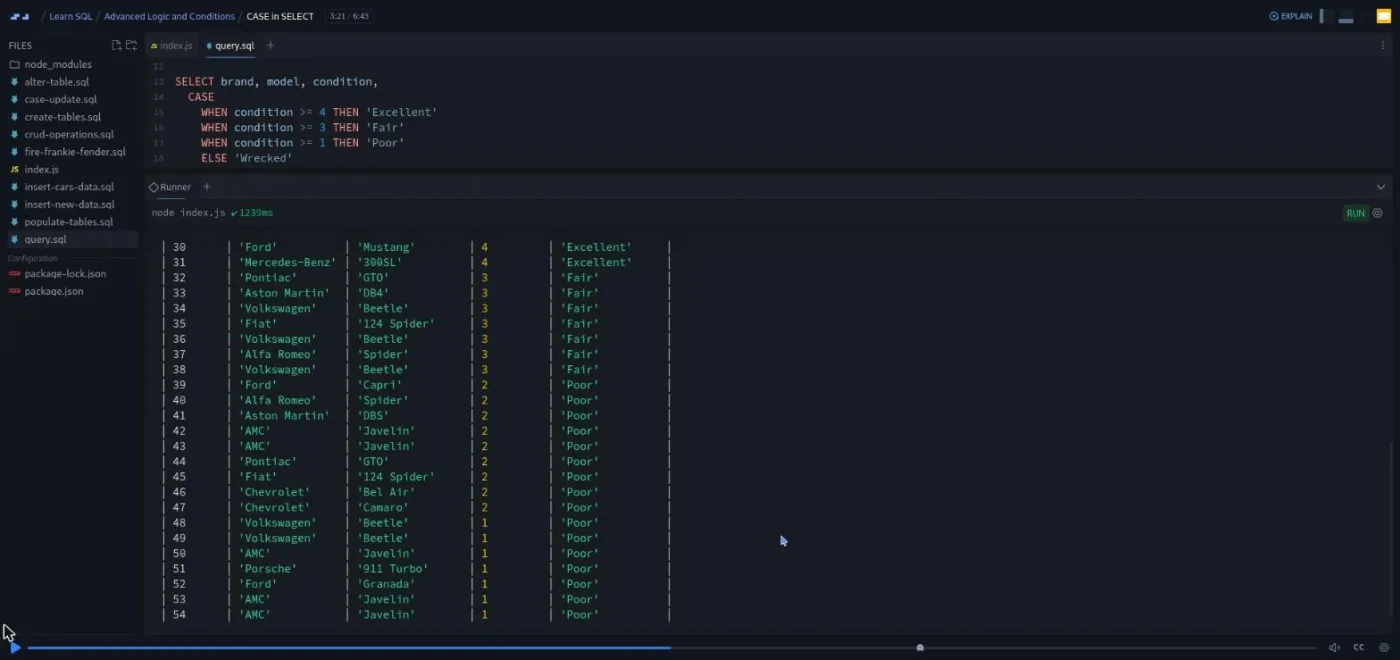
The three CASE lessons are the practical payoff. CASE in SELECT turns condition scores into labels (Excellent, Fair, Poor, Wrecked) and then calculates staff bonuses from sales totals. CASE in WHERE builds a filter where the minimum acceptable condition depends on the car's age. CASE in UPDATE bumps Aston Martin prices by different percentages depending on the model, and only for unsold cars.
CASE challenges (5:18) closes with two reports: label each dealership as outperforming, meeting targets, underperforming or no sales, then count sales per quarter using EXTRACT(MONTH FROM sold_date). A 46 second recap and Per's one minute "how to use your certificate" scrim finish the course.
What a lesson feels like
Every scrim is the same layout: a file explorer on the left, query.sql in the editor, and a Runner pane underneath that prints the result table when you save. There is no browser preview because there is nothing visual to build; the output is always a table or an error. Gregor talks over the recording, types the query, saves, and points at rows in the result.
A challenge looks like a comment block at the top of query.sql describing what Rodney or Penny wants. The recording pauses, you write the query below the comment, save, and check the table. Then you press play and Gregor writes his version. He puts every clause on its own indented line, which is a habit worth copying. Scrims run from 36 seconds to 11 minutes; most in module 1 are under four, most in modules 2 and 3 are seven to eleven because they hold two or three challenges each.
Captions and a timestamped transcript panel are available under the settings menu, with subtitles in ten languages. The transcript is accurate enough that I could follow the entire course from it. I did not see any of the AI-checked "Challenge with Instant Feedback" markers that some newer Scrimba courses carry; the challenges here are the classic kind, where you compare your output with his.
Free or Pro: exactly what is gated
The course is free. All three modules, all 49 scrims and all 62 challenges open on a free account. There are no "Solo Project (PRO)" items in this course.
Two things to know. First, only the intro scrim is marked SAMPLE; every other scrim shows "Only available to signed in users" until you create a free account. Second, the Certificate of Completion at the end of the table of contents is a Pro feature, as it is across Scrimba. Pro also unlocks the career paths this course belongs to and the Pro-only channels on Scrimba's Discord; the pricing page lists basic Discord access as free.
So for this course alone you do not need to pay. If you want it inside the Backend Developer Path with the certificate at the end, see current plans (opens in a new tab) for what Pro costs in your region.
How long it takes
The video runs about 3.4 hours (3.8 on the course header). With 62 challenges, most of which you should attempt before watching the answer, budget two to three times that: 8 to 11 hours. That is a week at an hour a day, or two focused weekends.
Module 1 goes fast because each challenge is a small variation on what you just watched. Modules 2 and 3 are where the time goes. The Alter table, Full join and Aggregates scrims each need more than their runtime just to think through which table goes on the left, and the ANY and EXISTS challenges are the kind you rewrite twice. If you are new to programming altogether, add a couple of hours for the JavaScript wiring in index.js, which Gregor explains but does not dwell on.
Who it's for, and who should skip it
Take it if you have never written SQL, or if you learned it years ago and want to relearn it with your hands. It also suits frontend developers who can build an interface but have never had to ask a database a question, and anyone starting the Backend Developer Path or Fullstack Developer Path, which both list it. Beginners who can only spare short sessions will like that most scrims stop cleanly after four minutes.
Skip it if you already write multi-table joins and subqueries; module 3 would be a 45 minute refresher and the rest would drag. Skip it too if what you need is database design, indexing, transactions, or how to connect Postgres to an app. None of that is here. Intro to Supabase is the course for the last of those.
Start Learn SQL for free (opens in a new tab)Prerequisites
None are required. The course page says it helps to have read or written a bit of code, and I agree: the index.js file that runs your queries is JavaScript, and in module 2 you add three lines to it yourself. If you have done Learn JavaScript you will not notice; if you have never coded, follow along by copying and it will still work.
You need a free Scrimba account for everything past the intro and a browser. You do not need database software or a terminal.
Where it fits
Learn SQL is listed on both the Backend Developer Path and the Fullstack Developer Path. The natural next step is Intro to Supabase, which puts a hosted Postgres database behind a React app and where the joins and constraints from module 2 stop being exercises. Learn Node.js and Learn Express.js are the server side that eventually sends these queries.
Strengths and limits
What it does well:
- It is free and short.
- Every one of the 62 challenges is tied to a request from someone at the dealership, so you know what the query is for.
- Gregor writes the bug before the fix.
- The error messages from Postgres are shown rather than hidden.
- Modules 2 and 3 reach joins, constraints, subqueries and CASE.
Where it is limited:
- The challenges are checked by eye against Gregor's output, not automatically.
- The SQL injection lesson references a chapter that is not in this course.
- The JavaScript runner is a small hurdle for non-programmers.
- There is no schema design, indexing, transactions, or app integration.
- The story characters (Rodney, Penny, Frankie Fender) are a matter of taste, though I found them harmless.
Related courses and comparisons
- All Scrimba backend courses, the full category hub
- Intro to Supabase, to put SQL to work behind a real app
- Build a Mobile App with Firebase, a different backend approach
- Learn Regular Expressions, another short, free backend skill
- Learn Node.js and Learn Express.js, the server side to pair with this
- Scrimba vs freeCodeCamp, if you are choosing a platform
Yes. All three modules, all 49 scrims and all 62 challenges are free. You need a free Scrimba account for every scrim except the intro, which is marked SAMPLE. Only the Certificate of Completion is Pro.
Gregor Thomson, a full stack developer at the University of Greenwich who previously spent three years at the Founders and Coders bootcamp in London. Three short scrims (learning in public, the affiliate program, the certificate) are by Scrimba's Per Borgen.
You do not build an app. You manage the database of Retro Rides, a fictional classic car dealership: one cars table in module 1, then dealerships, staff and sold_cars tables that you create, populate, alter and join in modules 2 and 3.
No. The database is PGlite, a version of Postgres that runs in JavaScript inside the scrim. You edit query.sql, save, and a Runner pane prints the result table.
Yes. It is rated Beginner and assumes no SQL. It helps to have seen a little code, because the queries are run by a small JavaScript file you edit three times in module 2, but Gregor shows exactly what to add.
Yes. Every scrim has captions, a timestamped transcript panel in the settings menu, and subtitles in ten languages.
No. You write the query, look at the output table, then watch Gregor's solution. I did not find any of the AI-checked Challenge with Instant Feedback markers that some newer Scrimba courses have.
About 3.4 hours of video, but plan for 8 to 11 hours including the 62 challenges. That is roughly a week at an hour a day.
It covers joins, constraints, ALTER TABLE, subqueries with ANY, ALL and EXISTS, CASE, and a lesson on SQL injection. It does not cover schema design, indexing, transactions, or connecting a database to an application.
PostgreSQL. Gregor names MySQL, Microsoft SQL and Oracle as other flavors with the same core syntax, and a few functions used here (SERIAL, TO_CHAR, EXTRACT) are Postgres-specific.