Build a Mobile App with Firebase
Rafid Hoda's Build a Mobile App with Firebase is a two-hour Pro project course. You build a shopping list app in plain HTML, CSS and JavaScript, store its items in a Firebase Realtime Database, and finish by installing it on your phone's home screen. It's a tight, well-sequenced two hours if you already write basic JavaScript.
Reviewed inside the course with a Pro account, September 2026: all 38 scrims and transcripts.
Quick answer
Build a Mobile App with Firebase suits anyone who has finished a beginner JavaScript course and wants to watch data leave the browser for the first time, the shortest route to that moment in the Scrimba catalog. The catch: everything past the first two scrims sits behind Pro. The same Firebase workflow closes the free Learn JavaScript course, applied to a different app, so if you've already built that course's leads tracker, you've seen most of the Firebase side of this one already.
Build a Mobile App with Firebase
ProTaught by Rafid Hoda (opens in a new tab)
A guided build of a realtime shopping list with vanilla JavaScript and the Firebase Realtime Database, finished as a progressive web app on your phone.
View on Scrimba (opens in a new tab)Is it worth your time?
The course does one thing and does it in the right order. Every concept shows up because the shopping list needs it: you need push to save an item, onValue to see it again after a refresh, Object.values to loop over what comes back, a unique ID before you can delete anything, and createElement because innerHTML strings cannot carry a click handler. Nothing is taught ahead of when you use it, which makes the two hours feel short.
The teaching style is challenge-first. In most scrims Rafid writes the task as a comment, says "pause here, try it out for yourself and I'll be right back," and then solves it on screen. I counted challenges in 20 of the 38 scrims, plus the solo project, and some scrims have three in a row. You cannot get through this course by watching.
Two things to know before you pay. First, the material dates from early 2023: the Firebase library (the SDK) is pinned to version 9.15.0 and a console timestamp in one lesson reads 2023-01-31. The functions still work in 2026, but the Firebase console screenshots in the slides will not match what you see. Second, the same Firebase workflow closes Scrimba's free Learn JavaScript course, applied to a different app: its final module takes the leads tracker Chrome extension and swaps localStorage for a Realtime Database, with the same push, onValue, remove, viewport, favicon, manifest and Netlify steps. This standalone version builds a shopping list instead, adds click-to-delete with Object.entries and createElement, more asides (flexbox, user-select) and a solo project, but if you have already done that module, you have seen most of the Firebase side of this.
What you'll learn
Scrimba lists the 38 scrims flat, with no module headings. The groupings below are mine, so you can see where the time goes; durations are the sum of the scrim timers in each group.
Course curriculum
8 modules · 38 lessons
- Getting set up
- Connecting Firebase
- Reading data in realtime
- Styling the list
- Deleting items
- Making it feel like a mobile app
- Deploy, install, share
- Solo project and wrap-up
I counted 38 scrims on the course page in September 2026, adding up to 2 hours 3 minutes of video; Scrimba's listing and its structured data say 39 lessons, which I take to include the certificate entry that is not a scrim.
Inside the course, module by module
1. Getting set up (12 min, 3 scrims)

The intro scrim is the pitch: you are cooking, you are out of an ingredient, you cannot remember what else you needed. The app is called Add to Cart. Rafid is upfront in the first two minutes that "what we'll be building is not technically a native mobile app. It's a web app that's disguised as a mobile app," and he tells you to go do the free HTML and CSS and JavaScript courses first if you cannot build a form on your own.
Scrim 2 hands you an input and a button and asks you to log the input's value on click, which is the level the course starts at. Scrim 3 is a CSS challenge with a finished design to copy: a 320px column, a cat image, a rounded input and a red button. Both of these scrims are free previews.
2. Connecting Firebase (17 min, 3 scrims)
Scrim 4 is the ten-minute aside where the database arrives, and it is the most important scrim in the course. Rafid walks through the Firebase console: create a project, skip Analytics, create a Realtime Database, pick a region, start in test mode, copy the database URL. Then he explains ES module import and export from scratch with a tiny add function, because that is how the Firebase SDK is loaded. The Cannot use import statement outside of module error is shown on purpose so you learn to add type="module" to the script tag. Then initializeApp, getDatabase, ref and push go in one by one and three movie titles land in the database.
He is strict about one thing, and repeats it in scrim 5: "you need to make sure that this is replaced with your specific database URL. Otherwise you will be writing to my database." Scrim 5 makes you redo the whole setup for the shopping list as a challenge. Scrim 6 covers security rules in two and a half minutes: test mode expires after 30 days, so you set read and write to true, and Rafid admits that "literally anyone can write to your database" and moves on.
3. Reading data in realtime (31 min, 7 scrims)
The next half hour is where the app becomes an app. Scrim 7 appends items to a <ul> with innerHTML and clears the input. Scrim 8 refactors both lines into named functions (clearInputFieldEl, appendItemToShoppingListEl) and hits the classic inputValue is not defined error, which is how parameters get introduced. Scrim 9 is a standalone aside on Object.values, Object.keys and Object.entries, needed because Firebase returns your list as an object, not an array.
Scrim 10 is the second ten-minute aside, on onValue. It uses a separate book-list project, and the concept is explained before the code: the database "sends the new data from the database to all of its clients," and that data is called a snapshot. You then hit a real bug on screen. Editing a title in the console appends the whole list again instead of replacing it, and the last challenge is to work out where clearBooksListEl() has to go inside the onValue callback.
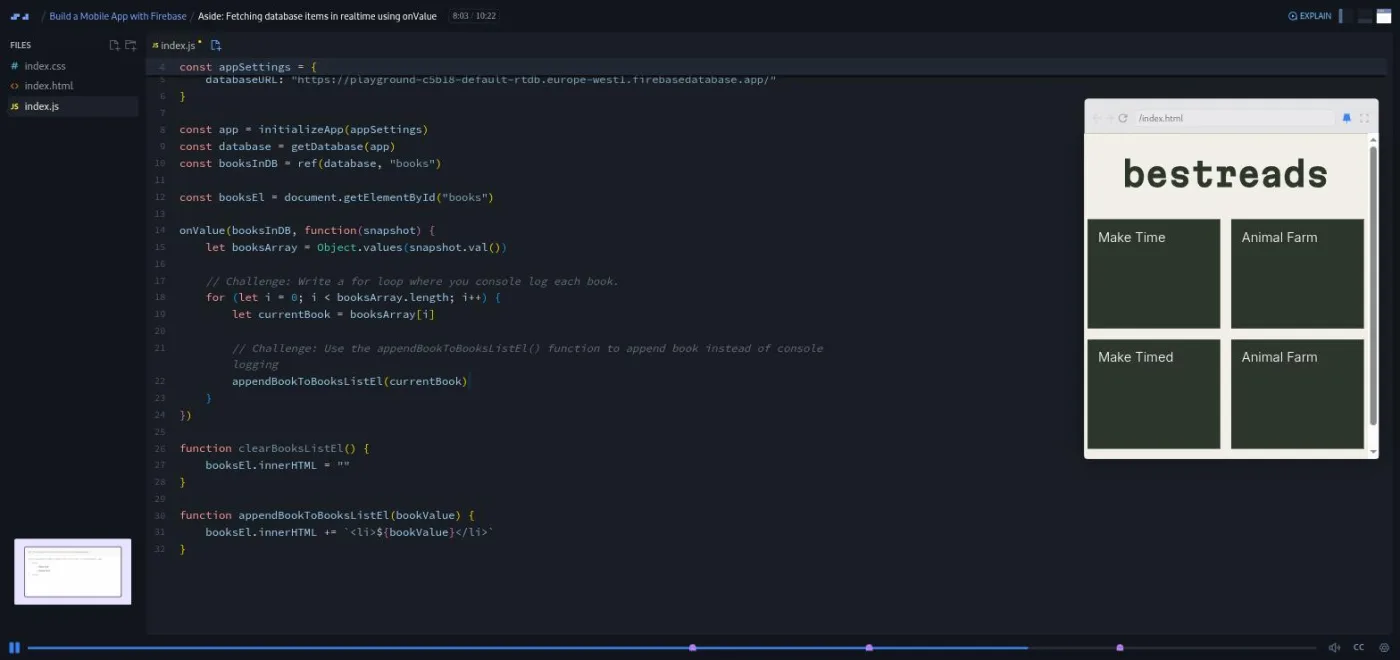
There is a candid moment at 9:32 of that scrim, where a note recorded later cuts in: "this is future me talking to you. After recording the scrim, I noticed that at this point I'm actually seeing both books on my side, but you're actually seeing a blank web page." The in-browser preview could not run the Firebase code against his database; you have to paste your own URL to see it work.
Scrims 11 to 13 bring onValue into the shopping list, with three challenges (call onValue, log snapshot.val(), convert it with Object.values), a for loop to render the items, and then "Let's smash the bug," where the list duplicates because the item is both pushed and appended. Rafid's fix ends with the line he uses several times: "Always grab the opportunity to refactor your code."
4. Styling the list (7 min, 3 scrims)
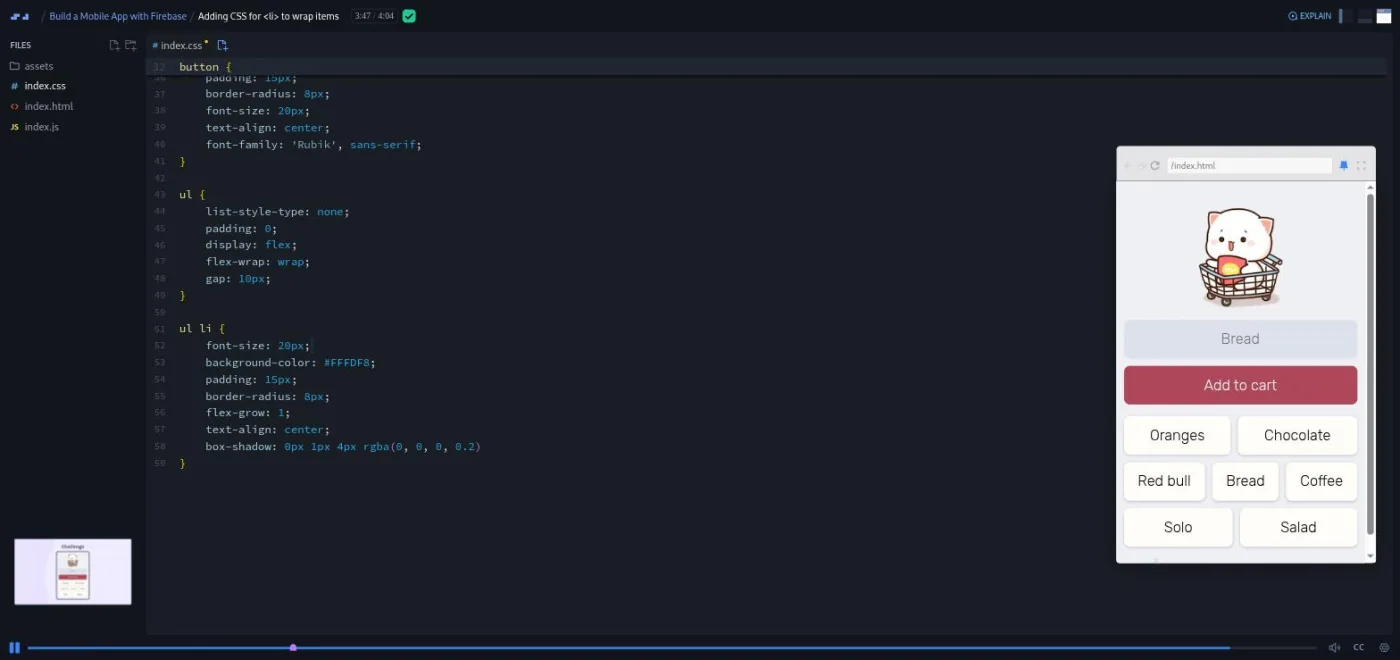
Two one-minute flexbox asides (flex-wrap on a row of video thumbnails, gap on a Beatles album cover made of four images) and then a four-minute CSS challenge that turns the bullet list into wrapped, rounded chips with flex-grow: 1. This is where the app starts to look like the thing in the intro.
5. Deleting items (23 min, 5 scrims)
Deleting needs a unique ID, so scrim 17 opens with why: "what happens if someone adds the same item twice?" You switch from Object.values to Object.entries so each item comes back as an [id, value] pair. Scrim 18 is the createElement lesson, and Rafid gives it a disclaimer up front ("create element can be one of those things that's pretty confusing to understand") before breaking it into three steps: create the <li>, set its textContent, append it to the <ul>.
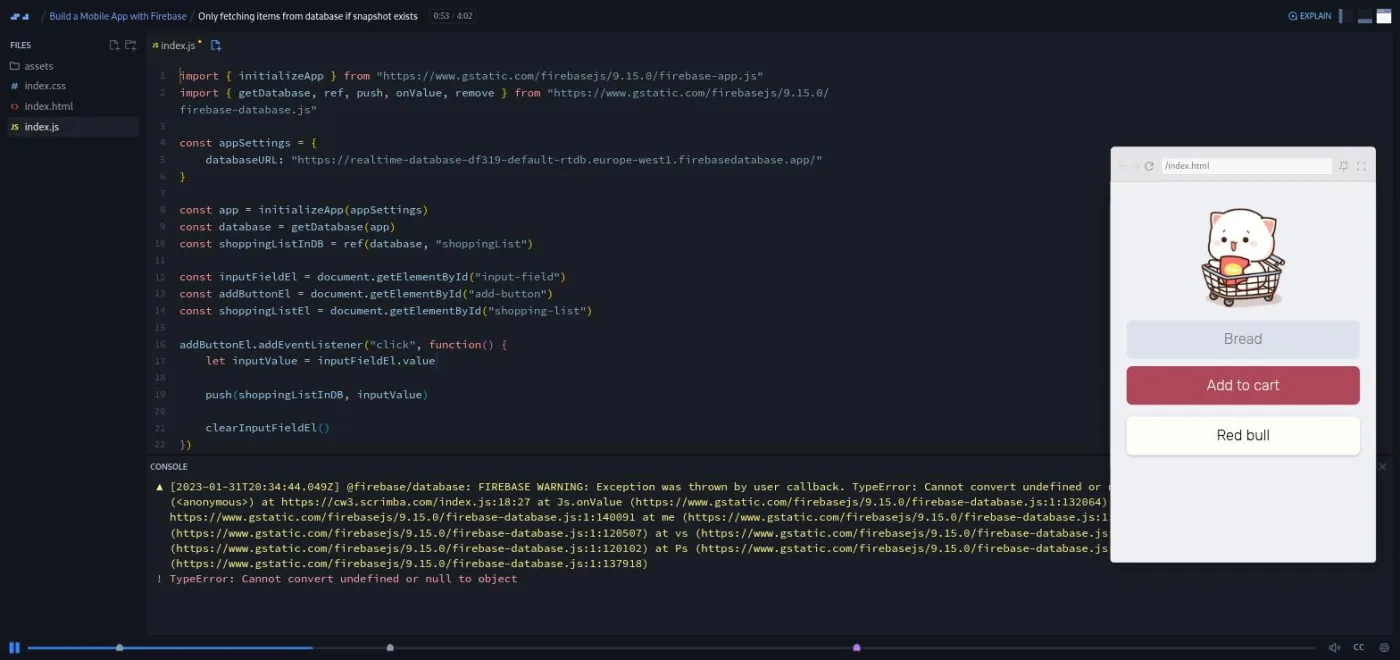
Scrim 19 is another aside project, a fake news list called The Scrimba Times, where double-clicking a story removes it. It introduces remove and the idea that you must pass the exact path, ref(database, "newsStories/ns0"), not just the ID. Scrim 20 applies that to the shopping list in three challenges. Scrim 21 is the bug I liked most in the course: delete the last item and the app throws Cannot convert undefined or null to object, because when the last item goes, the shoppingList reference goes with it and there is no snapshot. The fix is snapshot.exists() and an else branch that prints "No items here... yet".
6. Making it feel like a mobile app (15 min, 9 scrims)
Nine short scrims, mostly asides, turn the page into something that behaves like an app on a phone. You add hover styles and cursor: pointer to the button and the chips, then user-select: none so fast tapping does not highlight text. That one is followed by a one-minute scrim from someone on the Scrimba team, not Rafid, warning that "user select is overused across the internet" and to keep it off the body unless you have a reason. A viewport aside with a short history lesson (it opens with "let's get inside of the DeLorean") explains why sites look shrunken on phones, and the fix is the standard <meta name="viewport"> line, which Rafid says he Googles every time.
Then the favicon: generate the icon set at favicon.io, drop the files in the project, paste the link tags in the head. Then the web app manifest, the file that lets a website install like an app (the fancy name is a progressive web app, or PWA), explained through a cat-picture project: name, short_name, icons, theme_color, background_color and display: standalone. Scrim 30 fills the same fields for Add to Cart in under a minute and declares the app done.
7. Deploy, install, share (11 min, 5 scrims)
Personalise your app (change the cat, the font and the colours so yours does not look like every other student's), then deploy: download the project as a zip from Scrimba, drag the folder onto Netlify, rename the site. Scrim 33 shows add-to-home-screen on Android in Chrome and on iPhone in Safari, and the app opens full screen with its own icon. Scrim 34 asks you to post it on Twitter or LinkedIn and tag Rafid. The recap in scrim 35 walks back through every function and CSS trick in the order you met them.
8. Solo project and wrap-up (7 min, 3 scrims)
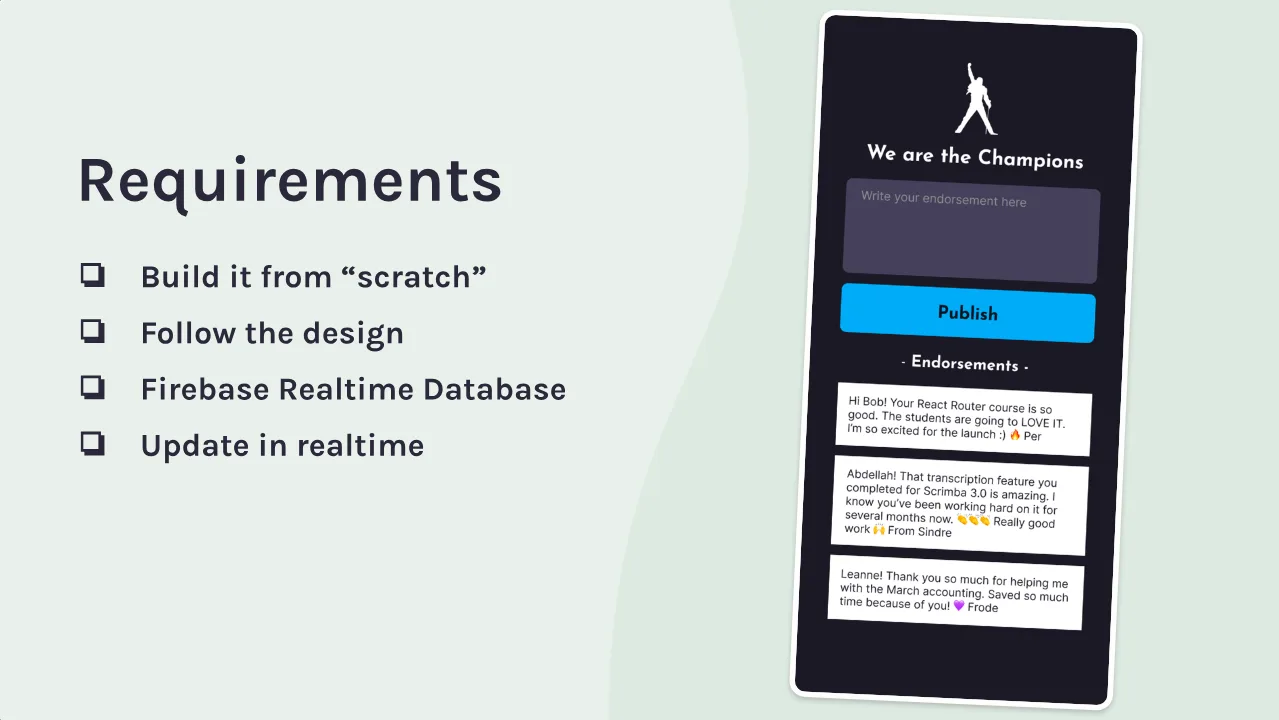
Scrim 36 is Per Borgen's two-minute pitch for the Scrimbassador referral program, which you can skip. Scrim 37 is the Pro solo project, We are the Champions: an endorsements board where you write a thank-you note, press Publish and it appears in a list, backed by the Realtime Database and updating live. Rafid describes it as a feature from SalesScreen, the company he worked at before Scrimba. There is a Figma file, a hints link, and four stretch goals: from and to fields (with the hint that you can push objects, not just strings), newest first, a likes counter that only counts once per person, and a desktop layout.
The last scrim is a 53-second note on how to use the certificate.
What a lesson feels like
A typical scrim is three to five minutes. Rafid narrates over the editor, the app runs in a preview pane on the right, and when a slide is needed (the Firebase console, a concept diagram, a challenge brief) it takes over the screen. Challenges are written as comments in the file. The recording pauses, you type into the same editor, then you press play and he solves it. His solutions are chatty and he names things out loud ("I'm not really sure what I should call it, so I'm just gonna call it hello for now"), which is closer to how people really code than most courses admit.
Every scrim has captions, a full timestamped transcript under the settings menu, and subtitles in ten languages, and you can change the playback speed. I did not find any of Scrimba's AI-checked challenges here; the challenges are the classic pause-and-try kind, and the only feedback is comparing your code with his.
One practical thing to know: in the onValue aside Rafid warns that the preview shows a blank page on your side because it cannot read his database. Expect to paste your own database URL before the Firebase scrims show anything, and budget a few minutes for that the first time.
Free or Pro: exactly what is gated
The course is Pro. Two scrims are marked SAMPLE and open without a subscription: the intro and "Setting up app skeleton." The other 36 scrims, including everything involving Firebase, are Pro, as is the We are the Champions solo project and the certificate at the end. Scrimba's pricing page lists basic Discord access as free and the Pro-only channels as Pro, so the Discord itself is not part of what you pay for here.
If you want the same Firebase workflow without paying, the final module of the free Learn JavaScript course applies it to a different app, the leads tracker, with the same teacher in 23 scrims. What this Pro version adds is a second app to build, the delete-on-click lessons, more asides, the solo project and the certificate. See current plans (opens in a new tab) for what Pro costs in your region.
How long it takes
Two hours of video, but the challenges are the course, and there are a lot of them. Plan for four to six hours: about three hours to work through the scrims and do every challenge, plus the time to set up your Firebase project, deploy to Netlify and install the app on your phone, which are outside the browser. Two evenings is realistic. The solo project is another two to four hours if you follow the Figma file, more if you attempt the stretch goals.
Who it's for, and who should skip it
It fits people who have finished a beginner JavaScript course and have never sent data to a server. The moment an item you typed survives a page refresh is the whole point, and this is the shortest route to it in the Scrimba catalog. It also fits anyone who wants the add-to-home-screen trick explained in the simplest possible form: a manifest file and an icon set, nothing more.
Skip it if you have already done the mobile app module in Learn JavaScript and do not want a second run at the same Firebase workflow, because most of the function calls will be familiar. Skip it if you want Firebase authentication, Firestore or deploying on Firebase Hosting; none of those appear. And skip it if you dislike being told to pause: more than half the scrims stop and wait for you.
Start Build a Mobile App with Firebase on Scrimba (opens in a new tab)Prerequisites
You need to be able to build a small page in HTML and CSS from a picture, and write JavaScript at the level of getElementById, addEventListener, functions with parameters, arrays and for loops. Rafid says as much in the intro and points to the free Learn HTML and CSS and Learn JavaScript courses. You do not need any Firebase or backend experience. Outside Scrimba you need a Google account for the Firebase console, a Netlify account to deploy, and a phone to install the result on.
Where it fits
Scrimba's course page does not attach this course to a career path. It is a natural side project for anyone partway through the Fullstack Developer Path, and a gentler first backend than Learn SQL. If you want Firebase as a subject rather than a project, Learn Firebase, by the same teacher, is the systematic companion. Intro to Supabase is the Postgres-based alternative if you would rather learn a relational backend.
Strengths and limits
What it does well: every Firebase function arrives because the app needs it; the bugs are real and shown on screen (the duplicated list, the null snapshot, the missing type="module"); the solo project is a genuine test of whether you can do it without him; and the last quarter delivers something you can show people on your phone.
Where it is limited: it is one project and six functions, security rules get two minutes and a promise of a future course, the console slides are from 2023, Rafid warns that the preview shows a blank page on your side until you paste in your own database URL, and the Firebase workflow overlaps heavily with the free Learn JavaScript module.
Related courses and comparisons
- All Scrimba backend courses, the full category hub
- Learn Firebase, the more systematic companion
- Learn JavaScript, whose last module applies the same Firebase workflow to a leads tracker, for free
- Intro to Supabase, a Postgres-based alternative backend
- Learn SQL, if you want to understand databases underneath
- Scrimba vs freeCodeCamp, if you are choosing a platform
No. It is a Pro course. Only the first two scrims are free previews. The free Learn JavaScript course applies the same Firebase workflow to a different app, its leads tracker, in its final module, without the shopping list, the delete-on-click lessons, the solo project or the certificate.
Add to Cart, a shopping list app: type an item, it is saved to a Firebase Realtime Database, appears for everyone using that database in real time, and is deleted when you click it. You then deploy it to Netlify and add it to your phone's home screen as a progressive web app. The Pro solo project is a second app, an endorsements board called We are the Champions.
Only the Realtime Database, through six functions: initializeApp, getDatabase, ref, push, onValue and remove, plus snapshot.val() and snapshot.exists(). No authentication, no Firestore, no Firebase Hosting. Security rules get a short scrim that sets read and write to true.
Rafid Hoda, who also made Scrimba's Learn Firebase course. One short scrim on user-select is narrated by another Scrimba team member, and Per Borgen appears in a referral program scrim near the end.
No. Everything runs in Scrimba's editor and the Firebase SDK is loaded from Google's CDN as an ES module. You need a Google account for the Firebase console, and for the last few scrims a Netlify account and a phone.
The recording is from early 2023 and uses Firebase SDK 9.15.0. The functions still work in 2026, but the Firebase console has changed since the slides were made, so expect to hunt for buttons.
Yes. Every scrim has captions, a timestamped transcript in the settings menu, and subtitles in ten languages.
Not that I found. The challenges are the classic kind: a comment in the file, a pause, then Rafid's solution.
Two hours of video. Plan four to six hours with every challenge, the Firebase and Netlify setup, and installing the app on your phone, plus two to four hours more for the solo project.