Learn Regular Expressions
Learn Regular Expressions is a free, 46-minute Scrimba course on JavaScript regex, recorded by Beau Carnes of freeCodeCamp as 34 short screencasts. There's no project, just one symbol or method per scrim, building from .test() to lookaheads and capture groups. If you already write JavaScript and want regex to finally click, it does the job in under an hour.
Reviewed inside the course with a Pro account, September 2026.
Quick answer
This one fits anyone who writes JavaScript and has been copying regex patterns off the internet without understanding them. The catch: both scrims that call themselves challenges are solved by Beau within seconds, so nothing here tests you. Follow it with Advanced JavaScript to see regex used in a real search feature, or with freeCodeCamp's own regex challenges if you want practice with feedback.
Learn Regular Expressions
FreeTaught by freeCodeCamp (Beau Carnes) (opens in a new tab)
freeCodeCamp's regex curriculum as short Scrimba screencasts: test, match, flags, character classes, quantifiers, anchors, lookaheads, and capture groups.
Start free on Scrimba (opens in a new tab)Is it worth your time?
Yes, for a narrow reason. Regex is a skill you use for ten minutes at a time, a few times a month, and it is easy to go years without learning it properly. This course takes that gap and closes it in under an hour. Each scrim teaches one symbol or one method, shows it on a short string, and runs the code so you see the result in the console. By the end you can read a pattern like ^[A-Za-z]{2,}\d*$ and say what each piece does, which is the whole point.
These are freeCodeCamp screencasts on the Scrimba player, not a native Scrimba course, and it shows in one way: Beau types and explains, but he never stops the recording and hands you the keyboard. The two scrims with "challenge" in the transcript are solved by him within seconds. You can still pause any scrim, edit the code, and re-run it, and you should, because that is the only way the details stick.
What you'll learn
Scrimba shows this course as a single flat list with no modules, so the seven groups below are my own, drawn from the order the concepts appear in.
Course curriculum
7 editorial groups · 36 scrims · about 47 minutes (my count of the flat list)
- First patterns: test, match, or, and flags
- Wildcards, character sets, and ranges
- Quantifiers, greedy vs lazy, first challenge
- Anchors, shorthand classes, username validator
- Counting matches, optional characters, lookaheads
- Capture groups, replace, and the outro
- Scrimba extras: ambassador pitch and certificate
I counted 36 scrims in the table of contents: 34 freeCodeCamp screencasts (the number the course description also uses) plus two short Scrimba house scrims at the end. Scrimba's structured data says 37 lessons, and the header says 46 minutes; my scrim durations add up to 47 minutes, of which 44 are regex teaching.
Inside the course, module by module
1. First patterns: test, match, or, and flags (7 min, 7 scrims)
The intro is 78 seconds. Beau says the course focuses on JavaScript but that "almost everything you learn about regular expressions in this course can also apply if you're using regular expressions in another programming language," and he points people who do not know JavaScript to Scrimba's basic JavaScript course first. Then it is straight into code.
"Using the Test Method" introduces the /the/ syntax and the first method: as Beau puts it, "the test method takes the regex, applies it to a string, and then returns true or false if the pattern matches something." The next five scrims add one thing each. Matching is case sensitive, so /Waldo/ fails on lowercase. The pipe | means or (/dog|cat|bird|fish/). The i flag ignores case. .match() gives you the matched text instead of true or false. The g flag returns every match as an array, and the "Twinkle twinkle" example shows i and g used together.
Two methods, two flags, one operator. Everything after builds on those.
2. Wildcards, character sets, and ranges (6 min, 5 scrims)
The period . matches any single character (/hu./ finds "hum" and "hug"). Square brackets match one character from a set (/b[aiu]g/ finds bag, big, and bug), and the scrim ends with pulling every vowel out of a quote using [aeiou] with ig. Ranges come next: [a-z], then [2-6], then both in one set, [h-s2-6].
The fifth scrim in this group is mislabeled. In the table of contents it is called "Match Characters that Occur One or More Times," the same title as the scrim after it, but what Beau teaches is the negated set: [^0-9aeiou] matches everything that is not a digit or a vowel, "the caret character that's right underneath a six on a keyboard." Go by the content, not the title.
3. Quantifiers, greedy vs lazy, first challenge (6 min, 4 scrims)
+ means one or more (/s+/g on "Mississippi" returns "ss", "ss", "s"). * means zero or more, shown with "goal" and "gut feeling" against /go*/, plus a third string with no g that returns null. Then comes the longest teaching scrim so far, three and a quarter minutes on greedy versus lazy matching.
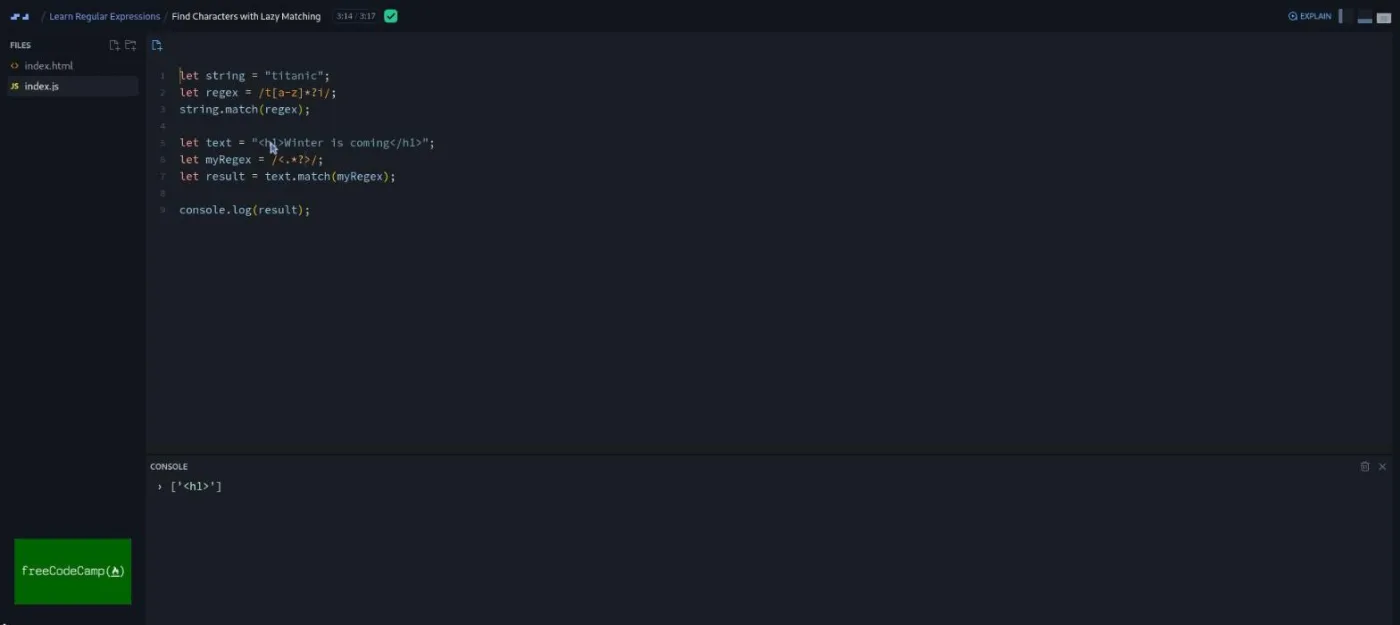
Beau's definition is the clearest sentence in the course: "A greedy match finds the longest possible part of the string that fits the regex pattern and returns it as a match. A lazy match finds the smallest possible part of the string and returns that." He shows it twice, first on "titanic" with /t[a-z]*i/, then on an HTML string where /<.*>/ swallows the whole line and /<.*?>/ returns only the opening tag.
The group ends with "Find One or More Criminals in a Hunt," the first scrim that calls itself a challenge. The brief is fun (escaped criminals are the letter C, find them all at once), but the solution is /C+/ and Beau types it himself about 40 seconds in. "It's actually pretty simple," he says, and it is.
4. Anchors, shorthand classes, username validator (8 min, 9 scrims)
Nine short scrims that mostly pair up. ^ outside brackets anchors to the start of a string; $ anchors to the end. \w matches letters, digits, and underscore; \W matches everything else. \d matches digits; \D matches non-digits. \s matches whitespace (Beau lists space, carriage return, tab, form feed, and newline); \S matches the rest. Several of these are under 30 seconds, and in "Match Non-Whitespace Characters" Beau openly asks you to guess the answer before he gives it: "if you've been noticing the pattern so far, you'll realize to match non white space characters is just a capital S."
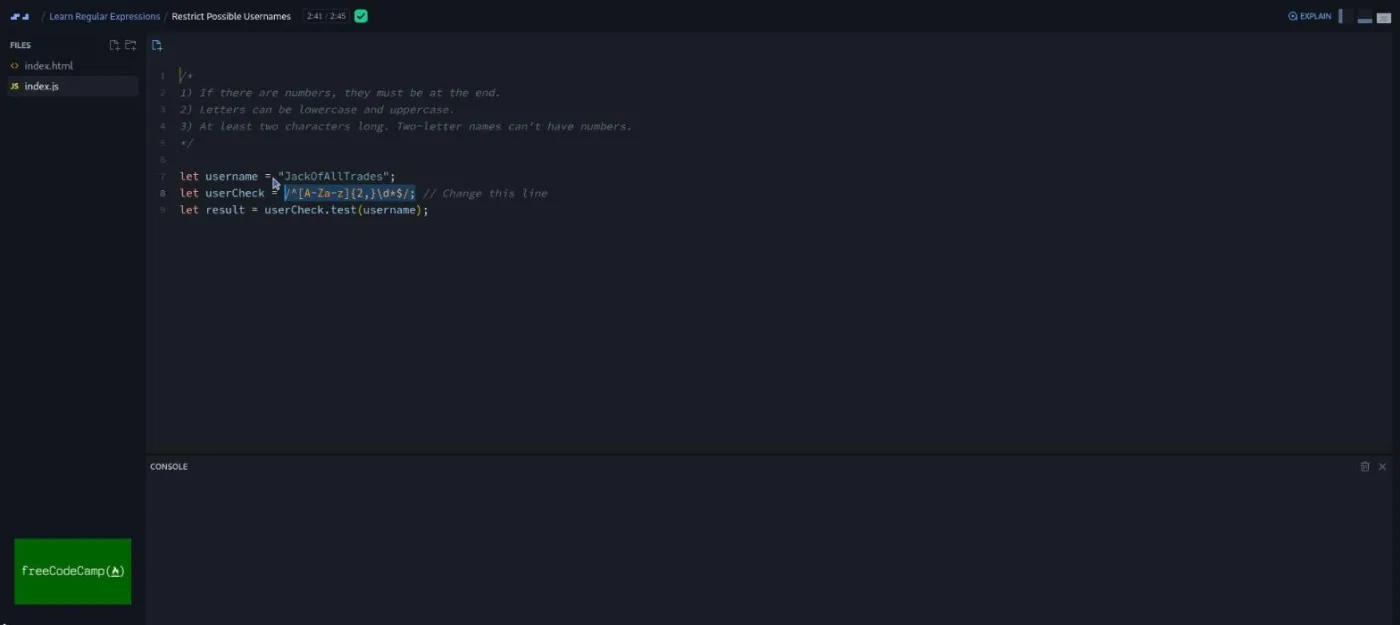
The scrim that matters here is "Restrict Possible Usernames," at 2:45 the one place where the course assembles several pieces into something you might ship. The brief is three rules in a comment block: numbers only at the end, letters in either case, at least two characters. The answer is built left to right: ^[A-Za-z] for the start, {2,} for the count (Beau's explanation: "the curly braces indicate the number of times the previous thing can match"), \d* for optional trailing digits, $ to close it.
5. Counting matches, optional characters, lookaheads (7 min, 5 scrims)
Three scrims on curly-brace quantifiers: {3,6} for a range, {4,} for a minimum, {4} for an exact count (timber spelled with exactly four m's). Then ? for an optional character, shown with the American and British spellings of favorite: /favou?rite/.
"Positive and Negative Lookahead" is three and a half minutes and the hardest concept in the course. A lookahead is a check that something does or does not appear later in the string, without including it in the match. Beau's toy examples are /q(?=u)/ and /q(?!u)/ on "quit" and "no quit," and then, as he says, "a more practical use of look aheads is to check two or more patterns in one string": a password rule that wants five or more characters and two consecutive digits, (?=\w{5,})(?=\D*\d{2}). If you follow this one on the first pass, you are doing well; it is the scrim I would rewatch.
6. Capture groups, replace, and the outro (10 min, 4 scrims)
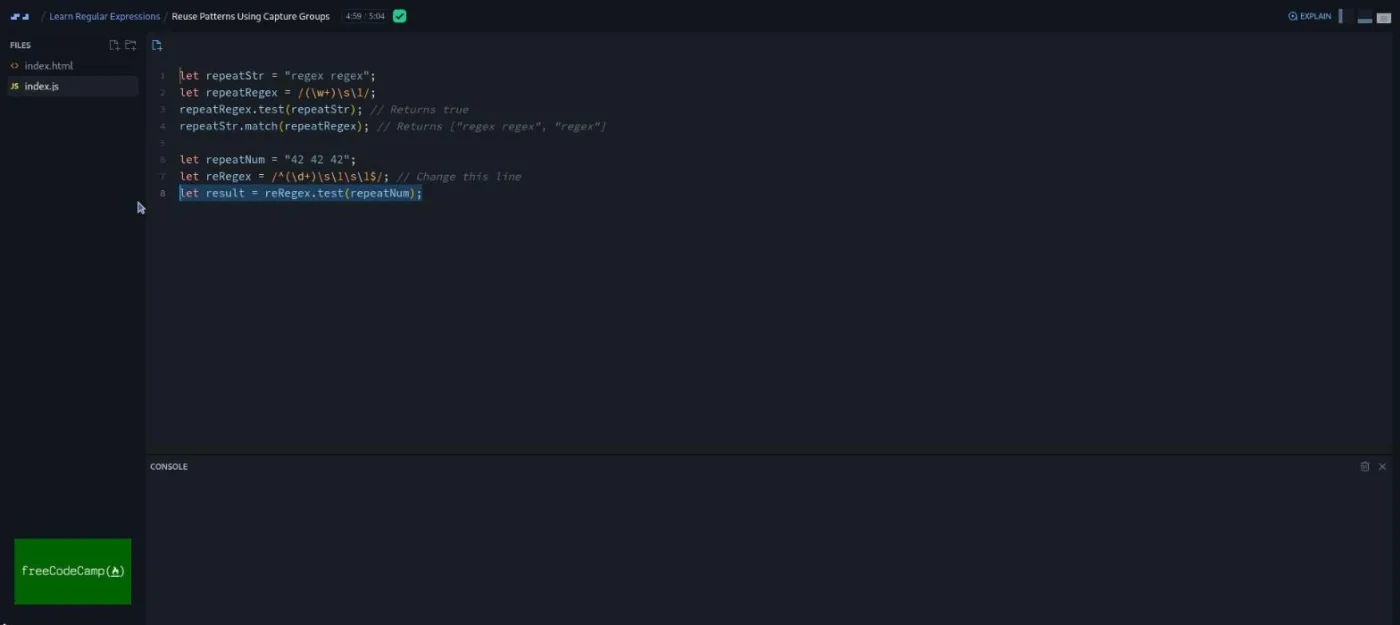
"Reuse Patterns Using Capture Groups" is the longest scrim at five minutes. Parentheses capture a group, and \1 repeats whatever the first group matched, so /(\w+)\s\1/ finds "regex regex". Beau spends time on why .match() returns two elements here (the full match, then the group), and then builds the exercise: match a number repeated exactly three times with spaces. The first attempt, (\d+)\s\1\s\1, also matches four repeats; the fix is anchoring both ends, "adding the caret and the dollar sign just means we want exactly this."
"Use Capture Groups to Search and Replace" moves to .replace(), first with a plain string ("silver" becomes "blue"), then with $2 $1 to swap two captured words so "Code Camp" comes back as "Camp Code." The last teaching scrim is the second challenge: strip whitespace from both ends of a string using regex only. Beau admits "the trim method would work here, but the challenge is to do it with just using regular expressions," and the answer, /^\s+|\s+$/g with an empty replacement, uses anchors, a shorthand class, a quantifier, and the or operator in one line. It is a good final exam, even though he takes it for you.
The outro is 17 seconds: congratulations, a pointer to a freeCodeCamp YouTube playlist of JavaScript projects, and "keep learning, and thanks for watching."
7. Scrimba extras: ambassador pitch and certificate (3 min, 2 scrims)
Two scrims Scrimba appends to most of its courses, both voiced by Per Borgen rather than Beau: a two minute pitch for the referral program and a short note on adding the certificate to LinkedIn. Neither has anything to do with regex. Skip both.
What a lesson feels like
Every regex scrim has the same two files, index.html and index.js, no dependencies, and the console panel across the bottom of the editor instead of a browser preview. Beau opens with the concept in one or two sentences, types the pattern into a prepared example, runs it, and reads the console output. Median length is about a minute. The longest four (lazy matching, usernames, lookaheads, capture groups) run from two and three quarter to five minutes, and those are the ones that reward a second viewing.
Because the recording never pauses for you, the learning loop is up to you. What worked for me: pause when Beau has written the pattern but before he runs it, change the test string in the editor, re-run, and see if the result is what you predicted. The Scrimba player supports this on every scrim, and it turns a watch-only course into something closer to a drill. Captions, a timestamped transcript panel, playback speed, and subtitles in ten languages are all there.
Beau's delivery is plain and unhurried. He says "so" a lot, corrects himself in the open ("uh, oh, I need a parenthesis here"), and does not pad. For a subject this dense, that is what you want.
Free or Pro: exactly what is gated
Nothing in this course is gated. All 36 scrims are free (the first one also carries Scrimba's SAMPLE badge). I looked for Solo Project items and the instant-feedback challenge icon that Scrimba's own courses use, and this list has neither.
Pro is relevant only around the edges: the certificate of completion and the Pro-only channels on Scrimba's Discord (the pricing page lists basic Discord access as free). If you only want the regex, stay on the free plan. See current plans (opens in a new tab) if you want the certificate.
How long it takes
The runtime is 46 minutes. Unlike Scrimba's own courses, there are no challenge stops to multiply that by, so watching straight through is a one-sitting job. Budget 90 minutes to two hours if you pause to edit and re-run the examples, which you should. Then expect to come back to the lookahead and capture group scrims once more when you need them for real, because those are the two that do not stick on a single pass.
Who it's for, and who should skip it
It fits anyone who writes JavaScript and has been avoiding regex, and people partway through a backend or full-stack track who want the skill without a detour. It is also a decent refresher before a job interview where string manipulation might come up.
Skip it if you have never written JavaScript; every example is a JS string and a method call, and the intro says as much. Skip it too if you want practice problems with feedback. This course explains, it does not test. For that, pair it with freeCodeCamp's own regex challenges or with the two regex scrims and the Contact Search super challenge in Advanced JavaScript.
Start Learn Regular Expressions for free (opens in a new tab)Prerequisites
Basic JavaScript: variables, strings, and calling a method on a string. No prior regex knowledge. Nothing to install; the whole course runs in the browser with two files.
Where it fits
This course is not part of any Scrimba career path. Take it after Learn JavaScript, and before the regex section of Advanced JavaScript, where Tom Chant assumes you can already read a pattern and moves on to using one in a search feature.
Strengths and limits
What it does well: one concept per scrim, always shown on a real string with the console output visible; a sensible order that builds from .test() to lookaheads without skipping steps; the greedy versus lazy explanation is the best short version of that idea I have heard; and it is free with no gating at all.
Where it is limited: Beau solves both "challenges" himself, so nothing tests you; there is no project and no output beyond console logs; one scrim title is wrong; the two Scrimba house scrims at the end are filler; and it stops at JavaScript, so named groups, lookbehinds, and the RegExp constructor never come up.
Related courses and comparisons
- All Scrimba backend courses, the full category hub
- Learn JavaScript, the free course to take first if the examples here look unfamiliar
- Advanced JavaScript, which uses regex in a real search feature
- Learn SQL, another short, free backend skill
- Intro to Supabase, a backend project course
- Scrimba vs freeCodeCamp, if you are weighing the two sources directly
Yes, all of it. I found no Pro-gated scrims, no Solo Projects, and no locked lessons in the table of contents. Pro only matters for the certificate.
Beau Carnes of freeCodeCamp recorded the 34 regex screencasts; the teacher card on Scrimba shows freeCodeCamp. The two short scrims at the end (the ambassador pitch and the certificate note) are voiced by Scrimba's Per Borgen.
No. It is freeCodeCamp's regular expressions curriculum re-recorded as Scrimba screencasts, and the intro says so. The player is Scrimba's, so you can pause, edit the code, and re-run it, but the lessons themselves never stop and hand you a challenge.
Yes, a little. Every example is a JavaScript string and a method like .test(), .match(), or .replace(). Beau recommends a basic JavaScript course first if you have not written any.
Two scrims are called challenges (find the criminals, trim whitespace with regex), but Beau solves both on screen within a minute. There is no project and no AI-checked challenge. If you want to be tested, pause and rewrite the examples yourself.
The test, match, and replace methods; the i and g flags; the or operator; the wildcard period; character sets, negated sets, and ranges; the + * and ? quantifiers; greedy vs lazy matching; the ^ and $ anchors; the \w \W \d \D \s \S shorthand classes; curly-brace counts; positive and negative lookaheads; and capture groups with \1 and $1.
46 minutes of video with no challenge stops, so one sitting to watch. Plan on 90 minutes to two hours if you pause to edit and re-run the examples.
No. Each scrim is an index.html and an index.js in the browser with no dependencies, and the output appears in the console panel under the editor.
Yes. Every scrim has captions, a timestamped transcript panel, adjustable playback speed, and subtitles in ten languages.
Two consecutive scrims are both called Match Characters that Occur One or More Times. The first one teaches negated character sets with the caret; the second teaches the + quantifier. It is a labeling slip, not a duplicate lesson.