Scrimba Explain From Claude Code: MCP Setup, PR Explainers and the CI Endpoint

Last updated:
Scrimba Explain exposes two MCP endpoints: one for your own agent session, one for pull requests. Claude Code connects to either with one command or one JSON file, reads your repository or diff, and streams a narrated video lesson into Scrimba. Drafts cost nothing until someone opens and claims the link. I ran both endpoints against a public Anthropic repo and a merged pull request, and this post is what came back, including the parts that went wrong.
If you have not met the tool yet, the Scrimba Explain review covers what an explainer is and whether the output is any good. The Scrimba Explain reference page has the quotas and visibility rules in tables. What follows is the developer side only: the agent endpoints, the setup, and two real runs.
Two endpoints, one difference
MCP is the Model Context Protocol, the open standard coding agents use to call outside tools. Scrimba runs two remote MCP servers for Explain, and they differ in who can watch the result by default.
https://scrimba.com/explain/mcp | https://scrimba.com/explain/pr/mcp | |
|---|---|---|
| Meant for | Your own agent session: a branch, a subsystem, a bug you just fixed | CI jobs and pull requests |
| Tools | start_explainer_stream, append_explainer_chunk, finish_explainer_stream, create_playlist | The three stream tools only, no playlists |
| Default visibility | Private draft until claimed (you can ask for unlisted) | Unlisted, so a reviewer can watch without an account |
| Authentication | None. No token, no login step before creation | None |
Both are streamable HTTP servers, so they also work in Cursor, Windsurf, Zed and any agent that speaks MCP (docs.scrimba.com/explain/mcp (opens in a new tab)). Playlists on the standard endpoint hold 2 to 12 lessons behind one claim link.
Adding it to Claude Code
Scrimba's docs give one command (docs.scrimba.com/explain/claude-code (opens in a new tab)):
claude mcp add --transport http scrimba-explain https://scrimba.com/explain/mcp
That writes the server into your Claude Code config for good. I did not want that on a shared machine, so I used the per-run form instead. It takes a JSON file and a flag, and nothing persists:
{
  "mcpServers": {
    "scrimba": {
      "type": "http",
      "url": "https://scrimba.com/explain/mcp"
    }
  }
}
claude -p "your prompt here" \
  --mcp-config scrimba.mcp.json --strict-mcp-config \
  --allowedTools "mcp__scrimba__*,Read,Glob,Grep" < /dev/null
--strict-mcp-config tells Claude Code to ignore every other MCP server on the machine for this run. The < /dev/null matters too: without it, headless Claude waits three seconds for piped input and prints a warning. The PR variant is the same file with pr/mcp in the URL.
Note the shape of the --allowedTools glob. My first attempt used mcp__scrimba* and Claude Code ignored the rule with a warning: a wildcard is only allowed after the full mcp__<server>__ prefix. Scrimba's docs sidestep this by listing the three tool names in full, which also works.
What the tool list looks like
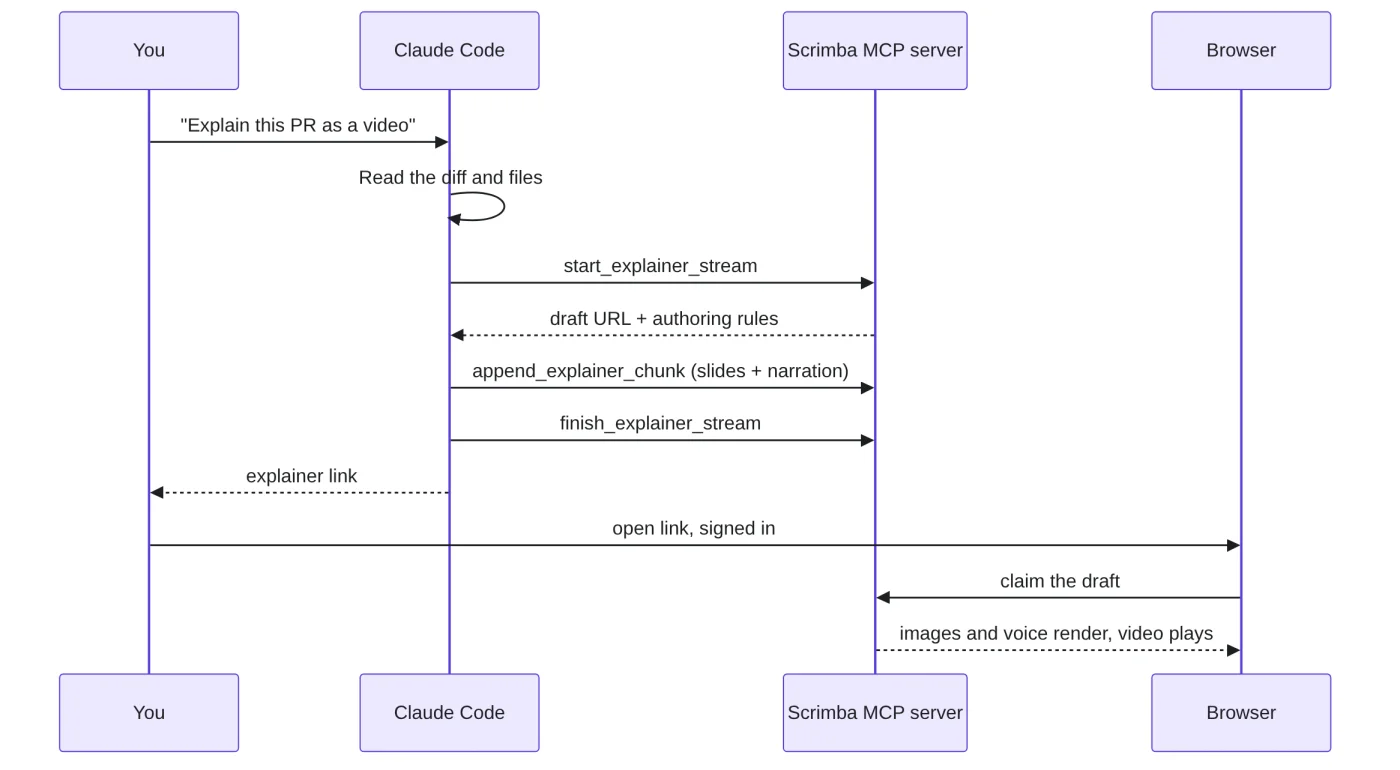
Asked to list its tools without calling them, Claude Code reported four on the standard endpoint. start_explainer_stream takes a title (under about 45 characters), an optional description, a frame mode (square, portrait or landscape) and a visibility of private or unlisted. It returns the draft URL, a stream token and the authoring contract.
That contract is the interesting part. It is about 67 KB of rules for the OPML slide format: code, diff, diagram (Mermaid), math, animation, image and infographic items, plus <say> blocks that link narration to slide anchors. Your agent writes the whole lesson in that format. Scrimba only supplies the voice and the pictures.
append_explainer_chunk pushes OPML and returns what is left of a 512,000 byte budget and ten minutes of narration. finish_explainer_stream closes the draft. create_playlist opens one claim link and a token per lesson.
The explainer Claude Code made from a real repo
I cloned Anthropic's public anthropic-quickstarts repository and ran this from the agents/ folder, one attempt, no edits:
Read agent.py (the
Agent._agent_loopmethod) and utils/tool_util.py. Then, using the Scrimba MCP tools, create ONE explainer that explains how this agent decides to call a tool and feeds the result back into the model, for a JavaScript developer who has called an LLM API once, with a diagram slide and a quiz. Make it unlisted. When done, reply with the explainer URL and a short summary of the slides you wrote.
Claude Code read both files, opened the stream with the title "Agent tool loop: how Claude calls tools" and visibility unlisted, then sent two chunks of OPML (6.6 KB and 7.3 KB). The run took 160 seconds and 13 turns. Claude Code reported about USD 1.20 of API usage for it, which is the real cost of an agent-authored explainer, since the draft itself is free.
The result is at scrimba.com/explain/guide049ig84ai and embedded below, so you can step through it while reading. It plays for 5 minutes 12 seconds across 14 narrated slides. The transcript headings, as rendered on the page: Agent tool loop, One call vs. a loop, One turn of the agent loop, What every API call carries, Ask the model then look for tool_use, Record the model's turn first, Run tools or return, Executing one tool call, Several tool calls in one reply, The conversation grows each pass, The loop in six steps, Quiz 1, Quiz 2, Answers.
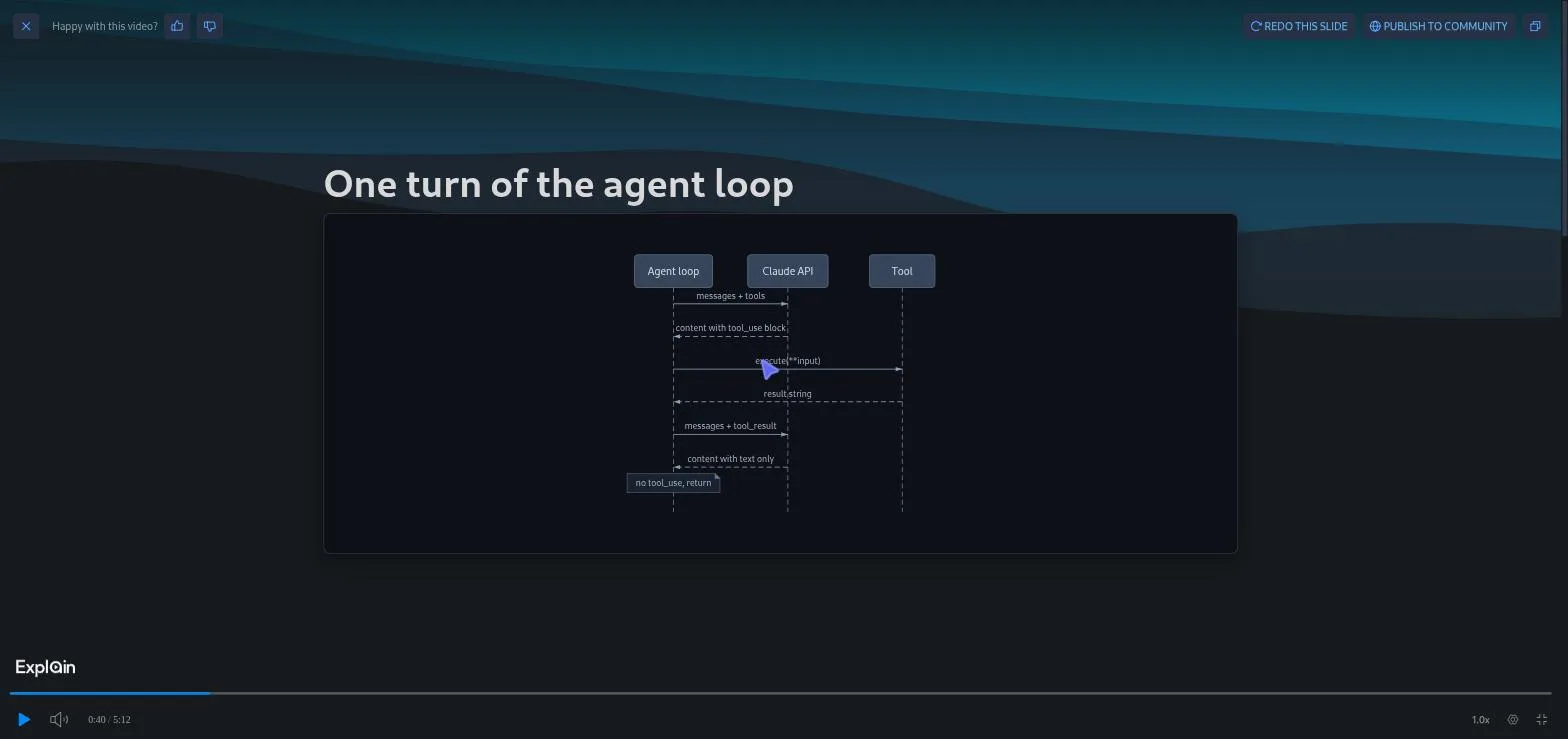
I checked the content against the source. Both quiz answers are right: with no tool_use block the loop returns, and a tool that throws becomes a tool_result with is_error set. The narration's claim that the assistant turn is appended before any tool runs matches the code. One wrinkle: the code is Python and the audience was a JavaScript developer, and Claude flagged that in the narration rather than translating it, with asyncio.gather explained as Promise.all.
The quiz is two card slides plus an answers slide. The MCP contract has no interactive quiz item, so there is no answer checking, unlike some web explainers.
Drafts are free until you claim them
The quota applies when a signed-in Scrimba user opens the link and claims the draft (docs.scrimba.com/explain/limits-and-plans (opens in a new tab)). Your agent can make twenty drafts and you pay for none of them until one is claimed. Images generate on first open and narration on claim plus first view, so an unclaimed draft is only text sitting on Scrimba's servers.
For me the link opened on a "Claim this explainer to watch it" screen, and within about ten seconds it moved on to the playing explainer without a click. Being signed in is enough.
A free account gets 10 claims for life and Pro gets 100 a month, so the agent route is where the Pro quota starts to matter. Details are on Scrimba's pricing page (opens in a new tab).
Explaining a real pull request
For the second run I used the PR endpoint on a merged pull request from the same repo: anthropics/anthropic-quickstarts #485, "Slack quickstart: sign the reply route so forged session metadata is ignored", 4 files, +124/-6. I saved the description and the diff with gh and gave both as files:
Make a Scrimba explainer of this pull request. The PR description is in pr-485.md and the full diff is in pr-485.diff (read both with the Read tool). Audience: a JavaScript developer who has shipped one webhook. Use a diff slide for the key change. When done, reply with the explainer URL.
This run took 135 seconds and 14 turns, one 18 KB chunk, 12 narrations, about 7 minutes of audio. Claude Code chose landscape mode and the title "Signing webhook routes with HMAC (PR 485)". It is at scrimba.com/explain/guide04mover9n.
The slide order tells you how the agent read the change: a sequence diagram of the Slack bridge, cards on why the old agent-ID check was forgeable, an animation of the forged route, the diff slide on the verifyRoute guard, three code slides (key derivation, kickoff ordering, constant-time compare), a lifecycle diagram, and a closing slide on consequences like secret rotation. Claude added one caveat in its reply: the "after" pane of the diff omits a long console.warn line so both panes fit the frame.
That is the format doing what a PR description cannot. A description says what changed. The explainer spends its first two minutes on why the old check failed, which is the part a reviewer who did not write the code needs.
The GitHub Action, per Scrimba's docs
I did not run this part, so treat it as Scrimba's description rather than my test. The docs say npx pr-explainer generates a .github/workflows/scrimba-pr-explainer.yml file that produces an explainer for each pull request and skips draft and fork PRs unless you explicitly allow them (docs.scrimba.com/explain/agent-plugins-and-ci (opens in a new tab)). The headless recipe on the same page is the claude -p form shown above, with the three PR tools listed in --allowedTools.
Going by my two runs, a team wiring this into every PR should expect roughly a dollar of Claude usage per explainer. Scrimba's side stays free until someone claims it.
Limits, rate limits, and what actually broke
The documented limits: 10 minutes of narration per explainer, idle streams are auto-completed after 30 minutes, and rate limits are shared across every Scrimba MCP endpoint, answered with a 429 and a Retry-After header. The contract adds upload limits of 8 MB per file and 12 pictures. I hit none of these across two creations, and no auth or quota error appeared.
What did break was on the Claude Code side. On every start_explainer_stream call the 67 KB contract exceeded Claude Code's tool result window, so it was saved to a file and Claude spent six or seven extra tool calls reading it back with jq and sed. That is about half the wall time of each run. In auto permission mode those shell calls ran without asking; on a default install they would prompt, so allow Bash too or expect to approve a few reads.
Privacy defaults for code explainers
Standard endpoint drafts are private until claimed, and stay private unless you asked for unlisted, as I did. PR endpoint drafts are unlisted from the start (docs.scrimba.com/explain/privacy-and-sharing (opens in a new tab)). Unlisted means anyone with the link can watch, so an unlisted explainer of a private repo is only as private as the link.
Two things I could not find stated anywhere: how long an unclaimed draft is kept, and what Scrimba does with the code your agent streams into it. If your repository is confidential, that is the question to ask before the first run.
When a video beats a PR description
A PR description is enough when the diff is small and the reviewer already knows the subsystem. The explainer earned its seven minutes on PR 485 because the change only makes sense once you understand how the Slack bridge trusts session metadata, and the diff does not say that.
The same applies to onboarding: the agent loop explainer above is a file a new hire would otherwise read cold. Scrimba's Learn AI Agents has Arsala Khan walk you through building that same decide-call-observe loop by hand on OpenAI's Responses API, capped at five turns, then wire it into a working app. Intro to Model Context Protocol has Maham Codes build the kind of tool-and-resource server these two endpoints extend, one weather tool, one resource, in 17 scrims.
After this post you can add the server, make one draft of a branch you understand, check it against the code, and decide whether a claim is worth one of your ten.
Claim your first explainer on a free account
A free Scrimba account is enough to claim your first explainers and test the format on your own code before the quota matters.
References
- Scrimba Docs, Claude Code (opens in a new tab): the
claude mcp addcommand, the four tools, and the "images on first open, narration on claim" rule. - Scrimba Docs, MCP (opens in a new tab): the endpoint, streamable HTTP, playlists of 2 to 12 lessons, asking for unlisted.
- Scrimba Docs, Agent plugins and CI (opens in a new tab): the
/explain/pr/mcpendpoint, the headless recipe,npx pr-explainer, and the narration, idle and 429 limits. - Scrimba Docs, Limits and plans (opens in a new tab): 10 explainers for life on Free, 100 a month on Pro, drafts free until claimed.
- Scrimba Docs, Privacy and sharing (opens in a new tab): private default over MCP, unlisted for the PR endpoint.
- anthropics/anthropic-quickstarts: the
agents/agent.pyandutils/tool_util.pyfiles, and pull request #485, used for the two runs. - Two runs on 2026-09-20 with Claude Code CLI 2.1.278: explainers guide049ig84ai and guide04mover9n.
Not to create a draft. Both endpoints accepted the stream with no token, header or login step. You need a signed-in Scrimba account to open the link and claim the explainer, which is when it starts to play and when it counts against your quota.
Source: Scrimba Help Centre
The PR endpoint has the three stream tools and no playlists, and its drafts are unlisted by default so a reviewer can watch without an account. The standard endpoint adds create_playlist and keeps drafts private until claimed unless you ask for unlisted.
Source: Scrimba Help Centre
Only when you claim it. Drafts are free however many the agent makes. Claiming one takes one of the 10 lifetime explainers on a free account or one of the 100 a month on Pro.
Source: Scrimba Help Centre
My two runs took 160 and 135 seconds, 13 and 14 turns each. About half of that was Claude Code reading the roughly 67 KB authoring contract back from a file because it exceeded the tool result window. Claude Code reported about USD 1.1 to 1.2 of API usage per run.
A wildcard is only allowed after the full server prefix. Use mcp__scrimba__* rather than mcp__scrimba*, or list the three tool names in full as Scrimba's docs do.
Scrimba's docs say npx pr-explainer generates a GitHub Actions workflow that makes an explainer per PR and skips draft and fork PRs unless you explicitly allow them. I have not run the Action myself; the headless claude -p form it wraps is the one I tested.
Source: Scrimba Help Centre
Drafts from the standard endpoint are private until claimed; PR endpoint drafts are unlisted, so anyone with the link can watch. Scrimba's docs do not state how long unclaimed drafts are kept or how the streamed code is handled, so ask before pointing it at a confidential repository.
Source: Scrimba Help Centre
Ten minutes of narration, a 512,000 byte OPML budget, uploads of 8 MB per file and 12 pictures, idle streams that are auto-completed after 30 minutes, and shared rate limits that return a 429 with a Retry-After header. I did not hit any of them in two runs.
Source: Scrimba Help Centre