Learn AI Agents
Learn AI Agents is Bob Ziroll's Pro course on LLM agents: 31 scrims, just under two hours, where you build the same weather-and-location agent twice, first with a hand-written ReAct loop, then with OpenAI function calling. The loop logic holds up; the SDK and the models it runs on are late 2023.
Reviewed inside the course with a Pro account, September 2026.
This page is part of our Scrimba AI courses catalog. Scrimba's course page lists it under the AI Engineer Path.
Quick answer
It fits developers who already call an LLM from JavaScript and want to see what an agent loop is actually doing, not which framework to install. The catch: the code is frozen in November 2023, down to a beta OpenAI helper Bob warns might change "in one or two days." Take Intro to AI Engineering first if you have not, then move on to Build a Support Agent with Vercel AI SDK or Build Serverless AI Agents with Langbase for a current stack.
Learn AI Agents
ProTaught by Bob Ziroll (opens in a new tab)
Build an LLM agent from scratch with a ReAct prompt and a loop, then rebuild it with OpenAI function calling.
View on Scrimba (opens in a new tab)Is it worth your time?
The thing this course does that most agent tutorials skip is make you build the loop by hand before any SDK does it for you. Bob is explicit about why. In lesson 6 he says the LLM "will tell us what function it wants to call or what action it wants to perform, and then we will write our code in a way that can then actually perform that action."
You then spend nine scrims doing exactly that. You write the system prompt, split the model's reply into lines, find the Action: line with a regular expression, look the function up in an availableFunctions object, push an Observation: message back, and wrap it all in a for loop capped at five iterations. When the OpenAI function calling section replaces all of it with a tool_calls array and a finish_reason check, you understand what the API is saving you from. That is the point of the course and it lands. By the end you can write a tool-calling loop from nothing and read an OpenAI tool_calls response; you will not have a product, since the weather tool stays hardcoded the whole way through.
The code has aged. The dependency panel shows an openai 4.1x SDK throughout ([email protected] in the ReAct scrims, [email protected] by the UI scrim). The models are gpt-4, gpt-3.5-turbo, gpt-3.5-turbo-1106 and gpt-4-1106-preview, and in the setup challenge Bob says the 1106 models were "just released" at the time of recording. That puts it in November 2023.
The final technique, openai.beta.chat.completions.runFunctions, is introduced with the words "this is so new that not only is it still considered in beta with OpenAI's SDK, but it's also not even in their documentation." Bob warns you in the same scrim that "what we just learned here might be changing for all I know in one or two days." He was right. Treat the concepts as current and the exact method names as history you will need to translate.
The second caveat is scope. getCurrentWeather returns a hardcoded forecast for the whole course, and Bob edits the numbers by hand to show the answers change. getLocation starts hardcoded too, then in the "Adding arguments" scrim becomes a real call to an IP lookup service, which Bob demonstrates by switching his VPN between Salt Lake City, New York and Denver. That is the only real tool in the course. There is no weather API and no framework, so you finish with a pattern, not a product.
What you'll learn
Scrimba presents this course as one flat list of 31 scrims with no module headers. The grouping below is mine, by topic, so the durations can be compared.
Course curriculum
31 scrims in a flat list, grouped by topic for this review
- Intro and prompt engineering recap
- ReAct agent from scratch
- OpenAI functions agent
- UI, solo project and wrap-up
Lesson counts are the toc-scrim-item rows I counted in the expanded table of contents in September 2026, and the durations are the per-scrim times added up. My sum is 121 minutes against the 117 minutes in the page header and the PT1H57M12S in its structured data. One wrap-up scrim is listed at 3:11 but its transcript ends at 1:15, which accounts for about half the gap. Scrimba's own listing and structured data say 31 lessons, so on this course the numbers agree.
Inside the course, scrim by scrim
1. Intro and prompt engineering recap (18 min, 5 scrims)
All five of these are marked SAMPLE, so you can watch them without Pro. "AI Agent Intro" gives the definition above, with adaptive cruise control and self-driving cars as the analogy, and sets the plan: "first, using a prompting strategy called ReAct, then refactoring our code to use a built in capability of OpenAI called functions, and by the end we'll get a sneak peek of something that's currently in beta called automatic function calling."
"Prompt Engineering 101" is a six minute compression of Scrimba's separate Prompt Engineering for Web Developers course. Bob recommends you take at least its first section before this one. The demo is the old centering-a-div question run three ways in the OpenAI Playground on GPT-3.5, from "how do I center something" to "how do I center a div element horizontally and vertically using CSS Flexbox." The point is that the vague prompt gets a scattershot answer covering Photoshop and word processors, and the specific one gets code you could paste.
"Control Response Formats" is two minutes on asking for a length ("explain in two paragraphs", "give me twenty examples") or a shape (a comparison table, an analogy, a comment above every line of pasted code). "Zooming Out" is a three minute diagram scrim. Bob draws agents as one small region inside AI, with LLMs like GPT-4, Mistral and Llama 2 as tools an agent can pick up, alongside speech, vision and image models. His one-line definition here is worth keeping: an agent "can pull together multiple tools and then iterate on a task using those tools until that task is complete."
"Agent Setup" writes the first chat.completions.create call with gpt-4 and a single user message asking for activity ideas based on location and weather. The model, of course, answers that it cannot access either, which is the problem the rest of the course solves. This scrim is also where Bob tells you to put your own key in an OPENAI_API_KEY environment variable on Scrimba: "Without an API key, you'll still be able to see my recordings and the data that I get back from my API calls, but you won't be able to play with the code."
2. ReAct agent from scratch (47 min, 11 scrims)
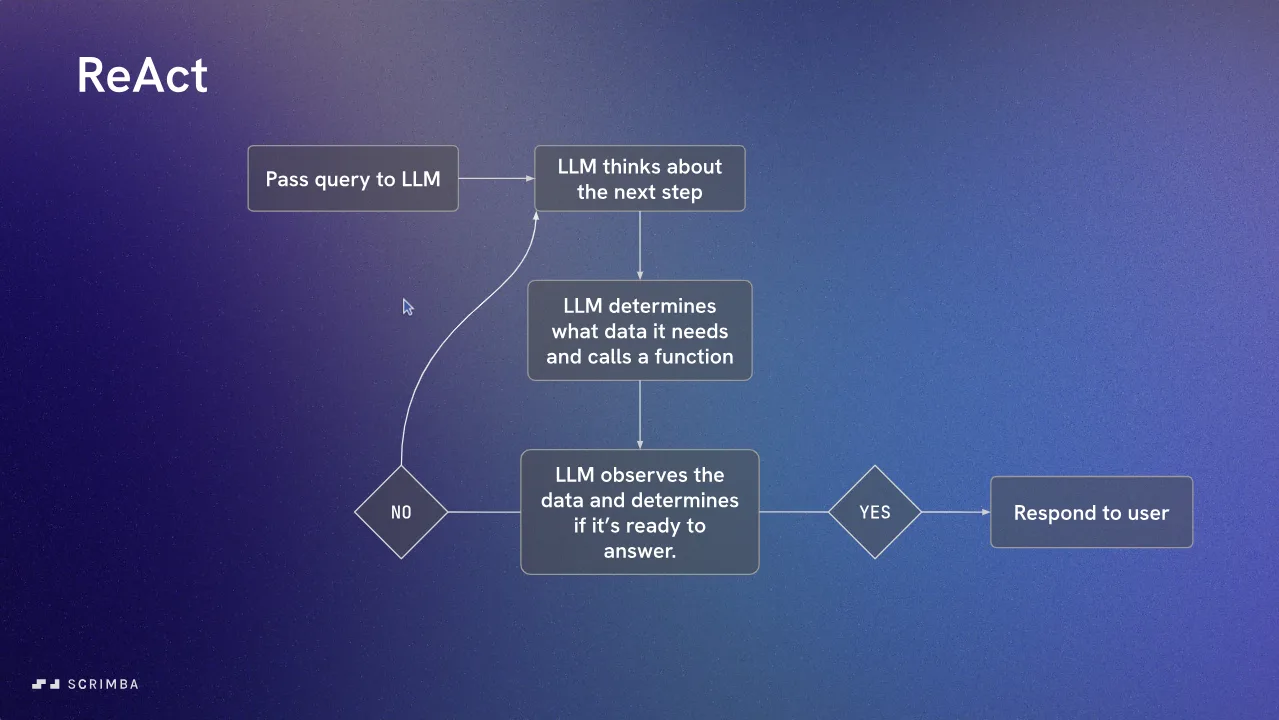
The core of the course. "Introduction to ReAct prompting" argues against hardcoding a chain (call the weather function, pass the result into the prompt) because, as Bob puts it, "I've predetermined in the code a chain of events that need to occur in order to get a very specific response." Instead the LLM gets three phases, reasoning, acting and observing, and the flowchart in the grid above. ReAct is short for reason and act; Bob links a Medium article for the theory and moves on.
"Build action functions" creates tools.js with two async stubs. getLocation returns "Salt Lake City, Utah" (Bob's real location; by part 7 he has changed it to New York City) and getCurrentWeather returns a JSON string with 72 degrees and sunny. Bob first wires them into the prompt the naive way, as a chain, and gets a working answer. Then he says the sentence that starts the real work: "Let's refactor this so that we turn our manual chain of events into an agent that is aware of the tools at its disposal and able to reason, act, and observe."
The build is a numbered run of nine "ReAct Agent" parts. Part 1 writes a four step plan as a comment in index.js: design the ReAct prompt, build a loop, parse actions, create an end condition. It is also where Bob switches from gpt-4 to gpt-3.5-turbo because a loop that calls the API five times per question adds up. Part 2 pastes in the system prompt, which he credits to a blog post with a Python implementation of the pattern. The prompt spells out Thought, Action, PAUSE and Observation, lists the two available actions with an example call for each, and ends with a full example session as a few-shot demonstration (a worked example the model is expected to imitate).
Part 3 is a slide scrim about state. Bob's point is that "between one API call and the next, it's not remembering our conversation," so the loop has to resend the whole messages array every time. He draws the model with open eyes when it is reading the history and closed eyes while your code runs the action. Part 4 is the first challenge: stub an agent(query) function, build the messages array with the system prompt and the query, move the API call inside, and call it. Bob tests it with "What book should I read next? I like self help books" and the model, with only two tools, tries to look up his location anyway.
Parts 5 to 7 are the parsing. Part 5 notices that the model separates its lines with newline characters and writes the plan: split on \n, find the line with Action:, pull out the function name and argument, call it, add an Observation: message. Part 6 is a challenge with the regex supplied; the solution uses Array.find with regex.test, then regex.exec to read the two capturing groups. Part 7 is another challenge, and the answer is bracket notation: put both functions in an availableFunctions object and call availableFunctions[action](actionArg).
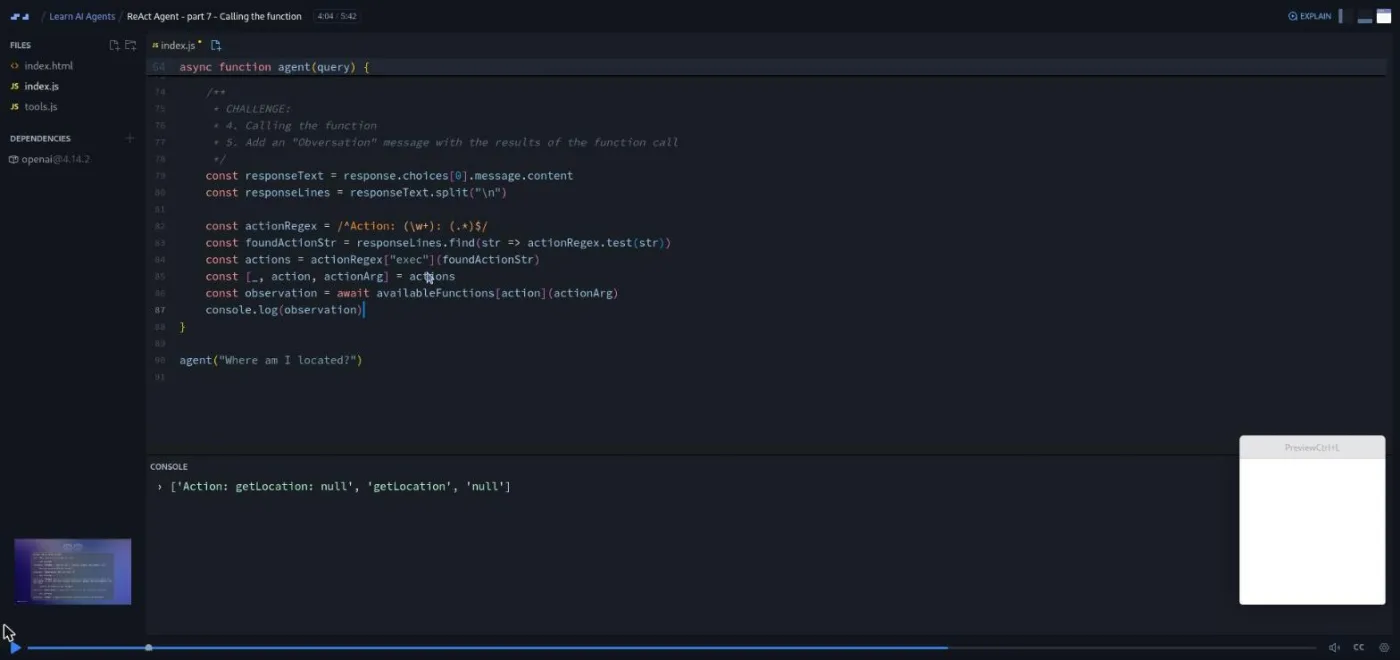
The challenges are real pauses: "So I'll give you a chance now to pause and work on this challenge," then the solution. Bob is candid that this is not glamorous work. At the end of part 7: "the way that we're parsing these strings does feel a bit tedious. This is going to lead us very soon into learning about OpenAI functions and we'll see how we can offload what kind of feels like a hacky way around figuring out what function to call to OpenAI."
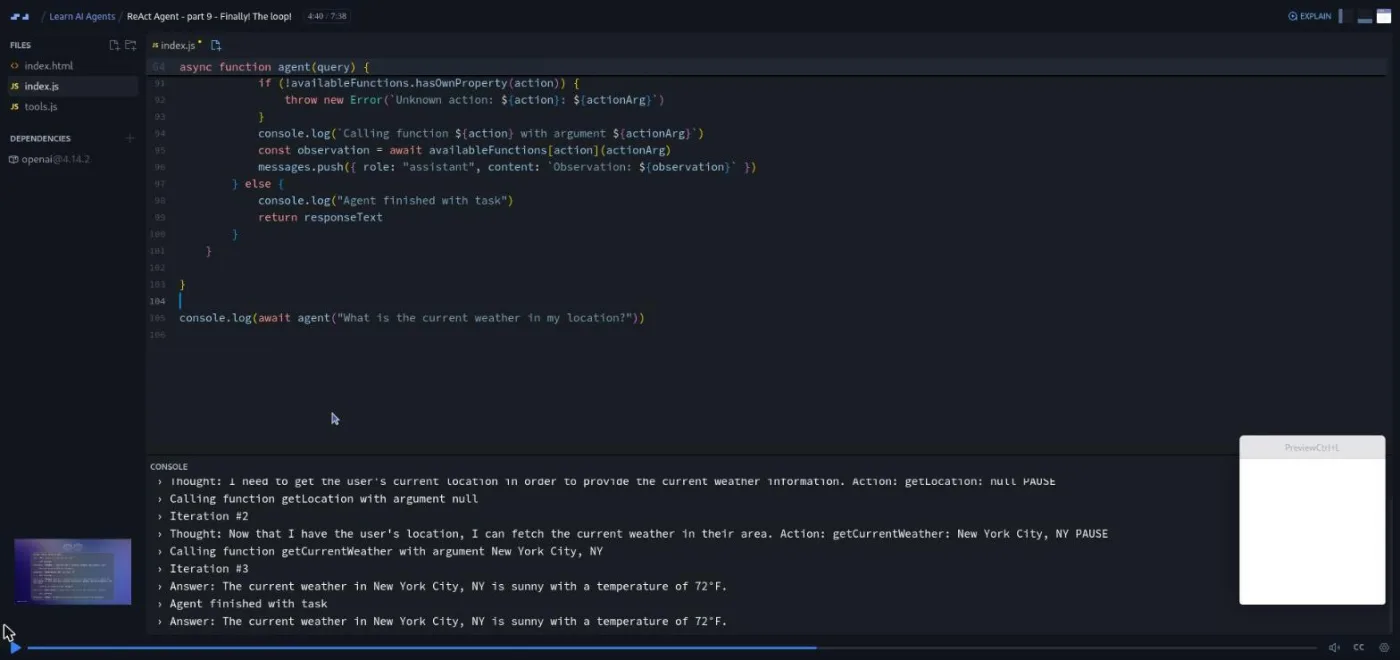
Part 8, "Housekeeping", hoists messages out of the call so it can be pushed to, adds the assistant reply and the Observation: line to it, and throws an "unknown action" error if the model names a function that is not in the object. Part 9 is the payoff and the longest scrim in this half at 7:38. Bob caps the loop with MAX_ITERATIONS = 5 ("we don't know for certain if it's not just going to get completely out of control and end up calling the API a thousand times"). He adds a console log per iteration and hits two bugs on camera: message.push instead of messages.push ("I'm sorry for anybody that was screaming at me for that") and a missing await. Then comes the three-iteration run below, and a last test where he edits the hardcoded weather to two degrees and snow and the suggestions switch to ice skating at Rockefeller Center.
3. OpenAI functions agent (41 min, 9 scrims)
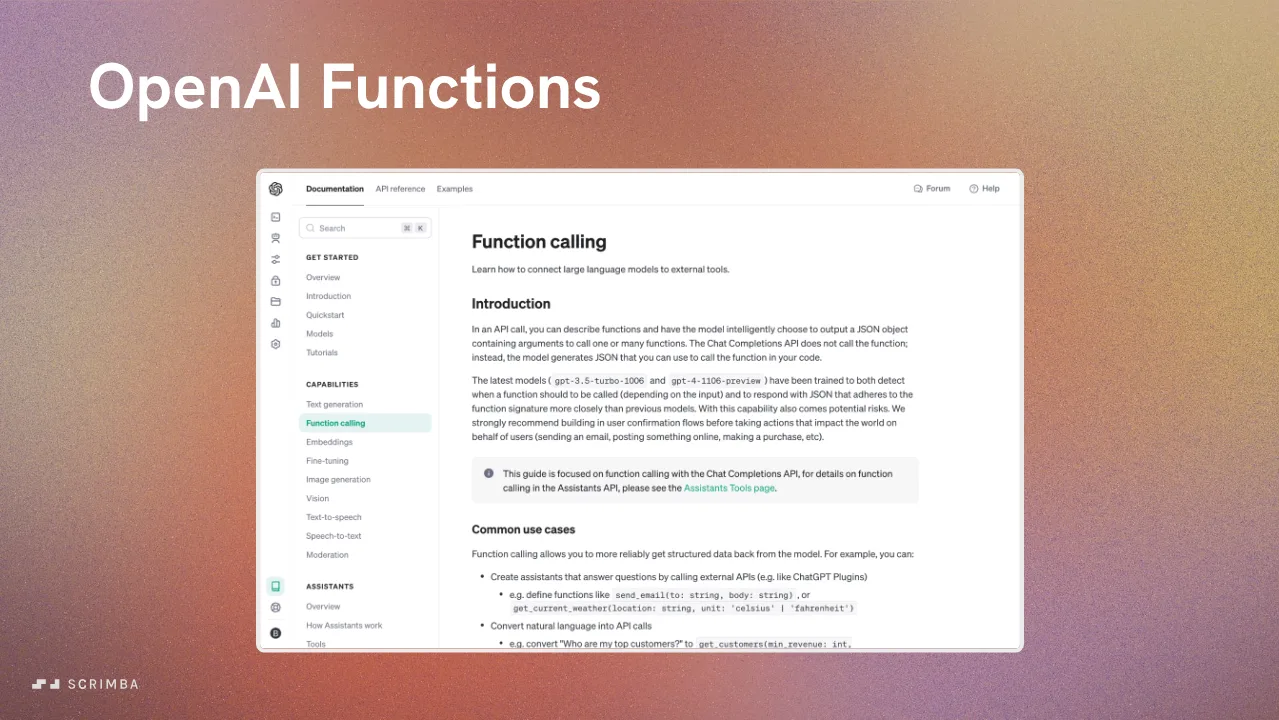
Function calling is OpenAI's built-in version of what you just hand-rolled: you describe your functions in the request, and the model replies with a structured tool_calls array instead of prose. Bob's framing in the one minute intro: "we don't have to do the same kind of string parsing that we were doing before. I could be wrong but it feels like this is going to be quite a bit more error prone than something that's built into OpenAI." The plan is to "gut everything that we've done here and rewrite it from scratch using OpenAI functions," pulling from OpenAI's documentation example.
"Demo day" is demolition, not a demo. Bob deletes the long ReAct prompt and the regex, replaces the system message with two lines ("You are a helpful AI agent. Give highly specific answers based on the information you're provided"), and adds an empty tools: [] to the request so the code still runs. "Tools" (6:28) fills that array in. Each entry is { type: "function", function: { name, description, parameters } }, where parameters is a JSON schema, a small object that names each argument and its type. Bob moves the 25-line array into tools.js, and shows the two things that matter: with a location question the response has content: null and a tool_calls array; with "how are you today?" it has content and no tool calls.
"Loop Logic" writes the plan around finish_reason: if it is "stop", return the content; if it is "tool_calls", call the functions, push the results and loop again. "Setup Challenge" has you write the stop branch; Bob's solution destructures finish_reason and message from choices[0]. This is also where he swaps to gpt-3.5-turbo-1106 and explains that "at the time of recording, this was just released as well as a GPT four dash eleven o six preview model," adding that 1106 "just means November sixth."
"Tool Calls" is the other challenge: the tool_calls branch. The note that matters is that tool_calls is an array, because "in a very recent update" the API changed from a single function_call to a list. Bob loops it with for...of, and tests "get me the weather in Tokyo and New York" and then Oslo too; the model calls the stub three times. "Pushing to messages" adds the results with role: "tool", a tool_call_id and the function name, and hits an API error on camera: a tool message "must be a response to a preceding message with tool_calls." The fix is one line, pushing the assistant's own message first, and he explains why the ID exists (to match each result to its call when the same function runs three times).
"Adding arguments" gives getCurrentWeather a location parameter, adds it to the schema with a required list, and reads it with JSON.parse(toolCall.function.arguments). Bob also tries a unit enum, gets 75 degrees Celsius back for every city, and removes it. Then he replaces the getLocation stub with a real IP lookup and shows it working through a VPN.
"Automatic function calls" (9:04, the longest scrim in the course) deletes the loop entirely in favor of openai.beta.chat.completions.runFunctions, passes the real JavaScript functions instead of schemas, and reads the result with await runner.finalContent(). A .on("message", ...) listener shows the internal system, user, assistant and function messages flowing past. Bob's reaction to seeing his own loop absorbed into the SDK: "I'm not sure whether to rejoice or to cry."
4. UI, solo project and wrap-up (15 min, 6 scrims)
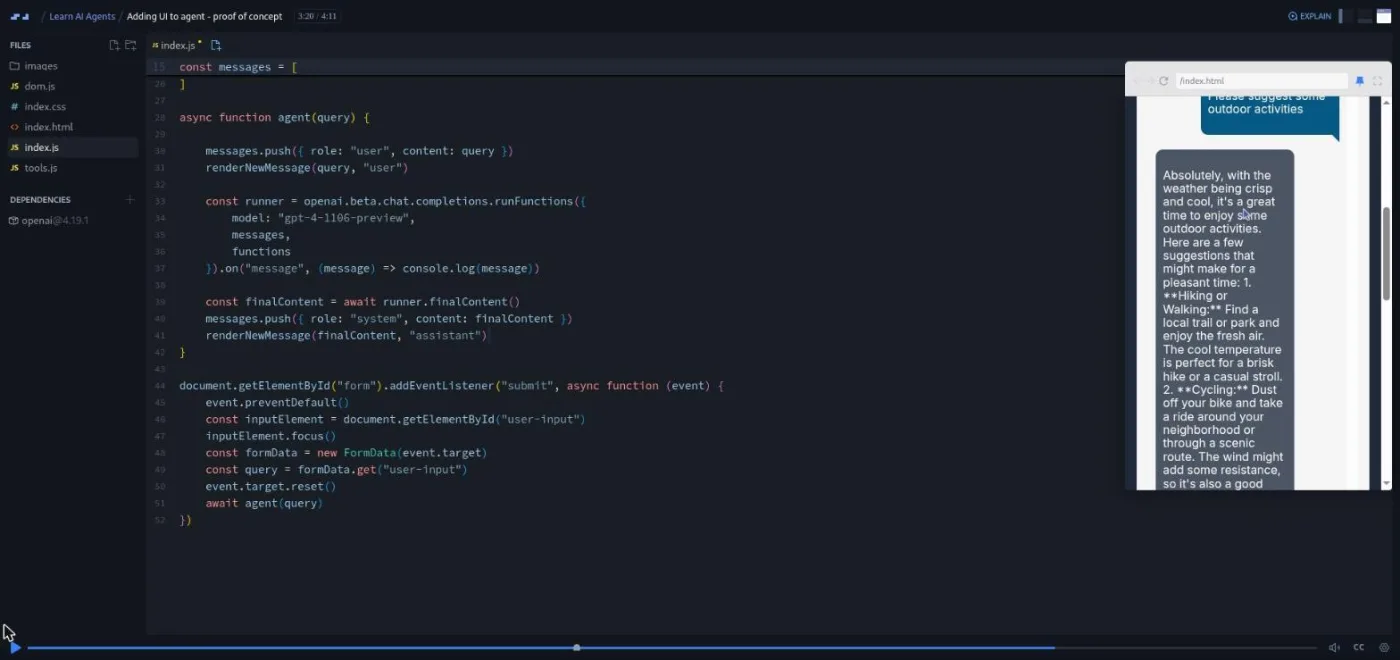
"Adding UI to agent" is the sixth challenge and the only scrim with a visible front end: a vanilla JavaScript chat window with a form, a renderNewMessage helper in dom.js, and gpt-4-1106-preview behind it. The challenge is to make the agent remember the conversation. That sounds like one messages.push and turns out to need the array hoisted out of the function so it survives between submissions. Bob asks "please suggest some outdoor activities" as a follow-up and judges the answer honestly: "They're not specific to my location of Salt Lake City at all. But for a first go at it, that's not too shabby."
The Solo Project brief, "AI Travel Agent," is narrated by a different Scrimba voice than Bob's and comes with a Figma file. The app is a form for travelers, origin, destination, dates and budget, then a results page with dates, weather, flights and a hotel. The brief is explicit that "you can just use the OpenAI API to create hallucinated flight and hotel data," booking buttons only console.log, and the one real integration is a weather API. Stretch goals include activity ideas that differ for a single traveler, a couple or a family, a shareable trip page, and AI-generated images.
"Nice work!" recaps in a little over a minute. Bob's own summary of the ReAct half is the best short description of it: "some fancy prompt engineering that we did on top of a custom loop that we built around our GPT assistant." Three housekeeping scrims follow, voiced by other Scrimba staff: Scrimba Docs, the Scrimbassador referral program, and how to use the certificate.
What a lesson feels like
Scrims run from under a minute to nine, most between three and six. Every one is Bob's voice over a live editor with the console open below and the preview collapsed, since nothing here has a UI until the last build. The slides are few and used for diagrams, not bullet points. Challenges arrive as a numbered comment block in index.js ("CHALLENGE: 4. Calling the function, 5. Add an Observation message") plus a spoken pause; the six marked in the table of contents each get a "Challenge" badge on hover. Bob also says more than once that you can skip a challenge and watch, and that asking ChatGPT for help with the regex is fair game.
You need your own OpenAI key in a Scrimba environment variable to run anything, and every run costs money on your account, which Bob mentions when he caps the loop. Without a key you can still watch and read the code. All scrims have captions, a timestamped transcript under the settings menu, and subtitles in ten languages per the course header. Bob's manner is dry and self-aware. When the SDK update makes his loop redundant he says "let's just rip the band aid right off," and he ends with an unprompted speech about how quickly things change and why you should check the GitHub README rather than trust the course.
Free or Pro: exactly what is gated
This is a Pro course. Scrimba's catalog lists it under the Pro tab and its structured data says isAccessibleForFree: false. The first five scrims (the intro, both prompt engineering scrims, "Zooming Out" and "Agent Setup") carry the SAMPLE badge and play without a subscription. Everything from "Introduction to ReAct prompting" onward, including all six challenges, the AI Travel Agent solo project, and the certificate of completion, needs Pro.
See current plans (opens in a new tab) for what a subscription costs in your region. Scrimba's pricing page lists basic Discord access as free and the Pro-only channels as Pro, so the community itself is not the reason to upgrade; this course and the rest of the AI Engineer Path are.
How long it takes
117 minutes of video, but the course expects you to type. Plan for four to six hours. That covers the runtime and the six challenges, each a few minutes of real coding if you do them before watching the solution. It also covers the setup cost of an API key and environment variable, and the time you will spend reconciling runFunctions and the 1106 models with whatever the OpenAI SDK looks like when you take it. The AI Travel Agent solo project is separate and open-ended; from the brief and the Figma file I would budget a further six to ten hours for a working version.
Who it's for, and who should skip it
It fits you if you have already called an LLM from JavaScript, you know what async/await and array destructuring are, and you want to understand what agent frameworks are doing rather than which one to install. Bob says as much in the setup scrim: "I'm assuming that this is not your first course that you're taking in the AI engineer path."
Skip it, for now, if you have not done Intro to AI Engineering or something equivalent; the course moves fast through the OpenAI client and never explains it. Skip it if you need Python; everything here is browser JavaScript. Skip it if you want a current, production-shaped agent stack: the models and the beta helper are late 2023, and the Vercel AI SDK support agent or Langbase courses are the applied follow-ups.
View Learn AI Agents on Scrimba (opens in a new tab)Prerequisites
Comfortable JavaScript (destructuring, regex basics, async/await, ES modules), a working knowledge of the OpenAI chat completions API, an OpenAI account with an API key and a little credit on it, and Scrimba's environment variable feature (the setup scrim links to a post explaining it). Prompt engineering basics help; the course's two recap scrims assume you have seen them before.
Where it fits
It sits in the AI Engineer Path. The natural order on this site is Intro to AI Engineering first, then this course to understand the loop, then one of the tooling-specific agent courses to build something real. The Model Context Protocol course is the closest conceptual neighbor, since MCP standardizes the "tools" this course hand-rolls, and Learn RAG covers the retrieval step an agent would call as one of those tools.
Strengths and limits
What it does well: it builds the agent loop by hand before automating it, so the tool_calls API makes sense when it arrives; the challenges are placed where the work is (parsing, calling, the stop condition); Bob debugs on camera and says when something is hacky; and at under two hours it does not pad.
Where it is limited: the code is late 2023 (an openai 4.x SDK, gpt-3.5-turbo-1106, a beta runFunctions helper that Bob himself warns may vanish). The weather tool is a hardcoded stub and the location tool is a bare IP lookup, and there is no error handling beyond one thrown error, no streaming, and no framework. The solo project asks for a full front end the course never taught, so the jump from the last scrim to the brief is a big one.
Related courses and comparisons
- Intro to AI Engineering, the prerequisite fundamentals
- Prompt Engineering for Web Developers, the course Bob's recap scrims summarize
- Build Serverless AI Agents with Langbase, a free, applied companion
- Build a Support Agent with Vercel AI SDK, a project-based agent build on a current SDK
- Intro to Model Context Protocol (MCP), the standard for the tools this course hand-writes
- Learn RAG, to ground an agent's answers in your data
- AI Engineer Path, the path this course sits in
No. It is a Pro course. The first five scrims (intro, two prompt engineering recaps, Zooming Out, and Agent Setup) are free samples; the ReAct build, the OpenAI functions build, all six challenges, the AI Travel Agent solo project and the certificate need a Pro subscription.
Bob Ziroll, per the teacher card on the course page and his own introduction in the first scrim. He also teaches Scrimba's Learn React and Advanced React. The solo project brief and the three housekeeping scrims at the end are voiced by other Scrimba staff.
One agent, twice. A weather-and-location agent with two tools (getLocation and getCurrentWeather), first driven by a hand-written ReAct system prompt and a parsing loop, then rebuilt with OpenAI function calling and the SDK's beta runFunctions helper. The weather tool stays hardcoded; the location tool becomes a real IP lookup in the Adding arguments scrim. The last scrim wraps it in a vanilla JavaScript chat UI. The solo project is an AI travel agent built from a Figma design.
Yes, to run any of the code. The Agent Setup scrim tells you to create one and store it as an OPENAI_API_KEY environment variable on Scrimba. Without it you can watch the recordings and read the code but not run or edit it. Each run bills your OpenAI account.
The concepts are; the code is not. The dependency panel shows an openai 4.1x SDK (4.14.2 in the ReAct scrims, 4.19.1 by the UI scrim), the models are gpt-4, gpt-3.5-turbo-1106 and gpt-4-1106-preview, and the final technique is a beta runFunctions helper Bob describes as not yet documented. He says the 1106 models had just been released when he recorded, which dates it to November 2023. Expect to translate method names to the current SDK.
Six scrims carry a Challenge badge in the table of contents: ReAct code setup, parsing the action, calling the function, the OpenAI functions setup challenge, tool calls, and adding UI. They are pause-and-code exercises with Bob's solution afterwards. I did not see the instant AI feedback badges that some newer Scrimba courses use.
117 minutes of video by Scrimba's count (121 by my sum of the scrim times). Budget four to six hours with the challenges, key setup and some SDK translation, plus six to ten more if you build the AI Travel Agent solo project.
Neither. It is browser JavaScript with the official openai package and nothing else. No LangChain, no Vercel AI SDK, no Python.
Yes. Every scrim has captions, a timestamped transcript under the settings menu, and the course header lists subtitles in ten languages.