What Is Scrimba Explain? The AI Explainer, Tested (2026)

Last updated:

Scrimba Explain turns a question into a short narrated video explainer, complete with diagrams, code walkthroughs and, most of the time, a quiz at the end. A free Scrimba account gets 10 explainers for life, Pro gets 100 a month, and it works in the browser, inside Scrimba lessons, in ChatGPT, and inside coding agents like Claude Code through MCP. Most AI coding tools compete to write your code faster. This one explains it.
There is a kind of stuck that no course fixes. You have read the syntax three times. You can reproduce the example. You still could not say out loud why it works, and you know that asking the question properly would take longer than pretending you understood.
Scrimba's own documentation uses that exact reader as its example prompt: "I understand the syntax, it's the 'why' I'm missing." Another one: "why does a closure still see a variable after the function returned? I know Python but not JS, show me a diagram." Neither of those is a beginner. Both are people mid-way through learning something, which is where most of us spend most of our time.
That is who this tool is for first. Everything else it does is downstream of that.
Tested on the web, in the Chrome extension and in Claude Code through MCP with a free Scrimba account, September 2026. The screen recordings below are mine.
How Scrimba Explain works
You type a question and get back a short video that explains it, narrated, with visuals built for the answer rather than stock footage. The docs put it in one line: "Ask a question, and get a narrated video lesson back, built while you watch."

Here it is answering "What happens when you type a URL into the browser?". A few seconds after pressing Explain, a narrated explainer called "How a URL becomes a website" starts playing.
The first 30 seconds of a 57-second explainer. Captions are available in the player.
Transcript and on-screen description
On screen: The Scrimba Explain home page. The question "What happens when you type a URL into the browser?" is typed into the prompt box and Explain is pressed. A generating screen appears, then a narrated explainer titled "How a URL becomes a website" starts playing. It moves to a slide titled "The internet's address book", where an animated diagram connects a browser, a DNS address book and a website server, and then to a slide titled "The request and response".
Narration: What happens when you type a URL into your browser? Think of the internet like a massive phone system. Your browser knows the name you typed, like example.com, but it needs a phone number, called an IP address, to actually call the server. It asks a DNS server, which acts like an address book, to swap that name for a number. Once the browser has the address, it reaches out to the server. They start with a TCP handshake, which is just a way of saying "Are you there?" and "Yes, I'm ready." Only then does the browser send a GET…
The explainer is built slide by slide for that question: a title card, an animated diagram of the browser asking DNS for an address, a request-and-response walkthrough, a numbered breakdown of how the browser builds the page, and a multiple-choice question at the end. The docs are firm about the distinction: "An explainer is not a screen recording. Each slide is real, typed content."
There are five ways in:
| Entry point | What it does |
|---|---|
| Web | Type a question at scrimba.com/explain, get a video back |
| Inside a lesson | Press EXPLAIN in a scrim's header and ask about the code in front of you; the lesson, your highlighted lines and the teacher's transcript go in as context |
| ChatGPT | Mention @Explain in a conversation and the answer arrives as a video |
| Chrome extension | Turn any article or page you are reading into an explainer |
| Claude Code / Codex (MCP) | Connect it to your coding agent through MCP, the standard way agents plug into outside tools, and get a walkthrough of your actual code |
If you are learning: it answers the question you cannot phrase
A chat window drifts. You ask for the simple version, and three replies later you are reading about edge cases. Explain lets you pick the level up front, and the whole video stays at it.
Scrimba ships several teaching styles:
| Style | What it does |
|---|---|
| Explain | The default. "Simple words, small steps", built on concrete examples |
| Standard | Clear, well-rounded teaching |
| TLDR | A few slides. The core insight instead of a full lesson |
| Professor | "Maximum depth, down to the bytes": real memory, wire formats, engine behaviour |
| LOL | "Funny and sarcastic, still accurate" |
| Per and Tom | Scrimba's founder and Tom Chant, in their own teaching voices |
Professor is the one that tells you who else they are building for, but Explain and TLDR are the two a learner will live in. TLDR is for the moments you do not want a lesson, just the one sentence that makes the rest click.
The other thing worth knowing if you are not learning in English: explainers are narrated in 33 languages, with a native voice for each. I learned to code in my second language and I underrate how much friction that adds until something removes it.
My rule: let it explain something you have already tried to understand and failed. Not the first thing that meets a new topic. The order decides whether it builds the muscle or replaces it, and nothing in the tool enforces that for you. This is the same argument I make about AI generally in how to learn coding without depending on it.
If you are a junior: it is for the code you did not write
The second audience is the one starting a first job, and the problem there is different. The concepts are usually fine. What is not fine is forty thousand lines of someone else's code and three days to find your way around it.
I do not think you can read an entire codebase as a solo developer or on a team of three. Nobody can. You cannot read every pull request line by line either, and neither can anyone else on the team, which is why code quietly gets merged that nobody has really read.
Scrimba reached the same conclusion. They attach an Explain video to every pull request in their own codebase. Per describes it as starting with a high-level overview and then digging into the details, so the team can stay on top of what is changing.
Through MCP, the prompts their docs suggest are exactly the ones a new hire needs:
- "Walk me through how authentication works in this codebase"
- "Explain what this branch changes and why"
- "Explain the bug we just fixed and how"
The output is grounded in your actual files, because your agent does the research and Explain renders it. That is what separates it from a generic illustration of the concept.
Here is that flow on the Express source code. Asked for a short explainer of what res.send does in lib/response.js, Claude Code reads the file, calls Explain, and hands back a link that renders while it works.
Claude Code connected to Explain through MCP, sped up while it builds the explainer. Captions are available in the player.
Transcript and on-screen description
On screen: A terminal running Claude Code in the Express repository. The prompt "Make a short explainer video of what res.send does in lib/response.js. Keep it brief." is typed and submitted. Claude Code reads lib/response.js, calls scrimba-explain and replies with a link to the explainer, which renders while it builds. This part plays sped up six times. The browser then opens the finished explainer, titled "Express res.send() Internals", which moves to a flowchart titled "What send() does" and a code slide titled "Branching on body type".
Narration: …turns whatever you hand it into a finished HTTP response. The flow branches on the type of the body. A string just gets a charset, while a plain object is handed off to res.json instead of being sent directly. Everything else moves on to compute Content-Length and an ETag, before the final status check decides whether the body actually gets sent. This switch is the entry point. A string falls back to Content-Type HTML, unless one is already set, in which case Express only adds a UTF-8 charset. A null body becomes an empty string, a Buffer-like value gets Content-Type bin…
One detail explains a lot: explainers made through MCP are private by default. ChatGPT ones are unlisted. So the entire developer half of this product is invisible to everyone outside the team using it, which is why the public side of Explain looks like a general learning tool and the developer side looks like a rumour.
If you are heading into a first role, this pairs with reading code, the skill AI coders skip, and with the general reality of the junior job market in 2026: writing code is the cheap part now, and being able to explain it is what gets noticed.
The Chrome extension: explain the page you are reading
You hit the extension icon on a dense technical article. There is no popup: the extension reads the page, opens the explainer in a new tab, and it starts building while you watch. Here it is on MDN's guide to using promises, a page plenty of JavaScript learners bounce off the first time.
The extension is available for Chrome. The clip shows the click, the explainer generating and its first half minute. Captions are available in the player.
Transcript and on-screen description
On screen: MDN's "Using promises" guide is scrolled briefly, then the Explain extension icon in the browser toolbar is clicked. A new tab opens and a narrated explainer titled "Using JavaScript Promises" starts playing. It moves to a slide titled "What is a Promise?" and then to a side-by-side code comparison titled "From Callbacks to Promises".
Narration: Promises are the standard way to handle asynchronous tasks in JavaScript, moving us away from messy callback functions. A promise is an object that stands in for a future result. The fundamental shift is that functions now return this object immediately, and you attach your success or failure logic to it later. The difference is striking. Callback hell forces deep nesting and repetitive error handling. The promise chain flattens the logic, allowing you to catch all errors in one place at the end.
A long reference page became a one-minute walkthrough: what a promise is, a diff that turns nested callbacks into a promise chain, the async/await version with the code view highlighting each line as it is narrated, running several promises at once, and wrapping an old callback API. The on-screen pointer does the talking-through. Scrimba's own demo of the extension also draws mermaid diagrams.
Per pitches this for articles you "kind of don't have the patience or the energy to go through" right now, rather than ones you cannot understand. Most evenings, that is the actual problem.
Many explainers end with a quiz. Summaries, tasks on your own code and the TLDR style skip it. Scrimba's docs say page explainers from the extension skip it too, though the closing quiz in their own extension demo suggests that rule is not firm. When it is there, it is a small detail doing heavy lifting. The failure mode of every explanation tool is that watching feels like learning. A question at the end is the cheapest possible defence against that.
What people use Scrimba Explain for besides code
The docs list eleven use-case domains, and only two of them are software. The others include healthcare ("Cardiac Prescription Logic"), finance, real estate, automotive, philosophy, and care and admin ("Navigating Elder Care in the UK"). Per's own launch demo generates a driving test briefing for a driving instructor's students.
The public community feed said the same thing louder at launch, with entries like Algebra Basics, The Sky in Norwegian and Why We Get Hiccups. By 20 September 2026 it had tilted technical and multilingual: AWS EBS Explained, Mastering Array.reduce, a five-part Getting Started with RAG playlist, C# Design Patterns, plus French entries next to the puppy training and grammar explainers. The Featured tab Scrimba curates still leans general (The Offside Rule, Newton's First Law, The Magic of Nursing).
So Scrimba built a general learning tool, and the coding integration is the specialised half. For you, that means a free tool you will end up using outside programming too, which is worth more than a narrow one you open twice.
How to get Scrimba Explain, and is it free?
Two steps: create a free Scrimba account, then install the plugin in your coding agent if you want the repository side. The Explain hub (opens in a new tab) links out to the ChatGPT app, the Chrome Web Store listing and Scrimba's Claude Code docs. Codex has no card of its own there. It uses the same @Explain Video Generator plugin as ChatGPT, either from Codex inside the ChatGPT desktop app or from the Codex CLI plugin browser. Only the Codex IDE extension needs the MCP endpoint at scrimba.com/explain/mcp, the same one any other MCP-capable agent uses. The Chrome extension is a separate install and needs no agent at all.
The "free during open beta" line from the launch is gone. The limits page (opens in a new tab) now gives a free account 10 explainers for life (they do not renew) and a Pro account 100 a month. Follow-up questions and Go deeper each spend one. Drafts made from ChatGPT or a coding agent are free until you open the link and claim them, and redoing, regenerating or exporting an existing explainer costs nothing. The launch numbers were 20,000 explainers on 13 August; by 20 September the hub listed 150 Featured, 516 Community and 191 Playlist entries in its public tabs.
The free tier is an acquisition funnel, and Per says so himself at the end of the Chrome extension video: it is free but you need an account on scrimba.com, "which is a learning platform that we are building". Ten lifetime explainers is enough to find out whether the format works for you and not enough to study with. Whether the 100 a month tips you into Pro depends on everything else Pro includes, which our Pro vs Free breakdown covers, and the reference page on Explain has the full limits table.
The EXPLAIN button inside Scrimba lessons
There is a fifth entry point the launch coverage skipped and I nearly missed: an EXPLAIN button in the header of every scrim, next to the timeline. Click it, type what you want explained, and Scrimba builds an explainer using the lesson as context. What gets sent is the lesson title, the files in the editor, any code you have highlighted, the teacher's transcript, and the point where you paused. The result opens in the scrim sidebar, counts toward your 10 or 100, and needs a signed-in account, so it does not work on locked scrims. Scrimba's page on Explain in scrims (opens in a new tab) has the details.
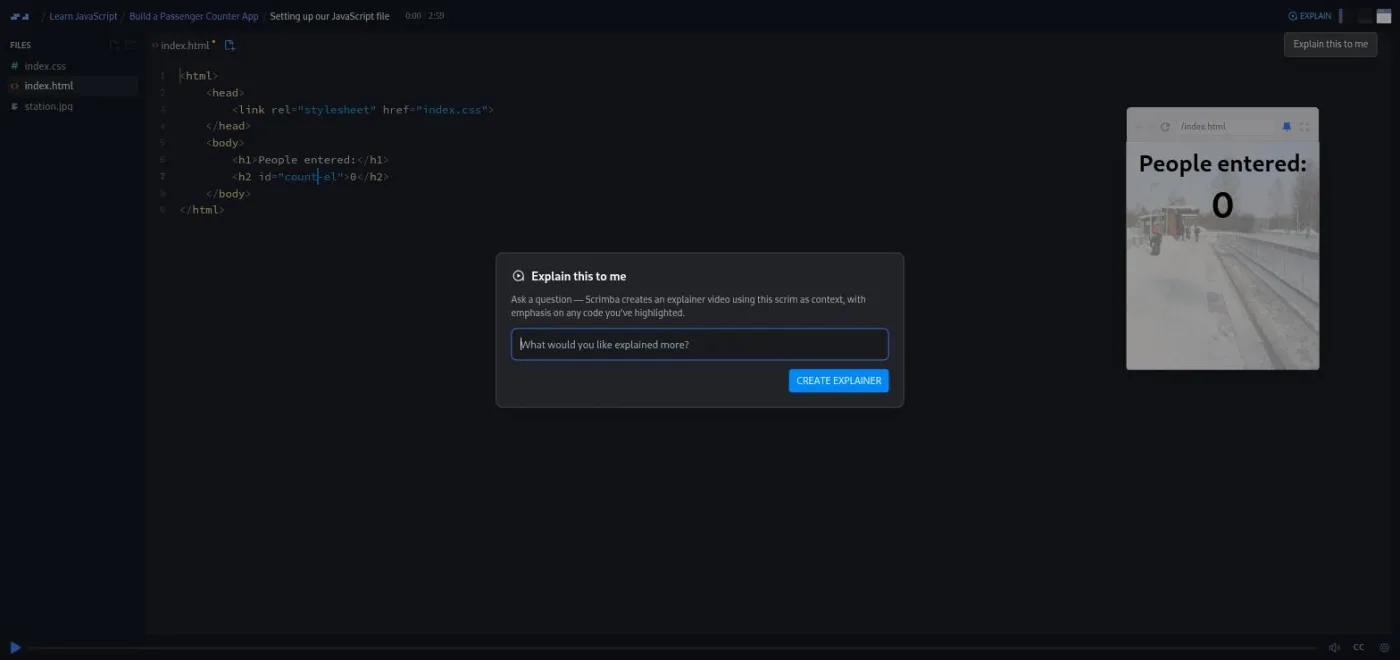
One naming quirk will save you a confused search. In ChatGPT's plugin directory the same product is listed as Explain Video Generator, not Scrimba Explain. I stepped through exactly what one of these lesson explainers produces, slide by slide, on a Learn RAG lesson, in a full walkthrough of the EXPLAIN button.
The limits of Scrimba Explain
The output is only as good as the research behind it
With MCP, that research is your agent's work rather than Scrimba's. A vague question against a repository your agent has not properly explored produces a confident, well-narrated, shallow video. The production values do not drop when the substance does, and in a learning tool that is a real risk.
The free quota does not renew
Ten explainers for life, on the free account, is a trial rather than an allowance. Each follow-up and each Go deeper spends one, so a single curious evening can use half of it. Treat the free tier as a way to test the format, and plan any regular use around the Pro quota or around the agent drafts, which stay free until you claim them.
It answers questions but does not plan your learning
Scrimba never pitches Explain as a course. The limit is subtler than that: it answers questions you already know to ask. It cannot tell you what you do not know, and it never makes you write anything. Those are the jobs the 81.6-hour, 13-module Frontend path and the 108.4-hour, 20-module Fullstack path do instead, building toward a portfolio project rather than a quiz. Explain does not overlap with either.
The bottom line
If you are learning, this is the closest thing I have used to a tutor you can interrupt. Point it at the concept you have already failed to understand once, pick TLDR when you want the insight and Explain when you want the lesson, and take the quiz seriously.
If you are junior and drowning in a codebase, the MCP integration is the strongest thing here, and few people ever see it because those explainers are private by default.
Whether it helps depends on a habit the tool cannot enforce. Use it on something you have already wrestled with and it works like a tutor. Use it to skip the wrestling and you start leaning on it, the kind of reliance behind the 20% of developers in the Stack Overflow 2025 survey who report less confidence in their own problem-solving. I use it. I just use it second.
If you already lean on NotebookLM for narrated video summaries of your own documents, see how Explain compares to NotebookLM Video Overviews for learning code.
References
- Scrimba Docs, What is Scrimba Explain? (opens in a new tab) - the one-line definition, the "not a screen recording" distinction, and 33-language narration.
- Scrimba Docs, Writing a good prompt (opens in a new tab) - the "I understand the syntax, it's the 'why' I'm missing" and closure example prompts.
- Scrimba Docs, Teaching styles (opens in a new tab) - Explain, Standard, TLDR, Professor, LOL, Per and Tom, with their exact descriptions.
- Scrimba Docs, Use cases (opens in a new tab) - the eleven domains, including healthcare, finance, real estate and elder care.
- Scrimba Docs, Privacy and sharing (opens in a new tab) - MCP explainers private by default, ChatGPT explainers unlisted.
- Scrimba Docs, Claude Code (opens in a new tab) - the install command and the suggested repository prompts quoted above.
- Scrimba Docs, ChatGPT and Codex (opens in a new tab) - the @Explain Video Generator plugin route for ChatGPT and Codex, and the MCP fallback for the Codex IDE extension.
- Introducing Explain by Scrimba - the pull request practice, the driving instructor example, and 20,000 explainers as of 13 August 2026.
- Turn Complex Articles into Videos with Explain in Chrome - the extension walkthrough, the mermaid diagrams and closing quiz, and the free account framing.
- Scrimba on Product Hunt - the 13 August 2026 launch.
- Scrimba Docs, Limits and plans (opens in a new tab) - 10 explainers for life on Free, 100 a month on Pro, what counts and what is free.
- Scrimba Docs, Explain in scrims (opens in a new tab) - the in-lesson EXPLAIN button and what it sends as context.
- Stack Overflow 2025 Developer Survey, AI - 20% reporting decreased confidence in their own problem-solving.
It turns a question, article, document or codebase into a short narrated video explainer with diagrams, code walkthroughs and, in most cases, a closing quiz. You can use it on the web, from the EXPLAIN button inside a Scrimba lesson, through the Chrome extension, by mentioning @Explain in ChatGPT, or from a coding agent like Claude Code via MCP. Unlike most AI coding tools it does not write code, it explains things that already exist.
Partly. A free Scrimba account gets 10 explainers for life, and they do not renew. Pro accounts get 100 a month. Follow-ups and Go deeper each count as one, while explainers drafted from ChatGPT or a coding agent are free until you open and claim them, and redoing or exporting an existing one is free. Ten is enough to test the format, so try it before deciding whether the Pro quota matters to you.
No. Scrimba's own documentation lists eleven use-case domains and only two are software, with the rest covering healthcare, finance, real estate, philosophy and elder care among others. The public community feed launched heavy on non-coding topics like algebra, languages and biology, and by September 2026 had shifted toward technical entries, with the curated Featured tab still leaning general. The developer features are one half of the product, not the whole of it.
The output format and the grounding. You get a narrated video with diagrams, a code view and usually a quiz rather than a wall of text, and you can pick a teaching style so the explanation stays at your level. With MCP, your coding agent researches your actual files first. It is not a text-to-video model and uses no avatars or stock footage. In ChatGPT's plugin directory it is listed as Explain Video Generator.
Yes, through MCP. Connect it to Claude Code, Codex or any MCP-capable agent and it builds the walkthrough around code in your repository rather than a generic example. Those explainers are private by default, which is why this side of the product is largely invisible. Scrimba attaches one to every pull request in their own codebase.
Add it as an MCP server with claude mcp add --transport http scrimba-explain https://scrimba.com/explain/mcp, then ask for an explainer in plain words, such as 'make an explainer of what this branch changes'. Claude Code reads your files, calls Explain and returns a link that renders while it builds. The explainer is private by default, and opening the link claims it to your free Scrimba account.
No, and that order matters more than anything else in this review. Use it on something you have already tried to understand and failed, where it works like a tutor. Use it as the first thing that meets a new topic and it replaces the struggle that builds skill, since a polished narrated explanation produces a strong feeling of understanding whether or not the understanding is there.
Try the format before you weigh a subscription
Explain needs only a free Scrimba account, and the free courses are a better test of whether interactive learning suits you than any feature list.