Intro to Model Context Protocol (MCP)
Maham Codes teaches Intro to Model Context Protocol (MCP) in about 37 minutes across 17 scrims. You build a small weather MCP server in Node.js and TypeScript, with one tool, one resource, and a STDIO transport. It's Pro, and it's the fastest way to get a working MCP server rather than just watch one explained.
Reviewed inside the course with a Pro account, September 2026: all 17 scrims and transcripts.
Quick answer
This fits developers who already build with an LLM API in JavaScript or TypeScript and want a working MCP server by the end of an afternoon. The catch: the MCP Inspector and Claude Desktop parts are shown on slides, not built in the browser, and the third MCP building block, prompts, is explained but never coded. If you have never called an AI model from code, start with Intro to AI Engineering instead; this course will feel abstract without that foundation.
Intro to Model Context Protocol (MCP)
ProTaught by Maham Codes (opens in a new tab)
A short build-along on MCP: what it is, then a weather MCP server in TypeScript with a tool, a resource, and a STDIO transport.
View on Scrimba (opens in a new tab)Is it worth your time?
Yes, if MCP is a gap you need to close quickly. The whole thing is shorter than a lunch break. By scrim 7 you have a server that starts, prints the tool and resource it registered, and says "Server ready!" in Scrimba's built-in terminal, a small working build rather than a slide deck.
The server is tiny on purpose: two hardcoded cities, no real API. The MCP Inspector and Claude Desktop parts are shown on slides and screen recordings, so you watch them rather than do them in the browser. And the third MCP building block, prompts, is explained but never coded. Maham says it outright in lesson 7: "prompts are optional." If you want a deeper tool-using build, Build a Support Agent with Vercel AI SDK goes much further.
One thing that surprised me: four of the 17 scrims are not Maham's. They are short AI-generated explainers with a quiz at the end, added by Scrimba in September 2026. More on those below.
What you'll learn
Scrimba lists this course as a flat list of 17 scrims with no modules. The four groups below are mine, so you can see how the time is spent.
Course curriculum
4 modules · 17 lessons
- What MCP is and how it is built
- Build the weather MCP server
- Transports, security, and clients
- Wrap up and Scrimba extras
I counted 17 scrims, about 47 minutes in total. Scrimba's header still says 37 minutes and its listing says 12 lessons. Both predate the four AI explainers and the housekeeping scrims (feedback form, Scrimba Docs, the Scrimbassador pitch, and the certificate note) added later, so the listing numbers no longer match what you see inside.
Inside the course, module by module
1. What MCP is and how it is built (13 min, 4 scrims)
The Introduction is a two and a half minute video with slides. Maham's framing: models like GPT, Claude, or Gemini feel "magical" when they use tools, but "it's not just the model itself doing the magic. It's context." She calls the course a "module" throughout; it reads like it was cut from a longer curriculum.
"Intro to MCP and its importance" names the two problems MCP solves. Models do not know recent things, and stuffing context into a prompt is expensive because you pay per token. Then comes the analogy the course leans on: "Think of MCP like a USB C for AI." One connector, any device. She ends on the architecture. An MCP client lives inside a host app such as an IDE, and you can plug several MCP servers into it, each wrapping a different data source.
"Core MCP concepts and architecture" is the lesson to rewatch. It defines the three building blocks. Resources are like HTTP GET requests: they return data and change nothing. Tools are like HTTP POST requests: they do something, such as sending an email or booking a hotel room. Prompts are reusable templates. As Maham puts it in lesson 3, "use a resource when your agent needs to read or retrieve information and use a tool when your agent needs to do something." Transports get a one line preview: STDIO for local work, streamable HTTP for production.
The fourth scrim, "MCP: Resources vs Tools," is the first of the AI explainers. It is a 100 second narrated slide deck ("Resources are like a library where the AI reads information, while Tools are like a workshop") that ends with a quiz question. A note on the page says the content was generated by AI and hand-checked by Tom from Scrimba.
2. Build the weather MCP server (17 min, 3 scrims)
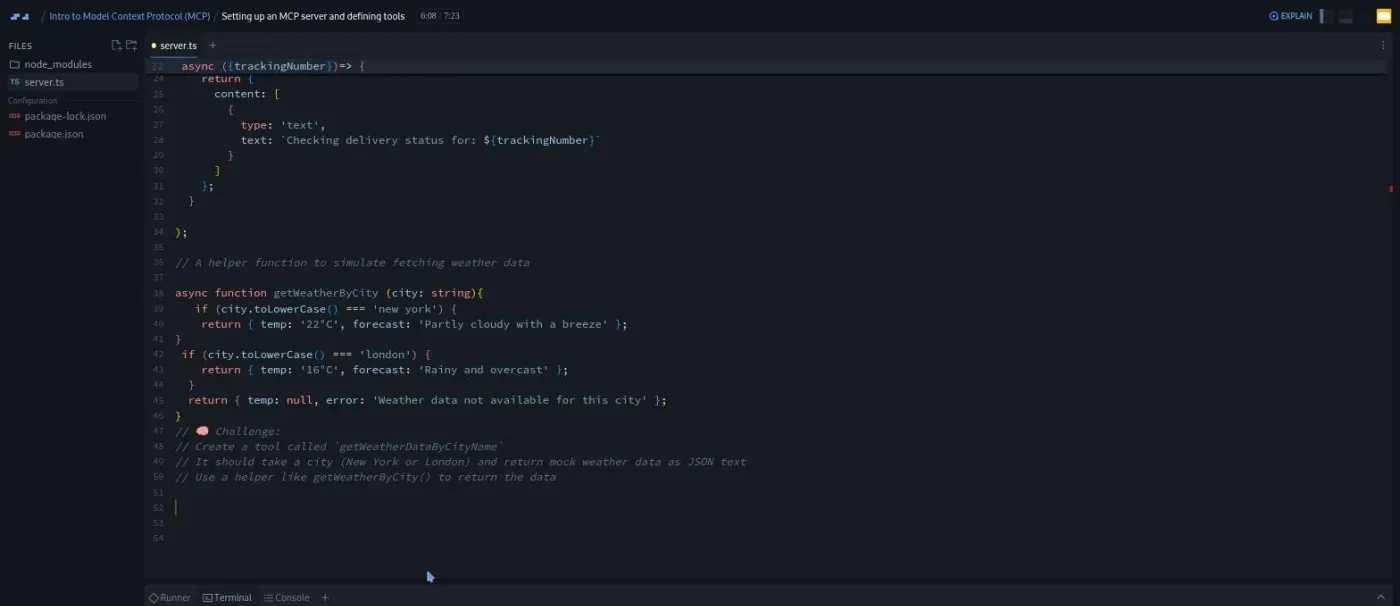
This is the part you will remember. "Setting up an MCP server and defining tools" is the longest scrim at 7:23 and the first with real code. You run npm init -y and install @modelcontextprotocol/sdk and Zod (a small library for validating inputs). Then you create server.ts with a new McpServer({ name: 'Weather Data Fetcher', version: '1.0.0' }). Maham then registers an example tool, trackPackage, so you can see the shape. A tool has a name, a description, a Zod schema for the input, and an async function that returns { content: [{ type: 'text', text: ... }] }.
Then the recording stops and it is your turn. The brief is written as a comment in the file: create a tool called getWeatherDataByCityName that takes a city and returns mock weather as JSON text, using the getWeatherByCity helper she just wrote. "I'll wait here so that you can try it yourself," she says at 6:01. "Don't worry if you're not able to do it. We'll do it together once you're back."
"Registering resources in the MCP server" follows the same pattern. Maham shows a resource with an example URI (flights/airports), a description, a MIME type, and a function that returns the content. Your challenge: a weather://cities resource that returns a plain text list of London and New York. Both of these scrims warn you that nothing runs yet, because there is no transport.
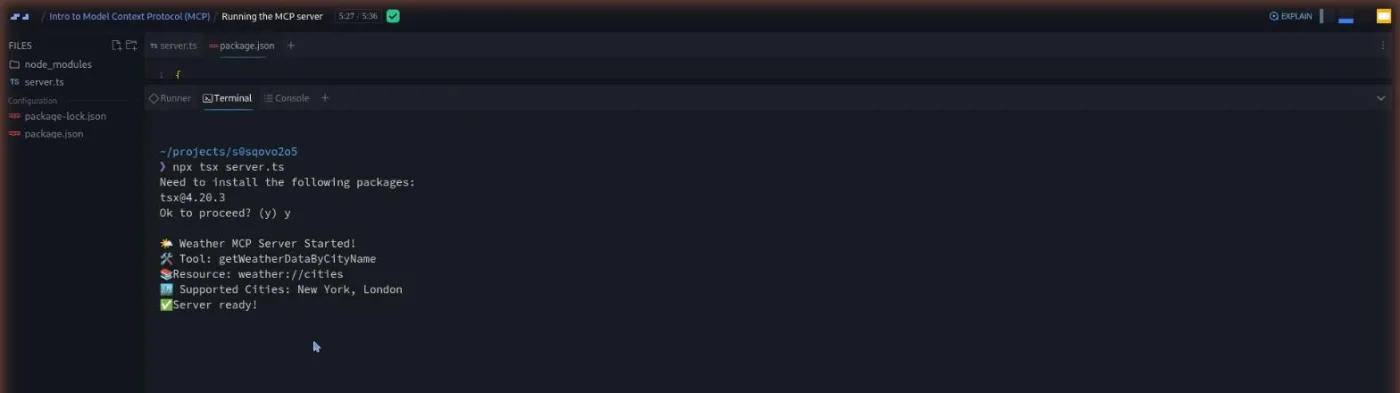
"Running the MCP server" fixes that. After a short detour on prompts (optional, and skipped in code), you import StdioServerTransport. You then write an init() function that creates the transport, calls await server.connect(transport), and logs a few status lines. The challenge here is to write that init() yourself. There is a good, practical explanation of why the logs use console.error rather than console.log. With STDIO, standard output is the channel the protocol messages travel on, so writing to it "might accidentally interfere with the protocol messages." Then you add "type": "module" to package.json, run npm install, and npx tsx server.ts in Scrimba's terminal.
The versions: @modelcontextprotocol/sdk 1.15, Zod 3.25, TypeScript 5.8. The MCP SDK moves fast, so check the current docs if you build this outside Scrimba.
3. Transports, security, and clients (10 min, 6 scrims)
"Transports" is a two and a half minute slide lesson. A transport is how client and server exchange messages. STDIO uses the process's input and output streams and suits local tools. Streamable HTTP sends each message as an HTTP POST and can stream replies back. As Maham puts it, use it "when you want any kind of web based integrations that's not on the same machine." You do not implement the HTTP transport.
Three more AI explainers sit around this lesson:
- "MCP Capability Discovery" covers how a client finds out which tools a server offers.
- "MCP Trust Boundaries" explains that the host app decides which tools the model may use, and that risky actions should need user approval.
- "Local vs Remote MCP Servers" contrasts the two setups.
Each is 75 to 90 seconds, ends with a quiz question, and carries the line "Explain is AI and can make mistakes." They reference a newer MCP spec than Maham's lessons, so treat them as pointers, not settled facts. A 12 second "Share Your Feedback" scrim asks what you think of them.
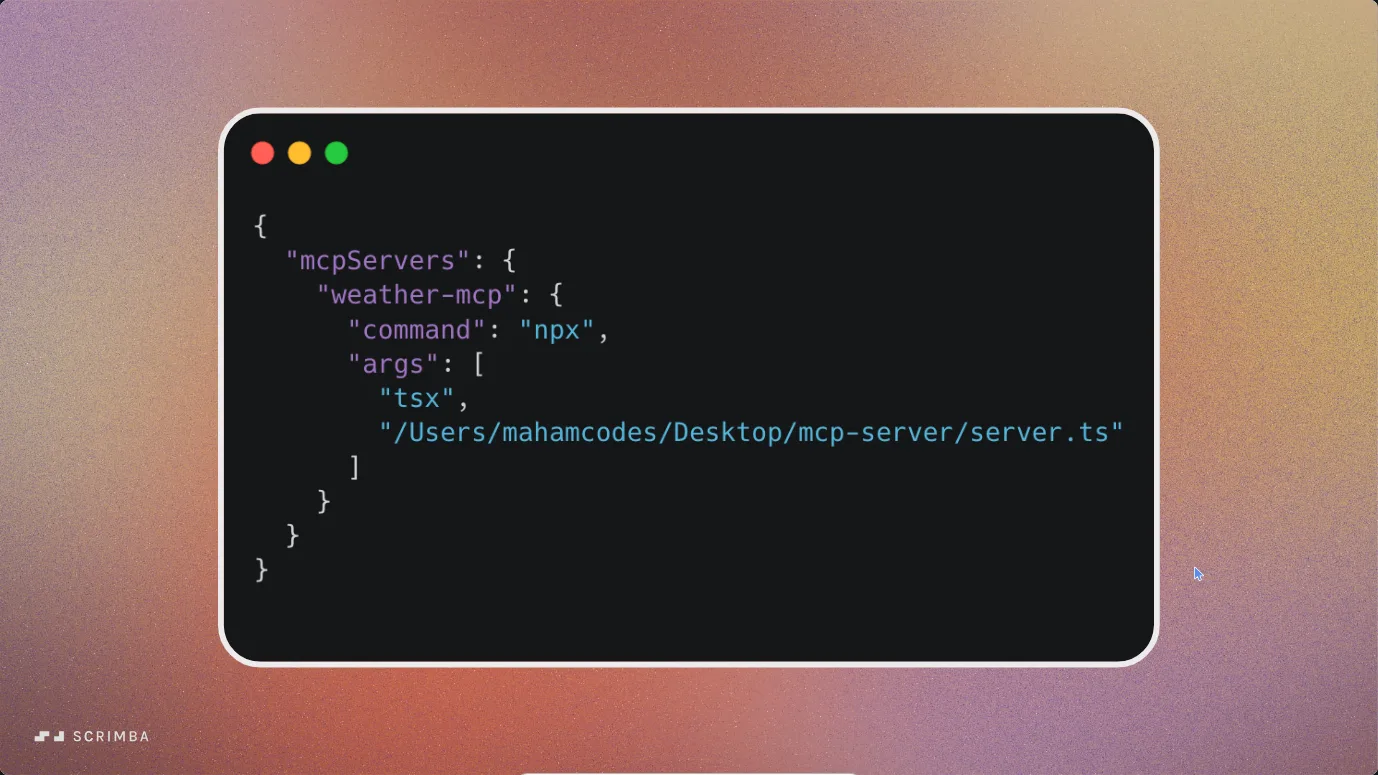
"MCP clients" is Maham's last teaching scrim and the one that ties the pieces together. An MCP client, in her words, is "the smart connector inside a host app that talks to your MCP server." She opens MCP Inspector with npx @modelcontextprotocol/inspector@latest, points it at the weather server, and calls the tool for London by hand. Then she opens Claude Desktop, edits the developer config, and asks "what's the weather in London?" so Claude calls the tool. Both demos are screen recordings. You cannot repeat them inside the scrim, but the config is short enough to copy.
4. Wrap up and Scrimba extras (7 min, 4 scrims)
Maham's "Wrap Up" restates the course in two and a half minutes and lists what you can now do: explain MCP, build a server with tools and resources, connect it to a client, and debug it with Inspector. The remaining three scrims are not about MCP. Tom Chant introduces Scrimba Docs, Per Borgen pitches the Scrimbassador referral program, and a 53 second note tells you how to use the certificate on LinkedIn.
What a lesson feels like
There are two kinds of scrim here. The concept lessons (intro, importance, core concepts, transports, clients, wrap up) are narrated slide decks with the occasional screen recording, and there is no code to touch. The three build lessons open a real editor and terminal. Maham types in server.ts, and when the challenge comes, the recording pauses with the brief as a comment in the file. You write in the same editor, then press play to watch her version. Those three scrims carry Scrimba's "Challenge with Instant Feedback" icon, which means an AI check of your solution is available.
Every scrim has captions and a timestamped transcript in the settings menu, with subtitles in ten languages. Maham's delivery is brisk and scripted, closer to a documentation walkthrough than Per Borgen's chatty style, and precise about details such as the console.error point above. If you learn by reading, the transcript panel lets you skim a lesson in a minute.
Free or Pro: exactly what is gated
The course is Pro. Four scrims are marked SAMPLE and open without a subscription: the first three concept lessons plus the first build lesson, "Setting up an MCP server and defining tools." That is the whole conceptual part plus the first challenge, so you can try it for free and decide from there.
Everything after that is Pro: registering the resource, running the server, transports, the explainers, the clients lesson, the wrap up, and the certificate of completion. Pro also unlocks the rest of the AI catalog. It adds the Pro-only channels on Scrimba's Discord too (the pricing page lists basic Discord access as free). See current plans (opens in a new tab) for what Pro costs where you live.
How long it takes
Scrimba says 37 minutes; the 17 scrims add up to about 47. Budget one and a half to two hours to do it properly. The three challenges will take most people ten to fifteen minutes each if they type rather than watch, and the explainer quizzes add a few minutes. Add another hour if you want to run the server on your own machine and connect it to Claude Desktop or Cursor. The course shows that part but does not let you do it in the browser. It is a one-sitting course.
Who it's for, and who should skip it
It fits JavaScript or TypeScript developers who already build with an LLM API and want to expose their own tools to Claude, Cursor, or another MCP host. It also works as a quick briefing for people on the AI Engineer Path who want to know what MCP is before they meet it in a bigger project.
Skip it if you have never called a model from code; the problem MCP solves will not feel real yet. Skip it, too, if you want production depth: authentication, remote servers, and the streamable HTTP transport are named but not built.
Start Intro to Model Context Protocol (MCP) on Scrimba (opens in a new tab)Prerequisites
Comfortable JavaScript and enough TypeScript to read a typed function signature. The course uses async/await, ES modules, and npm without explaining them, and no MCP experience is assumed. If TypeScript is the gap, Learn TypeScript covers it; Learn Node.js helps with the npm and terminal side.
Where it fits
This is a standalone course, not a step in a path. It pairs with Learn AI Agents, which teaches how a model decides to call a tool. This course teaches how to package tools so any host can call them. Learn Context Engineering covers the other half of "context," what you put in the prompt.
Strengths and limits
What it does well:
- Explains resources versus tools with a comparison (GET versus POST) that sticks.
- Gets you to a running server in three short lessons, with a challenge in each.
- Covers small practical things, such as why to log with
console.error. - The Inspector and Claude Desktop demos show the finished loop end to end.
Where it is limited:
- The server is a toy with two hardcoded cities.
- Prompts and the HTTP transport are described but never coded.
- The client demos are watch-only.
- The four AI explainers are a different voice and reference a newer spec than the main lessons.
- The MCP SDK version pinned in the course will drift.
Related courses and comparisons
- All AI courses on Scrimba, the category hub
- Learn AI Agents, where tool calling is taught from the model's side
- Intro to AI Engineering, the fundamentals to take first
- Build a Support Agent with Vercel AI SDK, a fuller tool-using build
- Learn Context Engineering, the prompt side of context
- AI Engineer Path, if you want the whole track
No, it is a Pro course. Four scrims are free samples: the Introduction, Intro to MCP and its importance, Core MCP concepts and architecture, and Setting up an MCP server and defining tools. The rest, including the certificate, needs Pro.
A weather MCP server in Node.js and TypeScript with one tool (getWeatherDataByCityName, returning mock data for New York and London), one resource (weather://cities), and a STDIO transport. You run it in Scrimba's terminal. Testing it in MCP Inspector and Claude Desktop is shown on slides.
Maham Codes, a developer relations engineer who also made Build Serverless AI Agents with Langbase on Scrimba. Four short AI-generated explainer scrims were added by Scrimba's Tom Chant in September 2026, and Per Borgen appears in two housekeeping scrims.
I counted 17 scrims, about 47 minutes in total. Scrimba's header still says 37 minutes and its listing says 12 lessons; both predate the four AI explainers and the housekeeping scrims added later, so the listing numbers no longer match what you see inside.
Yes, three. Write the weather tool, write the cities resource, and write the init function that connects the STDIO transport. Each pauses the recording with the brief as a comment in the file, and each carries Scrimba's Challenge with Instant Feedback icon.
Not for the course itself; the server runs in Scrimba's built-in terminal. To repeat the MCP Inspector or Claude Desktop demos you need Node.js and the host app on your own machine.
Only in slides. The Transports lesson explains STDIO and streamable HTTP, and the Local vs Remote explainer covers the difference, but the code only uses STDIO.
About 47 minutes of video, or one and a half to two hours if you do the three challenges yourself. Add an hour to run it locally with Claude Desktop or Cursor.
Yes. Every scrim has captions, a timestamped transcript in the settings menu, and subtitles in ten languages.