How to Learn DevOps in 2026: The Path, the Resources, and What to Pay For

Last updated:
Learn DevOps in this order: Linux, Git, Docker, a real deployment, environment variables and secrets, then continuous integration. Kubernetes comes last, and only if you want the DevOps job title rather than the ability to ship your own work. Before you start, spend ten minutes with the free roadmap at roadmap.sh/devops so you can see how those pieces depend on each other. Every stage below has a good free resource and a good paid one: the free route costs you time and assembly, the paid route costs money and buys both back.
Below is the path, the best resource for each step in both directions, and when paying is genuinely the better call.
First, decide which of two goals you have
DevOps as a job title covers Kubernetes clusters, infrastructure as code, on-call rotations, and platform teams. That is a multi-year career. Most people who say "I want to learn DevOps" want something much smaller: the layer between "it works on my machine" and "it is running where other people can use it."
Those two goals share the first six steps and diverge hard after that. If you write software and want to ship it, you can stop after continuous integration and you are done. If you want DevOps on your business card, that is where the real curriculum starts. Deciding which one you are chasing is the single highest-leverage thing you can do, because chasing the full title when you wanted the deployment layer is the most common way people quit in week two.
Two reasons the timing is good either way. Docker reached 71.1% adoption in the Stack Overflow 2025 Developer Survey after what the survey calls "a +17 point jump in usage from 2024 to 2025, the largest single-year increase of any technology surveyed." And when the same survey asked which tasks developers refuse to hand to AI, deployment and monitoring topped the list at 76%. The skill is becoming standard and staying human at the same time.
DevOps is not a set of tools, and the name is half the problem
Everything below this section is tools. I want to stop first, because the tools are the least interesting part, and learning them without the idea behind them is how people end up doing all the work and getting none of the benefit.
The history explains the confusion better than any definition does.
In 2006, Amazon's CTO Werner Vogels described the company's operating rule in an ACM Queue interview with a line that has outlived the interview: you build it, you run it. The team that writes the service carries the pager for it. In 2008, at the Agile conference in Toronto, Andrew Clay Shafer ran a session on "agile infrastructure", and Patrick Debois turned up because he was frustrated that operations work could not move the way development had learned to move. In June 2009, John Allspaw and Paul Hammond gave a talk at Velocity called 10+ Deploys Per Day: Dev and Ops Cooperation at Flickr, which proved the thing worked at scale. Then in October 2009 Debois organised a conference in Ghent to keep the argument going. He needed a Twitter hashtag for it. He shortened "development and operations" to #DevOps, and the label stuck to a movement that already existed without it.
Notice what is absent from that story: a single tool. Docker did not exist until 2013. Kubernetes and Terraform arrived in 2014. The idea is older than every tool you will use to implement it, which tells you the tools are an answer, not the question.
The question was organisational. Developers were paid to ship change and operations were paid to prevent instability, so the two groups were structurally set against each other, and the work piled up at the wall between them. DevOps was an argument that the wall itself was the defect. When Damon Edwards and John Willis summarised it in 2010 they used the acronym CAMS: culture, automation, measurement, sharing. Automation is one of four, and it is the only one you can buy.
What the word means depends entirely on where you are standing
This is the part that confuses beginners, and it is not their fault. The word genuinely means different things in different places.
At a small company or on your own projects, DevOps is not a job, it is a hat you wear on Thursday. You wrote it, so you deploy it, and when it breaks at midnight there is no one else. This is where most self-taught developers actually live, and it is why the deployment layer in this article matters more to you than any org chart.
At a mid-sized company, it usually is a role. Someone owns the pipelines, the environments, and the deployment tooling that everyone else uses. TechWorld with Nana makes this point well in her explainer on what DevOps really is: the original definition was "too broad and too high level" to act on, so companies each implemented it differently, and out of that a concrete job title emerged. She is blunt that the people who coined the term did not intend a "DevOps engineer" role, and equally blunt that the reality diverged from the theory anyway. I think she is right on both counts.
At a large company, the work has mostly been renamed again, into platform engineering or SRE. Google's version, site reliability engineering, is best understood as one specific implementation of these ideas with error budgets and hard numbers attached.
So when a job advert says DevOps, it can mean any of: write the pipelines, run the clusters, be on call, or be the person who unblocks forty developers. Read the responsibilities, never the title.
What I actually think
The tools list in this article is a snapshot of how the industry solves this problem in 2026, and it will date. The problem will not. Every tool here exists to shorten the distance between someone changing code and that change safely reaching a user, and to make sure the person who wrote it is the person who finds out when it breaks.
I came up through peer-to-peer project work at 01Talent rather than a company with an operations department, and I build scrapers, which are the kind of software that runs unattended and fails quietly at three in the morning. Nobody hands you a runbook for that. You learn very fast that "it works on my machine" is not a technical statement about a machine, it is a statement about how little you know about where your code actually lives.
That is the real reason to learn this material, and it is not on any roadmap. Not because Docker is popular. Because owning your software end to end changes how you write it in the first place.
Before you start: get the map
Start at roadmap.sh/devops. It is a free visual roadmap showing how Linux, Git, Docker, CI/CD, Terraform, Ansible, cloud platforms and monitoring connect, and roadmap.sh is one of the most starred projects on GitHub.
Use it as a map, not a checklist. Here is a slice of the middle of it, and the sprawl is the point:
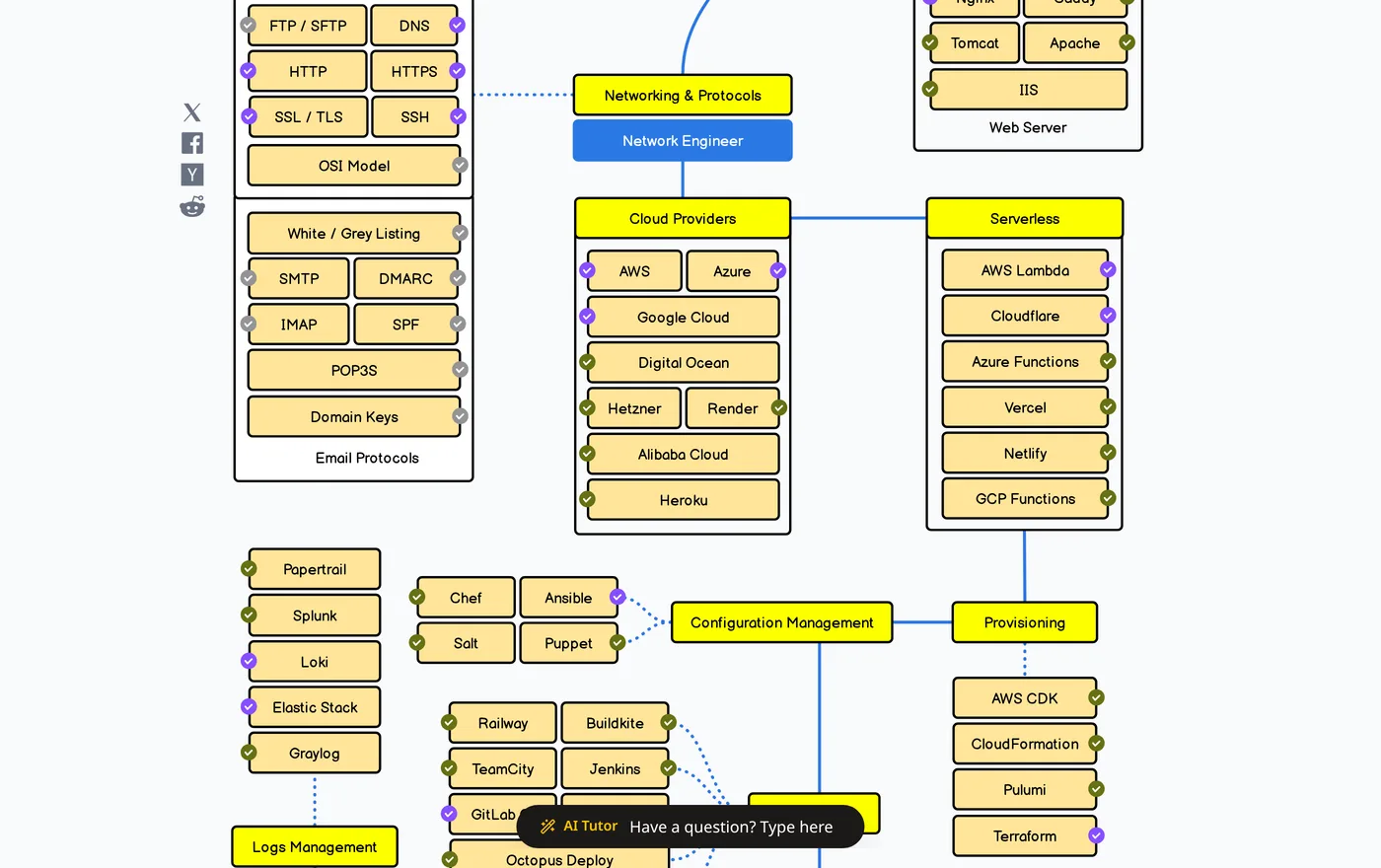
That is one screen of several, and you will never touch most of those boxes. Its value is not the list. It is that it shows what depends on what, which is exactly the knowledge that stops you spending a fortnight on Kubernetes before you understand Linux file permissions.
The path, step by step
Each step names the best free resource and, where one meaningfully beats it, the paid option worth the money.
1. Linux and the prerequisites. freeCodeCamp's DevOps Prerequisites Course runs about three hours and was produced with KodeKloud. It covers Linux basics, building a lab environment with VirtualBox and Vagrant, and reading YAML and JSON. Every tool later in this list assumes all three, and skipping it is why people find Kubernetes manifests incomprehensible.
2. Git. Branching, pull requests, and reading a diff. You need this before CI, because CI is just "run these commands when the repository changes." If you are already using Git for your own projects you can move on.
3. Docker. TechWorld with Nana's Docker Tutorial for Beginners is a free three-hour YouTube course and is the single most recommended free Docker resource for good reason. Nana explains the mental model rather than reciting commands. Pair it with KodeKloud's free "Docker Training Course for the Absolute Beginner," which adds browser-based labs so you type rather than watch, and keep Docker's own getting-started guide open as the reference you check when a command does not behave.
The step nobody tells you: as soon as the tutorial ends, containerise an application you already wrote. Tutorial containers always work. Yours will not, and the debugging is the actual learning.
4. A real deployment. Take the container and put it on a managed host. Render, Railway and Fly.io all have free or cheap tiers, and none of them require you to understand cloud networking on day one. The goal is a URL you can send someone, not an optimal architecture.
5. Secrets and environment variables. Get configuration out of your code and out of your repository. This is a short topic with an expensive failure mode: leaked API keys in public Git history are one of the most common beginner mistakes and one of the hardest to fully undo.
6. Continuous integration. The GitHub Actions documentation is free, current, and better than most paid courses on the subject. Write one workflow file that installs dependencies and runs your tests on every push. That is CI. Everything else is elaboration.
Where paying beats the free route on this path: steps 1, 3 and 7 are the ones where a paid platform genuinely pulls ahead, because all three want hands-on environments rather than more video. KodeKloud's paid tier turns each into guided labs with a terminal, which is a different activity from watching Nana and then staring at an empty editor. Steps 2, 4, 5 and 6 are well enough covered free that paying adds little.
7. Kubernetes, only if you want the title. Nana's Kubernetes Tutorial for Beginners is a free four-hour course, and there is a shorter 1 hour 12 minute crash course if you want the concepts first. KodeKloud's free "Crash Course: Kubernetes For Absolute Beginners" covers similar ground with labs.
If you are a web developer who wanted to ship your side project, you can stop at step 6 with a clear conscience. Kubernetes solves problems you do not have yet.
Should you pay? It is time versus money, not discipline
The free route is not the smart route and the paid route is not the lazy one. They trade different things, and pretending otherwise has probably cost more people more time than any bad course ever did.
Free costs you assembly. You decide the order, stitch resources from five sources, discover the gaps yourself, and lose hours to setup that a browser lab would have skipped. If you have more time than money, that is a fine trade and the path above is genuinely complete.
Paying buys back time and removes decisions. A good platform sequences the material, hands you a pre-built environment, and tells you what comes next, which matters most if you are studying around a job, changing careers against a deadline, or preparing for a certification with a date on it. At roughly the price of a couple of coffees a month, the arithmetic gets easy: if a paid platform saves you five hours in a month, it has paid for itself against almost any hourly value you put on your own time.
Here is what the three main options actually give you.
| KodeKloud | TechWorld with Nana Bootcamp | Scrimba Intro to DevOps (opens in a new tab) | |
|---|---|---|---|
| Shape | 130+ courses, 1,280+ hands-on labs | Structured bootcamp, 4 to 6 months | One 5.5-hour course inside a wider subscription |
| Scope | Docker, Kubernetes, Terraform, Linux, cloud, certification prep | Docker, Kubernetes, Jenkins, Terraform, Ansible, Helm, monitoring | Containers and Docker, deployment with Render, CI |
| Level | Beginner through certification | Beginner to job-ready | Intermediate, assumes you can build an app |
| Free tier | 25+ free courses and labs, account required | Free crash courses on YouTube | Other Scrimba courses are free, this one is not |
| Best for | Certification prep and deep hands-on labs | People targeting a DevOps job title | Web developers who want to ship what they build |
Bottom line: if you want the DevOps job title and a deadline, KodeKloud is the strongest value for hands-on practice and certification prep, and Nana's bootcamp is the most structured route to job-ready. If you are a web developer who mainly needs to ship what you build, Scrimba's course is the tighter fit, which I come to below. And if money is the binding constraint, the free path above still gets you there, just slower.
Where Scrimba fits, and who should ignore it
I reviewed Intro to DevOps inside a Pro account, and I check every claim below against the free options above rather than taking the course's own marketing at its word.
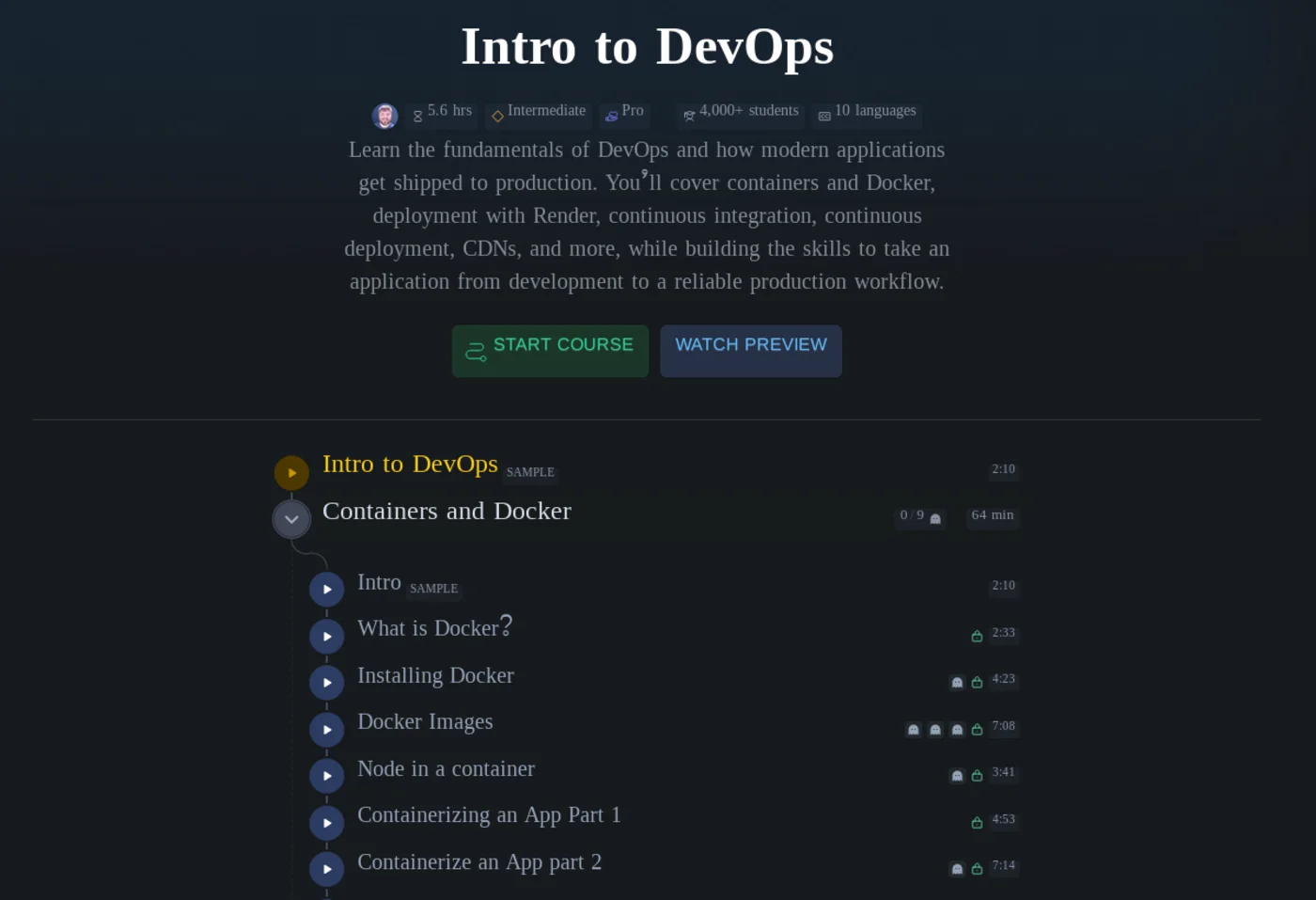
Scrimba shipped Intro to DevOps (opens in a new tab) on 10 August 2026, taught by DonTheDeveloper. It runs 84 lessons across about five and a half hours, is marked Intermediate, requires Pro, and has picked up 4,000-plus students with captions in ten languages. There is a free 2:10 sample lesson, so you can see the format before deciding anything.
It is a better course than its own marketing suggests. Here is the shape of it:
| Module | Lessons | Time | What it actually covers |
|---|---|---|---|
| Containers and Docker | 14 | 64 min | Images, Docker Hub, bind mounts, named volumes, Docker Compose |
| Deployment | 11 | 75 min | Render build commands, smoke tests, domains, staging, health endpoints, signal handling |
| Continuous Integration | 22 | 75 min | GitHub Actions YAML, Prettier, ESLint, Docker Hub auth via secrets, PR status checks, branch rulesets |
| Continuous Delivery | 14 | 92 min | Neon database, automated migrations, feature flags, rollbacks, deploying to production |
| CDNs | - | 23 min | Origin server problems, caching, DDoS protection, edge functions, gotchas |
Look at the Continuous Delivery module in particular. It teaches backward-compatible database migrations through the full expand, backfill, prepare, switch and contract sequence, then feature flags and rollbacks. That is a professional operational pattern rather than beginner filler, and an unusual thing to find in a course called "Intro to". The CI module is similarly concrete: you write a real GitHub Actions YAML file, watch it fail, then add Prettier, ESLint and a Docker Hub push job to it, with credentials handled through GitHub secrets rather than pasted in.
The format is the other half of the case, and it matters more here than in most subjects:
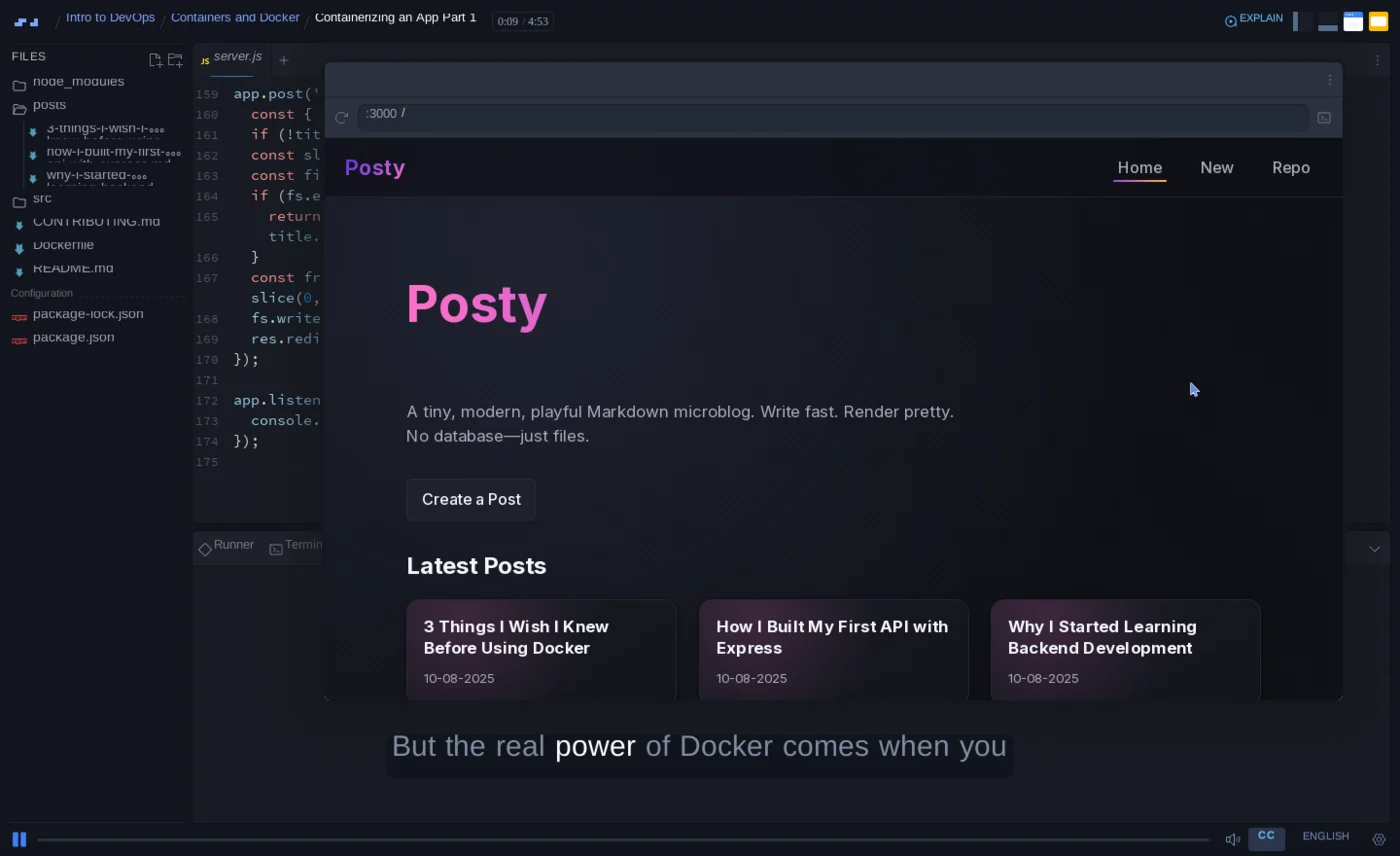
That is a real project, not a slide: a Node microblog with a Dockerfile, a live preview running on port 3000, and a terminal. When you click into the code, the player switches to your copy of it and offers a "back to teacher" button to return to the instructor's version:
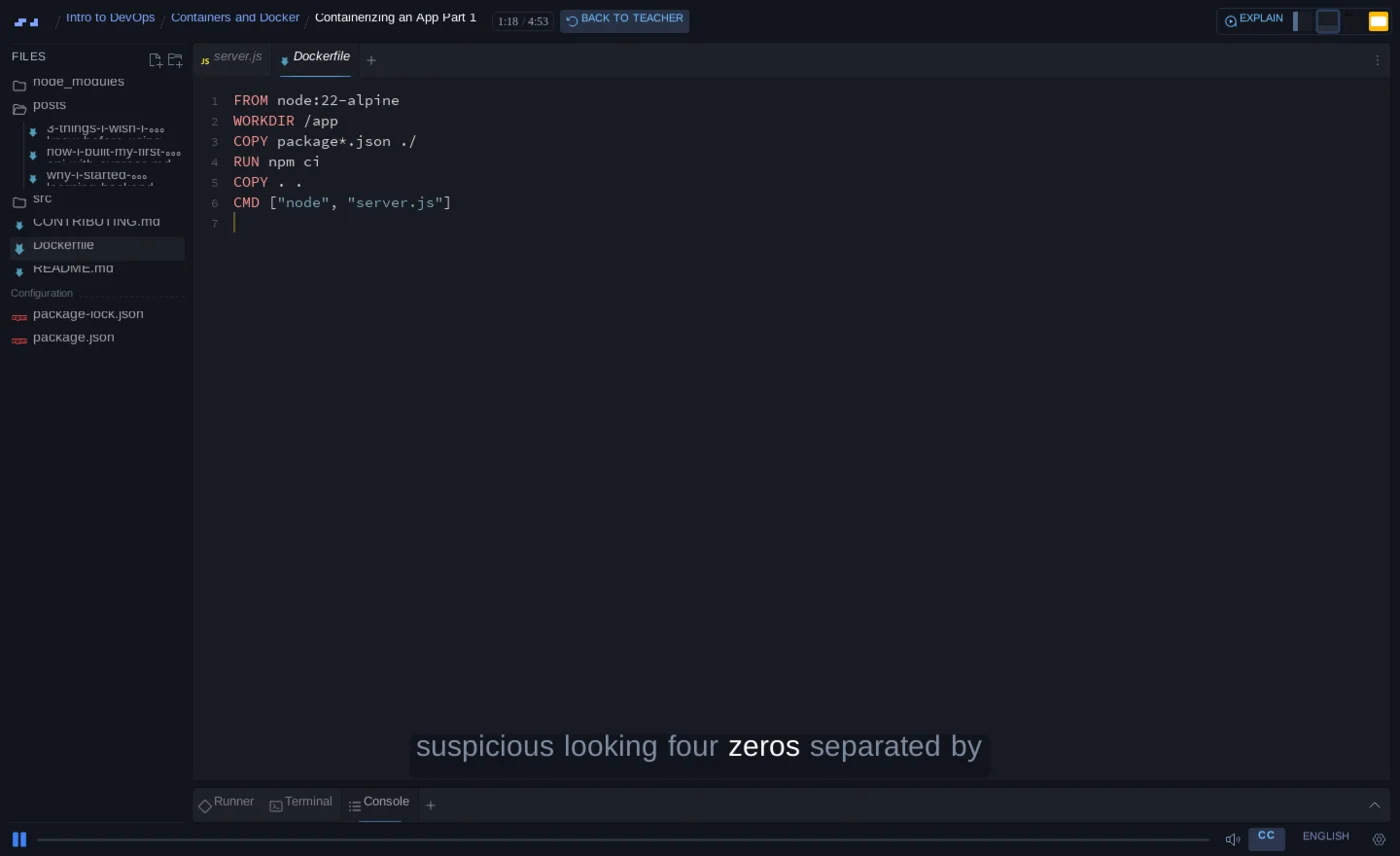
That button is the whole pedagogical argument in one control. You can stop the lesson at any line, edit the instructor's Dockerfile, and jump back to their version when you want to.
The stated prerequisite is more welcoming than the Intermediate badge suggests: it is "designed for developers who already understand the basics of building applications", and "you don't need any previous DevOps, Docker, deployment, or CI/CD experience". Intermediate here means you can build an app, not that you have done ops before.
Consider it if you are a web developer who can already build applications and your real problem is that your projects live on localhost. The course maps almost exactly onto steps 3 to 6 of the path above, in order, with the sequencing decided for you. If you are already paying for Pro to follow a Scrimba path, it costs nothing extra and is the obvious next thing to do.
Ignore it if you want the DevOps job title. It teaches you to ship one application well; it does not touch Kubernetes, Terraform, Ansible or infrastructure at scale, and KodeKloud goes far deeper for less. Ignore it too if you cannot yet build an application on your own, since that is the one prerequisite Scrimba actually states. And ignore it if you are not otherwise interested in Scrimba, because Pro is a subscription decision rather than a course decision. Prices vary by region, so see our pricing breakdown or Scrimba's own pricing page (opens in a new tab).
Two limits beyond scope. Deployment is taught on Render, so the concepts transfer but the buttons do not, and a job asking for AWS needs a second learning curve. The course also has almost no public footprint: no trailer, no reviews, nothing from either instructor. That says nothing about quality, but it does mean you are buying largely unseen. Watch the free sample lesson first.
Where to practise
Reading about containers teaches you nothing. You need a terminal, and you have three options.
Killercoda gives you browser-based Linux and Kubernetes environments with guided scenarios and a genuinely perpetual free tier, not a trial. It is actively maintained and has scenarios aimed at the current CKA exam.
KodeKloud's free tier is the other strong browser option, and it is the one I would pick if you want labs attached to a course rather than standalone scenarios. Its paid plans carry 1,280+ hands-on labs across Git, Docker, Kubernetes and Terraform, and the free courses include real lab environments too.
The third is your own machine. Install Docker locally and use it, because the friction of a real setup is itself part of the skill, and it is the setup you will have at work.
This is the part I think beginners undervalue most, so I want to be specific about it.
The hard problem in learning infrastructure is not understanding what a pod is. It is that you cannot practise infrastructure on nothing. A video can explain a cluster; it cannot give you one. And the systems you most need to practise on are precisely the ones you cannot conjure on a laptop: a multi-node cluster, a broken deployment somebody else wrote, a service that fails only under load, a pipeline with a real repository behind it.
What platforms like KodeKloud and Killercoda actually sell is that missing environment. You get a disposable world with a terminal attached, organised by the tool you are trying to learn:
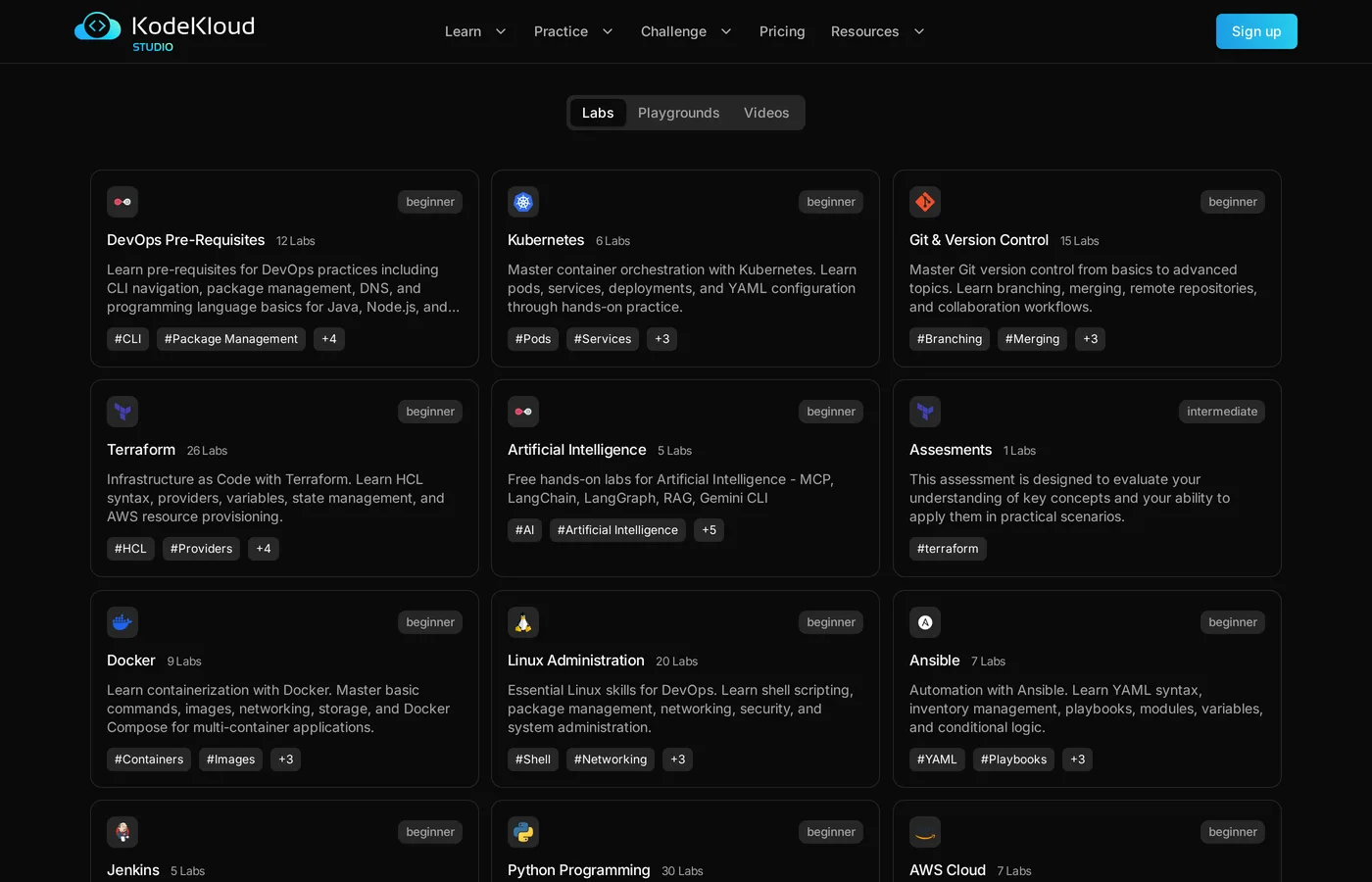
Note what that catalogue is counting. Not videos: labs. Twenty-six separate Terraform environments, twenty Linux ones, fifteen for Git.
Here is what one of them looks like from the inside, which is the part the marketing pages never show you:
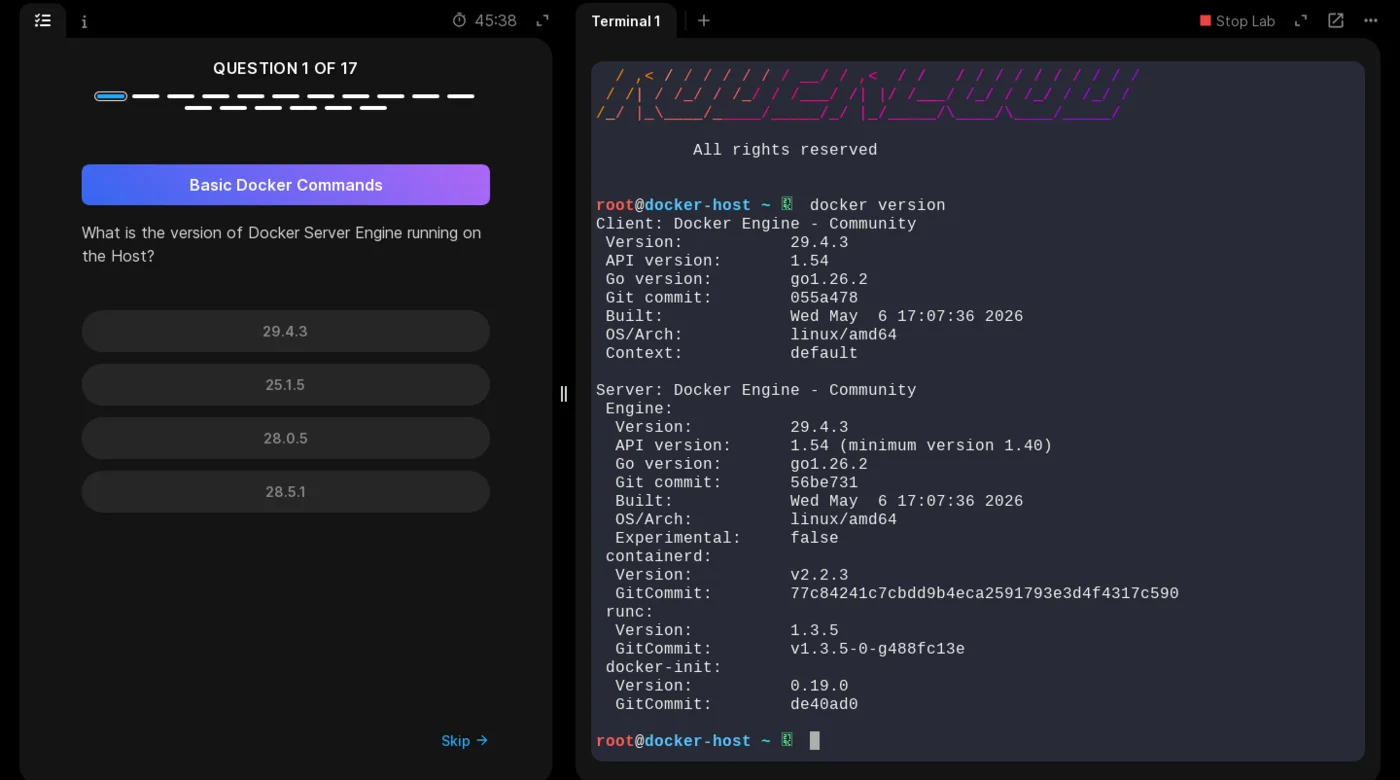
That is the whole argument in one screen. The question on the left cannot be answered from memory or from the video; you have to go into the shell on the right, run docker version against a machine that actually exists, and read the answer out of the output. The host is real, you are root on it, and there is a timer because it is a live container that costs somebody money to run.
The Kubernetes labs give you an actual cluster rather than a single host, and this is where the value gets hard to replicate on a laptop:
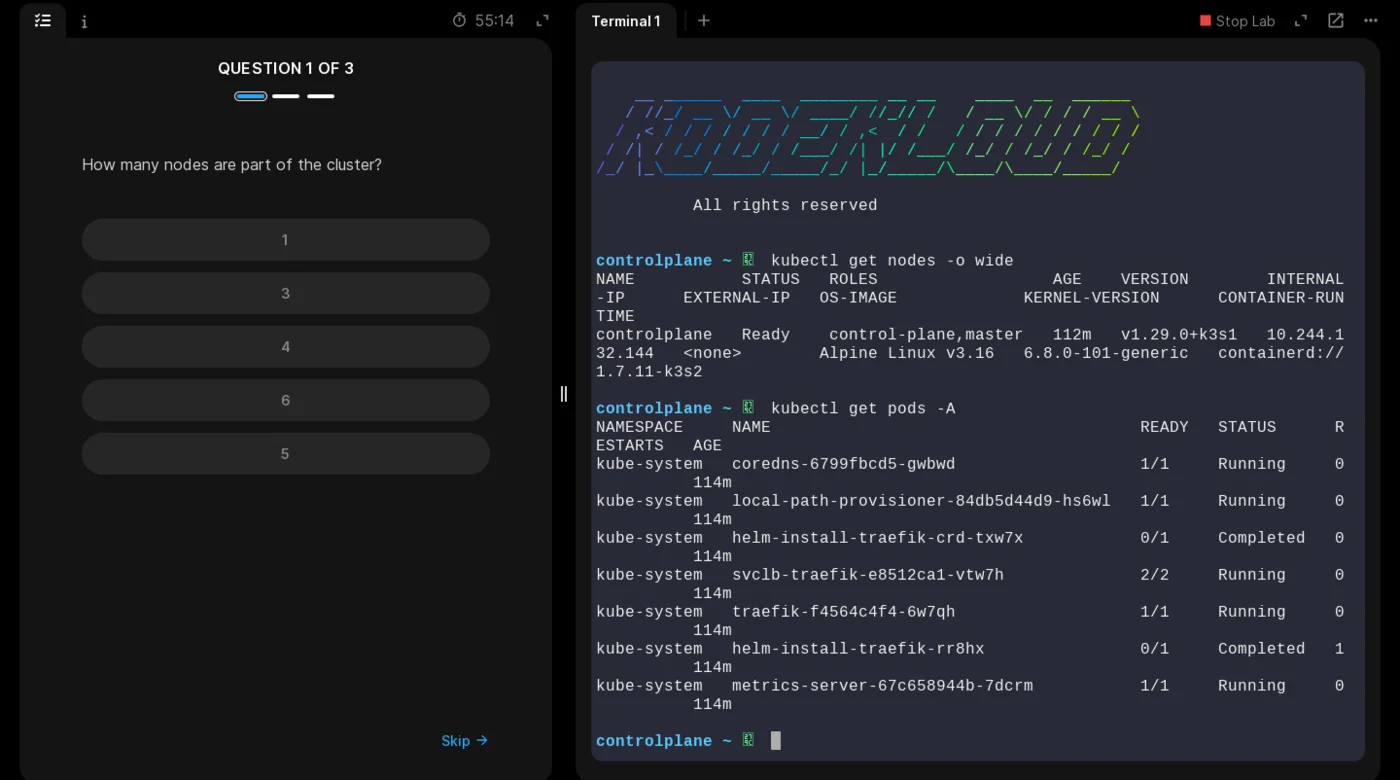
Read what the second command returns. That is not a diagram of a cluster, it is a cluster: CoreDNS resolving service names, a local-path provisioner handing out volumes, Traefik installed by a Helm job and fronted by a service load balancer, and a metrics server feeding resource data. Standing that up on your own machine is an afternoon of yak-shaving before you have learned anything about Kubernetes. Here it existed before you arrived, and you get root on the control plane.
The question on the left is "how many nodes are part of the cluster", and the answer comes out of the terminal on the right. You cannot guess it, and watching a video will not tell you.
Killercoda does the same thing in a different shape, handing you an empty two-node Kubeadm cluster in the browser with the control-plane taint already removed so you can schedule work on it.
The version that looks like an actual job
There is a step beyond single-topic labs, and it is the closest thing to real work a browser can give you. KodeKloud Engineer drops you into a fictional company, xFusionCorp Industries, as a system administrator on Project Nautilus, and then gives you tickets.
The company has documentation, and the documentation is the point:
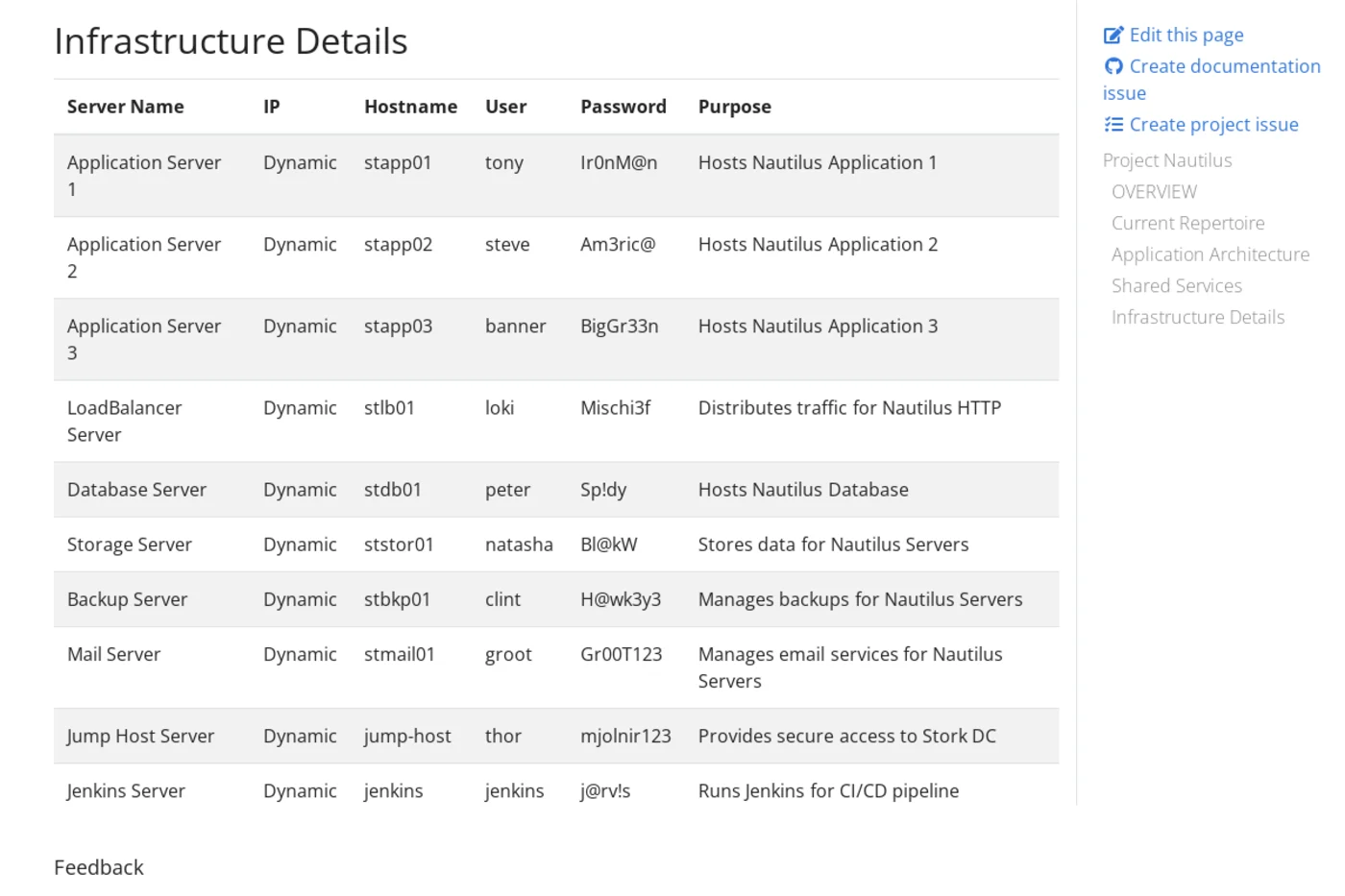
Yes, that is a full credential table sitting in public documentation, and yes, I am publishing it. Before you file a CVE: the users are the Avengers, thor guards the jump host with mjolnir123, and the Jenkins box logs in as j@rv!s. Every one of those machines is destroyed and rebuilt per session. If a password table ever gives you that little anxiety at work, something has gone very right.
Read past the joke and look at the estate. Ten servers with hostnames and owners: three application servers behind an Nginx load balancer, a MariaDB database, network-attached storage, a backup host, a mail server, a Jenkins box for CI/CD, and a jump host that is the only way in. That is an ordinary three-tier architecture, documented the way a real one would be, down to which colleague owns which machine.
The tasks then arrive as tickets against that estate rather than as exercises. Fix the failed service on stapp02. Set up the cron job on stbkp01. Give a new starter access through the jump host. You have to read the architecture before you can act, because nothing tells you which box to log into, and reaching stdb01 means going through jump-host first, exactly as it would at work.
This is the closest a browser gets to the thing that is genuinely hard to practise alone: not a tool, but an estate you did not design, with conventions you have to learn and a topology you have to navigate. If you want to know whether infrastructure work suits you, an afternoon here tells you more than a month of tutorials.
The task design matters as much as the sandbox. A good lab does not ask you to type commands from a transcript. It hands you a cluster where something is already wrong and asks you to find it, which is the actual job. That is why lab platforms are worth paying for in a way that video courses often are not: you can get explanation free from Nana all day, but you cannot get a broken cluster free, and the broken cluster is where the learning happens.
The limits: these environments are disposable and reset, so you never feel the weight of a system you have to live with, and a curated failure is easier than a real one because somebody chose it to be instructive. Neither is a reason to skip them. Both are reasons to move to your own project afterwards.
Which certifications are worth it, and what they cost
Certifications help most when you are trying to get past HR filters for infrastructure roles without matching job history, because this is one of the few corners of software where hiring managers genuinely recognise them. They help least if you are a web developer adding deployment skills, since nobody has ever asked a frontend candidate for a CKA.
Prices below are the standard exam fees as of September 2026 and exclude local tax.
| Certification | Cost | Format | Notes |
|---|---|---|---|
| KCNA (Kubernetes and Cloud Native Associate) | $250 | Multiple choice, 90 min, 75% to pass | One free retake included. The best first one. |
| CKA (Certified Kubernetes Administrator) | $395 | Hands-on, live cluster | Two attempts included. The one employers name. |
| CKAD / CKS | $395 each | Hands-on | Developer and security specialisations. Later. |
| HashiCorp Terraform Associate | $70.50 | Multiple choice | Cheapest credible option. Valid two years, no free retake. |
| AWS Certified Cloud Practitioner | $100 | Multiple choice | Entry-level cloud vocabulary, not a DevOps credential on its own. |
| GitHub Foundations (GH-900) | $99 | 75 questions, 120 min, 70% to pass | Valid three years. Useful early if Git is still shaky. |
| GitHub Actions (GH-200) | $99 | Multiple choice, 100 min | Intermediate. The most directly useful one for CI. |
Bottom line: if you want the DevOps job title, the sequence that gets the most return per dollar is Terraform Associate or GitHub Actions first as a cheap confidence check, then KCNA, then CKA when you can actually drive a cluster. If you are a web developer, skip all of them and put the money toward a platform subscription instead.
No certification substitutes for having deployed something and broken it. The exam proves you can pass the exam, nothing more.
Where Udemy fits: exam prep, not credentials
One thing first, because it decides how you should use the platform. A Udemy certificate of completion is worth nothing to an employer. It certifies that video finished playing. Nobody screens for it, nobody asks about it, and it belongs nowhere near the certifications section of your CV. If you are buying a Udemy course for the certificate, do not buy it.
What Udemy is genuinely good at is being cheap, one-time-purchase preparation for the exams in the table above, the ones that do carry weight. You buy a course, you keep it, and on sale these typically land in the $10 to $20 range, which is a rounding error against a $395 exam fee. Used that way it is one of the best-value things on this page.
So pair them deliberately. Each course below prepares you for a specific credential, and the credential is the thing that goes on your CV.
| Credential you are chasing | Exam fee | Udemy course that prepares you |
|---|---|---|
| CKA (Certified Kubernetes Administrator) | $395 | Certified Kubernetes Administrator (CKA) with Practice Tests (opens in a new tab), Mumshad Mannambeth |
| HashiCorp Terraform Associate | $70.50 | HashiCorp Certified: Terraform Associate 2026 (opens in a new tab), Zeal Vora |
| AWS Certified Cloud Practitioner | $100 | Ultimate AWS Certified Cloud Practitioner CLF-C02 (opens in a new tab), Stephane Maarek |
The CKA course is the standard recommendation for that exam, and its practice tests are the reason: they are the closest thing to the real hands-on format outside the exam itself. Worth knowing that Mannambeth founded KodeKloud, so the course previews that teaching style if you are also weighing the subscription. Zeal Vora's Terraform course is built around the current certification blueprint and ends in practice tests. Maarek has taught AWS certifications to millions of students and keeps the course current with the CLF-C02 revision, which matters because AWS changes exam versions regularly.
One gap worth naming: for KCNA, the Udemy listings are dominated by practice-question packs of uneven quality with no clear standout, so use the official CNCF curriculum and a labs platform instead. Docker is not on the list above because the credentials that matter for containers are the Kubernetes ones, and Docker itself is well covered by the free resources earlier in this post.
Whatever you buy, check the last-updated date before paying. Udemy will happily keep selling a course built for a retired exam version, and a certification prep course that is out of date is worse than none. If you want a wider view of the platform, we keep a set of Udemy course guides, and our guide to what course certificates actually do covers the completion-certificate question in more depth.
Where this sits next to everything else you are learning
Deployment is one skill in a stack, and it pays off differently depending on the rest of it.
On the Frontend Developer path this is what turns a repository into a link you can send someone, which is the single biggest upgrade a portfolio can get. On the Fullstack and Backend paths it sits closer to the core, since running services other people depend on is a larger share of the job. Both paths stop short of this material by design: our Backend path review notes that Docker and CI/CD are the gap employers ask about, and the Fullstack path review says the same about deeper DevOps work.
Two neighbours are worth sequencing around it. Git and GitHub come first, for the reason in step 2. Databases usually come next, and the free Learn SQL course is the cheapest way to find out whether backend work suits you at all, and the wider backend catalog shows what follows.
Continuous integration in step 6 also has a natural partner: the tests it runs. If your pipeline has nothing to execute, CI is just a green checkmark, and Scrimba's Introduction to Unit Testing covers the habit that gives it something to check. And if you are still choosing a direction rather than a tool, which coding path to learn in 2026 compares the four tracks on job-market grounds, while the Path Advisor does it in about a minute.
What no course gives you
Every option on this page, free or paid, is a rehearsal. The tooling is chosen for you, the application is known to work, and the failures are the instructive ones. Real deployment is mostly debugging things nobody warned you about, like a build that passes locally and dies in CI over a case-sensitive filename.
One specific limit applies to all the beginner material above: deploying to Render or Railway is not the same as deploying on AWS, Google Cloud, or a self-managed server, and job postings name those directly. The concepts transfer well. The button locations do not.
So convert whichever route you pick into your own project immediately. Containerise something you built, deploy it, break it on purpose, and fix it. That debugging is what becomes an interview answer, and it is the only part none of these resources can hand you. Deployed projects are also among the few things that substitute for job history, which is the wider argument in how to get coding experience without a job.
If you want deeper reading once the practical work is underway, all three of Google's Site Reliability Engineering books are free online and are the best writing available on what running systems actually involves.
References
- Stack Overflow 2025 Developer Survey, Technology - Docker at 71.1% adoption and the +17 point jump described as the largest single-year increase of any technology surveyed.
- Stack Overflow 2025 Developer Survey, AI - 76% of developers declining to use AI for deployment and monitoring, the highest of any task surveyed.
- roadmap.sh DevOps roadmap - the free step-by-step map of tools and their dependencies.
- freeCodeCamp DevOps Prerequisites Course - the free three-hour Linux, YAML and lab-environment primer produced with KodeKloud.
- TechWorld with Nana - free Docker (about 3 hours) and Kubernetes (about 4 hours) tutorials, plus a 1 hour 12 minute Kubernetes crash course.
- KodeKloud free courses - 25+ free courses including Docker and Kubernetes for absolute beginners, with browser labs.
- Killercoda - free browser-based Linux and Kubernetes environments, with a perpetual free tier.
- KodeKloud Engineer, Project Nautilus documentation - the xFusionCorp three-tier architecture, shared services, and the ten-server infrastructure table.
- CNCF KCNA certification - exam format and the $250 price including a free retake.
- HashiCorp Terraform Associate certification - the $70.50 exam fee and two-year validity.
- AWS Certified Cloud Practitioner - the $100 exam fee.
- GitHub certifications - the $99 fee, GH-900 format, and three-year validity.
- devopsdays: about - the first DevOpsDays in Ghent, October 2009, and Patrick Debois's role in organising it.
- 10+ Deploys Per Day: Dev and Ops Cooperation at Flickr - Allspaw and Hammond at Velocity, June 2009, the talk that showed it working in production.
- IT Revolution on DevOps culture - the CAMS framing (culture, automation, measurement, sharing) from Damon Edwards and John Willis.
- TechWorld with Nana: What is DevOps? REALLY understand it - the argument that the original definition was too broad to act on, so each company implemented it differently and a job title emerged from that.
- Google SRE books - all three titles free to read online.
- Scrimba, Intro to DevOps (opens in a new tab) - course scope, publication date of 10 August 2026, lesson count, runtime, and instructors.
Patrick Debois organised the first DevOpsDays conference in Ghent in October 2009 and needed a Twitter hashtag, so he shortened development and operations to #DevOps. The ideas predate the label: Werner Vogels described Amazon's you-build-it-you-run-it rule in 2006, Andrew Clay Shafer ran an agile infrastructure session at Agile 2008, and Allspaw and Hammond's 10+ Deploys Per Day talk at Velocity in June 2009 showed it working at Flickr. No tool appears in that story. Docker arrived in 2013, Kubernetes and Terraform in 2014.
It depends where you are standing, which is why the word confuses people. On your own projects it is a hat you wear rather than a job: you wrote it, so you deploy it. At mid-sized companies it is usually a real role owning pipelines and environments, even though the people who coined the term did not intend that. At large companies the work is often renamed platform engineering or SRE. When you read a job advert, read the responsibilities and ignore the title.
The full path is available free. Use roadmap.sh/devops for the map, freeCodeCamp's three-hour DevOps Prerequisites Course for Linux and YAML, TechWorld with Nana's free Docker and Kubernetes tutorials on YouTube, KodeKloud's 25+ free courses for browser labs, the GitHub Actions documentation for CI, and Killercoda for free hands-on environments. The cost is your own time: you assemble the order, find the gaps, and handle setup yourself.
It depends on whether time or money is your binding constraint, not on discipline. Paying buys sequencing, pre-built lab environments, and someone deciding what comes next, which matters most if you are studying around a job, changing careers against a deadline, or sitting a certification. If a paid platform saves you five hours in a month it has already paid for itself. If you have more time than money, the free path is genuinely complete.
The roadmap first, then Linux and YAML, then Git, then Docker, then a real deployment to a managed host, then secrets and environment variables, then continuous integration. Kubernetes comes last and only if you want a DevOps job title. Most web developers can stop after CI, because Kubernetes solves problems they do not have yet.
They serve different needs. Nana's free YouTube tutorials are the best free explanations of Docker and Kubernetes and her paid bootcamp is a structured 4 to 6 month route to job-ready. KodeKloud is stronger on hands-on labs, with 1,280+ browser lab environments and the most established certification prep for CKA, CKAD and CKS. Many people use Nana to understand and KodeKloud to practise.
Start cheap. The HashiCorp Terraform Associate is $70.50 and GitHub Actions (GH-200) is $99, and either works as a low-cost check on whether you enjoy the material. Then KCNA at $250, which includes a free retake and is multiple choice. Leave the CKA at $395 until you can actually drive a live cluster, since it is a hands-on exam.
No. A Udemy certificate of completion certifies that a video finished playing, and no employer screens for it. Keep it off the certifications section of your CV. Udemy is worth using as cheap exam preparation for credentials that do carry weight, such as the CKA, the HashiCorp Terraform Associate, and the AWS Cloud Practitioner, where a course on sale for $10 to $20 is a rounding error against the exam fee.
Match the course to the credential rather than buying broadly. For the CKA, Mumshad Mannambeth's Certified Kubernetes Administrator with Practice Tests is the standard pick and its practice tests mirror the hands-on exam format. For the Terraform Associate, Zeal Vora's course is built on the current blueprint. For the AWS Cloud Practitioner, Stephane Maarek's CLF-C02 course is kept current. Always check the last-updated date, since exam versions change.
Only if you are a web developer who can already build applications and whose real problem is that projects stay on localhost. It covers containers, Docker, Render deployment and CI in 84 lessons over about five and a half hours, is marked Intermediate, and requires Pro. If you want the DevOps job title, KodeKloud and Nana go far deeper for less or nothing. What Scrimba adds is sequencing and a browser editor with no local Docker setup. See our full review for the module-by-module breakdown.
If sequencing is what stops you finishing
Try Scrimba free to see the format, then Intro to DevOps and the Frontend, Fullstack, and Backend paths are there when you're ready to go Pro. The free routes above work too.