Scrimba Explain vs NotebookLM Video Overviews for Learning Code (2026)

Last updated:
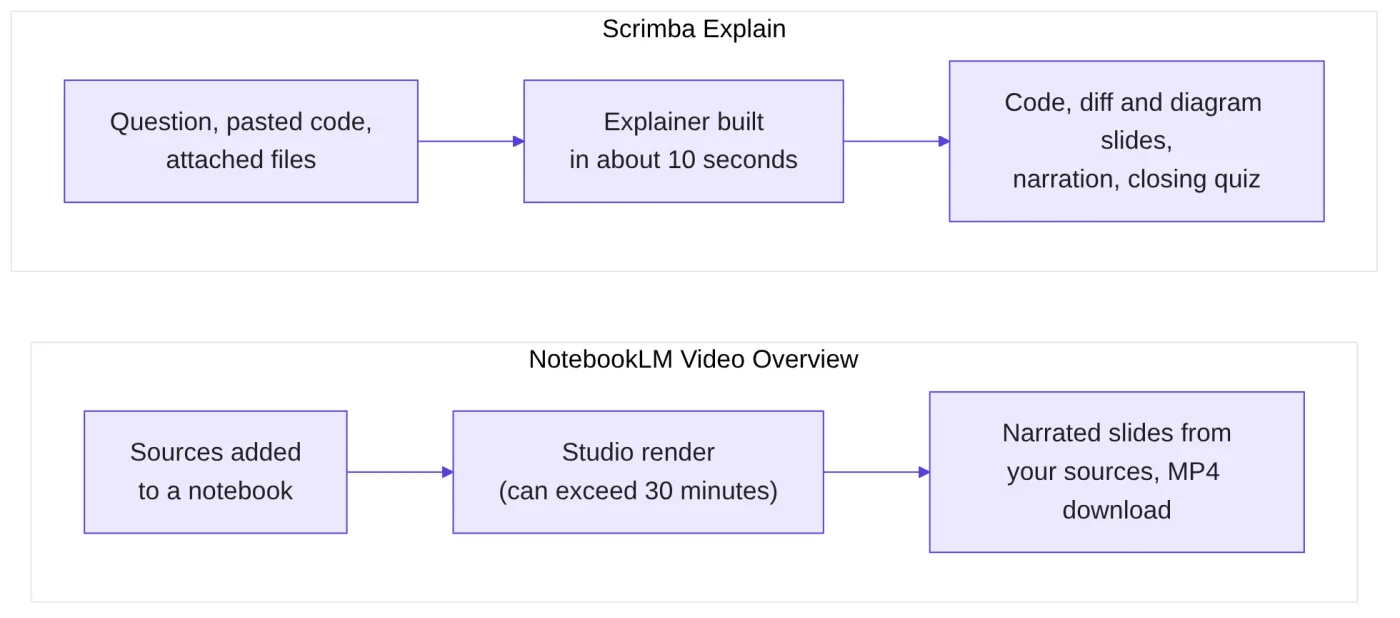
Scrimba Explain turns a typed question into a narrated video with code, diagram and quiz slides in about ten seconds. NotebookLM Video Overviews turn documents already sitting in a notebook into a narrated slideshow that can take over 30 minutes. Pick Explain for a coding concept or a piece of code, NotebookLM for a video summary of your own PDFs or notes.
I generated every Explain result in this comparison myself, on a Pro account: the explainers, the transcripts, the quizzes. NotebookLM sat behind a corporate sign-in on the machine I had, so its side of the table comes from Google's own help pages and blog posts, linked where it appears, and anything Google does not document is marked unverified.
What each tool is
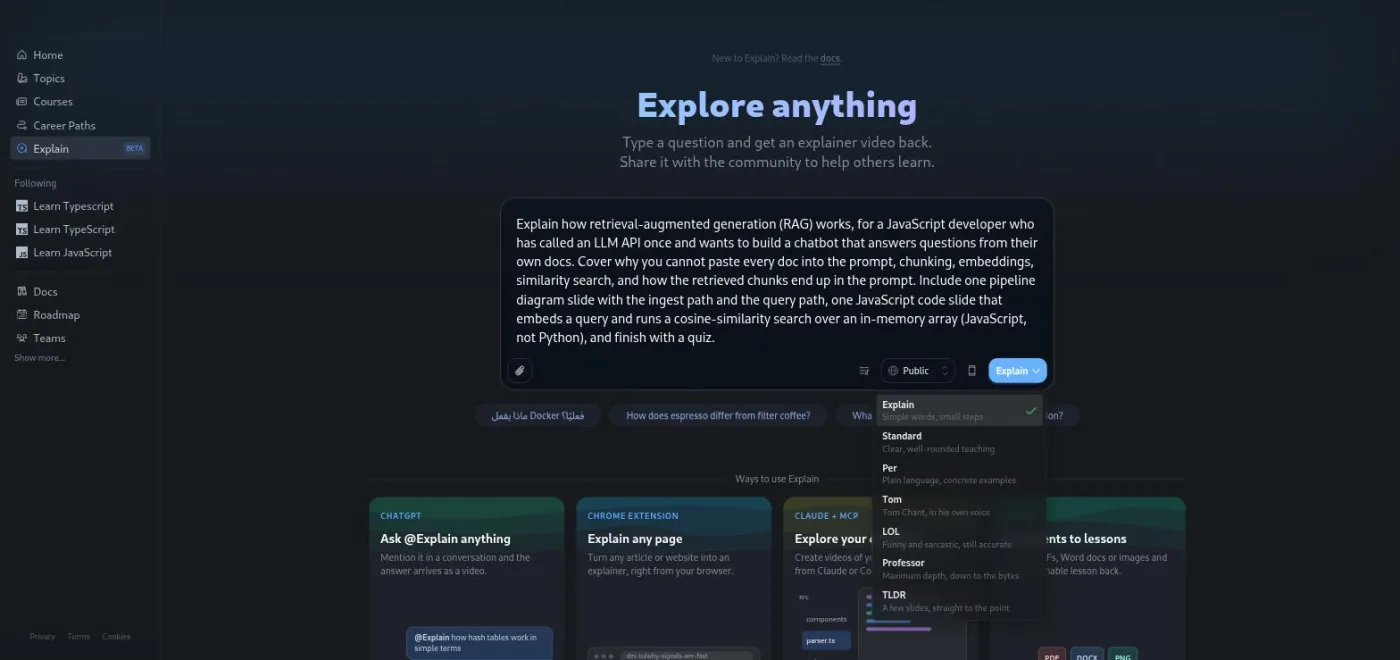
Scrimba Explain is the AI explainer feature on scrimba.com/explain (opens in a new tab). You type a question, optionally paste code or attach a file, and it builds a short narrated lesson from typed slides while you watch. The Scrimba Explain review covers what it is like to use; the reference page has the full quota and entry point tables. I will not repeat either here.
NotebookLM is Google's research notebook. You add sources (PDFs, Docs, slides, web pages, YouTube links, audio) and ask questions grounded in them. A Video Overview is one of its Studio outputs: Google describes it as narrated slides that pull "images, diagrams, quotes and numbers from your documents", launched in July 2025 as the visual sibling of Audio Overviews (Google blog). Google's help centre now calls the product Gemini Notebook on some pages, though the app still lives at notebooklm.google.com.
Explain starts from a question. NotebookLM starts from a pile of sources. Most of the table below follows from that.
Comparison table
Every NotebookLM cell below is taken from Google's documentation. Where Google is silent, the cell says so.
This comparison table may scroll horizontally on smaller screens.
| Feature | Scrimba Explain | NotebookLM Video Overviews |
|---|---|---|
| Input types | Typed question; pasted code; attached code files, Markdown, PDFs, images, Jupyter notebooks; a web page (Chrome extension); a repository (MCP) | Notebook sources: Docs, Word, PDF, text, Markdown, Slides, Sheets, audio, images, YouTube URLs, web URLs, ePub, CSV, pasted text (help page) |
| Code slides | Yes, a first class slide type. My context window explainer (below) got a chatUtils.js slide with a working trimHistory function | Not documented. Google lists images, diagrams, quotes and numbers from your sources; code is not mentioned (unverified) |
| Diagram slides | Yes, on request. The same explainer drew a User / App State / LLM sequence diagram | Yes, diagrams pulled from your sources; Google does not document drawing new ones (unverified) |
| Quiz | When you ask for one in the prompt. One multiple choice question at the end (TLDR style and extension explainers skip it) | Not inside the video as documented. Quizzes and flashcards are a separate Studio output |
| Languages | 33 narration languages | 80 plus (80 listed for Explainer format, 73 for Short, as of September 2026); Cinematic is English only |
| Length and build time | Most run 40 seconds to 2 minutes; mine was playable about 10 seconds after submit | Short format (called Brief at launch) is about 60 seconds; Explainer length not published; generation can take over 30 minutes (help page) |
| Export format | MP4 at 2560x1440 and 60 fps plus a .vtt captions file; Public or Unlisted only | Download as a local video file; Play Books sources can block it; resolution not published |
| Free quota | 10 explainers for the life of a free account; 100 a month on Pro | 3 Video Overviews a day on the free plan; 20 a day on Pro; 200 a day on Ultra |
| Sharing defaults | Public by default on the web hub (picker in the composer); Unlisted from ChatGPT; private draft from MCP | Share a link after confirming notebook sharing, or share the whole notebook; default state of a fresh overview not documented (unverified) |
| Agent and MCP integration | Yes: MCP endpoint for Claude Code, Codex and other agents, plus a ChatGPT plugin and a CI endpoint for pull requests | None documented for Video Overviews (unverified) |
Sources for the NotebookLM column: the Video Overviews help page, the source types page, the plan limits page and Google's languages announcement. Sources for the Scrimba column: my own explainers plus limits and plans (opens in a new tab), languages (opens in a new tab) and exporting (opens in a new tab) in Scrimba's docs.
Where NotebookLM wins
Your own corpus. If the thing you want explained is a 90 page PDF, six lecture recordings and a Google Doc of notes, NotebookLM is built for that. A free notebook takes up to 50 sources, each up to 500,000 words or 200 MB (source limits). Explain accepts attachments too, but Scrimba pitches it as a question answering tool, and I would not hand it a semester of material.
Languages. Google's help page lists 80 languages for the Explainer format against Scrimba's 33. If you learn in Tamil or Ukrainian both are covered; if you learn in Swahili, only NotebookLM is.
Daily renewal. The free plan gives 3 Video Overviews a day, reset every 24 hours (plan limits). Scrimba's free 10 never renew. Over a month of light use, the NotebookLM free plan gives you more videos.
Visual variety. Google offers eight illustration styles (Classic, Whiteboard, Watercolor, Retro Print, Heritage, Paper-craft, Kawaii, Anime) and a Cinematic format built with Veo 3 for Ultra subscribers (styles, Cinematic). Explain lets you name an art style for its images, but the product is not about looking good.
Where Scrimba Explain wins
Code on screen. This is the one that decides it for programmers. When I asked for "one short JavaScript snippet that trims the history to a token budget", the result was a chatUtils.js slide with a trimHistory(messages, tokenLimit) function that the narration walked through line by line. Google's own description of Video Overviews never mentions code, and nothing in the help pages suggests a syntax highlighted code slide exists. I could not check, so treat that as unverified, but the absence in the docs is telling.
Speed. The context window explainer was playable about ten seconds after I pressed the button. Google warns that a Video Overview "may take a while" and "sometimes, more than 30 minutes" (help page). If you are stuck mid lesson, ten seconds keeps you in the lesson; thirty minutes does not.
The quiz. Every one of my explainers ended with a quiz slide, usually headed "Test your knowledge" (one Professor run called it "Your turn", and one playlist lesson "Test your strategy"): one question, three or four answers, gold for a first try. NotebookLM has quizzes, but as a separate Studio item, not inside the video. For retention that matters, because the question arrives while the explanation is still in your head.
Your repository. Explain has an MCP endpoint (MCP is the open protocol coding agents use to call outside tools) that lets Claude Code or Codex write a lesson about the branch you are reading. Google documents nothing like this for Video Overviews. Scrimba also teaches the protocol itself: Maham Codes's Intro to MCP is 17 scrims in which you build a weather MCP server in Node.js and TypeScript, the same connective tissue Explain's endpoint runs on.
Embedding and Public sharing. Explain gives you an iframe embed and a Public community feed. That default cuts both ways, which the sharing row in the table shows, but it means a good explainer can be dropped into a README or a blog post.
The same prompt, both tools
This is the section I most wanted to write with two screenshots side by side, and could not. Here is what I can offer: the full Explain result, and what Google's documentation says would happen if you fed the same brief to NotebookLM.
The prompt I used, Standard teaching style, on the web hub:
What is a context window, why do LLMs seem to forget the start of a long conversation, and what can a developer do about it? For a web developer building a chat app in JavaScript who sends the whole message history on every request. Cover tokens versus characters, what happens when the history exceeds the limit, and the two common fixes: a sliding window and summarising older turns. Show one short JavaScript snippet that trims the history to a token budget before the API call. Include one diagram slide showing the window filling up turn by turn, and finish with a quiz.
What Scrimba Explain produced
The explainer is at scrimba.com/explain/guide0jc32sm3l, titled "Managing the LLM Context Window", 1 minute 22 seconds, and it is embedded here so you can watch it before reading my notes on it. Its transcript has six sections: Managing the LLM Context Window, Tokens vs. Characters, The window filling up, Handling the limit, Implementing a sliding window, and Test your knowledge.
Three slides matter. The diagram slide shows a User, App State and LLM sequence with the window filling turn by turn, exactly what I asked for. The code slide, chatUtils.js, holds a trimHistory(messages, tokenLimit) function that drops the oldest messages until the estimate fits, using the rough four characters per token heuristic. The quiz asks what happens when the history exceeds the limit; the correct answer is that the API returns an error, which is right.
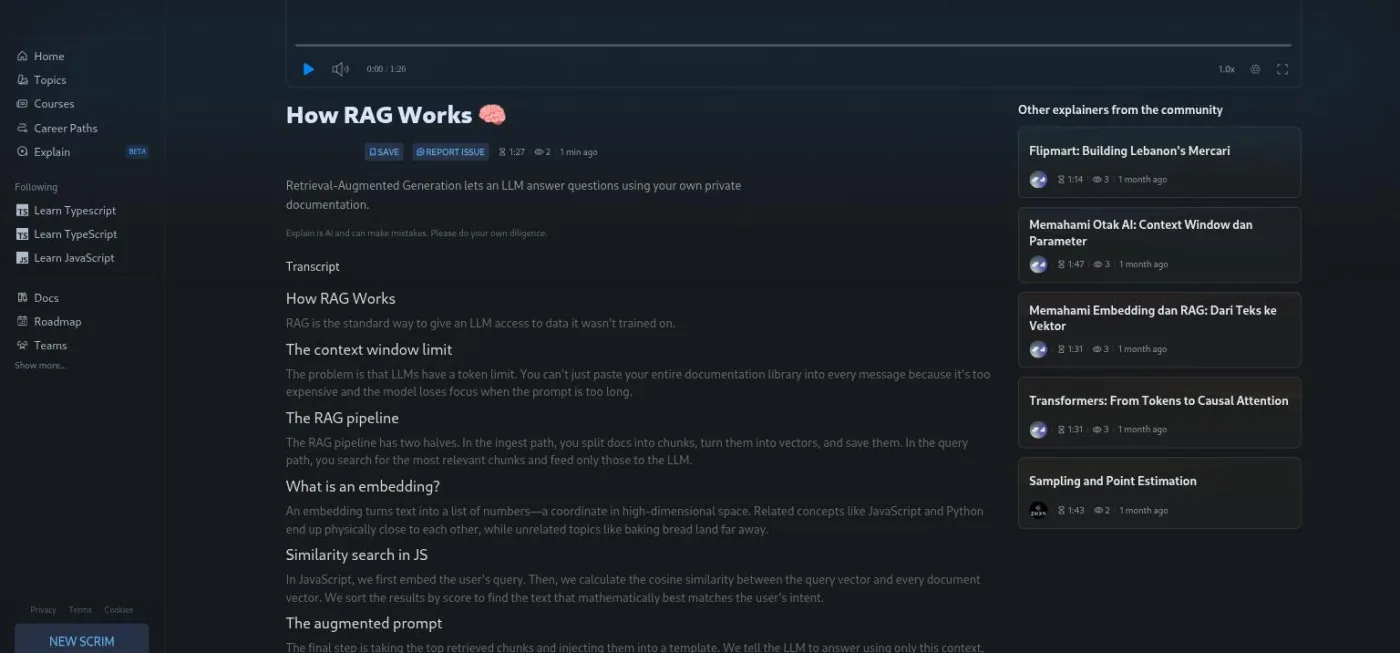
What it skipped: the prompt asked why models "seem to forget" the start of a conversation, and the explainer only covered truncation and overflow. It said nothing about attention degrading in the middle of long contexts. Fair for 82 seconds, but a Professor style run might have gone there. The screenshot below is a different explainer from the same batch, on RAG in Professor style, because it shows the transcript layout more clearly than the context window one.
What NotebookLM's docs say you would get
You cannot type that prompt into an empty notebook. Video Overviews need at least one source, so step one is adding something: a blog post on context windows, an API reference page, or your own notes. Then, in Studio, you choose Video Overview, pick a format (Cinematic, Explainer or Short, which Google's launch post called Brief), a language and a visual style, and pick a suggested topic or type a custom one (help page).
The output would be a narrated slideshow drawing on the sources you added. Whether it would contain a JavaScript slide is the open question, and Google does not answer it. A diagram is plausible if one of your sources contains one. A quiz inside the video is not something Google documents; you would generate the quiz separately in Studio. And you would wait: minutes at best, more than thirty at worst.
"Same prompt, both tools" only works for one of them. NotebookLM's steering prompt shapes a summary of what you already gave it. Explain's prompt is the whole input.
Who should use which
Pick Scrimba Explain if you are learning to code and the thing you are stuck on is a concept, a function or a diff. Code slides and a ten second turnaround are built for that moment, and the quiz catches you before you move on. It also fits anyone using Claude Code or Codex who wants a walkthrough of a branch without writing it. Ten free explainers is enough to find out whether it helps; after that you are on the Pro quota or the free agent drafts.
Pick NotebookLM Video Overviews if your material already exists as documents and you want a video summary of it. Students with a folder of lecture PDFs are the obvious case, along with anyone learning in a language Scrimba does not cover. The free plan's three a day is generous for that use.
Use both if you are working through Scrimba's AI courses. Guil Hernandez's Learn RAG, 22 scrims that build a Supabase-backed movie chatbot, is the retrieval idea NotebookLM runs on every time it answers from your notebook. Arsala Khan's Learn Context Engineering, 15 scrims spent trimming a chat app's message history by token count, is the same problem Explain's own context window explainer (above) walks through. Arsala Khan's Learn AI Agents and Intro to AI Engineering cover the calling side, and the 13.4-hour AI Engineer Path strings all of it together.
Whichever you choose, both vendors say the same thing about accuracy. Scrimba prints "Explain is AI and can make mistakes" under every player. Google says Video Overviews "may contain inaccuracies or audio glitches" (help page). My context window explainer was correct but incomplete, which is the usual shape of the problem.
Try Explain on a free Scrimba account
Ten explainers, the free course modules and the Discord come with a free account. Enough to see whether narrated code slides help you before any subscription question comes up.
References
- Scrimba Docs, What is Scrimba Explain? (opens in a new tab) - definition and slide types.
- Scrimba Docs, Limits and plans (opens in a new tab) - 10 explainers for life on Free, 100 a month on Pro.
- Scrimba Docs, Languages (opens in a new tab) - the 33 narration languages.
- Scrimba Docs, Exporting (opens in a new tab) - MP4 at 2560x1440, 60 fps, .vtt captions.
- Scrimba Docs, Visibility when creating (opens in a new tab) - Public default on the web hub.
- Scrimba Docs, MCP (opens in a new tab) - the agent endpoint.
- Managing the LLM Context Window - the explainer generated for this article, 1:22, Standard style.
- Google, Video Overviews help page - formats, styles, generation time, sharing and download, accuracy notice.
- Google, Source types and limits - accepted sources, 500,000 words or 200 MB per source.
- Google, Plan limits - 3 Video Overviews a day on the free plan, 20 on Pro, 200 on Ultra.
- Google blog, Video Overviews launch - July 2025 launch and the "images, diagrams, quotes and numbers" description.
- Google blog, More languages - 80 languages for Video Overviews.
- Google blog, Nano Banana styles - six of the visual styles; the help page lists all eight.
- Google blog, Cinematic Video Overviews - Cinematic format, English only, Ultra plan.
Scrimba Explain, for most coding questions. It renders code and diagram slides from a typed prompt, builds in about ten seconds and can end with a quiz when you ask for one. NotebookLM Video Overviews summarise documents you have already added to a notebook, and Google does not document code slides for them.
Source: Scrimba Help Centre
Not as documented. A Video Overview is generated from the sources in a notebook, so you add at least one source first and then use a steering prompt to focus it. Scrimba Explain works from the prompt itself, with attachments optional.
Source: Scrimba Help Centre
A free Scrimba account gets 10 explainers for the life of the account; Pro gets 100 a month. NotebookLM's free plan allows 3 Video Overviews a day, reset every 24 hours, with 20 a day on Pro and 200 on Ultra.
Source: Scrimba Help Centre
NotebookLM. Google's help page lists 80 languages for the Explainer format and 73 for Short; the Cinematic format is English only. Scrimba Explain narrates in 33 languages and keeps code and file names unchanged.
Source: Scrimba Help Centre
Yes. Scrimba exports an MP4 at 2560x1440 and 60 fps with a .vtt captions file, for Public or Unlisted explainers. NotebookLM has a Download option on the Video Overview, though some sources such as Play Books can block it and the resolution is not published.
Source: Scrimba Help Centre
Scrimba Explain does, through an MCP endpoint that lets a coding agent write a lesson about your repository, plus a ChatGPT plugin. Google documents no agent or MCP integration for Video Overviews.
Source: Scrimba Help Centre
No. NotebookLM was behind a corporate sign-in on the machine used for this article, so every NotebookLM claim comes from Google's help centre and blog, linked in the References. The Scrimba side is first-hand, including the context window explainer linked above.
Source: Scrimba Help Centre
No. The quiz is the last slide of the explainer you already created. Follow-up questions and the Go deeper button do create new explainers and draw on the same allowance.
Source: Scrimba Help Centre