Scrimba Explain: what it is, what you get free, and the five ways to open it
Scrimba Explain is an AI explainer tool. You type a question, paste code or point it at a page, and it builds a short narrated video lesson from slides while you watch. A free account gets 10 explainers in total; Pro gets 100 a month. It runs on the web, inside Scrimba lessons, in Chrome, in ChatGPT and over MCP.
Tested on the web, in Chrome and in Claude Code.
An explainer is not a screen recording. Each slide is typed content (code, a diff, a diagram, an image) with a synthetic voice narrating over it. Scrimba's own one-line version: "Ask a question, and get a narrated video lesson back, built while you watch" (docs.scrimba.com/explain/introduction (opens in a new tab)). The Scrimba Explain review has the tested verdict on output quality.
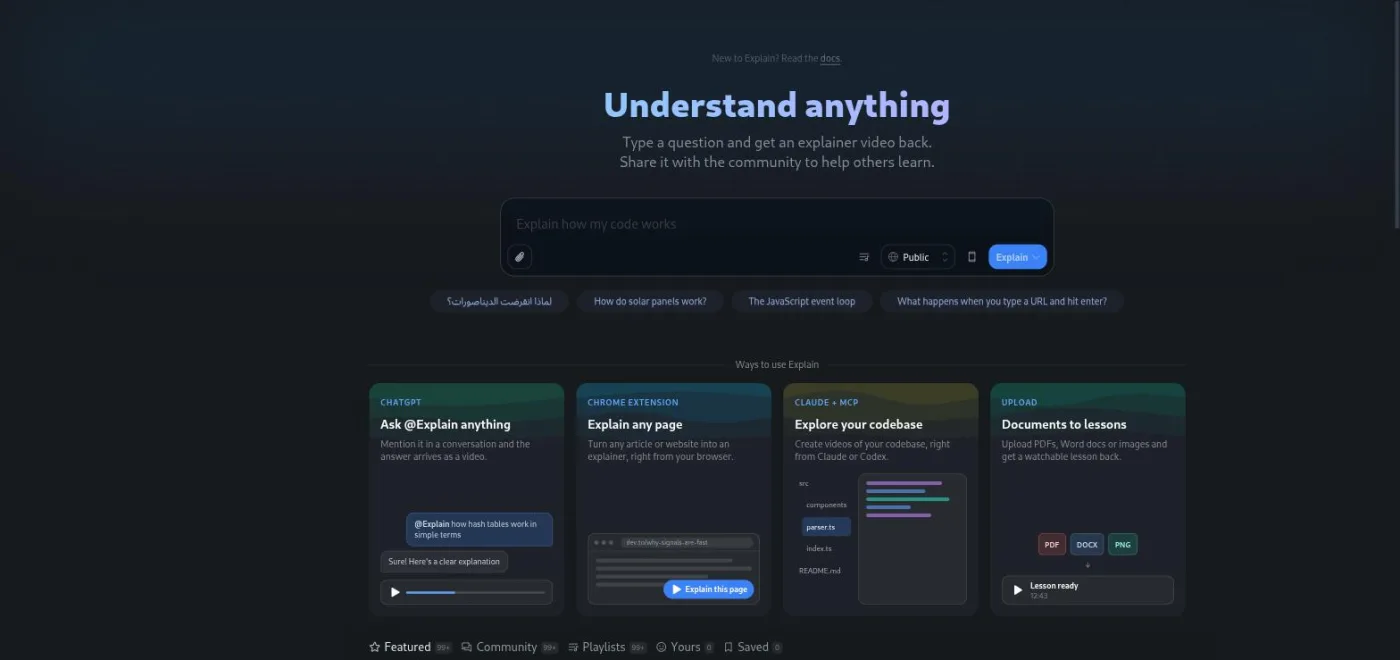
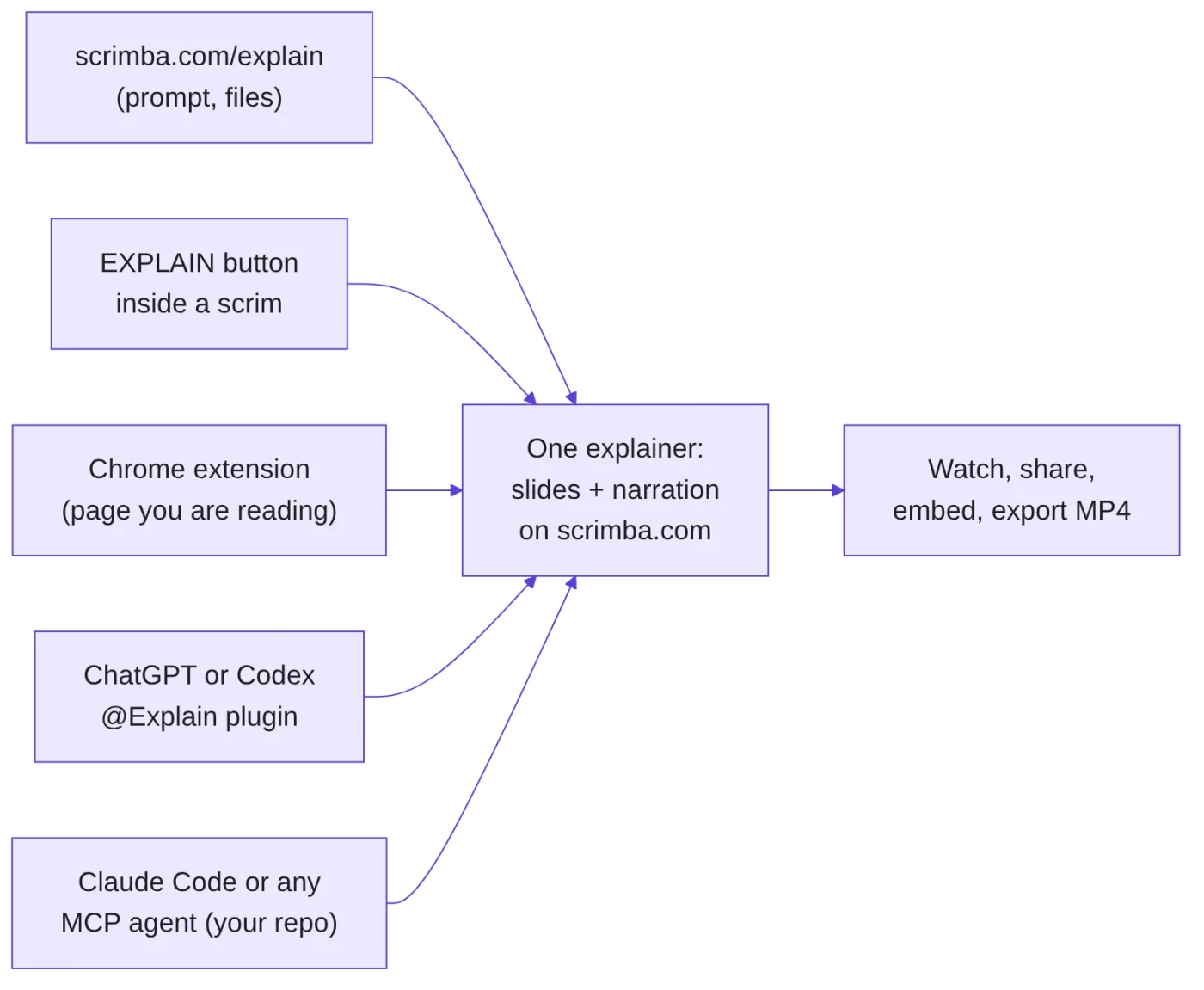
Five ways to open it
Every route ends at the same kind of explainer page. What differs is the input and who can see the result by default.
| Entry point | What it takes as input | Default visibility |
|---|---|---|
| Web hub, scrimba.com/explain (opens in a new tab) | A typed question, pasted code, attached files (code, PDFs, images, notebooks), a teaching style | Public (picker in the composer; signed-out users get Unlisted) |
| EXPLAIN button inside a scrim | The lesson's code, your highlighted lines, the teacher's narration so far, the point where you paused | Never more public than the scrim it came from |
| Chrome extension, "Explain by Scrimba" | The first 12,000 or so characters of the page you are reading | Public, and listed in the community feed |
| ChatGPT or Codex, the @Explain Video Generator plugin | Whatever the chat has worked out: a PDF, a pull request, your notes | Unlisted (anyone with the link) |
Claude Code or any MCP agent, the /explain/mcp endpoint | Your actual repository: a branch, a PR, a subsystem; the agent writes the lesson itself | Private draft until you open the link and claim it |
MCP is the Model Context Protocol, the open standard coding agents use to call outside tools. Scrimba exposes Explain as a remote MCP server, so Claude Code, Codex, Cursor and similar tools can stream a lesson into it. Claude Code connects with one claude mcp add command, copied from Scrimba's Claude Code page (opens in a new tab).
A second endpoint for CI jobs, /explain/pr/mcp, starts explainers Unlisted instead of private so a reviewer can watch without an account. There is no public Explain API yet, only a waitlist.
How many explainers you get
Watching is free and unlimited, with or without an account. The quota is on how many explainers you add to your account.
| Plan | Explainers | Renews? |
|---|---|---|
| No account | 1, always Unlisted (not available for scrims) | No |
| Free account | 10 | No, it is a one-off allowance for the life of the account |
| Pro | 100 a month | Yes, at the start of each monthly period |
Source: docs.scrimba.com/explain/limits-and-plans (opens in a new tab). Current plan prices are on Scrimba's pricing page (opens in a new tab); I do not quote them here because they vary by region.
What counts against the allowance:
- Creating an explainer on the web hub or from inside a scrim.
- Each follow-up question and each "Go deeper" click, because both make a new explainer.
- Claiming a draft that ChatGPT, Codex, Claude Code or the CI endpoint built for you.
What does not count: drafts an agent makes before anyone claims them (the agent writes the lesson; Scrimba only generates the images and narration once someone opens and claims the link), redoing slides, regenerating narration, exporting, and adding something to Watch later. So Claude Code can draft twenty explainers of your repo for nothing. The quota only bites when you claim one.
For learners, 10 free explainers is enough to find out whether the format helps you. It is not enough to press the button every lesson. The Pro vs Free page covers the rest of what Pro changes.
What an explainer contains
An explainer is a sequence of slides with narration. Slide types include code the narration points into, diffs, diagrams, animations, images, infographics, math, and cards or lists. Explain decides the structure; you decide the topic, the audience and, on the web, the teaching style.
Most explainers I opened ran between 40 seconds and two minutes. Here is one I generated from the web composer, embedded so you can watch it on this page; it covers RAG in the Standard style and shows the slide types in order (cards, diagram, list, animation, two code slides, quiz).
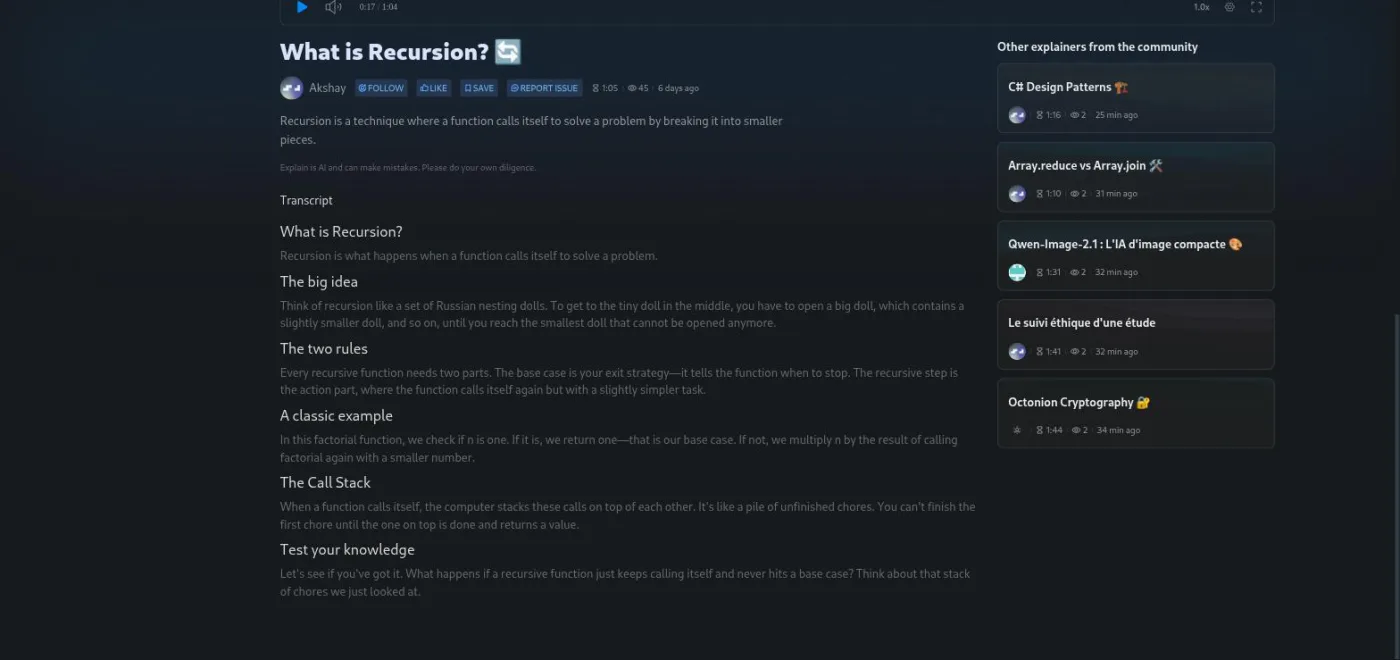
Under the player on the explainer page sit the description, the disclaimer "Explain is AI and can make mistakes. Please do your own diligence." and the full transcript as headed prose.
Quizzes: an explainer can end with one multiple-choice question, three or four answers, one right. Gold for a first-try answer, silver for the second, bronze for the third. Adding "end with a quiz" to a web prompt makes one more likely. Summaries, tasks on your own code and the TLDR style never get one. The docs say Chrome extension page explainers skip the quiz too, though Scrimba's own extension demo video ended with one, so treat that rule as loose.
Teaching styles are web-only and change both the writing and the voice. The seven: Explain (the default, simple words and small steps), Standard, TLDR, Professor ("maximum depth, down to the bytes"), LOL, Per (Scrimba's founder, in his own voice) and Tom (teacher Tom Chant). Explainers from ChatGPT or an agent are written by that model, so the picker does not apply there.
Narration comes in 33 languages. Explain uses a voice native to the language where it has one; otherwise the slides still come out in the language you asked for and the narration falls back to English. Code and file names stay unchanged either way. Web search is automatic. Ask about something recent or a version number and Explain searches, then lists the sites it used in a Sources row above the transcript.
Sharing, embedding and export
There are three visibility levels. Public means everyone, and the explainer can appear in the community feed. Unlisted means anyone with the link, but it is not listed or searchable. Private means only people you share it with.
You can change visibility any time afterwards, by right-clicking the explainer or from the cog icon in the player. The same cog menu has "Copy embed code", an iframe you can paste into any page. Viewers of an embed do not need a Scrimba account.
Export produces an MP4 at 2560x1440 and 60 frames per second, with captions as a subtitle track and as a separate .vtt file. The render runs on Scrimba's servers and takes about as long as the explainer itself. The explainer must be Public or Unlisted (a private one cannot be exported), and playlists cannot be exported as one video yet.
The Chrome extension default catches people out: page explainers go to the community feed as soon as they finish, so a work document you "explained" is public until you change it. And an Unlisted draft from ChatGPT or the CI endpoint can be claimed by only one person, who then owns it.
Where it fits in a Scrimba course
The entry point that matters most for learners is the EXPLAIN button inside a scrim, Scrimba's interactive lesson format (see how scrims work). The explainer is built from a snapshot of the lesson: the files in the editor, the lines you highlighted, the teacher's narration up to your pause point, and the course it belongs to. It reuses the lesson's own variable names instead of inventing a new example.
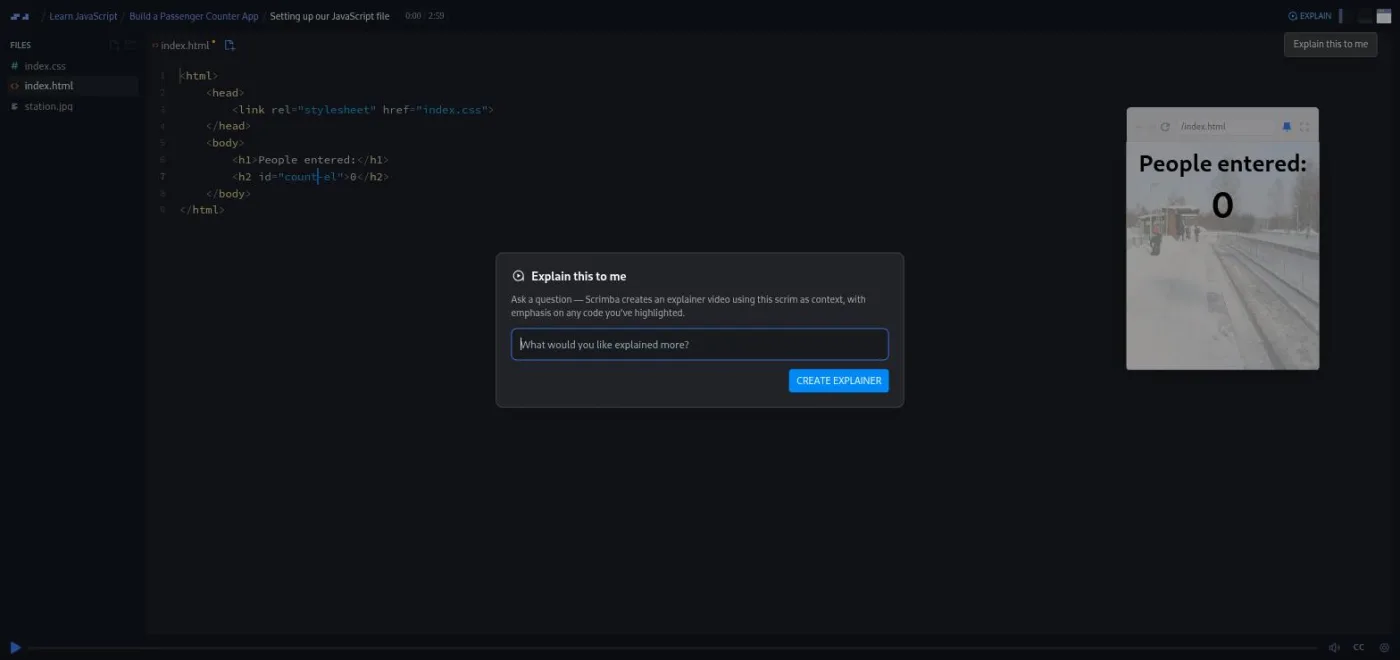
Your explainers from a lesson sit in that scrim's sidebar under Explainers, marked with the time you asked. Each costs one explainer from the same allowance.
Scrimba's docs frame it as a way past a confusing moment in a lesson, not a way to teach a whole topic. The narrower the question, the better the grounding, because what gets sent is the lesson's own files, the code you highlighted, the transcript and the point where you paused. I pressed it once, on the chunking lesson in Learn RAG, and stepped through the result slide by slide in the inside-courses post; the tested review covers the web, Chrome and Claude Code routes, and wiring Explain into Claude Code over MCP has its own walkthrough with a real pull request.
If you want to build something like this rather than use it, Scrimba's AI catalogue covers the parts. AI Engineering is calling models from code. RAG is grounding answers in your own documents, roughly what the scrim snapshot does. AI Agents and MCP cover the protocol behind the Claude Code route. The AI Engineer Path strings them together.
Try Explain on a free account first
A free Scrimba account includes 10 explainers, the free course modules and the community Discord. No card needed to see whether the format suits you.
FAQ
An AI tool that turns a question, a document, a web page or your own code into a short narrated video lesson made of slides. It runs on scrimba.com/explain, inside Scrimba lessons, in a Chrome extension, in ChatGPT and Codex, and from coding agents over MCP.
Source: Scrimba Help Centre
Partly. Watching any explainer is free and unlimited. Creating them is capped: 10 explainers for the life of a free account, 100 a month on Pro, and 1 unlisted explainer without an account.
Source: Scrimba Help Centre
Yes. Each follow-up and each Go deeper click creates a new explainer and draws on the same allowance. Redoing slides, regenerating narration and exporting do not.
Source: Scrimba Help Centre
Not until you claim them. The connected tool writes the lesson, so drafts are free however many you make. The allowance applies when you open the link, sign in and claim the explainer as yours.
Source: Scrimba Help Centre
It depends on the route. Web hub explainers default to Public (switch the picker before you submit). Chrome extension explainers are Public and listed in the community. ChatGPT explainers are Unlisted. Claude Code explainers start as private drafts. Scrim explainers are never more public than the scrim.
Source: Scrimba Help Centre
Yes. Right-click an explainer you own and choose Export video. You get an MP4 at 2560x1440 and 60 fps plus a .vtt captions file, emailed when the render finishes. The explainer must be Public or Unlisted; private explainers cannot be exported.
Source: Scrimba Help Centre
Scrimba lists 33 languages, including Arabic, Chinese, French, German, Hindi, Japanese, Portuguese and Spanish. Explain narrates with a native voice where it has one; if it does not, the slides are still written in the language you asked for and the narration falls back to English. Code and file names stay as written.
Source: Scrimba Help Centre
Only on scrims you can open, and only when signed in. It does not appear on scrims locked for your plan, and the one signed-out explainer does not apply to scrims.
Source: Scrimba Help Centre
Related: the Scrimba Explain review for the tested verdict, how to prompt Explain for different teaching styles, how scrims work, and Pro vs Free for the rest of the plan differences.