Advanced JavaScript
Tom Chant's Pro follow-up to Learn JavaScript runs about 9.8 hours across nine modules, from the ternary operator to generators, with no single project: you work concept by concept in the console through 94 challenges. It closes the gap between writing JavaScript and understanding it, if you already have the basics down.
Reviewed inside the course with a Pro account, September 2026: 65 of the 156 scrims opened, at least a third of every module, transcripts read in full.
Quick answer
Take it if you can already write JavaScript but could not explain the event loop, this, prototypes, or why a generator uses yield. Bob Ziroll guests for the API theory in module four, and Tom says in the first minute that "the concepts are broken down into bite sized chunks and we'll be working a lot in the console" rather than one big project. The catch: only the first five scrims are free.
Advanced JavaScript
ProTaught by Tom Chant (opens in a new tab)
Nine console-first modules of intermediate-to-advanced vanilla JavaScript: async and APIs, objects and classes, Map and Set, closures, currying, debouncing, and generators, with 94 challenges.
View on Scrimba (opens in a new tab)
Is it worth your time?
Yes, if you are in the specific spot it targets. Tom describes it in the intro as "designed to take you from the intermediate level where you probably are right now to an advanced level." That is an accurate description of who gets the most from it: someone who has finished Learn JavaScript or equivalent, can build a small app, and keeps hitting concepts they copy without understanding. The course puts each of those concepts in a short scrim, has you write it, and moves on.
Two things surprised me. The first is how much of the course is challenge. The table of contents shows a challenge icon on 80 of the 156 scrims, and the module headers count 94 challenges. Some are two-minute refactors. Most modules end in a "super challenge" that Tom says will need "multiple concepts from the lessons to solve a given problem." Those run from a page of spec (Game Characters) to an eight-minute walkthrough (the recursion finale).
The second is that the intermediate label fits modules one to three and five. Four, seven, and nine are advanced, and Tom warns you in each intro. He says as much at the start of the custom objects module: "some of this stuff is hard. When I first came across it, it made me wanna go and learn Python instead or just become a hermit." Plan for those three modules to take longer than the rest.
This is vanilla JavaScript in the console with occasional DOM work: no frameworks, no TypeScript, no build tools, and no project you can put in a portfolio. That is the point of the course, and Tom says so in the intro. If what you want is another app to build, look elsewhere.
What you'll learn
Course curriculum
9 modules · 155 lessons
- Advanced Foundations
- Methods & Loops
- Function Expressions & Parameters
- Asynchronous JavaScript & APIs
- Logical Operators & Coalescing
- Working with Objects
- Creating Custom Objects
- Collections & Symbols
- Advanced Function Patterns & Generators
Lesson counts are the scrims I counted in each expanded module in September 2026: 156 total (155, plus a one-minute certificate scrim after module nine). I re-expanded the table of contents for this review and the counts held. Scrimba's numbers measure different things. The "0/14" style figure in each module header is the number of challenges in that module: 94 across the course, matching the 80 of 156 scrims that carry a challenge icon (14 scrims carry two). The course listing and its structured data say 207 lessons, which counts the clips inside scrims rather than the scrims you click. When other pages on this site quote 207, that is Scrimba's number.
Inside the course, module by module
1. Advanced Foundations (86 min, 22 scrims)
Tom is upfront that this module has no theme: "These are just some of the building blocks you need," as he puts it in the module intro. The building blocks are the ternary operator (a one-line if/else), switch statements, object destructuring, timers, the event loop, import and export, two built-in constructors, and hoisting. The module closes with the Stock Ticker super challenge, its solution as a separate scrim, and an outro.
The first five scrims, through the Ternary Operator Challenge, are marked SAMPLE and free to anyone. The ternary challenge is a fair preview of the whole course: a number-guessing game with an if/else that you refactor into a ternary. A second challenge pasted into the same file then asks for too-high, too-low, and exactly-right. Tom ends it with the advice I would give too: "Is it difficult to read? If it is then refactor your code because complex ternaries really can be very hard to decipher."
The scrim that justifies the module is The Event Loop, at nine and a half minutes. It opens with a question: how long does a setTimeout with a 5,000 millisecond delay wait? Tom answers it by walking a diagram of the call stack, the browser's web APIs, the task queue, and the loop that moves finished tasks back onto the stack. Tom then proves the point with performance.now() and a million-iteration loop. The answer, in his words, is "a minimum of five thousand milliseconds, but it could be more depending what's in the task queue."
Hoisting gets the same treatment. The scrim starts as a thinking challenge (predict the console output before you press save), then explains why a let throws before it is initialized while a function declaration does not. Tom's name for the gap is the temporal dead zone, "a semi zombie like state like those first few minutes of an early morning where you know who you are but you can't quite function." The Stock Ticker super challenge closes the module: a fake stock API, a price that updates every 1.5 seconds, and a triangle that turns green, red, or gray depending on the direction. You write code in two files, and the list of concepts Tom expects you to use is hidden on the next slide so you can attempt it blind.
2. Methods & Loops (101 min, 22 scrims)
The longest module by runtime, and the one that turns you into someone who reaches for the right array method without thinking. Tom's frame in the intro is "kind of like a station on a production line that does something to each product." The scrims go through for...of and for...in, then forEach, includes, map, join, filter, and reduce, each with a short challenge. A round-up scrim covers every, some, find, findIndex, indexOf, and at in five minutes with no challenge attached, which is the right weighting.
The scrim to watch twice is .map() vs .forEach(). Tom swaps a working map for a forEach, watches it break, and makes you fix it. The lesson is that forEach returns undefined, so you cannot chain .join() onto it. The rule he lands on is worth memorizing: "If you use the map method but you don't make use of the array it returns, that is what's called an anti pattern." The reduce scrim uses a month of UK rainfall, four weekly totals that sum to 152 millimeters, and Tom's subtitle for the method is "give me just one thing."
Two scrims on regular expressions (patterns for matching text) close the teaching. Tom is realistic about them in the module intro. The plan is to "look more at how you use regex rather than how you actually create your own as there are so many examples out there in the public domain." He adds that AI is good enough at writing regex that you do not need to worry about it too much. What you do learn is the g and i flags, the .test() method, and why replaceAll throws without the global flag. The Contact Search super challenge then uses all of it: a search box that matches full or partial names against an array of contacts and renders a card for each hit. Tom's solution combines import/export, the RegExp constructor, filter, forEach, and destructuring, and he tells you to "expect to do some figuring out and some searching."
3. Function Expressions & Parameters (50 min, 14 scrims)
The shortest teaching module, and half of its scrims are challenges. Tom's intro line on arrow functions is representative of his tone: the syntax "basically involves making functions look like arrows so they confuse more people. But actually, they're pretty cool and you're gonna learn to love them." The Arrow Functions scrim then spends five minutes on exactly when you can drop the brackets (one parameter only) and the curly braces (one line only), followed by three challenges in a row.
The Rest Parameter scrim solves a real problem: a setPermissionLevel function hard-coded for three usernames that silently ignores a fourth. The fix is ...names, which collects the leftover arguments into an array you can iterate. Callback Functions is short but important, because it names something you have been doing since forEach: passing a function to another function to be called "when that function deems necessary." It is the setup for the async module.
The Real Estate super challenge asks for property cards from an array of listings, with the room sizes summed for a total area. If no array is passed, a placeholder property renders instead, which is where default parameters come in. Tom lists the tools he expects: import/export, map, join, destructuring, reduce, and default parameters. He also sets two rules: "you're not allowed to copy and paste code, and you're not allowed to just skip ahead to the answer."
4. Asynchronous JavaScript & APIs (84 min, 24 scrims)
The module most people buy the course for, and the only one with two teachers. Tom frames it in the intro as the step toward the back end: "Learning to work with APIs takes you in the direction of becoming a full stack developer." The first four scrims are Bob Ziroll's theory. What is an API? runs eight minutes on Bob's definition: "any tool that will help connect your program with someone else's program." The restaurant analogy that goes with it casts the waiter as the API between your table and the kitchen. Clients & Servers, Requests & Responses, and a JSON review follow.
Then Tom takes over with code. You fetch a random dog image twice, first with .then() chains and then with async/await, and learn along the way why top-level await only works with type="module". The Promises scrim explains the three states (pending, fulfilled, rejected) with a job interview analogy Tom credits to Bob. "We'll let you know within a week" is fulfilled whether or not you got the job, and rejected only if they never call. Handling Rejected Promises adds .catch(), .finally(), and a try/catch challenge. The dog API is reached through a Scrimba proxy so the course cannot break if the real endpoint changes, which is a small sign of care.
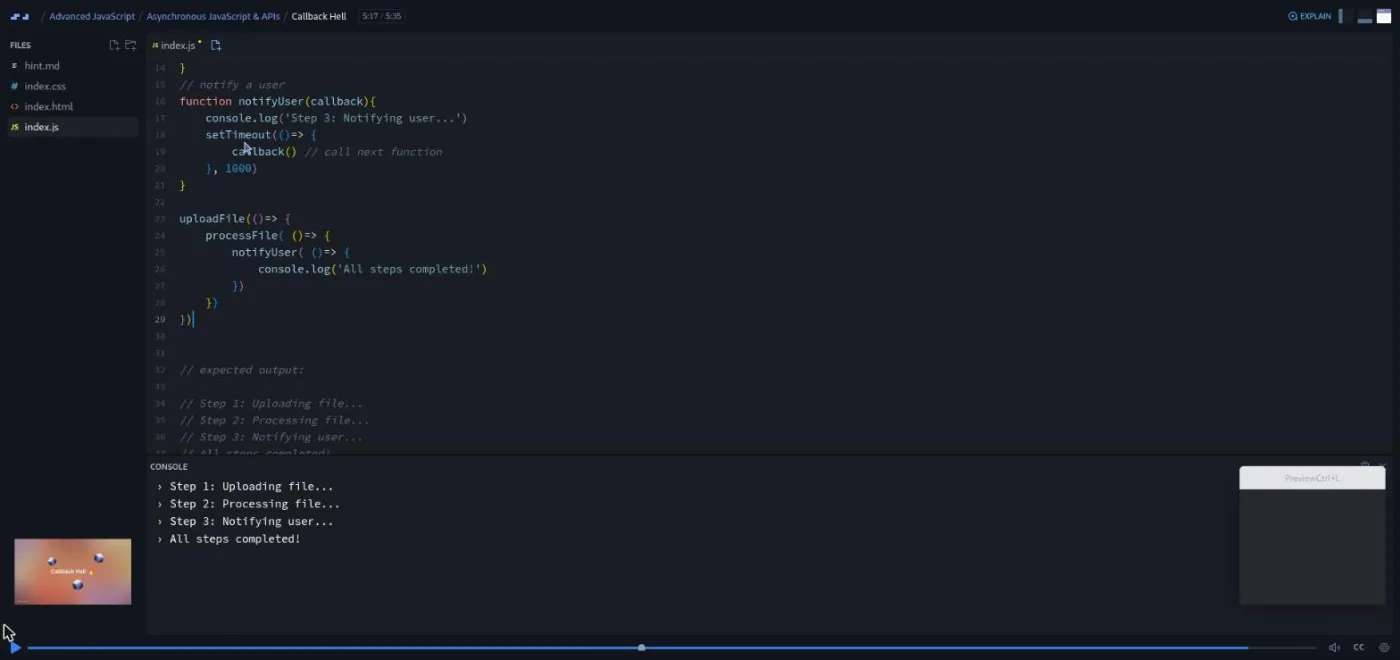
The Callback Hell scrim is the best-taught lesson I opened. You get three functions that fake an upload, a process, and a notify step with setTimeout, and the challenge is to chain them with callbacks. Tom warns you that "you are going to come up against the gotcha here," and the gotcha is real: pass processFile(notifyUser) directly and it runs immediately, so the steps print out of order. A hint.md file in the project explains the fix. Then he does something I like: "Now normally, I tell you to keep working until a challenge is completed. In this case, I will say don't spend too long on it if you get really stuck. This is the old way."
The second half builds your own promises. The Promise Constructor scrim makes one that resolves 50 percent of the time using Math.random(). Promise.all then runs three of them and fails if any one rejects. The Async Image Load super challenge applies the pattern to three image URLs with a half-second fake delay. Tom calls that one "not too big," and it is not: the point is that nothing renders until every image has loaded. There is also a two-minute "Want to become a Scrimbassador?" scrim about Scrimba's referral program, which I would skip.
5. Logical Operators & Coalescing (29 min, 8 scrims)
Short and sharp. Tom's definition of short-circuiting, from the intro, is the one to remember: "behavior where evaluation stops as soon as the outcome is determined." You use || to supply defaults, && to guard property access, then meet the two operators that fix their weaknesses.
The Nullish Coalescing scrim is built around a bank balance app that says "currently not available" when the balance is zero, because 0 is falsy and || cannot tell it from a missing value. The ?? operator only falls through on null or undefined, and the challenge is a one-character swap that Tom gives you "precisely two seconds" to do. Optional Chaining (?.) then makes a deeply nested library object safe to read when a property is missing. One quirk worth knowing: Scrimba's editor underlines ?. in red as if it were an error. Tom says on record that the code is fine and that "the Scrimba editor at the present time doesn't like optional chaining."
The Library Software super challenge is a refactor rather than a build. You take a function full of nested ifs that pushes books to a collection and rewrite it with short-circuiting, ??, and ?., ending with less code than you started with. Tom's summary applies to the whole module: "not about writing loads of code this time... but there was quite a lot of thinking involved."
6. Working with Objects (54 min, 14 scrims)
Objects are split across two modules, and this first one is about using them rather than manufacturing them. The intro reminds you that "arrays are objects in JavaScript," which is why arrays keep turning up. There is no super challenge here; Tom says it is because "we have got quite a lot more to learn about objects in the following section."
The first surprise is Objects and Inbuilt Methods, which explains why books.forEach fails and why Object.keys(books) works: some methods live on the instance, and static methods live on the constructor. Assignment by Value/Reference is the scrim I would send to anyone who has ever had an array change behind their back. Tom copies a string (fine), then copies an array with = and shows both variables pointing at the same memory, then defines shallow versus deep copies. The spread operator and Object.assign cover the shallow case, and structuredClone gives you a real deep clone in one call.
The module ends on this, which Tom warns about in the intro in a way that matches my own experience: "In a way, it's so simple, yet it's also so confusing. It often takes students a while to get their head around it." Binding "this" shows the classic failure, storing an object's method in a variable and watching this become undefined, and fixes it with .bind(product). A challenge follows.
7. Creating Custom Objects (77 min, 21 scrims)
The module that earns the word "advanced" in the title. The Creating Objects Explainer sets up the whole arc with an image: a machine that takes a template and some data and "can just keep producing objects all day long." You then build the same gamer object three ways. Factory Functions is a plain function that returns an object (easy to read, no inheritance). Constructor Functions adds the capital letter, the new keyword, and this. Constructor Functions to Classes shows the class syntax, which Tom calls "arguably just syntactic sugar for constructor functions." Each way gets a challenge.
The middle of the module is inheritance, meaning one object taking properties and methods from another. Tom pauses first for .apply() and .call(), which let you set what this means inside a function, because the constructor-function version of inheritance needs them. The Inheritance Explainer is five minutes of theory on the prototype chain. Every object has a prototype, and JavaScript looks up the chain until it finds the property. The top of the chain is what Tom calls "somewhat unhelpfully" the object object. Polymorphism gets a plain definition too: a child can override a method it inherits. Inheritance with classes then does the same job with extends and super, and Tom's verdict is that "that syntax is so much nicer than trying to do this with a constructor function."
Static methods, private fields, and getters and setters finish the teaching. The Private Fields scrim locks a #destination property so it cannot be changed from outside the class, and notes that Scrimba's console hides private fields where Chrome's would show them. Tom also explains the old underscore convention and why the # syntax is better: it enforces the rule instead of just signaling it.
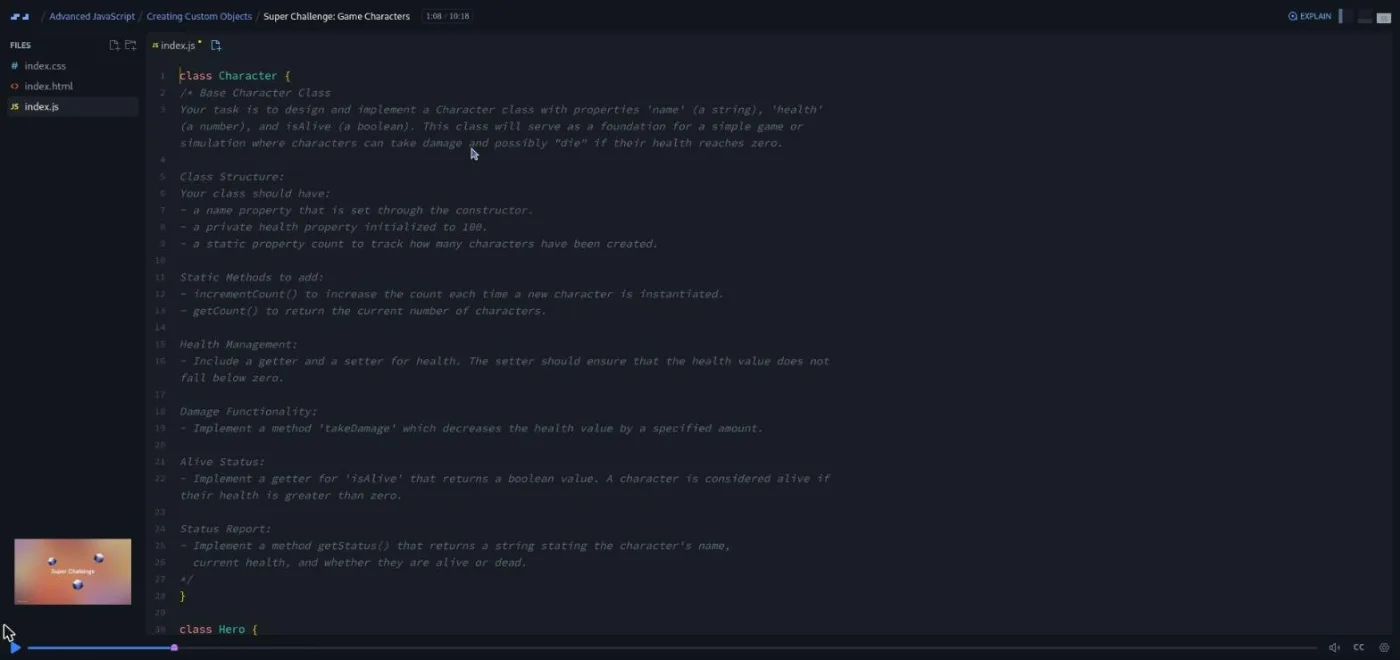
The Game Characters super challenge is the one I would use to decide whether you have understood the module. The file gives you three empty classes and a comment spec. Character needs a private #health initialized to 100, a static count, incrementCount() and getCount(), a health getter and a setter that floors at zero, takeDamage(), an isAlive getter, and getStatus(). Hero then adds an inventory and Villain a threat. Below the classes are test calls with the expected console output as comments, so you know when you are done. Tom's walkthrough has a few nice touches, like using Math.max(0, value) in the setter instead of an if. He also reminds you that this.health -= amount goes through the setter rather than touching #health directly.
8. Collections & Symbols (21 min, 8 scrims)
Three concepts, each with a challenge, and no super challenge. Tom's framing is that these "tend to get ignored which is a shame because they're actually really cool features of the language." He also flags the naming trap up front: the Map object "has got nothing to do with the array map method which has a lowercase m. And no, I have absolutely no idea why the JavaScript gods are so in love with the word map."
Symbols are unique identifiers you can use as object keys. The use case Tom picks is adding a hidden property to an object your code does not own, so for...in, Object.keys, and JSON.stringify all skip it. The Map scrim is the longest at seven minutes: a race-finishers app where each key is an athlete object rather than a string, and you learn set, get, has, delete, and size. The part I did not know is at the end: plain objects reorder integer-like string keys to the front, while a Map keeps insertion order no matter what. Set closes the module as an array-like collection where every value is unique.
9. Advanced Function Patterns & Generators (78 min, 22 scrims)
The intro to this module has the line that best sums up Tom's teaching voice: "When I say advanced, I really do mean advanced. We're getting into the kind of stuff here where you can stick your nose up at other junior developers." The topics are closures, IIFEs, recursion, currying, throttling and debouncing, and generators, and two super challenges close the course.
Closures get two scrims and a challenge. A closure is a function that remembers the variables of the function that created it, even after that outer function has finished running. Tom builds one from an outerFunction that returns an innerFunction. The definition he lands on is worth writing down: "a closure allows a function to remember and continue to access variables from the lexical scope of its outer function even after that function has executed." IIFEs (functions that run the moment they are defined) get a single scrim with a use case, reading a saved theme preference once when the page loads, and a challenge that makes one async.
Recursion is four scrims, and Tom warns that "recursion gets harder from here on in." The basic example is a countdown that calls itself with count - 1 until a base case stops it. Recursion and Unwinding is two minutes of pure diagram: sumToN(5) stacking five calls and then unwinding them to 15. Currying turns a three-parameter calculateVolume into three nested one-parameter functions, and the challenge is to rewrite it as arrow functions. The Throttling and Debouncing overview gives the two definitions you need: throttling runs a function at most once per interval, debouncing waits until the events have stopped. Generators are functions you can pause with yield and resume with .next(), taught with a slide deck that advances one slide per click.
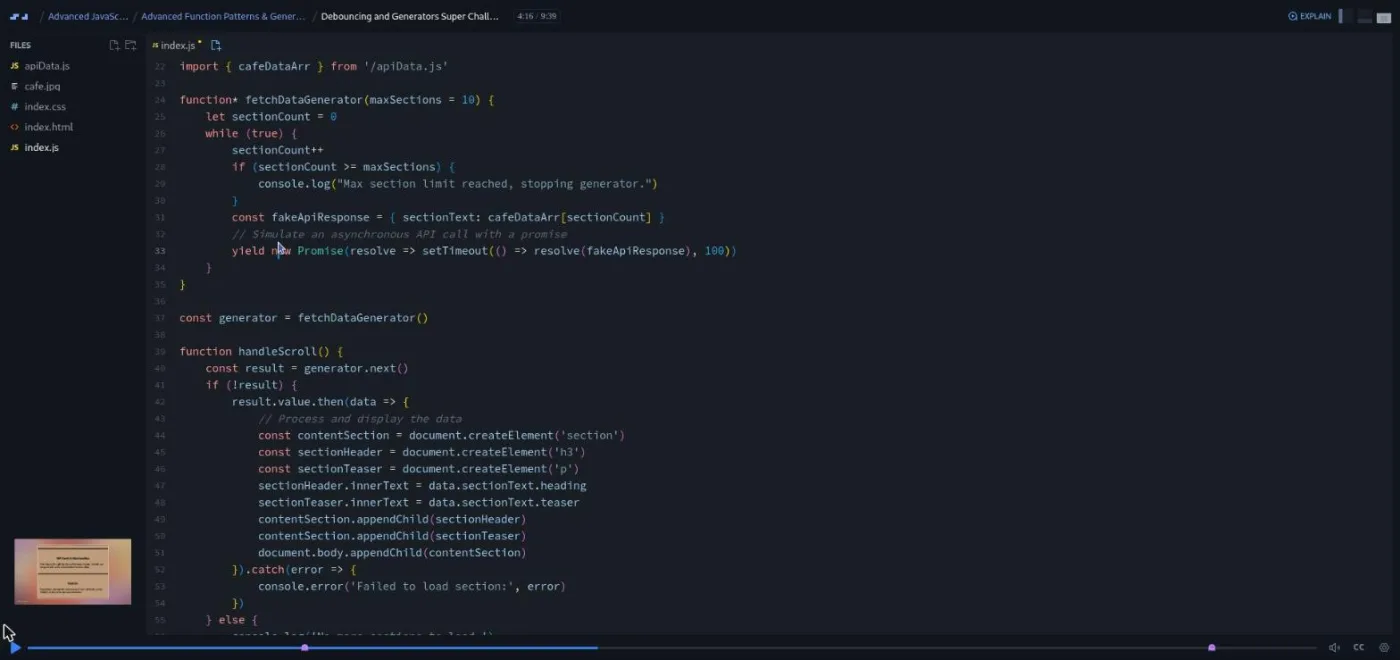
The Debouncing and Generators super challenge is a debug challenge rather than a build: a cafe site that should load ten content sections from apiData.js as you scroll, with the loading debounced, and does not. You have to fix it. Tom's walkthrough works through several fixes, and his commentary on one of them is a good lesson in itself. The generator's .next() returns "an object with a promise in it and a boolean in it," so if (!result) never fires and you have to check result.done. Then there is an off-by-one where the counter increments before the lookup, which he admits "I didn't notice at first either."
The Super Challenge Recursion is the hardest single scrim in the course, at eight and a half minutes. You write a function that walks a nested company object and returns every employee with a given ID. The stretch goal is to do it without a global results array, and Tom shows why that matters: with a global array, a second call returns the first call's results too. The fix uses the spread operator to merge each recursive call's array into the current one. A hint.md file covers both versions, and Tom says using it "is absolutely fine."
What a lesson feels like
A typical scrim is two to six minutes. Most modules open with a one-minute intro over a title slide, then go straight into a file in the editor. Tom types the code, hits save, and reads the console, which sits under the editor rather than in a separate preview pane, because most of the course has no UI to look at. A handful of lessons (the throttling and debouncing ones, the super challenges with cards or a cafe page) do have an HTML page in the preview.
Challenges are written as comments in the file. The scrim pauses on a marker in the scrubber, you write the code in the same editor, and you press play to see Tom's solution. Super challenges get a longer brief and, in the first three modules, a separate solution scrim so you can attempt the problem without the answer sitting at the end of the same recording. Several also hide the list of expected concepts on the next slide, so you can try blind and check afterwards. Some challenges come with a hint.md file in the project.
Every scrim has captions, a timestamped transcript panel under the settings menu, and subtitles in ten languages. The transcript is what I used to read the course and to pick the moments in the screenshots above. Tom's voice is dry British humor over a fairly fast pace. He speed-types repetitive code ("I'll just speed type the next two functions"), warns you before the hard parts, and states difficulty plainly, which reads as reassuring rather than off-putting. He is also good at saying when not to persist, as in the callback hell scrim.
One quirk I noticed: a few scrims (Taking APIs to the Next Level, API requests: the body, Inheritance with classes Challenge, Closures Part 2, IIFEs) show a duration of 0:00 in the table of contents. They are real lessons. IIFEs, for example, is three and a half minutes when you open it. The module durations Scrimba prints appear not to include them, so the true runtime is slightly over 9.8 hours.
Free or Pro: exactly what is gated
This is a Pro course. The free part is the first five scrims of module one, marked SAMPLE in the table of contents: the course intro, the module intro, two scrims on the ternary operator, and the Ternary Operator Challenge. That is about 15 minutes, and it is enough to judge the teaching style but not the level. Everything from Switch Statements onward is behind the subscription.
Unlike Scrimba's free courses, there are no separately gated Solo Projects; the super challenges are ordinary scrims inside the modules. The certificate of completion (with a one-minute "How to Utilize Your Certificate" scrim) requires Pro, as do the two career paths that include this course and the Pro-only channels on Scrimba's Discord. The Discord itself is not a Pro perk: Scrimba's pricing page lists basic Discord access as free, and Tom's course outro points everyone to the "Today I Did" channel there. See current plans (opens in a new tab) for what Pro costs in your region.
How long it takes
The 9.8 hours is video runtime. With 94 challenges, several of them ten-minute debugging or class-design problems, budget two to three times that: 20 to 30 hours. At an hour a day that is four to six weeks, and the split is uneven. Modules one to three should move quickly because most of the material is consolidation. Modules four, seven, and nine each deserve a full week, and if generators and currying are new to you, plan to rewatch. Tom says outright that "unless you've studied some advanced JavaScript concepts before, you're going to find some of this course difficult," and I would take him at his word.
Who it's for, and who should skip it
It fits developers who finished Learn JavaScript (or equivalent) and want to understand the language rather than pattern-match it. By the end you should be able to read a promise chain, explain why a let throws before its line, write a class with private fields, and pick map or forEach on purpose. It is also a sensible stop before or alongside Learn React, since the array methods, spread, destructuring, and async sections are exactly what React code assumes. If you are interviewing, the closures, this, prototype, and event loop scrims cover the questions that come up most; pair it with JavaScript Interview Challenges.
Skip it if you are a complete beginner (do Learn JavaScript first), if you want a project for your portfolio (there is none here), or if you are only missing one or two concepts. In that last case the shorter Tricky Parts of JavaScript is a better fit. Also note Tom's own warning that a few scrims overlap with the Frontend Developer Path, "likely in the advanced foundation section, the asynchronous JavaScript section, and the creating custom objects section." He suggests rewatching them anyway.
Try the free sample scrims of Advanced JavaScript (opens in a new tab)Prerequisites
Comfortable JavaScript: variables, functions, arrays, objects, and basic DOM work. The course does not reteach them, and the first module already assumes you can read an if/else and refactor it. HTML and CSS matter only in the handful of lessons with a page in the preview. You do not need to know promises, classes, or any of the module titles going in. Tom says "we'll be taking it from the very basics" for each concept, and that held up in the scrims I read: every hard idea starts with a small, contrived example before the real one.
Where it fits
Advanced JavaScript is listed on Scrimba's course page under both the Frontend Developer Path and the Fullstack Developer Path. Within the JavaScript catalog it is the depth course: Learn JavaScript gets you building, this one explains what you built, and Learn React or Learn Node.js is the usual next step. The async module in particular is the best preparation in the catalog for Learn Express.js, where you are on the other side of the request.
Strengths and limits
What it does well: it is challenge-first (80 of 156 scrims), every module has a clear concept order, and the super challenges are the closest thing to real problems in the JavaScript catalog. Tom names what is hard up front, and the transcript panel makes the theory-heavy scrims easy to revisit.
Where it is limited: there is no project to show for it, and the intermediate label fits modules one to three and five but not four, seven, and nine. The console-only format means some lessons are visually dull, and a referral-program scrim sits in the middle of the async module. A few table-of-contents entries display 0:00, so the real runtime is slightly longer than advertised.
Related courses and comparisons
- All JavaScript courses, the full category hub
- Learn JavaScript, the free prerequisite
- The Tricky Parts of JavaScript, a shorter top-up on gotchas
- JavaScript Interview Challenges, to drill what you learn
- Learn React, the usual next step on the frontend track
- Learn Node.js and Learn Express.js, if you want to use the async module on a server
- Scrimba vs freeCodeCamp, if you are choosing a platform
No. It is a Pro course. The first five scrims of module one (through the Ternary Operator Challenge) are marked SAMPLE and free; everything after that needs a subscription. The earlier Learn JavaScript course is free.
Effectively yes. Tom says the course is designed to take you from intermediate to advanced, and the first module assumes you can already read and refactor conditionals, write functions, and work with arrays and objects.
Tom Chant teaches all nine modules. Bob Ziroll guests for the API theory scrims at the start of module four (What is an API?, Clients & Servers, Requests & Responses, and the JSON review).
Nothing you would put in a portfolio. Tom says in the intro that the course does not build one big project and works mostly in the console. The closest things to builds are the super challenges: a stock ticker, a contact search, a real estate card list, an async image loader, a library-software refactor, game character classes, a debounced infinite-scroll cafe page, and a recursive employee search.
Scrimba's module headers add up to 94, and that matches the challenge icons in the table of contents. 80 of the 156 scrims carry at least one; 14 scrims contain two. Each module except Working with Objects and Collections & Symbols ends in a super challenge.
Modules one to three are intermediate consolidation. Modules four (async), seven (classes, inheritance, private fields), and nine (closures, recursion, currying, debouncing, generators) are advanced, and Tom warns you about that in the intros.
Yes. Every scrim has captions, a timestamped transcript panel under the settings menu, and subtitles in ten languages.
No. Everything runs in Scrimba's browser editor. There are no npm packages or build tools in the course; it is vanilla JavaScript with the occasional HTML page in the preview pane. The dog API in module four is reached through a Scrimba proxy so the lessons keep working if the real endpoint changes.
9.8 hours of video, but with 94 challenges plan for 20 to 30 hours, or four to six weeks at an hour a day. The second half takes longer than the first.
A little. Tom says a few scrims appear in both, most likely in the Advanced Foundations, Asynchronous JavaScript, and Creating Custom Objects modules, and suggests rewatching them as a refresher.