Learn RAG
Learn RAG is Scrimba's Pro course on Retrieval-Augmented Generation: fetching text from your data and feeding it to a language model before it answers. Guil Hernandez teaches it in about 94 minutes and 22 scrims, from embeddings to a movie-recommendation chatbot on Supabase, the fastest route to retrieval if you already call the OpenAI API from JavaScript.
Reviewed inside the course with a Pro account, September 2026: every scrim's transcript read and its code opened.
This page is part of our Scrimba AI courses catalog. Scrimba lists it under the AI Engineer Path.
Quick answer
Take it if you already call the OpenAI chat API from JavaScript: it is the most direct route to the retrieval half of that job. The course is Pro-only, in one flat list, with three AI-checked challenges and a Pro solo project called PopChoice at the end. If you have never sent a chat completion from code, start with Intro to AI Engineering.
Learn RAG
ProTaught by Guil Hernandez (opens in a new tab)
Embeddings, a Supabase vector store, similarity search, chunking with LangChain, and a chatbot that answers from your own data.
View on Scrimba (opens in a new tab)The course has no chapter title cards; every scrim opens straight into a slide or the editor. The two slides below are the closest thing to course artwork.
Is it worth your time?
Yes, if you fit the prerequisites, and they are real. Guil says it in the intro: he assumes you know JavaScript and asynchronous code and have already used the OpenAI chat completions API. By the fifth scrim you are writing an async callback inside map and wrapping it in Promise.all. Nobody explains what a promise is.
What I liked is how little theory sits between you and a working pipeline. One six-minute slide lesson covers embeddings; after that, everything is code you run in the scrim. When cosine similarity comes up (the math that scores how close two embeddings are), Guil shows the formula, says "I don't know about you, but this makes my head spin," and pastes a SQL function from the Supabase docs instead. That is the right call for a 94-minute course.
The code is old. The scrims pin [email protected] and [email protected], and the models are text-embedding-ada-002 and gpt-4. A 44-second scrim after "Vector databases" has a Scrimba staffer "popping in from the future" because the Supabase package "has been superseded and deprecated." The fix is a right-click and "upgrade package," and he warns you will need to do that in each scrim. The RAG pattern itself is unchanged.
What you'll learn
Scrimba presents this course as one flat list of 22 scrims with no modules. The groupings below are mine, made from the titles and transcripts; durations are the sum of the scrims in each group.
Course curriculum
5 modules · 22 lessons
- Embeddings (intro to first challenge)
- Vector database with Supabase
- Semantic search and chat completions
- Chunking, error handling, and the ReelRecs chatbot
- Solo project and wrap-up
I counted 22 scrims plus a certificate entry in September 2026. Scrimba's header says 94 minutes and its structured data says 23 lessons; the listed durations add up to about 98 minutes. When other pages on this site say 1.6 hours or 23 lessons, that is Scrimba's number.
Inside the course, section by section
1. Embeddings (21 min, 5 scrims)
The intro is a three-minute video. It opens with Spotify in 2014 turning songs and listening history into vectors, then promises "an AI tool that replies to you based on custom data stored with vector embeddings."
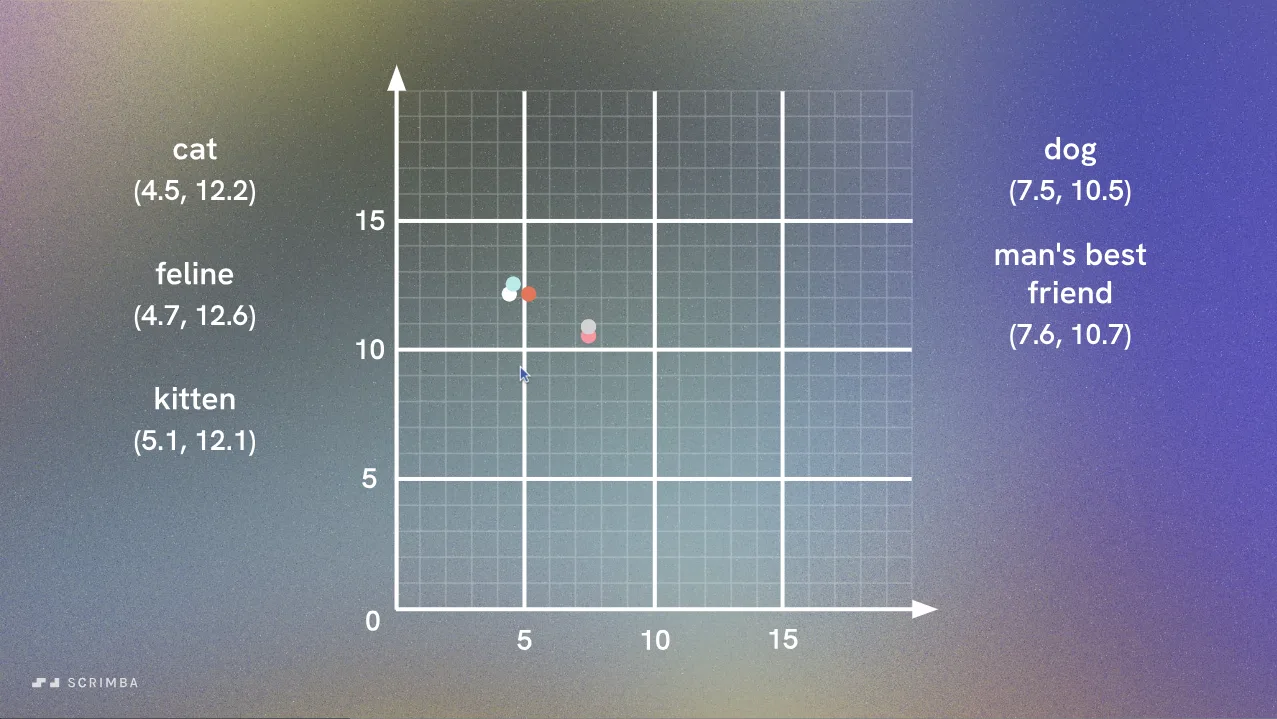
"What are embeddings?" is slides, and it is good. Guil defines an embedding as "placing one object into a different space": a piece of text becomes a long list of numbers, and texts with similar meaning get similar numbers. He spends most of the six minutes on the 2D graph: cat at (4.5, 12.2), feline at (4.7, 12.6), dog off in its own region, "building" far from all of them.
"Set up environment variables" is 94 seconds of housekeeping. You see three ways to open Scrimba's environment-variable modal, then add OPENAI_API_KEY so config.js can read it with process.env. The client is created with dangerouslyAllowBrowser: true, which tells you the code runs in the scrim's browser sandbox, not on a server.
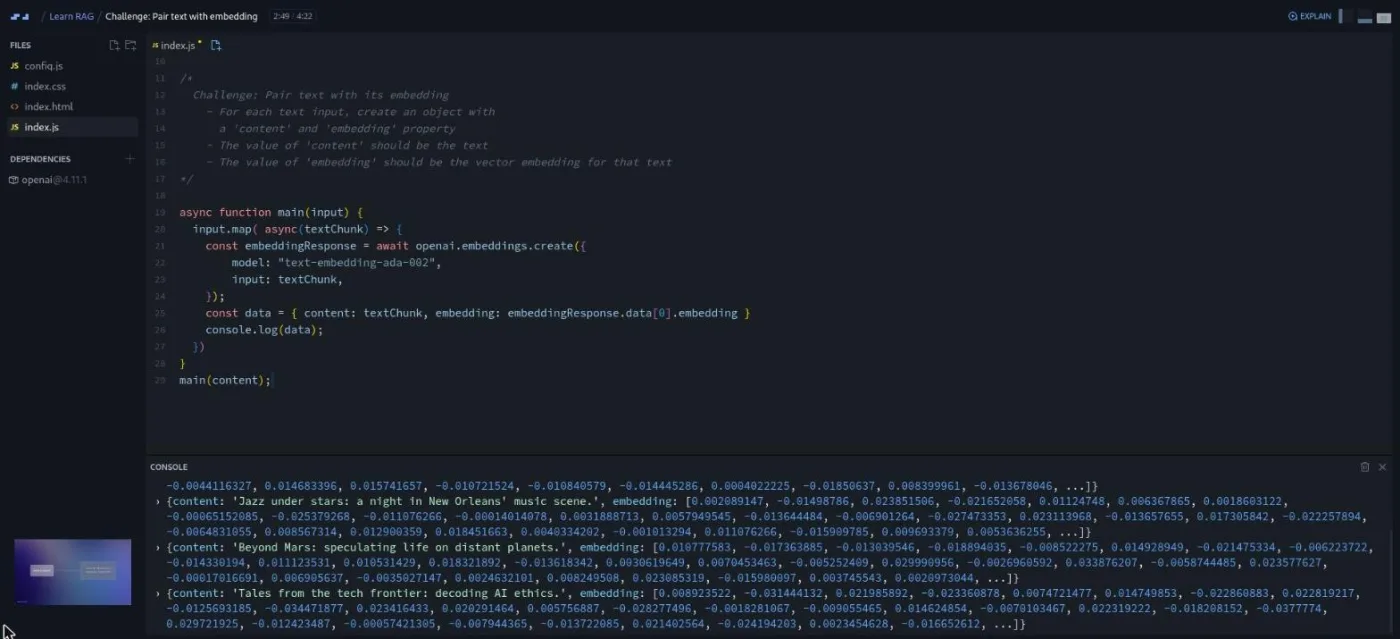
"Create an embedding" is the first real code scrim. Guil pastes the Node example from OpenAI's docs, sends "hello world" to openai.embeddings.create(), and reads the response: four tokens used and an array of 1,536 floating-point numbers. Then he swaps the string for five podcast descriptions and gets five vectors back in one request.
The first challenge follows. It is the first of three scrims with Scrimba's "Challenge with Instant Feedback" icon, which means an AI checks your solution against the brief. The brief: for each text input, build an object with content and embedding properties. Guil's solution is map with an async callback inside Promise.all, and "if your solution looked a bit different than mine, that's totally okay."
2. Vector database with Supabase (13 min, 4 scrims)
"Vector databases" is a short slide explainer. Traditional databases match exact values; a vector store finds rows whose embeddings are close to yours. Guil name-checks Chroma, Pinecone, and Supabase, then picks Supabase, a hosted Postgres service that gains vector search through the pgvector extension. The 44-second dependency warning comes next.
"Set up your vector database" is a walkthrough of supabase.com. You sign in with GitHub, create a free project, and enable the vector extension. Then you copy the project URL and API key into two more environment variables, SUPABASE_URL and SUPABASE_API_KEY.
"Store vector embeddings" gives the database a table. The scrim ships documents.sql, six lines for the SQL editor: id bigserial primary key, content text, and embedding vector(1536). The content is ten fictional podcast descriptions "that AI models like ChatGPT have no prior knowledge of," so any correct answer later must have come from your data.
Guil inserts one row per map iteration first, to show that object keys must match column names, then refactors to a single batch insert(data). "Fingers crossed," and ten rows appear in the table editor.
3. Semantic search and chat completions (23 min, 3 scrims)
This is the core of the course. "Semantic search" is a five-minute concept scrim built on three phrases: "dogs are loyal companions," "books contain a world of knowledge," and "canines are faithful friends." You group the first and third by meaning without a shared word. That is the gap between lexical search (matching words) and semantic search (matching meaning), illustrated again with Spotify podcast search.
"Query embeddings using similarity search" is nearly ten minutes and the one I would point a skeptic at. Guil sets the query to "jamming in the big easy," embeds it, and needs a way to compare it against the table. pgvector "makes the comparison and processing of vectors easy and fast with a SQL function that you can copy right from the docs."
That function is match_documents, walked through line by line. A 1,536-dimension query vector goes in; id, content and a similarity score come out. It uses cosine distance because "that is what OpenAI recommends we use on their embeddings."
Back in JavaScript, you call it through supabase.rpc('match_documents', { query_embedding, match_threshold, match_count }), with threshold 0.50 and count 1. The jazz query returns the New Orleans podcast at roughly 85 percent similarity despite sharing no words with it.
Then the useful part. "Training puppies" returns a whale-song episode at about 75 percent, because the search "will still attempt to find the closest match based on the semantic relationships, even if contextually they're unrelated." That minute explains why the threshold exists.
"Create a conversational response using OpenAI" adds getChatCompletion. The system prompt survives to the end of the course: "an enthusiastic podcast expert" that must answer from the context and say "Sorry, I don't know the answer" rather than invent one. The user message is Context: ${text} Question: ${query}, sent to gpt-4 with temperature 0.5 and frequency penalty 0.5. "Something peaceful and relaxing" now gets a paragraph about a 30-minute silence podcast, and "training puppies" gets the refusal.
4. Chunking, error handling, and the ReelRecs chatbot (31 min, 5 scrims)
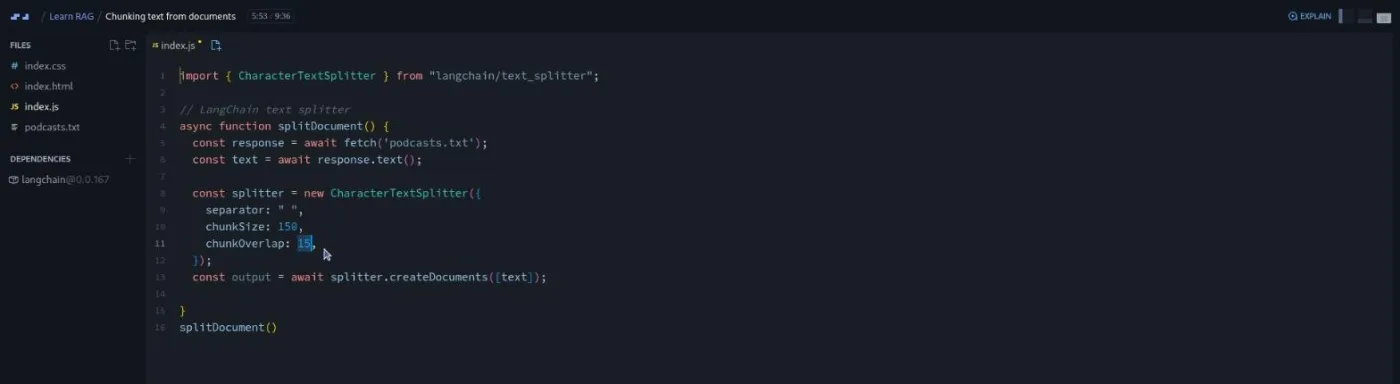
"Chunking text from documents" is the LangChain lesson and, at 9:36, the longest scrim. Chunking means cutting a long document into short pieces before embedding each one. The embedding model "accepts a maximum of 8,191 tokens," and embedding several paragraphs at once "might miss out on important nuance details."
On podcasts.txt, Guil imports CharacterTextSplitter, sets chunkSize: 150 and chunkOverlap: 15, and gets 50 chunks; with overlap at zero, 47. RecursiveCharacterTextSplitter, which tries to keep sentences together, gives 78. His rule: "if the chunked text makes sense to a human without surrounding context, it will likely make sense to the language model."
The second AI-checked challenge combines everything so far. Split movies.txt, twelve films from 2022 and 2023 with rating, synopsis, and cast; embed every chunk; insert them into Supabase. Guil's solution uses the recursive splitter at 250 and 35, creates a movies table, and writes the match_movies function in the same SQL query.
"Error handling" is three minutes of try/catch. You check response.ok on the fetch, log and rethrow from splitDocument so the caller stops, and throw on the error that Supabase returns from an insert. He proves it with a typo in the file name and reads the error chain in the console.
"Query database and manage multiple matches" is the third AI-checked challenge. After switching the RPC to match_movies and the prompt to "an enthusiastic movie expert," Guil asks "which movie can I take my child to?" and gets The Super Mario Bros. Movie. The challenge: return at least three matches and combine them into one string. His solution sets match_count to 4 and joins the content fields with a newline.
Two more queries show retrieval working. "I feel like having a good laugh" returns Glass Onion and Barbie. "The movie with that actor from Cast Away" returns Asteroid City, because the chat model already knows Tom Hanks and the database supplied the cast list.
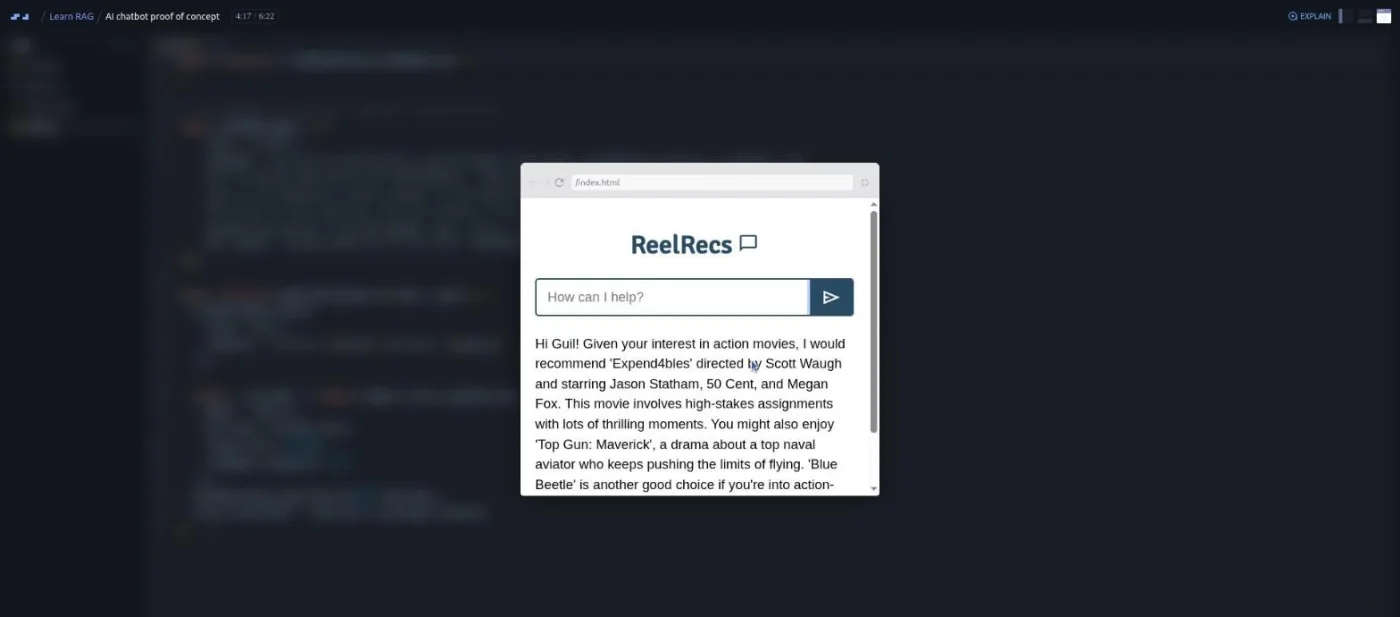
"AI chatbot proof of concept" wires the pipeline to a search form and a reply paragraph. Guil types "I like airplanes" and gets Top Gun: Maverick. Then he shows the limitation: ask a follow-up and "the AI draws a blank because it has no memory or context of previous interactions."
The fix is to push each assistant reply onto chatMessages so the history travels with every request. After that it remembers his name and his taste for action films. This memory resets on refresh; long-term memory is "another course."
5. Solo project and wrap-up (10 min, 5 scrims)
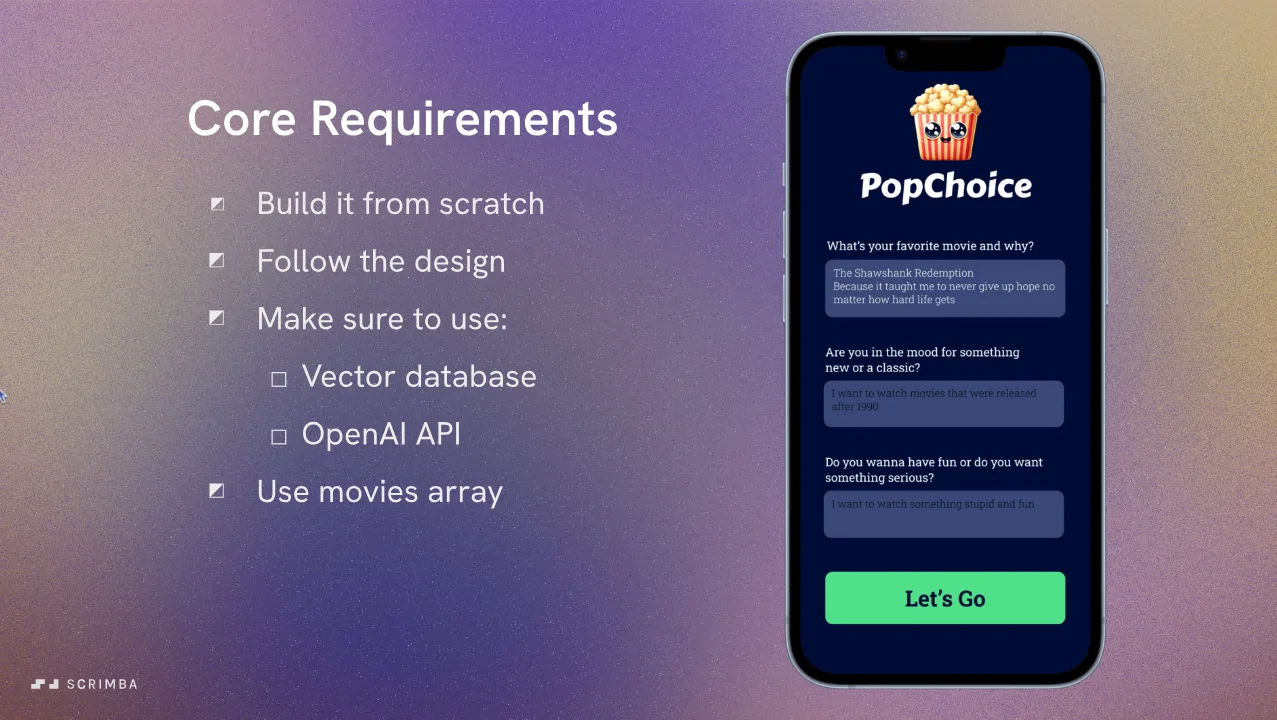
"Solo Project: PopChoice" is a four-and-a-half-minute brief voiced by a different Scrimba presenter. The app asks three questions (favorite movie and why, new or classic, fun or serious), combines the answers into one string, embeds it, searches the database, and explains why the match fits your mood. Core requirements are on the slide above.
Any framework is allowed, "including React," or plain JavaScript. Stretch goals include a start screen for several people in one movie night, chunking the provided movies.txt instead of using the array, and pulling posters from a linked API. Hints are linked, and config.js comes set up for OpenAI and Supabase.
The remaining four scrims are housekeeping and none is by Guil. Two are pitches: Scrimba's free docs site and Per Borgen's Scrimbassador referral program. The other two are the "You made it to the finish line!" recap and the standard "How to Utilize Your Certificate" scrim. You can skip all four without missing anything about RAG.
What a lesson feels like
Scrims run from 44 seconds to just under ten minutes. Four are slide videos with no files; the rest open on a small project: config.js for the API clients, index.js for the lesson code, and a data file. Guil talks over the editor, runs the code, and reads the console, which is where most of the teaching happens. Scrims autoplay when opened, so have a finger on pause if you want to read the code first.
Challenges are written as comments in the file. Every scrim has captions, a timestamped transcript under the settings menu, and subtitles in ten languages. Guil's voice is calm and unhurried; "before I send you running off for the hills with this mathematical beast" tells you the tone.
Free or Pro: exactly what is gated
The first five scrims (intro through the first challenge, about 21 minutes) carry a SAMPLE badge and can be previewed without a subscription. Everything from "Vector databases" onward needs Pro. That covers the Supabase setup, similarity search, chunking, the two later challenges, the ReelRecs chatbot, the PopChoice project with its Figma file and hints, and the certificate.
Pro also covers the AI Engineer Path this course sits in and the Pro-only channels on Scrimba's Discord; basic Discord access is listed as free. See current plans (opens in a new tab) for what Pro costs in your region.
How long it takes
The 94 minutes is video runtime. Budget three to four hours: the challenges take longer than their scrims, the Supabase setup happens on another site, and you will be upgrading the deprecated package in each scrim. PopChoice done properly from the Figma file adds four to eight hours. Call it a weekend for the course and a second one for the project.
Who it's for, and who should skip it
It fits JavaScript developers who already call the OpenAI chat API and now need the retrieval side, such as documentation assistants and support bots. It is also the course to take if you want pgvector on Supabase specifically.
Skip it, for now, if async/await and Promise.all are shaky, or if you have never sent a chat completion from code; do Intro to AI Engineering first. Skip it if you need Python, a dedicated vector database such as Pinecone, or production concerns like re-ranking and evaluation; none of that is here. LangChain appears only as its text splitters.
Prerequisites
Comfortable JavaScript including asynchronous code, and prior experience with the OpenAI API and chat completions. No prior knowledge of embeddings, vector databases, SQL, or Supabase is assumed. You will need an OpenAI API key with billing enabled and a free Supabase account.
Where it fits
This is the retrieval course on the AI Engineer Path, between the fundamentals and the agent work. The history handling in the last lesson leads into Learn Context Engineering, and grounded retrieval is what makes the tools in Learn AI Agents trustworthy. For the concepts in written form, Scrimba's docs have a free RAG chapter (opens in a new tab).
Strengths and limits
What it does well: a complete RAG pipeline in under two hours of video. The similarity-search lesson shows both the hits and the false match, so you understand thresholds. The chunking lesson gives concrete numbers (50 vs 47 vs 78 chunks) rather than hand-waving. The challenges are AI-checked, and the solo project is a real portfolio piece with a design file.
Where it is limited: the scrims pin [email protected] and [email protected], so package and model names need translating to current ones. It covers one vector store and one embedding provider, and it stops at a proof of concept with in-memory chat history.
Related courses and comparisons
- All AI courses, the category this course belongs to
- Intro to AI Engineering, the fundamentals to take first
- Intro to Mistral AI, a free course that touches on RAG
- Learn AI Agents, where grounded retrieval makes agents reliable
- Learn Context Engineering, the follow-up on what goes in the prompt
- AI Engineer Path, the path this course is sequenced into
No. It is a Pro course. The first five scrims (about 21 minutes, up to and including the first challenge) are marked SAMPLE and can be previewed; the Supabase setup, similarity search, chunking, the chatbot, the PopChoice solo project, and the certificate need a subscription.
A pipeline that embeds text with OpenAI, stores the vectors in a Supabase table with pgvector, finds matches with a match_documents SQL function, and sends the matched text to the chat model. The last lesson turns it into ReelRecs, a small movie-recommendation chat with conversation memory. The Pro solo project is PopChoice, a mobile-style app that recommends a film from your answers.
Guil Hernandez teaches every lesson except a handful of short ones voiced by other Scrimba staff: the PopChoice brief, the 44-second dependency warning, and the housekeeping scrims at the end. His teacher card describes him as a developer and educator who works with Python, JavaScript, and agentic AI, with a long tenure at Treehouse.
Yes, two. An OpenAI API key with billing enabled, stored as a Scrimba environment variable, and a free Supabase project where you enable the vector extension and paste a SQL function into the SQL editor. Nothing is installed on your machine; the code runs in the scrims.
Partly. The scrims pin openai 4.11, langchain 0.0.167, text-embedding-ada-002 and gpt-4, and a warning scrim tells you to upgrade the deprecated Supabase package in every scrim you touch. The RAG pattern it teaches is unchanged; expect to translate a few package and model names to current ones.
Three scrims carry Scrimba's Challenge with Instant Feedback icon: pairing each text with its embedding, splitting movies.txt and inserting the chunks into Supabase, and returning several matches from the database and combining them into one string. An AI checks your solution against the brief even if your code differs from Guil's.
94 minutes of video. Plan on three to four hours for the lessons and challenges including the Supabase setup, and another four to eight hours if you build PopChoice from the design file.
Only for chunking. One lesson uses CharacterTextSplitter and RecursiveCharacterTextSplitter from [email protected] with a 150-character chunk size and 15-character overlap, and the challenge that follows uses 250 and 35. The embeddings, database calls, and chat requests use the OpenAI and Supabase clients directly.
Yes. Every scrim has captions, a timestamped transcript panel under the settings menu, and subtitles in ten languages.