Learn HTML and CSS
Learn HTML and CSS is Scrimba's free beginner course, taught by Per Borgen: about 5.7 hours of short scrims in which you build and deploy five websites, then build a sixth on your own from a skeleton. It is the strongest starting point on the site for someone who has never written a line of code.
Reviewed inside the course with a Pro account, September 2026.
Quick answer
It fits absolute beginners: no prior HTML, CSS, or coding experience needed, and every project deploys to a live site while the whole course stays free. The catch is scope, flexbox runs through every module but CSS Grid, media queries, and responsive design are not covered. Start here, then move on to Learn JavaScript.
Learn HTML and CSS
FreeTaught by Per Borgen (opens in a new tab)
A free, project-based introduction to HTML and CSS built around five build-and-deploy websites and 75+ challenges.
Start free on Scrimba (opens in a new tab)Is it worth your time?
It is free and it is the right first course, so the answer is an easy yes. What sets it apart is that you ship something in the first module: the twelfth scrim is "Build a Personal Website" and the thirteenth is "Deploy your Personal Website." Instead of memorizing tags in the abstract, you write HTML in the editor, see the page change in the preview beside it, and put it on the web before you have learned any CSS at all.
Per's teaching voice is playful to the point of silly, and it works for a first course. His explanation of the three web languages is a car: HTML is the tires, doors, and steering wheel, CSS is the paint, JavaScript is the engine. The second CSS lesson is titled "Let's destroy wikipedia" and has you open DevTools on the Wikipedia article "List of helicopter prison escapes" and set its background to red. You learn margin "via flags," meaning you recreate national flags with boxes and spacing.
It is a beginner course, not a comprehensive one. Flexbox appears in every module from the Google clone onward, but only the parts you need (display: flex, justify-content, align-items, flex-direction); there is no CSS Grid, no media queries, no responsive design, and no CSS variables. Per says as much when flexbox first appears: "if you are a little bit confused about Flexbox, that is totally okay as well. We're going to work with that several times throughout this course." Deeper layout is what Learn Responsive Web Design and Learn CSS Grid are for.
What you'll learn
Course curriculum
6 modules · 115 lessons
- Build & Deploy Your First Website
- Build a Google.com clone
- Build a Digital Business Card
- Build a Space Exploration Site
- Build a Birthday GIFt Site
- Solo Project: Hometown Homepage
Lesson counts are the scrims I counted in each expanded module in September 2026. Scrimba's own module headers show 14, 19, 18, 9, 20, and 0 (they exclude intros, recaps, asides, and the solo project briefs), and the course listing says 121 lessons, which counts clips inside scrims. When other pages on this site quote 121, that is Scrimba's number.
Scrimba also publishes a free written HTML reference (opens in a new tab) (with a matching CSS one) in its docs, and the course links to it in a "Scrimba Docs" scrim at the end of module one. A Beginner, Intermediate, and Deep Dive switcher lets you look up a tag or property quickly, then reread it in more depth later.
Inside the course, module by module
1. Build and deploy your first website (75 min, 20 scrims)
HTML only, and faster than you would expect. Tags, a "Write a news article!" challenge, the <img> tag, nesting, then "Internet superpowers: Change the BBC news!", where you edit a live news site's headlines in DevTools. Buttons and input tags lead into "Let's build Google!" (the HTML of the Google homepage, restyled in module two), anchor tags, proper document structure, lists, and an aside on description lists. Then you build a one-page personal site and deploy it, get a short introduction to semantic HTML, and finish with a recap, a "Learning in public" nudge, and a pointer to the Scrimba Docs.
2. Build a Google.com clone (82 min, 27 scrims)
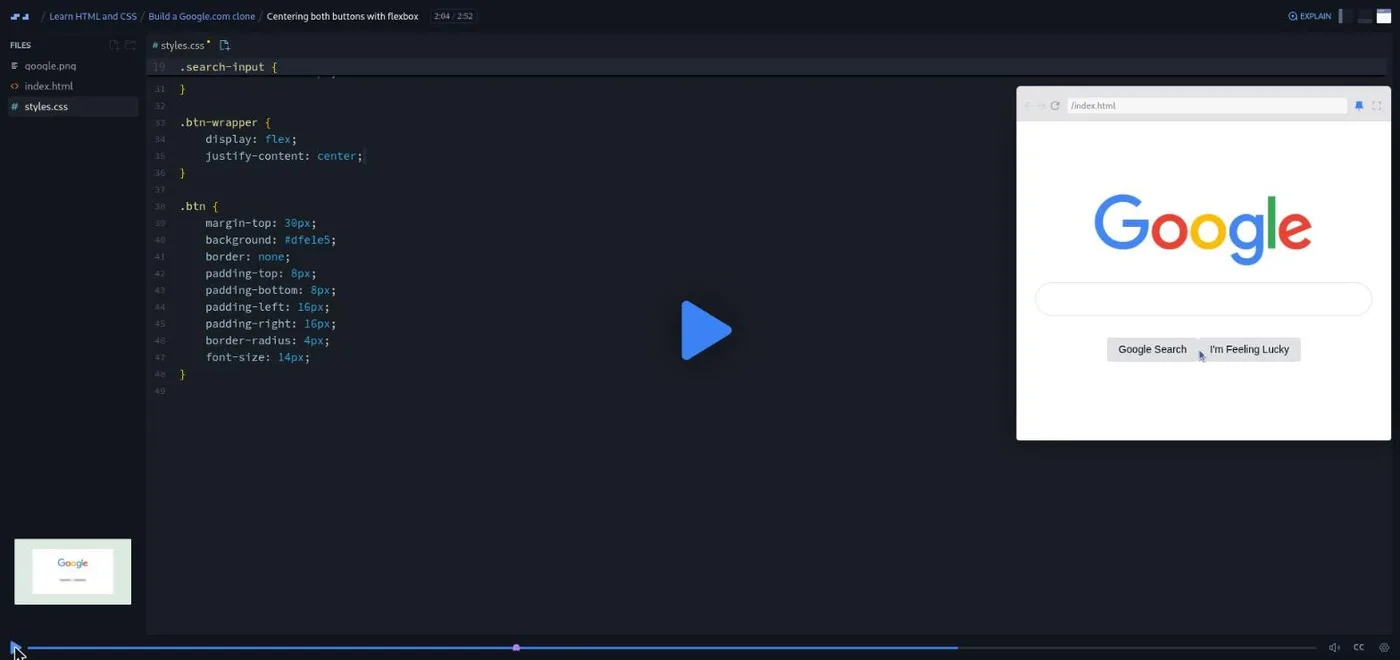
CSS starts here. The first challenge, "Write your first lines of CSS!", is a sample scrim you can try without an account. After the Wikipedia demolition, you link a stylesheet, set widths, learn inline vs block, and then margins, first "via flags," then to space out and center the Google elements. Divs ("Divs rule the world"), classes, padding, borders and border-radius, an aside challenge to style a Twitter button, and finally the reason flexbox exists: "Why we can't have two block-level buttons," followed by "Flexbox" and "Centering both buttons with flexbox."
The module closes with "Why are Solo Projects important?" and the first Pro solo project, The Daily Dribble Newsletter.
3. Build a Digital Business Card (72 min, 22 scrims)
A card with your photo, name, and links, and the module where the CSS gets more deliberate: fixing an image path (with a lesson on relative paths), the alt attribute, sizing, borders and padding, flexbox child containers and flex items, a first utility class, justify-content, centering the card, an aside on inheritance (marked "Updated"), colors, web-safe fonts, and the margin and padding shorthands. "Make it your own!" then "Deploy your Digital Business Card," followed by a "Git & GitHub Intro" scrim, a recap, and the second Pro solo project, an Amazon product page.
4. Build a Space Exploration Site (44 min, 15 scrims)
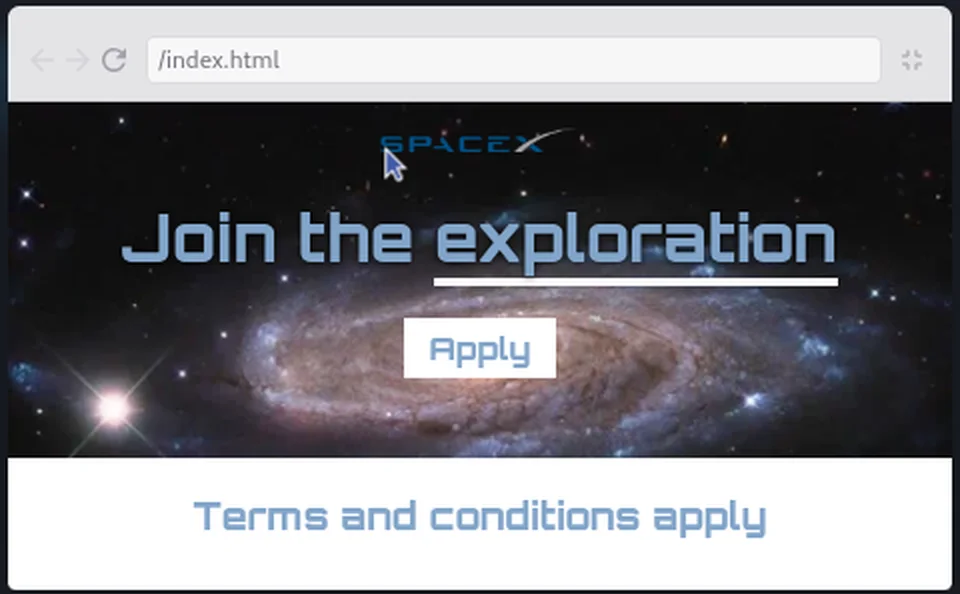
The shortest module and the most visual. A background image from Unsplash, centering and a styled button, Google Fonts and @font-face, an aside on spans, an underline via a span, an ID for the logo, replacing a JPG with a WebP, choosing a color palette from an image, a terms and conditions section, and text shadows for readability. The Pro solo project here is a web agency hero section.
5. Build a Birthday GIFt Site (99 min, 28 scrims)
The largest build: a page that says "Today is Nick's birthday" with a photo, age and date badges, and a column of "gifts" that reveal a GIF when you hover. It starts with header styling, colors, and text shadow, then "We have a problem that flexbox can fix," align-items, flex-direction, and turning the header into a flexbox. You create the first gift, swap an <img> for a <div>, add the hover effect, then three more gifts, a footer, and a background gradient. The tail of the module is the most practical part of the course: <em> and <strong>, publishing with GitHub Desktop, deploying, editing in VS Code, a three-part intro to HTML audio and video, HTML tables, and personalizing the site so you can actually send it to someone.
6. Solo Project: Hometown Homepage (8 min, 3 scrims)
Three scrims: "It's time to go solo!", the brief, and "Congrats on completing the course!" The brief is a four minute walkthrough of the finished site (a hero with a background image, a three-column activities section, and a guide card) and Per maps each part back to a module: "this hero section here with a background image ... that's pretty similar to what we did in the space exploration site," the coloured headings are from the birthday site, the guide card "resembles our business card quite a lot," and the three columns are "a job for Flexbox if you ask me." You get a skeleton with the images and almost no styling, and the requirements are to use classes, flexbox, background-image, and the provided palette.
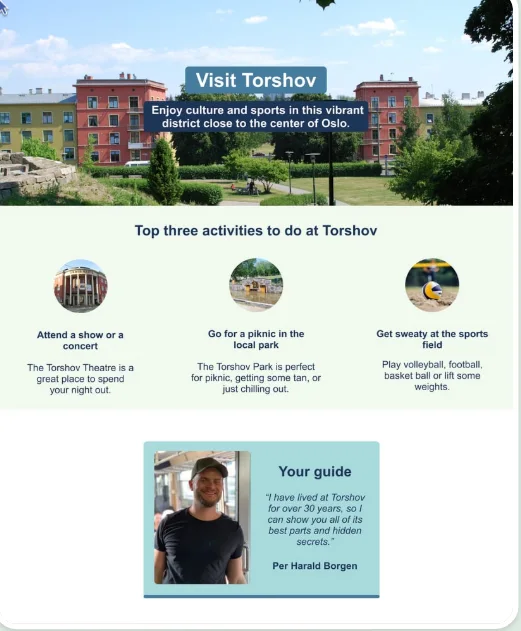
Unlike the three Pro solo projects, this one is free and inside the course itself.
What a lesson feels like
Scrims are short, mostly two to four minutes. Per talks over a live editor with the preview on the right, and challenges arrive as comments in the file plus a paused recording: "please take over here, do this challenge, and then return back to me when you've done it or when you feel you need some guidance." Every scrim has captions, a full timestamped transcript under the settings menu, subtitles in ten languages, playback speed, and a "Download as Zip" for the project files.
The tone is deliberately low-stakes. "If you didn't do this, no worries at all," after the flexbox challenge. The course also keeps sending you outside the sandbox: DevTools on the BBC and Wikipedia, Unsplash for images, Google Fonts, Netlify and GitHub Desktop for deploying. By the end you have used the same tools a working front end developer uses, which is unusual for a course this short.
Free or Pro: exactly what is gated
All six modules, every challenge, the deploys, and the Hometown Homepage solo project are free, with no card required.
Pro gates three Solo Projects, one at the end of modules two, three, and four: The Daily Dribble Newsletter, an Amazon product page, and a web agency hero. Each is a build-from-a-design exercise with no walkthrough. Pro also unlocks the certificate, the career paths this course belongs to, and the Pro-only Discord channels (basic Discord access is free). If you only want this course, you never have to pay. See current plans (opens in a new tab) if you later want the path structure around it.
How long it takes
5.7 hours is video runtime. With 75+ challenges, five deploys, and a solo project, plan for 12 to 18 hours: two to three weeks at an hour a day. The birthday site module alone is 99 minutes of video and will take most beginners three or four sessions. Add three to five hours if you build the hometown homepage properly from the palette rather than the skeleton.
Who it's for, and who should skip it
It fits absolute beginners: people who have never written a line of HTML, who want to learn by building real things rather than watching slides. It is the first course on the Frontend Developer Path and the Fullstack Developer Path, and the obvious first stop for beginners and designers who want to ship their own pages.
There is almost no one who should skip it outright. If you already write HTML and CSS confidently, move past it to Learn Flexbox, Learn CSS Grid, or Learn Responsive Web Design.
Start Learn HTML and CSS for free (opens in a new tab)Prerequisites
None. You need a browser and the willingness to type along. No prior programming, no setup, no maths. A free Netlify or GitHub account helps for the deploy scrims, and the course shows you how to make one.
Where it fits
This is the foundation course on the Frontend Developer Path and the Fullstack Developer Path, and the recommended starting point for beginners. The natural next step is Learn JavaScript, also taught by Per, whose first project (a passenger counter) picks up with the same HTML you learn here.
Strengths and limits
What it does well: it is free, it assumes nothing, it gets a true beginner deploying a real site inside the first module, the projects are memorable (a Google clone, a birthday page you can actually send), and it introduces DevTools, Unsplash, Google Fonts, GitHub, and Netlify along the way.
Where it is limited: it is a beginner course by design. Flexbox is taught only as far as each project needs it, and CSS Grid, media queries, responsive layout, and CSS variables are absent. Three of the four solo projects are Pro.
Related courses and comparisons
- Learn JavaScript, the natural next step
- All Scrimba CSS courses, the full CSS category hub
- Learn Responsive Web Design, to go deep on CSS afterward
- Learn Flexbox and Learn CSS Grid, focused layout follow-ups
- Scrimba vs freeCodeCamp, if you are choosing a platform to start with
Yes. All six modules, every challenge, the deploys, and the Hometown Homepage solo project are free with no card required. Only the three Solo Projects at the end of modules two to four, the certificate, and the Pro Discord channels need Pro.
Yes. It is rated Beginner, assumes no prior experience, and has you deploy a personal website before you have written any CSS. It is the best true starting point on the site.
A personal website, a Google.com clone, a digital business card, a space exploration landing page, and a birthday site with hover-reveal gifts, plus a free solo hometown homepage at the end. Three more (a newsletter page, an Amazon product page, and an agency hero) are Pro solo projects.
Flexbox, yes, as far as each project needs it: display flex, justify-content, align-items, and flex-direction. CSS Grid, media queries, and responsive design are not covered; Scrimba has separate courses for those.
About 5.7 hours of video, but plan for 12 to 18 hours including the challenges, deploys, and the solo project, or two to three weeks at an hour a day.
Yes. Every scrim has captions, a timestamped transcript panel under the settings menu, and subtitles in ten languages.
Learn JavaScript is the natural next step. For deeper CSS, Learn Responsive Web Design and the focused flexbox and grid courses follow well.
No. You code directly in the Scrimba browser player. The deploy lessons use Netlify and GitHub Desktop, and the birthday module shows how to open the project in VS Code if you want to.