Learn Firebase
Rafid Hoda teaches Scrimba's Pro course on Firebase, Google's hosted backend, in about 3.4 hours. You build one app, a private mood journal called Moody, adding email and Google login, a Firestore database, and the security rules that keep entries private. It is the fastest catalog route from a static frontend to an app with logins and live data.
Reviewed inside the course with a Pro account, September 2026.
Quick answer
Learn Firebase fits developers who already write JavaScript and want logins and a database without running a server. It is not a backend fundamentals course: it needs your own Firebase project to follow along, and the "part two" promised in the intro (image uploads, hosting, a social app) never arrived. Next, Build a Mobile App with Firebase puts the same skills on a phone.
Learn Firebase
ProTaught by Rafid Hoda (opens in a new tab)
Add Google and email login, a realtime Firestore database and security rules to a plain HTML, CSS and JavaScript app, one documented feature at a time.
View on Scrimba (opens in a new tab)Is it worth your time?
If your problem is "I can build a frontend but every idea I have needs accounts and saved data," this course solves it in an afternoon or two. Rafid's opening pitch is exactly that: "How do you make an app with features like sign in, a database, and uploading files without writing any backend code? Answer. Firebase." The course delivers on the first two of those three.
Rafid pitches this at the intermediate frontend developer in the first minute, and explains why: "If you're a beginner, then this is way too advanced for you. And if you're an advanced programmer, then you don't really need me." He is right on both counts. The starter code is written for you, and the challenges are mostly "read this documentation page, then make it work in our app."
The caveats are real, though. You are learning one vendor's product, not how backends work. The Firebase console screens are shown as slides, so parts of the course are "click here in Google's dashboard" rather than coding. And the intro describes a two-part course; three years on (the Firebase console dates visible in the scrims show it was recorded in September 2023), only part one exists, and the last scrim is titled "Credits - End of PART 1."
What you'll learn
Course curriculum
2 modules · 38 lessons
- Authentication
- Cloud Firestore
Lesson counts are the scrims I counted in each expanded module in September 2026, including the intros, a two-minute Scrimba referral ad in module one, and the congratulations and credits scrims at the end of module two. Scrimba's listing says 40 lessons, which adds the one-minute "How to utilize your certificate" scrim that sits outside both modules; the module headers themselves show "0/0" and no count at all.
Inside the course, module by module
1. Authentication (62 min, 15 scrims)
The module opens with a six-minute welcome that demos the finished Moody app (logged in as "Justin Bieber," then via Google as "Shahrukh Khan") and sets the format: "Each scrim will cover a Firebase functionality. I'll give you the documentation that you'll need and then it's up to you to implement the functionality through challenges that I give you." The four opening scrims, including this one, are free samples; everything after is Pro.
"Authentication Intro" is a four-minute history lesson about MIT in 1961 and the invention of the password, told over photographs rather than code. "Looking at the starter code" then walks the single index.js file Rafid wrote for you, with comment headers for imports, Firebase setup, UI elements, event listeners and functions. He admits the one-file layout is for teaching: "If you're actually building a JavaScript project and you have a lot of code, it's probably a good idea to split up the code in different files."
"Firebase Setup" is the first real work: create a project in the Firebase console, register a web app, paste the config object and initializeApp into the file. Rafid addresses the question everyone asks at this point head on, and admits it looks crazy: "Are we really about to expose the API key on the client side? ... this is actually how it's supposed to be." Security rules, not secrecy, are what protect the data, and the course comes back to that promise later.
The short "Important note about challenges" scrim matters more than its two minutes suggest. Every challenge writes to Rafid's Firebase project unless you swap in your own config, so he warns: "every single time you pause to do a challenge, you gotta replace this whole Firebase config object with your own, which I know is super annoying and I'm really sorry about that." Budget for that friction. His tip is to keep your config in a text editor on the side.
From there the features arrive one per scrim, each as a challenge in the same shape. Import the function, copy the documentation snippet, drop the unnecessary getAuth call because the app already has one, then wire in the input values and handle success and failure with .then and .catch. In order: createUserWithEmailAndPassword, signInWithEmailAndPassword, signOut, then onAuthStateChanged, which Rafid describes as "a special function that sits and listens for any changes to the auth object" and which replaces the manual view switching from the earlier scrims. "Sign in with Google" adds GoogleAuthProvider and signInWithPopup, plus the console step most tutorials skip: authorizing your domain so the popup is allowed to return to your app.
The last three coding scrims use the signed-in user object. You show the profile picture (falling back to a default image), greet the user by first name with displayName.split(" ")[0], and let them update their name and photo with updateProfile. Then Rafid deletes the update-profile form again "to keep it to the essentials." The module ends with a Scrimbassador referral-program ad from Per Borgen, which is not course content.
2. Cloud Firestore (2.4 hrs, 23 scrims)
The module intro sidesteps the SQL versus NoSQL debate on purpose: "I can go into a whole lecture about the differences between the two and the pros and the cons of choosing one over the other. But I'm not gonna do any of that, because it's really not that important." Setup is two lines (getFirestore and a db object) plus creating the database in test mode in the console.
"Adding a document to a collection" is the first long scrim at twelve minutes. Rafid creates a collection and a document by hand in the console and explains that document IDs only need to be unique within their collection. Then he deletes it all and has you do it from code with collection and addDoc inside a try/catch. He is upfront about it: "This isn't that simple of a challenge, but do give it a go." When his own test post does nothing on screen, it turns out he forgot to uncomment the function call, which is the kind of small bug you will make too. He also shows setDoc for custom IDs and the overwrite behaviour that comes with it, then reverts to addDoc.
"Data types" is a console-only tour of every Firestore field type, from strings and numbers to geopoints, timestamps, arrays and maps, built around a bakery in Oslo where his sister used to work. Then three quick challenges add fields to the post: the author's uid, a createdAt from serverTimestamp(), and a mood number from one to five chosen with emoji buttons. Rafid writes the emoji UI himself and says so: "that is where I want you to do the work because I'm sweating over here after having done all that work all by myself."
The two biggest teaching scrims sit in the middle. "Fetching data once with getDocs" (14 minutes) has two challenges, first logging each document's ID and body, then a renderPost function that turns the data into HTML with a displayDate helper Rafid wrote to make Firestore timestamps readable. He then presses the fetch button twice and lets you spot the duplicated posts before adding a clearAll. "Fetching data in realtime with onSnapshot" (11 minutes) replaces that button with a live listener. Rafid says up front that he is not happy with the official docs for this feature, so he writes it with you, then admits, "Well, I lied because this is where I want to give you a challenge."
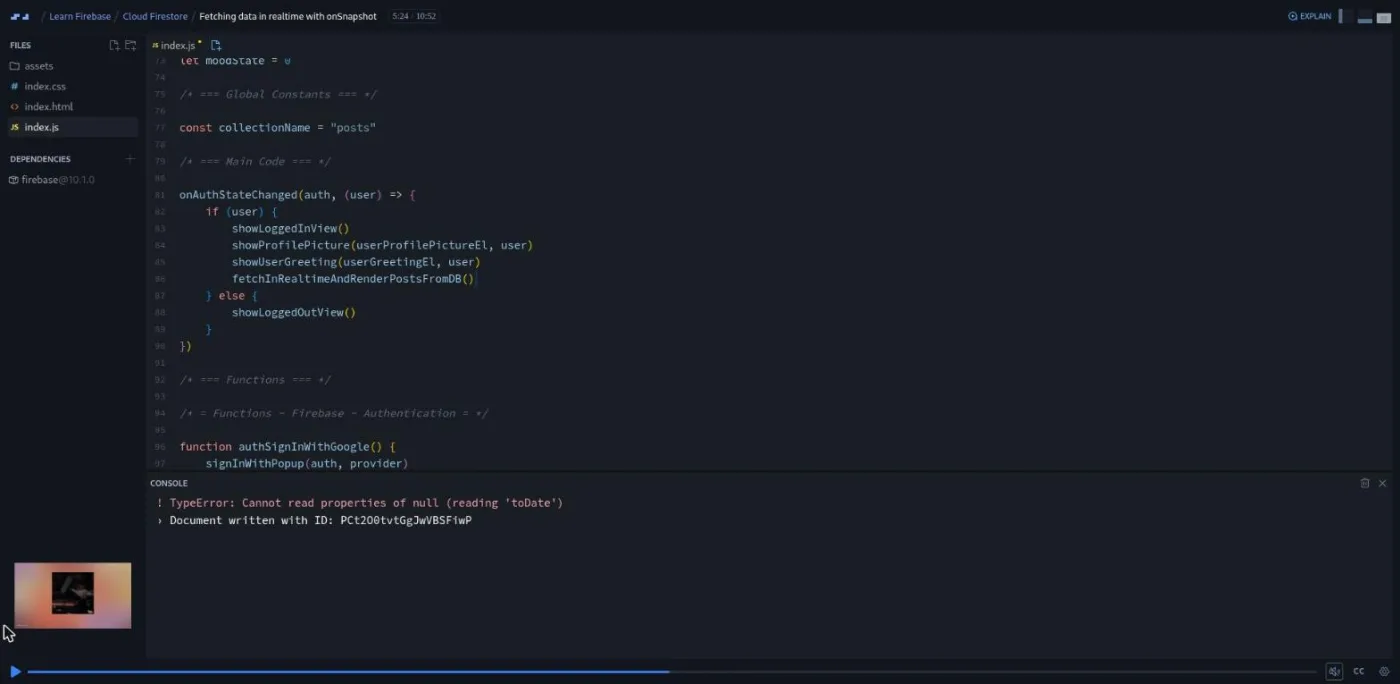
That realtime scrim also contains the best bug in the course. The first live post throws "cannot read properties of null (reading toDate)," because onSnapshot fires before the server has stamped createdAt. Rafid explains the race and adds a null check to displayDate. He then edits a post in the console and deletes the whole collection while the app is open, and both changes appear instantly. The scrim ends with a twist: a post from "Greta Thunberg" appears in his private journal, because right now anyone can write to the database.
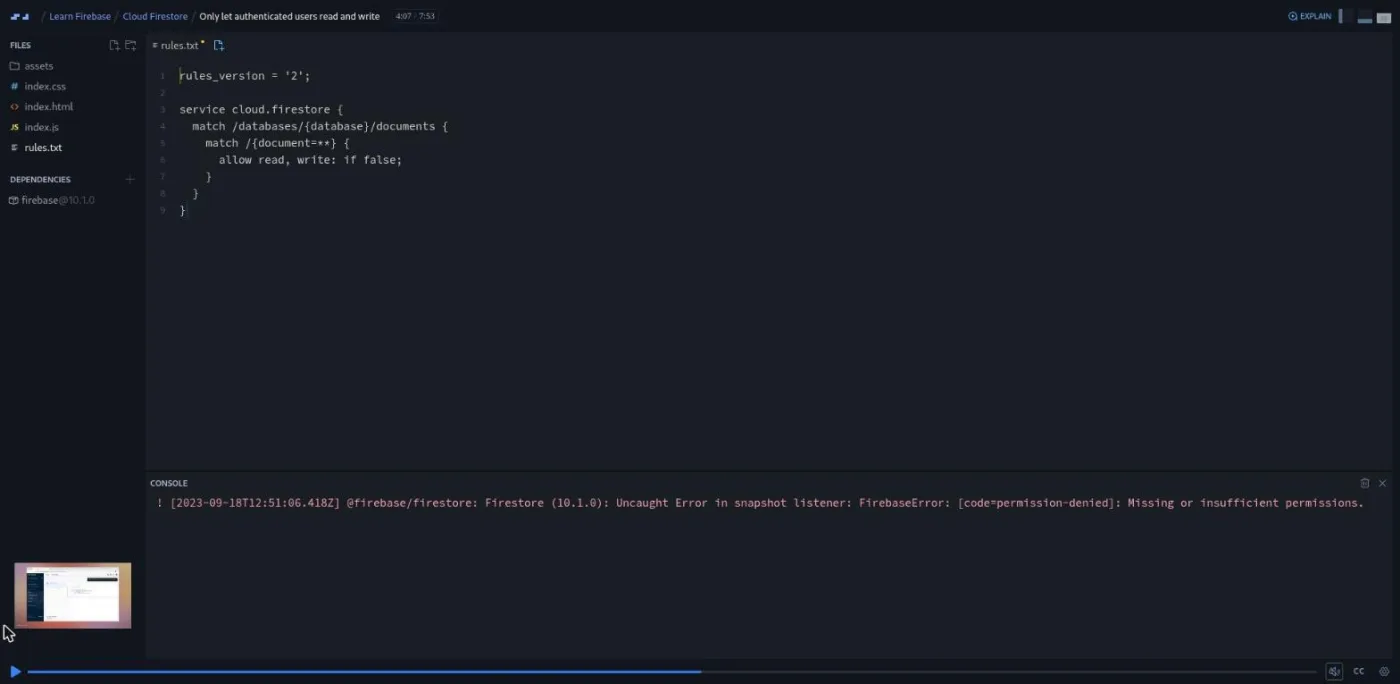
That leads into security rules, which Rafid chose to teach inside this module "because it is intimately connected with the code that we're writing." He warns that "Security rules can be one of those things that are a bit scary in the beginning," then keeps them small. Because the console is shown as slides, rules are written in a rules.txt file in the scrim and pasted into Firebase. You start by setting everything to false and watching "Missing or insufficient permissions" appear, then allow reads and writes only when request.auth != null. "Only show users their own posts" pairs a where("uid", "==", user.uid) query with a read rule comparing request.auth.uid to resource.data.uid, and "Custom functions in Security Rules" extracts those checks into isSignedIn() and userIsAuthorOfPost().
"Order posts by date" adds orderBy("createdAt", "desc") and hits a second real error: the compound query needs a composite index, which Rafid creates by following the link in the error message. "Add date filters" is the longest scrim in the course at 21 minutes and builds today, week, month and all buttons from date-range queries. It is mostly plain JavaScript date arithmetic, and Rafid says so: "This is a lot of code and we're way into the scrim now. So please don't worry if you're not understanding every part of this." He admits the four near-identical fetch functions could be refactored and kept them separate because "when you're teaching, you gotta strike that delicate balance."
The final stretch rewrites renderPost with createElement so each post can carry buttons, then adds editing with updateDoc (through a browser prompt(), which he calls a shortcut) and deletion with deleteDoc. Each forces a rules change: allow write is split into create, update and delete, and the last two require the signed-in user to be the author. The delete scrim fails with a permissions error first, on purpose, so that rule is the last challenge. "Congrats" reframes what you built as a CRUD app ("you could turn this app into almost any other app") and points at his Build a Mobile App with Firebase course for putting it on a phone.
What a lesson feels like
Rafid calls it "a reference course" rather than a classic Scrimba course: each scrim covers one Firebase feature, shows the relevant documentation page, then stops so you wire it into the app yourself. A typical scrim is three to seven minutes; the four longest (adding a document, getDocs, onSnapshot, date filters) run 11 to 21 minutes. Rafid talks over the editor with a slide overlay for the Firebase console and the documentation. The challenge pattern is fixed: he pre-writes any HTML, CSS and plain JavaScript off camera ("I'll see you back in a second"), explains it, shows the documentation page, writes a numbered brief in a comment, and pauses. You paste the docs snippet, adapt it, and press play to compare. Most challenges are five to ten lines; the hardest is finishing the week-filter function.
There are no AI-checked challenges and no Solo Projects; the Moody app is the project, built continuously. Every scrim has captions, a timestamped transcript panel, and subtitles in ten languages. The tone is warm and a little goofy (Justin Bieber and Shahrukh Khan are the test users). Rafid leaves his mistakes in rather than editing them out, from a forgotten semicolon in a rules file to postsRef is not defined during the filter scrim.
Free or Pro: exactly what is gated
Four scrims are free samples: the welcome, the authentication intro, the starter-code tour, and Firebase setup. That is enough to see the format and the finished app, but not to write a single line of Firebase code. Every scrim from "Important note about challenges" onward, all of Cloud Firestore and security rules, and the certificate are Pro. There are no separately gated Solo Projects because the course has none.
Pro also unlocks the two career paths this course sits in and the Pro-only channels on Scrimba's Discord (the pricing page lists basic Discord access as free, so the server itself is not gated). See current plans (opens in a new tab) for what Pro costs where you live. My read: on its own this is a thin reason to subscribe. If you are already on the Fullstack path, it is the fastest route in the catalog from a static frontend to an app with logins and live data.
How long it takes
The 3.4 hours is video runtime. Almost every scrim stops for a challenge, and you should be pasting your own Firebase config and checking your own console between them. Plan on 7 to 10 hours: two or three evenings for authentication, and a weekend for Firestore and rules. Add an hour up front to create a Firebase project and enable email, Google and Firestore in the console, which the course walks through but which you do in your own browser tab.
Who it's for, and who should skip it
It fits frontend developers who have finished Learn JavaScript or equivalent, are comfortable with promises and async/await, and want to ship an app with accounts and saved data this month. It is also a sensible next step after Build a Mobile App with Firebase, which uses the older Realtime Database; this course is the Firestore and auth counterpart.
Skip it if you want to understand servers, HTTP or SQL; take Learn Node.js, Learn Express.js or Learn SQL instead. Skip it too if you are a beginner; Rafid says so himself in the first minute. If you would rather learn an open-source alternative with SQL underneath, Intro to Supabase covers similar ground.
Start Learn Firebase on Scrimba (opens in a new tab)Prerequisites
Solid JavaScript, including DOM manipulation, template strings, array methods and promises. The course uses .then/.catch for auth and async/await with try/catch for Firestore, and never explains either. You also need a Google account to create a Firebase project, and you should be prepared to work in the Firebase console alongside Scrimba, since the course cannot embed it.
Where it fits
Scrimba lists Learn Firebase under both the Frontend Developer Path and the Fullstack Developer Path. It is the point on those paths where a frontend developer first stores data somewhere other than localStorage and first thinks about who is allowed to read it. If you later want the backend that Firebase hides, Learn Node.js and Learn Express.js are the complementary route.
Strengths and limits
What it does well: one app carries the whole course, so every feature has an obvious reason to exist; the documentation-first challenges teach you to read Firebase's docs rather than memorize the course; security rules are taught next to the code they protect, and the "Greta Thunberg" moment makes the need for them concrete; Rafid leaves in the real errors (null timestamps, missing indexes, permission denials) and fixes them on camera.
Where it is limited: it teaches Firebase specifically, not backend concepts; the console cannot run inside Scrimba, so you juggle two windows and must paste your own config for every challenge; the promised part two (file uploads, hosting, a social app) never shipped, so uploading files is mentioned in the intro but not taught; the date-filter scrim is long and repetitive by the instructor's own admission; and the whole thing is Pro apart from four intro scrims.
Related courses and comparisons
- All JavaScript courses, the category this course belongs to
- Build a Mobile App with Firebase, Rafid's shorter Realtime Database project
- Intro to Supabase, the open-source alternative with SQL underneath
- Learn Node.js and Learn Express.js, if you want real backend fundamentals
- Learn JavaScript, the language foundation
- Learn React, a common frontend to pair with Firebase
- Scrimba vs Boot.dev, if you are weighing backend-focused platforms
No. Four intro scrims (welcome, authentication intro, starter code, Firebase setup) are free samples. Every coding challenge, the whole Cloud Firestore module, security rules and the certificate need Pro.
One app, a private mood journal called Moody. Users sign up with email or Google, post how they feel with an emoji, see posts appear in real time, filter them by today, week, month or all, and edit or delete their own entries. Security rules make sure nobody sees anyone else's posts.
Rafid Hoda, a Scrimba teacher who also made Build a Mobile App with Firebase. The teacher card and every transcript credit him; one two-minute referral-program scrim is narrated by Per Borgen.
Yes. The course's config points at the instructor's project, and he asks you to paste your own firebaseConfig into the code every time you attempt a challenge. You also enable email login, Google login and Firestore in your own Firebase console.
No. The intro promises a part two with Cloud Storage, Firebase Hosting and a social app, but as of September 2026 the course still ends at 'End of PART 1'. Only authentication, Firestore and security rules are taught.
Yes. Every lesson imports named functions such as getAuth, signInWithPopup, getFirestore, onSnapshot and updateDoc from firebase/auth and firebase/firestore, which is the modern modular syntax rather than the older namespaced API.
No. Every challenge is the classic pause-and-compare kind, and the app itself is the project. There are no Challenge with Instant Feedback icons and no separately gated Solo Projects in this course.
Yes. Every scrim has captions, a timestamped transcript panel under the settings menu, and subtitles in ten languages.
3.4 hours of video, but plan on 7 to 10 hours including the challenges and the console setup, or two or three evenings for authentication and a weekend for Firestore and security rules.