Build a React Project: Movie Search App
James Q Quick's Build a React Project: Movie Search App runs 56 minutes for Pro subscribers: you build a search form, fetch results from The Movie Database API, and render poster cards with two functional components and useState. It is a solid rep between React fundamentals and a full project, not a place to learn React from scratch.
Reviewed inside the course with a Pro account, September 2026.
This page is part of our Scrimba React courses catalog. Scrimba's catalog data lists it under the Frontend Developer Path and the Fullstack Developer Path.
Quick answer
It fits you if you have just finished a React fundamentals course and want one supervised rep of the input, fetch, render loop before a bigger build. The catch: the code runs on React 16.13 with ReactDOM.render, so treat it as a drill, not a template for a new project. Once you are done, the Memory Game in React is the next step up.
Build a React Project: Movie Search App
ProTaught by James Q Quick (opens in a new tab)
A one hour React build: a movie search form, a fetch to the TMDB API, useState for the query and results, and a MovieCard component, with three challenges.
View on Scrimba (opens in a new tab)
Is it worth your time?
For the right person, yes, and the right person is narrow: you know what a component and a hook are, you have not yet built anything that talks to a real API, and you want to do it once with someone watching. The course delivers exactly that loop. By the end of scrim 8 you type "Jurassic Park", press Search, and a list of posters with release dates, ratings, and overviews appears in the preview pane. James's own summary in the wrap-up is fair: "relatively simple, but I think covers some of the core concepts of React."
The code shows its age. The starter pins react and react-dom at 16.13.1, the root component is a class with a render() method, and mounting is done with ReactDOM.render, which React 18 replaced with createRoot. In the intro James introduces himself as a developer advocate at Auth0; the teacher card on the same page now says Cloudflare. Nothing here is wrong for React 16, and hooks, fetch, and map work the same way today, but you will not see React 18 or 19 patterns. The closing clip even pitches a "React Bootcamp" that no longer exists under that name.
The second caveat is size. There is one screen, no routing, no loading state, no error message for the user, and the API key is pasted straight into the fetch URL. That is fine for an hour of practice. It is not a portfolio piece unless you keep building after the last scrim.
What you'll learn
Scrimba presents this course as one flat list with no modules. The grouping below is mine, made from the scrim order and what each one covers, so you can see where the time goes.
Course curriculum
13 scrims, about 56 minutes, counted from the table of contents in September 2026.
- Getting started: intro, API key, base styles
- The search form: first component and its styles
- Fetching and state: the search function and useState
- Rendering results: cards, styles, MovieCard
- Wrap-up and Scrimba outros
My count is 13 scrims adding up to about 56 minutes, which matches the listing; James's own material is the first 11 (54 minutes), and the last two are generic Scrimba outro clips. Scrimba's numbers disagree with each other: the About text says "11 lessons", the structured data says 14, and when other pages on this site quote 14 lessons, that is Scrimba's figure.
Inside the course, scrim by scrim
1. Getting started (12 min, 3 scrims)
The Course Introduction is a slide talk, not code. James explains his "learn, build, teach" motto, then the plan: functional components, hooks for state, CSS written from scratch in BEM naming (he says "BIM" throughout), and fetch against TMDB. He also tells you that you can drag and resize the preview window inside the scrim if it covers code, which is worth knowing before scrim 6.
How To Get Your Movie DB API Key is two minutes of instructions for themoviedb.org: make a free account ("no credit cards or anything like that"), open Settings, click API, request a key. Do this before you start; scrim 6 needs it and the course never comes back to it.
Add Base Styles to Our App is the first coding scrim. James tours the starter: a class component called Main rendering "Hello world!", and React 16.13.1 in the dependencies panel, with a note to right-click and update if yours is older. Then he writes style.css from scratch: a 10px root font size so rem math is easy, box-sizing: border-box with a clear explanation of why, a .container at 1000px max width, and a .title class for the "React Movie Search" heading. As he puts it in lesson 3, border-box means the browser will "take those things into account, like your border, the width of your border, and your padding, and include that in the one hundred pixels by one hundred pixels."
2. The search form (12 min, 2 scrims)
Create Your First Component is the first challenge and the last free sample. James creates a throwaway test.js to show what a functional component looks like (import React, export default function, return JSX), then hands you a spec: a searchMovies.js file with a form of class form, a label with htmlFor="query", a text input named query with a placeholder, and a submit button. "Go ahead and pause the video. Take a few minutes to do this yourself," he says at 2:34, and the solution follows. He hits two of his own errors on the way (a lowercase file name, a missing ./ on the import) and fixes them on camera. The test.js file stays in the project for the rest of the course.
Style the Search Movies Component is pure CSS, mobile first. The form becomes a one column grid, the input and button get 20px rounded corners, the button gets a hover transition, and a min-width: 786px media query lays label, input, and button side by side with grid-template-columns: auto 1fr auto. James is upfront that you will not see the desktop layout in Scrimba's narrow preview.
3. Fetching and state (13 min, 2 scrims)
Create the Search Movies Function is where the API comes in. James writes an async arrow function, wires it to onSubmit, and calls e.preventDefault() so the form stops reloading the page. Then he pastes the TMDB search URL with his own key in it and tells you to swap in yours, hardcodes const query = "Jurassic Park" for now, and does await fetch(url) followed by await res.json(). He logs the response so you can see the results array in the console, then wraps the whole thing in try/catch after showing what an unhandled typo in the URL does. The concepts, in order: arrow functions, template literals, promises, async/await, and try/catch, each explained in a sentence or two as it appears.
Manage State with React useState Hook is the second challenge. James sets up const [query, setQuery] = useState(""), explains array destructuring, binds the input with value={query} and onChange={(e) => setQuery(e.target.value)}, and shows the React warning you get if you set value without onChange. He searches for Step Up ("one of my favorite movies when I was in early high school") to prove the query is live. Then the brief at 4:24: create the state for movies with useState and update it "when appropriate". The answer is useState([]) and setMovies(data.results) inside the try block.
4. Rendering results (16 min, 3 scrims)
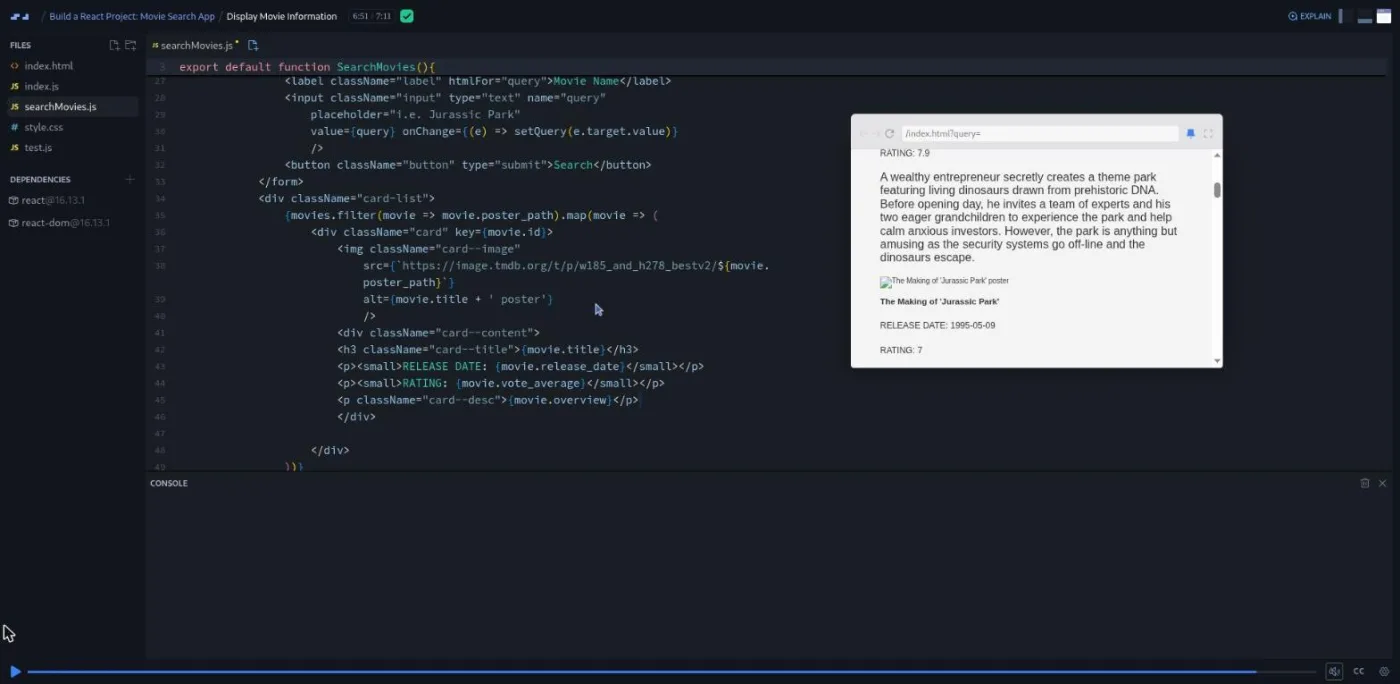
Display Movie Information is the longest scrim at 7:11 and the one where the app starts to look like something. James wraps the form in a fragment (<>), adds a card-list div, and maps movies to a card div with a poster image, an h3 title, small tags for release date and rating, and a paragraph for the overview. Along the way he explains the key prop when React warns about it, and filters out movies without a poster_path so there are no broken images. The image URL comes from TMDB's image CDN; he admits he "had to do some research to figure out where or what that URL was."
Style the Movie Cards is under three minutes: padding, a 10px radius, a soft box shadow, a white background, a bigger card--title, and margin: 0 auto with display: block to center the poster.
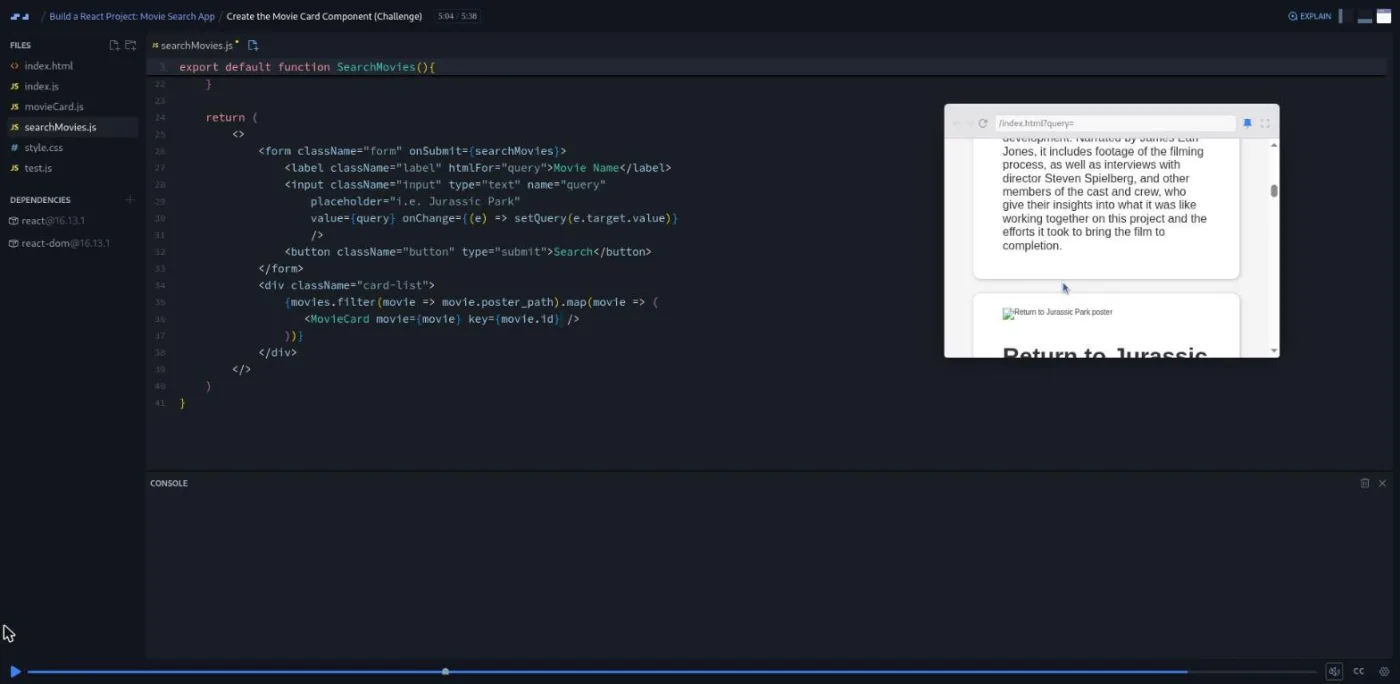
Create the Movie Card Component (Challenge) is the third and best challenge, because it introduces props for the first time. James explains that every component receives a props object, shows how to pass movie={movie} in JSX, and asks you to move the card markup into movieCard.js. The solution walks through three ways to read the prop: props.movie, const { movie } = props, and destructuring in the parameter list. It also fixes a real bug: after the move, the key prop was left on the inner div instead of on <MovieCard> in the map, and React complains until it is moved. "This is definitely a best practice for you as you start building bigger and bigger React applications," he says of splitting components out.
5. Wrap-up (3 min, 3 scrims)
Wrap Up is a 74 second recap of components, hooks, fetch, and reusable components. Then two clips Scrimba adds to every course: Congratulations!, in which a Scrimba staffer points you at Bob Ziroll's React course (under its old "React Bootcamp" name), and How to Utilize Your Certificate, a one minute nudge to add the certificate to LinkedIn.
What a lesson feels like
The eight coding scrims run from three to seven minutes; the other five are the slide intro, the TMDB API-key walkthrough and three outros. James narrates over a live editor with the preview on the right, and he writes the CSS and the JavaScript in front of you rather than pasting finished files; the two things he does paste (the TMDB URL and the poster CDN URL) he says so. He makes small mistakes and fixes them on camera, which is more useful than it sounds when you are learning what a missing ./ looks like.
The three challenges follow the same pattern: a spoken spec, "pause the video", then the solution. The table of contents marks all three with Scrimba's challenge icon, but in the transcripts they are pause-and-compare exercises; I did not test whether the instant feedback checker is switched on for them. Every scrim has captions, a timestamped transcript under the settings menu, subtitles in ten languages, and playback speed. Because the editor holds the finished state of each scrim, you can also open any lesson and read the final code without pressing play.
Free or Pro: exactly what is gated
The first four scrims are marked SAMPLE and open without Pro: the intro, the API key walkthrough, the base styles, and the first component challenge with its solution. That is 18 minutes and about a third of the course, and it is enough to decide whether James's pace suits you.
Everything after that is Pro: the form styling, the fetch function, the useState challenge, rendering and styling the cards, the MovieCard challenge, the wrap-up, and the certificate of completion. The Discord server is not part of this gate; Scrimba's pricing page lists basic Discord access as free and only the Pro channels as paid. See current plans (opens in a new tab) if the two paths this course belongs to are what you are after.
How long it takes
Fifty-six minutes is video runtime. Plan for two to three hours: ten to fifteen minutes to register at TMDB and find the API key page, the three challenges at ten to twenty minutes each if you write them before watching the solution, and some time pausing to retype the CSS. If you already have a TMDB key and just want the React parts, ninety minutes is realistic.
Who it's for, and who should skip it
It fits you if you have done the state and side effects sections of Learn React or the equivalent elsewhere and want one small, complete, API-backed app under your belt before something bigger. It also fits someone who learned React with class components and wants to see useState and a functional component in a project rather than a slide.
Skip it if you have never written React; the intro assumes you know what a component is, and the About text on Scrimba says so itself. Skip it if you want modern React specifically: no React 18, no createRoot, no useEffect, no environment variables for the key, no loading or error UI. And skip it if you want a longer build; the Memory Game in React is the bigger project on this track.
Prerequisites
JavaScript first: arrow functions, template literals, map and filter, and enough about promises to follow await fetch() then await res.json(). James explains each of these in a sentence as it appears, but not from zero. Basic React: JSX and the idea of a component. Comfort editing CSS helps because about a third of the runtime is styling. You will also need a free TMDB account for the API key, and Scrimba's browser editor means nothing to install.
Where it fits
This is a practice slot between React fundamentals and a real project. After Learn React, do this in an evening, then move to the Memory Game in React or straight to Advanced React for routing and data patterns the movie app does not touch. If the fetch and useState parts felt new, the React Challenges course gives you more short drills of the same kind.
Strengths and limits
What it does well: it is short and complete, it ends in an app that visibly works, the three challenges land on the right concepts (a functional component, state for fetched data, props), and James explains every JavaScript feature he uses instead of assuming it.
Where it is limited: React 16.13 and ReactDOM.render date it, the root Main component is still a class, the API key lives in the client code, there is no useEffect, no loading state, and no error shown to the user, and the closing clip advertises a course that has since been renamed.
Related courses and comparisons
- Learn React, the prerequisite
- Build a Memory Game in React, a longer project build
- React Challenges, for more problem-solving drills
- Advanced React, routing and data patterns after this
- Best React courses compared, how it stacks up
Partly. The first four scrims (18 minutes, including the first challenge) are free samples. The remaining nine scrims and the certificate need Scrimba Pro. Learn React, the fundamentals course, is free.
Thirteen scrims totalling about 56 minutes of video, eight of them coding lessons. With the TMDB signup and the three challenges, plan for two to three hours.
A single-page movie search: a form bound to useState, an async fetch to The Movie Database search endpoint, and a list of MovieCard components showing poster, title, release date, rating, and overview.
React 16.13.1 and react-dom 16.13.1, mounted with ReactDOM.render. The root component is a class; the two components you write are functional and use useState. There is no useEffect and no React 18 or 19 syntax.
Yes, a free key from themoviedb.org. Scrim 2 walks through getting it, and you paste it into the fetch URL in scrim 6. Nothing needs installing; the project runs in Scrimba's browser editor.
In the lessons themselves they are pause-the-video exercises: James gives a spoken spec for the first component, the movies state, and the MovieCard with props, you write it, then you compare with his solution. The table of contents shows Scrimba's challenge icon on all three, but I did not verify whether instant feedback is enabled.
Yes. It assumes you know what a component and JSX are and can follow arrow functions, template literals, map and filter, and async/await. Scrimba's own description points beginners to Learn React first.
James Q Quick, a developer educator (Cloudflare as of 2026, Auth0 when this was recorded) who also teaches Scrimba's Intro to Astro course and runs the Compressed.fm podcast.
Yes. Every scrim has captions, a timestamped transcript in the settings menu, and subtitles in ten languages, and you can read the finished code in the editor without pressing play.