Learn Class Components in React
Bob Ziroll's Pro course teaches React's class-based syntax in 18 scrims and about 80 minutes: you convert small hooks components (a toggle, a counter, a contact card, a Star Wars fetcher) into classes and map each lifecycle method to its useEffect equivalent. It's worth your time if a legacy codebase or Advanced React puts class components in front of you.
Reviewed inside the course with a Pro account, September 2026.
Quick answer
This course fits React developers who already know hooks and now need to read or maintain class-based code, or who are about to start Advanced React, which assumes it. The one catch: Scrimba's About text still calls it free, but only the first four scrims are; everything on state and lifecycle methods needs Pro. New to React? Take the free Learn React first.
Learn Class Components in React
ProTaught by Bob Ziroll (opens in a new tab)
An 80 minute crash course in React class components, state, the constructor, and lifecycle methods, built for reading legacy code.
View on Scrimba (opens in a new tab)Is it worth your time?
For one narrow group, yes. If you already write React with hooks and you have just inherited a codebase full of componentDidMount and this.setState, 80 minutes with Bob will get you reading and editing that code without guessing. He spends most of the time on exactly the two things that trip hooks developers up: why this is undefined inside a class method you passed to onClick, and how the lifecycle methods map onto useEffect. Both are explained with the bug on screen first and the fix second.
For everyone else, no. Bob says as much in the intro: "With the release of hooks in React sixteen point eight, there's only a small handful of reasons left to actually use class components in React." New React code is not written this way, and learning classes before hooks gives you habits you will have to undo. This is a maintenance course, and a good one, but it is not a place to learn React.
One thing to know before you click: the About text on Scrimba still calls this a "free, one-hour course," but the header stats say Pro, and only the first four scrims carry the free SAMPLE badge. Everything from "State in class components" onward needs a subscription.
What you'll learn
Scrimba shows the course as one flat list of 18 scrims with no modules. The grouping below is mine, following the three topics Bob works through in order, so the durations are my sums of the scrim lengths.
Course curriculum
4 modules · 18 lessons
- Classes and converting components
- State, setState, and the constructor
- Lifecycle methods
- Wrap-up: referral clip and certificate
I counted 18 scrims totaling 80 minutes and 50 seconds; Scrimba's structured data says 19 lessons, which adds the Certificate of Completion entry at the bottom of the list, and the course header rounds the runtime to "80 min" while the catalog card says 1.3 hours. Four scrims are labeled as challenges, and two more lessons pause for an optional one.
Inside the course, section by section
1. Classes and converting components (16 min, 4 scrims)
The intro opens with "No. Don't click away. You're in the right place. This is still a part of the advanced React course." Bob explains that his new Learn React course teaches only function components, which left a gap before Advanced React, which assumed classes. The rest of the scrim is his case for learning "old React" anyway: existing codebases and the older tutorials you will hit while debugging.
"ES6 classes review" is five minutes of plain JavaScript, no React. The file defines a Character class with a constructor, a class field (alive = true), and an updateHp method, then Enemy and Hero classes that extend it. Bob calls it "admittedly a very abbreviated review," skips prototypes entirely, and tells you to "uncomment this code and play with it, pause the screencast, try changing things, see what happens."
"Intro to class components" converts a one-line function component into class App extends React.Component with a render() method, then shows props as this.props.type. As Bob puts it, "the this keyword will be everywhere inside of your class component so you'll get used to it pretty quickly." The first challenge follows immediately: convert three function components (App, a Header that takes a username prop, and a Greeting with time-of-day logic) to classes and find "the small bug," which turns out to be a prop nobody passed.
2. State, setState, and the constructor (32 min, 6 scrims)
This is the core of the course and where the real confusion lives. "State in class components" takes a "Should I go out tonight?" Yes/No toggle built with useState and rebuilds it with a state class field. The rule is stated flatly: "in a class component, state will always be an object and every piece of data that we want to save will be a property on that object." It also has to be called state, nothing else.
"Setting state in class components" introduces this.setState() and then triggers the bug everyone hits. Bob clicks the toggle, the console throws "cannot read properties of undefined (reading setState)," and he calls it "one of the most confusing things to learn, especially when you are a new developer in React." The fix for now is turning the method into an arrow function; the explanation waits two lessons. He also fixes a second bug you will make yourself: the prevState callback now has to return an object, not a string.
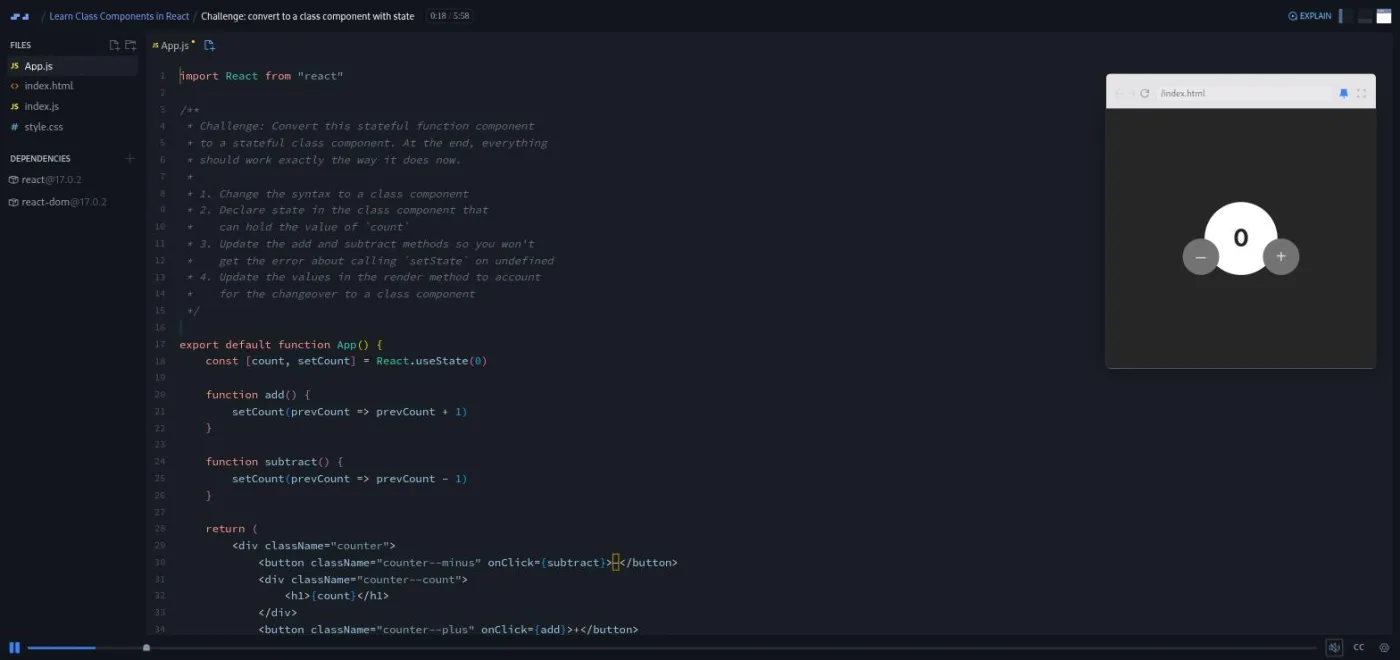
The challenge scrim converts a counter with plus and minus buttons from useState to a class, with a four step brief in the file. Bob's own solution is worth watching for the mistakes: he forgets extends React.Component ("Sorry for anyone that was screaming at me for that") and explains why an arrow function returning an object literal needs parentheses.
"Constructor method in class components" is the longest scrim at nearly eight minutes and the one to rewatch if you maintain older code. Bob shows the older syntax from before class fields existed: a constructor(), a super() call, this.state = {...}, and the line that fixes the undefined this without arrow functions, this.toggleGoOut = this.toggleGoOut.bind(this). He refuses to go down the rabbit hole: "I'm going to teach you the quick solution to this, but I'm also gonna recommend that you not be too terribly concerned about why this works." A two minute challenge has you convert the counter back to constructor syntax.
The section ends with "Updating complex state," a contact card with a favorite star. After a third conversion challenge, Bob shows the one thing classes do better: this.setState() merges the object you give it into existing state, so you can drop the spread operator you needed with useState. Bob is blunt about it: "in reality we only avoided writing one line of code. But that being said, we gotta take the wins when we can get them."
3. Lifecycle methods (30 min, 6 scrims)
A short slide intro explains mounting, updating, and unmounting, and names the methods the course covers: render, componentDidMount, componentDidUpdate, and componentWillUnmount.
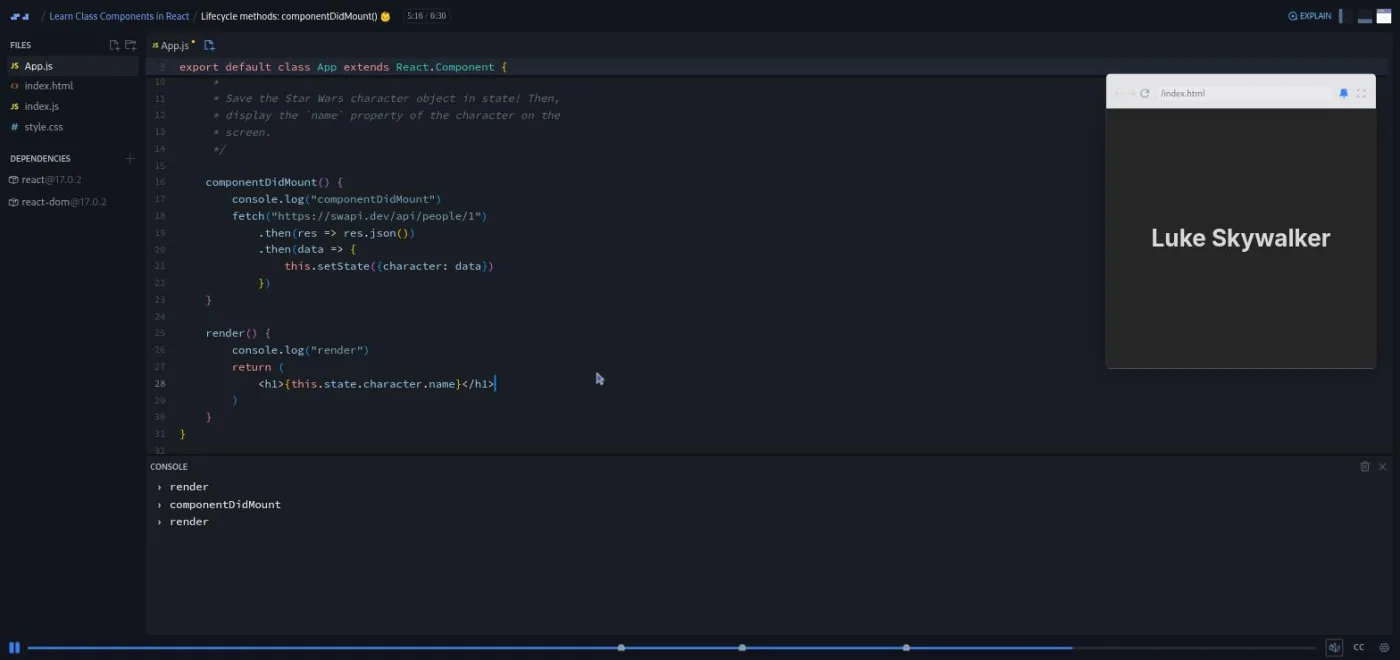
"componentDidMount" uses the Star Wars API. Bob logs from render and componentDidMount so you see the order in the console, fetches a character, then hands you a challenge: save the response in state and render its name. He closes by writing the useEffect equivalent with an empty dependency array, commented out because it will not run inside a class.
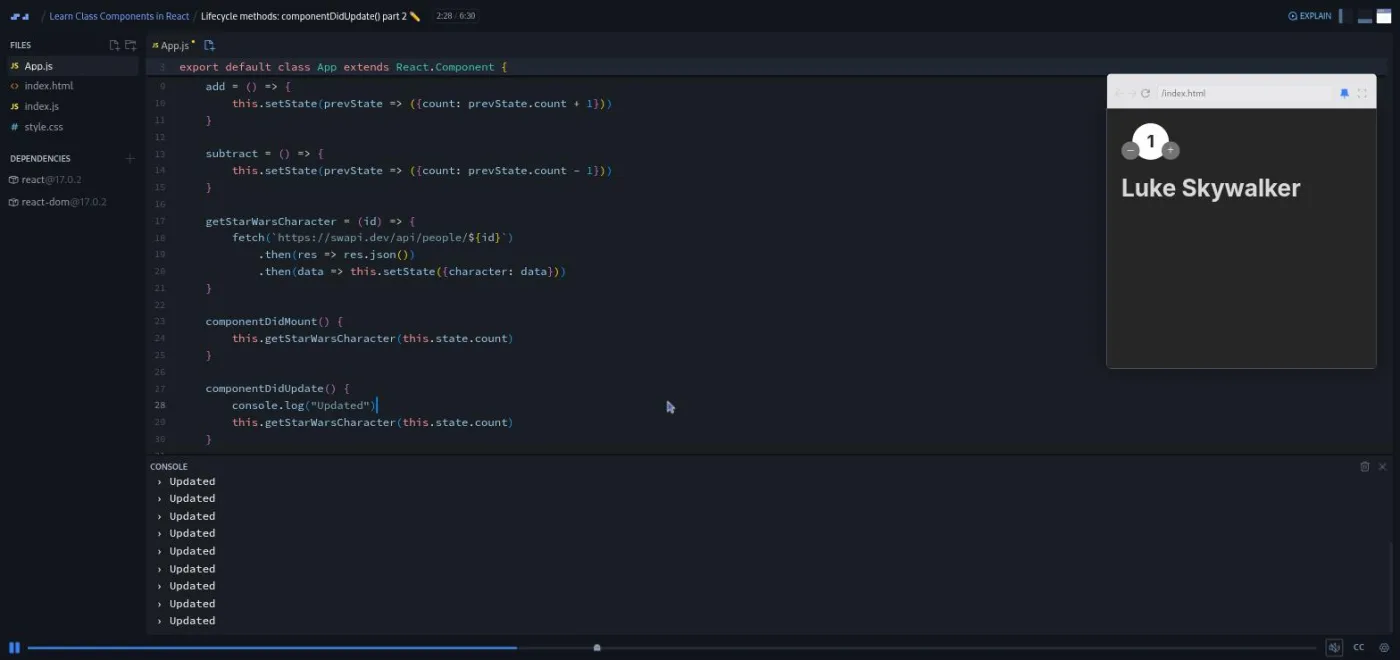
"componentDidUpdate part 1" takes a form Bob "stole" from another lesson and saves its state to localStorage on every change, then repopulates it on refresh. Part 2 is the lesson I would show anyone who thinks they understand componentDidUpdate. The counter now drives which Star Wars character to fetch, and putting the fetch inside componentDidUpdate sends the app into an infinite loop, on screen, with the console filling up. The fix is the prevState argument: only fetch when prevState.count !== this.state.count. Bob is candid about the example: "you either need an app that's relatively complex and large in scope, or you have to use an example that's relatively contrived."
"componentWillUnmount" reuses a window width tracker with a resize listener. Toggling the component off and resizing produces React's "can't perform a React state update on an unmounted component" warning, and the fix is removeEventListener in componentWillUnmount. "Other Lifecycle Methods" is a three minute slide tour of shouldComponentUpdate, getDerivedStateFromProps, and getSnapshotBeforeUpdate, each with a link to the React docs and a reason he is not teaching it.
4. Wrap-up (3 min, 2 scrims)
The last two scrims are not course content: a two minute clip from Per Borgen about the Scrimbassador referral program, and the standard 53 second "How to Utilize Your Certificate" clip that ends most Scrimba courses.
What a lesson feels like
Scrims run from two to eight minutes, and every one is Bob talking over a live editor with the preview on the right. The pattern is consistent: take a working hooks component, break it or rewrite it as a class, hit the error, fix it, then type a comment block summarizing the rules "in case anybody's more of a visual or a reading learner." Challenges arrive as a numbered brief in a comment at the top of the file and a paused recording; Bob's solution follows right after, so you can compare.
Every example is tiny by design, a counter, a toggle, a contact card, a form. There is no project. The dependencies panel shows react and react-dom at 17.0.2 throughout, which is old but fine for this material, since nothing here changed in React 18 or 19. Each scrim has captions, a timestamped transcript under the settings menu, subtitles in ten languages, and speed control.
Bob's tone is the same as in Learn React, calm and a little self-deprecating. Twice he tells you not to chase the "why" of this binding, and once he admits an example is contrived. I found that more useful than a longer course pretending the topic deserves more time.
Free or Pro: exactly what is gated
Four scrims are free previews with the SAMPLE badge: the intro, the ES6 classes review, "Intro to class components," and the first challenge. That is the first 16 minutes, and it covers converting stateless components. The remaining 14 scrims, including everything about state, setState, the constructor, and all of the lifecycle methods, are Pro. So is the certificate.
There are no Solo Projects in this course and no separate Pro-only challenge tier; the four conversion challenges are ordinary scrims. The About text on Scrimba still describes the course as free, which is out of date. Pro also unlocks the Pro-only channels on Scrimba's Discord (the server itself has a free tier, so the Discord alone is not a reason to upgrade). See current plans (opens in a new tab) for what a subscription costs in your region.
How long it takes
The video is 80 minutes. If you already know hooks and pause to do the four challenges yourself, budget two to three hours: each conversion takes five to ten minutes of typing, and the two componentDidUpdate lessons are worth a second pass. If your JavaScript classes are rusty, add an hour to work through the Character, Hero, and Enemy example in scrim two until extends, super(), and class fields feel normal. An afternoon covers it either way.
Who it's for, and who should skip it
It fits you if you know modern React and have a class-based codebase to maintain, or you are about to start Advanced React, the course this section was recorded to prepare you for; Bob says in the intro that it assumed class knowledge. It also helps if older tutorials keep showing you this.setState and you want to know what it does.
Skip it if you are new to React. Do Learn React first; it is free and teaches the way React is written now. Skip it too if what you want is deeper React knowledge in general: there is nothing here about routing, performance, or patterns, only the class syntax.
Start Learn Class Components in React on Scrimba (opens in a new tab)Prerequisites
You need working JavaScript, including class, extends, and the arrow function versus regular function distinction, because Bob only touches classes for five minutes and skips prototypes on purpose. You also need basic React: components, props, and useState, since every lesson starts from a working hooks component. Knowing useEffect is optional but rewarding; Bob compares each lifecycle method to it, and those asides are the best part of the lifecycle section. Nothing needs installing; everything runs in the Scrimba editor with React 17 pre-loaded.
Where it fits
This is a side branch off Scrimba's React track, not a step on it. It is not part of the Frontend Developer Path or the Fullstack Developer Path, and Bob describes it as an onboarding phase between Learn React and Advanced React. Take it right before Advanced React, or the week you inherit a legacy codebase.
Strengths and limits
What it does well: it is short and shows every bug on screen before fixing it, the this binding problem and the componentDidUpdate infinite loop are demonstrated rather than described, every lifecycle method is mapped onto its useEffect equivalent, and Bob is clear about what he is skipping and why.
Where it is limited: it teaches syntax that new React code no longer uses, the examples are deliberately trivial with no project to build, React 17 is the only version you see, the free preview stops before state is introduced, and Scrimba's own listing still calls it free when it is not.
Related courses and comparisons
- Learn React, the free, hooks-based course most people should take first
- Advanced React, the course this section was recorded to prepare you for
- React Challenges, to drill modern React
- Best React courses compared, how it stacks up
Hooks, for almost everyone. Bob Ziroll says in the intro that since React 16.8 there is only a small handful of reasons to use classes. Take this course when a legacy codebase, an older tutorial, or the Advanced React course puts class components in front of you.
No. It is a Pro course. The first four scrims (about 16 minutes, up to the first challenge) are free previews; everything about state, setState, the constructor, and lifecycle methods needs a subscription. The About text on Scrimba still says free, which is out of date.
Converting function components to classes, props via this.props, state as a class field, this.setState with a callback, why this is undefined in a class method and the arrow function and bind fixes, the constructor and super(), setState's automatic merging, and componentDidMount, componentDidUpdate (with prevState), and componentWillUnmount. Three other lifecycle methods get a slide each.
You need useState at minimum, because every lesson starts from a working hooks component and converts it. Knowing useEffect helps: each lifecycle method is compared to it.
Bob Ziroll, who also teaches Learn React and Advanced React. He recorded this as the onboarding section for Advanced React after his new Learn React course dropped class components.
There are four conversion challenges (three components, a counter with state, the counter with a constructor, and a contact card) plus two optional pauses in the lifecycle lessons. They are ordinary paused scrims with Bob's solution following; I did not see any AI-checked challenges in this course.
Nothing you would keep. The examples are a Yes/No toggle, a counter, a contact card with a favorite star, a form that persists to localStorage, a Star Wars character fetcher, and a window width tracker. Each exists to show one class feature.
React 17.0.2 and react-dom 17.0.2 in every scrim. Nothing taught here changed in React 18 or 19, so the version does not matter for the material.
80 minutes of video. Plan two to three hours if you do the four challenges yourself, plus an hour if JavaScript classes are new to you.
Yes. Every scrim has captions, a timestamped transcript under the settings menu, and subtitles in ten languages.