React Interview Questions
React Interview Questions is Cassidy Williams' 41-minute Pro course: nine slide-deck scrims of interview questions with her model answers, plus one coding exercise that converts a class-based counter into a function component with useState. If your interview is a week away and you already know React, it is a well spent lunch break.
Reviewed inside the course with a Pro account, September 2026: every scrim transcript read, the coding exercise worked through.
Quick answer
This fits you if you already know React and have an interview coming up; it will not teach a beginner React. The catch is scope: it drills talking through concepts, not writing code under pressure, so pair it with React Challenges if your rounds are live coding. Once you are through it, Advanced React goes deeper on the concepts these questions only name.
React Interview Questions
ProTaught by Cassidy Williams (opens in a new tab)
Nine short question-and-answer scrims on the React concepts interviewers ask about, from the virtual DOM to context, with one class-to-hooks conversion exercise.
View on Scrimba (opens in a new tab)Is it worth your time?
Knowing React and explaining React out loud are different skills, and the second one is what a phone screen tests. That is the gap this course fills. Cassidy tells you in the first topic scrim how to use it: "As I ask each of the questions, please feel free to pause the video and think about your answer. Write down your answer even. Say it out loud." Then, a few seconds later: "It's gonna seem like we're drilling you, but, hey, that's what interviews are like." If you treat the pauses as real pauses, 41 minutes of video becomes a genuine mock interview, with a model answer after each attempt.
The answers are good. They are short, they name the one thing an interviewer wants to hear (for the virtual DOM question, "the key thing to bring up is diffing"), and they carry Cassidy's opinions rather than textbook neutrality. Class components? "In my very humble opinion, you should almost never use class based components." The context API? "You shouldn't overuse the context API, and that is really the key part of this question."
Two caveats. Scope first: this is talk-about-it preparation. It will not help you if your interviews are live-coding rounds; pair it with React Challenges for that. Then age: the project pins React 16.13.1, the code uses ReactDOM.render, and a few answers describe the world as it was around 2020. I list the specific ones below so you can update them before you repeat them in an interview.
What you'll learn
Course curriculum
1 flat section · 13 scrims (11 course scrims plus two generic Scrimba clips), grouped here by topic
- Course introduction
- The virtual DOM and React limitations
- JSX and props
- State, lifecycle, and effects
- Refs and context
- Miscellaneous (but important!) questions
- Conclusion and Scrimba clips
Scrimba presents the course as one flat list of 13 scrims with no sections, so the grouping above is mine. The 11 course scrims, intro through conclusion, add up to 40 minutes 33 seconds of video, which Scrimba's header rounds to 40 min and this site to 41. The two generic Scrimba clips at the end add about three more minutes, which is why the rounded section times above come to 44.
Inside the course, scrim by scrim
1. Course introduction (1:54, 1 scrim)
Cassidy introduces herself as a principal developer experience engineer at Netlify, which dates the recording (her Scrimba teacher card now describes a developer advocacy role at GitHub). She sets expectations plainly: "this is for people who want a job doing React, and this is for people who generally already know React." Then the format: "I'm not going to be teaching you how to write React at all in this course, but rather I'll be kind of pushing your knowledge and asking you questions." The intro is a free preview, so you can hear the tone before paying.
2. The virtual DOM and React limitations (8:37, 2 scrims)
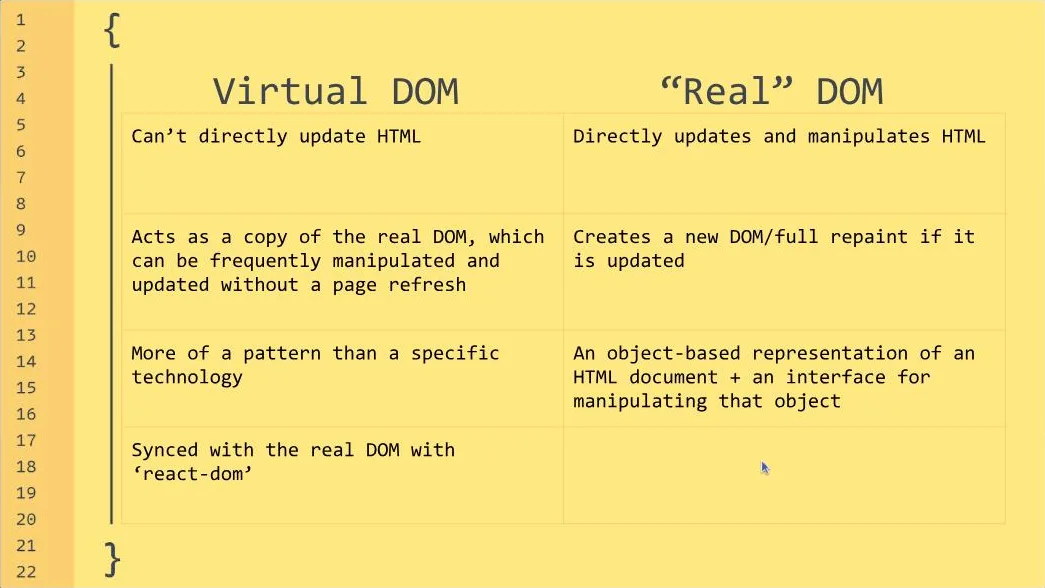
The Virtual DOM scrim (also a free preview) asks two questions. The first, what is the difference between the virtual DOM and the real DOM, gets a comparison table on the slide and a clear priority: "you can talk all you want about what I just showed you but the key thing to bring up is diffing." She also covers the React versus ReactDOM split, which is a common follow-up. The second question, is the virtual DOM the same as the shadow DOM, gets a quick no and the input-slider example of what the shadow DOM is for.
React Limitations is the scrim that has aged most. The four points (React is a library, not a framework; it is fairly large; it is owned by Facebook; the documentation) are still solid interview talking points. The details are from another era. The framework examples are Gatsby and Next.js, the smaller alternative is Preact, and the documentation complaint is that the docs "doesn't really touch on function components nearly as much as it touches on class based components." That was true of the old docs. React's rewritten documentation has been hooks-first for years, and the company is Meta. Give the modern versions of these answers.
3. JSX and props (7:14, 2 scrims)
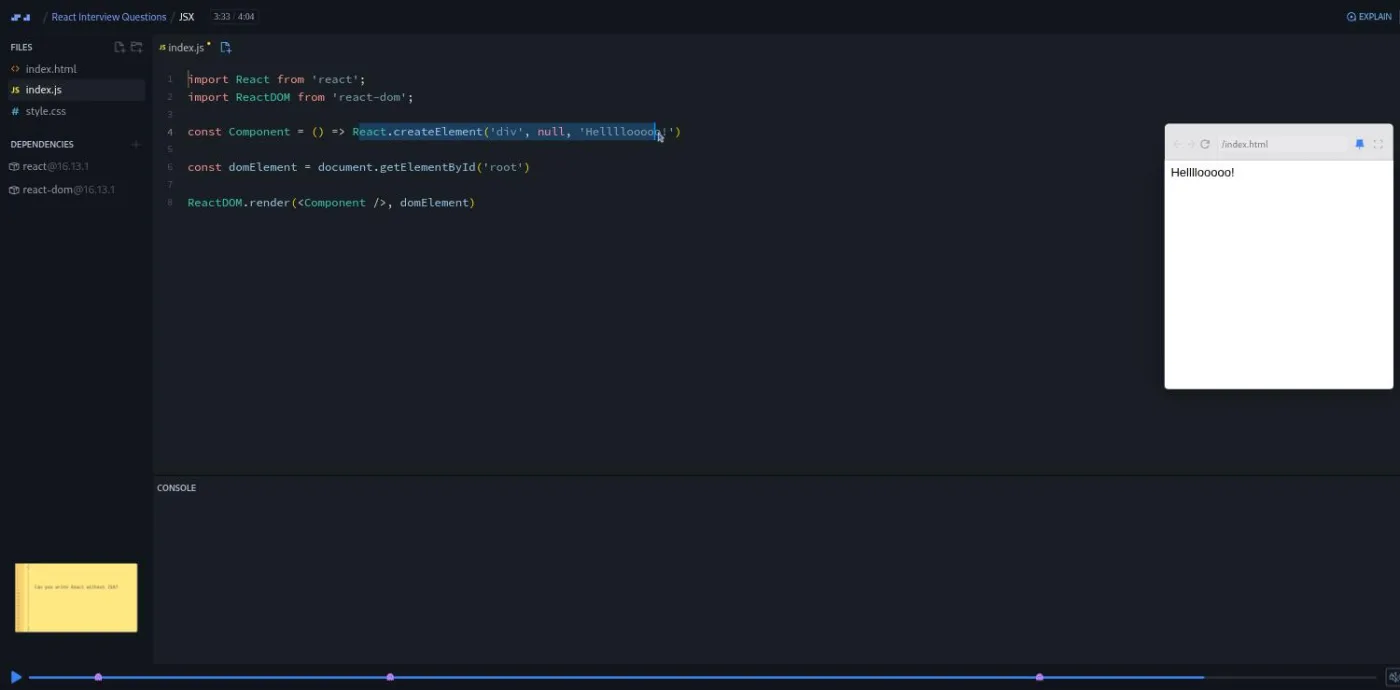
JSX is the first scrim where Cassidy leaves the slides for the editor. Three questions: what is JSX ("a lot of people say, oh, JSX is just putting HTML in your JavaScript, and that is not true"), what is the difference between an element and a component, and can you write React without JSX. For the second she types a <div> element holding a stretched-out hello, renders it, then wraps it in a function to show that "a component is a function that returns an element." For the third she replaces the JSX with React.createElement('div', null, 'Hellllooooo!') and runs it, then leaves you with "it is totally possible to write React without JSX, but why would you?"
Props opens with the course's worst joke ("I gotta give you props for getting this far because I'm a component that would give you props, I guess"), which Cassidy immediately disowns, and then covers three questions in three minutes. Parent to child is props; child to parent is a function passed as a prop and called by the child. Prop drilling is passing a value down through grandparent, parent, child, and, in her example, "atom." Can you modify props? "Props are read only," with an add(x, y) example to explain why components must act like pure functions with respect to their props.
4. State, lifecycle, and effects (8:00, 2 scrims)
State and Lifecycle is, in Cassidy's words, "probably the most misunderstood section of React," and she asks you to answer these "without referring to your notes." Props versus state is framed as function parameters versus variables declared inside a function. The next question is the one I found most useful, and least often taught: how state differs between a class component and a function component. Her answer: "State and a class component is something that persists like an object. State in a function component is something that is recalled and reinstantiated because the function component is recalled and reinstantiated." Then the lifecycle: mounting, updating, and unmounting, with componentDidMount, componentDidUpdate, and componentWillUnmount named, and the punchline that in function components all of it becomes useEffect.
Effects goes deeper on that hook. It takes two parameters, a function and a dependency array. The timing depends on the array. An empty array runs on mount. An array with a variable runs on mount and whenever that variable changes. No array runs "on mount and then on every single state change that happens in the application, which you could use that, you might hate that." The return value is the cleanup function; Cassidy admits "this is something that tripped me up when I first learned about useEffect" and uses a window resize listener to show what needs cleaning up.
5. Refs and context (5:39, 2 scrims)
Refs starts with a disclaimer that "refs are something that you probably won't be asked a lot about in a job interview" and then covers the three questions you might get: refs versus state ("state variables are something that can trigger a rerender. Meanwhile, refs don't"), when to use them (managing focus, which she says is "probably ninety nine percent of the time" she uses them, plus animations and outside DOM libraries that need a real node to attach to), and how to update one in a function component (inside an effect).
Context asks two questions: context API versus prop drilling, and when you should not use context. The answer to the second is the line to use in an interview: "I would only put what's absolutely necessary at the top level of my application with context." Auth and theme yes, click counters no. She also mentions that Redux was built on an early, unofficial version of context, which is worth having in your pocket if the interviewer brings Redux up.
6. Miscellaneous (but important!) questions (7:49, 1 scrim)
The longest scrim runs through five definitions and then the exercise. Fragments are "kinda nothing." Class components are for almost never, except error boundaries, which "at the time of the creation of this course" need a class. A higher-order component is "a function that takes in a component and it returns a new component." Portals render children into a DOM node outside the parent's hierarchy, as modals do. Controlled versus uncontrolled components closes the list, and she calls it "one of my favorite questions."
Then, at 4:53: "The last thing I wanted to do is not on a slide." The editor holds a class-based Counter with this.state = { count: 0 } and two buttons calling this.setState. "I'd like you to convert this counter component into a function component. Go ahead and pause your video." The solution takes two minutes: drop extends React.Component, import useState, replace the constructor with let [count, setCount] = useState(0), and swap every this.state.count for count.
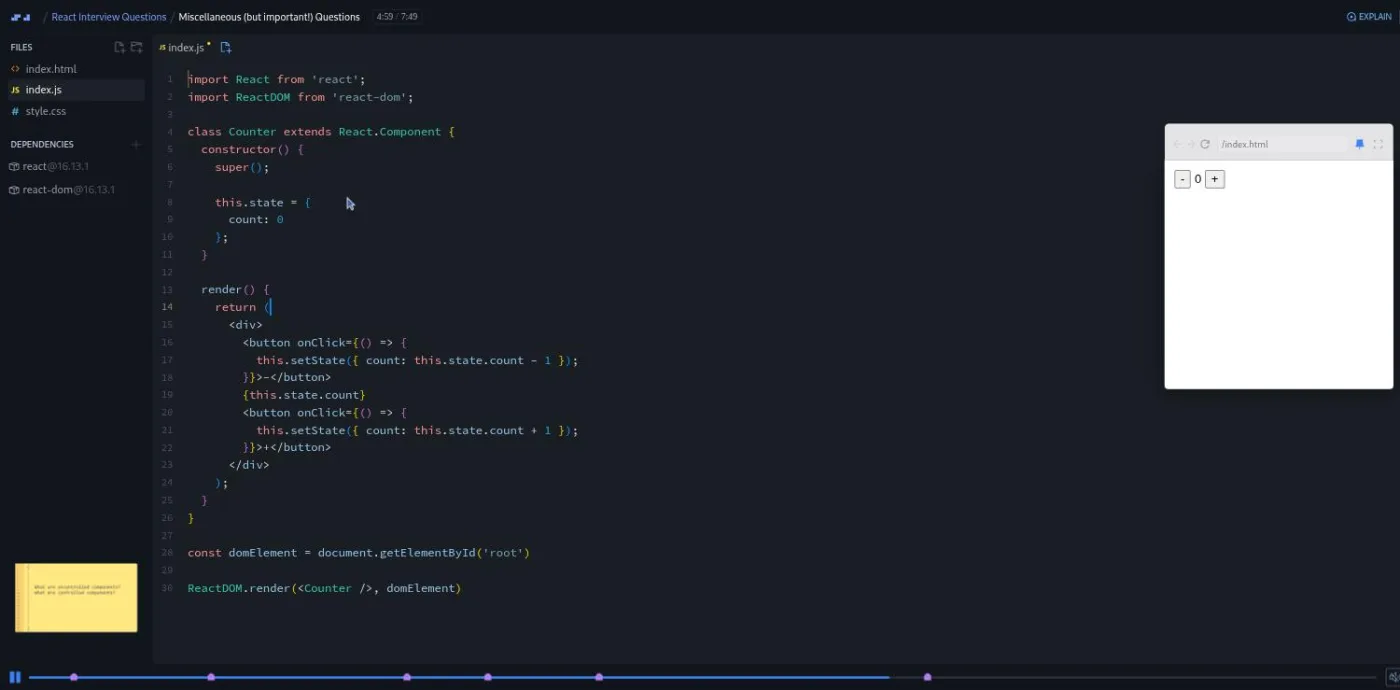
This is the only place the course checks whether you can write hooks rather than describe them, and it is a fair proxy for a common screening task.
7. Conclusion and Scrimba clips (4:15, 3 scrims)
An 80-second recap ("If you could answer all of these questions in this course, then you are all set for your React interviews"). Then come two clips from Scrimba staff that appear at the end of many courses: a two-minute pitch for the Scrimbassador referral program and a one-minute "How to Utilize Your Certificate." Neither is course content.
What a lesson feels like
Each topic scrim is a yellow slide deck styled like a code editor. A question appears, the audio goes quiet for a second or two, and then Cassidy answers it, sometimes with a table or a list on the slide, sometimes by closing the slide and typing in the editor. The scrubber shows a marker at each question, so it is easy to jump back and re-answer. Two scrims (JSX and the miscellaneous one) have real code running in the preview pane; the rest are slides and voice.
The built-in pauses are short. If you want the mock-interview effect, you have to hit pause yourself, and Cassidy tells you to. Every scrim has captions, a full timestamped transcript under the settings menu, subtitles in several languages, and playback speed controls. At 1.5x speed the whole thing fits in under half an hour.
Free or Pro: exactly what is gated
The first two scrims, the course introduction and The Virtual DOM, carry a SAMPLE badge and play without a subscription. The other nine course scrims, the coding exercise, and the certificate need Pro. The listing shows challenge markers on the topic scrims (26 in total, roughly one per question asked), but there is no AI-checked challenge here; the check is your own answer. The Discord server is open to free accounts, with Pro-only channels for subscribers. See current plans (opens in a new tab) for what Pro includes in your region.
How long it takes
41 minutes of video. Done properly, with a real pause and a spoken or written answer for each of the 25 or so questions, plan on 90 minutes to two hours. Add another 30 to 60 minutes if you stop to look up the modern answers to the dated points (Meta instead of Facebook, the rewritten docs, createRoot instead of ReactDOM.render). A second pass the night before an interview, just replaying the questions and answering from memory, takes about an hour.
Who it's for, and who should skip it
It fits you if you can already build things in React and have a technical screen or a first-round interview coming up. It also fits developers who learned React by doing and never learned the vocabulary; the course names the concepts you have been using without naming.
Skip it, for now, if you are still learning React. Do Learn React first; this course assumes hooks, props, and state are familiar. Skip it if your interviews are mostly live coding, where React Challenges matters more. And do not expect senior-level material: there is nothing on performance, concurrent rendering, server components, or testing.
Start React Interview Questions on Scrimba (opens in a new tab)Prerequisites
Working React: components, props, state, useState, useEffect, and a general sense of rendering. Cassidy references class components throughout (lifecycle methods, this.setState), so if you have never seen a class component, the Class Components in React course is a useful 80-minute detour first. No setup is needed; everything runs in the browser.
Where it fits
Scrimba's course page lists it under the Frontend Developer Path and the Fullstack Developer Path. It pairs with Frontend Interview Tips, which covers the JavaScript and CSS side of the same interviews, and with the four-week frontend interview plan on this site if you want a schedule. For depth behind the answers, Advanced React is the follow-up.
Strengths and limits
What it does well: it is short and focused, the questions are the ones that come up, the model answers name the one point to lead with, and Cassidy's opinions (function components over classes, do not overuse context) are the ones a 2026 interviewer holds too. The counter conversion is a realistic screening task.
Where it is limited: it is 41 minutes and Pro-only, it was recorded in the React 16 era and a handful of answers need updating, the pauses are too short to force you to answer, and it covers none of the live-coding or system-design side of a React interview.
Related courses and comparisons
- Learn React, the prerequisite
- React Challenges, for the live-coding side of interviews
- Frontend Interview Tips, the JavaScript and CSS interview companion
- Class Components in React, if the lifecycle methods are unfamiliar
- Advanced React, to deepen the concepts behind the answers
- Best React courses compared, how it stacks up
No. It is a Pro course. The introduction and the Virtual DOM scrim are free previews (marked SAMPLE); the other nine course scrims, the coding exercise, and the certificate need a subscription.
41 minutes of video across 13 scrims. Pausing to answer each of the roughly 25 questions yourself takes it to 90 minutes or two hours.
Virtual DOM vs real DOM and shadow DOM, React's limitations, what JSX is, element vs component, React without JSX, passing values parent to child and back, prop drilling, why props are read only, props vs state, state in class vs function components, the component lifecycle, useEffect's parameters, timings and cleanup, refs vs state and when to use refs, context vs prop drilling and when not to use context, fragments, error boundaries, higher-order components, portals, and controlled vs uncontrolled components.
One exercise. In the Miscellaneous scrim you convert a class-based counter with this.state and this.setState into a function component with useState. The JSX scrim also has live code in the editor, but Cassidy types it.
Cassidy Williams. She introduces herself as a principal developer experience engineer at Netlify, which is when it was recorded; her Scrimba teacher card now describes a developer advocacy role at GitHub.
The concepts are, the details are not all. The project pins React 16.13.1 and uses ReactDOM.render, the Limitations scrim calls the owner Facebook and criticizes the old docs for favoring class components, and error boundaries are described as class-only. Update those answers before an interview.
Yes. Every scrim has captions, a timestamped transcript panel under the settings menu, and subtitles in several languages.
Only for the talking part. For coding under time pressure, pair it with React Challenges.