What's New in React 19?
What's New in React 19? is Bob Ziroll's free, 69-minute catch-up course, a flat run of 15 scrims that rebuild one username form four times with the action prop, useActionState, useOptimistic and useFormStatus. It is the fastest way to see React 19's actions model in working code if you already write hooks-based React.
Reviewed inside the course with a Pro account, September 2026.
This page is part of our Scrimba React courses catalog. Scrimba's course page lists it under the Frontend Developer Path and the Fullstack Developer Path.
Quick answer
What's New in React 19? is a free, advanced-level mini course: a two-scrim useTransition refresher, a short React Compiler scrim, then a single username form rebuilt four times with form actions, useActionState, useOptimistic and useFormStatus, closing on refs as props, the use() API and document metadata. It fits you if you already write hooks-based React and want the changes explained in working code; if you are still learning React, take Learn React first, as Bob says himself in the intro and conclusion scrims.
What's New in React 19?
FreeTaught by Bob Ziroll (opens in a new tab)
A free, hour-long tour of React 19: form actions, useActionState, useOptimistic, useFormStatus, refs as props, use() and document metadata, built on one small form.
Start free on Scrimba (opens in a new tab)
Is it worth your time?
Yes, if you fit the audience. An hour of Bob's time gets you a working mental model of actions, which is the concept the rest of React 19 hangs on, and you end up with one form that you have rewritten four ways in your own hands. The teaching choice that makes it work is the single running example: a "Current user" label, a text input and an Update button, wired to a fake updateNameInDB call that waits 1.5 seconds and throws if you type the word "error". Every new hook is applied to that same form, so you see exactly what each one removes from the previous version.
It was recorded in May 2024 against a React 19 release candidate (the dependency panel shows 19.0.0-rc-915b914b3a-20240515), and Bob says several times that the official docs had not caught up yet, so the slide links point at the React 19 announcement post instead. Everything he teaches shipped in the final React 19, but the framing ("coming with React 19") reads as a preview now. The use() lesson also ends on a limitation: creating a promise inside a component and passing it to use() refetches on every render, and Bob leaves the caching fix out of scope. You learn what use() is, not how to use it in production without a framework.
What you'll learn
Course curriculum
15 course scrims in a flat list, grouped here into five editorial parts
- Catch-up: transitions and useTransition
- React Compiler and form actions
- useActionState, in three parts
- useOptimistic and useFormStatus
- refs as props, use(), metadata, conclusion
Scrimba presents this course as one flat list with no modules, so the five parts above are my grouping, not Scrimba's. The expanded table of contents shows 17 rows: the 15 course scrims (66 minutes and 39 seconds by their own timers) plus two generic Scrimba clips at the end, a Scrimbassador referral pitch and a certificate tip, which together bring the header figure to 69 minutes. The course listing and its structured data say 16 lessons; when other pages on this site quote 16, that is Scrimba's number.
Inside the course, scrim by scrim
1. Catch-up: transitions and useTransition (11 min, 3 scrims)
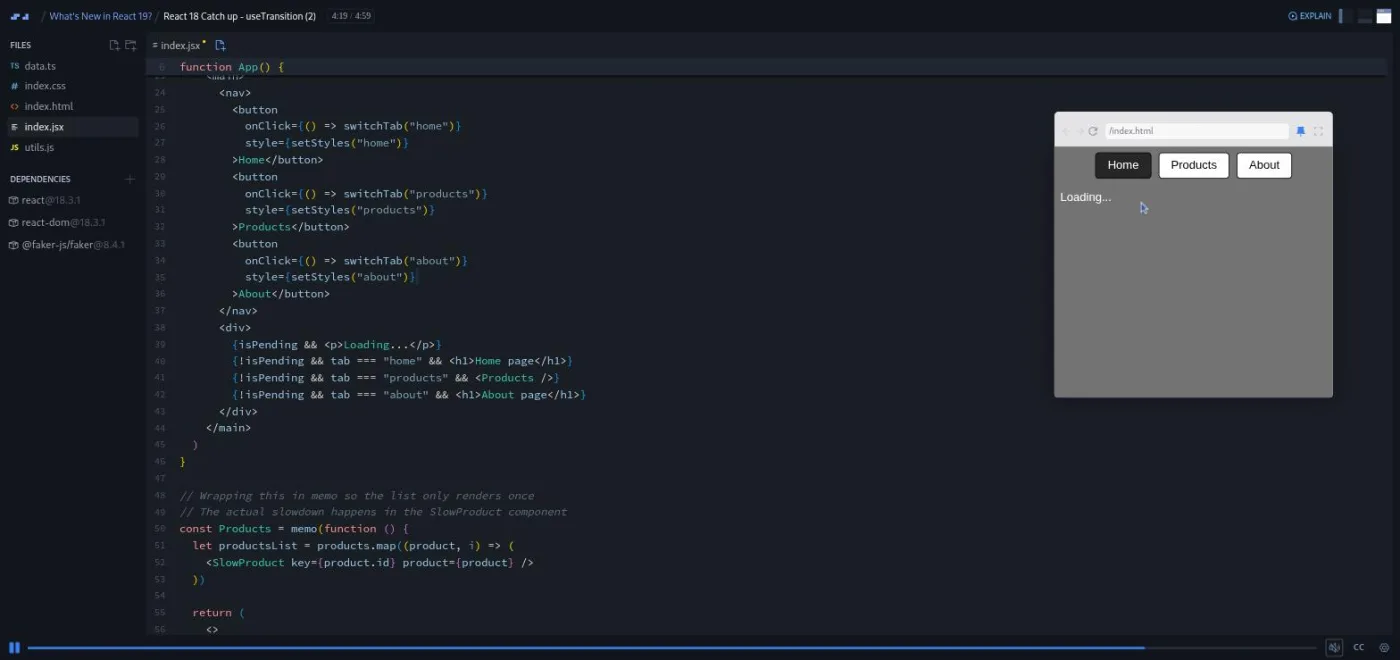
The intro is a two minute title-card scrim in which Bob lays out the plan and admits the starting point is a React 18 feature: "if you've taken my introductory or advanced courses in React, you'll know that we don't cover use transition in either of those courses." The two useTransition scrims use a tab switcher (Home, Products, About). The Products tab renders 1,500 fake products from @faker-js/faker, each with a one millisecond artificial sleep, so the tab takes about 1.5 seconds to appear. These two scrims still run React 18.3.1; everything after them runs the React 19 release candidate.
Part 1 is a guided reading of the code and the bug: click Products and then About straight away, and React finishes the slow Products render before switching, "and the whole switching to products just looks like it never really happened," as Bob puts it. Part 2 wraps setTab in startTransition so the slow update becomes interruptible, then uses the isPending boolean to show a "Loading..." paragraph. That boolean is the seed for everything that follows: "this kind of boilerplate just is so so common that React built it right into the value of is pending."
2. React Compiler and form actions (12 min, 3 scrims)
The compiler scrim is under two minutes and has no code beyond a Hello World. Bob explains that the compiler is meant to replace the manual useMemo, React.memo and useCallback work he teaches in the performance section of Advanced React, then points at docs that "were just released a day ago" and "still under construction". Treat it as a heads-up, not a lesson.
Form action is the longest scrim in the course at 7:30 and the one that sets up the running example. It opens with the old pattern: a controlled input tracked in state, an onSubmit handler that calls event.preventDefault(), an await on the fake database call, then two setState calls. Bob is candid about how he feels about that: "Something has always felt a little off to me about this ... it feels a bit more convoluted than it needs to be." He then swaps onSubmit for action, receives the native FormData object instead of an event, and deletes the input state. The change handler and the preventDefault go too, and he reads the value with formData.get("name") after adding a name attribute. The Error and loading states scrim then shows why adding manual loading and error state back into an action does not behave the way you expect, "because form actions run as a transition," which motivates the next hook.
3. useActionState, in three parts (18 min, 3 scrims)
This is the core of the course and the only place it slows down. Part 1 introduces the three-value return ([state, actionFunction, isPending]), the reducer-style signature Bob compares to Array.reduce, and the wrapped action you pass to the form. It ends with a warning that is still useful: "the documentation is not currently correct as I'm recording this, but that blog post is."
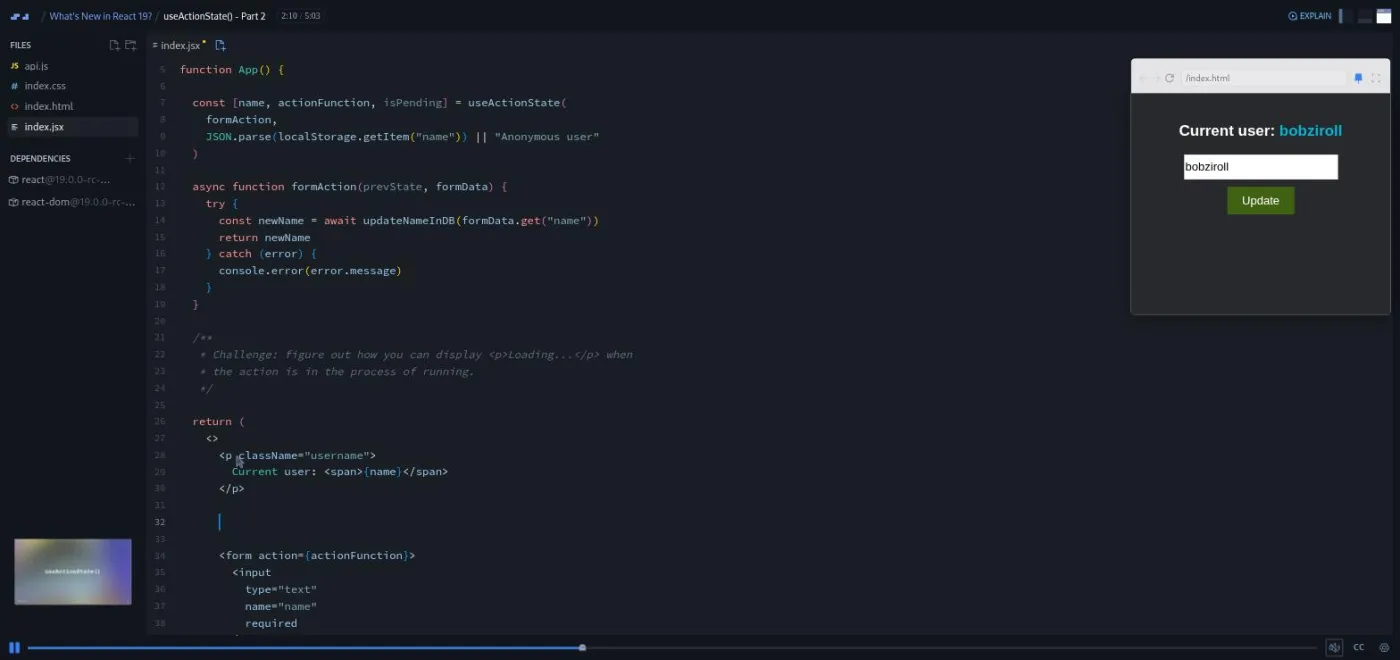
Part 2 fixes the (prevState, formData) signature, returns the new name instead of calling a setter, and issues the first challenge: show a Loading paragraph while the action runs. The scrim carries Scrimba's "Challenge with Instant Feedback" icon, and the brief lives in a comment block in the editor. Bob's tone is relaxed about it: "If you're already relatively experienced with React, then this might not be much of a challenge for you."
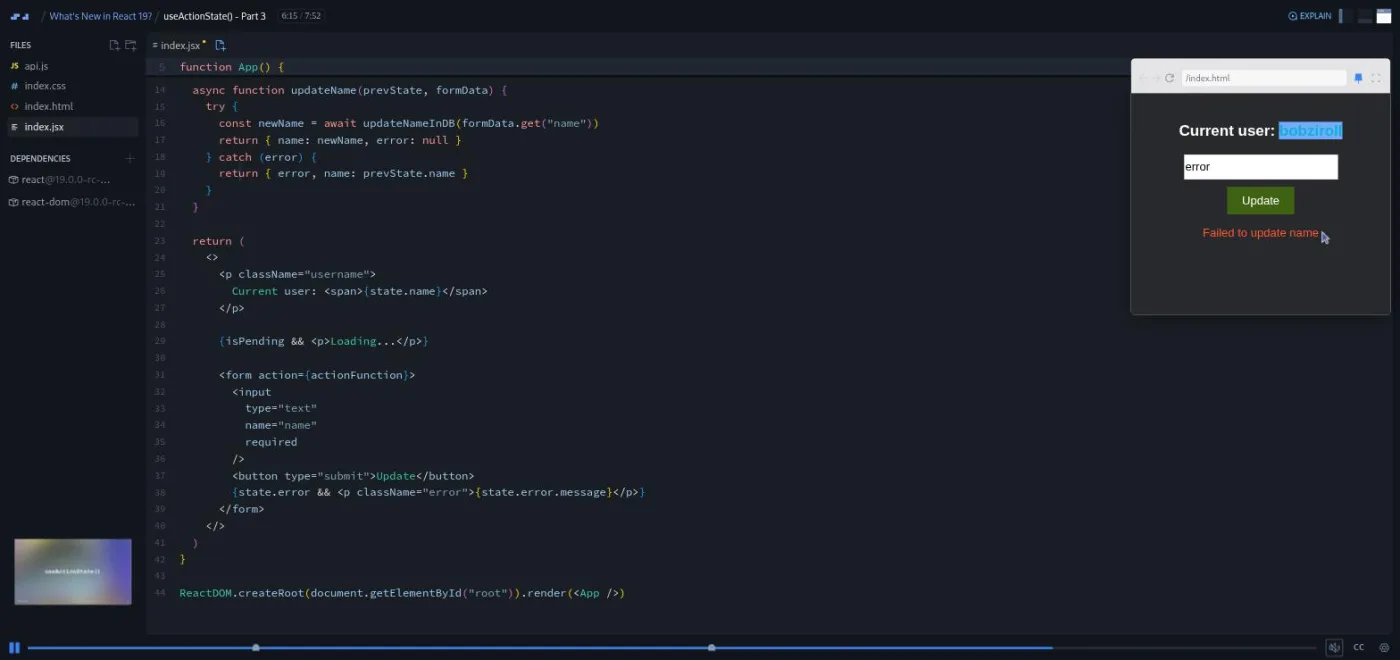
Part 3 is where the pattern earns its keep. Bob turns the state from a bare string into an object with name and error keys, then sets two more challenges. The first is to move the caught error message from the console into the UI; the second is to keep the previous name when returning the error (the trap is returning { error } alone and losing state.name). The finished action returns { name: newName, error: null } on success and { error, name: prevState.name } on failure, and the error paragraph renders from state.error. By the end of this part you have deleted every useState call from the component, and Bob does a "sanity check" recap of exactly what went away.
4. useOptimistic and useFormStatus (10 min, 2 scrims)
useOptimistic gets one 5:25 scrim, with a challenge in the middle: figure out where to call setOptimisticName so the label updates the instant you submit. The answer is the first line of the action, before the await. Bob's test is the same one from Part 3: submit "Bob error", watch the label flip to it, then watch it snap back when the fake database rejects it. His framing is the like button: "you don't want a little loading spinner to show up while it's speaking to the database." He also deletes the isPending Loading paragraph at the end, since the optimistic label made it redundant.
useFormStatus is pitched at people writing component libraries. Bob extracts a MyButton component, spreads the rest of its props onto a native button, and then reads pending from useFormStatus() inside it, with no prop drilling, because "React turns the form element into a context provider." The one thing to remember from this scrim is the import: it comes from react-dom, not react. The button reads "Submitting..." while the action runs and "Update" otherwise.
5. refs as props, use(), metadata, conclusion (16 min, 4 scrims)
refs as props is under three minutes and has no runnable demo (Bob does not create the ref with useRef; he shows the shape). The point is that forwardRef is gone as a requirement: a custom component now receives ref as an ordinary prop.
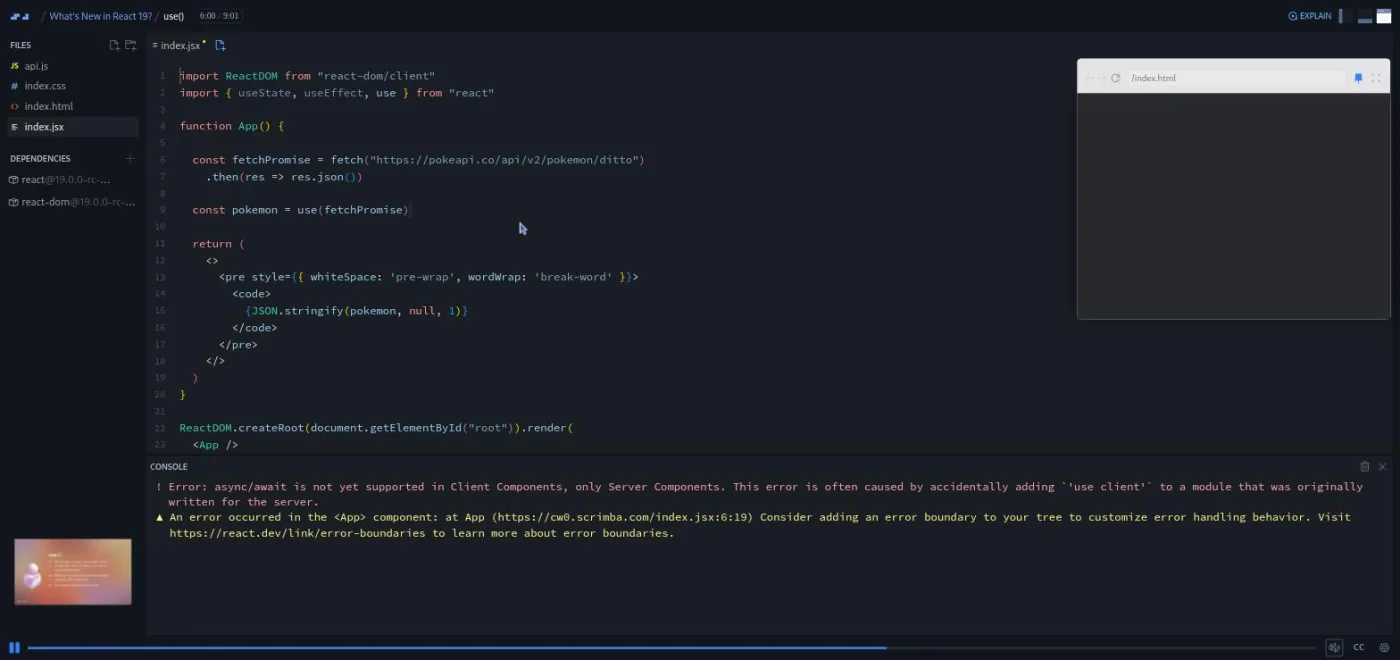
use() is the second longest scrim at 9:01 and the most interesting one to read. Bob is clear up front that use "isn't actually a hook" and so can be called inside an if. He rewrites a Pokemon API fetch from the useEffect plus useState pattern to const pokemon = use(fetchPromise). That hits the error "async/await is not yet supported in Client Components" because nothing is catching the suspended component. Wrapping it in <Suspense fallback={<p>Loading...</p>}> clears that, and then comes the warning that matters: "A component was suspended by an uncached Promise." He does not fix it. His verdict is that use "shows, pun intended, great promise for the future", and he suggests you add a counter button to the scrim and watch the fallback flash on every re-render.
The metadata scrim shows a BlogPost component rendering <title>, <meta> and <link> tags inside an <article>, which React 19 hoists into the document head; Bob proves it with a dev tools screenshot he took before recording rather than a live demo. The one minute conclusion sends people who found it hard back to Learn React (which he was "just about to start rerecording from scratch" at the time, and has since) and people who want more to Advanced React.
What a lesson feels like
Every scrim is Bob talking over a live editor, with the running form in a small preview window on the right and a slide thumbnail in the corner. Scrims run from about a minute to nine minutes; most are three to five. Bob ends most scrims with "feel free to play with the code", and here it is worth doing: the same form carries through nine scrims, so you can pause anywhere, break it, and see what the hook you just added changed.
The three challenges (loading paragraph, error message, optimistic update) each arrive as a comment block in the file and a "Pause now and work on this challenge" from Bob, followed a few seconds later by his solution. They are short, five to ten minutes each if you type them. Every scrim has captions, a timestamped transcript in the settings menu, subtitles in ten languages, and speed control.
Free or Pro: exactly what is gated
All 15 scrims are free, including the three challenges: the header stats say "free", the course's structured data marks it accessible for free, and the intro carries the SAMPLE badge. There are no Solo Projects in this course, so nothing inside it is Pro-only. I reviewed it on a Pro account, so I did not test the free experience myself.
What Pro adds around it: the Certificate of Completion row at the bottom of the table of contents, the two career paths that include this course, and the Pro-only Discord channels. Basic Discord access is free according to Scrimba's pricing page, so the server itself is not a reason to upgrade. One thing I could not verify: Scrimba caps free accounts at 10 interactive challenges in total, and the three "Challenge with Instant Feedback" scrims here may count toward that cap. See current plans (opens in a new tab) if the paths or the certificate matter to you.
How long it takes
The runtime is 69 minutes, of which 67 is course content. If you watch and type along with the three challenges, plan for two to three hours: the useActionState trio is 18 minutes of video that deserves a second pass, and the use() scrim rewards the experiment Bob suggests at the end. An experienced React developer who only wants the deltas can skim it in an evening; someone who has never seen useTransition should budget the full three hours and treat the first two scrims as a real lesson rather than a recap.
Who it's for, and who should skip it
It fits you if you learned React on 18 (or on Bob's older courses) and want to know what action={fn}, useActionState, useOptimistic, useFormStatus and use() do, with a form you can break. It is also a good primer before the forms section of the current Learn React, which now uses form actions.
Skip it if you have never written React; Bob says as much in the intro, and he assumes you know useState, useEffect, async functions and what a promise is. If you took the re-recorded Learn React you already know the action prop; the rest of this course (useActionState, useOptimistic, useFormStatus, use()) is still new. And if you are here for the React Compiler or server components, this is not the course: the compiler gets two minutes and server components are not covered.
Prerequisites
Comfortable hooks-based React: useState, useEffect, controlled inputs, and async/await. The useActionState scrims lean on the reducer idea (a function that receives previous state and returns new state), so having met useReducer or Redux helps, though Bob explains it. Nothing to install; the whole course runs in the Scrimba editor with the dependencies pinned in each scrim.
Where it fits
This is a side course rather than a step in a sequence. Scrimba lists it under the Frontend Developer Path and the Fullstack Developer Path, and the natural moment to take it is right after Learn React or Advanced React, when the new hooks will make sense in context. If the forms material was the part you liked, React Router covers the router-side form handling Bob mentions in the Form action scrim.
Strengths and limits
What it does well:
- One running example that you refactor four times.
- Three short challenges with instant feedback.
- A
use()lesson that shows the limitation instead of hiding it. - Bob's habit of saying which parts he personally finds confusing (the actions definition, the
usename, the "name" attribute on a name field).
Where it is limited:
- It was recorded against a May 2024 release candidate and talks about React 19 as upcoming.
- The compiler scrim is a pointer rather than a lesson.
- The refs scrim has no runnable demo.
- The
use()caching problem is left unsolved. - Server components are absent.
Related courses and comparisons
- Learn React, the foundation this assumes, now re-recorded for React 19
- Advanced React, where the performance material the compiler replaces lives
- React Router, for the router-side forms Bob references
- React Challenges, to practice modern React
- Best React courses compared, how it stacks up
Yes. All 15 scrims, including the three challenges, open on a free account, and there are no Solo Projects to gate. Pro is only needed for the certificate row, the two career paths that include the course, and the Pro-only Discord channels; basic Discord access is free.
A useTransition refresher, a short React Compiler overview, the form action prop, useActionState in three parts, useOptimistic, useFormStatus, refs as props, the use() API with Suspense, and document metadata hoisting. Server components are not covered.
No. The scrims pin a React 19 release candidate from May 2024 (the two useTransition scrims run React 18.3.1). Everything taught shipped in the final React 19, but Bob talks about the features as upcoming and links to the announcement post instead of the docs, which had not been updated yet.
No. It is rated Advanced and assumes hooks-based React and async JavaScript. Bob says in the intro and the conclusion that beginners should take Learn React instead, which now covers React 19.
Three scrims carry Scrimba's Challenge with Instant Feedback icon: show a loading paragraph, move the error into the UI, and place the optimistic update. Each is a comment-block brief in the editor with Bob's solution afterward. Nothing to install; it all runs in the browser.
One small form: a Current user label, a text input and an Update button, backed by a fake database call that waits 1.5 seconds and throws if you type the word error. You rewrite it with form actions, useActionState, useOptimistic and useFormStatus, plus a separate Pokemon API demo for use() and a blog post demo for metadata.
69 minutes of video. Plan two to three hours if you type the challenges and replay the useActionState scrims; an evening if you only want the deltas.
Bob Ziroll, who is responsible for Scrimba's React curriculum and also teaches Learn React and Advanced React. The teacher card on the course page confirms it.
Yes. Every scrim has captions, a timestamped transcript under the settings menu, subtitles in ten languages, and playback speed control.