React Challenges
React Challenges is Scrimba's Pro practice course for React developers: 40 broken or unfinished apps, each with a written brief and a recorded solution from Daniel Rose, across 9.8 hours. You build a synth keyboard, a Game Boy game and a spaceship blaster, and it earns the time if you already know React well enough to get stuck.
Reviewed inside the course with a Pro account, September 2026: every one of the 40 challenge briefs, seven of the solution walkthroughs, the intro and the outro.
Quick answer
It fits you if you have finished Learn React and want to find out what you can build without a walkthrough; if you have not, the briefs read as a wall. The catch: most of the runtime is Daniel solving each problem for you, not you attempting it, so the real value is the time you spend stuck before you press play. Finish it and move to Advanced React.
React Challenges
ProTaught by Daniel Rose (opens in a new tab)
Forty broken or unfinished React apps to fix, each with a written brief, hint files and a recorded solution. React 18, hooks only.
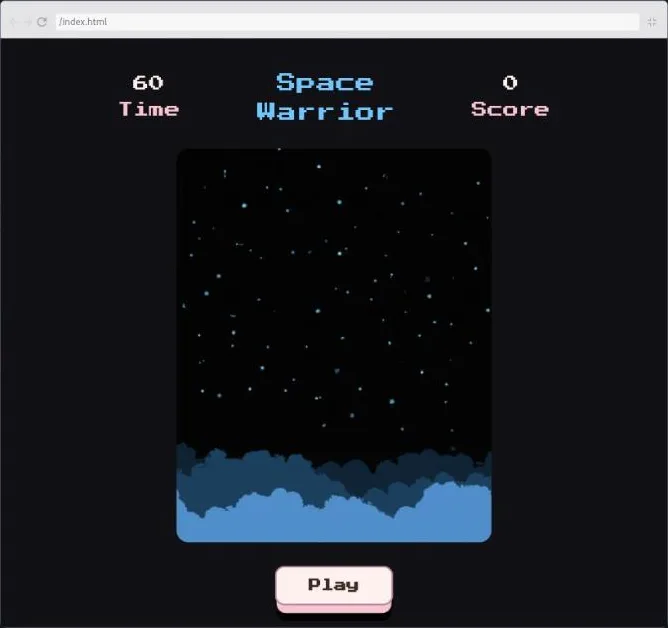
View on Scrimba (opens in a new tab)The course has no chapter title cards to show you. It is one flat list of scrims, and the intro slides carry a Homer Simpson GIF and a hamster GIF I am not going to republish. So here is what the final challenge looks like the moment you open it instead.
Is it worth your time?
Yes, if you are in the gap between "I followed a React course" and "I can start from a blank handler." Every one of the 40 briefs is written the way a ticket would be. Here is the state object, here is the div, make these four things happen, do not touch anything else. That constraint is the point. You are practicing the reach-for-it moment rather than learning new hooks.
The one thing to know before paying is the split between briefs and solutions. Only 2.7 of the 9.8 hours are Daniel setting the problem. The rest is him solving it slowly, on purpose. He says in the intro that the solution scrims are "meant to make things understandable to someone who was totally baffled by a challenge." If you were not baffled, he tells you to skim them: "It's not cheating, and it's not going to hurt my feelings." Take him at his word. The value is in the minutes you spend stuck.
It teaches nothing in order: forms come up in challenge 4, again in 13, again in 24 and 37. If you want a syllabus, this is the wrong course. If you want to be surprised by what you cannot do yet, it is the right one.
What you'll learn
Course curriculum
84 scrims in a flat list (intro, 40 challenge and solution pairs, three wrap-up clips), grouped here into six editorial parts
- Intro and challenges 1 to 6: buttons, state objects and controlled forms
- Challenges 7 to 13: converting, refactoring and passing props
- Challenges 14 to 20: localStorage, derived values, iteration and styles
- Challenges 21 to 27: mouse events, files, CSS variables and event delegation
- Challenges 28 to 34: fetching, search, timestamps and sorting
- Challenges 35 to 40 and wrap-up: intervals, games and the big builds
Scrimba presents the course as one flat list with no modules, so the six parts above are my grouping and the durations are the summed scrim lengths from each lesson header. My count of 84 scrims and 9.8 hours matches the course listing exactly. The teacher card on the same page says "82 lessons," which leaves out the affiliate clip and the generic certificate clip at the end.
The course page lists 35 learning objectives. In practice four skills keep coming back. You update a state object or an array of objects without losing the other properties, control form elements, wire mouse and keyboard events, and turn hard-coded JSX into a map. Nothing here needs a router, a data library or TypeScript.
Inside the course, part by part
1. Intro and challenges 1 to 6 (60 min, 13 scrims): buttons, state objects and controlled forms
The intro is six minutes of advice and it is worth watching. Daniel lists what you will build: a synth keyboard, a drawing app, an amusement park game for your mouse finger, a spaceship blaster and "a parody of a certain Nintendo franchise that shall remain nameless." Then he sets expectations. Most challenges "assume that you have completed Scrimba's React Basics course," and some "go into more advanced territory or things that aren't covered in any of the Scrimba courses." His rules are to read the brief closely, plan in plain language before typing, and not to overbuild. "If your code is feeling like a Rube Goldberg contraption powered by a pack of dogs, it is probably a sign that you are overthinking."
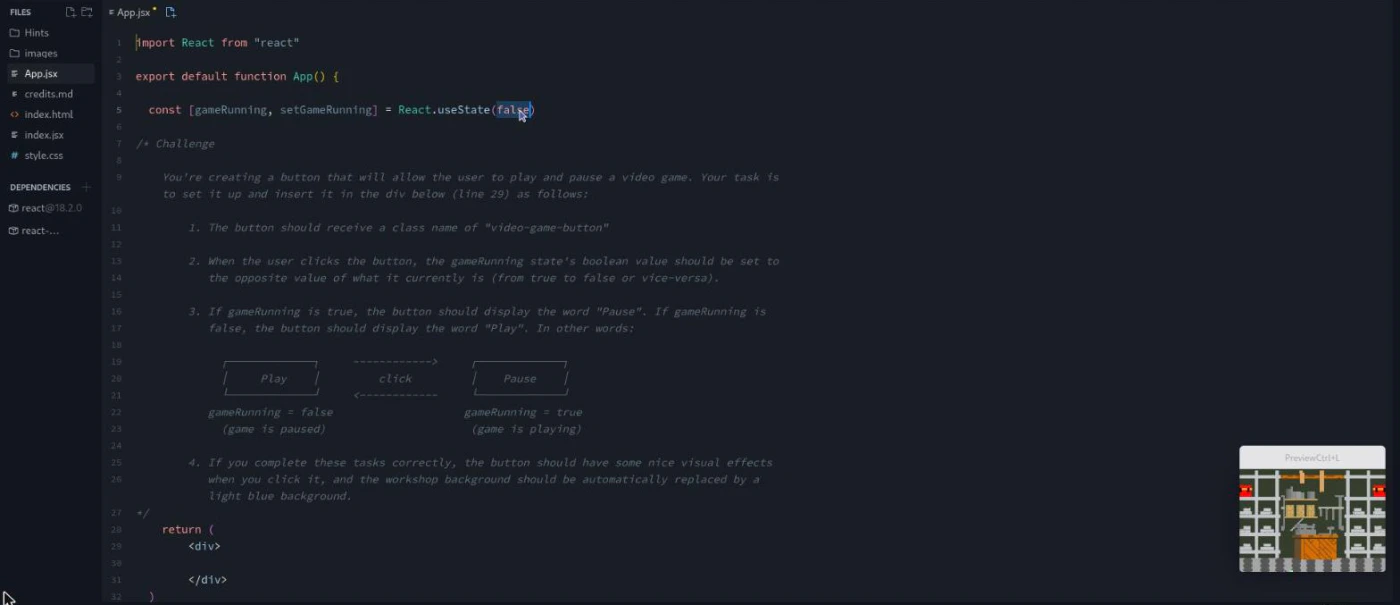
Challenge 1, Video Game Button, is the pattern for everything after. A gameRunning boolean already exists; you add a button that toggles it and reads Play or Pause. The brief is a comment block with an ASCII diagram, and the hints folder has three files (Handling clicks, Changing the state, Changing the text). In the solution Daniel shows the inline arrow and the named handleClick versions. Then he deliberately writes onClick={setGameRunning(!gameRunning)} to trigger the infinite render loop and explain why. As he puts it in lesson 3, "the parentheses are basically an instruction to invoke the function."
The next five briefs widen out. React Study Buddy is a flashcard that flips by toggling a class. RPG Character Creator asks for a state object with nested stats and six attack names, which the pre-built components then render. World's Most Annoying Form gives you eight uncontrolled inputs (text, email, three radios, a select, a checkbox) and a table mapping each to a formData property. Once they are controlled, code you never touch sabotages your answers "in humorous ways." The Legend of Scrimba is one controlled name input with maxLength, required and a disabled state. Math-o-Matic Quiz Generator is conditional rendering. Daniel's solution walks from a ternary to && before pointing out the two useEffects that already hide the answer message for you.
2. Challenges 7 to 13 (95 min, 14 scrims): converting, refactoring and passing props
This block is about code shape rather than features. Simple Food Restaurant hands you a page built by the "Cheeky Coding Company" with innerHTML and appendChild and asks for a React app of well organized components. The 15 minute solution starts from createRoot, hits the "JSX expressions must have one parent element" error, and ends by splitting Header, Main and Footer into files. Haunted House Real Estate is the opposite move: pull the JSX inside a map out into a HouseCard component and pass at most four props. The brief is explicit: "You should not manually pass every piece of houseData as a separate prop." Word Power pushes the same idea further, collapsing a "laundry list" of props into one per element. Its brief admits the setup is "a bit contrived."
Original Calculator is the heaviest of the seven. Three numbered tasks, each an update to a currentCalc state object under one of six conditions (building a number, starting a new calculation, continuing one). A spoiler banner in the file warns you not to scroll past the tasks because the code below is nearly the answer. Top 100 Colors and Enemies in the Castle are quick maps over data (100 hex codes, three walking enemies). Million Dollar Bank Account is a four character passcode form. The ask is a single change handler that works for all four inputs because the input names match the state keys.
3. Challenges 14 to 20 (96 min, 14 scrims): localStorage, derived values, iteration and styles
Save the Dashboard is a draggable widget layout (using react-draggable) where the save button does nothing. You write the config to localStorage and read it back, with lazy state initialization as the bonus. Daniel's setup line is typical of his humour. He saves the layout "in order to show it to my parents so that they will finally be proud of me," refreshes, loses it, and concludes "I guess I'm still gonna be a disappointment."
Stock Tracker is the one to slow down on. A setInterval inside a useEffect (already written) fakes price changes every four seconds. Your job in Stock.jsx is to replace eight hard-coded variables with values derived from a stock prop: the difference, the percentage, a color class and an arrow, rounded to two decimals. Weird Wikipedia Articles and Mood Tracker are the iteration drills. The first turns four hand-written list items into a map over real links (including "list of people who died on the toilet"). The second turns two hard-coded cards into 14 from a data file, with a hint titled Key Error Message. Fire Starter uses mouse-down, mouse-up, mouse-enter and mouse-leave across three nested divs to light a campfire. AutoComplete is onFocus, onBlur and a check-all button that Daniel admits is "making fun of some of the hype surrounding artificial intelligence right now." Anti-Motivational Quote App applies inline style objects that live inside the state.
4. Challenges 21 to 27 (98 min, 14 scrims): mouse events, files, CSS variables and event delegation
Frontend Birthday Cards replaces a click with a simulated swipe: mouse down on the cover, drag 50 pixels left, card opens. File Uploader is a real <input type="file"> with multiple, accept and required, turning the FileList into an array of { fileName, fileType, fileSize } objects. Photo Editor is three range sliders feeding a filter state and then --brightness, --contrast and --saturation custom properties in the stylesheet. Spam Newsletter is a subscribe form with a case-insensitive duplicate check and a hint file named Refresh Problem for anyone who forgets preventDefault. Weather App cycles a local three-day array through state. There is no live API, despite the name.
Read-Me-Later is the standout. You add one onClick to the container and route four buttons through dataset.buttonType and dataset.articleId. Then you fix a toggleExpand function that is broken by a one-line mistake, and the bonus asks what "the React Documentation warns against" in the four handlers. The 18 minute solution spends its last three minutes on mutation, and Daniel is more nuanced than most instructors. "People say that you can't mutate state and that's not actually true. You can mutate state, and sometimes it does actually work." The caveat follows: shipped code "would probably want to refactor it to avoid mutating state." Finger Strength Test closes the block. A hacker "deleted two of its states and four of its event handlers" from an amusement park game, and the bonus is to handle all four events with one function.
5. Challenges 28 to 34 (104 min, 14 scrims): fetching, search, timestamps and sorting
Boredom Blaster 3000 is the only network challenge: 20 saved keys, one fetch each against the Bored API on page load, and a hint file called Multiple Fetches. The API documentation is included as a markdown file. This is the one brief I could not verify still runs end to end, because that API has been unreliable in recent years. Sonnet Central searches all 154 Shakespeare sonnets for a word and renders a div per match with an h3 and a p per line. The bonus wraps matching words in a span and, for empty results, prints "Alas, thy search hath yielded no results."
Three briefs are about capturing event details into a state object. Virtual Reality Site Enter Button logs a Date plus offsetX and offsetY from the click. Employee Spying Program is a textarea that logs every keystroke with a timestamp and quietly replaces "Evil Corp." with "Good Corp." Legit File Sharing Site Download Button uses detect-browser and an IP lookup to log the user's browser and city, beneath a fine-print joke about a "totally not pirated software file." Emoji Personality Test is array spreading in one handleClick. ScrimbaFest is filter-then-sort: bands by day, ordered by an importance rank of 1 to 4, each with a size class.
6. Challenges 35 to 40 and wrap-up (135 min, 15 scrims): intervals, games and the big builds
The last six are where the "twenty minutes, thirty minutes, or even more" from the intro applies. Broken Clock is a frozen iPhone clock. The fix is a setInterval in a useEffect with a cleanup, and the project ships an on-screen counter that must never exceed 1 so you can see when you forget the cleanup. Sketch-o-Matic is an etch-a-sketch grid where holding the mouse and entering a cell flips that cell's filled property without touching the other cells. Debatable is a comment form on a mock social network, and its 24 minute solution is the longest in the course. It opens with "A lot of people have trouble with forms in React because, well, they are tricky to do." Then it covers computed property names, the checkbox checked versus value trap, and why a shared array reference broke the thread.
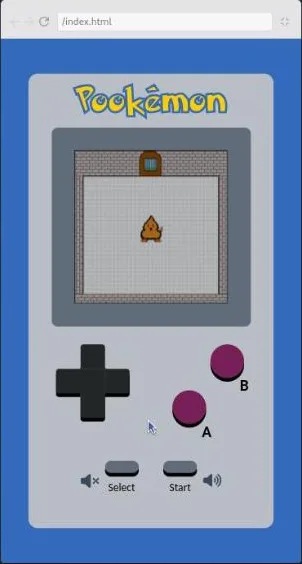
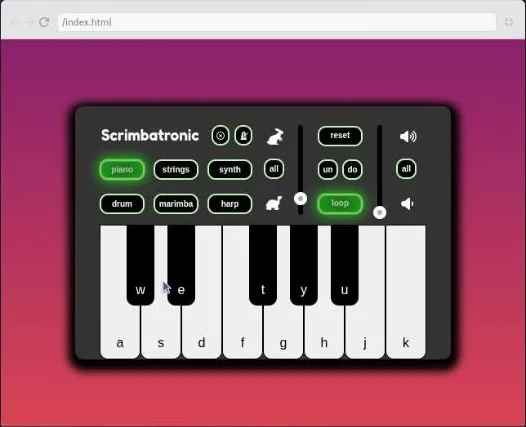
Pookémon and Scrimbatronic are the two builds Daniel is proudest of. Pookémon is a Game Boy screen where you finish updatePosition so the character moves within a boundaries object and can reach the door to bomb it. It ships with use-sound, two music tracks and a Pokemon font. In the outro Daniel says it started as a Pokedex parody grafted onto the Word Power app before he thought, "What if I actually just made a little video game?" Scrimbatronic is a synth keyboard with six instruments. You write mouse-down, key-down and key-up handlers that set active and keyPressed on the matching object in a synthKeys array. The brief tells you to "play some music on it" before calling it done.
Space Warrior finishes the course. The gameplay is written. You build the start button and a 60 second countdown, stop it at zero, reset the score on restart and fade the button in and out. The solution changes the timer to six seconds to test faster and hits a real bug where the effect keeps setting timerRunning to false once the clock reaches zero. It closes with Daniel pointing at an article on making setInterval behave with hooks as a bonus refactor. The outro then recommends redoing whichever challenges hurt, then Advanced React and React Router. Above all, it recommends solo projects: "the single best way to consolidate your knowledge and understanding of React."
What a lesson feels like
A challenge scrim is a two to seven minute tour of a working (or half-working) app in the preview pane, then a read-through of the comment block. Daniel narrates a fictional client for each one (a video game workshop, a haunted house realtor, an evil corporation) and the jokes are dry enough to keep you reading. Then the recording ends and you are in the editor with the brief, the Hints folder and a Run button. Hints are plain text files, usually two to four. A few challenges have a single one called Big Spoiler Hint or Big Hint instead.
Solution scrims are Daniel typing and thinking aloud, testing after each change, and going down a wrong path on purpose to show the error. The long ones (Debatable at 24 minutes, Space Warrior at 21, Scrimbatronic at 19, Read-Me-Later at 18) each contain a section on a general principle. Mutation, shared references, intervals in effects: things you would not get from the brief alone. Every scrim has captions, a timestamped transcript under the settings menu, subtitles in ten languages (the course header lists "10 languages") and playback speed. There are no quizzes, no AI-checked challenges and no solo project briefs. The whole course is the solo project.
Free or Pro: exactly what is gated
This is a Pro course. Two scrims carry the SAMPLE badge and open without a subscription: the intro and the Video Game Button challenge brief. Everything from the first solution onward is Pro. So is the Certificate of Completion at the end of the list, and so are the two career paths that include the course. Scrimba's pricing page lists basic Discord access under the free plan and the Pro-only channels under Pro, so the community is not something you are buying here. See current plans (opens in a new tab) for what Pro costs in your region.
How long it takes
9.8 hours is video. The briefs are 2.7 hours of it, and each brief is followed by your own attempt. Daniel prices that at "a few minutes" for the easy ones and "twenty minutes, thirty minutes, or even more" for the hard ones. Budget 20 to 30 hours if you attempt every challenge before watching the solution and skim the solutions you did not need. Budget closer to 40 if you watch all 6.9 hours of solutions in full and try the bonus challenges (several briefs have one). At an hour a day that is four to six weeks. Doing only the last six, which is a defensible way to use the course, is a weekend.
Who it's for, and who should skip it
It fits you if you have finished Learn React or the equivalent, can write useState and useEffect without looking them up, and want to find out where you stall. It is also good interview preparation of the practical kind. The briefs look like take-home tasks, not trivia. And it suits people who like Daniel's approach of open-ended problems with "usually not a single right answer."
Skip it if map, object spread and controlled inputs are still new. The briefs assume them from challenge 1 and there is no teaching to fall back on except the solutions. Skip it if you want React 19 features, since it pins React 18.2 and never uses form actions. And skip it if you want a guided build. Every app here is already built, and your part is the repair.
Prerequisites
Working React with hooks: components, props, useState with objects and arrays, useEffect with a cleanup, controlled inputs and event handlers. Solid JavaScript underneath it: map, filter, find, spread, destructuring, Date, setInterval, fetch. You need no local setup. Everything runs in the Scrimba editor with React 18.2 and small packages already listed under Dependencies (nanoid in most projects, react-draggable, use-sound, detect-browser and time-events-manager in a few). A QWERTY keyboard helps for Scrimbatronic, and the brief tells you which property to change if you do not have one.
Where it fits
Scrimba's course page lists React Challenges under the Frontend Developer Path and the Fullstack Developer Path. Take it straight after Learn React. Daniel's own recommendation in the outro is Advanced React and React Router next. "They are how I learned React myself." For interview drilling of the question-and-answer kind, pair it with React Interview Questions.
Strengths and limits
What it does well: the briefs are specific about scope (most say you only need to write code below the comments), and the projects are more fun than they need to be. The hint files give you a middle option between struggling and watching, and the long solutions explain mutation, references and intervals rather than just showing the answer.
Where it is limited: about 70 percent of the runtime is solutions, so the headline hours flatter the amount of practice. The order is deliberately unstructured, so forms appear four times while routing, context, reducers and tests never do (despite "Writing tests" in the objectives list). It is React 18 with no React 19 material, and one challenge depends on an outside API I could not confirm still answers.
Related courses and comparisons
- Learn React, the prerequisite
- Advanced React, to deepen patterns before drilling them
- React Interview Questions, pairs well for interview prep
- What's New in React 19, for the features this course does not cover
- Best React courses compared, how it stacks up
No. It is a Pro course. Two scrims are free previews (the intro and the first challenge brief, Video Game Button); the other 82, the certificate and the two paths that include it need a subscription. Learn React, the prerequisite, is free.
Forty, each as a challenge scrim and a solution scrim, 84 scrims in all at 9.8 hours. Briefs run 1.5 to 7 minutes and total 2.7 hours; solutions run 3 to 24 minutes and total 6.9 hours. Your own attempts are on top of that.
Forty small apps that each need one fix or feature: a play/pause button, a flashcard, an RPG character creator, a calculator, a draggable dashboard, a stock tracker, a file uploader, a photo editor, a weather app, a read-later app, a Shakespeare sonnet search, a synth keyboard, an etch-a-sketch, a comment form, a Game Boy game and an arcade shooter, among others.
React 18.2 with react-dom 18.2 in every project I opened, function components and hooks only. There are no React 19 features such as form actions.
Yes. The intro says most challenges assume you have completed Scrimba's React basics course, and the first brief already expects useState, a ternary in JSX and an onClick handler. There is no teaching before the briefs.
Every challenge has a Hints folder at the top of the file explorer with one to seven plain text hint files, and a few offer a single Big Spoiler Hint instead. The solution scrim follows each brief, and Daniel tells you to watch it and retry if you are completely stuck.
Daniel Rose, a Scrimba teacher who came to the platform as a student, changed career from a non-technical creative field, and lives in Barcelona. He wrote all 40 projects himself and narrates both the briefs and the solutions.
No. Everything runs in the Scrimba editor with the dependencies preinstalled. One challenge (Boredom Blaster 3000) fetches from the public Bored API with no key; another (Legit File Sharing Site) calls an IP lookup service. Neither brief asks you to sign up for anything.
For practical interviews and take-home tasks, yes: the briefs read like tickets and reward speed with state updates, forms and events. For conceptual questions, pair it with the React Interview Questions course.
Plan for 20 to 30 hours if you attempt every brief and skim the solutions you did not need, up to 40 if you watch every solution and try the bonus challenges. That is four to six weeks at an hour a day.
Yes. Every scrim has captions, a timestamped transcript panel under the settings menu, subtitles in ten languages and playback speed control.