Learn React
Scrimba's free, hooks-first React course, taught by Bob Ziroll across about 15 hours and six projects, two of them full capstones. You need working JavaScript going in, but once you have it, this is the strongest free starting point for modern React and the anchor of Scrimba's React track.
Reviewed inside the course with a Pro account, September 2026.
This page is part of our Scrimba React courses catalog. It is sequenced into the Frontend Developer Path and the Fullstack Developer Path.
Quick answer
Learn React fits you if you already write JavaScript and want to build real UI with hooks: a Chef Claude recipe app that calls Anthropic's Claude API, and two capstone games, Tenzies and Assembly: Endgame. It is rated Intermediate and the pace shows it once state and forms arrive in section three. From here, the usual next step is Advanced React.
Learn React
FreeTaught by Bob Ziroll (opens in a new tab)
Modern, hooks-first React taught by editing the instructor's code in the browser, ending in two capstone projects.
Start free on Scrimba (opens in a new tab)Is it worth your time?
It is free, so the only thing it costs you is time, and the format earns that time. Editing the instructor's code directly in the player suits React especially well: you change a piece of state and watch the component re-render in the preview beside it, which is the thing static tutorials cannot show you. Bob's intro sets the tone in one line: "nobody ever becomes a concert pianist by simply watching YouTubes about playing piano." The course is structured to make you type.
It is labeled Intermediate, and it means it. Section one moves through JSX, React.createElement, components, and styling in about two hours, and by section three you are destructuring props, mapping arrays to components, and wiring async functions to a form. If map, filter, object destructuring, and a promise are new to you, do Learn JavaScript first; you will stall around the React State section otherwise, not because React is hard but because the JavaScript underneath it is unfamiliar.
The React versions are inconsistent across projects. The course was re-recorded for the React 19 era, and it shows in good ways (form actions, the modern useState patterns) and awkward ones: the Chef Claude project pins a July 2024 React 19 release candidate, while the capstones run React 18.3, and one lesson is a 35 second "Quick AI Update" from a Scrimba staffer explaining that the Anthropic SDK dependency has moved on since Bob recorded and you may need to right-click it and choose Upgrade. None of that blocks you, but expect to hit it.
What you'll learn
Course curriculum
6 modules · 182 lessons
- Static pages
- Data-Driven React
- React State
- Side Effects
- Capstone Project #1: Tenzies
- Capstone Project #2: Assembly: Endgame
Bob says the course has "over 170 interactive coding challenges." Lesson counts above are the scrims I counted in each expanded section in September 2026, about 180 in total. Scrimba's own figures differ in both directions: the section headers show 22, 22, 57, 18, 17, and 21 (they leave out intros, recaps, quizzes, and the two Pro solo projects), while the course listing and its structured data say 358 lessons, which counts the clips inside scrims rather than the scrims you click. When other pages on this site quote 357 or 358 lessons, that is Scrimba's number.
Inside the course, section by section
1. Static pages (2.4 hrs, 29 scrims): the ReactFacts site
Starts from zero React: a course introduction (free to preview), a "First React Code" scrim, then React.createElement() before JSX so you see what JSX compiles to. Two lessons argue the case for React ("It's Composable!", "It's Declarative!"), then custom components, fragments, parent and child components, and styling with classes. The project is a one-page ReactFacts site with a navbar, a bulleted list, and a background image. There is a "Local Setup w/ Vite" scrim early on for people who want to leave the browser, and a "Pop quiz" plus a "Custom Components Quiz" in the middle. The section ends with the first Solo Project (Pro): a Digital Business Card built from a design file and a written spec.
2. Data-Driven React (2.3 hrs, 26 scrims): the Travel Journal
Props, in five numbered lessons, followed by the quiz Bob could not resist titling "Prop quiz! (Get it??)". Then destructuring props, non-string props, importing static assets, a refresher on array.map(), "React can render arrays," and mapping data to components. The Travel Journal takes an array of places you have visited and renders an Entry component for each, which is where key props and spreading an object as props are introduced.
3. React State (5.2 hrs, 58 scrims): Chef Claude
The longest section by far and the one that changes what you can build. It opens with the Chef Claude project overview: a form where the user adds ingredients, a rendered "Ingredients on hand" list, and a "Get a recipe" button that, in Bob's words, "will send the list of ingredients embedded in a prompt that we send to the Claude API from Anthropic."
Before the AI call comes the core of React: event listeners, props vs state, useState and array destructuring, updating state with a callback, complex state with arrays and objects, then a nine lesson run on forms (basics, submission, form action, textarea, radio, checkbox, select, Object.fromEntries). Conditional rendering gets seven scrims including "Why does && work?". Then state moves between components (passing state as props, setting state from children) through a four part "Sound pads" challenge. The AI part arrives at the end: an "API Sign Ups" lesson, an AI code walkthrough of the pre-written helper, and the challenge to wire it up yourself. The helper offers two functions, getRecipeFromChefClaude and getRecipeFromMistral (via Hugging Face), so you can pick a provider.
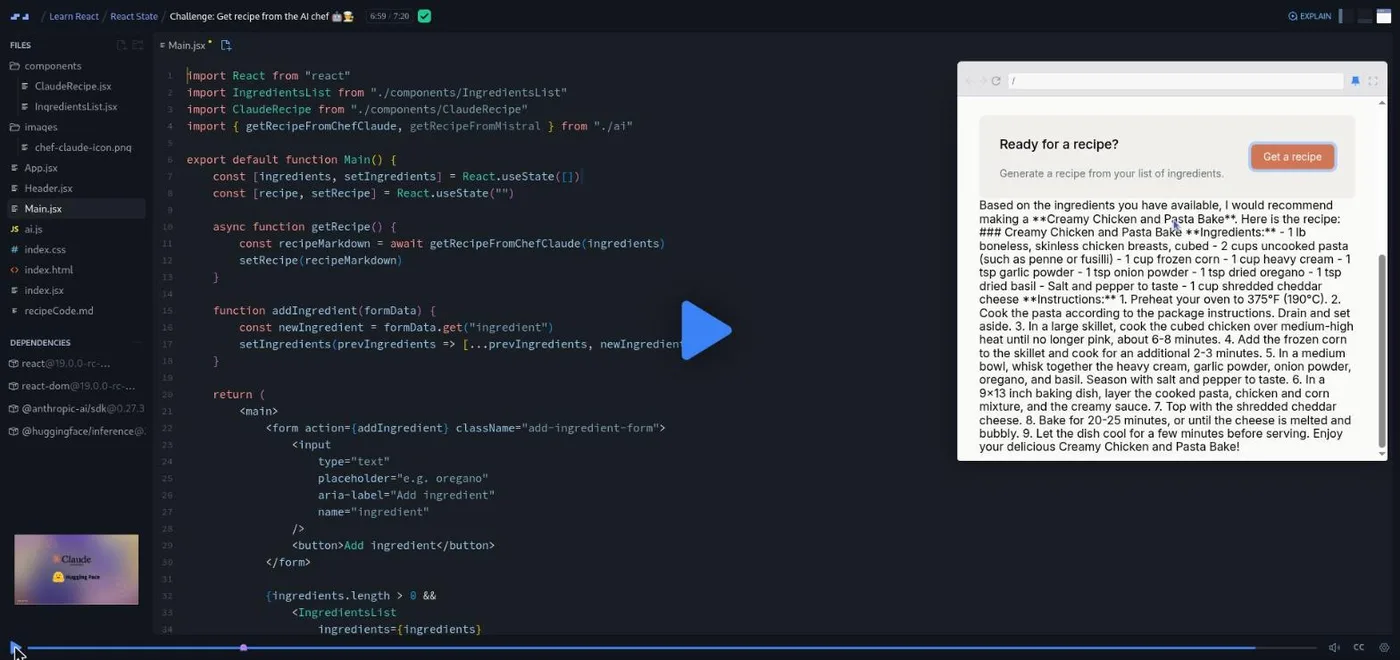
This is also the section where the course's age shows. The dependencies panel lists a React 19 release candidate from July 2024, and the "Quick AI Update" scrim warns that "things in the world of AI have moved on" and tells you to upgrade the Anthropic SDK if the challenge errors. You will also need your own API key for whichever provider you choose; the "API Sign Ups" lesson walks through it.
4. Side Effects (108 min, 22 scrims): the Meme Generator
A meme generator that fetches meme templates from an API. Controlled components come first (two lessons), then a "Functional programming in React" aside, "Fetching data in React," and the useEffect sequence: intro, syntax and default behavior, the dependencies array, the empty dependencies array, a quiz, a practice, and the cleanup function. There is a "Sneak peak: refs" scrim and a scrollIntoView() practice, plus a lesson honestly titled "scrollIntoView() iFrame bug fix" for a quirk of the in-browser preview.
5. Capstone 1: Tenzies (86 min, 19 scrims)
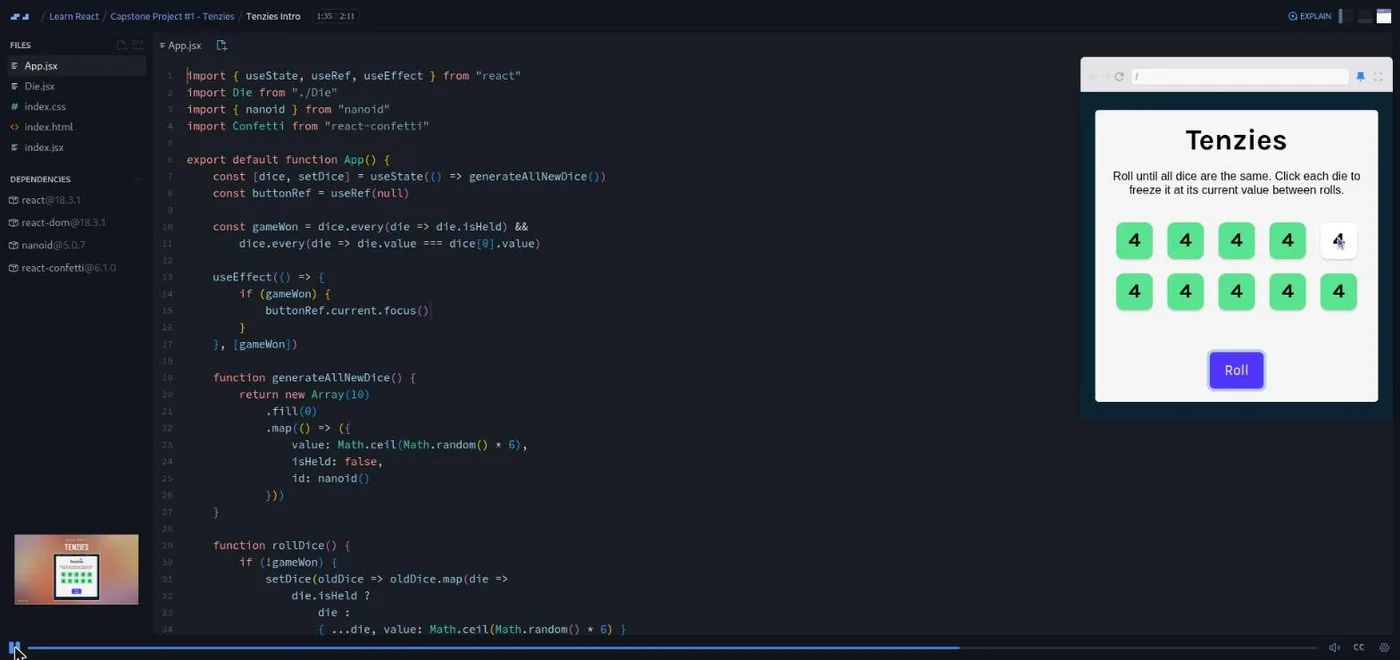
Bob's framing: "although we won't necessarily be learning much new content in these remaining two sections, they do represent the most important parts of this entire course. Do not under any circumstances skip these capstone projects." Tenzies is a dice game: roll ten dice, hold the ones you want, keep rolling until all ten match. You build a Die component, generate ten random dice, map them to components, hold dice in three parts, end the game in three parts, then add lazy state initialization, a "new game" button, and two accessibility passes (including moving focus to the button with a ref when the game is won). Confetti drops from react-confetti when you win.
6. Capstone 2: Assembly: Endgame (2.2 hrs, 28 scrims)
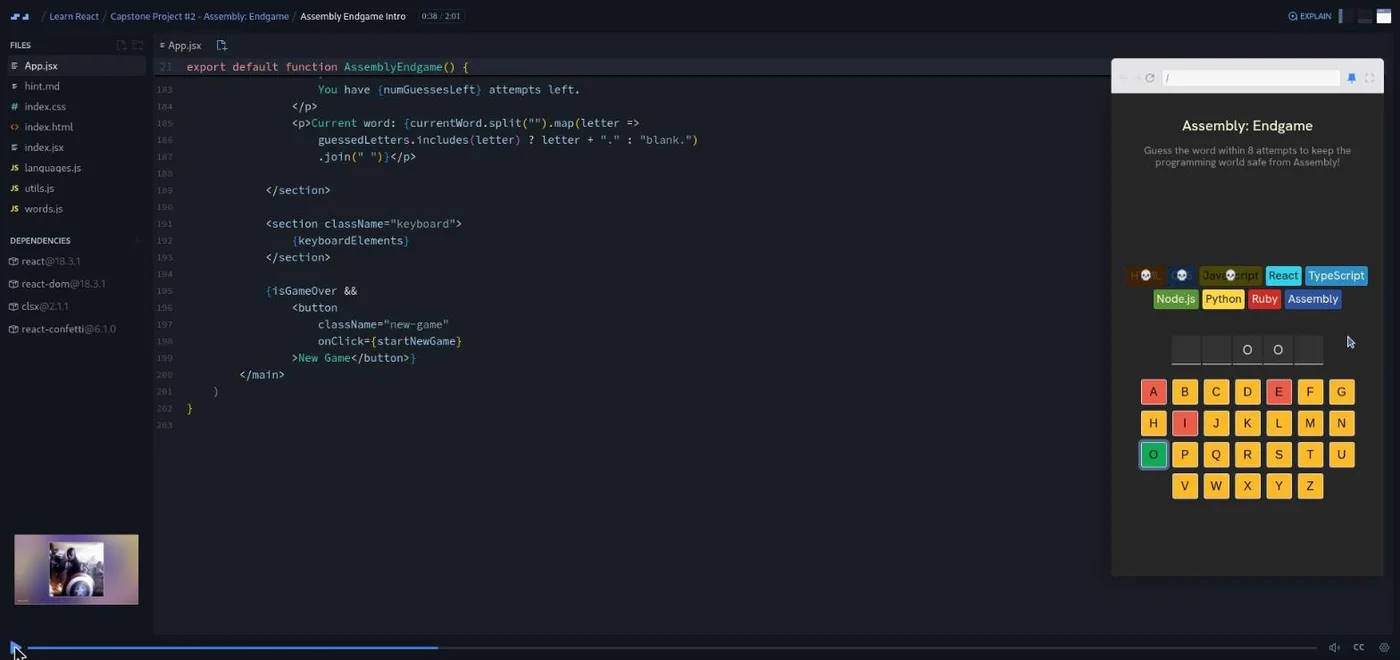
"Okay, let's be real. It's just a rebranded version of hangman," Bob says in the intro, and then makes it a good one: each wrong guess wipes a programming language off the board, with only Assembly surviving if you lose. Twenty-plus scrims walk through planning, a header, a status section, the languages list, the word display, an on-screen keyboard, tracking guessed letters, styling keys by guess, counting wrong guesses, "lost languages," an isGameOver flag, won/lost status, conditional rendering with a helper function, farewell messages per language, disabling the keyboard at game over, two accessibility passes, random word selection, and a new game reset. It uses clsx for class names and react-confetti again. The section ends with the second Solo Project (Pro), Quizzical, a trivia quiz app, then the course outro and a one minute "Turn your certificate into an asset."
What a lesson feels like
Scrims run from under a minute to nine minutes; most are two to five. Bob talks over a live editor with the preview on the right, and challenges arrive as numbered comments in the file plus a paused recording. The course also uses quizzes ("Pop quiz," "Changing state quiz," "useEffect quiz!") as retrieval practice; Bob cites the book Make It Stick in the intro and says the course is structured around its formula. Every scrim has captions, a full timestamped transcript under the settings menu, subtitles in ten languages, playback speed, and a "Download as Zip" option for the project files.
Bob's voice is calm and slightly self-deprecating, and he is explicit about not grading you: "no one is going to be hovering over your shoulder and judging your performance. Making mistakes isn't going to hurt your outcome, it's only going to help." He also tells you, in the AI challenge, to "use a tool like Claude or ChatGPT to help you out" rather than skip an exercise.
Free or Pro: exactly what is gated
All six sections, all the challenges, and both capstone projects are free. Bob says it plainly in the first scrim: "all of the learning content in this course is one hundred percent free."
Pro gates the two Solo Projects: the Digital Business Card after section one and Quizzical after section six. Each comes with a written spec and a design file and no walkthrough; Bob calls them "a tool for you to gauge whether you are actually ready to keep moving forward in the curriculum or not." Pro also unlocks the certificate, the career paths this course belongs to, and the Pro-only Discord channels. The Discord server itself is open to everyone; Bob says in the intro that it "is available to all members free and pro," and Scrimba's pricing page lists basic Discord access under the free plan, so the server alone is not a reason to upgrade. See current plans (opens in a new tab) if you want the path structure around the course.
How long it takes
15.1 hours is video runtime. With 170+ challenges and two capstones you should type yourself, plan for 35 to 45 hours: five to eight weeks at an hour a day. The React State section alone is 5.2 hours of video and will take most people two weeks. If you do the solo projects from the design file, add another 8 to 15 hours.
Who it's for, and who should skip it
It fits you if you are comfortable with JavaScript and want to learn React by building rather than watching, and it is the natural anchor for anyone on the Frontend Developer Path. It is also one of the few free React courses that has you call an LLM API from a frontend, in the Chef Claude project.
Skip it, for now, if you have never written JavaScript. Do Learn JavaScript first and come back. Skip it if you specifically need class components or older lifecycle patterns for a legacy codebase; this course teaches hooks only, and the class-based material lives in a separate course. And if you want routing, data fetching libraries, or TypeScript, none of that is here; see React Router and Advanced React.
Start Learn React for free (opens in a new tab)Prerequisites
Working JavaScript is the real prerequisite: variables, functions, map and filter, object destructuring, and a basic grasp of async/await (the AI challenge solution is an async function and Bob assumes you know why). Comfort with HTML and CSS helps. You do not need any prior React. For the Chef Claude section you will need a free API key from Anthropic or Hugging Face.
Where it fits
Learn React is the React anchor for two paths: the Frontend Developer Path and the Fullstack Developer Path. The usual next step after it is Advanced React, which goes deeper into performance, patterns, and the parts this course leaves out. If Chef Claude was the part you enjoyed most, the AI Engineering course picks up exactly there.
Strengths and limits
What it does well: it is free, it teaches modern hooks-first React with six real projects, the capstones are complete apps with accessibility passes rather than toys, the Chef Claude section gets you calling a real AI API, and Bob Ziroll is a clear, well-paced instructor who tells you when he is about to guilt-trip you.
Where it is limited: the Intermediate pacing is unforgiving if your JavaScript is shaky, the React versions are inconsistent across projects (a 19 RC in Chef Claude, 18.3 in the capstones), the AI lessons need an API key and a dependency upgrade to run today, and it does not cover routing, data libraries, or TypeScript.
Related courses and comparisons
- Advanced React, the deeper follow-up
- React Router, client-side routing
- Class Components in React, for legacy codebases
- Best React courses compared, how it stacks up
- Scrimba vs freeCodeCamp and Scrimba vs Codecademy, if you are choosing a platform
Yes. All six sections, every challenge, and both capstone projects are free with no card required. Pro is only needed for the two Solo Projects (Digital Business Card and Quizzical), the certificate, and the career paths.
Not as a first course. It is rated Intermediate and assumes working JavaScript, including array methods and async/await. Complete beginners should do Learn JavaScript first, then return to this one.
Bob Ziroll, a React educator who has held senior education roles at Scrimba and the V School bootcamp and also teaches Scrimba's Advanced React course.
Six projects: a ReactFacts static page, a Travel Journal, Chef Claude (an AI recipe generator on the Claude API), a Meme Generator, and two capstone games, Tenzies and Assembly: Endgame. Two more (a Digital Business Card and a Quizzical trivia app) are Pro solo projects.
Mostly. It is hooks-only and uses React 19 features such as form actions in the Chef Claude project, which pins a July 2024 React 19 release candidate. The capstone projects run React 18.3. No class components.
Yes. The AI challenge calls Anthropic's Claude API through the @anthropic-ai/sdk package, with a Hugging Face Mistral alternative. A dedicated API Sign Ups lesson covers getting keys, and a Quick AI Update scrim explains how to upgrade the SDK if the challenge errors.
About 15 hours of video, but plan for 35 to 45 hours including the challenges and capstones, or five to eight weeks at an hour a day.
Yes. Every scrim has captions, a timestamped transcript panel under the settings menu, and subtitles in ten languages.