Intro to AI Engineering
Scrimba's core Pro course on building software around large language models, taught by Arsala Khan in about 2.5 hours across 36 scrims. It's a build-along: you take Gift Genie, a gift-suggestion app, from a first API call to a streaming, tool-using, backend-secured product, and it's the foundation course on Scrimba's AI track.
Reviewed inside the course with a Pro account, September 2026.
Quick answer
Intro to AI Engineering suits developers with working JavaScript who want to build real LLM features rather than a playground demo: you leave knowing the messages array, streaming, structured output, and how to keep an API key off the client. The catch is the prerequisite, it assumes JavaScript and a model-provider account and doesn't reteach either. It's sequenced first into the AI Engineer Path; if you're new to programming, start with Learn to Code with AI instead.
Intro to AI Engineering
ProTaught by Arsala Khan (opens in a new tab)
Build Gift Genie, an LLM-powered app, from a first API call to streaming, structured output, web search, and a secured Node backend.
View on Scrimba (opens in a new tab)Is it worth your time?
If you are going to take the AI Engineer Path, yes, and take it first. It is short and dense, and it spends its time on the part most tutorials skip: what happens between "the model answered" and "the feature is reliable." Error handling, sanitizing model output before it hits the DOM, streaming chunks into the UI, forcing JSON, and getting the API key off the client each get their own scrims, in that order, because each one is a real failure you would otherwise hit in production.
Arsala's framing in the first scrim is the right one: "this course isn't about chasing trends, it's about learning how to build with these tools responsibly, same way we think about our APIs interacting with our application code." He also promises not to say "AI superpower" again ("Probably.") and then does, which tells you the tone.
It assumes working JavaScript and the ability to call an API, and it does not reteach either. And it needs a model-provider account: OpenAI is "the safest default" but requires a small minimum credit purchase, which Arsala says comfortably covers the whole path; Groq and OpenRouter are offered as free alternatives, and an api-urls.txt file in the setup scrim lists the endpoints.
What you'll learn
The course is one flat list of 36 scrims rather than modules; the grouping below is mine, by topic and in order.
Course structure
36 scrims in 9 editorial groups
- Orientation: marketplace, environment, client (free samples)
- First requests: prompts, tokens, snapshots
- Messages, system prompt, UI, errors, safe markdown
- Streaming into the Gift Genie UI
- Context, few-shot prompting, temperature and top-p
- Responses API, JSON and structured outputs
- Web search tool
- Backend orientation and migration super challenge
- Outro, PollyGlot solo project, certificate
Group durations are my estimates from the per-scrim times shown in the table of contents; the course total is Scrimba's 2.5 hours. Scrimba's listing says 58 lessons, which counts clips inside scrims; the table of contents you click through has 36.
For the theory in written form, Scrimba's free How AI Works handbook (opens in a new tab) covers the same fundamentals (tokens, prompting, context, calling models) with a Beginner, Intermediate, and Deep Dive depth switcher. The handbook explains the concepts; this course wires them together in JavaScript.
Inside the course, scrim by scrim
Orientation (5 scrims, all free to preview)
"Introducing Your AI Superpower" makes the case with the Gift Genie itself: the old way to build a gift recommender was "a massive curated database of products," a search engine, a ranking system, and "endless rules for different demographics of people"; now you describe the person in natural language. "The AI Marketplace" is the most useful five minutes in the course for a newcomer: models are named organization/model like git repos, a model provider is "a company that runs models on their servers and provides an API," and the OpenAI JavaScript library "is not locked to the OpenAI platform" because Groq, OpenRouter and others host OpenAI-compatible APIs. "Environment Setup" walks through creating a key and storing three environment variables in Scrimba's editor (settings → edit environment variables): AI_URL, AI_KEY, and AI_MODEL, with the model ID kept in an env var so that "switching providers will mostly mean changing these three values, not touching your code." "Recommended Models" and "Setting Up Your AI Client" finish the setup.
First requests (7 scrims)
Your first request, a walkthrough, and a "Rebuilding" challenge, then max_tokens ("Shorter Responses With Tokens"), refining the prompt, refactoring the request, and a short scrim on model snapshots (why gpt-x-2024-xx-xx style pinned versions exist).
Messages, system prompt, UI, errors, safe markdown (6 scrims)
The messages array and the system message are the conceptual core; an aside on token costs and context windows explains why conversation length matters. "Wiring up our UI" connects the request to the Gift Genie form, "Error Handling" deals with failed calls, and "Rendering Markdown Safely" introduces marked plus DOMPurify so model output cannot inject HTML. That pairing (import { marked } from "marked"; import DOMPurify from "dompurify") is the first thing you see at the top of index.js in the later challenges.
Streaming (3 scrims)
"Streaming AI Responses" is taught in the console first: set stream: true, then loop with for await because "a normal loop expects everything to be there already," and read choices[0].delta.content instead of message.content. The "Gift Genie UI Streaming Challenge" has you reconstruct the message in the page, and "Structuring Our Markdown Responses" cleans up what streams in.
Context, prompting, and sampling (3 scrims)
Making the Gift Genie context aware (carrying prior turns), few-shot prompting with examples in the system prompt, and temperature and top-p.
Responses API, JSON, structured outputs (3 scrims)
A short intro to OpenAI's Responses API, then forcing JSON output, then structured outputs with a schema so the UI can render fields rather than prose.
Web search tool (2 scrims)
An aside on the web search tool and then "Web Search In The Gift Genie UI," so suggestions can reference current products.
Backend orientation and the super challenge (2 scrims)
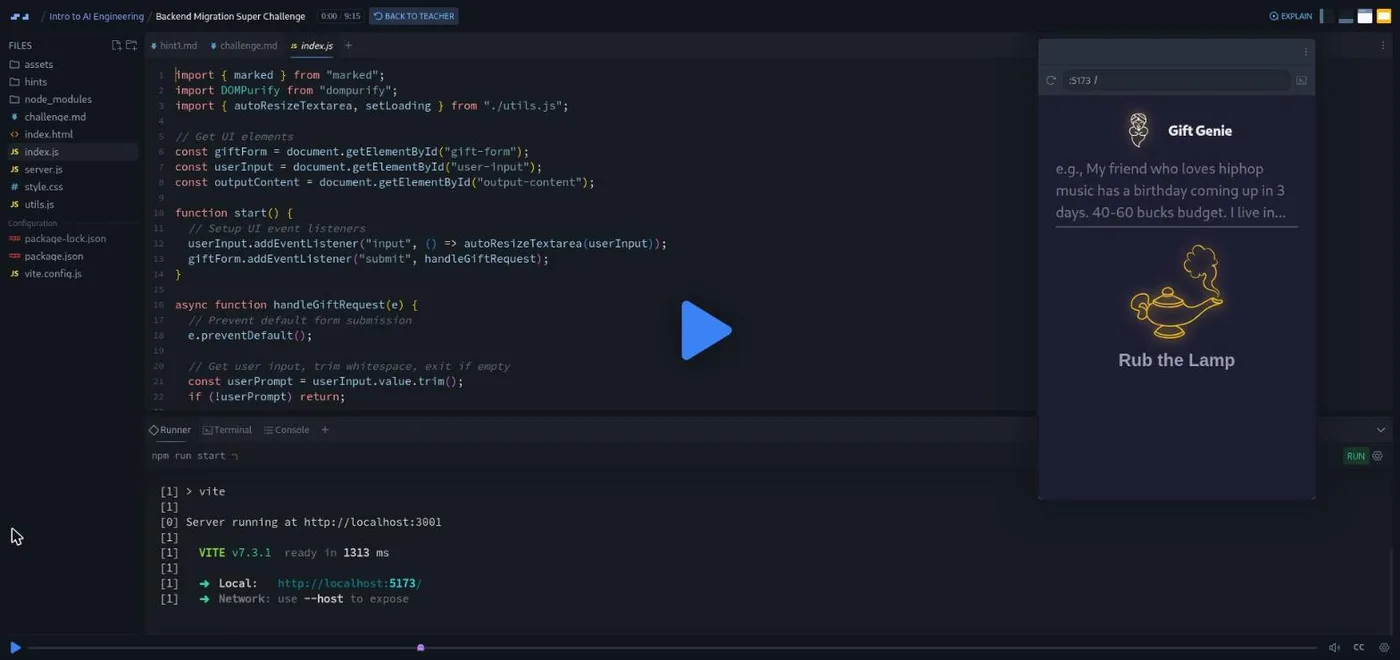
The course's real ending. "Backend Orientation" explains why the key cannot live in the browser, and the "Backend Migration Super Challenge" (about nine minutes of brief) has you move the call to a Node server: the front end sends a plain fetch with the prompt, the server owns the messages array and the OpenAI call, returns JSON, and the client converts markdown and sanitizes it. The workspace is a real Vite project with server.js, package.json, vite.config.js, a challenge.md, and a hints/ folder with twelve numbered hint files, running in Scrimba's terminal panel.
Outro and solo project (5 scrims)
An outro, then "Solo Project: PollyGlot," a translation app briefed by Per Borgen: type English text, pick a language, guess the translation yourself, then press the button. You get a blank CSS file, a blank JavaScript file, and a near-empty HTML file, and build the rest, including the API call, from scratch. The remaining scrims are a Scrimba Docs pointer, an affiliate-program note, and "How to Utilize Your Certificate."
What a lesson feels like
Scrims run one to seven minutes. Arsala explains with slides and diagrams (request "shape," the frontend-server-provider flow), then switches to the editor and runs the code so you see the console output. Challenges are written into files as comments or as a challenge.md, and the recording pauses. The AI calls are live: when Arsala streams a response in the console, you can see the chunks arrive. Every scrim has captions, a timestamped transcript under the settings menu, subtitles in ten languages, and playback speed.
Because the app talks to a real provider, your own runs cost real (tiny) money on OpenAI or free-tier quota on Groq and OpenRouter. Arsala says he "built this course, making a lot of API calls" without exhausting the minimum OpenAI credit.
Free or Pro: exactly what is gated
The first five scrims (through "Setting Up Your AI Client") are free samples. Everything from "Your First AI Request" onward, the streaming and backend challenges, and the PollyGlot solo project need Pro. Pro also covers the whole AI Engineer Path, certificates, unlimited challenges, and the Pro Discord channels. See current plans (opens in a new tab) for what Pro costs in your region.
How long it takes
2.5 hours of video, but the challenges are substantial: budget 8 to 12 hours, plus a couple of hours for provider sign-up and the environment variables the first time. The backend super challenge alone is a two to three hour session if you use the hints sparingly, and PollyGlot is another three to five hours built properly.
Who it's for, and who should skip it
It fits developers with JavaScript under their belt who want to build with LLMs and would rather understand the mechanics than copy snippets. It is the natural first technical stop on the AI track, and a good fit for people coming off Learn React, whose Chef Claude project is a smaller version of exactly this.
Skip it if you have never coded. Start with Learn to Code with AI or Learn JavaScript first. Also skip it, for now, if you only want one specific technique like RAG; you can come here later.
Start Intro to AI Engineering on Scrimba (opens in a new tab)Prerequisites
Working JavaScript: variables, functions, async/await, and calling an API with fetch. Basic familiarity with how web requests work helps. No prior AI experience is assumed. You will need an account with a model provider and an API key; the setup scrim covers OpenAI, Groq, and OpenRouter.
Where it fits
This is the backbone of the AI Engineer Path. Almost everything else on the AI track assumes the fundamentals taught here. Common next steps are Learn RAG, Learn AI Agents, and Prompt Engineering for Web Developers.
Strengths and limits
What it does well: it is concise, it teaches the failure modes in the order you would meet them (errors, unsafe output, blocking UI, unstructured output, exposed keys), it is provider-agnostic with free options, and it ends with a real full-stack challenge and a solo project rather than a wrap-up slide.
Where it is limited: it firmly assumes prior JavaScript, it needs a provider account before lesson six, the OpenAI-specific scrims (Responses API, structured outputs, web search) will age with that API, and the Scrimba page title still credits the course's previous instructor, which can confuse people comparing notes.
Related courses and comparisons
- Learn to Code with AI, the free beginner on-ramp
- Learn RAG, to ground LLM output in your data
- Learn AI Agents, the agent follow-up
- Prompt Engineering for Web Developers, the productivity angle
- Learn React, whose Chef Claude project is the gentler warm-up
The first five scrims (the AI marketplace, environment setup, recommended models, and setting up the client) are free samples. The rest of the course needs Scrimba Pro. The free starting points on the AI track are Learn to Code with AI and Intro to Mistral AI.
Any OpenAI-compatible one. Arsala recommends OpenAI as the default (it needs a small minimum credit purchase) and Groq or OpenRouter as free alternatives. The course stores the URL, key, and model in Scrimba environment variables so switching means changing three values.
Effectively yes. The course assumes working JavaScript, async/await, and the ability to call an API. It does not reteach programming.
Arsala Khan, who builds Scrimba's AI Engineer Path and also teaches Learn Context Engineering. Scrimba's page title still names the earlier instructor, Tom Chant, but the current recordings are Arsala's.
Yes. You build Gift Genie throughout, from a first API call to streaming, structured output, web search, and a Node backend, and finish with a PollyGlot translation app as a solo project.
About 2.5 hours of video; plan for 8 to 12 hours with the challenges, more if you do the backend super challenge and PollyGlot properly.
It is the foundation. Most other AI courses assume the concepts taught here, so it is usually the first technical course you take on the path.