Build Serverless AI Agents with Langbase
Maham Codes's free Build Serverless AI Agents with Langbase course runs 49 minutes across 13 scrims, and it builds one thing: a support agent that retrieves answers from an uploaded FAQ file using the Langbase SDK in TypeScript. It is a clean, complete RAG loop in under an hour, though everything you learn runs through Langbase's own methods.
Reviewed inside the course with a Pro account, September 2026.
Quick answer
This fits you if you already know what retrieval-augmented generation (RAG) is and want to see the full loop, chunking, embedding, retrieval, and generation, working end to end without setting up a vector database. The catch is that every concept runs through a Langbase method, so if Langbase is not part of your plans, take the transferable mental model to Learn RAG instead.
Build Serverless AI Agents with Langbase
FreeTaught by Maham Codes (opens in a new tab)
Build a RAG support agent in TypeScript with the Langbase SDK: memory, document upload, retrieval, an agent pipe, and grounded answers with sources.
Start free on Scrimba (opens in a new tab)Is it worth your time?
Yes, if you already know what RAG is and want to see one working in under an hour. The build is small but real. By scrim 9 you type one command, npx tsx index.ts, and the console prints an answer to "How do I upgrade my individual plan?" that is grounded in the FAQ file you uploaded, with the source cited. Nothing is skipped over: every step is a file you create and a command you run.
The caveat is that this is a Langbase course first and an agents course second. The concepts (chunking, embeddings, top-k retrieval, system prompts) are explained well, but every one of them is used through a Langbase method: memories.create, memories.documents.upload, memories.retrieve, pipes.create, pipes.run. If Langbase is not in your plans, the transferable part is the mental model, which you can also get from Learn RAG.
The second caveat is setup. Before the first coding scrim you need a Langbase account, a Langbase API key stored in Scrimba's environment variables, and an LLM provider key added inside Langbase Studio (the course embeds documents with OpenAI's text-embedding-3-large). The course tells you this, but only in passing, so budget fifteen minutes for it.
What you'll learn
Scrimba presents this course as one flat list of 13 scrims with no sections. The grouping below is mine, so you can see how the time is spent.
Course curriculum
13 scrims in one flat list, grouped here for readability
- Orientation: what you are building and how to run code
- Build the memory: create, upload, understand
- Retrieve and generate: the RAG loop
- Beyond the build: AI primitives and Command.new
- Scrimba house scrims: referral program and certificate
The 13 scrims add up to 52 minutes 48 seconds; take away the two Scrimba house scrims at the end and it is 49 minutes 53 seconds, which is the 49 minutes shown in the course header. Scrimba's listing and structured data say 19 lessons, which counts the clips inside scrims rather than the scrims you click; 13 is what you will see in the table of contents.
Inside the course, scrim by scrim
1. Orientation (10 min, 3 scrims)
The intro is the free preview scrim. Maham sets out the premise in one sentence: "AI agents without frameworks, and these agents are going to be context aware." She then defines an agent as "autonomous software powered by LLMs that can perceive, reason, decide, and act," names the prerequisites (JavaScript and TypeScript, with a pointer to Learn JavaScript), and tells you to sign up on Langbase and get an API key, because "we'll need it for the upcoming lessons."
Core Concepts is a four minute slide lesson that defines agentic RAG and Langbase's two main building blocks. Pipes are "serverless AI agents that run online"; memory agents are "AI agents with human like long term memory." The useful part is the last minute, where she walks the full pipeline you are about to build: create a memory, upload data, retrieve chunks for a question, pass them to a pipe, return the answer.
Setting Up Environment Variables in Scrimba is the practical bridge. You add your Langbase key in Scrimba's settings under "scrim environment" and read it as process.env.LANGBASE_API_KEY. She also tells you how every code scrim will run: npm install, then npx tsx filename.ts in the terminal.
2. Build the memory (15 min, 3 scrims)
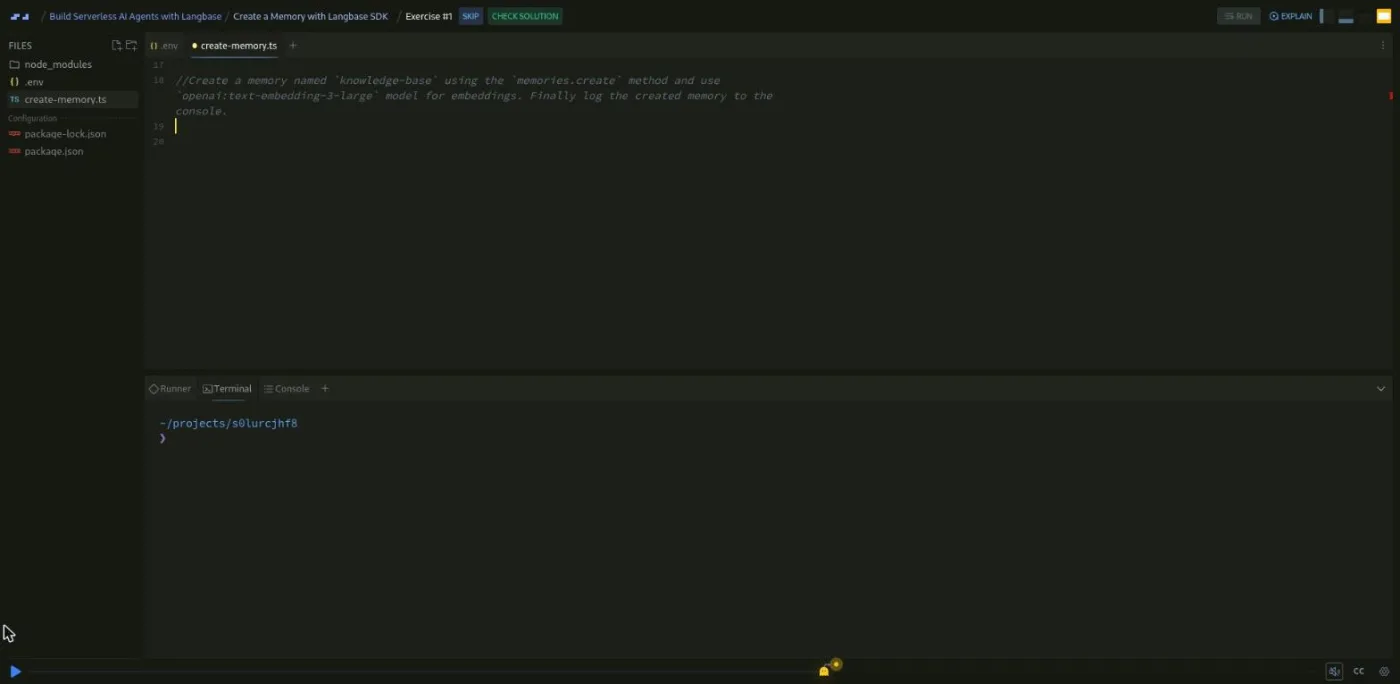
Create a Memory with Langbase SDK is the first coding scrim and the first challenge. You watch her create create-memory.ts, import dotenv/config and Langbase, and instantiate the client. Then the recording pauses: "Create a memory named knowledge base using the memories dot create method and use OpenAI text embedding three large model for embeddings. Finally, log the created memory to the console." The solution is eleven lines. When she runs it, the console prints the new memory with a chunk size of 10,000 and an overlap of 2,048, and it appears in the Memory tab of Langbase Studio.
Upload Documents to AI Memory is the longest scrim at six and a half minutes and the second challenge. You create a docs folder with a mock langbase-faq.txt, read it with readFile and path.join, and call memories.documents.upload with a content type, a document name, the file contents, and optional meta tags. The challenge is to finish the upload call and print a success message. She notes that Langbase accepts text, PDF, markdown, and CSV.
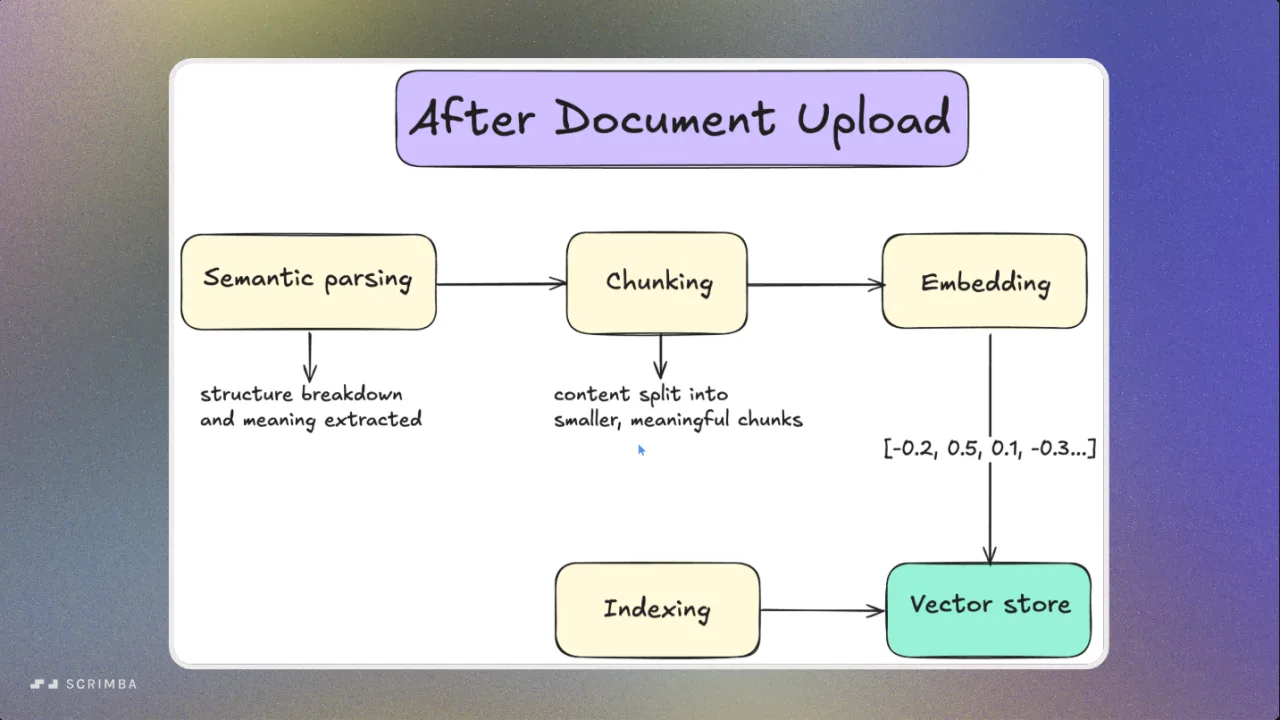
Memory Agents on Langbase is a slide lesson with no code, and it is the best explanation in the course. She walks through what happens after upload: parse, chunk, embed, index. Her line on embeddings is the one to remember: "an embedding is basically a numerical representation of the meaning." She then covers the query side, where Langbase can rewrite the query, retrieve, rerank, generate, and evaluate.
3. Retrieve and generate (15 min, 3 scrims)
Perform RAG Retrieval starts in Langbase Studio, where a "retrieval testing" panel lets you type a question and see chunks come back with similarity percentages. Then the code: an agents.ts file exporting runMemoryAgent(query), which calls memories.retrieve with the query, topK: 4, and the memory name, and an index.ts that prints the chunks. Her tip: "You can adjust chunk size and overlap under the settings to improve retrieval accuracy."
Create an AI Agent Pipe is the third challenge. You create create-pipe.ts and define a pipe with pipes.create: a name, a description, and a messages array holding the system prompt. She explains the system prompt as "giving the AI its job description before the conversation starts." The challenge is to write that definition yourself; the solution names it ai-support-agent with a two sentence system prompt.
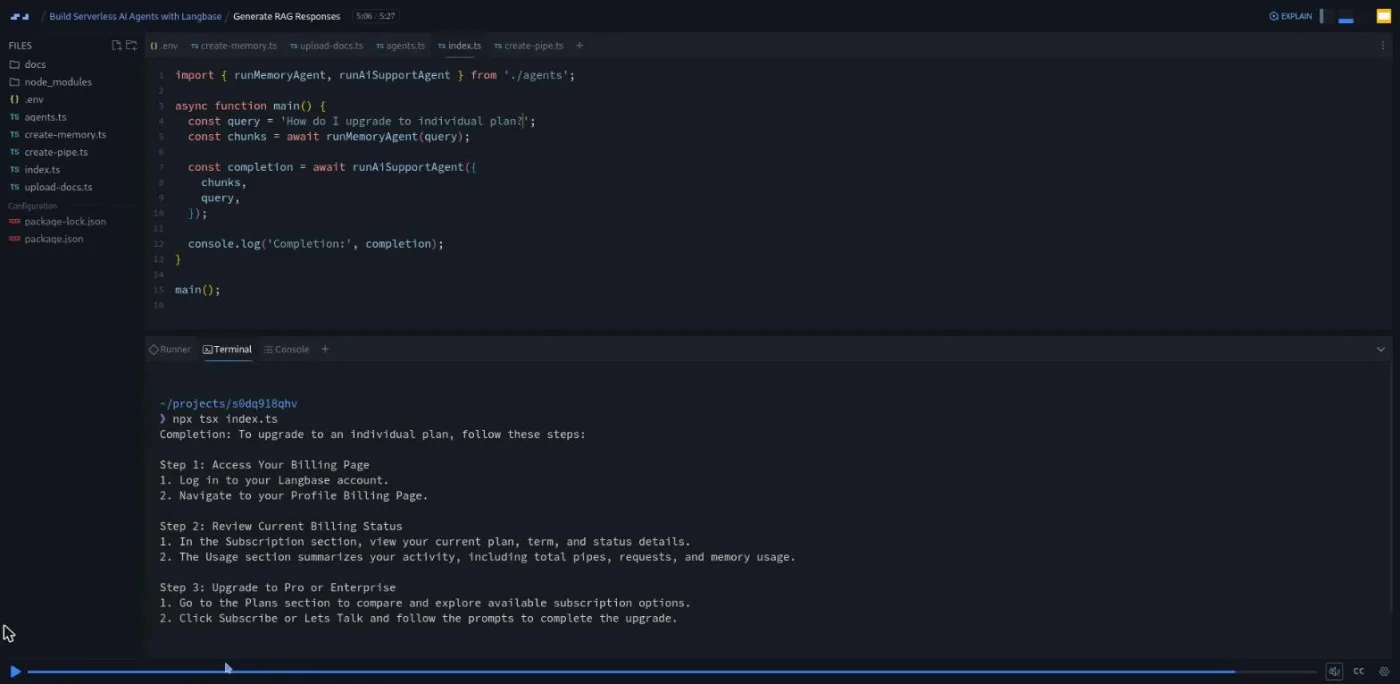
Generate RAG Responses closes the loop. Back in agents.ts you add runAiSupportAgent(chunks, query), which builds a system prompt from the chunk text (rules: be helpful, use only the given context, always cite sources) and calls pipes.run with stream: false. index.ts now chains the two functions. She runs it and ends with: "You just build a retrieval augmented generation rag agent, and it first retrieves relevant info from memory, then it uses that info to answer questions accurately. And it always cites its sources."
4. Beyond the build (10 min, 2 scrims)
AI Primitives for Context Engineering is a tour of the rest of Langbase's catalog: Workflow, Threads, Parser, Chunker, Embed, Tools, and Agent, plus eight reference architectures with names like "prompt chaining" and "evaluator optimizer." It is a slide lesson with no code and reads like a product overview. It does contain one good pointer, to Scrimba's Intro to Model Context Protocol course, which Maham also teaches.
Vibe Coding AI Agents with Command.new is a six minute screen recording of Langbase's Command tool. You type "build an AI support agent that uses my docs as memory for autonomous RAG" and it generates the agent code, a React front end, a memory, and a deployable API. This is the same agent you just built by hand, generated in a minute, and she is candid that the point of the manual build was understanding: "we'll be building the back end step by step so you can understand exactly what's happening behind the scenes."
5. Scrimba house scrims (3 min, 2 scrims)
The last two scrims are not part of the course content. Per Borgen of Scrimba pitches the Scrimbassador referral program, then a 53 second scrim tells you to put your certificate on LinkedIn. Both appear at the end of many Scrimba courses.
What a lesson feels like
Every scrim is between one and six and a half minutes. Five of the thirteen are slide lessons with no code (intro, Core Concepts, environment variables, Memory Agents, AI Primitives), one is a screen recording of a third-party site (Command.new), and five are coding scrims where you can pause, edit the file, and run it in Scrimba's built-in terminal. The three challenges follow the same pattern: she demonstrates a method, states the task in one sentence, and says "I'll pause here so you can do it on your own," then walks through the solution.
The code is small. The longest file, upload-docs.ts, is 31 lines. Because the scrims are so short, the transcript panel is more useful here than in most courses: you can read a scrim's transcript in a minute to decide whether you need to watch it. Captions, playback speed, and subtitles in ten languages are all there.
One thing to know: the challenges only work if your keys are set up. If you skipped the environment variables scrim, the first npx tsx will fail on a missing API key, and the course does not show you that error.
Free or Pro: exactly what is gated
All 13 scrims and all three challenges are free; the course sits in the Free tab of Scrimba's catalog and its structured data marks it free. There are no Solo Projects in this course, so nothing inside it is locked behind Pro.
What Pro adds around it: the Certificate of Completion listed at the end of the table of contents, the AI Engineer Path structure that this course belongs to, and the Pro-only Discord channels (basic Discord access is free). See current plans (opens in a new tab) if the path is what you want.
Separately from Scrimba, you need a Langbase account and an LLM provider key for the code to run. I did not test what Langbase's free tier covers, so check that before you start.
How long it takes
Video runtime is 49 minutes. Plan for two to three hours: fifteen minutes of setup (Langbase account, API keys, Scrimba environment variables), around an hour to type along with the five coding scrims and do the three challenges yourself, and time to poke at the retrieval testing panel with your own questions. If you swap the mock FAQ for a document of your own, which is the obvious next step, add another hour.
Who it's for, and who should skip it
It fits you if you can write basic TypeScript, you know what an LLM API call looks like, and you want to see a full RAG agent run in one sitting. It also works as a first look at Langbase if you are evaluating it against a framework.
Skip it if you have never called an LLM from code; Intro to AI Engineering is the right start. Skip it if you want platform-neutral agent design; Learn AI Agents covers tool calling and agent loops without tying you to a vendor. And if what you want is to understand RAG itself, Learn RAG goes deeper on chunking and embeddings than this course has room for.
Start Build Serverless AI Agents with Langbase for free (opens in a new tab)Prerequisites
Basic JavaScript and TypeScript (async functions, imports, reading a file). Maham says so in the intro and recommends Learn JavaScript if you are not there yet. You also need to be comfortable running commands in a terminal, because every coding scrim ends with npx tsx. No prior agent or RAG experience is assumed; Core Concepts and Memory Agents cover the ideas before you use them.
Where it fits
This is a free stop on the AI Engineer Path. It pairs naturally with Learn RAG (the concepts) and Learn Context Engineering (the broader practice the course keeps referring to). For a contrasting agent build on a different SDK, Build a Support Agent with Vercel AI SDK builds a similar support agent with more decision logic. Maham's other Scrimba course, Intro to Model Context Protocol, is the one the AI Primitives scrim points you to.
Strengths and limits
What it does well: a complete RAG agent in five short coding scrims, each step a file you can read in a minute; three challenges that are small enough to finish; the Memory Agents lesson, which explains parse, chunk, embed, and index more clearly than many longer courses.
Where it is limited: everything is expressed through the Langbase SDK, so little of the code transfers elsewhere; two of the eleven content scrims are product tours (AI Primitives, Command.new); setup outside Scrimba is required and only lightly explained; and it does not touch tools, workflows, or threads in code, only on slides.
Related courses and comparisons
- Learn AI Agents, the broader, platform-neutral agent course
- Learn RAG, the concepts behind chunking, embeddings, and retrieval
- Build a Support Agent with Vercel AI SDK, a contrasting agent build
- Intro to Model Context Protocol (MCP), also taught by Maham Codes
- Intro to AI Engineering, the underlying fundamentals
- Intro to Mistral AI, another free AI course
Yes. All 13 scrims, including the three challenges, are free with no Pro subscription. Pro only adds the certificate, the AI Engineer Path structure, and the Pro-only Discord channels. You do need a separate Langbase account and an LLM provider key for the code to run.
One project: a support agent that answers questions from a mock FAQ text file. You create a Langbase memory, upload the document, retrieve the four most relevant chunks for a question, create an agent pipe with a system prompt, and connect them so the agent answers with sources cited. It runs from the terminal with npx tsx.
Maham Codes (@MahamDev), who describes herself in the intro as an AI content developer and also teaches Scrimba's Intro to Model Context Protocol course. The two closing scrims are Scrimba house content from Per Borgen.
13 scrims in one flat list, no sections. Scrimba's listing says 19 lessons because it counts the clips inside scrims. Five scrims are slide lessons, five are coding scrims, one is a screen recording of Command.new, and two are Scrimba's standard closing scrims.
Three, each marked with Scrimba's Challenge with Instant Feedback icon: create the memory, upload the document, and define the agent pipe. Each is stated in one sentence, the recording pauses, and the solution follows.
A Langbase account and API key, stored as LANGBASE_API_KEY in Scrimba's environment variable settings, plus an LLM provider key added in Langbase Studio (the course embeds with OpenAI's text-embedding-3-large). Inside Scrimba nothing else is installed; each coding scrim runs npm install and npx tsx in the built-in terminal.
49 minutes of video. Plan two to three hours including account setup, typing along with the five coding scrims, and doing the three challenges yourself.
Yes. Every scrim has captions, a timestamped transcript panel, playback speed control, and subtitles in ten languages. The transcripts are a fast way to skim the slide lessons.
This is a short, Langbase-specific RAG build. Learn AI Agents is longer and platform-neutral, covering tool calling and agent loops. Take this one to see a memory-backed agent work quickly, and the other to learn agent design you can apply anywhere.