Intro to Dall-E and GPT Vision
Guil Hernandez's Intro to Dall-E and GPT Vision is a 62 minute Pro course: seven scrims on generating and editing images with DALL-E, two on reading images with GPT-4 Vision, and a small FilmFusion poster app in between. It is a clear hour, but the vision code needs a model swap before it runs today.
Reviewed inside the course with a Pro account, September 2026.
Quick answer
It fits you if you already call the OpenAI chat API and want to add image generation or image reading to a project. The catch: the two vision lessons request a model name OpenAI has since retired, so you need a one-line fix before they run. If you have no image use case yet, Learn RAG or Learn AI Agents will teach you more.
Intro to Dall-E and GPT Vision
ProTaught by Guil Hernandez (opens in a new tab)
Generate, edit and vary images with DALL-E, then ask GPT-4 with Vision questions about a photo, all from a browser scrim with your own OpenAI key.
View on Scrimba (opens in a new tab)Is it worth your time?
If you already call OpenAI from JavaScript and you want to add images to an app, yes. An hour gets you every image endpoint (generate, edit, variations) plus the vision side of chat completions, with a tiny project in the middle. Guil's examples are concrete and a little personal: he fixes an unfinished Orlando building with inpainting, feeds his own photo to the variations endpoint, and asks the vision model what laid the blue egg he found in his yard.
The code has aged, and it matters more here than in most Scrimba courses. The image lessons still hold up, but the two vision scrims will not run as recorded (the Vision section below has the details), and nothing in the course flags it.
Scope is the other limit. Most AI apps never generate or read images. Without an image use case, Learn RAG or Learn AI Agents will change what you can build more than this will.
What you'll learn
Course curriculum
15 scrims, about 68 minutes of player time, in one flat list. The three groups below are mine, not Scrimba's.
- Image generation with DALL-E (scrims 1 to 7)
- FilmFusion challenge and solution (scrims 8 and 9)
- GPT-4 with Vision, recap and wrap-up (scrims 10 to 15)
Scrimba's course page has no modules, just 15 scrims in a row, so the grouping above is mine. Scrimba's header says 62 minutes and its structured data says 17 lessons; I counted 15 scrims, and adding up the length shown in each scrim's player came to about 68 minutes, because the table of contents lists the wrong duration for two scrims (the challenge solution is 6:33, not 2:17, and Vision part 2 is 4:24, not 7:32). When other pages on this site say 17 lessons, that is Scrimba's number.
Inside the course, scrim by scrim
1. Image generation with DALL-E (41 min, 7 scrims)
The two minute introduction is a slide deck. Guil explains why you would generate images (speed, originality, imaginary people instead of real ones) and sets the one prerequisite: "make sure you're comfortable with the basics of working with the OpenAI API using the text generation models." He also asks you to save your own OpenAI key as an environment variable in Scrimba, because every later scrim runs against the real API.
"Generate original images from a text prompt" (7:02) is the first code. The scrim starts with an OpenAI client and top-level await, and you call openai.images.generate with a prompt. Guil leaves out the model at first so you see the default is DALL-E 2, asks for three astronauts at once with n: 3, then switches to DALL-E 3 and points out the revised_prompt field: "DALL E three is trained to understand more nuance and detail, so it automatically revises and rewrites your original text prompt." There is no parameter to switch it off.
"Response formats" (5:56) explains the trap that shapes the whole course: image URLs from the API expire after one hour. Guil says it himself: "I bet that you from the future are seeing a broken image and this alt text." The fix is response_format: "b64_json", which returns the image as a base64 string (binary data written out as text so it can go straight into an img tag). He warns that a full-size base64 image "will often crash the scrim's mini browser," so the course drops to DALL-E 2 at 256 by 256 pixels whenever it wants to show a result live.
"Prompting for image generation" (8:30) is the best scrim in the course. It is mostly slides: describe the subject, mood, lighting, angle and style; use "in the style of Monet" type comparisons; read the revised prompt to learn how the model understood you; and a trick to stop DALL-E 3 rewriting your prompt, which is to prepend "I need to test how the tool works with extremely simple prompts. Do not add any detail, just use it as is." The limits list is useful too: avoid several faces, avoid layout instructions like "a tree on the left," and do not expect readable text in the image.
"Size, quality and style" (5:54) covers the three parameters: DALL-E 2 does 256, 512 or 1024 square; DALL-E 3 adds 1024 by 1792 portrait and 1792 by 1024 landscape, quality: "hd", and style: "vivid" or "natural". This scrim carries the challenge icon in the table of contents, and the challenge is small: pause and regenerate the steampunk canyon in landscape. Guil is honest about natural: "They're quite bland and not nearly as good," except for photo-style shots, logos and stickers.
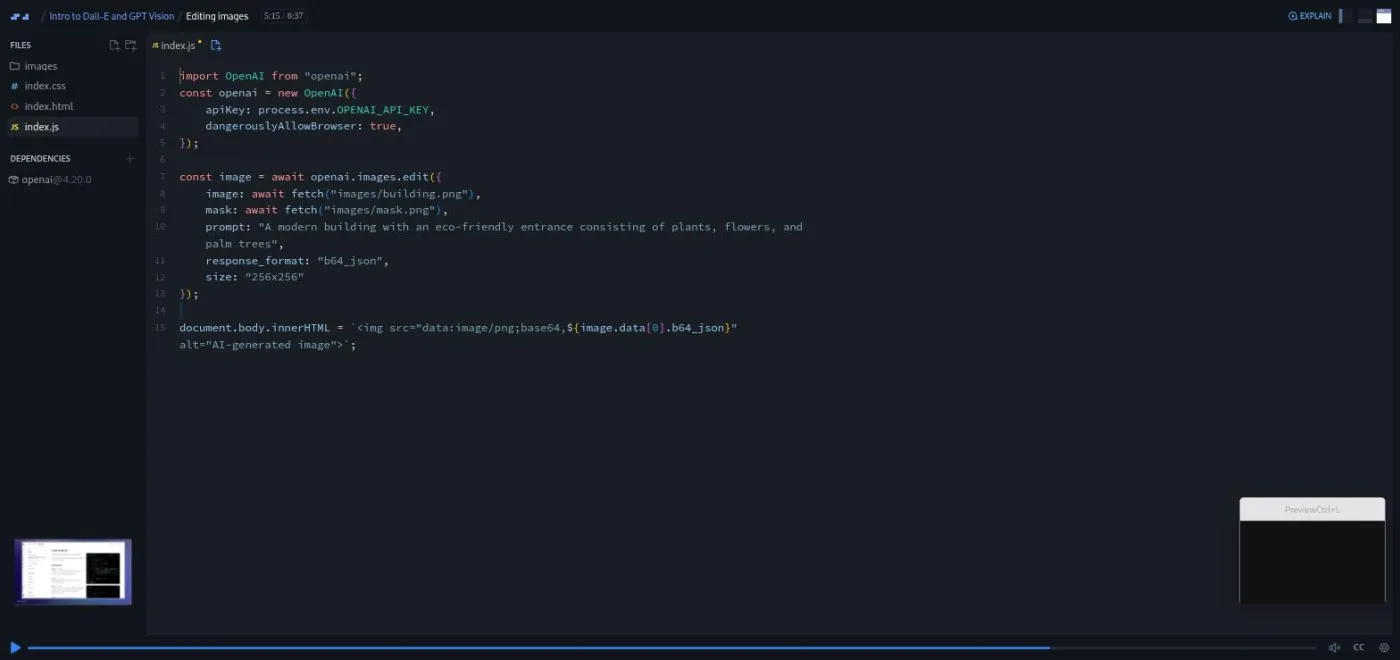
"Editing images" (6:37) is inpainting: you give the API an image and a mask (a PNG with a transparent hole), and DALL-E 2 fills the hole from your prompt. Only DALL-E 2 supports it. Guil makes the mask in Figma and shows the steps, then fixes a half-finished Orlando building known locally as the I-4 Eyesore. One detail worth knowing: the docs use Node's fs.createReadStream, which cannot run inside a browser scrim, so he uses await fetch("images/building.png") instead.
"Image variations" (4:26) calls openai.images.createVariation on a bike photo, then on Guil's own portrait ("it's like looking into an AI generated mirror") and his dog Joey. Again DALL-E 2 only, square PNG under 4 MB.
2. FilmFusion challenge and solution (9 min, 2 scrims)
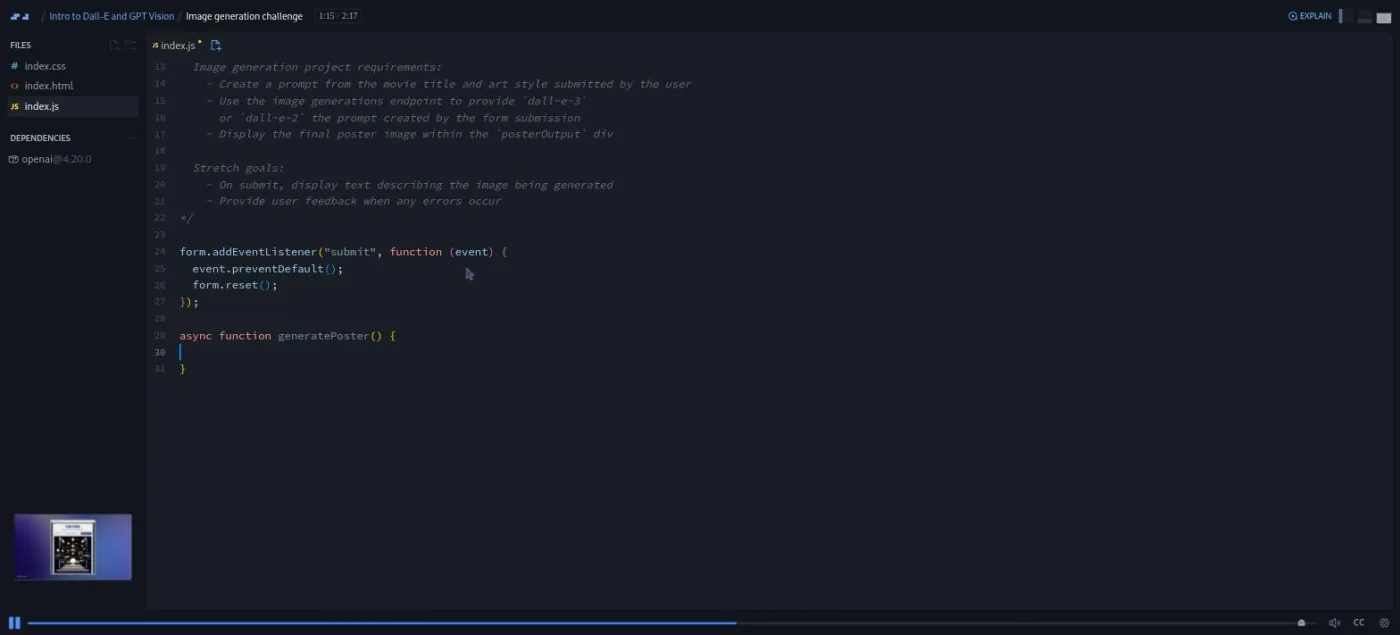
The challenge brief (2:17) hands you a form with a movie title input, an art style dropdown and a Generate Poster button, plus an empty generatePoster function. The requirements sit in a comment: build a prompt from the title and style, send it to the images endpoint with DALL-E 3 or 2, and render the poster in the output div. Stretch goals: show "Generating poster for..." text on submit, and show an error message if the request fails.
The solution (6:33, not the 2:17 the table of contents shows) builds the prompt as a template literal, An imaginative poster inspired by the movie "${movieTitle.value.trim()}" rendered in the ${artStyles.value} art style, passes it to generatePoster(prompt), and drops the returned URL into an img. Guil tests with Back to the Future in Art Deco and admits the poster text "reads as sort of gibberish," which the prompting scrim warned about. The stretch goals become a status line and a try/catch around the request.
3. GPT-4 with Vision, recap and wrap-up (18 min, 6 scrims)
"GPT-4 with Vision, Part 1" (7:32) switches endpoints. Vision goes through openai.chat.completions.create, and the user message's content becomes an array with two objects: { type: "text", text: ... } and { type: "image_url", image_url: { url } }. The image must be a hosted URL, not a local path; Guil uploads his photos to the scrim and links to them. The egg example is the one to watch: the first answer says "thrush family, like the American Robin," so he adds "small egg" and "during spring" to the prompt and gets northern mockingbird, which matches his yard.
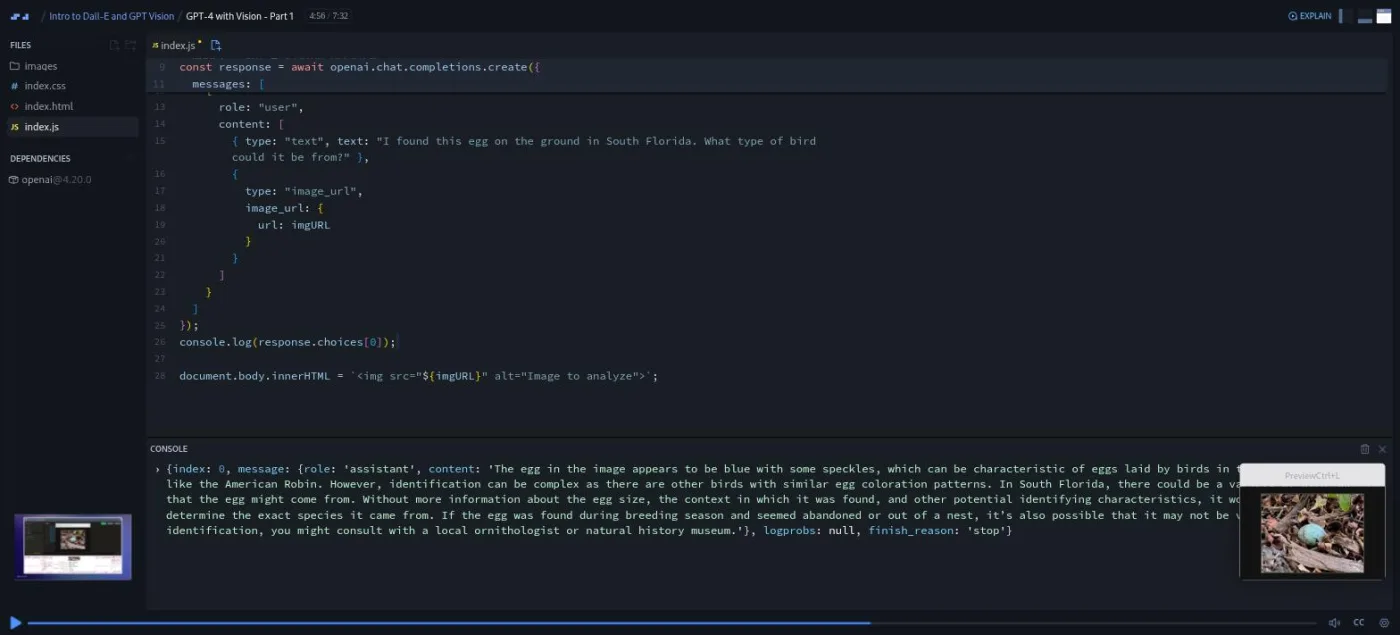
The model name is the problem. Guil names it in the transcript as "GPT four vision preview," and that is the model the scrim requests. OpenAI no longer serves that model, so you will need to change the string to a current vision-capable model before any of this scrim's requests return. The request shape itself (text plus image_url in one content array) is still how the API works.
"Part 2" (4:24) prices a whole restaurant menu from a photo, notices the total changes on a second run, and compares two cheese photos by adding a second image_url object. Guil closes with limits: GPT-4 cannot generate images, uploads are capped at 20 MB, PNG, JPEG, WebP and non-animated GIF are supported, non-Latin text reads poorly, and "OpenAI stressed that the model should not be used for medical advice."
The recap (1:48) lists what you did and points you to the Discord "today I did" channel. The last three scrims are Scrimba clips, not course content: Tom Chant on Scrimba Docs (1:18), Per Borgen on the Scrimbassador referral program (1:59), and Per again on using your certificate (0:53).
What a lesson feels like
Every scrim opens on a title slide, then Guil talks over a small index.js with a preview popup. Scrims run from under a minute to eight and a half minutes. Because image URLs from the API die after an hour, he often shows results on slides or uploads a saved copy into the scrim, then resets the code at the end so you can run it live with your own key. Expect more slides than live output.
There are two challenge moments: the landscape regeneration inside "Size, quality and style," and FilmFusion. Both are the "pause me and try it" kind, not autograded. Every scrim has captions, a timestamped transcript under the settings menu, subtitles in ten languages, and playback speed.
Free or Pro: exactly what is gated
This is a Pro course. The first five scrims carry the SAMPLE badge and play without a subscription: the introduction, generating from a text prompt, response formats, prompting, and size, quality and style. That is 30 minutes and covers the whole generation side. Everything from "Editing images" on is Pro: inpainting, variations, the FilmFusion challenge and solution, both GPT-4 with Vision scrims, the recap, and the certificate.
Pro also unlocks the AI Engineer Path this course belongs to and the Pro-only Discord channels. Basic Discord access is free on Scrimba's pricing page, so the server alone is not a reason to upgrade. See current plans (opens in a new tab) for what Pro includes in your region.
There is one cost the course does not gate but you should budget for: your own OpenAI API key. Every example calls the real API, and DALL-E 3 HD images cost more per image than standard ones, which Guil shows on a pricing chart in scrim 5.
How long it takes
62 minutes is video runtime. Plan for two and a half to four hours: an hour of watching, an hour of running each example with your own key and swapping prompts, and one to two hours on FilmFusion if you do the stretch goals and style it.
Who it's for, and who should skip it
It fits you if you have built something with the OpenAI chat API, want to add image generation or image understanding to it, and would rather see every parameter demonstrated once than read the docs cold. It is also a gentle first look at multimodal models (models that accept more than one kind of input, here text and images).
Skip it if you have never called an AI model from code; do Intro to AI Engineering first, since this course assumes the chat completions basics. Skip it if you need the current OpenAI image model, because only DALL-E 2 and 3 appear here. And skip it if you want image work outside OpenAI; no other provider is mentioned.
Preview the first five scrims free on Scrimba (opens in a new tab)Prerequisites
JavaScript with async/await and template literals, a working knowledge of the OpenAI chat completions API, and an OpenAI API key saved as an environment variable in Scrimba. Figma is used for one mask in the editing scrim, but any tool that exports a PNG with transparency will do.
Where it fits
Scrimba lists this course under the AI Engineer Path. Treat it as an elective: take it when a project needs images, not as a step everyone must pass. The natural neighbours are Intro to AI Engineering before it and Learn RAG or Learn AI Agents after it.
Strengths and limits
What it does well: it covers every images endpoint and the vision request shape in an hour, the prompting scrim is the most reusable eight minutes in it, the FilmFusion challenge is small enough to finish, and Guil explains the one-hour URL expiry and the base64 crash before you hit them.
Where it is limited: the code has not been updated since it was recorded, editing and variations are DALL-E 2 only, there is no coverage of OpenAI's newer image model, and half the visuals are pre-generated slides because live output cannot survive the scrim's preview.
Related courses and comparisons
- Intro to AI Engineering, the fundamentals to take first
- Learn RAG, for grounding text-based AI apps
- Learn AI Agents, for AI that acts rather than describes
- Intro to Mistral AI, a free way to practise LLM app patterns
- Prompt Engineering for Web Developers, if the prompting scrim was your favourite part
No, it is a Pro course, but the first five scrims (about 30 minutes, the whole image generation side) are free previews marked SAMPLE. Editing, variations, the FilmFusion challenge, both GPT-4 with Vision scrims and the certificate need Pro.
Scrimba says 62 minutes and 17 lessons. I counted 15 scrims, and their player lengths add up to about 68 minutes. Plan two and a half to four hours to run the examples with your own key and build FilmFusion.
Guil Hernandez, a Scrimba teacher who also made Learn to Code with AI and Learn RAG. Three short clips at the end are from Tom Chant and Per Borgen and are about Scrimba features, not DALL-E.
FilmFusion, a one-page app where you type a movie title, pick an art style from a dropdown, and get a DALL-E poster. Stretch goals add a status message and error handling. Everything else is a series of short examples: generating, editing, varying and analysing images.
Yes. Every scrim calls the real API. Guil asks you in the introduction to save your key as an environment variable in Scrimba. DALL-E 3 HD images cost more per image than standard, so budget for a few dollars of experiments.
The DALL-E 2 and 3 examples run as written. The two vision scrims call gpt-4-vision-preview, which OpenAI has retired, so change the model string to a current vision-capable model first. The request shape (text plus image_url in one content array) is unchanged. The SDK pinned in the scrims is [email protected].
Two, both of the pause-and-try kind: regenerate an image in landscape inside the size, quality and style scrim, and the FilmFusion project with a full solution walkthrough. Nothing is autograded.
Yes. Every scrim has captions, a timestamped transcript panel under the settings menu, and subtitles in ten languages.