Learn to Code with AI
Guil Hernandez's free Learn to Code with AI runs about 4.5 hours across three modules. You paste ChatGPT prompts into the Scrimba editor, edit the code it returns, and ship about 15 small projects, from a drum kit to a Firebase-backed expense splitter. It works well for a first project this weekend; it will not teach you to program.
Reviewed inside the course with a Pro account, September 2026: all 42 scrims opened, 40 transcripts read.
This page is part of our Scrimba AI courses catalog. Scrimba's course page lists it under the AI Engineer Path.
Quick answer
It fits someone with an idea, no coding background, and a ChatGPT account open in a second tab. The catch: the recordings date from 2023, so the ChatGPT screenshots are stale even though the prompts still work. Finish it and want to understand the code you pasted? Move to Learn JavaScript.
Learn to Code with AI
FreeTaught by Guil Hernandez (opens in a new tab)
Build and deploy 15 small web projects by prompting ChatGPT for HTML, CSS, and JavaScript, then wiring four of them to a Firebase database.
Start free on Scrimba (opens in a new tab)Is it worth your time?
Yes, for the person it is made for: someone with an idea, no coding background, and a ChatGPT account. The course costs nothing, and the format does something a YouTube video cannot. Guil pastes ChatGPT's code into the editor and it runs in the preview pane beside it, so when he changes border-radius: 20px to 0px you see the button corners square off. Then he stops and hands you the editor for a challenge. There are 23 of those, and they are small enough that a beginner can finish them.
The recordings date from 2023: the slides show the ChatGPT interface labelled "May 24 Version," the first project is a "Login with Twitter" button, and the Firebase code pins version 9.20.0 from Google's CDN. The prompts still work in today's ChatGPT, and the HTML, CSS, and JavaScript have not changed, but the screenshots will not match what you see on your screen. Guil promises in the module 1 wrap-up that "I'll be adding more sections to the course featuring new, more complex projects." As of September 2026 that has not happened.
"Learn to code" means something specific here. You copy prompts from a prompts.md file, paste them into ChatGPT in another tab, and paste the answer back. The challenges are where you type real code, and they are mostly two or three line edits. Guil is upfront: "You are meant to punch above your weight in this course and work with code or take on challenges you don't fully understand." That is a fair deal for a prototyping course, but do not expect to write a project from a blank file when you finish.
What you'll learn
Course curriculum
3 modules · 40 lessons
- Build and deploy your first projects with ChatGPT
- Next-level projects with AI
- Build projects with Firebase
Lesson counts are the scrims I counted in each expanded module in September 2026, 40 in total plus two short platform add-ons after module 3 (a Scrimba Docs intro and a certificate tip). Scrimba's module headers show 0/14, 0/8, and 0/1, which is the number of challenges in each module rather than the number of scrims, and the listing's structured data says 47 lessons, which counts something else again. When other pages on this site quote 47 lessons, that is Scrimba's number.
Inside the course, module by module
1. Build and deploy your first projects with ChatGPT (116 min, 16 scrims)
Three short scrims set the scene: a course welcome (the free preview), a two minute case for ChatGPT as "a stellar problem solver," and a sign-up walkthrough for OpenAI. Then "What you need to know about HTML and CSS" explains the two with a car analogy (HTML is the frame, CSS is the paint job) and shows the workflow you will repeat all course: copy a prompt from prompts.md, paste it into ChatGPT, paste the code back, click run.
The projects start small and grow. "Build a login button" makes a Login with Twitter button, then challenges you to turn it into a GitHub button by editing one line of HTML and two of CSS. "Website hero section" builds a landing page for a fictional Hover Chair with a Google Font and a product image. "Subscription signup form" builds a BarkerBox dog-toy signup with three challenges: add a name field, add an image, then style it round with a border. Along the way Guil points out Flexbox and explains alt text properly.
"What you need to know about JavaScript" is the first time you see a variable. From there the projects get interactive: an event invite called GIF Gala (two parts; part 1 has no transcript, part 2 covers if, else if, and swapping a background GIF based on the RSVP), then the "Cake raffle app," which is the first project built from a conversational prompt. Its reset button challenge is the hardest in the module, and Guil says so at 6:35: "This is likely the toughest challenge you've worked on so far." The solution includes a real bug: the list clears but the array does not, so old names keep winning.
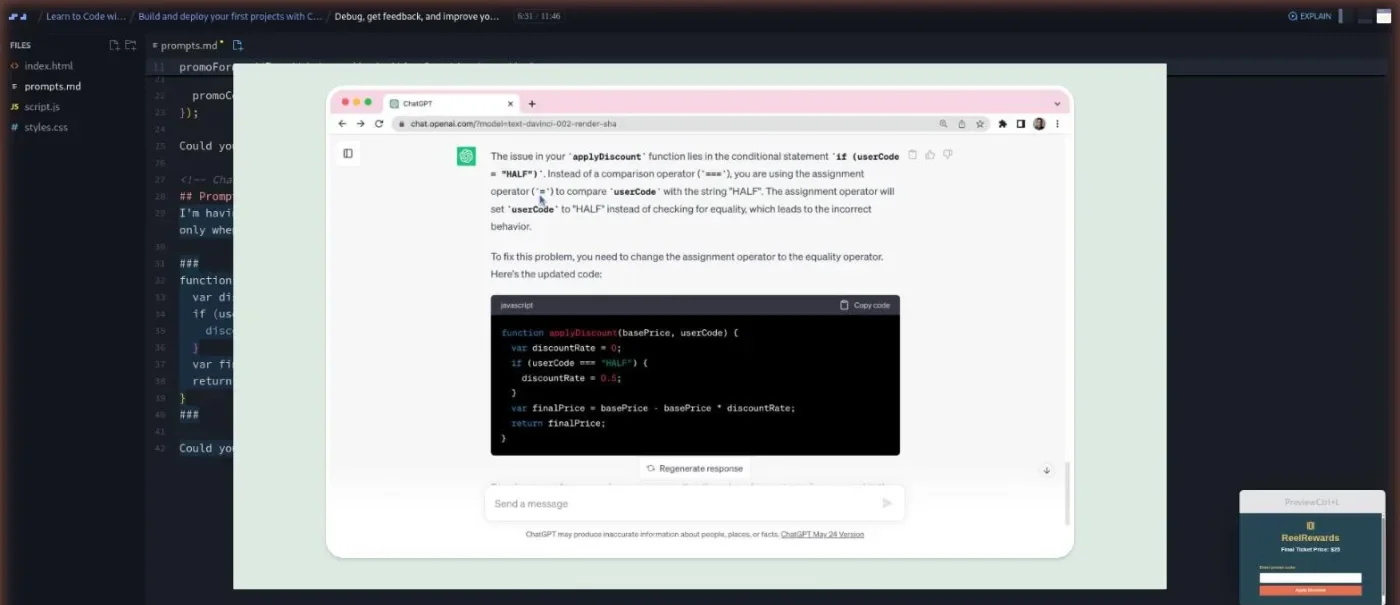
"Debug, get feedback, and improve your code" is the most useful scrim in the course. Guil gives you a broken ReelRewards promo-code page and fixes it with ChatGPT three times: a script tag in the wrong place, a form that refreshes the page, and a discount that applies to any code. The third one is your challenge.
The module ends with a "Drum kit app" (four challenges: name it, add a ride sound, add keyboard keys, then add snare, tom, and hi-hat yourself), a three minute Netlify drag-and-drop deploy, and a wrap-up. There is also a 1:41 scrim called "Dive deeper" that is a pitch for Scrimba's Frontend Developer Career Path.
2. Next-level projects with AI (107 min, 14 scrims)
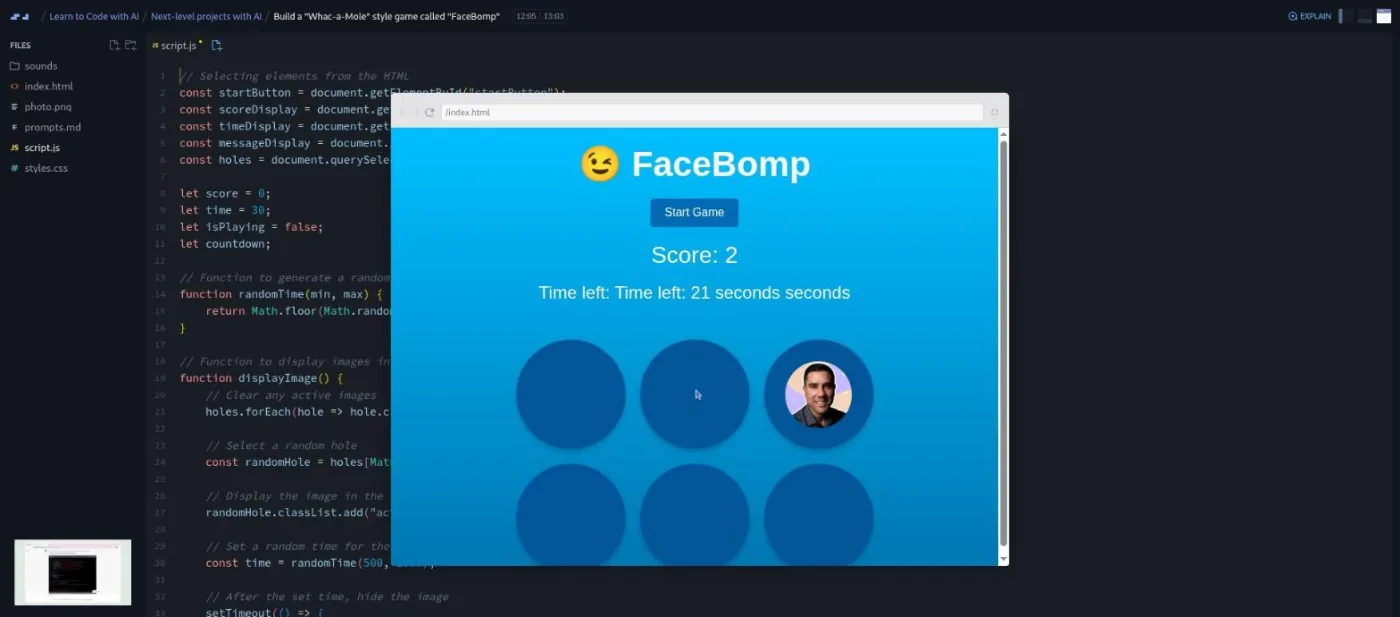
The intro promises that "with AI at your side, you can quickly get off the ground with plain conversational English, and then gradually become more technical." The projects back that up. FaceBomp, a whack-a-mole game with your own photo as the mole, takes two scrims and 26 minutes. ChatGPT generates the grid, the timer, and the scoring. Your challenges are to shrink and hide the images with CSS transform: scale(0), change the button text while a round is running, fix a doubled "Time left" label, and add a bump sound plus a different end sound for high scores.
"Project slideshow" asks for a dot-navigation image slider in one prompt and gets it, then adds autoplay with setInterval. "Personal homepage" is the biggest build: header, about, skills with progress bars, footer with Font Awesome icons, then a challenge to drop the slideshow into it. That homepage is what you push to GitHub in the next scrim (by dragging files into the browser, no git commands) and later connect to Netlify so every change deploys itself.
The smart home interface, two scrims, is where Guil switches to many small prompts instead of one big one, and where you write your first prompt from scratch (for a glow effect on pressed buttons). "Turn your project into a mobile app" adds a manifest.json so the app installs on a phone home screen.
Then SnapStash, a shopping wish-list Chrome extension in two scrims: a manifest.json, a popup, Chrome's storage API so the list survives a restart, delete buttons, and category grouping. You cannot test it inside Scrimba; you download the zip and load it at chrome://extensions. Guil's closing line sums up the module: "You didn't just build a Chrome extension. You created something that uses data persistence."
The last scrim in the module is a two minute ad for Scrimba's affiliate program by co-founder Per Borgen, not course content.
3. Build projects with Firebase (50 min, 10 scrims)
Firebase is Google's hosted database. This module uses its Realtime Database, which pushes changes to every open copy of your app the moment they happen. Two short explainers and a setup scrim get you a project (you need a Google account) and show Scrimba's Firebase template, which hides your database URL behind an environment variable so you are not publishing it.
"Add Firebase to a project" reconnects the GIF Gala invite from module 1 so guests' messages are saved and listed live. Then come three apps, each built from starter code plus one or two prompts. Kudos Delight is a compliment generator that stores kudos and shows a random one; both of its parts are challenges you complete with ChatGPT. LunchVote is a poll where colleagues add lunch spots and vote; part 2 adds a delete button and debugs a missing set import. RoadWallet splits trip expenses.
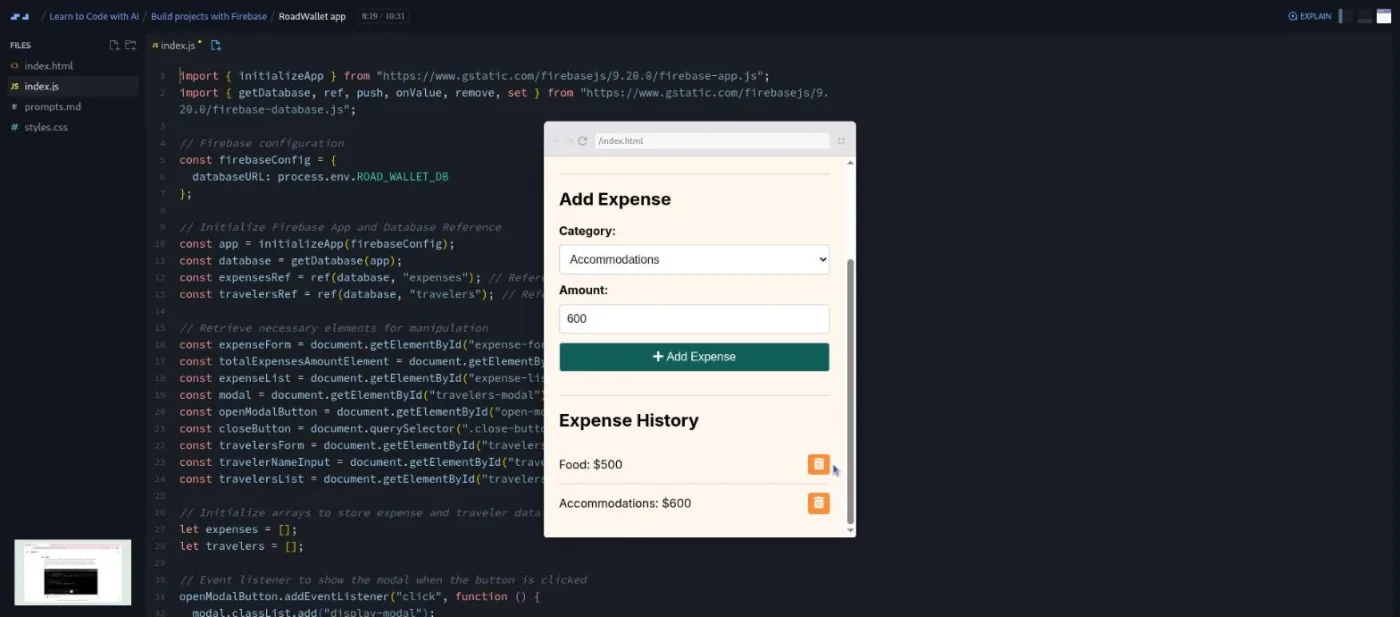
RoadWallet is the odd one out: most of the app is pre-written and the point, in Guil's words, "is to explore how ChatGPT can effectively interact with, modify, and enhance a substantial existing codebase." He asks for the complete file back rather than a diff, which is a habit worth copying.
After the wrap-up there are two platform add-ons that are not by Guil: a 1:18 intro to Scrimba Docs by Tom Chant and a 0:56 "How to utilize your certificate" by Per Borgen again.
What a lesson feels like
Scrims run from one to fifteen minutes; the build scrims are mostly nine to fourteen. Each opens with the project files already in place (index.html, styles.css, script.js, and a prompts.md with the prompts Guil will use) and a slide for anything he needs to show outside the editor, such as ChatGPT's reply. He reads the prompt aloud, explains why it is written that way, then you watch the code land and the preview update.
Challenges arrive as comments pasted into the file with a "pause me now." You edit, click run, and press play to see his solution. Only the first scrim carries a free-preview badge; the small icon next to a duration in the table of contents means "Challenge," and I counted 23 of them. Every scrim has captions, subtitles in ten languages, and a transcript panel under the settings menu, except two: "Interactive event invite - part 1" and "Lunch break poll" have no transcript at all.
One thing to know before you start: ChatGPT is not inside Scrimba. You keep it open in another tab, and for the Chrome extension you also need to download the zip and load it in your own browser. Guil's tone is patient and repetitive on purpose; almost every scrim ends with "ask ChatGPT about any code you don't understand."
Free or Pro: exactly what is gated
Nothing in the course is gated. All 40 module scrims, all 23 challenges, and the three Firebase apps are free. There are no Solo Project (Pro) items, which is unusual for a Scrimba course. The only Pro items are the Certificate of Completion at the end of the table of contents and the career path the course sits in.
Scrimba's pricing page lists basic Discord access as free and the Pro-only channels as Pro, so the Discord server Guil points to in the intro is not a reason to upgrade. See current plans (opens in a new tab) if you want the certificate or the AI Engineer Path around it.
How long it takes
4.5 hours is video runtime. Plan for 10 to 14 hours. Every build scrim has you pausing to paste a prompt into ChatGPT, read its answer, and paste code back, and the 23 challenges take a beginner five to fifteen minutes each. The account setup is real time too: OpenAI, Netlify, GitHub, Firebase, and Chrome's developer mode all get set up during the course. If you deploy every project and personalise the homepage as Guil asks, add another three to five hours. At an hour a day that is two to three weeks.
Who it's for, and who should skip it
It fits you if you have never coded, you want a working thing you can show someone, and you are comfortable working with ChatGPT in a second tab. It also fits designers, marketers, and founders who want to prototype without hiring anyone; the pages for beginners cover that audience.
Skip it if you already write HTML and JavaScript; the challenges will feel like busywork and the ChatGPT prompting is basic. Skip it if you want to understand how language models work or build with an API; that is Intro to AI Engineering. And skip it if the age bothers you: the prompts still work, but it is ChatGPT only, with no mention of Claude, Cursor, Copilot, or any model newer than GPT-4.
Start Learn to Code with AI for free (opens in a new tab)Prerequisites
None in terms of code. You need a free OpenAI account for ChatGPT (any tier works; the course uses the free web app), a Google account for module 3, and free Netlify and GitHub accounts for the deploy scrims. The Chrome extension needs Chrome. Everything else runs in the Scrimba editor.
Where it fits
This is the gentlest entry on the AI courses hub, and Scrimba lists it in the AI Engineer Path. The "Dive deeper" scrim that pitches the Frontend Developer Career Path is right about the next step: if you finish and want to understand the code, go to Learn HTML and CSS and then Learn JavaScript. If the Firebase module was the part you enjoyed, Build a Mobile App with Firebase goes deeper on the same database. If you liked writing prompts, Prompt Engineering for Web Developers is the natural follow-on.
Strengths and limits
What it does well: it is free with nothing gated, the projects are things people want to build (a poll, an expense splitter, a browser extension), the debugging scrim teaches a real skill, and Guil explains each line ChatGPT produces instead of pasting and moving on. The Firebase module gets a beginner from no database to a working one in under an hour.
Where it is limited: the recordings are from 2023 and the ChatGPT screenshots are out of date, two scrims have no transcript, the challenges are small edits rather than full builds, ChatGPT lives outside the editor so there is a lot of tab switching, and the promised extra modules never arrived. It teaches you to steer an AI through a project, not to program.
Related courses and comparisons
- Intro to AI Engineering, the next step if you want to call an AI model from code
- Prompt Engineering for Web Developers, for better prompts than the ones here
- Build a Mobile App with Firebase, a deeper Firebase project
- Learn JavaScript, to learn what the generated code means
- Intro to Mistral AI, another free AI starting point
- Courses for beginners, where this one fits
Yes. All 40 module scrims, all 23 challenges, and the Firebase projects are free with no card required. There are no Pro solo projects in this course. Pro only adds the certificate and the AI Engineer Path around it.
No. The course starts with what HTML and CSS are and introduces variables in scrim 8. You copy prompts into ChatGPT and edit the code it returns; the challenges are one to three line changes.
Guil Hernandez, a Scrimba teacher, for all 40 module scrims. Two short add-ons at the end are by Tom Chant (Scrimba Docs) and Per Borgen (using your certificate).
About 15 mini projects: login buttons, a hero section, a signup form, the GIF Gala RSVP page, a cake raffle, a drum kit, the FaceBomp whack-a-mole game, a project slideshow, a personal homepage, the Home Harmony smart home interface (installable as a mobile app), the SnapStash Chrome extension, and four Firebase apps: GIF Gala with saved messages, Kudos Delight, LunchVote, and RoadWallet.
Partly. The recordings date from 2023: the slides show the May 2023 ChatGPT interface and the Firebase code pins version 9.20.0. The prompts still work in current ChatGPT and the HTML, CSS, and JavaScript are unchanged, but the screenshots will not match your screen.
No. Guil uses the free ChatGPT web app. He mentions GPT-4 once, in the RoadWallet scrim, but every prompt works on the free tier.
Not for the first two modules; everything runs in the Scrimba editor with ChatGPT in another tab. You download a zip to deploy to Netlify, to upload to GitHub, and to load the Chrome extension. Module 3 needs a Google account for Firebase.
About 4.5 hours of video, but plan for 10 to 14 hours once you count the ChatGPT round trips, 23 challenges, and account setups, or two to three weeks at an hour a day.
Yes for 40 of the 42 scrims, with captions and subtitles in ten languages. Interactive event invite part 1 and Lunch break poll have no transcript.
Not on its own. It teaches you to get a project built by prompting and editing. To learn the underlying code, follow it with Learn HTML and CSS and Learn JavaScript.