Prompt Engineering for Web Developers
Prompt Engineering for Web Developers is Treasure Porth's Pro course on getting better output from ChatGPT, about 3.1 hours across three sections. You do not build an app: you rewrite weak prompts, paste ChatGPT's code into the editor, and run it. The technique still holds in 2026; the tool-specific detail, recorded in 2023 against ChatGPT and Google Bard, does not.
Reviewed inside the course with a Pro account, September 2026: all 50 scrims opened and transcribed.
This page is part of our Scrimba AI courses catalog. It's a standalone course, not part of the AI Engineer Path.
Quick answer
It fits you if you already write some JavaScript and want a repeatable way to get better results out of ChatGPT. The catch is the age: the prompting habits transfer to any current model, but you will have to translate the tool-specific detail yourself. If you want to build AI into an app rather than prompt one well, go straight to Intro to AI Engineering instead.
Prompt Engineering for Web Developers
ProTaught by Treasure Porth (opens in a new tab)
Write better prompts, then use ChatGPT to generate, test, debug, convert and document code, and to prepare for interviews.
View on Scrimba (opens in a new tab)Is it worth your time?
If you use ChatGPT for coding and your results are hit and miss, yes. The first section is a tight 80 minutes on the habits that make the difference. Say which language you want. Give context. Ask for a specific format. Break big requests into a list, and iterate instead of giving up. Treasure teaches each one with a bad prompt and a good prompt side by side, and the transcripts show the actual ChatGPT output for both, so you can see why the second one worked.
It is a 2023 course. Treasure says on camera that she is recording in June 2023, ChatGPT's training data "stops in late twenty twenty one," and one scrim is built around Google Bard, which no longer exists under that name. The prompting habits transfer to any current model, but expect to translate the tooling. It also is not a course about building AI into apps: there is no API call, no SDK, no model provider. For that you want Intro to AI Engineering.
So: strong technique, thin on modern tooling, and the last section (job search) is useful mostly if you are interviewing soon. I would take section one in an evening, skim what you need from section two, and keep section three for when you are applying.
What you'll learn
Course curriculum
3 modules · 48 lessons
- Prompt Engineering
- AI Assisted Coding
- Using AI Language Models for Job Search
Lesson counts are the scrims I counted in each expanded section in September 2026. Scrimba's section headers show 0/5, 0/4 and 0/2, which count only the challenge-style scrims. The course listing says 51 lessons: the 48 here, plus two Scrimba house scrims after the last section (a 1:18 "Scrimba Docs" promo and a 0:56 certificate scrim), plus the certificate itself. Every timed scrim adds up to the 80, 66 and 42 minutes shown.
By the end you can write a prompt that gets code in the language and shape you asked for. You can break a feature into a numbered list a model can follow, get edge cases and tests for a function you wrote, and run a mock interview against it. The course does not promise more than that, and it delivers that much.
Inside the course, module by module
1. Prompt Engineering (80 min, 18 scrims)
The first five scrims are free samples. The welcome scrim sets expectations. Language models "are really only good at one thing, and that is guessing what word should come next," as Treasure puts it. She names the prerequisite in the same breath: "you should have some experience with JavaScript and React to be successful in this course." The intro scrim then lists the five strategies the section will cover: be specific, use technical terms, provide context, give examples, and iterate.
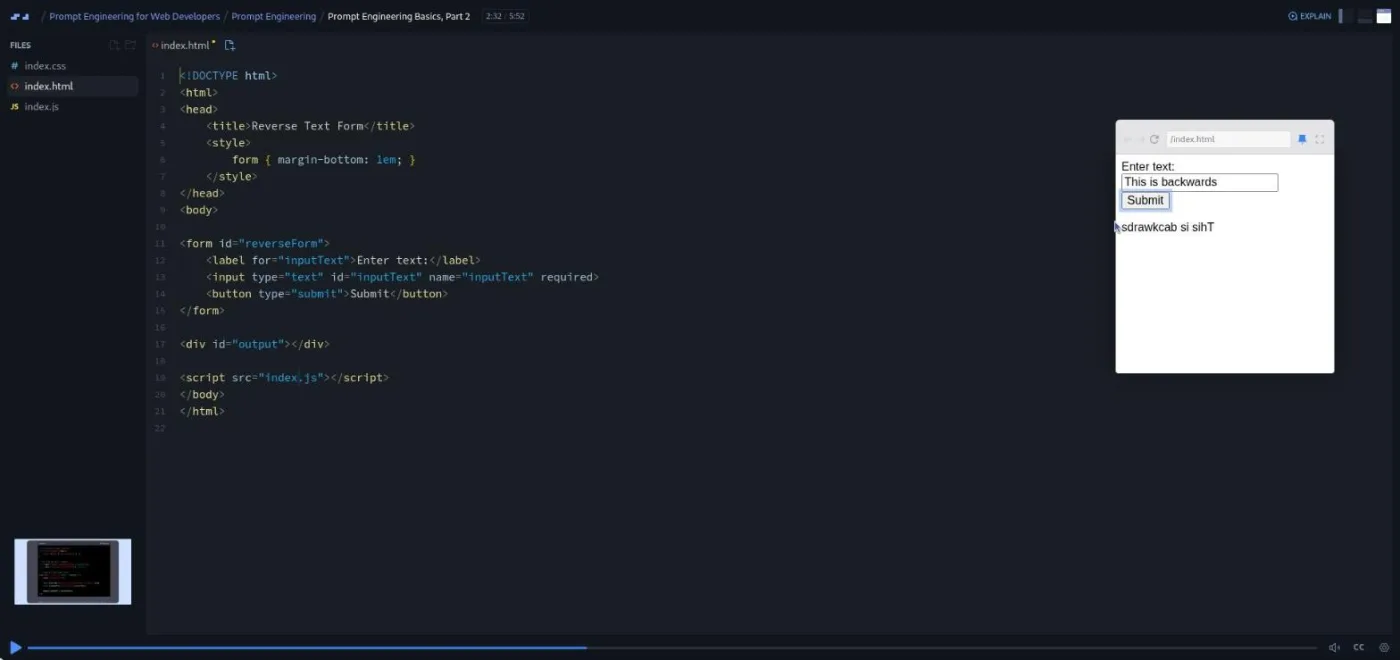
Basics Part 1 and Part 2 show the pattern the whole course follows. "How do I center something?" gets a request for more context; "What's the best way to center a div element horizontally and vertically using CSS?" gets Flexbox and Grid with pros and cons. Then Treasure asks for a form that prints the user's input in reverse, pastes ChatGPT's HTML and JavaScript into the scrim, and runs it. A quiz scrim follows with three vague prompts for you to rewrite.
The middle of the section is the useful part. Control the length and format (8:35, the longest scrim in the course) is about asking for the shape of the answer. Treasure asks for a two-step explanation, a comparison table of Grid and Flexbox, exactly three bullets on innerHTML, a text flowchart for a pull request, and pseudocode written as code comments. The line I now use most is "only include the code that needs to be modified." The Haiku-ish Generator challenge then has you improve three weak prompts until they produce working JavaScript, with a warning that ChatGPT counts syllables badly.
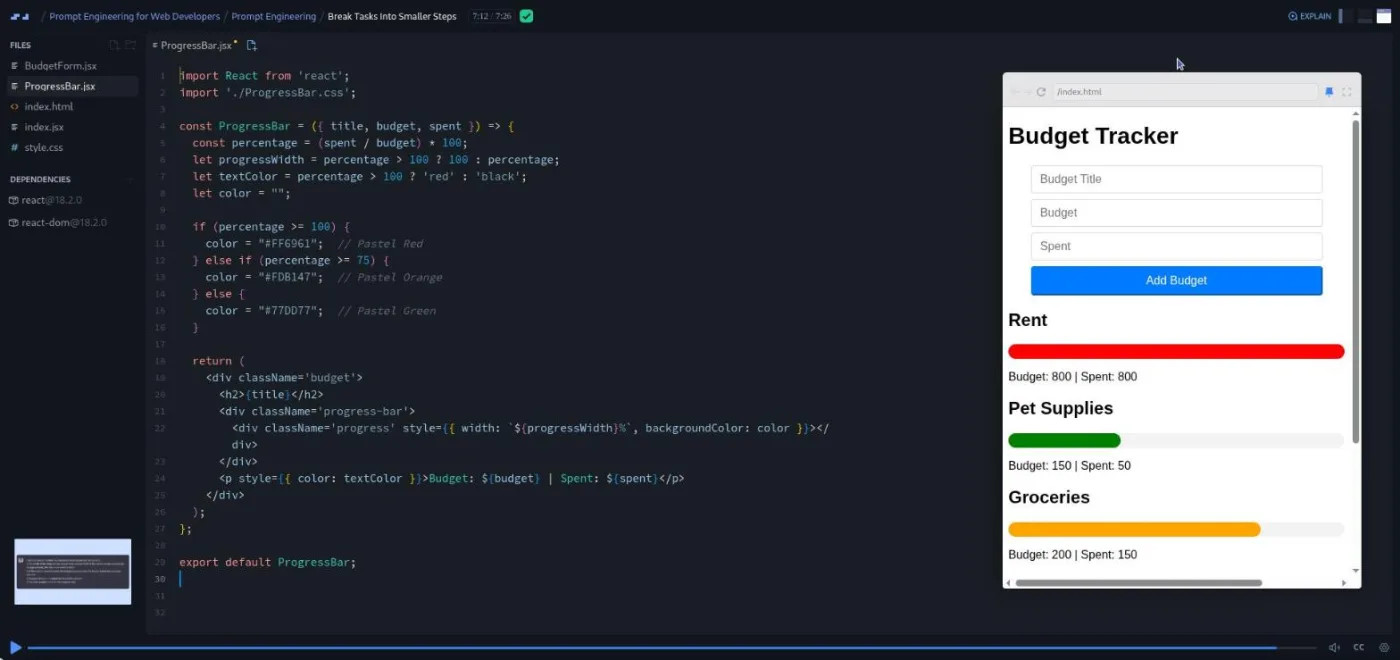
Break Tasks Into Smaller Steps is the scrim I would send someone who is frustrated with AI code. Treasure tries to get a whole React budget tracker from one long prompt and gets an app with invisible progress bars and two ignored requirements. "You wouldn't throw all the bricks and all the mortar into a pile and smear it around," she says, and then rebuilds it component by component in a React 18.2 scrim.
Four more ideas fill out the section. Prompt Iteratively contrasts editing a prompt and regenerating with adding a follow-up, using a board game shop page that lost its Buy Now buttons on the rewrite. Optimize prompts has ChatGPT interview you about what you want before it writes the prompt, and the modal challenge makes you do the same for a React modal. Role-based prompting ("act as a product manager") plans a houseplant app from architecture advice down to Jira tickets; the practice scrim repeats it for a hotel booking MVP. Prompt with Examples shows that an example input and output beats a paragraph of description, and the Seltzer Flavor Generator challenge, with a full solution scrim, is built on that. Beware Hallucinating is a short story about ChatGPT inventing a slider library: "When I go to this GitHub link, I get a four zero four. It doesn't exist." The recap scrim ends with a markdown file of every good prompt from the section, which you can download as a zip.
2. AI Assisted Coding (66 min, 20 scrims)
This section is a list of jobs and a prompt for each. Generate code with pseudocode shows two ways to describe a findBookById function in plain English and get the same JavaScript back. Generate code using a pseudo language goes further: Treasure asks ChatGPT to invent a markdown-like template for describing a React component, then uses it to generate a Counter and a NavBar. The follow-up challenge does the same for HTML forms. Her caveat is worth remembering: "ChatGPT's memory is short, and you may need to remind it of your template after every seven or ten interactions or so."
Generate Edge Cases and Generate Test Cases are the two scrims most likely to change how you work. She asks for eight edge cases for a removeDupes function, gets them as a single copy-pasteable block of console.log tests, and discovers the function treats "T" and "t" as different characters. Then she generates Jest tests for an isEven function, asks for a browser-runnable version, and lets the failing string test drive a refactor. The practice scrim hands you a chunkArray function that will loop forever on a chunk size of zero and asks you to find that yourself.
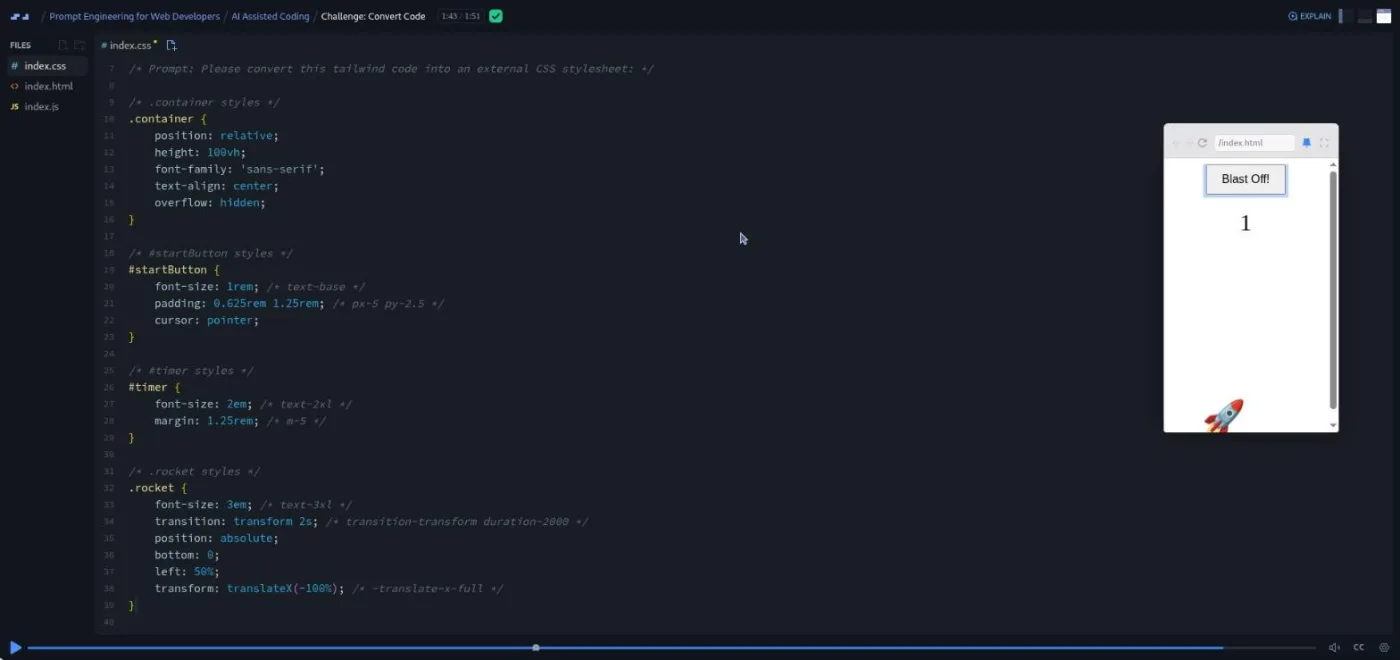
Debugging and Error Messages introduces a small trick I have started using. Ask for fixes "with code comments," then add "comment out the old code rather than replacing it so I can better see how you fixed it." Convert Code covers JavaScript to Python, CSS to Tailwind, CSV to JSON, and React to Vue. Its challenge gives you a rocket launcher written in jQuery and Tailwind and asks you to convert both so the countdown works.
The second half is lighter. Document Code asks for JSDoc and Storybook boilerplate, then has ChatGPT interview Treasure to produce a JavaScript style guide. Two Study Web Development scrims cover explanations by audience ("explain callbacks as if I am five"), study guides, and self-quizzing, with a warning that the model may invent sources. Explore APIs with Bard uses Google's model to query the GitHub API. Treasure spots that the "top five by stars" result is actually the first five returned, "a good lesson in staying vigilant." Get Help with Git and Github and Get Help Deploying are prompt lists rather than lessons. When to Step Back from AI names the failure mode: "copy paste and pray," where each fix introduces a new bug. The section ends with a recap and a Scrimba referral promo from Per Borgen.
3. Using AI Language Models for Job Search (42 min, 10 scrims)
Two DS/Algo scrims use the Two Sum problem to show a study loop: generate three easy problems, ask for a 150-word explanation, a metaphor, pseudocode "without giving away the answer," then brute force and optimized solutions. Treasure is direct about the limits: "these strategies work much better with ChatGPT four and beyond," and they suit easy to medium problems only. Part 2 covers pattern study (sliding window, two pointers). The FizzBuzz challenge has you solve it yourself, then ask for a review.
Review and Analyze Code uses the same Two Sum solution to introduce Big O by asking for a code review and three solutions with different time complexities. The practice scrim gives you a working but ugly isPalindrome function and asks you to get it reviewed; the improved version handles negative numbers. Get Live Code Interview Advice has ChatGPT play both sides of an interview, first asking clarifying questions as the candidate, then answering them as the interviewer for "an entry level position."
The last two long scrims are about documents and behavioral questions. Job Search Docs uses "act as a resume writing expert and ask me questions" to draft experience bullets, then tailors them to a pasted job ad and writes a 30-second pitch. Treasure's framing: AI is "a good starting place, but certainly not a destination" for a resume. Practice Interview Questions walks through the STAR method and an interview-coach prompt that gives feedback on your answers, including a deliberately wrong answer about accessibility. A one-minute congratulations scrim closes the course.
What a lesson feels like
Most scrims are three to six minutes. The screen is usually a slide with a prompt and ChatGPT's reply, then a cut to the editor where Treasure pastes the code in and runs it in the preview pane. Roughly every third scrim ends with "go ahead and pause the scrim now": you open your own ChatGPT tab, do the task, and come back for her prompts. Eleven scrims carry Scrimba's challenge icon, but the checking happens in your head and your ChatGPT window, not in the scrim.
You will not type much. The code files are there so you can paste generated code and see it run, and a few scrims (the quiz, the recap, the study review) are just a markdown file. Captions, a full timestamped transcript under the settings menu, subtitles in ten languages, and playback speed are all there. Treasure's delivery is warm and unhurried, with the occasional aside ("Way to go, Bob") and a rhyme at the end of the haiku challenge.
Free or Pro: exactly what is gated
The first five scrims of section one are free previews: the welcome, the intro, Basics Part 1 and 2, and the quiz. Everything after that, 43 of the 48 lessons, needs Pro, as does the certificate. There are no Solo Projects in this course, so there is nothing else to unlock inside it.
Pro also adds the Pro-only Discord channels; the basic Discord server is free on every plan according to Scrimba's pricing page, so that alone is not a reason to upgrade. See current plans (opens in a new tab) for what Pro costs in your region.
How long it takes
3.1 hours is the runtime. If you only watch, that is an afternoon. If you pause at every "go ahead and pause" and do the work in ChatGPT, plan on seven to ten hours, because writing and reworking prompts takes longer than watching someone else do it, and section one alone has five challenges. Section three only pays off if you also solve the problems and run the mock interviews, so budget more if you are preparing for interviews now.
Who it's for, and who should skip it
It fits you if you already write some JavaScript, you use ChatGPT or a similar model for code, and you want a system for getting better results. It is also a decent read for a junior developer who wants a repeatable way to study algorithms and rehearse interviews without a partner.
Skip it if you want to build with AI: no APIs are called here. Skip it if you have never written code, since every example assumes you can read the JavaScript and React that comes back. And if you already prompt well, with numbered requirements, examples, and follow-up questions, you will find the first section familiar and the rest a list of ideas you have probably had.
View Prompt Engineering for Web Developers on Scrimba (opens in a new tab)Prerequisites
Basic JavaScript and a little React. The budget tracker, accordion, modal, counter and nav bar examples are all React components. Treasure says plainly that you should have "some experience with JavaScript and React." You need a free ChatGPT account, which she links in the scrims. One scrim in section two, Explore APIs with Bard, uses Google Bard, which you will have to substitute with a current model. You do not install anything, and there is no API key or paid AI plan to buy beyond Scrimba Pro.
Where it fits
This course is not part of the AI Engineer Path; it stands apart in the AI catalog as a workflow course, not an engineering one. The natural pairing is Learn to Code with AI, Scrimba's free beginner on-ramp to building with ChatGPT, before this one; and Intro to AI Engineering after it, once you want to put a model inside an app. Scrimba's free Prompting chapter (opens in a new tab) in its docs covers the same technique in text form and is model-agnostic, so it is worth reading alongside.
Strengths and limits
What it does well:
- Every technique comes with a real prompt and the real reply.
- The edge case, test, and debugging scrims give you habits you can use the same day.
- The challenges are quick and low friction because nothing needs installing.
- Treasure is candid about hallucination, forgetful models, and when to stop asking.
Where it is limited:
- It was recorded in June 2023 on ChatGPT and Google Bard. The model-specific facts (a 2021 training cutoff, Bard as the "up to date" option) are stale.
- It never touches an API, an SDK, or a coding assistant in an editor.
- The Git, deploy, and study scrims are prompt lists with little to do.
- 43 of the 48 lessons sit behind Pro for a course you can finish in a weekend.
Related courses and comparisons
- Intro to AI Engineering, if you want to build AI into apps instead
- Learn to Code with AI, the free beginner on-ramp
- Learn AI Agents, for AI that acts rather than assists
- Intro to Mistral AI, a free way to practise LLM app patterns
- AI Engineer Path, where the engineering courses are sequenced
No. The first five scrims (welcome, intro, Basics Part 1 and 2, and the quiz) are free previews. The other 43 lessons and the certificate need Scrimba Pro. This course is not part of the AI Engineer Path. The free AI starting points are Learn to Code with AI and Intro to Mistral AI.
No. Every exercise runs in the public ChatGPT interface, and you paste the generated code into the scrim's editor to check it. A free ChatGPT account is enough. One scrim in section two uses Google Bard, which you will need to replace with a current model.
No. It is about using ChatGPT to plan, generate, test, debug, convert and document code, and to prepare for interviews. No API is called anywhere in the course. For building AI features, see Intro to AI Engineering.
Treasure Porth, a Scrimba instructor. She records every lesson herself; the only other voices are two short Scrimba house scrims at the end of the course.
Rewrite weak prompts, build a haiku generator, a React modal, and a seltzer flavor generator from prompts, generate edge cases and tests for small functions, convert a jQuery and Tailwind rocket launcher to plain JavaScript and CSS, solve FizzBuzz and get it reviewed, and run mock interviews. Eleven scrims carry Scrimba's challenge icon.
Partly. It was recorded in June 2023 with ChatGPT (GPT-3.5 and 4) and Google Bard, and it mentions ChatGPT's 2021 training cutoff. The prompting techniques still work with current models; the tool-specific details do not.
3.1 hours of video. Doing every pause-and-try exercise in your own ChatGPT tab brings it to seven to ten hours. Sections one and two can be done in a weekend; section three is best saved for when you are interviewing.
Some. Treasure says you should have experience with JavaScript and React, and most generated examples are React components (a budget tracker, an accordion, a modal, a nav bar). You read the code rather than write it, so a basic grasp is enough.
Yes. Every scrim has captions, a timestamped transcript under the settings menu, subtitles in ten languages, and playback speed control. The section one recap also includes a downloadable markdown file of the example prompts.