Intro to Mistral AI
Intro to Mistral AI is Scrimba's free, 84-minute course on building with Mistral's models in JavaScript, taught mainly by Per Borgen with Gil Hernandez and Mistral's Sophia Yang. In 25 scrims you build a RAG bot over an employee handbook and a function-calling agent, and it earns its short runtime.
Reviewed inside the course with a Pro account, September 2026.
Quick answer
It fits developers who already know JavaScript and want a free, hands-on build of a RAG bot and a function-calling agent. The catch is setup, not price: Mistral requires a card on file before it issues an API key, and the RAG section needs a free Supabase project too. From here, Learn RAG covers retrieval in more depth, and Learn AI Agents takes the agent loop further.
Intro to Mistral AI
FreeTaught by Per Borgen (opens in a new tab)
Chat completions, a handbook RAG bot on Supabase, a function-calling agent loop, and local inference with Ollama, all in JavaScript and all free.
Start free on Scrimba (opens in a new tab)Is it worth your time?
Yes, if you can write JavaScript and want to see RAG and function calling built end to end without paying for a course. For 84 minutes it covers a lot of ground, and it does so with the two projects that matter most on the AI track. One is a question-answering bot grounded in your own documents. The other is an agent that turns a sentence into a function call. Both are the same patterns you meet later in the paid AI courses, here in their simplest form.
Per sets the tone in the first minute: "My goal with this course is to teach you how to build magical stuff and more specifically, how to do that using JavaScript and Mistral AI." He keeps it that direct throughout. The challenges are short and the solutions follow right after, so nobody gets stuck for long.
Two caveats. First, it is a 2024 recording. Per warns in the models scrim that "these are the models it offers at the time of recording," and the model names (mistral-tiny, mistral-medium-latest) and the 0.1 client library show their age.
Second, you cannot follow along with a free Scrimba account alone. Mistral asks for a card before it issues an API key, and Supabase needs its own project and two SQL snippets pasted into its editor.
What you'll learn
The course is one flat list of scrims, so the grouping below is mine, in order.
Course structure
25 scrims in 5 editorial groups, plus 3 generic Scrimba pages
- Welcome, Mistral intro, and La Plateforme signup
- Chat completions, streaming, JSON, and choosing a model
- RAG: embeddings, chunking, Supabase, retrieval, generation
- Function calling: from a tool schema to an agent loop
- Running Mistral locally with Ollama, and the recap
Group durations are added up from the timer in each scrim's header and come to 82 minutes; Scrimba's header rounds the course to 84. Scrimba's About text says 25 lessons. The table of contents has 28 entries because it ends with three pointer pages (Scrimba Docs, the affiliate program, and how to use your certificate); my counts above are the 25 real lessons.
Inside the course, module by module
1. Welcome, Mistral intro, and La Plateforme signup (6 min, 3 scrims)
Per's welcome explains what Mistral is (a company that "twice managed to stun the AI community by launching small open source foundational models") and lays out the plan. In order: API basics, models, embeddings and vector databases, RAG, function calling, then local models. He also says the course "has been created in partnership with the company itself."
Sophia Yang's two minutes are a company brief: founded in 2023, Mistral 7B and Mixtral 8x7B as open weights under Apache 2.0, and Small, Medium, and Large as the paid tier.
The third scrim is the signup walkthrough. It is the one to watch before deciding whether to take the course, because it tells you the cost model plainly: "you only pay for what you use. So this is not an ongoing fixed subscription." You add a card, create a key, and store it as a Scrimba environment variable.
2. Chat completions, streaming, JSON, and choosing a model (13 min, 3 scrims)
Gil Hernandez teaches the first request. The code is small: import MistralClient, call client.chat with a model and a messages array, and read chatResponse.choices[0].message.content. He then adds temperature and a system message, and pauses twice for you to change the prompt yourself. Gil also uses this scrim to point out where you are. "You are experiencing a fully interactive scrim that you can pause at any moment and jump right into the code and make changes to it."
Per takes over for part two, which adds two settings you will use in every app. Streaming means switching chat to chatStream and reading chunks with a for await loop, and Per shows why by typing a question into a Hugging Face chat page and watching the reply build "token by token." JSON output takes two changes: set response_format to json_object and ask for JSON in the prompt.
The models scrim compares Mistral's open and paid models on the MMLU benchmark (a standard test for language models) and then on cost. The advice is to pick the cheapest model that does the job. As Per puts it, "you probably don't want to hire a person that is overeducated or overqualified for the job because most likely their hourly rate will be higher." The course uses mistral-large-latest for RAG and the agent because those need reasoning.
3. RAG: embeddings, chunking, Supabase, retrieval, generation (41 min, 11 scrims)
This is half the course, and it is built as one project: a bot that answers questions about a fictional company's employee handbook (handbook.txt, about 600 lines). Per explains RAG (retrieval-augmented generation, meaning you look up relevant text first and hand it to the model as context) with a story about asking Notion's AI where Scrimba keeps its Coursera export notes. Gil then gives a six-minute primer on embeddings, the numeric form of text that lets you compare meaning. "You can think of embeddings as the language that AI understands," he says, and walks through the classic king minus man plus woman example.
The build starts with chunking. Per imports RecursiveCharacterTextSplitter from LangChain, sets a chunk size of 250 characters with an overlap of 40, and inspects the 280 chunks that come out. His rule: "you want your chunks to be as small as possible, but you don't want to lose context." A short challenge has you refactor splitDocument to take a path and return an array of strings. Then you create one embedding with client.embeddings and the mistral-embed model, and the first real challenge asks you to embed every chunk and shape the result for the database.
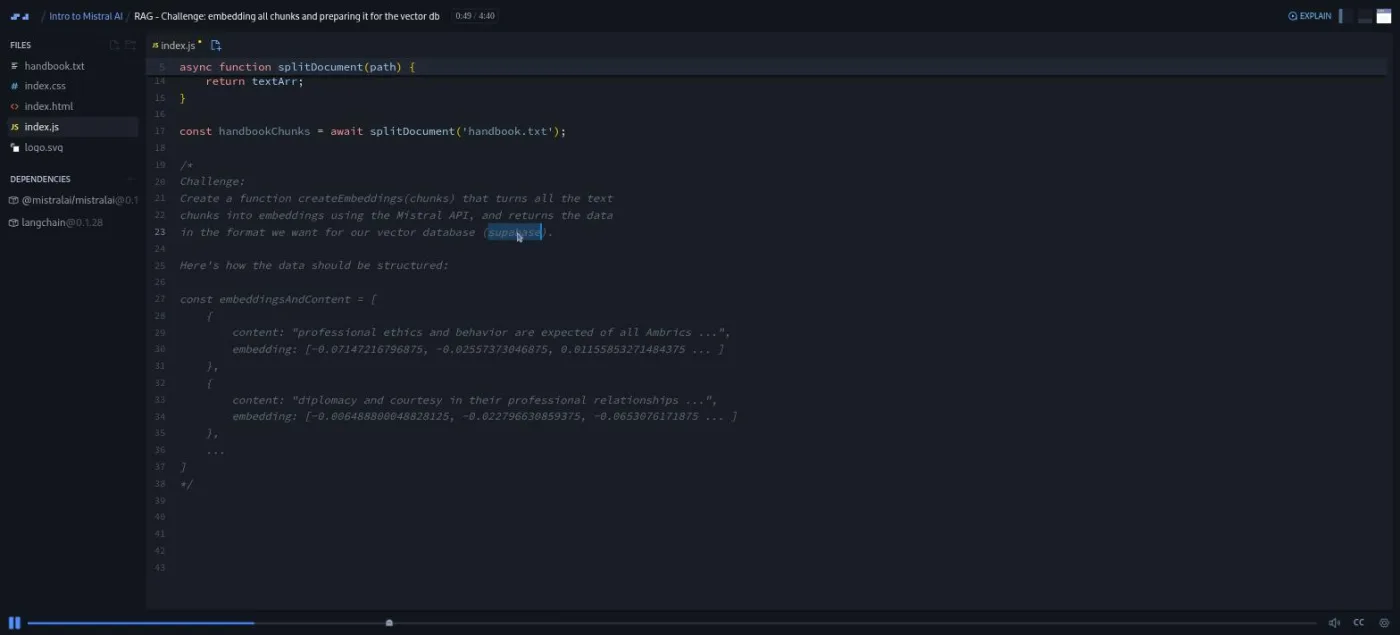
Gil returns for two Supabase scrims: what a vector database is, and a click-by-click setup of a free Supabase project with the pgvector extension, ending with two more environment variables. One quirk: the editor in those two scrims still shows OpenAI code from another course (text-embedding-ada-002), which is unrelated to the walkthrough. Per then creates the handbook_docs table with a SQL snippet (the embedding column is a 1024-dimension vector, matching mistral-embed) and uploads everything with a single supabase.from('handbook_docs').insert(data).
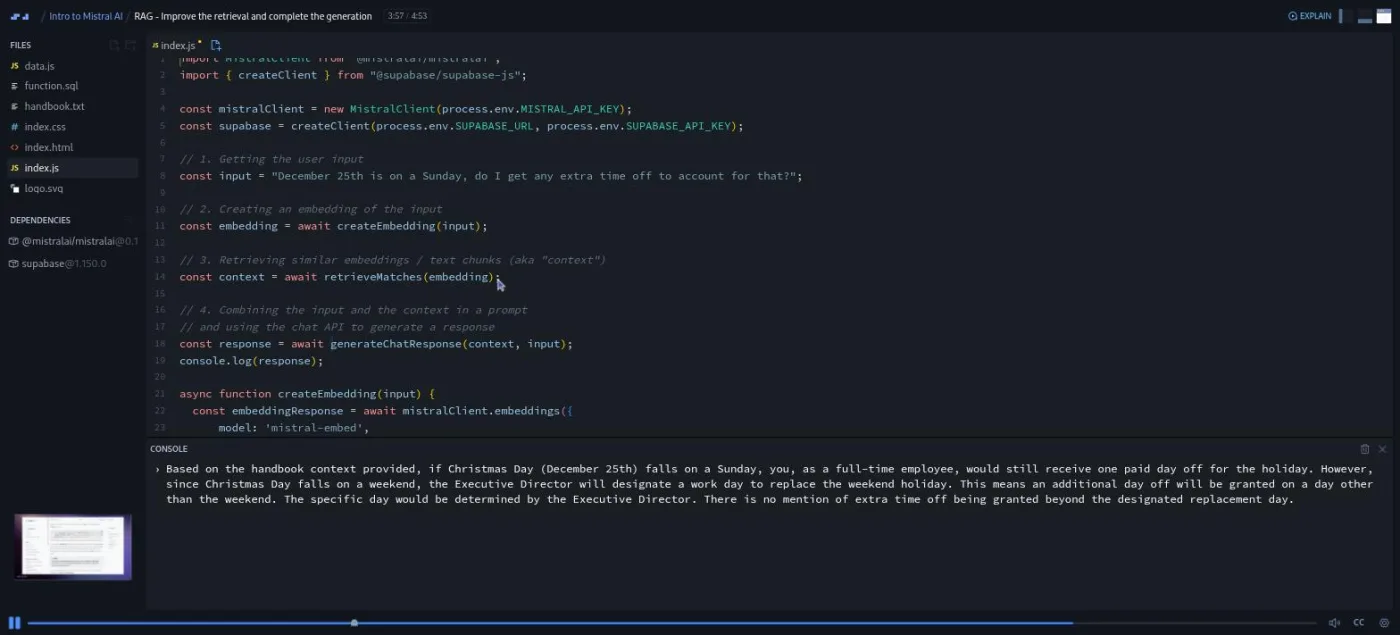
Retrieval uses a similarity function that Supabase supplies. Per is upfront that the math behind it stays in the box: "Luckily, we don't have to worry about any of that as Supabase provides us with a SQL function that we simply can copy paste." You call it with supabase.rpc. The first result for "December 25th is on a Sunday, do I get an extra day off?" comes back as a cut-off sentence about Christmas Day. The final two-part challenge fixes that: return five matches instead of one, then write the prompt that combines context and question and send it to mistral-large-latest.
4. Function calling: from a tool schema to an agent loop (17 min, 6 scrims)
The agent is a customer-service bot over a tiny array of transactions in tools.js. Per's opening point is the one people miss: the model never runs your code. "This is all our AI sees. It never sees the content of this function. It just looks at the description and tries to decide whether or not it should be invoked."
The first scrim sends the prompt "Is the transaction T1001 paid?" with a tools array, and the reply has an empty content and a tool_calls entry naming getPaymentStatus.
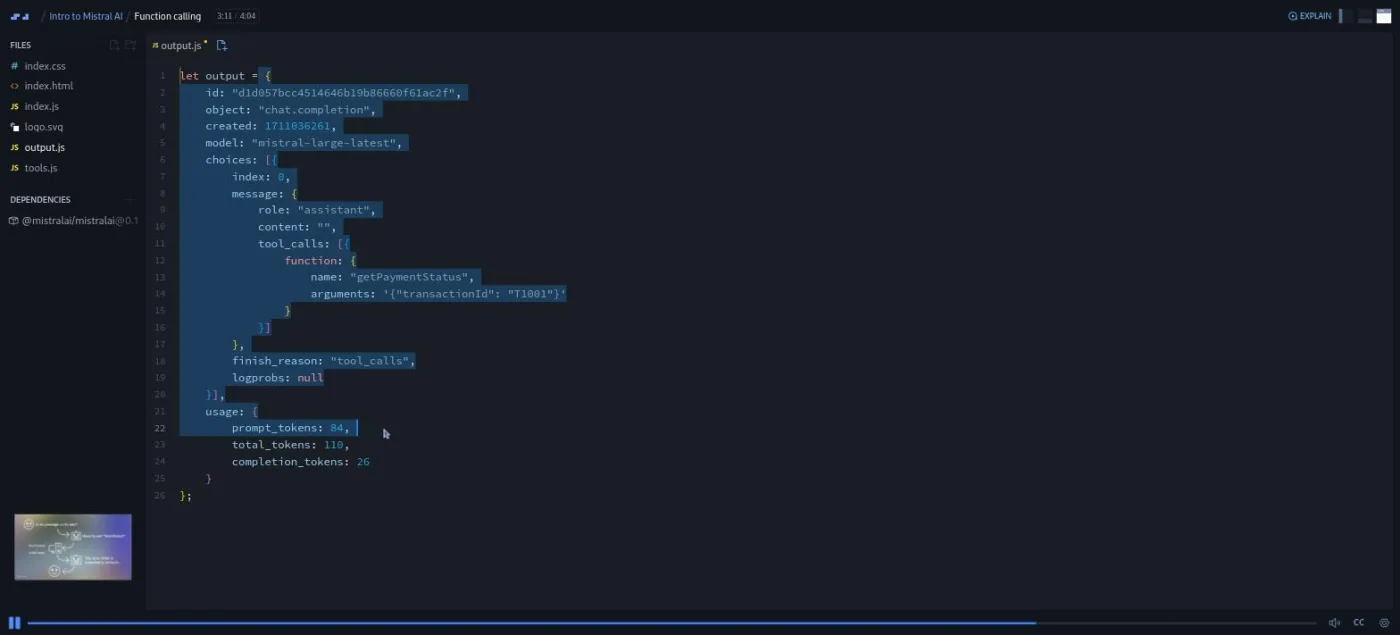
The next five scrims each add one piece, and each is a challenge:
- Describe a second function,
getPaymentDate, in the tool schema and change the prompt to trigger it. - Read the function name out of the response and
JSON.parseits arguments. - Call it through an
availableFunctionsobject with bracket notation. - Push a message with
role: 'tool'back into the messages array. - Wrap it all in a
forloop that runs at most five times and returns whenfinish_reasonisstop.
Per explains the cap: a while loop or recursion "could be better solutions, but they also open up for the possibility of infinite loops." The last run prints "The transaction T1001 was paid on October 5, 2021."
5. Running Mistral locally with Ollama, and the recap (5 min, 2 scrims)
The Ollama scrim is the only one that leaves the browser. You install Ollama, run ollama run mistral (a 4.1 GB download), chat with it in the terminal, then download the scrim as a zip, npm install, and start a 24-line Express server that passes a URL query to ollama.chat.
Per's sell is simple: "aside for the cost of the hardware and the electricity, these tokens are completely free," and the data stays on your machine. The recap is 77 seconds. After it come the three generic Scrimba pages, which have no video.
What a lesson feels like
Scrims run one to six minutes; the longest is Gil's embeddings explainer. Per and Gil talk over a slide for the concept, then switch to the editor and run the code, and you see the API response arrive in the console. Challenges are written into the file as a comment block, the narration says "go ahead and solve this," and the recording sits quiet for a few seconds before the solution starts. You are meant to pause there, write your version, and press play.
Every scrim has captions, a timestamped transcript under the settings menu, subtitles in ten languages, and playback speed. The API calls are real, so running Per's code yourself spends a fraction of a cent on your Mistral account each time. Nothing in the course marks your work automatically; the check is whether your console shows what Per's shows.
Free or Pro: exactly what is gated
Nothing inside the course. All 25 teaching scrims play in full without Pro, there is no Solo Project, and the challenges are plain comment blocks in the editor rather than Scrimba's AI-checked challenge format. The only item I did not test is the Certificate of Completion entry at the very end of the list; Scrimba's pricing page lists certificates as a Pro feature.
Pro is a separate decision. It buys the full AI Engineer Path (this free course is not part of it), the Pro-only Discord channels (basic Discord access is free), unlimited challenges, and certificates. See current plans (opens in a new tab) for what it costs in your region.
How long it takes
Budget three to five hours, not 84 minutes. The account setup alone (Mistral card and key, Supabase project, pgvector extension, three environment variables, two SQL snippets) is 30 to 60 minutes the first time. The RAG and function-calling challenges are short, but each one is worth writing yourself before watching the solution. The Ollama scrim adds a 4 GB download and a local npm install, so do it when you have time and disk space.
Who it's for, and who should skip it
It fits developers with working JavaScript who want to build a RAG bot and a tool-calling agent once, from scratch, before touching a framework. It is also a good way to try Mistral if you have only used OpenAI: the client, the messages array, and the tool schema all rhyme with what you know.
Skip it, for now, if you have never written async/await or called an API; start with Learn JavaScript or Learn to Code with AI. Also skip it if you will not put a card on file with Mistral, because the course cannot be followed past scrim three without a key. And if you want current SDK syntax rather than the concepts, read Mistral's docs alongside it.
Prerequisites
JavaScript with async/await, arrays and map, and a basic sense of what an API request is. No AI experience is assumed; embeddings and RAG are explained from zero. You will need a Mistral La Plateforme account with a card, a free Supabase account (GitHub login works), and, for the last scrim, a computer that can run Ollama and hold a 4 GB model.
Where it fits
This course sits outside the AI Engineer Path, but it works as a compact, free preview of two paid courses on it. Learn RAG covers the retrieval pipeline in more depth, and Learn AI Agents takes the function-calling loop further. Intro to AI Engineering is the fundamentals course that most people take first; this one works either as a taster before it or a second provider after it.
Strengths and limits
What it does well: it is free, and it builds a real RAG pipeline and a real agent loop rather than talking about them. The challenges sit exactly where you would otherwise copy code. Per explains the trade-offs as he goes, from chunk size to model cost to the five-iteration cap.
Where it is limited: it was recorded in early 2024 and pins Mistral's 0.1 client, so the model names and SDK calls will not match current docs. It needs two external accounts and a card before the main project runs. The Supabase scrims show leftover OpenAI code in the editor, and because the user input is hard-coded you never wire the bot to a page.
Related courses and comparisons
- Learn to Code with AI, the free beginner on-ramp
- Intro to AI Engineering, the deeper paid fundamentals
- Learn RAG, the same retrieval pipeline in more depth
- Learn AI Agents, where the function-calling loop goes next
- Learn Supabase, for the database side used here
- Build Serverless AI Agents with Langbase, another free AI course
Yes. All 25 teaching scrims play without a subscription and there is no Pro-only project inside it. You do need your own Mistral API key, which requires a card on file at La Plateforme, and a free Supabase project for the RAG section.
Per Borgen, Scrimba's co-founder, teaches the welcome, the models, the RAG build, function calling, and Ollama. Gil Hernandez teaches the first chat completion, embeddings, and the Supabase setup. Sophia Yang from Mistral records the two-minute company intro.
A question-answering bot over a fictional employee handbook (chunked with LangChain, embedded with mistral-embed, stored and searched in Supabase), and a small customer-service agent that decides when to call getPaymentStatus or getPaymentDate and loops until it has an answer. The last scrim runs Mistral locally behind a tiny Express server.
No. It assumes async/await, array methods, and comfort with API calls, and it does not reteach them. Start with Learn JavaScript or Learn to Code with AI first.
The concepts are, the code is not fully. It was recorded in early 2024 with version 0.1 of Mistral's JavaScript client and model names like mistral-tiny and mistral-medium-latest. Expect to translate the calls when you read Mistral's current docs.
About 84 minutes of video. Plan for three to five hours with account setup and the challenges, plus a 4 GB download if you do the Ollama scrim.
Yes. Every scrim has captions, a timestamped transcript under the settings menu, subtitles in ten languages, and adjustable speed.
No. Challenges are comment blocks in the editor and the recording pauses for you; you compare your console output with Per's. The AI-checked challenge format used in some Scrimba courses is not used here.