Build a Support Agent with Vercel AI SDK
Build a Support Agent with Vercel AI SDK is Mayo Oshin's Pro project course on Scrimba: 114 minutes across 23 scrims, ending in a Supabase-backed support agent that routes each question to retrieval, web search, or a direct answer. It teaches the Vercel AI SDK v5 API, and it earns two evenings if you already know RAG and function calling.
Reviewed inside the course with a Pro account, September 2026.
Quick answer
It suits developers who already understand RAG (retrieval augmented generation, where the model answers from documents you fetch for it) and function calling, and want one realistic build on a mainstream SDK. The catch is setup: you need your own OpenAI key and a free Supabase project, and the first half hour goes to other browser tabs before any agent code runs. Start with Learn AI Agents first if tool calling is still new to you.
Build a Support Agent with Vercel AI SDK
ProTaught by Mayo Oshin (opens in a new tab)
A Supabase-backed support agent that classifies each question and routes it to retrieval, web search, or a direct answer.
View on Scrimba (opens in a new tab)Is it worth your time?
Yes, if you are the person it was made for. The course runs just under two hours and spends almost none of that on theory. Every scrim after the first three is a working Node project in Scrimba's runner. You press RUN, npm install and node index.js execute in the terminal pane, and the output appears next to the code.
That format suits an SDK course. You watch generateObject return a typed pizza recipe, then a sentiment classification, and then you are asked to write the same thing yourself. By the end you can wire a retrieval tool and a web search tool into one generateText call and let the model choose between them.
Two things to know before you pay for it. First, it is not self-contained. You need your own OpenAI API key and a free Supabase project, and you paste three environment variables into the scrim's gear menu before anything runs. The course walks you through both signups, but you will spend the first half hour in other browser tabs.
Second, Mayo is upfront about the level. In the intro he says "this course is quite advanced. So the code is fairly complex, and the challenges I've set are really gonna make you think and work." He lists five prerequisites: the OpenAI API, basic prompting, the concept of RAG, function calling, and a basic Express server. If two or more of those are new to you, the pace will feel abrupt.
The limitation is scope. This is one SDK, one provider (OpenAI, via @ai-sdk/openai), one vector store, and one scenario. The routing pattern transfers anywhere, but you will not see streaming, a React frontend, evaluation, or conversation memory. The final UI is a plain HTML page with a textarea and an Ask button, served by a 50-line Express file.
What you'll learn
Scrimba presents this course as a flat list of 23 scrims with no chapter headings. The grouping below is mine, so you can see where the time goes. The durations are the sums of the scrims in each group, rounded to the minute, which is why the five group figures add up to 116 while the unrounded total is closer to 118.
Course curriculum
5 editorial groups, 23 scrims, about 118 minutes
- Intro and RAG refresher
- Supabase as a vector store
- Vercel AI SDK: text, structured outputs, tools
- Agentic routing and web search
- The finished agent and wrap-up
I counted 23 scrims in the table of contents in September 2026, including the four housekeeping scrims at the end (Outro, Scrimba Docs, Scrimbassador, certificate). Scrimba's listing and its structured data say 21 lessons and 114 minutes, while the 23 scrims add up to about 118 minutes. The three platform add-ons run 1:18, 1:59, and 0:53, which is four minutes and ten seconds, so Scrimba is evidently leaving them out of its own total.
Inside the course, scrim by scrim
1. Intro and RAG refresher (12 min, 3 scrims)
The intro is a slide deck, not code. Mayo makes the case for support as the use case ("customer support is at the heartbeat of every company"). He then shows the finished app answering "How do I join the Scrimba Discord?" with sources, follows it with a web search question, and lists the prerequisites. He introduces himself as an AI engineering educator and "the coauthor of Learning Langchain published by O'Reilly."
The RAG refresher is three minutes of slides: store information, retrieve the relevant pieces, pass them to the model. The embeddings model for the whole course is OpenAI's text-embedding-3-small. This scrim is also where you are told to create an OpenAI key and save it as OPENAI_API_KEY in the scrim's gear menu.
The Embeddings Recap is the first code scrim. It is a 14-line index.js that calls openai.embeddings.create and prints the 1,536-number array. An embedding is that array: a list of numbers that stands in for the meaning of a piece of text, so similar texts produce similar numbers. Mayo nudges you to change the text, save with Ctrl+S, and run again.
2. Supabase as a vector store (27 min, 4 scrims)
Vector Database Embed Documents is the setup lesson. You create a Supabase organization and project, then copy the public key and the service role key into SUPABASE_URL and SUPABASE_SERVICE_ROLE_KEY. Next you paste created_tables.sql into the Supabase SQL editor. The SQL enables pgvector (the Postgres extension that stores and compares embeddings) and creates a documents table with content, metadata jsonb, and embedding vector(1536). The ingest script embeds a sample text file (Apollo 11, Magna Carta, the Black Death, and so on) and inserts one row.
Vector Database Retrieval adds a match_documents database function that does cosine similarity, a score from 0 to 1 for how close two embeddings are. A retrieveSimilarDocs helper calls it through supabase.rpc with the query embedding and a match count of five. Mayo runs the question "In 1843, what was the key milestone in computing?" and gets a similarity of roughly 0.5. He explains why: "this text contains both the relevant information to answer the question ... but it also contains a bunch of other irrelevant information that has nothing to do with the question."
The challenge that follows is the last free scrim. The brief in index.js reads "Build a basic retrieval system" with four numbered steps: embed the query, write the Supabase RPC call, build the prompt with getRagPrompt, send it to the model. The recording stops for you to work and resumes with the solution at 1:57.
Text Splitting and Retrieval is the first Pro scrim. It shows a deliberately basic splitter (2,000 characters, 100 overlap) turning a 5,988-character passage on the Great Fire of London into four rows. Mayo is candid that "in this course, for the most part, we are not going to use text splitting, but it is important for you to understand how it works."
3. Vercel AI SDK: text, structured outputs, tools (37 min, 6 scrims)
This is the core of the course and the part that justifies the title. Vercel AI SDK Basics swaps the raw OpenAI client for generateText and embed from the ai package. The pitch, in Mayo's words: "If I wanna swap OpenAI with Cloud or any other model, it's very easy to do so as opposed to going through each of their documentations."
One version note matters. The package.json in the later scrims pins ai 5.0.x, @ai-sdk/openai 2.0.x, @supabase/supabase-js 2.56, and zod 4.1. That is the AI SDK v5 API (inputSchema, stopWhen, stepCountIs), not the older maxSteps style you will still find in many tutorials. The code here will not match a 2024 blog post.
The basics challenge (3:28) is a warm-up. Mayo frames it as "replicate the logic before, but we're gonna have a twist." You call generateText with a prompt for a recipe for your favorite meal, then pass the returned text into an embed call. The solution is pepperoni pizza, and the whole thing fits in two functions.
Structured Outputs introduces generateObject with a Zod schema. Zod is a small library for describing the shape of an object in JavaScript, and the SDK uses that description to force the model's reply into it. Mayo builds a pizza recipe first (name, ingredients array, steps), then a customer review classifier using z.enum(["positive", "negative"]) plus a reasoning field.
The structured outputs challenge (5:58) has two parts. First you write a schema for a sandwich order. size is an enum of small, medium, and large, and bread is a string. toasted is a boolean, toppings is an array with at least one entry, and notes is optional. Then you write a message classifier with a reasoning string and a label enum (complaint, question, and so on) and run it on a sample complaint about a buggy app. Mayo calls the second part "constrained classification," and it is the same shape the routing agent uses later.
Tool Calling is the longest lesson in the group at nearly ten minutes. It builds up in three functions you uncomment one at a time. The first is a single weather tool with description, inputSchema, and execute. The second calls two tools (weather plus cityAttractions) from one prompt. The third uses the same two tools with stopWhen: stepCountIs(3) so the model summarizes the tool results into a sentence. Mayo's definition is the plainest I have heard: "all a tool is is a function or an action that the model can invoke."
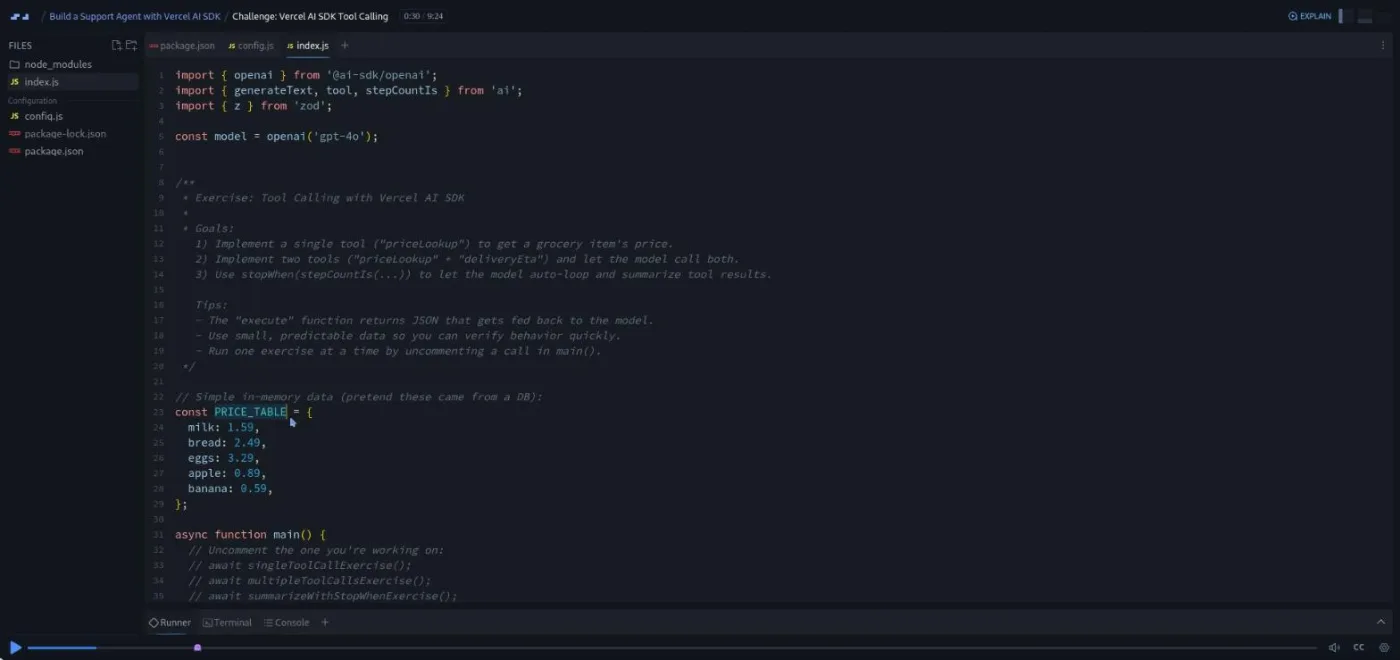
The tool-calling challenge mirrors the lesson exactly. You write a priceLookup tool over a five-item grocery table, then a deliveryEta tool, then add stopWhen(stepCountIs(3)) to get a summary ("The total cost for eggs is three point two nine dollars ... the estimated delivery time to the address is twenty six minutes"). Each of the three parts has TODO comments where you fill in the Zod schema and the execute body.
4. Agentic routing and web search (28 min, 5 scrims)
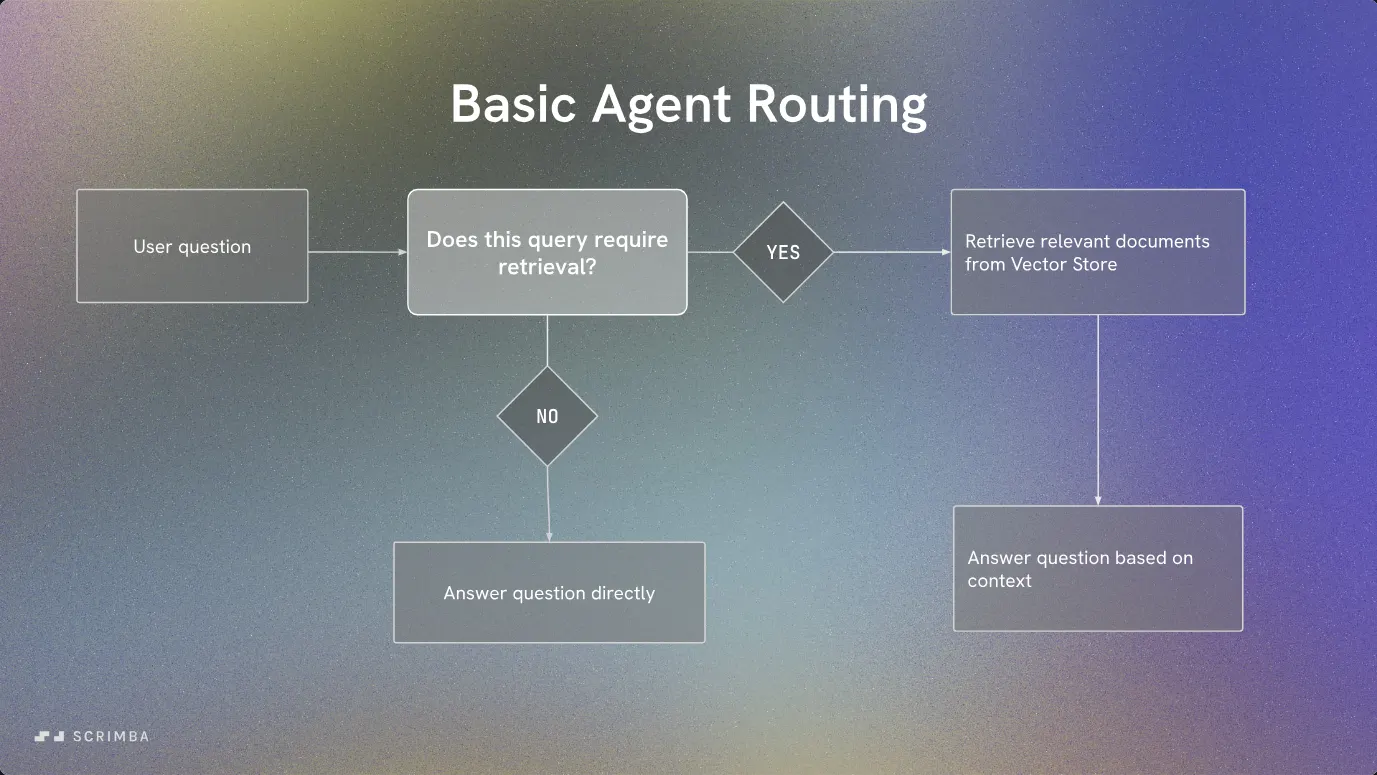
Agentic Retrieval Routing is the longest scrim in the course at 13:45 and the one where the project becomes a support agent. The docs folder now holds nine markdown files scraped from Scrimba's help center (joining Discord, student discounts, resetting progress, deleting your account). agenticRetrieval.js adds a classifyAndRetrieve function. A classification prompt with maxOutputTokens: 20 and temperature: 0 returns either GENERAL or RETRIEVAL, and the code branches on that word, with a fallback prompt if retrieval returns nothing. Mayo explains the settings plainly: "I want zero because I just want retrieval or just give me general. I don't want the model to express any creativity whatsoever."
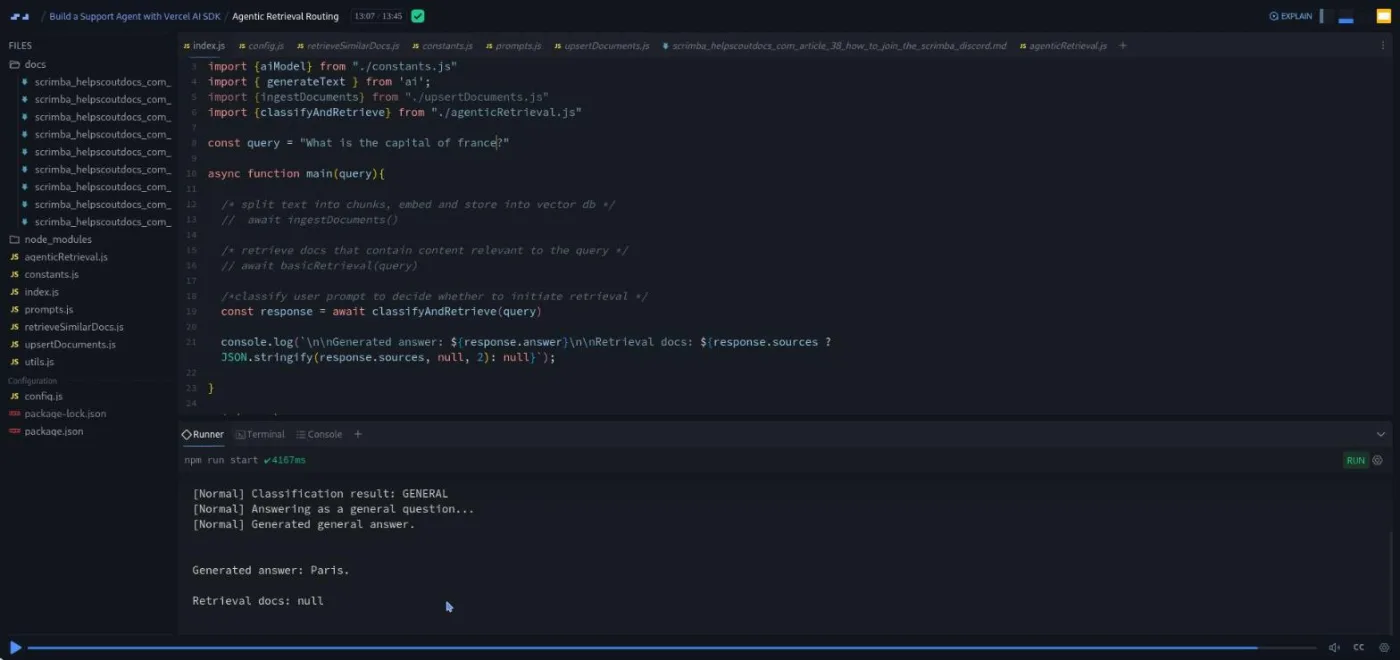
The routing challenge (3:13) is the smartest of the six, because it changes the design rather than repeating it. You refactor the plain-text classifier into a generateObject call with a Zod schema: a reasoning string and a type enum of retrieval or general. Mayo's tip is worth keeping: "The first thing I usually recommend is you pass in the reasoning so you can see what reasoning the model wants to give." When he runs it, the Discord question comes back typed retrieval with a one-line justification, and the answer follows as before.
Web Search AI Agent is a 30-line file showing openai.responses('gpt-4o-mini') with tools: { web_search_preview: openai.tools.webSearchPreview({}) }. The call returns text plus a sources array of URLs. The recording dates itself here: the answer to "What is the latest OpenAI large language model?" is GPT-5 "as of September twenty twenty five."
Web Search Plus Retrieval Agent is the payoff. The whole Supabase retrieval flow is wrapped into a knowledgeBaseSearch tool, the web search tool sits beside it, and a system prompt tells the model when to use each. stopWhen: stepCountIs(3) lets the model call a tool and then write its answer. The last challenge asks you to re-add the two tools and the generateText properties from memory.
5. The finished agent and wrap-up (12 min, 5 scrims)
Complete Customer Support AI Agent is a six-minute tour rather than a build. Everything from the previous lesson moves behind an Express POST /api/ask route, with index.html, style.css, and client.js served as static files. The preview pane shows the running app on port 3000.
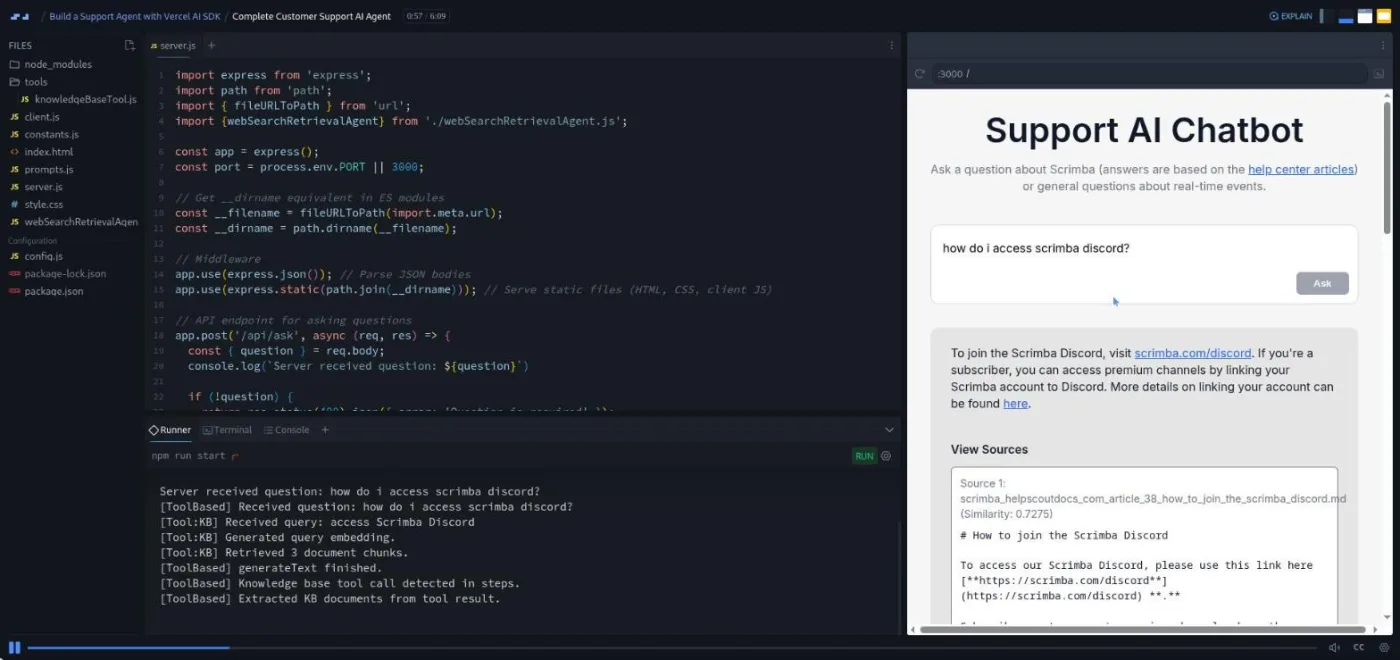
Mayo then asks "how do I resolve the error node_modules not found?", which the agent sends to web search instead. He walks through the architecture slide: does this need retrieval, and if so, is it real-time information or something in the vector store? His closing advice is to swap in your own documents or a different use case entirely. The Outro recaps the five things you built and suggests a stretch goal: "refactor the final project for your use case ... maybe you wanna build your own travel agent."
The last three scrims are the platform-wide add-ons Scrimba appends to most courses, and none of them is about the Vercel AI SDK. Scrimba Docs (1:18) is Tom Chant introducing the free reference docs, "a companion to our lessons" with three depth levels. Want to become a Scrimbassador? (1:59) is Per Borgen pitching the referral program. How to Utilize Your Certificate (0:53) tells you to add the certificate to LinkedIn and connect with Per. You can skip all three without missing anything.
What a lesson feels like
Scrims run from under a minute to 13:45; most are three to seven minutes. Because this is a Node course, the layout differs from Scrimba's frontend courses. There is a file explorer on the left, Monaco (the same editor VS Code uses) in the middle, and a Runner/Terminal/Console pane below with an npm run start button. Mayo narrates over the finished code, comments and uncomments function calls in main(), and presses RUN so you watch the output arrive. There is no live preview until the final lesson, where the browser pane appears on the right.
All six challenges arrive as comment blocks in index.js with numbered goals and TODO markers, and the scrubber shows a purple dot where the recording pauses. Mayo gives you "a couple minutes," and his solutions are brisk ("Hopefully, you didn't find that too challenging"). He types them out rather than pasting. Each scrim has captions, a timestamped transcript under the settings menu, and subtitles in ten languages. The six challenge scrims carry Scrimba's "Challenge with Instant Feedback" icon in the table of contents, meaning you can ask for an AI check on your solution.
Free or Pro: exactly what is gated
The first six scrims are marked SAMPLE and open without a subscription: the three intro scrims, the two Supabase setup lessons, and the first challenge. That is 32 minutes, and it gets you as far as a working single-document RAG query against Supabase. When I opened the seventh scrim in a browser without a Scrimba session, it showed an "Only available to subscribers" wall.
Pro unlocks the remaining 17 scrims, which is where the Vercel AI SDK itself appears: structured outputs, tool calling, the routing agent, web search, and the finished app. Pro also unlocks the Certificate of Completion listed at the bottom of the table of contents and the Pro-only Discord channels. Scrimba's pricing page lists basic Discord access as free, so the server alone is not a reason to upgrade. See current plans (opens in a new tab) for what a subscription includes.
How long it takes
114 minutes is video runtime. Plan for five to eight hours. The first hour goes on accounts and keys: an OpenAI key with billing enabled, a Supabase project, two SQL snippets pasted into the Supabase editor, and three environment variables in the scrim settings.
Each of the six challenges takes 10 to 25 minutes if you attempt it before watching the solution. The basics and routing challenges are the quick ones; the structured outputs, tool-calling, and web-search challenges have two or three parts each. If you take Mayo's stretch goal seriously and swap in your own documents, add another few hours. Two or three evenings is realistic.
Who it's for, and who should skip it
It fits JavaScript developers who already understand what RAG and function calling do and want to see them wired together with a current SDK, in a form they can lift into a real project. It is also a good first look at OpenAI's built-in web search tool, which most agent courses skip.
Skip it, for now, if you have not built anything with an LLM API. Do Intro to AI Engineering first, then Learn AI Agents, which teaches the tool-calling loop from scratch. Skip it if you need a framework other than the Vercel AI SDK, or a provider other than OpenAI; nothing here is portable without rewriting the imports. And skip it if you were hoping for a frontend: the chat UI is a static HTML page with no React in it.
Preview Build a Support Agent with Vercel AI SDK (opens in a new tab)Prerequisites
Mayo's own list from the intro: the OpenAI API and how to get a key, basic prompting, the concept of retrieval augmented generation, function calling, and a basic Express server for API routes. Scrimba's course page adds "ideally" APIs, Node tooling, and SQL. In practice you also need to be comfortable with async/await, ES module imports, and reading a Zod schema. You will need an OpenAI API key with some credit and a free Supabase account; both are set up on screen in the first four scrims.
Where it fits
Scrimba's course page lists this under the AI Engineer Path. The natural order is Learn RAG for the embeddings and vector store side, Learn AI Agents for the tool-calling loop, then this course to see both combined on the Vercel AI SDK. Build Serverless AI Agents with Langbase is the contrasting build with a different toolkit, and Intro to Model Context Protocol is where tools go next. If the Express part was unfamiliar, Learn Express.js covers it.
Strengths and limits
What it does well. It is short and ends with a working, deployable agent. It teaches the current AI SDK v5 API rather than the older one. The routing lesson shows the classify-then-branch pattern in plain code before hiding it behind tools, which is the right order. And five of the six challenges are graded copies of the lesson before them, so they are doable without a hint; the sixth, the routing refactor, is the one that asks you to combine two lessons.
Where it is limited. It depends on two external accounts and a paid API key. It is OpenAI-only, and text splitting is demonstrated once and then dropped. The final UI is minimal, and nothing is said about evaluating whether the agent's answers are any good. The web search lesson is also already dated (it names GPT-5 as the newest model), which is inevitable but worth knowing.
Related courses and comparisons
- Learn AI Agents, the conceptual prerequisite
- Learn RAG, the embeddings and retrieval side in more depth
- Build Serverless AI Agents with Langbase, a contrasting (and free) agent build
- Intro to AI Engineering, the underlying fundamentals
- Intro to Model Context Protocol (MCP), the next step for tools
- AI Engineer Path, the path this course belongs to
Partly. The first six scrims (32 minutes, through the first retrieval challenge) are free previews marked SAMPLE. The remaining 17 scrims, including everything about the Vercel AI SDK itself, need Scrimba Pro.
A customer support chatbot trained on nine of Scrimba's help center articles. The docs are embedded into a Supabase pgvector table, and the agent uses generateText with two tools, a knowledge base search and OpenAI's web search, plus stopWhen to decide how to answer each question. The final lesson serves it from an Express route with a plain HTML page.
AI SDK v5. The package.json pins ai 5.0.x and @ai-sdk/openai 2.0.x, and the code uses inputSchema, stopWhen, and stepCountIs, with zod 4 for schemas. The models are gpt-4o and gpt-4o-mini plus text-embedding-3-small.
Yes. You need an OpenAI API key and a free Supabase project, and you save OPENAI_API_KEY, SUPABASE_URL, and SUPABASE_SERVICE_ROLE_KEY in the scrim's environment settings. The setup is shown on screen in the first four scrims.
Mayo Oshin, who introduces himself as an AI engineering educator and coauthor of the O'Reilly book Learning LangChain. He narrates every lesson; the three short platform add-ons at the end are voiced by Scrimba staff.
114 minutes of video. With account setup and the six challenges, plan for five to eight hours, or two to three evenings.
Six of the 23 scrims are challenges, one after each main lesson: vector retrieval, AI SDK basics (a recipe you generate and then embed), structured outputs (a sandwich order schema and a message classifier), tool calling (a grocery price lookup), agentic routing (refactor the classifier to generateObject), and web search retrieval. All six carry Scrimba's Challenge with Instant Feedback icon.
Yes. Every scrim has captions, a timestamped transcript under the settings menu, and subtitles in ten languages.