Learn CSS Variables
Per Borgen's Learn CSS Variables is a 29 minute Scrimba course that teaches CSS custom properties on one portfolio page: declaring a variable, scoping it to a card, re-theming with two lines, and changing one from JavaScript. It fixes a real gap in half an hour if you have not used custom properties, and teaches nothing new if you have.
Reviewed inside the course with a Pro account, September 2026.
Quick answer
It fits anyone who writes CSS and still copies hex values around, or has seen var(--something) in someone else's code and never set one up. The catch is Pro: Scrimba's own page title still calls it a "free course", but only the three minute intro plays without a subscription. Finish it, then move on to Learn CSS Grid or Learn Flexbox for layout, or see these variables become theme tokens in Learn Tailwind CSS.
Learn CSS Variables
ProTaught by Per Borgen (opens in a new tab)
Eight short scrims on CSS custom properties: declaring, scoping, theming, changing them with JavaScript, and using them in media queries, with four checked exercises.
View on Scrimba (opens in a new tab)Is it worth your time?
For the topic, yes. Custom properties are the feature that turns a stylesheet full of repeated hex codes into something you can change in one place. This course teaches them in the order you will use them: global first, then scoped, then themed, then driven by JavaScript and media queries. Per's pitch in the intro is the whole argument: "the obvious benefit here is that now you can simply update this value here, and these two will be automatically updated."
Two caveats before you start. The recordings are from February 2018 (Scrimba's own lesson data dates them), so the transcript panel is empty on six of the eight lessons and the CC button does nothing there. If you rely on captions, that matters. And it is a Pro course despite the page title still calling it a "free course": only the three minute intro is marked SAMPLE. The current pitch for Pro is the Frontend Developer Path; this course is a small bonus inside it, not a reason to subscribe on its own.
What you'll learn
Course curriculum
11 scrims plus a certificate item, grouped editorially (the course itself has no modules)
- Declaring, using and scoping variables
- Theming, JavaScript, responsiveness and inheritance
- Wrap-up: congratulations, Scrimbassador, certificate
My count is 11 scrims totalling 32 minutes. Scrimba's header says 29 minutes, which is the eight lessons plus the one minute congratulations clip. The course description says "eight interactive screencasts". The catalog data this site uses says 12 lessons, which includes the certificate item at the bottom of the list. The course has no modules, so the grouping above is mine.
Inside the course, module by module
1. Declaring, using and scoping variables (14 min, 4 scrims)
The intro (3:08, the free sample) is a slide deck, not code. Per shows the same red hex value repeated across a stylesheet, then the same rules with --red declared once on :root and referenced with var(--red). He then lists what preprocessor variables cannot do: "CSS variables have access to the DOM. So you can create local scopes, meaning CSS variables that only work in a certain section of your app," plus changing them with JavaScript and inside media queries. The last slides show the portfolio page and its index.css, "the CSS which we'll be working with."
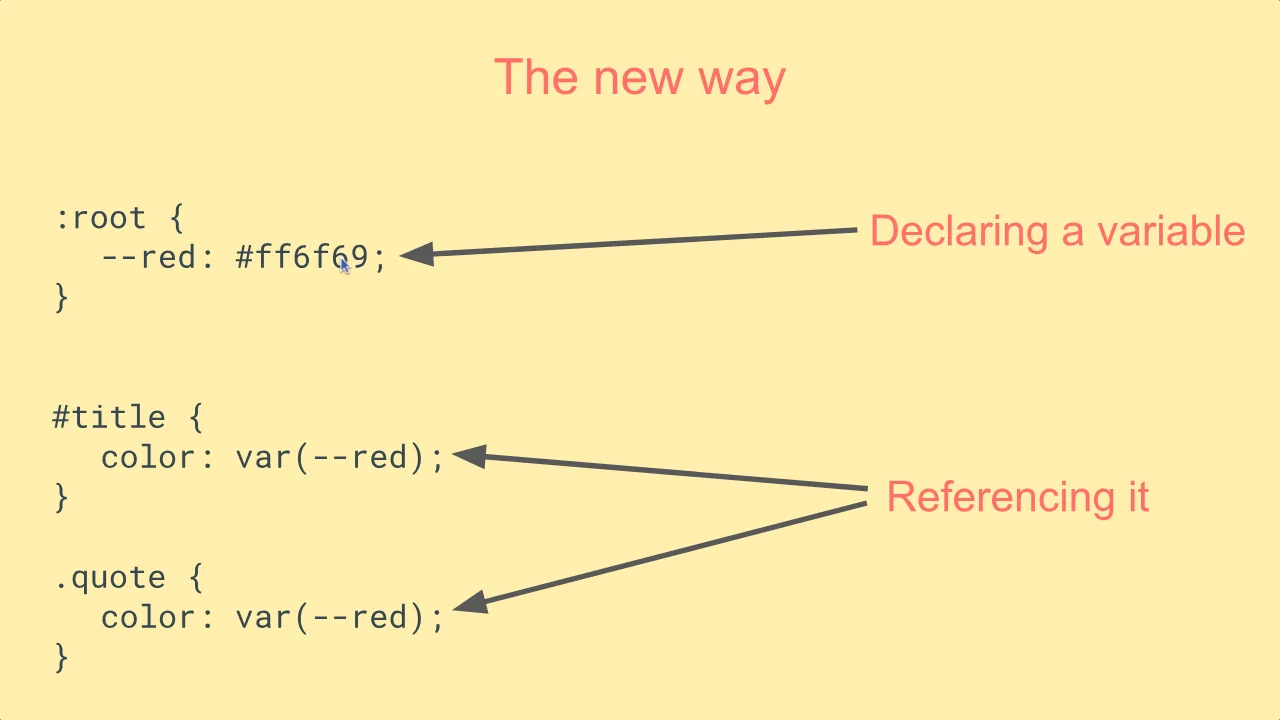
"Your first variable" (4:54) is the first real lesson and the one with a transcript. The page has three colors, and the red is used in five places. Per creates :root { --red: #ff6f69; }, replaces each use with var(--red), and is blunt about the syntax: "two dashes when you declare a variable and use it, and always use var. Otherwise, it won't work." He pastes a different shade into the variable and every red on the page changes at once. Then the first exercise: do the same for the yellow. "I think it's really important for you to actually get your hands dirty with the code," as he puts it at 4:21.
"Overriding variables" (2:41) has no transcript, so I followed the editor. At 1:19 he adds --red: #ff8e69; inside the .item rule, and the buttons inside the cards turn a softer red while the heading and nav keep the original. One declaration, scoped to a class, overrides the global. The rest of the scrim is him tidying the fourth card's done class away.
"Local variables" (3:28) makes the scope idea explicit. A --nav-red variable is declared inside #navbar and used for the links. At 1:38 he tries var(--nav-red) on the button background, outside the nav, and the buttons lose their color, so he reverts it at 1:50. That failed attempt is the lesson. The exercise (from about 2:08) asks you to declare a local yellow on .item and use it for both the card background and the button text; the solution code names it --item-yellow.
2. Theming, JavaScript, responsiveness and inheritance (14 min, 4 scrims)
"Theming" (2:46) is the most useful scrim for real projects. Per adds a featured class to one card, starts writing .featured > button and .featured > h1 rules, then deletes them at 1:33 and instead writes two lines inside .featured: --yellow: #ffe55b; --red: #ff5564;. The whole card re-themes because every rule inside it already reads those variables. This is the "component specific themes" idea from the intro, and it is the technique you will reuse most.
"Changing variables with JavaScript" (3:48) adds an index.js. In order: document.querySelector(':root'), getComputedStyle(root).getPropertyValue('--red') to read a variable, then root.style.setProperty('--red', 'green') at 2:09 to change it, which recolors the page live. The exercise at 2:41 has you repeat both steps for --yellow and set it to orange. Note the 2018 style: var, no modules, no event handling; the point is the two DOM methods, not the JavaScript around them.
"Responsiveness and variables" (4:52) is the longest lesson. Per first reorganizes the file with /* Variable declarations */ and /* Styles */ comments, then moves the grid's column definition into a --columns: 200px 200px variable on .grid. At 2:37 he writes @media all and (max-width: 450px) and inside it changes only the variable to 200px, so the grid collapses to one column without repeating the grid rules. The exercise (around 3:35) asks you to change the beige background inside the same media query; the finished file has a lighter --beige on small screens.
"Two inheritance examples" (2:46) closes with the gotcha most people hit. He declares --main-color: var(--red) on :root and uses it for the nav links, then sets --red: orange inside #navbar at 0:57 and nothing happens. --main-color was resolved where it was declared, on the root, not where it is used. The fix at 1:27 is to override --main-color itself in the nav. A second, shorter example repeats the idea with the heading and paragraph rules.
3. Wrap-up (4 min, 3 scrims)
A one minute "Congratulations" slide ("Keep up the great work!"), a two minute pitch for the Scrimbassador referral program, and a one minute "How to Utilize Your Certificate" clip suggesting you link the certificate from your resume and LinkedIn. These three are newer recordings with transcripts, and the last two appear at the end of most Scrimba courses. The certificate item sits below them.
What a lesson feels like
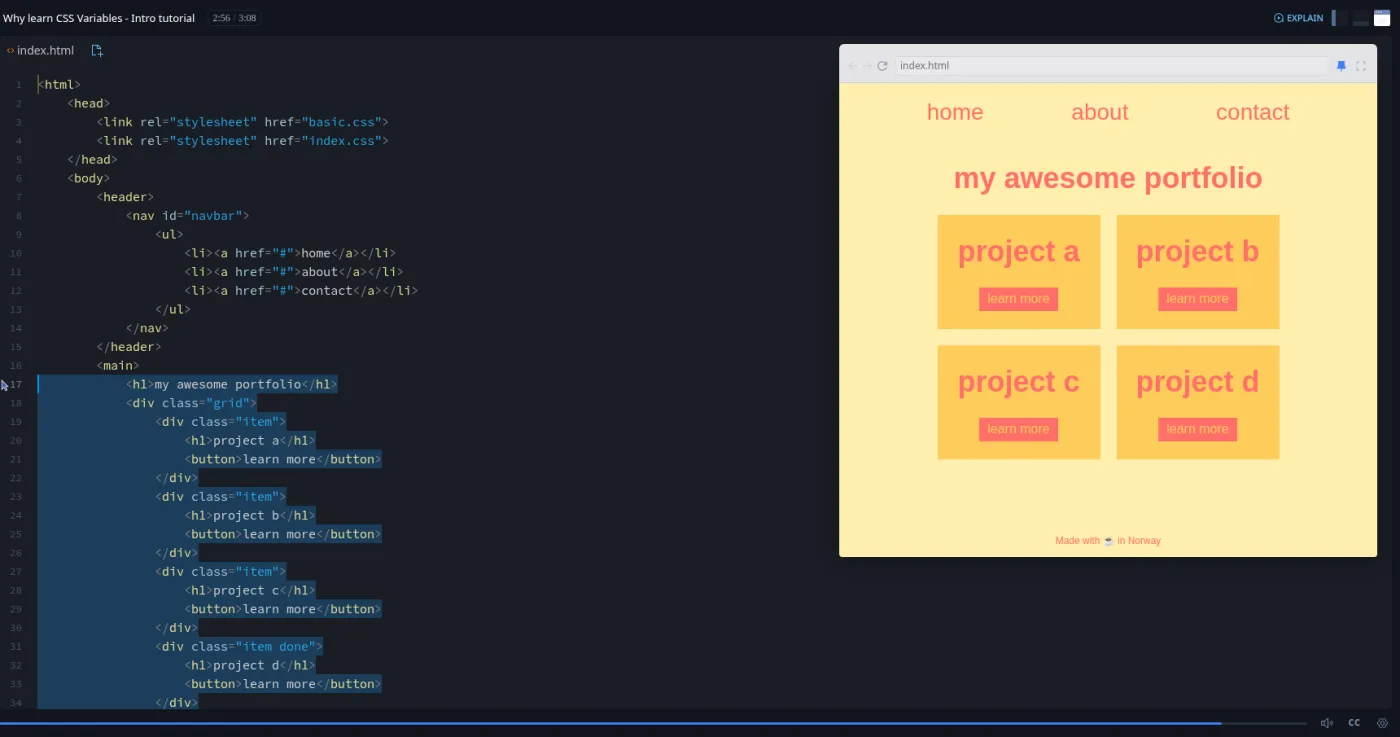
Every lesson is the same screen: the file explorer on the left, index.css in the editor, and the portfolio page in the preview pane on the right. Per talks over the editor, types, and the preview updates as he goes. The changes are small enough to follow in real time, which is the format working as intended.
The exercises are where the age of the recordings shows in an interesting way. In the 2018 audio Per says "pause this screencast, jump into the code, and do that." The platform has since retrofitted these points: the scrim forks into an "Exercise #1" branch with SKIP and CHECK SOLUTION buttons in the header. The lesson list shows the "Challenge with Instant Feedback" icon on the four lessons that have one (first variable, local variables, JavaScript, responsiveness). The brief is spoken, not written in the file, so on the three lessons without a transcript you need to listen for it.
Transcripts are the weak spot. The intro, "Your first variable", and the two wrap-up clips have a timestamped transcript panel and captions; "Overriding", "Local variables", "Theming", "JavaScript", "Responsiveness" and "Inheritance" have neither, even with captions switched on. Playback speed and font size settings work everywhere.
Free or Pro: exactly what is gated
Only the intro is free. It is the one scrim marked SAMPLE, and opening any other lesson without a subscription shows "Only available to subscribers." So Pro gates the eight teaching lessons, the four checked exercises, and the certificate. There is no solo project.
Scrimba's page title still reads "Learn CSS variables in this free course", which is stale; the header badge and the structured data both say Pro. Pro also includes the career paths this course belongs to and the Pro-only channels on Scrimba's Discord (the pricing page lists basic Discord access as free). See current plans (opens in a new tab) for what Pro costs in your region.
How long it takes
The 29 minutes is video runtime. With four exercises that each take a minute or two, and a couple of pauses to poke at the preview, budget 45 to 75 minutes for one sitting. That is two to two and a half times the runtime, which is the low end for a Scrimba course because the exercises are small. If you also want to try the theming and media query tricks on a stylesheet of your own afterwards, which is the point, give it a second hour.
Who it's for, and who should skip it
It fits anyone who writes CSS and still copies hex values around, or who has seen var(--something) in someone else's code and never set one up. It also suits people mid-way through the Frontend Developer Path who want the concept before Tailwind and the framework courses assume it.
Skip it if you already use custom properties for theming and responsive tweaks; the inheritance lesson is the only part likely to teach you something. Skip it too if you are still learning CSS fundamentals: Learn HTML and CSS comes first, and the grid lesson here assumes you know what grid-template-columns does.
Prerequisites
Working CSS: selectors, the cascade, and the box model. The responsiveness lesson uses a CSS grid and a media query without explaining either. The JavaScript lesson uses querySelector and one style method; you can follow it with no JavaScript, but it will make more sense after the first modules of Learn JavaScript.
Where it fits
Scrimba lists this course under the Frontend Developer Path and the Fullstack Developer Path. It is a half hour top-up, not a milestone. The natural neighbours are Learn CSS Grid and Learn Flexbox for layout, and Learn Responsive Web Design for the media query side. If you come here from Learn Tailwind CSS, this is what Tailwind's theme tokens compile down to.
Strengths and limits
What it does well:
- One page, one file, eight small changes in the right order.
- The theming and media query lessons show the two patterns you will reuse most.
- The inheritance lesson explains the bug you would otherwise hit on your own.
- The four exercises now check your answer.
Where it is limited:
- Six of the eight lessons have no transcript or captions.
- The recordings are from 2018. The code uses
varand id selectors, and there is no mention of@property, fallback values invar(), or design-token naming. - The exercise briefs are spoken only.
- It is Pro-gated for what is, in the end, half an hour on one feature.
Related courses and comparisons
- All Scrimba CSS courses, the full CSS category hub
- Learn Responsive Web Design, the comprehensive CSS course
- Learn HTML and CSS, the free foundation
- Learn CSS Grid and Learn Flexbox, other focused CSS top-ups
- Learn CSS Animations, for adding motion
- Learn Tailwind CSS, where these variables become theme tokens
No. Only the three minute intro is a free sample; the other lessons show 'Only available to subscribers' without Pro. Scrimba's own page title still says 'free course', but the header badge and structured data say Pro.
Per Borgen, Scrimba's co-founder, teaches all eight lessons. The teacher card and the transcripts confirm it.
One small portfolio page (a nav bar, a heading, four project cards and a footer) with three colors. Every lesson edits its index.css; lesson 6 adds a short index.js.
Partly. The intro, 'Your first variable', and the two wrap-up clips have a transcript panel and captions. The other six lessons, recorded in 2018, have neither, even with captions switched on.
Four lessons (first variable, local variables, JavaScript, responsiveness) fork into an 'Exercise #1' branch with SKIP and CHECK SOLUTION buttons. The lesson list marks them with the 'Challenge with Instant Feedback' icon. The brief is spoken, not written in the code.
29 minutes of video; plan for 45 to 75 minutes in one sitting including the four exercises.
No. Everything runs in the browser in Scrimba's editor, and there are no dependencies in the project.
The lessons are 2018 recordings. What they teach (declaring on :root, var(), scoping, setProperty, media queries) still works exactly the same, but newer additions such as @property and fallback values in var() are not covered.
Only for one lesson, which uses querySelector, getComputedStyle and style.setProperty. You can follow it without prior JavaScript, but it lands better after the first modules of Learn JavaScript.