Testing in React
Scrimba's Pro course on testing React apps: 56 minutes, Shant Dashjian, 12 flat scrims. You write Vitest and React Testing Library tests for the Meme Generator app from Learn React, then mock an external API with Mock Service Worker, read a coverage report, and write one accessibility test the test-driven way. Short, hands-on, and narrow by design.
Reviewed inside the course with a Pro account, September 2026: 11 of 12 scrims opened (all but Types of testing), transcripts read for the Welcome, Write your first test, and Accessibility testing with a side of TDD lessons.
This page is part of our Scrimba React courses catalog. Scrimba lists it as a full member of the Fullstack Developer Path.
Quick answer
Take it if you already write React components and want your first real exposure to Vitest, React Testing Library, and mocking with MSW, on an app you did not have to build yourself. Skip it if you are not yet comfortable writing React components and using async/await; Shant says outright that no testing background is needed, but the pace still moves fast. From here the natural next stop on the path is Learn Next.js or whichever backend course you have not taken yet.
Testing in React
ProTaught by Shant Dashjian (opens in a new tab)
Vitest, React Testing Library, and Mock Service Worker, taught by writing a real test suite for the Meme Generator app from Learn React.
View on Scrimba (opens in a new tab)Is it worth your time?
For the length, yes. Twelve scrims is not much, and the course does not pad itself with theory before it gets you typing. The second scrim is a straight recap of the app you are about to test: "if you've already taken Scrimba's React course, you should be very familiar with this fun app," Shant says, and reusing the Meme Generator means lesson one is already inside a real component tree instead of a toy example.
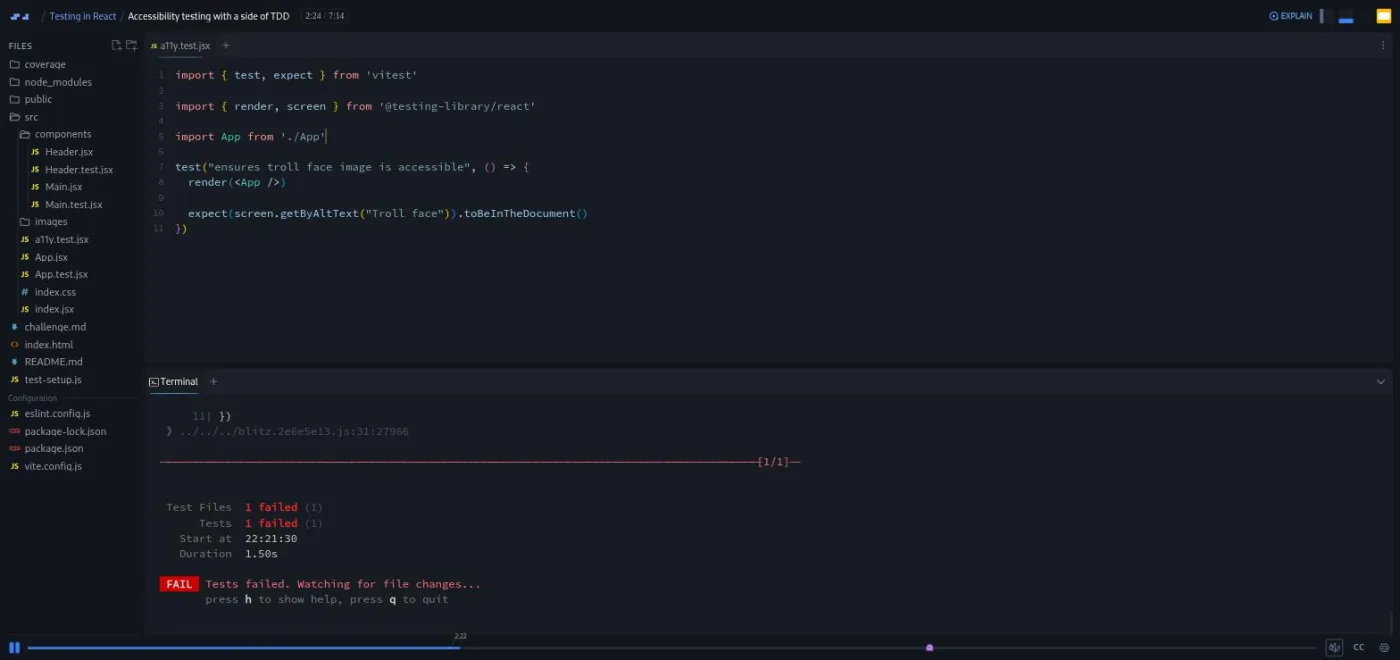
The teaching move I liked most is in the accessibility lesson. Shant writes expect(screen.getByAltText("Troll face")).toBeInTheDocument() before the alt text exists, saves, and lets you watch Vitest print 1 failed in red. Only after that does he add the fix and rerun. That is test-driven development shown, not defined, and it is the only place in the course the point lands that way.
The limit is scope. Mocking gets two scrims, coverage gets one, and "Types of testing" is a single closing lecture. If you want depth on any one of those (MSW's request handlers, coverage thresholds in CI, integration versus end-to-end testing), this course gives you the vocabulary and stops. It is a foundation, not a reference.
What you'll learn
The course has no modules; Scrimba's own page is one flat list of 12 scrims. The grouping below is mine, built around what each stretch actually teaches.
Course curriculum
12 scrims, about 56 minutes, no chapters on Scrimba's own page; editorial grouping
- Why test, and what you will test
- Vitest and React Testing Library: your first tests
- Testing user interactions
- Mocking external services with MSW
- Coverage, accessibility, and TDD
- Types of testing, and wrap-up
I counted 12 scrims in the table of contents in September 2026, which matches the 12 lessons in our own catalog and the roughly 56 minutes the course header shows; nothing here needed correcting against Scrimba's listing.
Inside the course, scrim by scrim
1. Why test, and what you will test (11 min, 3 scrims)
Welcome to Testing in React opens on slides, not code. Shant Dashjian introduces himself ("I'm Shant Dashjian, teacher at Scrimba and mentor at Pro Coding Mentor. I've been in the software industry since two thousand and nine") and states the course's own definition of the subject: "in the simplest terms, testing is the process of checking that your app does what the user wants it to do." He names the three tools up front, Vitest, React Testing Library, and the Mock Service Worker library, and flags this as an advanced course that assumes intermediate JavaScript and React basics. He also tells anyone on the Fullstack Developer Path directly: "if you are taking this course as part of Scrimba's full stack path, then you are good to go as you already studied all of those prior to this course."
"What we will test: Meme Generator" recaps the app you inherit rather than build: a Header component showing the app name and a troll-face image, and a Main component that fetches meme templates from an API. "Set up the tooling" adds Vitest's vitest package and React Testing Library and gets the test runner going in watch mode in the terminal.
2. Vitest and React Testing Library: your first tests (13 min, 2 scrims)
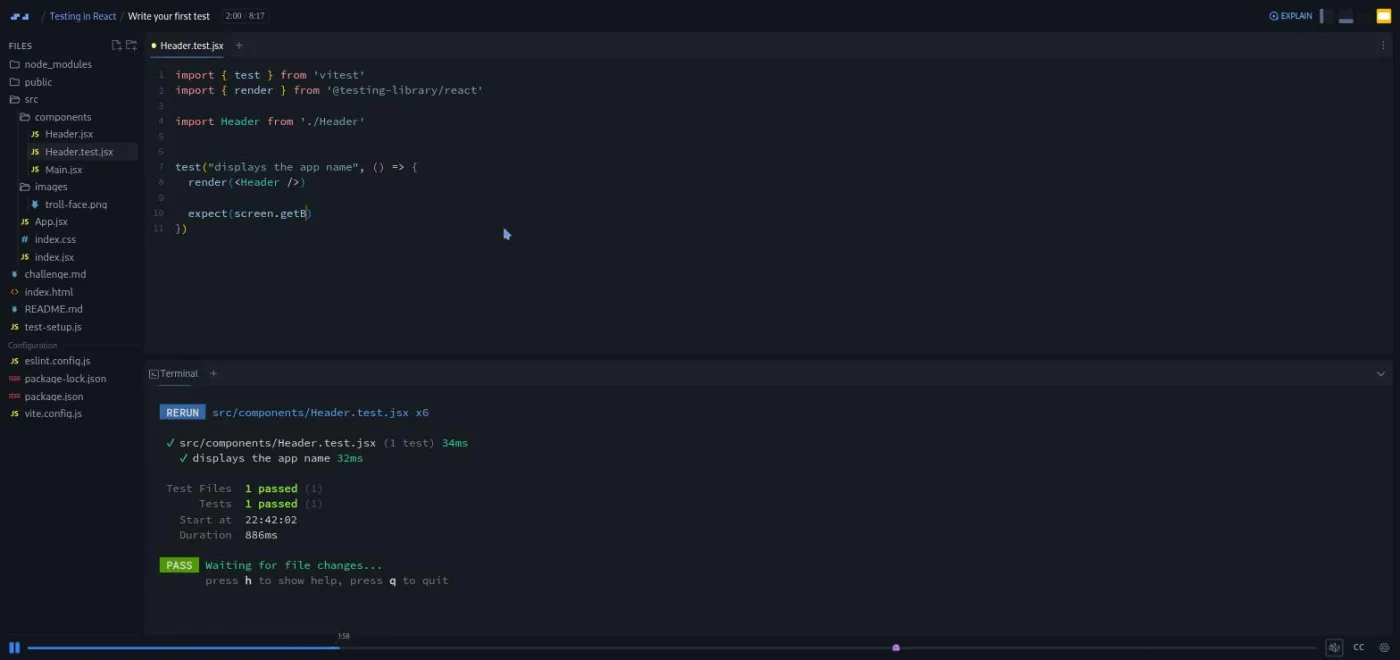
"Write your first test" is where the course actually starts typing. Shant creates Header.test.jsx next to Header.jsx (Vitest watches for any file matching *.test.jsx by default), imports test from vitest and render from @testing-library/react, and writes test("displays the app name", () => { render(<Header />); expect(screen.getByText("meme generator")).toBeInTheDocument() }). Saving it triggers an instant rerun in the terminal, and the test goes green.
"Practice, practice, and practice!" is a challenge that repeats the pattern on a second assertion without new concepts, which is the point: React Testing Library rewards repetition until render, screen, and expect stop needing a lookup.
3. Testing user interactions (8 min, 1 scrim)
Where the earlier tests only check what renders, this one simulates a click and asserts on what changes afterward, the harder half of component testing because it has to wait for React to re-render before the assertion runs.
4. Mocking external services with MSW (7 min, 2 scrims)
"Mock external services: Set up the tooling" and "Mock external services: Test" cover Mock Service Worker, the third tool Shant names in the Welcome scrim. The Meme Generator's Main component fetches templates from a real API, and a test that hits the real network is slow and flaky, so these two scrims intercept the request instead and return canned data. It is the shortest treatment of the three tools and the one place I would have wanted a second example.
5. Coverage, accessibility, and TDD (11 min, 2 scrims)
"View code coverage" adds Vitest's coverage report, which writes an HTML summary to a coverage folder you can see appear in the file tree, showing which lines your existing tests do and do not exercise.
"Accessibility testing with a side of TDD" is the strongest scrim in the course. Shant frames it directly: "we at Scrimba place great emphasis on web accessibility. This is a big reason why we have an entire course on accessible development in this full stack developer path," pointing at Learn Accessible Web Design for anyone on that track. He defines the discipline ("accessibility testing is a type of testing that ensures that the web app can be used by people with disabilities conforming to accessibility guidelines such as the Web Content Accessibility Guidelines or WCAG") and picks the troll-face image's missing alt text as the example. He creates a11y.test.jsx, writes expect(screen.getByAltText("Troll face")).toBeInTheDocument(), saves, and lets it fail: Vitest reports 1 failed in the terminal before any fix exists. Only then does the alt="Troll face" attribute get added and the test goes green. That order, test first, watch it fail, then make it pass, is test-driven development, and this is the only scrim in the course that demonstrates the cycle rather than naming it.
6. Types of testing, and wrap-up (5 min, 2 scrims)
"Types of testing" and "Congratulations!" close the course, followed by the Certificate of Completion for Pro members.
What a lesson feels like
Every scrim I opened follows the same shape: Shant states what the test should check, types it live with the terminal running Vitest in watch mode below the editor, and saves to trigger an instant rerun. Several of the twelve are marked as challenges, delivered the way other Scrimba courses handle them, a brief inside the file or a challenge.md tab, then his own solution. There is no mini-browser preview panel doing the heavy lifting here the way there is in a UI-building course; the terminal's pass/fail output is the main character. Every scrim I opened had captions, a timestamped transcript under the settings menu, and subtitles in ten languages.
Free or Pro: exactly what is gated
This is a Pro course, and unlike some of Scrimba's other Shant Dashjian courses (Intro to Vite, for one), none of the twelve scrims carried a visible SAMPLE badge on the course page when I checked. Pro also gates the Certificate of Completion at the end and the Pro-only channels on Scrimba's Discord; the Discord server itself is open to free members too. See current plans (opens in a new tab) for what a subscription costs in your region, and our Pro vs free page for the full split.
How long it takes
56 minutes of video; budget 90 minutes to two hours for one sitting once you include the challenge scrims and re-running the suite after each fix. Nothing here needs an external account or a slow install, since the project is already scaffolded with Vitest configured, so the extra time goes into typing and watching tests fail before they pass, not into setup.
Who it's for, and who should skip it
It fits developers who can already build a React component and want their first guided pass at Vitest, React Testing Library, and MSW, especially anyone working through the Fullstack Developer Path, where this course is a required stop. It also fits anyone who took Learn React and wants to see the Meme Generator tested rather than just built.
Skip it if you want deep coverage of any single tool. MSW gets two scrims, code coverage gets one, and there is no discussion of end-to-end testing tools like Playwright or Cypress. It is also not a place to learn React itself; if useState or useEffect are still new to you, do Learn React first.
Prerequisites
React fundamentals and intermediate JavaScript (callbacks, async/await) going in; Scrimba's own course page also lists HTML, web accessibility concepts, running code from a terminal, and comfort with npm and Vite. No prior testing experience is assumed. Learn React and Advanced React cover the React side.
Where it fits
Testing in React is a full member of the Fullstack Developer Path (verified against Scrimba's own path curriculum, not just the course listing). It is not part of the Frontend Developer Path. The natural lead-in is Learn React, since the app under test is the Meme Generator built there; Advanced React is worth taking first too if you want more practice before adding tests on top.
Strengths and limits
What it does well: it is short and hands-on, the Meme Generator app means lesson one is already inside real components, and the accessibility scrim is a genuine, if brief, demonstration of test-driven development rather than a definition of it.
Where it is limited: mocking and coverage each get only a scrim or two, there is no end-to-end testing tool in sight, and at 56 minutes this is an introduction you will likely want to supplement once you are writing tests for your own projects.
Related courses and comparisons
- Learn React, where the Meme Generator app comes from
- Advanced React, for more React before you add tests
- Fullstack Developer Path, where this course is a required stop
- All React courses, the category this course belongs to
No. It is a Pro course, and none of its 12 scrims carried a visible free-sample badge on the course page when checked in September 2026. Pro also gates the Certificate of Completion.
Shant Dashjian, a Scrimba teacher and mentor at Pro Coding Mentor who has been in the software industry since 2009. He also teaches Scrimba's Intro to Vite.
The Meme Generator app from Scrimba's Learn React course: a Header component showing the app name and a troll-face image, and a Main component that fetches meme templates from an API. You write Vitest and React Testing Library tests for rendering, user interactions, and accessibility, then mock the API fetch with Mock Service Worker.
Vitest as the test runner, React Testing Library for rendering components and querying the screen, and Mock Service Worker (MSW) for mocking the app's external API calls. It also covers Vitest's code coverage report.
Once, directly. In the accessibility lesson, Shant writes a test asserting the troll-face image has alt text before that alt text exists, runs it to watch it fail, then adds the fix and reruns it to green. That is the only scrim that shows the write-test-first cycle rather than naming it.
Yes. It is a full member of the Fullstack Developer Path, verified against Scrimba's own path curriculum. It is not part of the Frontend Developer Path.
56 minutes of video; plan 90 minutes to two hours in one sitting including the challenge scrims, since the project is already set up and nothing requires an external account.
No. Shant says explicitly that no testing background is required, only React fundamentals and intermediate JavaScript such as callbacks and async/await.