Intro to Vite
Intro to Vite is Scrimba's free, 39-minute course on the build tool behind most React and Vue projects. Shant Dashjian runs it in a real Node sandbox across 14 flat scrims: scaffold a React app on Vite 6, watch hot module replacement, handle assets and env vars, and build for production. Worth an hour if you already use a framework.
Reviewed inside the course with a Pro account, September 2026.
Quick answer
Take it if you already use React or Vue and treat npm run dev, dist/, and vite.config.js as magic: by the end you can scaffold a React app, explain why a saved edit shows up without a reload, and add a plugin from its docs. Skip it if you have never written a React component, since the course is rated Intermediate and never explains one.
Intro to Vite
FreeTaught by Shant Dashjian (opens in a new tab)
A short, hands-on tour of Vite: scaffold a React app, feel HMR, handle assets and env vars, build for production, configure and extend it.
Start free on Scrimba (opens in a new tab)
Is it worth your time?
Yes, for a narrower audience than the listing suggests: people who already use a framework and want to understand the tool underneath it. It is not a place to learn React. The app is Vite's own boilerplate, and the React you write is a header and a footer. It is not a deep dive into bundlers either, although the optional last lesson is a decent four minute version of one.
What sold me is that the course shows rather than tells. Shant's pitch in the Welcome scrim is about the seconds you lose waiting for a slow dev server: "if this takes three more seconds every single time, that quickly adds up to tons of wasted time, losing focus and dropping productivity. This is what Vite solves." Two scrims later you see it. You add a component, press save, and the header appears while the counter in the preview still reads three.
That is hot module replacement (HMR), and it lands better as something you watched than as a paragraph in the docs. The limit is scope. You leave knowing how to use Vite. You do not leave knowing how to tune it or debug a broken build, and a 39 minute course could not teach that anyway.
What you'll learn
The course has no modules; Scrimba's page shows one flat list of 14 scrims. The grouping below is mine, so the bars mean something.
Course curriculum
14 scrims, about 41 minutes including the two Scrimba house scrims at the end; editorial grouping
- Getting started: Welcome, scaffold a React app, experience HMR
- Static assets and environment variables
- TypeScript and building for production
- Configure with options and extend with plugins
- Extra: Vite internals, outro, Scrimbassador and certificate scrims
I counted 14 scrims in the table of contents in September 2026, about 41 minutes in total. Drop the two generic Scrimba scrims at the end (the Scrimbassador pitch and the certificate tip) and you get the 39 minutes the course header shows. Scrimba's structured data says 19 lessons. That number counts clips inside scrims rather than the scrims you click, and it is the number other pages on this site quote.
Inside the course, scrim by scrim
1. Getting started (12 min, 3 scrims)
The Welcome scrim is slides, not code. Shant covers who made Vite (Evan You, in 2020, six years after he made Vue) and why it is called Vite, "which means fast in French." He introduces himself as a Scrimba teacher and a mentor at Pro Coding Mentor, and points you to the Discord. He closes with "Vite is a build tool. So let's start building."
"Create your first React project with Vite" opens on an empty directory and a terminal. You check node --version (20) and npm --version (10), then run npm create vite@latest. The prompts ask for a folder (a dot means the current one), a framework (React), and a language (JavaScript). Then npm install and npm run dev, and the dev server comes up in about four seconds inside the Scrimba sandbox.
You open the mini browser on port 5173 to see the boilerplate. The scrim ends with a tour of what was generated. index.html is the entry point, src/assets/ holds files you want optimized, public/ holds files you do not, and vite.config.js is where settings go later.
The scaffolded package.json pins react and react-dom at ^19.0.0 and vite at ^6.2.0; the terminal banner reads Vite v6.2.6. Newer Vite releases have shipped since. Nothing in the course depends on the difference, so do not worry when your own scaffold reports a higher number.
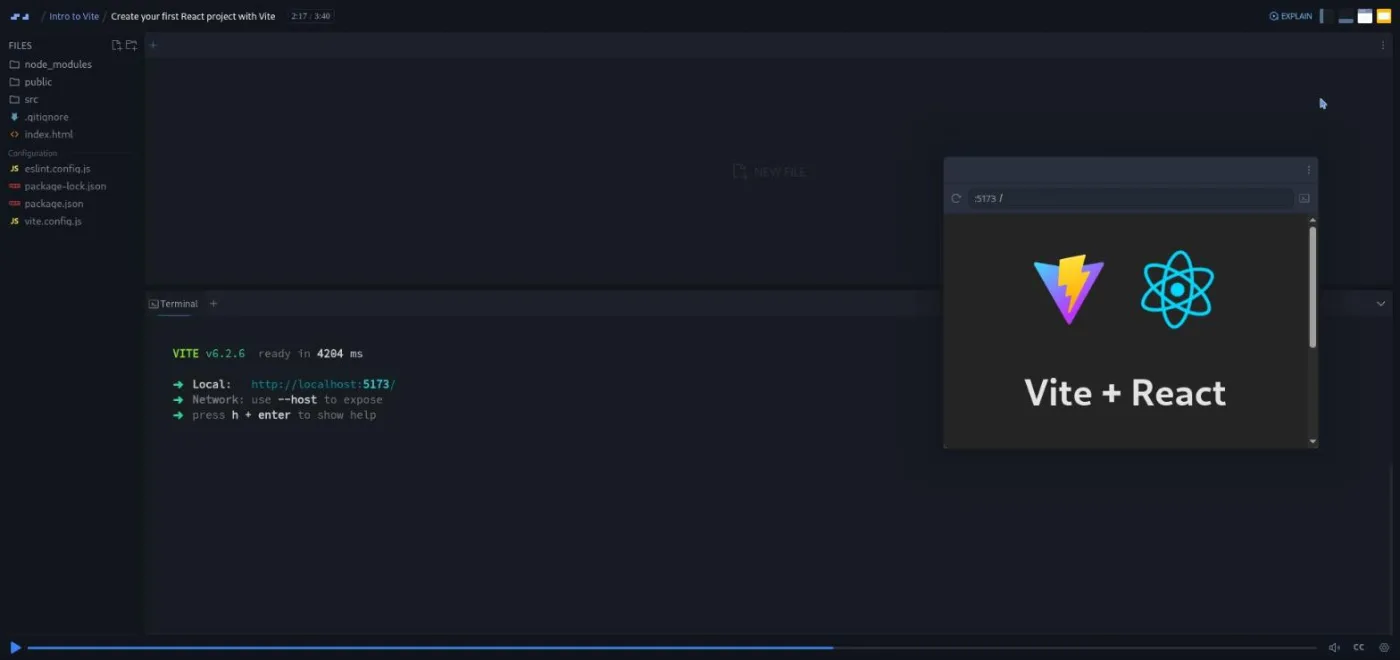
"Experience fast development" is the first challenge and the longest scrim at six minutes. It opens on a blank directory again: "This is Scrimba and here we learn by doing. So let's start off with a challenge to get your hands on the keyboard." You redo the scaffold yourself, from npm create vite@latest to a running dev server.
Then Shant adds a Header component and saves. The header appears "instantly" while the counter in the preview still shows three, which he uses to explain that HMR "did not blow away the application state." Adding a Footer on your own is the second half of the same challenge. Why HMR works (Vite swaps "the part of the code that got changed" instead of rebuilding everything) is left shallow here and picked up in the extra lesson.
2. Static assets and environment variables (10 min, 3 scrims)
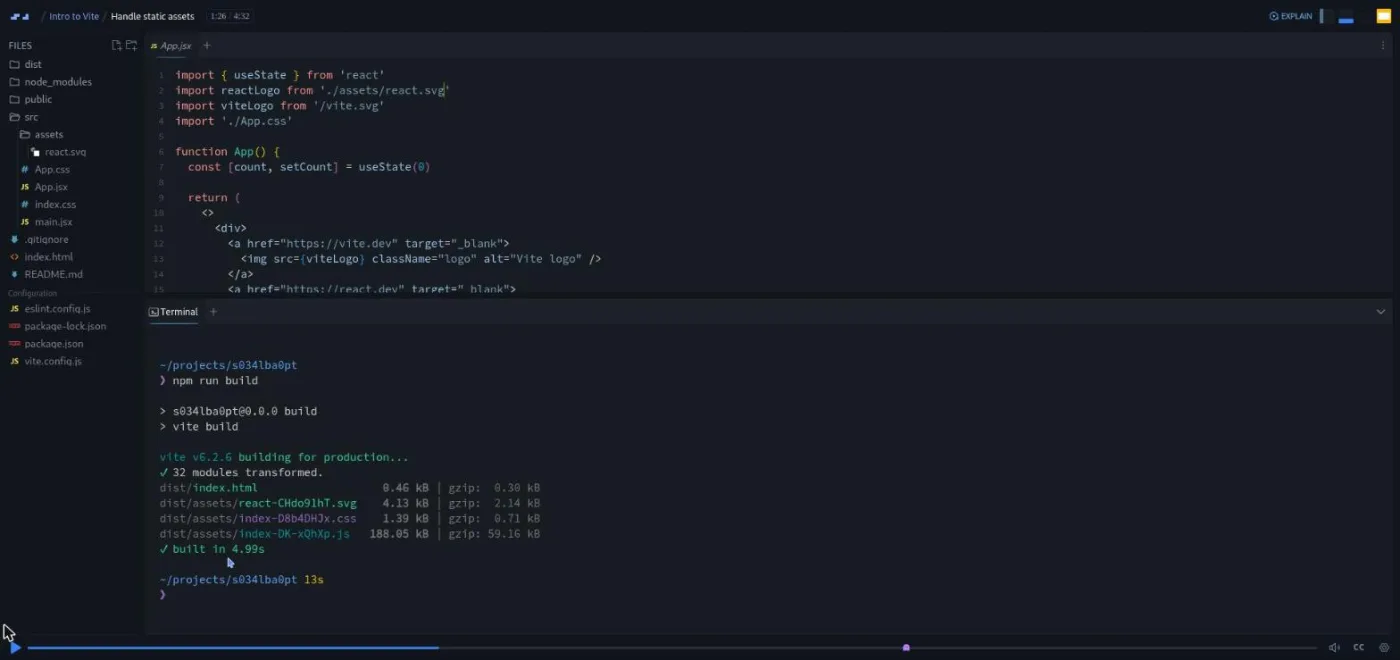
"Handle static assets" is the most useful scrim in the course if you have ever copied a Vite project without understanding it. Static assets are the images, fonts, and SVGs your app ships alongside its code. Vite has two rules for them, and this scrim is the first place I have seen both stated plainly.
Files in src/assets/ imported with a relative path get optimized. That means a content hash in the filename (a fingerprint that changes whenever the file does, so browsers never serve a stale copy), inlining as base64 text under four kilobytes, and any further processing by plugins. Files in public/ referenced with an absolute path are copied as they are.
You run npm run build and read the output: dist/assets/react-CHdo91hT.svg has a hash, vite.svg does not. The challenge is to add a Scrimba logo the first way and build again to see where it lands.
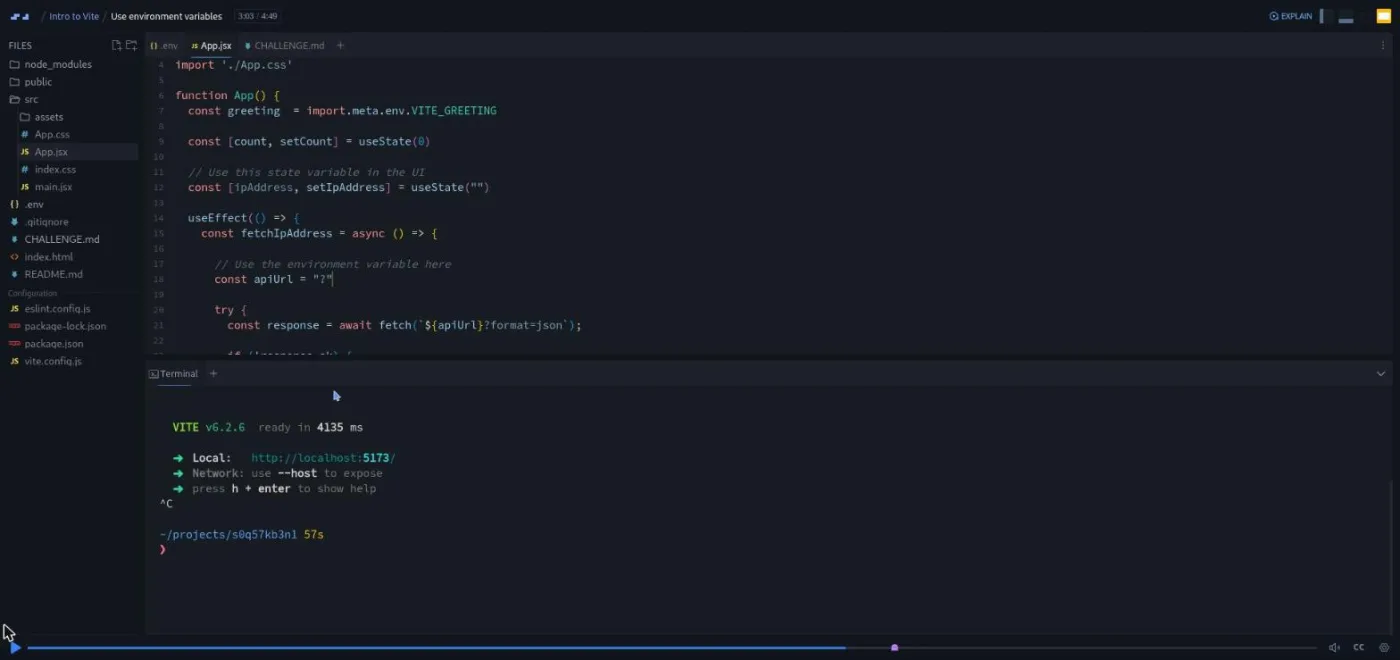
"Use environment variables" covers import.meta.env, the object Vite exposes for settings that change between machines. It has built-in constants (BASE_URL, MODE, DEV, PROD, SSR), and your own variables go in a .env file with a VITE_ prefix so they reach the browser. Shant adds VITE_GREETING=howdy and renders it.
The challenge is to put an IP lookup API URL in an environment variable and use it inside a useEffect he has already written, with const apiUrl = "?" marking the spot. The brief sits in a CHALLENGE.md file in the editor, which is how every challenge in the course is delivered.
The one minute "Using Scrimba's built-in environment variables" scrim is a side note. .env files are for your own machine. If you build scrims on Scrimba later, the gear menu has an "edit environment" option that stores keys centrally instead. Skip it if you never plan to publish scrims.
3. TypeScript and production (4 min, 2 scrims)
"TypeScript development with Vite" is two and a half minutes and makes one point. Vite transpiles TypeScript (strips the types and emits JavaScript) but does not type check, "to maintain the same fast developer experience." Type checking is left to your editor and tsc. The demo renames main.jsx to main.tsx, updates the script tag in index.html, and the app keeps running.
For real type checking Shant gives two routes. Pick TypeScript at scaffold time and get tsconfig.json and vite-env.d.ts for free. Or scaffold a throwaway TypeScript project and copy its config into an existing JavaScript one. No challenge.
"Build for production" is under two minutes. npm run build writes the optimized site to dist/, and npm run preview serves that folder on port 4173 so you can check the production bundle in the mini browser. That is the whole scrim, and it is enough.
4. Configure and extend (8 min, 2 scrims)
"Configure with options" opens with an opinion I share: Vite "just works out of the box," and configuration is for when you need it. The demo moves the dev server to port 3000 through a server block in vite.config.js. The challenge is to change the build output directory from dist to out.
Shant refuses to name the option: "You can click on this image which will take you to the Vite docs page for the build options and try to find that out." The answer (build.outDir) is at the bottom of CHALLENGE.md if you get stuck.
"Extend with plugins" is the best five minutes in the course. A plugin is a package that hooks into Vite's build to add a capability. Vite's core stays small "to keep Vite maintainable in the long term," and its plugins follow Rollup's interface, so most Rollup plugins work too.
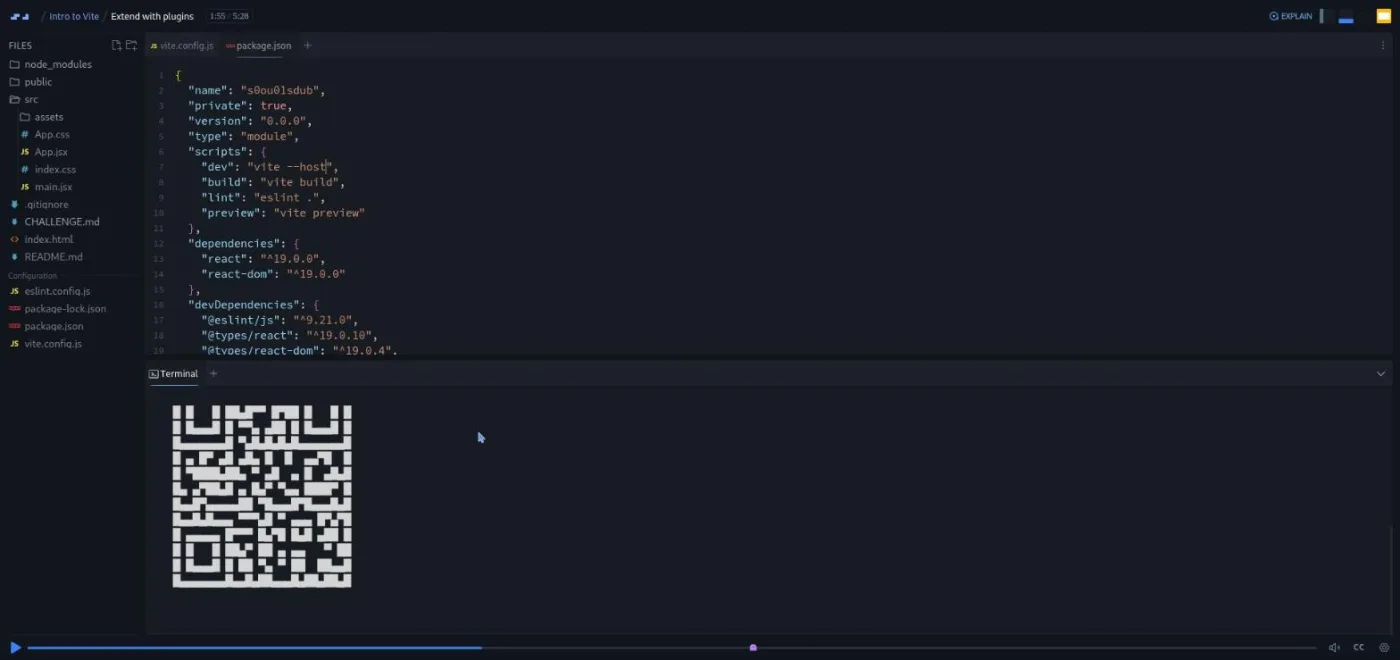
The demo installs vite-plugin-qrcode, adds qrcode() to the plugins array, and adds --host to the dev script. A QR code prints in the terminal so you can open the app on your phone. The challenge is the hardest in the course: read the vite-plugin-svgr docs, install it, and turn the React logo SVG into a component with the ?react import suffix.
Shant frames that as the real lesson: "Being able to read and follow online documentation is a key skill to have as a developer." He also leaves a note in CHALLENGE.md about why the logo renders smaller afterwards. The SVG component loses its width, and the fix is a CSS width matching the height.
5. Extra lesson and wrap-up (7 min, 4 scrims)
"Extra: Vite today, Vite tomorrow!" is flagged optional in its first twenty seconds ("You can skip this if it feels too technical for you"). Do not skip it. It is the only scrim that explains what Vite is made of.
Vite sits on two bundlers, the tools that turn many source files into a few browser-ready ones. In development it uses esbuild, written in Go, to pre-bundle your dependencies "ten to a hundred times faster than JavaScript based bundlers." For production builds and the plugin interface it uses Rollup. SWC, a Rust-based transpiler, is an optional alternative.
Shant contrasts older dev servers, which "eagerly crawl and build your entire application before it can be served," with Vite serving source files over native ES modules. ES modules are the browser's own import syntax, so the browser does part of the bundler's work. He closes on Rolldown, the Rust bundler VoidZero is building to replace esbuild and Rollup. The transcript has a few speech-to-text slips on names here, so listen rather than read.
The Outro is 51 seconds of recap. Then two house scrims, "Want to become a Scrimbassador?" (the referral program) and "How to Utilize Your Certificate," and the Certificate of Completion item.
What a lesson feels like
Most scrims run two to five minutes, and the pattern holds throughout. Shant states the concept, then does it in the terminal or editor with the mini browser docked on the right. He either sets a challenge or recaps and hands off ("In the next lesson, we'll learn how to..."). Challenges are announced out loud ("Go ahead and do that right now"), written up in a CHALLENGE.md tab, and solved on screen afterwards.
There are five of them. You rescaffold the project and add a footer, import and build a static asset, wire an environment variable into a fetch, find the build output option in the Vite docs, and read plugin docs to add SVGR. None are AI-checked; there are no "Challenge with Instant Feedback" icons in this course's table of contents.
The project is a real Node process in Scrimba's sandbox, so you type actual npm commands and wait actual seconds for installs. That makes the "fast" claim easier to judge than a slide would. Every scrim has captions, a timestamped transcript under the settings menu, subtitles in several languages, and speed control. Shant is upbeat to the point of "Super duper" and "You now have the power, Vite power." I found it more endearing than not.
Free or Pro: exactly what is gated
Nothing inside the course. All 14 scrims are free, and most carry the SAMPLE badge, which means they play without an account. There are no Solo Projects, so there is no Pro-only material to hit.
Pro gates the Certificate of Completion at the end, the career paths, and the Pro-only channels on Scrimba's Discord. The Discord server itself is not gated. Scrimba's pricing page lists basic Discord access under the free plan, and Shant points you there in the Welcome scrim.
For a 39 minute elective there is no reason to upgrade. Look at current plans (opens in a new tab) only if you want the certificate or you are already on a path. Our Pro vs free page has the full split.
How long it takes
39 minutes of video; budget 75 minutes to two hours. The scaffold and npm install steps run for real. Three of the five challenges (the env variable fetch, the build output option, and the SVGR plugin) send you into external docs, and that reading is where the extra time goes.
If you follow along on your own machine instead of the sandbox, add time for installing Node and your first npm create vite@latest. It is one sitting. Doing it twice, once in the browser and once locally, fills a second hour well.
Who it's for, and who should skip it
It fits developers who have started a React or Vue project from a template and want to understand the dev server, the dist folder, and vite.config.js. It also fits anyone about to move a project off webpack or Create React App who wants the mental model first. If you did Learn React and skipped its "Local Setup w/ Vite" scrim, this is the longer version.
Skip it if you want configuration depth, custom plugins, server-side rendering (SSR), or monorepo setups. None of that is here.
Start Intro to Vite for free (opens in a new tab)Prerequisites
Comfort with a terminal (node, npm, running scripts), and enough JavaScript and React to read a component with useState and useEffect. Learn JavaScript plus the first sections of Learn React is more than enough. Nothing to install if you stay in the browser; Node.js 20 or newer and npm if you follow along locally.
Where it fits
The natural time to take it is right after your first framework course, when you have a project and are curious what npm run dev does. It pairs with Learn React, Learn Vue, and Learn TypeScript; the TypeScript scrim here is the bridge. If the extra lesson's bundler talk was the part you liked, Learn Astro is another tooling-first course in the same category.
Strengths and limits
Strengths: it is free and short, and the real Node sandbox makes the speed claims visible instead of asserted. The static assets and plugins scrims fix two things most people get wrong. The optional internals lesson is a compact, accurate account of esbuild, Rollup, native ESM, and Rolldown.
Limits: the course is flat with no chapters, and the React content is minimal by design. Two of the 14 scrims are generic Scrimba material rather than Vite.
Related courses and comparisons
- All JavaScript courses, the category this course belongs to
- Learn React, the framework the course scaffolds
- Learn Vue, Evan You's other project, which also defaults to Vite
- Learn TypeScript, if the TypeScript scrim left you wanting more
- Learn JavaScript, the language underneath it all
Yes. All 14 scrims are free with no card required, most of them play without an account, and there are no Pro-only Solo Projects inside the course. Only the Certificate of Completion needs Pro.
Shant Dashjian, a Scrimba teacher who also mentors at Pro Coding Mentor. The teacher card, the title slide, and the transcript all agree; he introduces himself in the Welcome scrim.
Not an app in the usual sense. You scaffold Vite's React boilerplate with npm create vite@latest, then modify it: add Header and Footer components, import a logo through src/assets, read a VITE_ environment variable into a fetch, rename main.jsx to main.tsx, change the dev port and build directory, and add the QR code and SVGR plugins.
The scaffolded package.json pins react and react-dom at ^19.0.0 and vite at ^6.2.0; the terminal shows Vite v6.2.6 on Node 20 with npm 10. Newer Vite releases have shipped since, and nothing in the course depends on the difference.
Five: rescaffold the project and add a footer component, import and build a static asset, use an environment variable inside a useEffect fetch, find the build output directory option in the Vite docs and set it, and read the vite-plugin-svgr docs to add it. Each is described in a CHALLENGE.md file in the editor. None are AI-checked.
No. The project runs in a real Node sandbox in the browser, including npm install. If you follow along locally you need Node.js 20 or newer and npm.
39 minutes of video; plan 75 minutes to two hours including the installs and the five challenges, in one sitting.
Yes. Every scrim has captions, a timestamped transcript under the settings menu, and subtitles in several languages. The transcript has a few speech-to-text slips on names.
Some. You edit small React components with useState and useEffect and never get them explained. Anyone who has finished the first sections of Learn React is fine.
No. Scrimba lists it as a standalone course; it is not in the Frontend, Fullstack, Backend, or AI Engineer paths.