Introduction to Clean Code
Dylan C. Israel's Introduction to Clean Code is a 64-minute Pro course that turns messy JavaScript into readable code through better variable names, smaller functions, and far fewer comments, built from 26 scrims and seven refactoring challenges. It is worth the hour if nobody has ever reviewed your code, thin once you already work with a linter and a team.
Reviewed inside the course with a Pro account, September 2026.
Quick answer
This fits developers who can write working JavaScript but have never had anyone review it, and anyone about to start a first job wondering what a reviewer will flag. The catch: every example stays tiny, so a team that already runs a linter and code reviews will find little new here. Pair it with Introduction to Unit Testing once you have working code worth testing.
Introduction to Clean Code
ProTaught by Dylan C. Israel (opens in a new tab)
A one-hour intro to readable JavaScript: naming, small functions, and when a comment is worth writing, with seven refactoring challenges.
View on Scrimba (opens in a new tab)Is it worth your time?
The course has one idea, stated in the first scrim and repeated at the top of every section: code should be "searchable, readable, and understandable." Everything else is a technique in service of that. Dylan's argument for why you should care is blunt. "Ninety percent of your job is reading code, believe it or not," he says in the introduction, and he credits testing, clean code, and the SOLID principles with doubling his income early in his career.
The advice itself is the standard set from Robert Martin's Clean Code book, which Dylan recommends in the last scrim: meaningful names, small functions, no magic numbers, delete commented-out code. What the course adds is the format. You see a bad file, you get 30 seconds to fix it yourself, then you watch him fix it and explain each rename. If nobody has ever reviewed your code, that is the part you cannot get from the book.
The limit is depth. The examples are tiny, sometimes two lines, and the whole thing runs shorter than a lunch break. Dylan says as much in the comments challenge: "they're a little silly because it's a challenge." If you want practice at scale, the course points you back to your own projects.
What you'll learn
Course curriculum
5 modules · 26 lessons
- Introduction and linters
- Clean variables
- Clean organization and functions
- Clean comments
- Final challenge and wrap-up
Scrimba lists this course as a single flat list of scrims with no modules, so the five groups above are mine, following the section intros Dylan records ("the variables introduction", "the clean code functions introduction", and so on). I counted 26 scrims adding up to about 65 minutes of video; Scrimba's listing says 27 lessons and 64 minutes, and the extra lesson in its count appears to be the certificate item at the end of the list.
Inside the course, module by module
1. Introduction and linters (7 min, 2 scrims)

The introduction is a slide deck, and Dylan spends most of it on who the course is for: aspiring developers, juniors, QA engineers, and senior developers who "have ten years experience, but they repeated that first year ten times." He introduces himself as a senior engineer at Amazon. His teacher card on Scrimba now says engineering manager at ClickUp, and a later scrim mentions ES2020 as about to come out, which dates the recording to around 2020.
"Introduction to Linters" is the only scrim that stays on slides all the way through. Dylan admits the format does not fit Scrimba's challenge-first style: "it's gonna be a little harder here with linters." He explains what ESLint catches (spacing, stray console.logs, ordering rules) and recommends turning on format-on-save in VS Code. The homework is real, though: add ESLint to one of your existing GitHub projects. He is upfront that "I'm not gonna go on this journey with you."
2. Clean variables (16 min, 6 scrims)
This is the section Dylan says "can have the most impact immediately," and it is the strongest part of the course. "Clean Variables Part 2" opens on a factorial function with an all-caps variable that is not a constant, is never reassigned, and turns out to be unused. He deletes it, then renames the loop variable twice, first to totalMultiplications and then to factorialTotal, with the advice "don't always settle on your first name."
The same scrim introduces his "significant other test": if a variable name would not make sense to your partner or your mother, it is not descriptive enough. He acts out both sides of the conversation; d fails, todaysDate passes.
The first challenge, "Clean Variables Challenge", gives you a one-line function that builds "First M. Last" from an array using userNames[0] and userNames[1][0]. He stops talking at 0:29 and lets you work; there is a hints.md file in the sidebar that he pointedly refuses to open. His solution goes through three stages: named variables, a template string, then array destructuring. His verdict at the end is the line I would put on a poster: "we have a couple more lines of code. That's fine. What we're really going for here is readability."
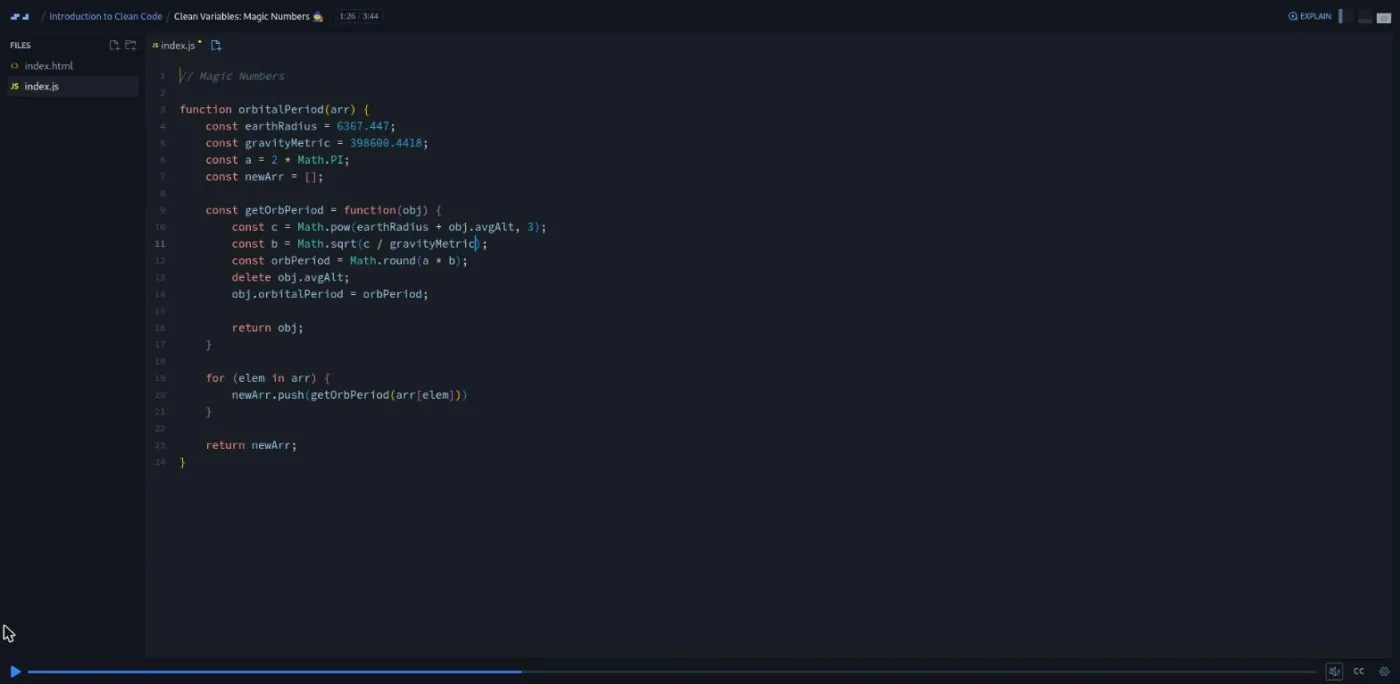
The two "Magic Numbers" scrims are the most candid moments in the course. The example is an orbital period calculator full of numbers like 6367.4447, and Dylan admits he "had to go back and rewatch a video" to remember what they were. He extracts earthRadius and gravityMetric, then confesses on camera that when his editor asked him to also rename the a, b, and c variables, he could not remember what c represented. The challenge that follows is a single number, 86400000, and the fix is to write it as 60 * 60 * 24 * 1000 so the calculation documents itself.
3. Clean organization and functions (16 min, 7 scrims)
A short "Spacing and Returns" scrim links an ESLint rule (padding-line-between-statements) and argues for a blank line before every return and between each case in a switch. The analogy is an essay: "it's not just one giant long run on sentence, and the same goes for your code."
The functions section then covers three techniques, each followed by a challenge. "Limit Parameters" turns getUsersFullName(first, middle, last, nickName) into a function that takes one user object; Dylan's threshold is "once you get past about two parameters, you need to start thinking about, is my function too large?" "Naming and Standardization" renames addUser to addAdminUser and makes retrieveAdminById match getUserById, because a codebase should pick one verb per operation. The challenge hands you four badly named functions, including addmessage in the wrong case, and he says up front that "some of our answers here obviously may differ."
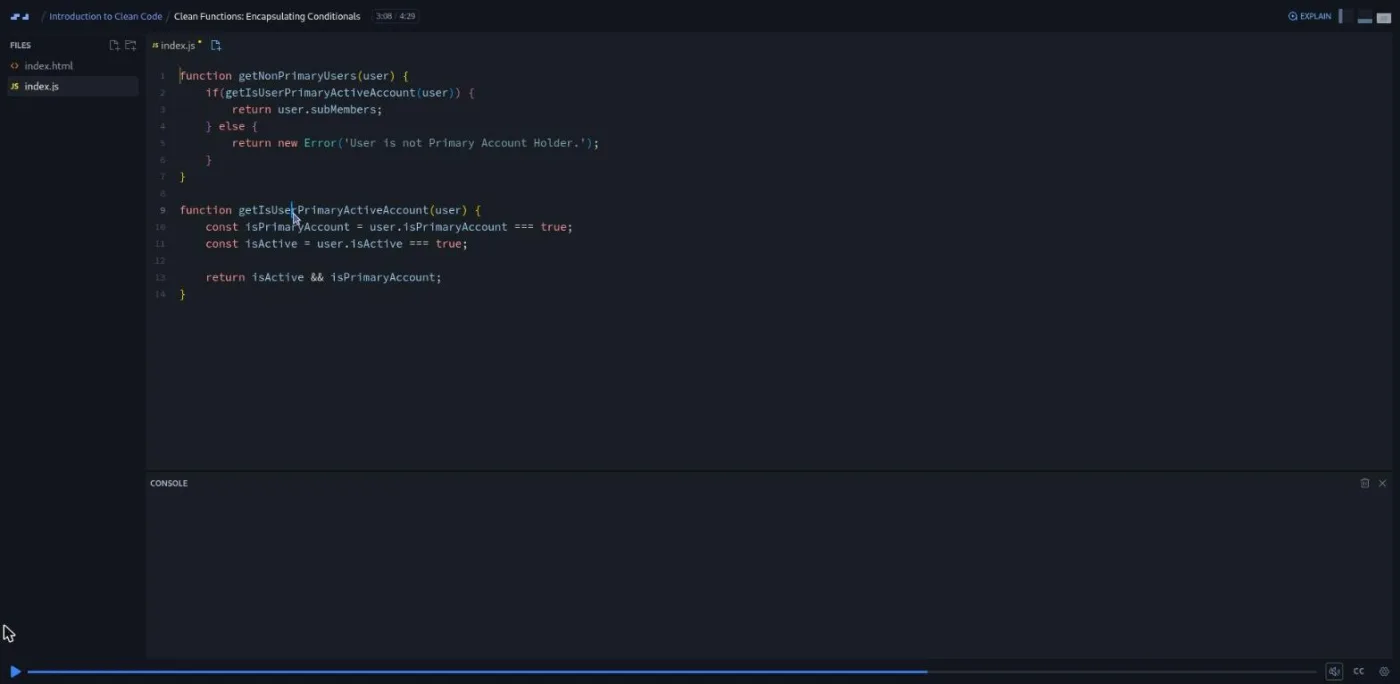
"Encapsulating Conditionals" is the longest scrim at 4:29 and the most useful. A function checks user.isActive && user.isPrimaryAccountHolder inline; he moves that check into isUserPrimaryActiveAccount(user), then pulls the two halves into named booleans. His rule: anything with more than one condition goes into a small function, and "if it's greater than two, I definitely do it one hundred percent of the time." The challenge is a loading-state function with three branches, which you rewrite with helpers like hasUserLoadedSuccessfully(state).
4. Clean comments (18 min, 7 scrims)
Dylan calls comments "one of the most misunderstood sections" and his position is that good naming should eliminate about 90 percent of them. The section intro lists what makes a comment bad (it explains bad code, it has to be maintained, it duplicates version control, it is a TODO nobody trusts) and what makes one good: short, valuable, explaining business logic, a warning, or a legal requirement.
"Avoiding Comments with Refactoring" is the best demonstration. The file is a longestString function Dylan wrote when he was learning, with a comment on every block. He renames it to getLongestStrings, changes length to longestWordLength and strs to longestWords, and every comment becomes redundant and gets deleted. "If you have to leave a comment for what a function does, oftentimes you have a very poor name or the function is too large," as he puts it at the start of the scrim.
"Avoiding Comments with Git" is 90 seconds on changelog comments and commented-out code ("I die a little bit on the inside" every time he sees the latter). "Avoid Visual Markers" takes a file with DEPENDENCIES and ADMIN CLASS banners and argues the banner means the file has two jobs, so the fix is a second file, not a prettier comment. TODOs get the same treatment: "just be like Nike and do it."
"What is a good comment?" shows the three kinds he does keep: a license notice, a one-line translation of an unreadable date regex, and a "do not remove trim" warning above a function where the UI layer sends stray whitespace. The challenge asks you to invent one of each.
5. Final challenge and wrap-up (8 min, 4 scrims)
The "Final Challenge" has no code in it. It is a list: go back to your old projects and clean them up, do the same to your algorithm practice, bring these ideas into code reviews and pair programming, and post before-and-afters in Scrimba's Discord. Dylan says he does the first one himself "about once every year." "What's Next" points at his Introduction to Unit Testing course, Husky git hooks, cspell, the Clean Code book, and the clean-code-javascript repo. The last two scrims are Scrimba's generic Scrimbassador referral pitch and Per Borgen's certificate scrim, not Dylan.
What a lesson feels like
Most scrims are two to four minutes and open on a file of 5 to 20 lines with a comment naming the exercise at the top. Dylan talks over the editor, renames things, and the code updates as he types. There is no live preview to speak of; the index.html is a shell, and the point is always the code, not output. Some scrims open on a slide deck (the intro, both section intros, the linters lesson, the good-comments recap, and the wrap-up).
The challenges follow a fixed pattern. He describes the file, says something like "that's all I'm gonna give you," pauses for a beat, then asks "were you able to do it?" and solves it. There are no automated checks and no AI feedback; you compare your renames with his and he repeatedly says yours may differ. Every scrim has a full timestamped transcript in the player's settings menu, and the course page lists ten subtitle languages.
The tone is loose. He jokes about his ex-girlfriend and his spelling, and he leaves his own fumbles in, like the Magic Numbers moment where he cannot remember what c stood for. If you prefer a tight script, a few minutes of the hour are chat.
Free or Pro: exactly what is gated
The course is Pro, but the first five scrims carry a SAMPLE badge and open without a subscription: the introduction, the linters lesson, both Clean Variables lessons, and the first variables challenge. That is 16 minutes and one real challenge, enough to know whether you like Dylan's style before paying.
Everything from "Clean Variables & Clean Properties (Challenge)" onwards, which is 21 of the 26 scrims and all six remaining challenges, needs Pro, as does the certificate of completion at the end of the list. There are no solo projects in this course and nothing to download. Pro also includes the career paths and the Pro-only channels on Scrimba's Discord; the pricing page lists basic Discord access as free, so the server itself is not gated. See current plans (opens in a new tab) for what Pro costs in your region.
How long it takes
The video is 64 minutes and the seven challenges are small, so plan about 90 minutes if you pause and attempt each one, or two hours if you also add ESLint to a project as the linters scrim asks. That is the low end of the usual two to three times runtime, because every exercise is a single short file.
The final challenge is where the time goes. Cleaning up one old repository properly is an afternoon, and that is where the habits form. Budget a weekend if you intend to do it.
Who it's for, and who should skip it
It fits self-taught developers who have finished a course like Learn JavaScript, have a few projects on GitHub, and have never had anyone read their code, and anyone about to start a first job and wondering what reviewers will flag. The examples are JavaScript, but the rules carry over to other languages, and Dylan says so in the variables intro.
Skip it if you already work with a linter and a review process; the ESLint scrim and the naming rules will be things you do every day. Skip it too if you want depth on architecture or SOLID; he names those ideas (interface segregation gets one sentence) and leaves them for you to look up. Complete beginners should wait until they can write a function and a loop without help, since every lesson assumes you can read the starting code.
Start Introduction to Clean Code on Scrimba (opens in a new tab)Prerequisites
Enough JavaScript to read a for loop, an if statement, and a class with a few fields. The solutions use template strings and array destructuring, which he explains briefly as he goes. Nothing needs installing; the ESLint homework is optional and happens on your own machine.
Where it fits
This is a standalone course, not part of a career path. The natural companion is Introduction to Unit Testing, which Dylan trails in the last scrim and which picks up the "testable and automatable" thread he leaves open. The git-hooks and linting advice in the wrap-up pairs with Learn Git and GitHub. Take it after Learn JavaScript or Advanced JavaScript, once you have code of your own to apply it to.
Strengths and limits
What it does well: the before-and-after format makes each rule concrete, the challenges are short enough that you will do them rather than skip them, Dylan calls out his own unreadable code by name, and the free previews cover the most useful section.
Where it is limited: the examples are tiny and never grow into a real file, there is no automated feedback on your solutions, two of the 26 scrims are generic Scrimba promos, the recording is from around 2020 (his job title is already out of date), and an hour is not enough to make any of this a habit without the homework.
Related courses and comparisons
- Introduction to Unit Testing, the natural companion, same instructor
- Frontend Interview Tips, more career-skills material from Dylan Israel
- Learn Git and GitHub, for the version-control habits the comments section assumes
- Advanced JavaScript, to deepen the JavaScript the examples use
- All JavaScript courses, the full category hub
No, it is a Pro course, but the first five scrims are free previews marked SAMPLE: the introduction, the linters lesson, both Clean Variables lessons, and the first challenge. The remaining 21 scrims and the certificate need a subscription.
64 minutes of video across 26 short scrims. With the seven challenges, plan on about two hours, plus an afternoon if you do the final challenge of cleaning up one of your old projects.
You rename variables and functions, extract conditions into small helper functions, replace magic numbers with named constants, and delete comments that no longer add anything. Each challenge is a single file of a few lines. There is no automated checking; you compare your answer with Dylan's.
The examples are JavaScript (template strings, destructuring, ES classes), but the rules on naming, function size, and comments apply to any language, and the instructor says so in the variables introduction.
No. Everything runs in Scrimba's browser editor. The linters lesson sets optional homework to add ESLint to one of your own GitHub projects, which you would do on your machine.
Yes. Every scrim has a timestamped transcript in the player's settings menu, and the course page lists ten subtitle languages.
Dylan C. Israel, who also teaches Introduction to Unit Testing and Frontend Interview Tips on Scrimba. He describes himself as a senior engineer at Amazon in the recording; his Scrimba teacher card now lists him as an engineering manager at ClickUp.
There is no project. The final challenge is to refactor your own old code. A certificate of completion is listed at the end of the course and requires Pro.
Self-taught and early-career developers who can write working JavaScript but have never had their code reviewed. Developers already working with linters and code reviews will find little new.