Learn Imba
Scrimba's free Learn Imba course teaches Imba, the compile-to-JavaScript language Scrimba itself runs on, across 2.9 hours and 43 scrims with Nathan Manousos. You build the Dopamine Box, a habit tracker with an icon picker, localStorage persistence and a celebration sound. It rewards a JavaScript developer curious about folding UI, styling and events into one syntax.
Reviewed inside the course with a Pro account, September 2026.
Quick answer
Learn Imba fits a working JavaScript developer curious about a different way to structure UI, styling and events, not someone chasing a job. Imba has almost no hiring market, and Nathan says so himself in the wrap-up. If career hours matter more than curiosity, start with Learn JavaScript or Learn React instead.
Learn Imba
FreeTaught by Nathan Manousos (opens in a new tab)
A free tour of Imba, the compile-to-JavaScript language Scrimba is built on, ending in a habit-tracker app with icons, persistence and sound.
Start free on Scrimba (opens in a new tab)
Is it worth your time?
The pitch in the intro is unusually personal. Nathan opens by saying Scrimba "was originally built as a way to teach people Imba," that he uses it "every day for all my projects," and that for him "it's replaced HTML, CSS, JavaScript, and React." He then apologizes in advance, because "after you learn it, going back to writing regular HTML, CSS, and JS is just painful." That enthusiasm is the course's main asset. He is not reading a script; he is showing you a tool he likes and explaining why each feature exists.
The second asset is the format. Almost every scrim stops with a written challenge prompt pasted into the editor ("Go ahead and give that a try, and then I'll show you how to do it") and picks up with his solution. Because each scrim is two to eight minutes, you are typing every few minutes rather than watching for half an hour.
Imba is niche. Nathan says so himself in the wrap-up, "there's not enough content about Imba out there on the Internet," and asks graduates to write blog posts and improve the docs. Nobody is hiring for it. Take the course because the ideas are interesting (styles scoped by default, a UI that re-renders on every event) and because some of them will make you look at React and Vue differently. Do not take it as a step toward a job.
What you'll learn
Course curriculum
43 scrims in a flat list, grouped here into six editorial parts
- Imba syntax basics
- Tags: HTML inside the language
- Styling in Imba
- Binding, events and components
- Building the Dopamine Box
- Wrap-up
Scrimba presents this course as one flat list of 43 scrims with no modules, so the six parts above are my grouping, not Scrimba's; the 43 scrims and 2.9 hours match the course listing and its structured data exactly, and the part durations are the sum of the scrim lengths shown in each lesson's header. The intro itself says "about two hours and forty lessons," recorded before the course's final edit; the listing's 2.9 hours and 43 scrims are the numbers this page uses.
Inside the course, module by module
1. Imba syntax basics (38 min, 8 scrims)
The intro is the only scrim marked SAMPLE (free preview) in the list and it opens on the finished Dopamine Box: a row of icon tiles for your daily habits, a drawer of icons to pick from, and a sound effect when you check off the last one. Nathan explains that the idea comes from a Mike Boyd YouTube video about a hardware box with lights, then sets expectations: "you should be confident with basic HTML, CSS, and JavaScript. If you know those, you'll be right at home, but if you don't, this course is going to be hard to keep up with."
The next seven scrims walk the language against JavaScript. In "Intro to Imba Syntax" he types the compiled JavaScript under each Imba line so you can see the difference is mostly semicolons, optional parentheses and "{name}" string interpolation, then asks the fair question: "what's the point of writing imba code if all it does is save us from writing semicolons?"
The answer arrives over the following scrims. Conditionals use indentation instead of braces ("Imba is a white space sensitive language") and can trail a statement (message = "yes" if done === num). Functions use def and return their last line without a return keyword. Anonymous functions use do, and a callback can trail the call it belongs to.
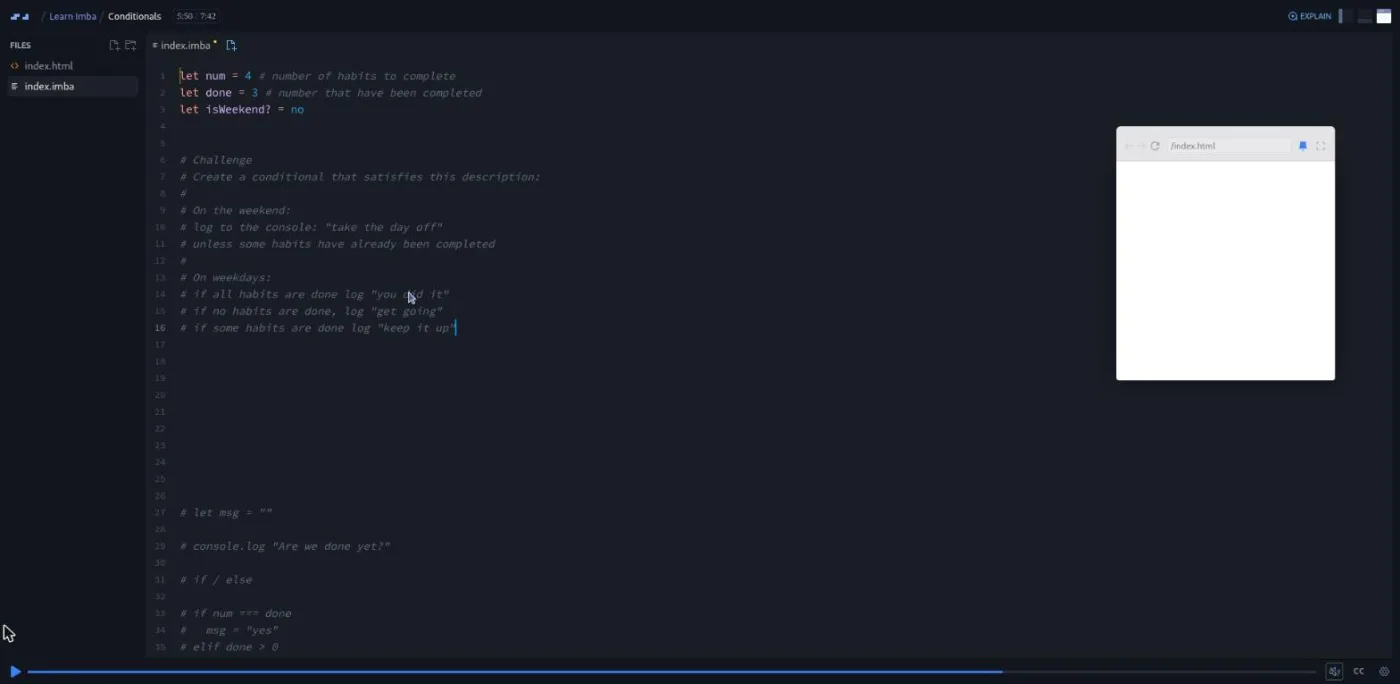
The challenges are small and specific: write the weekend-versus-weekday habit logic, print three days of a habit worksheet with nested loops, add a toggle method to a class. The "Imports" scrim answers the ecosystem question: it pulls nanoid from npm, a helper file written in Imba, and a JavaScript file that itself imports date-fns, to show that "you can use familiar syntax for importing things to import from NPM modules, from Imba files in your project, or from JavaScript or TypeScript files."
2. Tags: HTML inside the language (17 min, 4 scrims)
"Tags" is the turning point. Nathan admits "I'm getting really tired of logging things to the console," builds a div with the DOM API, then with React.createElement (React is a dependency of that scrim purely for the comparison), and then in Imba: imba.mount <div> "hello from imba". Tags are values in the language. Nesting is indentation, there are no closing tags, text goes in quotes, unquoted values are code, and classes use a dot (<ul.my-list>). The challenge is to convert a small block of HTML (a details and summary with a link) into Imba syntax.
"Defining Custom Tags" introduces tag habit-item with a prop name and a render method that returns <self>, and shows that props automatically become attributes. The next two scrims put a for loop and an if directly inside the template; as Nathan puts it, "you use the exact same looping syntax within your HTML templates that you do anywhere else." By the end you have a habit-group rendering a list of habit-items from an array of objects, and a checkbox that does not yet update the data, which sets up the binding lessons later.
3. Styling in Imba (32 min, 7 scrims)
This is the most opinionated stretch and the one most likely to split readers. Nathan says up front that "writing styles in Imba is the best way to write CSS." Inline styles go in square brackets on a tag (<label[display:flex gap:5px]>). Then come property shorthands: d for display, ai for align-items, bgc for background-color, rd for border-radius. He knows how that lands: "a lot of people see this and they hate it, but I really wanna encourage you not to be so quick to judge it, and I wanna say it's optional."
"Scoped Styles" is the scrim I would point a skeptic to. A css block inside a tag applies only to that tag's template, a file-level block only to that file, and global css to everything; "In Imba, the default is that styles are scoped." "Imba-Defined CSS Values" adds a built-in palette (gray3, cooler2, emerald4) and size tokens that he says are "heavily inspired by the Tailwind CSS project."
"CSS Modifiers" replaces pseudo-classes with @hover, adds @dark and breakpoints like @xs, and lets you write them inline after a value (bgc:cooler2 @hover:cooler3). The challenge is a responsive tweak: bigger tiles and a wider gap at the xs breakpoint. The eight minute "Bonus" scrim has no challenge and tours conditional classes, interpolated style values and $primary-color variables.
4. Binding, events and components (21 min, 5 scrims)
"Binding" fixes the checkbox from part two with a bind=done attribute; "updating that input will update the variable and Imba handles all of that including re rendering the view." Two challenges in one scrim: turn the label into a bound button, then add a text input bound to the name. "Binding Custom Tags" shows bind:name=habit.name so a child tag's changes flow back to the parent's array.
"Event Handling" introduces @click=completeAll and the mental model that matters most: "every time an event is handled in your app, Imba re renders everything." He claims this is faster than React and Vue in most common cases, a claim the course itself does not test. "Emitting Custom Events" contrasts the React habit of passing a handler down with Imba's emit("deleteItem") and @deleteItem on the parent. "Local vs Global Components" explains a naming rule you will otherwise trip over: a tag named in lowercase with dashes is global once its file is imported anywhere, while a CamelCase tag must be exported and imported where it is used.
5. Building the Dopamine Box (64 min, 16 scrims)
The second half is the project, and the challenges get looser. The first three scrims split the tags into their own files, wrap everything in a dopamine-box tag, and hand you a written spec to build the habit-adder tag yourself (header, bound input, Add button, CSS supplied).
Then the app gets real. "Event Modifiers" switches the adder to a form with @submit.prevent and shows off .throttle(1000), .log and .alt ("imagine that you needed to throttle an event... What a pain. You don't want to have to do that"). "Sending Data with Events" passes the habit name as the second argument to emit and reads it back from e.detail, which he admits "is not the easiest to remember name." "Adding SVG Icons" brings in about a hundred open-source Health Icons and Imba's non-standard <svg src=...> attribute, and "Add the Icon Chooser" turns them into a scrolling drawer of buttons, then leaves the click handler to you with a warning that "this challenge could be a little bit tricky because I haven't specified exactly how to do it."
The last stretch is refactoring plus polish. "Move Delete to Dopamine Box" is the best challenge in the course: the delete handler moves up to the root tag, which has no loop index, so you have to find another way to identify the habit ("if you find yourself doing something really complicated changing tons of code you're probably on the wrong track"). His answer is a nanoid id and habits.filter, and he gets the boolean backwards on the first try.
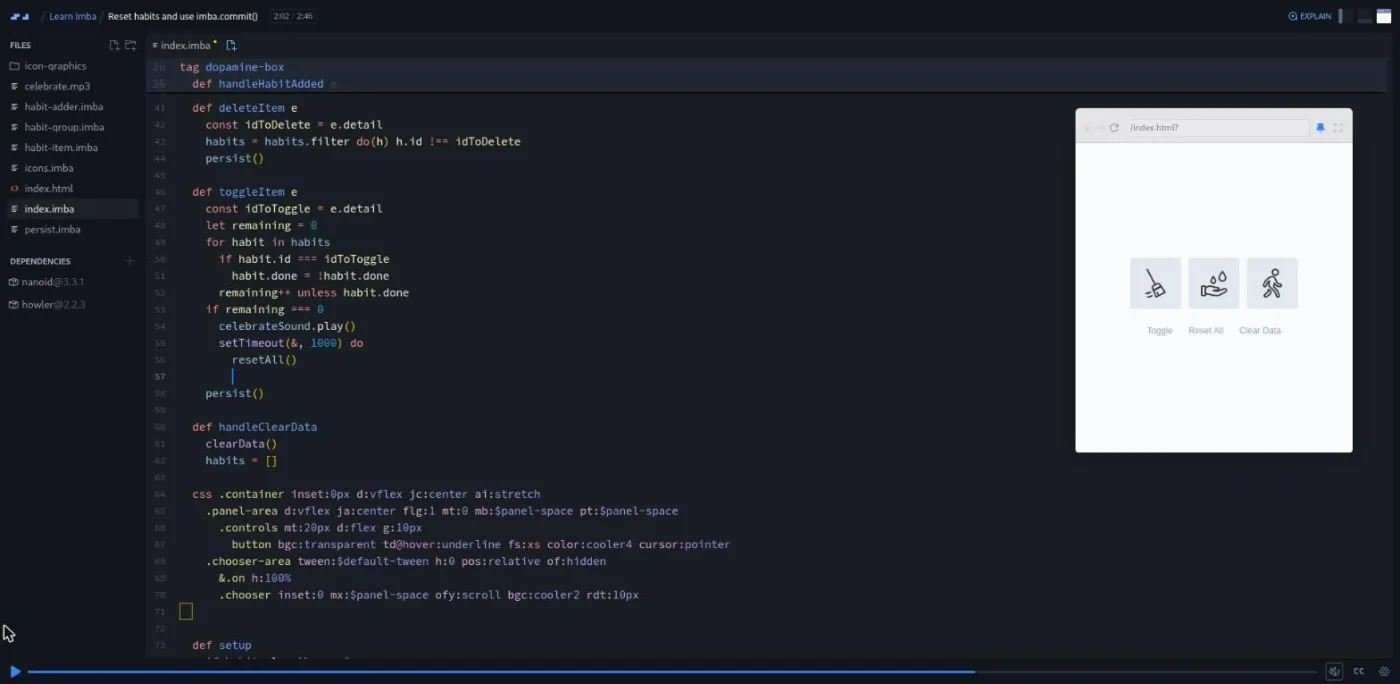
"LocalStorage" persists the array through three helper functions he wrote. "Lifecycle Methods" logs setup, mount, render and rendered so you can see the order, then has you open the drawer on first run from setup. "Celebration Sound Effect" plays an mp3 through the Howler library when the last habit is done, and the final coding scrim ends on a real gotcha: a setTimeout reset does not repaint because it runs outside an event, and imba.commit() is the fix.
6. Wrap-up (4 min, 3 scrims)
Nathan's "Wrap Up" is 70 seconds: build a small project of your own, use the docs and the Imba Discord, and write about what you learn. The final two scrims are Scrimba boilerplate from Per Borgen, a two minute Scrimbassador referral pitch and a 53 second "How to Utilize Your Certificate." Neither is about Imba.
What a lesson feels like
A scrim here is a code editor with one to eight Imba files, a narrow preview pane on the right, and a console. Nathan talks while typing, saves, and the preview reloads. He works in the actual project files, so the code you scroll through at any point is the state of the app at that lesson, and the challenge prompt is pasted into the file as a comment with numbered steps. When the recording stops, you type into the same editor, run it, then press play to watch his version.
The pace is brisk and the voice is dry. He tells you when he dislikes something ("the syntax here is kind of a mess" about native CSS variables) and leaves his own mistakes in, like the filter that keeps the wrong items and the setTimeout that never repaints. He also tells you to use the speed control under the gear icon and skip what you already know. Every scrim has a full timestamped transcript and captions, with subtitles in ten languages according to the course header.
Free or Pro: exactly what is gated
All 43 scrims are free, and the whole Dopamine Box project is built in the free scrims. There are no Solo Project (PRO) items in this course and I saw no "Challenge with Instant Feedback" markers in the lesson list, so there is nothing to unlock mid-course.
What Pro gates is the certificate of completion, which sits at the end of the list, plus the Pro-only channels on Scrimba's Discord (the pricing page lists basic access to the Discord community as free, so the server itself is not gated). Pro also unlocks the career paths, but this course is not on one. If you only want Imba, you never need a subscription; see current plans (opens in a new tab) if you want the certificate.
How long it takes
The 2.9 hours is video runtime. With 26 scrims that stop for a challenge, most of them under five minutes to solve, plan for six to nine hours: two or three evenings, or a weekend. The syntax part goes fast if you know JavaScript. The styling part is where you will pause to reread, because the shorthands and modifiers are new vocabulary.
The project part is where the time goes, especially the two open-ended challenges in "Add the Icon Chooser" and "Move Delete to Dopamine Box." If you then take Nathan's advice and rebuild something small on your own, add another few hours.
Who it's for, and who should skip it
It fits developers who already write JavaScript and want to see a different answer to the questions React, Vue and Tailwind answer: how to describe UI, scope styles, and update the screen. It also fits anyone curious how Scrimba's own player is built, since this is the language behind it. The whole course runs in the browser, so it is an easy weekend detour.
Skip it if you are still learning JavaScript; Nathan says so in the first three minutes, and the challenges assume you know map, filter, objects and callbacks. Skip it if every hour you have is aimed at getting hired: Learn JavaScript, then Learn React or Learn Vue, will do more for a job search. And skip it if terse syntax bothers you on principle; bgc:cooler2 @hover:cooler3 is the house style and the course does not hide it.
Prerequisites
Comfortable HTML, CSS and JavaScript. You need to recognize array.map, setTimeout, JSON.stringify, the filter method and how a form submit event works, because the course uses them without explanation. No Imba knowledge is assumed and nothing needs installing; the scrims compile Imba in the browser. If you later want to work locally, the styling scrims mention the VS Code Imba extension for autocomplete on the shorthands.
Where it fits
Learn Imba is not on any Scrimba career path and does not lead into another course. It sits beside the Frontend Developer Path as an optional curiosity. The closest relatives in the catalog are the framework courses it keeps comparing itself to, Learn React and Learn Vue, and Learn Tailwind CSS, whose design tokens Imba's built-in CSS values borrow from.
Strengths and limits
What it does well: it is free end to end, and it is taught by someone who ships real software in the language. Most scrims end in a challenge you can solve in a few minutes, and the project is a working app you could use. The last third teaches the ideas that transfer: events over passed-down callbacks, lifecycle methods, and why a timer needs a manual commit.
Where it is limited: the language has almost no job market, and Nathan says the Internet has little Imba content. The styling shorthands are a taste some people will never acquire, and the layout CSS for the drawer and icon grid is pasted in rather than taught. The intro's "two hours and forty lessons" is stale, and the last two scrims are generic Scrimba promotion.
Related courses and comparisons
- All JavaScript courses, the category this course sits in
- Learn JavaScript, the mainstream language to learn first
- Learn React, the framework the course keeps comparing itself to
- Learn Vue, another reactive framework worth more job-wise
- Learn Tailwind CSS, the design tokens Imba's CSS values borrow from
- How scrims work, if the challenge-and-solution format is new to you
Yes. All 43 scrims and the full Dopamine Box project are free with no card required. Only the certificate at the end and the Pro-only Discord channels need a subscription.
Nathan Manousos, a designer and developer at Flinto who maintains Imba open-source projects and built a commercial product, tasktxt, in Imba. The last two scrims are generic Scrimba clips from Per Borgen.
The Dopamine Box, a habit tracker: you pick habits from a drawer of about a hundred SVG icons, check them off during the day, hear a celebration sound when the last one is done, and the list resets and persists in localStorage.
No. Imba has almost no job market and the instructor himself says there is little Imba content online. Take it for the ideas, and spend career hours on JavaScript and a mainstream framework.
Yes. The intro says the course will be hard to keep up with otherwise, and the challenges use map, filter, callbacks, JSON.stringify and form events without explaining them.
2.9 hours of video and 26 scrims with challenges. Plan for six to nine hours, or two to three evenings.
Yes. Every scrim has captions and a timestamped transcript panel, and the course header lists ten subtitle languages.
No. Challenges are the classic Scrimba kind: a prompt pasted into the editor, the recording pauses, and the instructor's solution follows. There are no Solo Project (PRO) items and no instant-feedback markers in the lesson list.
No. Imba is compiled in Scrimba's browser editor. The course mentions the VS Code Imba extension only as an optional extra for autocomplete.
Scrimba is written in Imba, and the intro says the platform was originally built as a way to teach the language.