Practical Math for Frontend Developers
Scrimba's Practical Math for Frontend Developers is a 65-minute Pro course, taught by Ryan Gonyon, built around three tiny apps: a shopping cart, a weekly schedule, and a monthly expense sheet. The math is modest on purpose, mostly reduce(), CSS calc(), and the Date object, with one short detour into the algebra behind a roll() function. Skip it if those already come easily; otherwise it is a solid hour.
Reviewed inside the course with a Pro account, September 2026: all 15 scrims and transcripts read.
Quick answer
This fits developers who still write for loops where reduce() would do, who have never built a calc() layout with variables, or who need fake data for a prototype and have been hard-coding it. The catch: there are no graded challenges, just Ryan saying "pause the video and try it" about twenty times. If you already reach for reduce() without thinking, skip ahead to Learn React, where the same reduce() and map() patterns reappear in components.
Practical Math for Frontend Developers
ProTaught by Ryan Gonyon (opens in a new tab)
Random data with a roll() function, calc() layouts, the Date object, and reduce(), taught through a shopping cart, a weekly schedule, and an expense sheet.
View on Scrimba (opens in a new tab)Is it worth your time?
The word "math" is doing a lot of work in the title. The course promises "enough mathematics" to build three apps, and delivers on that narrow promise. What it teaches is how to generate believable fake data with Math.random(), how to make a header, a scrollable main section and a footer share the viewport with calc(), how to walk through a month with Date, and how to sum things with reduce. Only one scrim contains anything a school would call math: the algebra that turns a number between 0 and 1 into a number between any min and max. Ryan says so himself at the end of that scrim: "If you didn't fully follow all the algebra that got us here, that's totally fine."
This is a course about the arithmetic inside everyday DOM code, recorded in May 2020 (the Date scrim prints that date to the console). The three apps are small and unstyled beyond a light green header. Nothing here touches animation curves, trigonometry, canvas, or anything a game or graphics developer would need. If that is the gap you were hoping to close, this is the wrong course.
What it does well is give you one tool you will reuse. The roll() function, once written, appears in every later scrim: for prices, quantities, task names, whether a task is done, rent, utilities, and the number of expenses in a day. By the end you have generated a full month of fake financial data in about thirty lines, which is what you need when a design is ready and the API is not.
What you'll learn
Scrimba shows this course as a flat list of 15 scrims with no module headers. The four groups below are mine, following the three apps Ryan announces in the intro, with the three closing house scrims counted separately. Durations are the sums of the scrim lengths in the table of contents.
Course curriculum
15 scrims, about 64 minutes of video, of which 12 scrims and 61 minutes are Ryan's course content.
- Intro, calc() layout, and the roll() function
- Shopping cart
- Weekly schedule
- CSS shapes and the monthly expense sheet
- Scrimba wrap-up (recap, path pitch, certificate)
Scrimba's header says 65 minutes and its listing rounds that to 1.1 hours; the 15 scrims I counted add up to 63:52, and the structured data on the course page says 16 lessons, which I could not reconcile with anything visible in the table of contents (one scrim index, ~02, is missing from the sequence, so a lesson may have been removed).
Inside the course, module by module
1. Intro, calc() layout, and the roll() function (17 min, 3 scrims)
The two-minute intro sets the tone: "the course where we attempt to answer the age old question, when are we ever gonna use this?" Ryan lists the tools (a roll() function, CSS calc(), Math.random() and Math.floor(), and the Date object) and introduces himself as a developer with ten years of programming, a computer science degree with a minor in mathematics, and experience tutoring K-12 and university math. He closes with a joke about solving a Rubik's cube in under thirty seconds, "so you know I'm trustworthy." These three scrims are the ones Scrimba marks SAMPLE, so you can watch them without Pro.
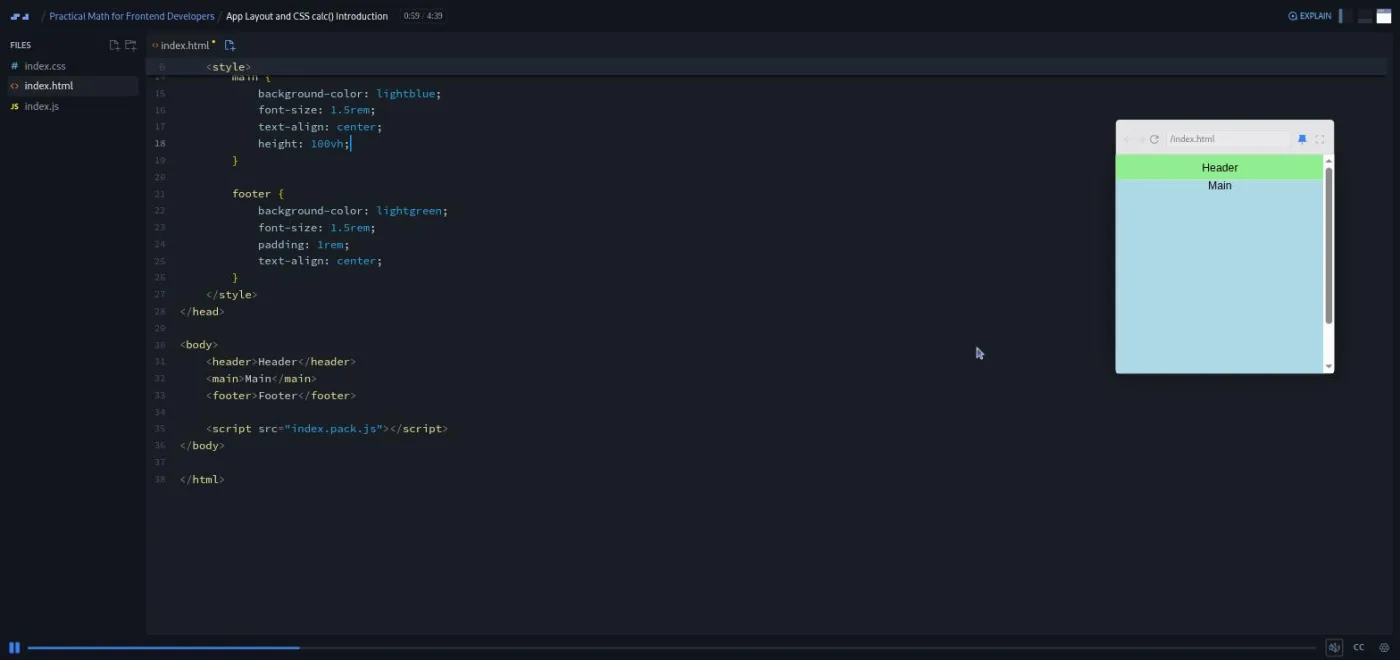
"App Layout and CSS calc() Introduction" is the layout lesson the other two apps reuse. You have a header, a main and a footer, and the goal is a header pinned to the top, a footer pinned to the bottom, and a main that fills the gap and scrolls. Ryan first sets main to height: 100vh, which pushes the footer off screen, then subtracts the header's font size and padding with calc(), then does the same for the footer. When that leaves the numbers duplicated in two places, he moves them into CSS variables on :root so that changing the header padding once resizes the main automatically. The last minute pastes in five paragraphs of lorem ipsum to show the overflow and fixes it with overflow-y: auto. There are three "pause the cast and try it" moments in four and a half minutes.
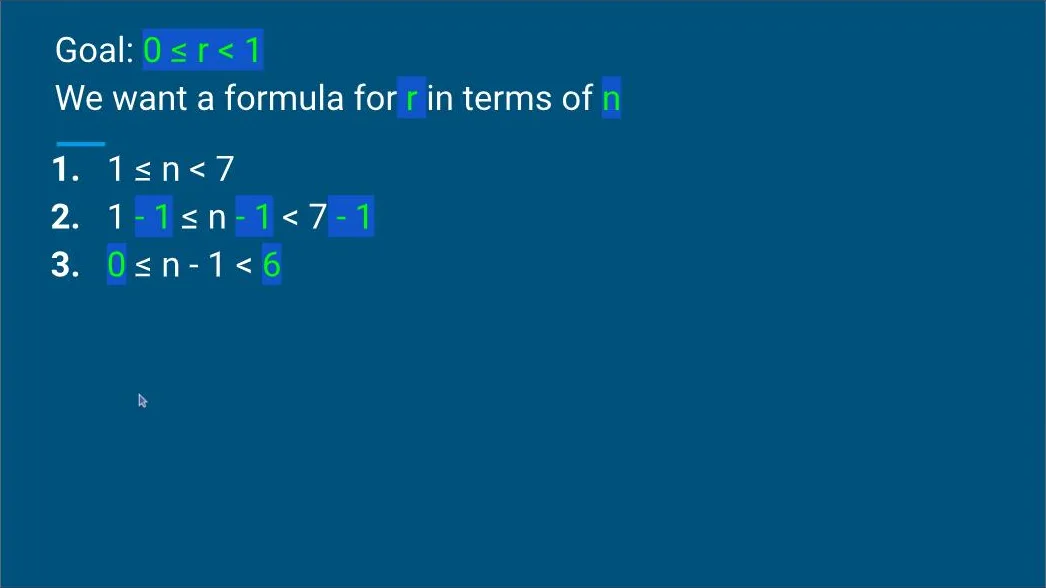
"Your roll() Function" is the longest scrim in the course at almost ten minutes and the only one with slides. Ryan wants a function that takes a min and a max and returns a number greater than or equal to the min and less than the max. He derives it on a slide, first for a six-sided die (1 <= n < 7, subtract 1 from each side, divide by 6, and you have the 0 <= r < 1 shape that Math.random() gives you), then in general, which lands on r * (max - min) + min. "Don't worry, it's nothing too complicated," he says at 1:22, "but if you want, this might be a good time to pull out a pen and paper and work alongside me." A third parameter, a float flag, decides whether to Math.floor() the result. The back half uses the function to generate a fake user with a name picked by index, an age between 12 and 64, and a height rounded with toFixed(1), with a pause prompt before each one.
2. Shopping cart (10 min, 3 scrims)
"Generate Data / Build Layout" starts with an array of food emojis Ryan "pulled from the food section on Emojipedia." He builds five random products with [...Array(5)].map(), and explains the choice with a line I liked: "in the age of ES6 and higher order functions, there's a growing sentiment that if you're writing a for loop you're doing it wrong." Each product gets a title from roll(0, possibleProducts.length), a price from roll(1, 10, true).toFixed(2), and a count from roll(1, 6). The rendering is plain innerHTML built with forEach, and the layout gives each of the three columns width: calc(100% / 3).
"Calculate Total / Apply Tax Rate" is the best short lesson in the course, because Ryan lets the bugs happen. He writes products.reduce() with a console.log inside, so you watch the accumulator go undefined when nothing is returned, then climb by one, then start appending strings because the price was stored with toFixed() ("our price is stored as a string, so it's just appending to the accumulator"), then forget the quantity ("we have two bananas here, but we're only adding the price for one banana"), then throw a floating point rounding error. Each fix is one edit. A random tax rate between 5 and 9 percent comes from roll(5, 9, true).toFixed(1), and a taxed() function applies it. His verdict on the total: "Those are some expensive groceries, but, hey, that's the price of avocados these days."
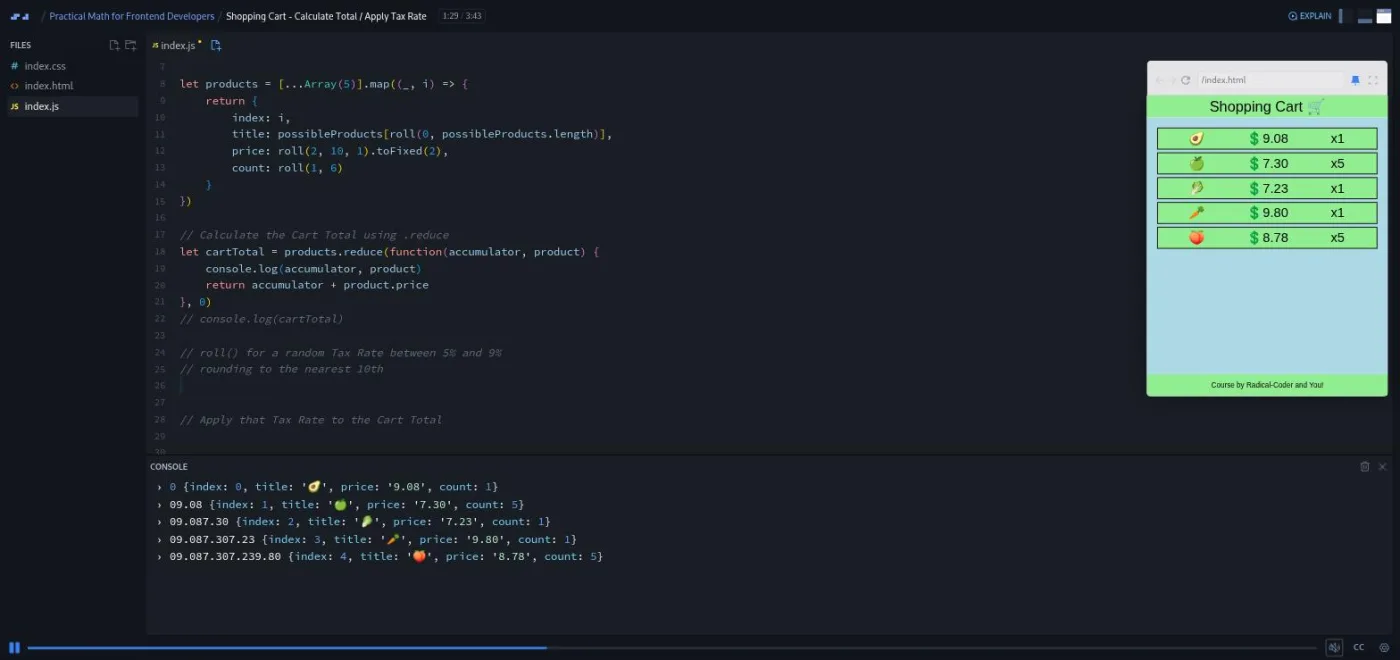
The 93-second "Bonus Challenge" adds a random weight in ounces to each product, widens the layout to four columns, and totals the weight with the same reduce line, price swapped for weight. It is labelled a challenge but works like the other scrims: a prompt to pause, then the solution.
3. Weekly schedule (16 min, 3 scrims)
"An Intro to JavaScript's Date Object" is a console-only tour with no layout. Ryan shows the four ways to construct a date (no arguments, individual components, milliseconds, and a date string) and then the traps: months are zero-indexed, so passing 3 gives you April; a two-digit year lands you in 1915; getYear() returns 120 for 2020 because it counts from 1900, so use getFullYear(). Setters like setYear() return milliseconds since 1 January 1970, which you can feed back into new Date(). He notes that "a lot of people nowadays use a library like Moment JS, but you might not always have access to that for every project," which is true, though a 2026 viewer would reach for a different library.
"Using Date() to Build Week / Generating Tasks" hard-codes the first day to 1 March 2020 "because you are almost certainly watching this cast in the future." You write getNextDay() with setDate(day.getDate() + 1), and Ryan points out that the Date object "is smart enough to know if you're at the end of the month or the end of a year and it'll roll over accordingly." Then generateTasks() rolls two to five tasks per day, names them Task ${roll(1, 61)}, and decides whether each is complete with roll(0, 2) and a ternary. buildWeek() maps over seven slots and advances the date each time.
"Build Layout / Display Data" is seven minutes and the one where the pieces combine. Each day gets height: calc(var(--main-height) / 3) so three days fill the screen, and Ryan mentions you could swap the 3 for a 4 or 5 for a different view. Tasks render as circles from a reduce that builds HTML strings, with flex-wrap and space-around to stop them stacking, and a ternary adds a checked class. Two more reduce calls count completed tasks per day and per week (he counts the dots on screen to check: "one, two, three, four, five, six, seven"). The closing problem is the one that sells calc(): adding a weekly summary bar at the top pushes Tuesday off the bottom, so the summary's font size and padding have to be subtracted before dividing by three, in parentheses, "because of order of operations."
4. CSS shapes and the monthly expense sheet (18 min, 3 scrims)
"A Brief Exploration of CSS Shapes" is a four-minute aside that does not feed into the apps. A square, then border-radius: 50% for a circle ("the real trick that we need to learn"), then transform: rotate(45deg) for a diamond, then the border hack for a triangle: zero width and height, a thick border, and only one side coloured. The last minute puts a smaller red triangle on a black one with ::after and absolute positioning to fake a border. It is a nice demonstration, and it is the one scrim without a pause prompt.
"Generate and Display Month" builds the calendar. The useful trick is getDaysInMonth(month, year), which returns new Date(year, month, 0).getDate(): day zero of the next month is the last day of this one, and February 2020 correctly comes back as 29. From there buildMonth() maps over that many days, each with a date and an empty expenses array. The layout puts days at width: calc(100% / 3) and height: calc(var(--main-height) / 4), and when a border makes them wrap, the fix is box-sizing: border-box.
"Generate, Display, and Track Expenses" is the eight-minute finale. Ryan rolls an annual income between 31,000 and 40,000 (he looked up the US median and found it "surprisingly low"), divides by twelve, subtracts a rolled rent and utilities, and displays the budget. Each day gets zero to four expenses between one and thirty dollars, rendered in red. The net value is a reduce inside a reduce, which he immediately refactors into a getDailyCost() helper "so that we don't have a bunch of nested reduce values." The first run comes out negative: "Oof. Looks like this month, we came out negative. That's not good." He lowers the maximum expenses per day to three and shrugs, "I guess we could all use a raise."
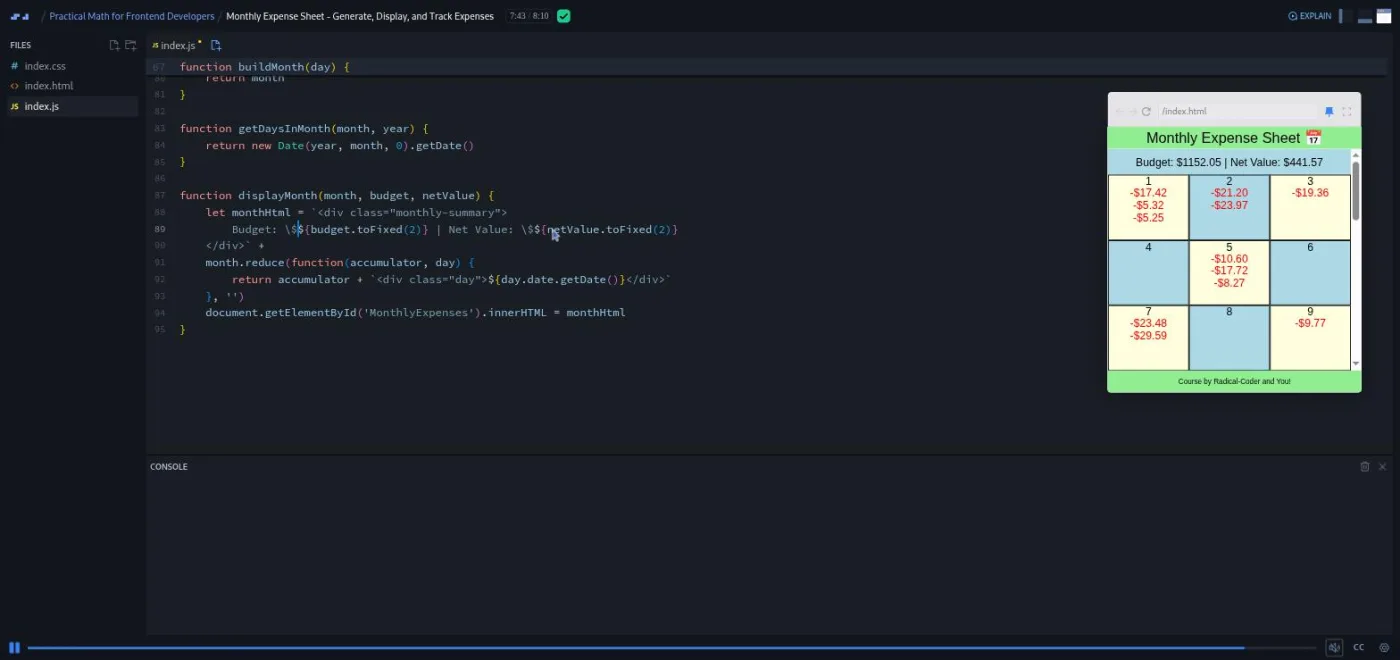
The scrim also carries the closest thing the course has to a thesis, at 5:08: "One thing I'd like to point out, that I hope has kind of been a theme throughout this course, is looking at your code like it's a math problem." Put your variables at the top, he says, the way you would list the givens in a word problem.
5. Scrimba wrap-up (3 min, 3 scrims)
"That's all Folks" is Ryan's one-minute recap and a pointer to his Discord and social links in the scrim's HTML. "Congratulations" is a Scrimba house scrim in which Leanne pitches the Frontend Developer Career Path; the figures she quotes (around seventy hours, a Pac-Man game, a Netflix clone) describe the path as it was in 2020, not the current one. "How to Utilize Your Certificate" is Per Borgen's standard 53-second reminder to add the certificate to LinkedIn.
What a lesson feels like
A scrim here is four to eight minutes of Ryan typing in the editor with the preview and console open, no slides except in the roll() lesson and the two bookends. He narrates every keystroke, runs the code, and lets the wrong output sit on screen for a few seconds before fixing it. The "challenge" format is informal: he says "pause the video and try that yourself," you pause, you type into the same editor, you press play to compare. There is no checker and nothing marks your attempt right or wrong. I counted around twenty of these prompts across the twelve core scrims, most of them in the roll() and weekly schedule lessons.
Captions and a full timestamped transcript are available from the settings menu, with subtitles in ten languages, and playback speed is adjustable. The transcripts are auto-generated and occasionally comic (Ryan's surname becomes "Gagnon," and roll is often "role"), which matters if you plan to read instead of listen.
Free or Pro: exactly what is gated
This is a Pro course. The first three scrims (the intro, the calc() layout lesson, and the roll() function) are marked SAMPLE and play without a subscription, which is about 17 minutes and, usefully, the part with the algebra. The other twelve scrims, the three apps, and the certificate of completion need Pro. There are no Solo Projects and no AI-checked challenges in this course, so nothing inside it is gated at a finer level than "the rest of the scrims."
Pro also covers the career paths this course sits in and the Pro-only channels on Scrimba's Discord (the pricing page lists basic Discord access as free, so the server itself is not gated). See current plans (opens in a new tab) for what Pro costs in your region. If you already have Pro for a path, the course is included; I would not subscribe for this course alone.
How long it takes
The video is 64 minutes. Because the prompts are short and every solution follows within seconds, most people will finish in two to three hours: about ninety minutes if you pause and type at each prompt, closer to three hours if you rebuild the three apps in your own editor afterwards, which is the only way the calc() and Date habits will stick. It fits in a single evening, or in three lunch breaks at one app per sitting.
Who it's for, and who should skip it
It fits self-taught developers who are past the basics of JavaScript but still write for loops where a map or reduce would do, who have never used CSS calc() with variables, or who have never had to construct dates by hand. It also fits anyone who needs fake data for a prototype and has been hard-coding it.
Skip it if you already reach for reduce without thinking, know that months are zero-indexed, and have built a viewport-filling layout with calc(). You would learn nothing new, and the "math" title will have oversold it. Skip it too if you wanted geometry, easing functions, or anything for canvas or games; none of that is here. Complete beginners should do Learn JavaScript first, since the course assumes arrow functions, template strings, spread, and getElementById without explanation.
Prerequisites
Comfortable JavaScript basics: functions, arrays, objects, template strings, and the DOM methods getElementById and innerHTML. Basic CSS, since the layout scrims edit height, padding, and display: flex without explaining them. No math beyond school algebra; the one derivation is on a slide and Ryan says you can skip following it. Nothing to install: every scrim runs in the browser.
Where it fits
Scrimba lists it under the Frontend Developer Path and the Fullstack Developer Path. It is a one-evening top-up between Learn JavaScript and the React track: the reduce and map patterns reappear constantly in Learn React, and the CSS variables and calc() work pairs with Learn CSS Variables. If the course leaves you wanting real algorithmic depth, Data Structures and Algorithms is the next step, not this one repeated.
Strengths and limits
What it does well: the roll() function is a reusable tool you will keep, Ryan lets bugs happen on screen and fixes them one edit at a time, the three apps are small enough to finish in one sitting, and the calc() with variables pattern is taught properly, including the order-of-operations trap.
Where it is limited: the title promises more math than the course contains, there are no graded challenges or solo projects, the apps are unstyled and stay in one HTML file each, the recording dates from 2020 (Moment.js reference, a 2020 career path pitch), and the auto-generated transcript mangles a few key words.
Related courses and comparisons
- All JavaScript courses, the category this course sits in
- Learn JavaScript, the language prerequisite
- Learn CSS Variables, more on the
:rootvariables the layouts depend on - Build Websites with Figma, HTML, and CSS, more applied frontend layout work
- Learn React, where the
mapandreducehabits reappear in components - Data Structures and Algorithms, if you wanted the mathematical side of programming
No. It is a Pro course. The first three scrims (intro, the calc() layout lesson, and the roll() function) are free samples, about 17 minutes in total; the remaining twelve scrims and the certificate need a Pro subscription.
One derivation: turning Math.random()'s 0 to 1 range into any min to max range, shown on a slide in the roll() scrim. Everything else is arithmetic inside CSS calc(), reduce() totals, percentages for a tax rate, and Date object handling. No geometry, trigonometry, or animation math.
Ryan Gonyon, who goes by Radical-Coder online. In the intro he describes ten years of programming, a computer science degree with a minor in mathematics, and experience tutoring K-12 and university math. The two closing scrims are Scrimba house scrims by Leanne and Per Borgen.
Three single-file apps: a shopping cart with random products, a total and a tax rate; a weekly schedule with random tasks and completion counts; and a monthly expense sheet with a rolled budget, daily expenses and a net value. There is also a four-minute CSS shapes aside.
Not in Scrimba's usual sense. There are no AI-checked challenges and no Solo Projects. Instead Ryan says 'pause the video and try it' around twenty times, and you compare your attempt with his solution when you press play.
Yes. Every scrim has captions, a timestamped transcript in the settings menu, and subtitles in ten languages. The transcript is auto-generated and mis-hears a few words, including the instructor's name and 'roll'.
No. Every scrim runs in Scrimba's browser editor with index.html, index.css and index.js. Downloading the code to modify it locally is optional, and Ryan invites you to.
64 minutes of video. Plan for two to three hours if you type at each pause prompt and rebuild one of the apps yourself.
The recording is from May 2020. Everything it teaches (calc(), CSS variables, Date, reduce) still works unchanged, but the Moment.js mention and the career path pitch in the Congratulations scrim are dated.