Learn Cybersecurity
Learn Cybersecurity is Scrimba's 5-hour Pro course on the security work that lands on a working developer's desk. Rachel Johnson teaches threat modelling and authentication; Jonathan Hill has you attack your own registration form with XSS and SQL injection, then build Express rate limiters. It is the most practical five hours on app security in the catalog.
Reviewed inside the course with a Pro account, September 2026.
Quick answer
It fits developers who already build Node or Express APIs and want to stop shipping the obvious holes, not people chasing a cybersecurity career or a certification. The catch: the first half is mostly slides and reasoning, with little code until the challenge scrims. Pair it with Learn Express.js if you have not built an API yet, or take it right after your first one.
Learn Cybersecurity
ProTaught by Rachel Johnson (opens in a new tab)
Threat modelling, authentication models, input validation with Zod, and rate limiting, taught in Node by Rachel Johnson and Jonathan Hill.
View on Scrimba (opens in a new tab)Is it worth your time?
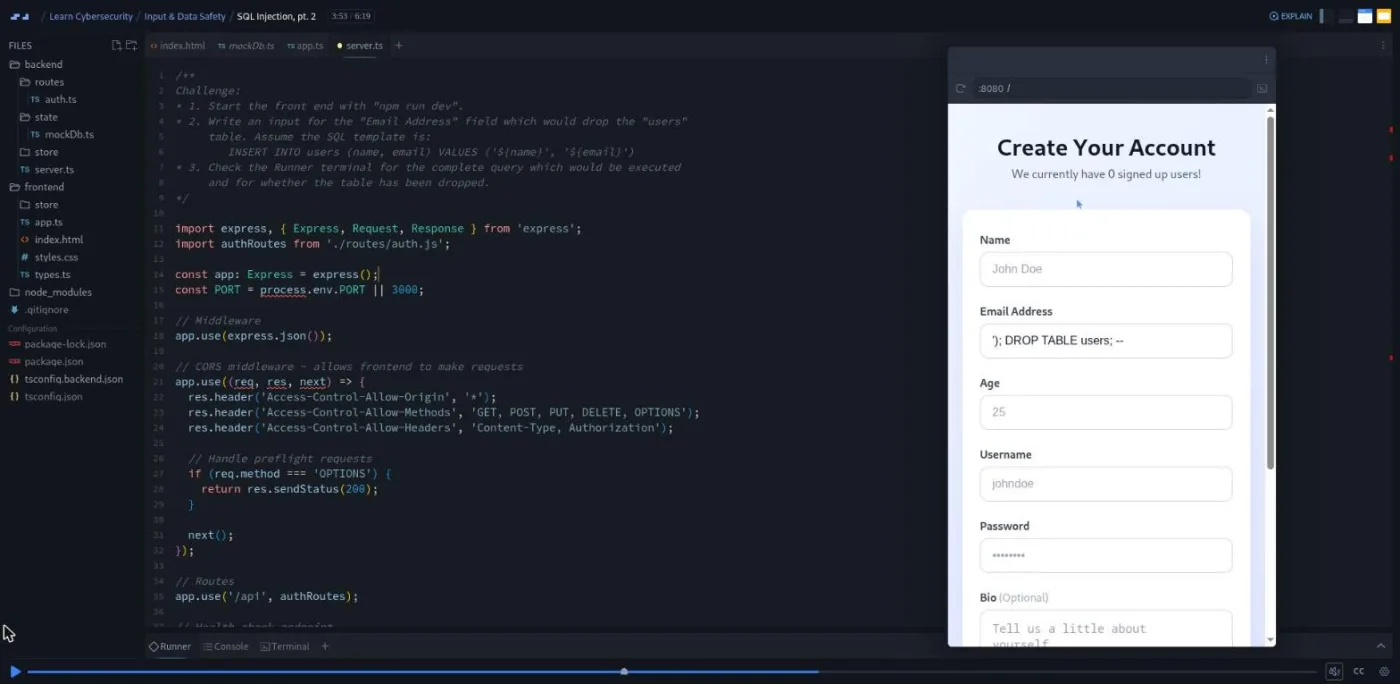
Most developers learn security from an incident. This course is the cheaper route, and the reason it works is that it makes you do the attack before the defence. In the input safety module you paste an <img onerror> payload into a name field and watch the page pop a fake "data breach" alert. Two scrims later you type '); DROP TABLE users; -- into an email field and the runner terminal prints "Disaster dropping users table" while the user counter at the top of the form drops to zero. Nothing real is deleted, but you have now written a SQL injection, and that memory sticks better than a slide about parameterised queries.
The first half is different in style. Rachel's modules are mostly slides and reasoning: you get a food delivery app called QuickBite, a list of bug reports, and a pause where you classify each one. There is little code until the challenge scrims. If you want to type from minute one, that half will feel slow. If you want to be able to explain in an interview why a JWT is "stateless" and why that is sometimes a bad thing, it is exactly the right depth.
This is developer-facing app security, not a security-engineer track, and it will not make you one. It covers only a slice of the OWASP top ten in code (XSS, injection, and denial of service). Rate limiting gets almost as much time as authentication, which tells you what the course cares about most: protecting an API you have already built.
What you'll learn
Course curriculum
4 modules · 81 lessons
- Think Like a Security-Minded Developer
- Authentication and Identity
- Input & Data Safety
- Rate Limiting & Throttling
Lesson counts are the scrims I counted in each expanded module in September 2026, 81 in total plus two course-level scrims (a Scrimbassador pitch and a certificate explainer) that make up the 83 lessons Scrimba's structured data reports. The module headers on the course page show much smaller figures (3, 4, 12 and 12), which appear to count the chapters inside each module rather than the scrims you click.
Inside the course, module by module
1. Think Like a Security-Minded Developer (30 min, 10 scrims)
Rachel opens with a confession: her first student portal was broken into by "a curious seven year old" who changed the student ID in the URL and saw another student's profile. "The code worked exactly like I wrote it," she says in the intro, "I just hadn't written it with attackers or even accidentally curious users in mind." The phrase she repeats through the module is "Think like an attacker. Design like a defender."
The module has two halves. STRIDE first: six categories (spoofing, tampering, repudiation, information disclosure, denial of service, elevation of privilege), each illustrated on the QuickBite delivery app. Then the Potential Threat Modelling scrim opens a stride_challenge.md file with six threats; Rachel classifies the first one with you, the screen pauses at 1:06, and you label the other five. OWASP follows the same shape: the Meet OWASP scrim walks through the broken access control page and its "how to prevent" list, then Bug Triage Challenge gives you six QuickBite bug reports (an uploaded menu.js that executed, webhooks arriving with fake "paid" statuses, card numbers in the logs) to map onto OWASP categories and fix.
As Rachel puts it at the end of that challenge, "If you can name the problem, OWASP will point you straight to the right solution." All Together Now closes the module with the line that summarises it: "Stride predicts and OWASP diagnoses." The first three scrims are free previews, the rest need Pro.
2. Authentication and Identity (67 min, 19 scrims)
This is the module I would send someone to if they only had an hour. Rachel separates authentication (who are you) from authorization (what may you do), then teaches three identity models in three arcs, each ending in a challenge.
Stateful identity is sessions and cookies. The core image is a gym locker: "It's a little bit like leaving your stuff in a gym locker and grabbing a numbered key for that locker. The key itself doesn't list what's in your locker." Two pitfall scrims follow, then the Stateful Challenge opens stateful_challenge.js with four broken cookie and session examples. The first cookie contains the user's password and IP address and a max age of about 32 years; you cut it down to a session ID and 30 minutes, then repeat on the other three.
Stateless identity covers opaque bearer tokens and then JSON Web Tokens. "This text sausage is a JSON web token," Rachel says of the three-part string, before explaining header, payload and signature and how the server's secret makes the signature tamper proof. The Stateless Challenge is the longest scrim in the module at just over six minutes: six scenarios, some fixed in code (a lookup function that accepts expired tokens gets an expiry check and a splice), some fixed with a sentence (a secret committed in plain text with no expiry claim).
Delegated identity is "sign in with Google". Rachel is careful to separate OAuth's consent screen from your app's own roles, and the walkthrough ends with the point that matters: "our app never handled passwords, never verified the user directly, and never stored the user's credentials." How to Choose then argues that real systems mix all three ("a delegated identity to prove who the user is, a JWT for API calls, and a simple session for the main website"), and a final challenge asks you to pick a model for five scenarios, from an internal admin dashboard to a single-server hobby project.
One oddity: the third scrim is still titled "BKS 2.3 v2 - Stateful, Stateless, and Delegated", which looks like an internal working title that was never renamed.
3. Input & Data Safety (101 min, 25 scrims)
Jonathan Hill takes over, and the format changes to a real project. Form Project Setup walks through a registration form: a TypeScript front end on port 8080, an Express 4 back end on port 3000, a mock database with a user counter at the top of the page, and an endpoint literally named /api/register-vulnerable. Jonathan turns off HTML5 validation with novalidate so that "we sort of start from scratch". The package.json pins Express 4.18, Zod 4.3 and TypeScript 5.3.
Three attacks come first. Cross-Site Scripting is two scrims: a demo where an <img onerror> payload in the name field fires ("Oh, blimey. Data breach. XSS successful"), then a challenge where you paste a div, an SVG and an iframe into the form, change innerHTML to textContent in app.ts, restart the front end and confirm they render as text. Denial of Service is a six minute slide lecture on SYN floods, botnets and the defences (redundancy, rate limiting, hardening, patching, monitoring). SQL Injection ends in the drop-table challenge described above, followed by parameterised queries as the fix.
Then a short Zod course inside the course, seven scrims in a separate mini project. The Star Wars challenge is representative: import Zod, write a characterSchema with a string name and a number episode, validate { name: "Luke Skywalker", episode: 4 }, then break it with "4" to see the ZodError. Jonathan's recurring metaphor is a machine you calibrate with a schema and feed data through. From there you npm install zod in the form project, write a validate(schema) middleware factory (the challenge is remembering schema.safeParse(req.body)), mount it on a new endpoint, render its 400 errors in the form, and build the register schema out field by field until the final challenge: a name of 2 to 50 characters with a regex, an optional bio of up to 500, and a trim.
The lesson underneath all of it, from the XSS challenge: "It's not just the front end that shouldn't trust any input. The back end also shouldn't trust inputs. Other consumers of the API may render it unsafely."
4. Rate Limiting & Throttling (98 min, 27 scrims)
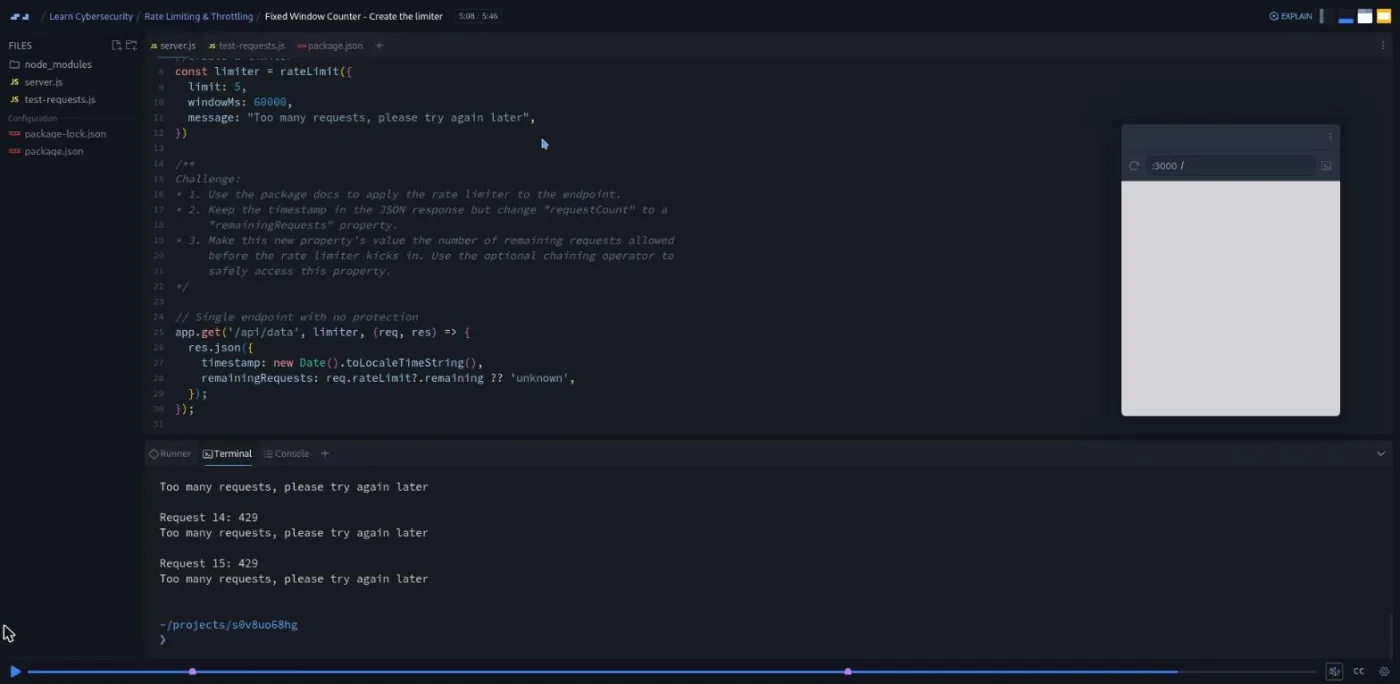
The longest module by scrim count and the most hands-on. It starts with a definition you will use: "Rate limiting is like a hard cap on requests per time period, whereas throttling is slowing down responses when the limit approaches." The project is a single Express endpoint plus a test-requests.js script that fires bursts at it, so every change is visible as a column of 200s turning into 429s in the terminal.
Fixed Window Counter is ten scrims of building with express-rate-limit. The first challenge is to read the package docs and configure five requests per sixty seconds with a "Too many requests" message; the second is to mount the limiter between the path and the handler and expose req.rateLimit?.remaining in the response. Then three scrims on client identification: by IP, by user ID (a mock x-user-id header and a keyGenerator that returns req.user.id, with three users interleaving so you can watch each one get its own window), and by API key or session ID.
The next three algorithms are theory with a parking garage analogy: sliding window log, sliding window counter, and token bucket. Token bucket then becomes a terminal game (token_bucket_game.js) where each round is one second, you type how many requests to send, and you finish the TokenBucket class yourself across several challenges. Leaky bucket gets the shortest treatment, and Jonathan's summary is the one to remember: "token bucket as here are tokens, spend them whenever you want, and this leaky bucket as get in line. I'll process you at my pace."
Throttling closes the module with express-slow-down. The final challenge brief reads like a ticket: the system degrades after three requests in ten seconds, so delay request four by one second, five by four, six by nine, and cap everything at seven requests per thirty seconds. The answer is a delayMs of (hits - 3) * (hits - 3) * 1000 next to a limiter set to seven requests per thirty seconds. Part two runs it and finds request eight completing before request seven, because seven was sitting on a sixteen second timer while the limiter filled up. "Delayed requests don't necessarily process in arrival order," Jonathan notes, which is the kind of thing you only learn by running it.
What a lesson feels like
Scrims run two to six minutes. In Rachel's modules the screen is mostly a slide with a diagram, and a markdown or JavaScript file opens only for the challenges; her pattern is to solve scenario one out loud, pause, and walk through "what I would have done" for the rest, with a reminder that your answer does not have to match hers. In Jonathan's modules the editor and a mini browser are open the whole time, and the challenge text sits in a comment above where you type. Saving a file recompiles the back end through the runner; the front end needs a Ctrl+C and npm run dev in the terminal, which he reminds you about in a README because you will do it a dozen times.
Every scrim has a timestamped transcript and captions, with subtitles in ten languages. I saw no "Challenge with Instant Feedback" icons in the table of contents, so the challenges are the classic kind: pause, code, resume and compare. Both teachers point you at external docs (OWASP, the Zod docs, the two npm packages) rather than spelling every argument out, which is realistic and occasionally frustrating.
Free or Pro: exactly what is gated
Three scrims are free previews, marked SAMPLE on the course page: the course introduction, The STRIDE Threat Model, and Potential Threat Modelling. Everything after that, 78 scrims across all four modules, needs Pro. So does the certificate of completion at the end.
There are no Solo Projects in this course, so there is no separate Pro-gated project tier: it is simply a Pro course. Pro also unlocks the career paths and the Pro-only channels on Scrimba's Discord; the pricing page lists basic Discord access as free, so the server itself is not gated. See current plans (opens in a new tab) for what Pro costs in your region.
How long it takes
Five hours is video runtime. The reasoning challenges in modules 1 and 2 add ten minutes each if you write your answers down rather than nodding along. Modules 3 and 4 are slower: each challenge needs a server restart and a test run, the Zod and rate-limit docs are open in another tab, and the throttling results are worth re-reading. Budget 10 to 15 hours in total, which is a week at an hour a day or two focused weekends. If you take Jonathan up on his closing suggestion to build a schema for your own form, and to combine a limiter, a throttle and client identification in a project of your own, add another five.
Who it's for, and who should skip it
It fits developers who have built at least one Express or Node API and want to stop shipping the obvious holes. It is a good follow-on from Learn Express.js and Learn Node.js, and anyone on the Backend Developer Path will recognise the stack. The identity module is also useful on its own for front end developers who consume JWTs without knowing what is inside them.
Skip it if you have never built a backend: module 3 assumes you can read an Express route and a TypeScript type, and module 4 assumes middleware order makes sense to you. Skip it too if you want general cybersecurity, ethical hacking, or a security certification track; none of that is here.
View Learn Cybersecurity on Scrimba (opens in a new tab)Prerequisites
Scrimba's own list is JavaScript and Node basics plus a grasp of HTTP requests, forms and databases, with no security background required. I would add: comfort with TypeScript syntax (the form project is written in it, though the types are simple), and enough SQL to understand what a semicolon does in a query. Learn TypeScript and Learn SQL cover both.
Where it fits
This is a standalone Pro course on the course page, but its teacher card places the material inside the Backend Developer Path, and the code assumes the Express you learn there. Take it after your first API and before you deploy anything with real users. The identity module is worth revisiting when you start Intro to Supabase or Learn Firebase, because both hand you a delegated auth flow and this course explains what they are doing for you.
Strengths and limits
What it does well: you perform the XSS and SQL injection attacks yourself before defending against them, the identity module gives you language for sessions versus tokens versus OAuth that most tutorials skip, the Zod section is a compact, reusable validation course, and the rate limiting module ends with a challenge whose output surprises you in a realistic way.
Where it is limited: the first two modules are mostly slides with little code, the OWASP top ten is covered in code for only three categories, there is no deployment or infrastructure security at all, and the leftover "BKS 2.3 v2" scrim title suggests the module has not had a final polish.
Related courses and comparisons
- Learn Express.js, where the auth and validation code applies directly
- Learn Node.js, the backend foundation
- Learn Firebase and Intro to Supabase, for managed auth after you understand it
- Learn TypeScript, if the form project's syntax is new
- All JavaScript courses, the full category hub
- Scrimba vs Boot.dev, if you are weighing backend-focused platforms
No. Only the first three scrims (the introduction, The STRIDE Threat Model, and Potential Threat Modelling) are free previews. The remaining 78 scrims and the certificate need a Pro subscription.
Rachel Johnson teaches the first two modules (threat modelling and authentication). Jonathan Hill teaches the last two (input safety with Zod, and rate limiting and throttling).
No. It is application security for developers: STRIDE and OWASP, sessions versus tokens versus OAuth, XSS and SQL injection, input validation, and rate limiting. There is no network security, malware, or penetration testing content.
A registration form with an Express and TypeScript back end that you attack with XSS and SQL injection and then secure with Zod validation middleware, a token bucket terminal game, and an Express API protected by express-rate-limit and express-slow-down.
The form project's package.json pins Express 4.18, Zod 4.3, and TypeScript 5.3. The rate limiting project uses express-rate-limit and express-slow-down.
Yes. The last two modules assume you can read an Express route, understand middleware order, and follow simple TypeScript types. Scrimba lists JavaScript and Node basics plus HTTP, forms, and databases as prerequisites.
Not that I saw. The table of contents shows no Challenge with Instant Feedback icons. Each challenge pauses the scrim, you write your answer or code, and the teacher walks through a possible solution when you resume.
Yes. Every scrim has a timestamped transcript panel and captions, with subtitles in ten languages.
No. The Express servers, the runner, and the terminal all run inside the Scrimba editor. You restart the front end with Ctrl+C and npm run dev in the built-in terminal.
About 5 hours of video. Plan for 10 to 15 hours with the challenges, server restarts, and time in the Zod and rate-limit docs.