Intro to NestJS
Scrimba's free Intro to NestJS is an 83-minute, 22-scrim course from DonTheDeveloper (Don Hansen on the title card). You build the profile API of DevMatch, a dating app for developers, on NestJS 11, adding controllers, services, DTOs, exception handling, pipes, and a guard. If you already know Express, it's a solid, fast look at a structured, TypeScript-first framework.
Reviewed inside the course with a Pro account, September 2026.
Quick answer
Intro to NestJS fits developers who've already built an Express API and want a fast tour of a structured, TypeScript-first framework: modules, controllers, services, DTOs, pipes, and guards, with 12 checked challenges. The catch is scope: no databases, authentication, or tests, just the DevMatch profile API in 83 minutes. Start with Learn Express.js first if you haven't built a Node API yet.
Intro to NestJS
FreeTaught by DonTheDeveloper (opens in a new tab)
Build the profile API of a dating app for developers with NestJS 11: modules, controllers, services, DTOs, exception filters, pipes, and guards, with 12 checked challenges.
Start free on Scrimba (opens in a new tab)
Is it worth your time?
Yes, if you meet the prerequisite. The whole course is one project, and every lesson adds one Nest concept in the order you would meet them on a real backend: module, controller, routes, service, then error handling and validation. Nothing is abstract. When decorators show up (the @Something() annotations Nest uses to attach behaviour to classes and methods), they show up on a controller the CLI just generated, and Don explains them in one sentence: "They're basically higher order functions."
By the outro you have a working REST API. It returns 404s with custom messages, rejects ids that are not UUIDs, and has a guard on the delete route.
Scope and level are the two limits. Scope: the data lives in an array in the service. Don says in the outro to "try the TypeORM or Prisma guides in the docs to persist profiles instead of using an in memory array," and he keeps authentication out on purpose: "I wanted to avoid diving deep into authorization in this course and just focus on the fundamentals of Nest."
Level: the second scrim tells you plainly to have "familiarity with building personal projects with Express" and to "think of this as the next step after you build a few basic Express apps." If you have never written a route handler, the pace will lose you by lesson five.
One more thing matters for a course this short: the challenges are real. Twelve scrims stop and hand you a numbered brief (the GET All Profiles lesson does it twice). The longest lesson, Service: Create Profile at 9 minutes, is mostly you working, then Don debugging two bugs he wrote on purpose.
What you'll learn
Scrimba presents this course as a flat list with no module headers. The groupings below are mine, made by topic so the curriculum bar has something to show. The scrim counts and durations come from the expanded table of contents in September 2026.
Course curriculum
6 modules · 22 lessons
- Getting started: why Nest, DevMatch, setup, modules and decorators
- Controllers: GET, GET by id, POST, PUT, DELETE
- Services: find, find one, create, update, remove
- Exception filters and error handling
- Pipes and guards
- Outro and certificate
The 22 scrim durations add up to 87 minutes when summed one by one. Scrimba's header says 83 min and its structured data says 1 hour 24 minutes, so the difference is rounding on their side, not a missing lesson. The 22 lessons figure matches Scrimba's own count exactly; I re-expanded the table of contents for this pass and got the same 22.
Inside the course, module by module
1. Getting started (10 min, 4 scrims)
"Why NestJS?" is the free sample lesson and the only one with a pitch in it. Don frames Nest as the step after Express: "Nest actually uses Express under the hood, so it's compatible with a lot of Express middleware," with Fastify as an option. He is candid about the job-market angle, which I did not expect in a framework intro. "Most aspiring developers are just building basic Express apps," he says, and "being able to demonstrate that you're familiar with and can build things with a more scalable framework like Nest looks way better than piecing together a simple Express app." Take that as one instructor's opinion, not a universal truth, but it is a real reason to be here.
"DevMatch" is a 90 second brief for the project, plus the prerequisites and a version note: "at the time of this recording, you'll need at least version twenty of Node to run Nest." "Setup" is two minutes.
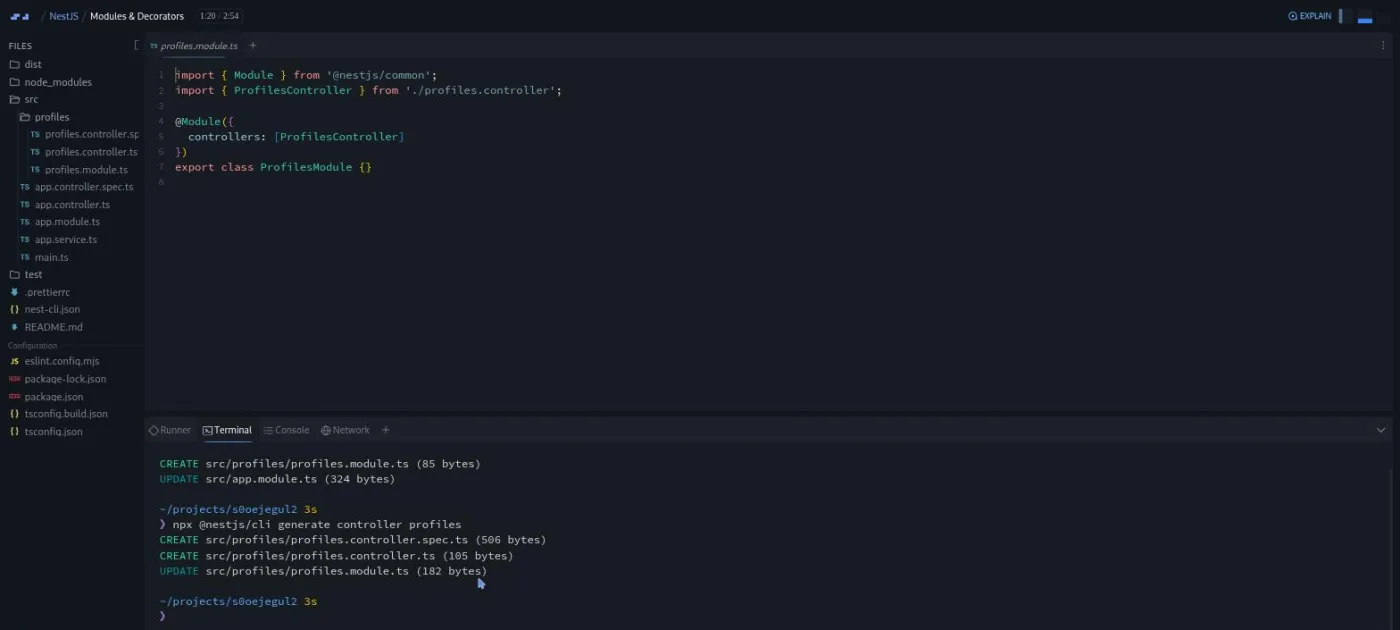
"Modules & Decorators" is where you touch the framework. Don runs npx @nestjs/cli generate module profiles and generate controller profiles in the built-in terminal, walks through what the CLI wrote into app.module.ts, and introduces the @Controller('profiles') decorator. He deliberately does not scaffold the whole feature at once: "as we're learning, let's use the CLI more selectively to generate what we need as we go through the lessons."
2. Controllers (19 min, 5 scrims)
One route per lesson. A controller in Nest is the class that receives HTTP requests and decides what to do with them. "Controller (GET) All Profiles" (4:39) adds @Get() and a @Query('location') parameter, and it is the only scrim with two challenge icons, so it stops you twice. "GET Single Profile" adds @Get(':id') with @Param.
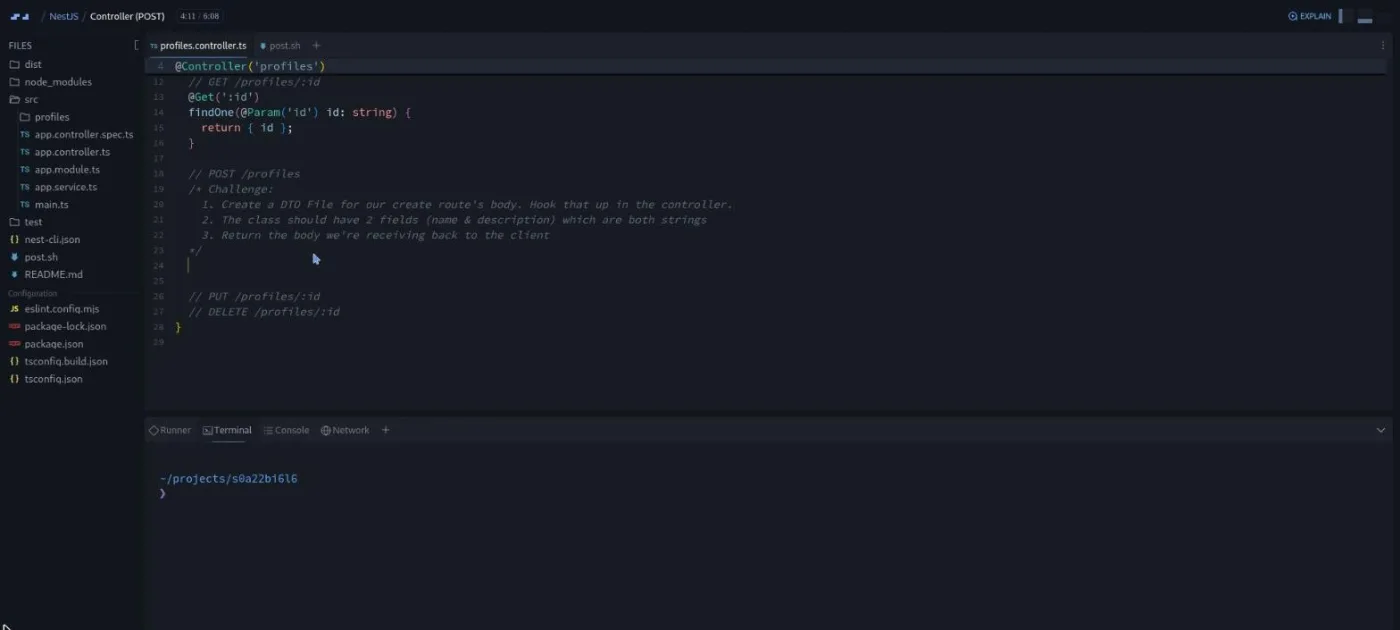
"Controller (POST)" (6:08) is where the course gets interesting. Don introduces the data transfer object, or DTO, a class that describes the shape of a request body: "think of a DTO as a little shape contract for each request." He explains why it is a class and not an interface: "classes stick around at runtime. That lets Nest validation features, pipes, read the class metadata and reject bad payloads."
He then explains a quirk of the platform. Scrimba's network tool only handled GET at the time of recording, so POST, PUT, and DELETE are tested with bash scripts he wrote. bash post.sh runs curl -X POST -i http://localhost:3000/profiles with a JSON body.
Then he ships a bug. The DTO import points at the wrong folder, the curl response comes back 201 Created with a content length of zero, and he uses the runner panel to find it. "Now maybe I created this bug on purpose or maybe it was an accident. You'll never know." The challenge that follows asks you to redo the whole thing yourself.
"Controller (PUT)" and "Controller (DELETE)" are shorter, at 2:42 and 3:15. PUT adds @Put(':id') with a second UpdateProfileDto. DELETE adds @Delete(':id') with @HttpCode(HttpStatus.NO_CONTENT), so a successful delete returns 204 and no body. Each has a challenge.
3. Services (25 min, 5 scrims)
The controller so far returns whatever it receives. This section moves the logic into a ProfilesService marked @Injectable(), which tells Nest it can hand the class to any controller that asks for it in its constructor. The service holds an array of three seed profiles (Brianna Watts, Jasper Quinn, and Leo Park) with dating-profile copy written for developers: "I only speak fluent bash." "Service (Get All Profiles)" and "Get Single Profile" wire findAll() and findOne(id).
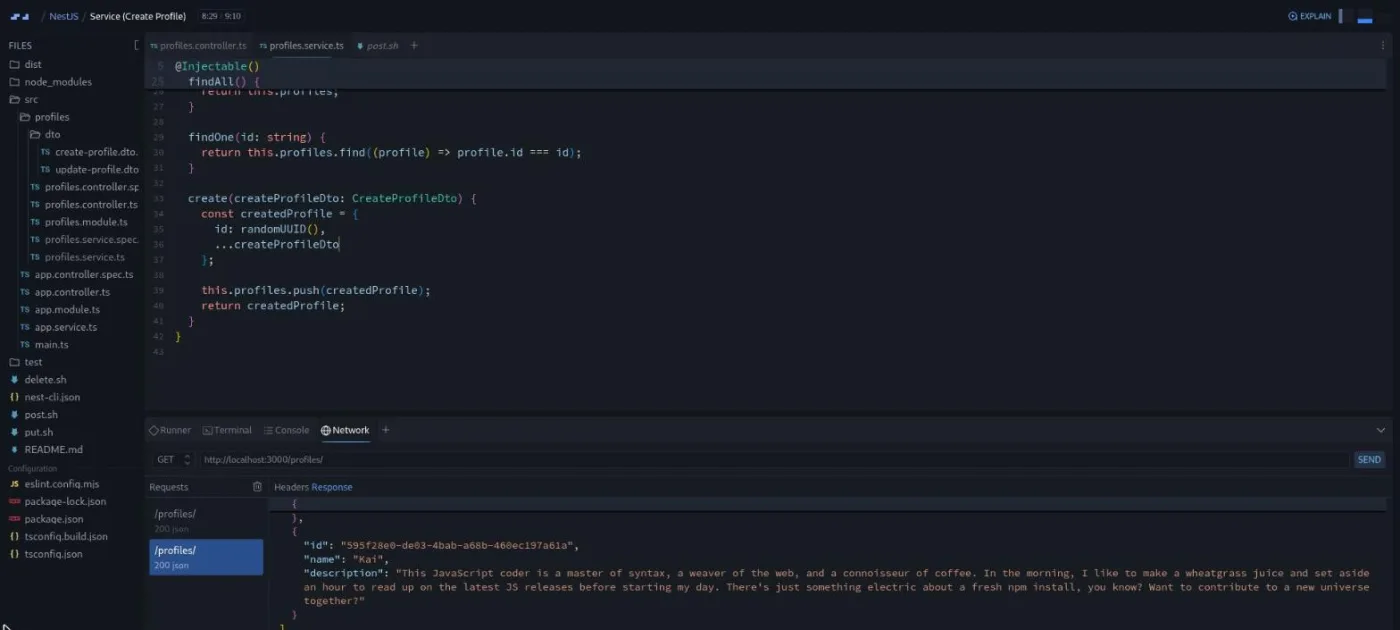
"Service (Create Profile)" (9:10) is the longest scrim in the course and the best one. The challenge brief is six numbered steps plus two testing steps, written as a comment in the controller. Don talks through it for nearly four minutes before he leaves you to it, including the design point that "the backend is where you'll typically create IDs for new resources, not the client." That is why the service uses randomUUID() from Node's crypto.
The solution is short: { id: randomUUID(), ...createProfileDto }, push, return. Then he tests it, and it fails. A plural file name in an import, and the raw body pushed instead of the created profile. Again the runner panel gives it away. His comment afterwards is the line I would put on the course page if I were Scrimba: "if you are creating bugs and you are struggling, that is a good thing. That's where the learning is happening."
"Update Profile" (5:16) and "Remove Profile" (3:54) finish the CRUD set (create, read, update, delete) with their own challenges.
4. Exception filters (15 min, 3 scrims)
An exception filter is the layer in Nest that catches whatever your code throws and turns it into an HTTP response. "Exception Filters - Bubbling Up" (7:15) is the conceptual high point of the course. Don throws new HttpException('Not found', HttpStatus.NOT_FOUND) from the controller, replaces it with Nest's built-in NotFoundException, then moves the throw into the service's findOne(). An exception thrown a layer down still becomes a 404 response: "any errors are thrown here, they're going to bubble up to the controller and Nest just provides that convenience for you." The lesson ends with the practical version, a matchingProfile check that throws Profile with ID ... not found when nothing matches.
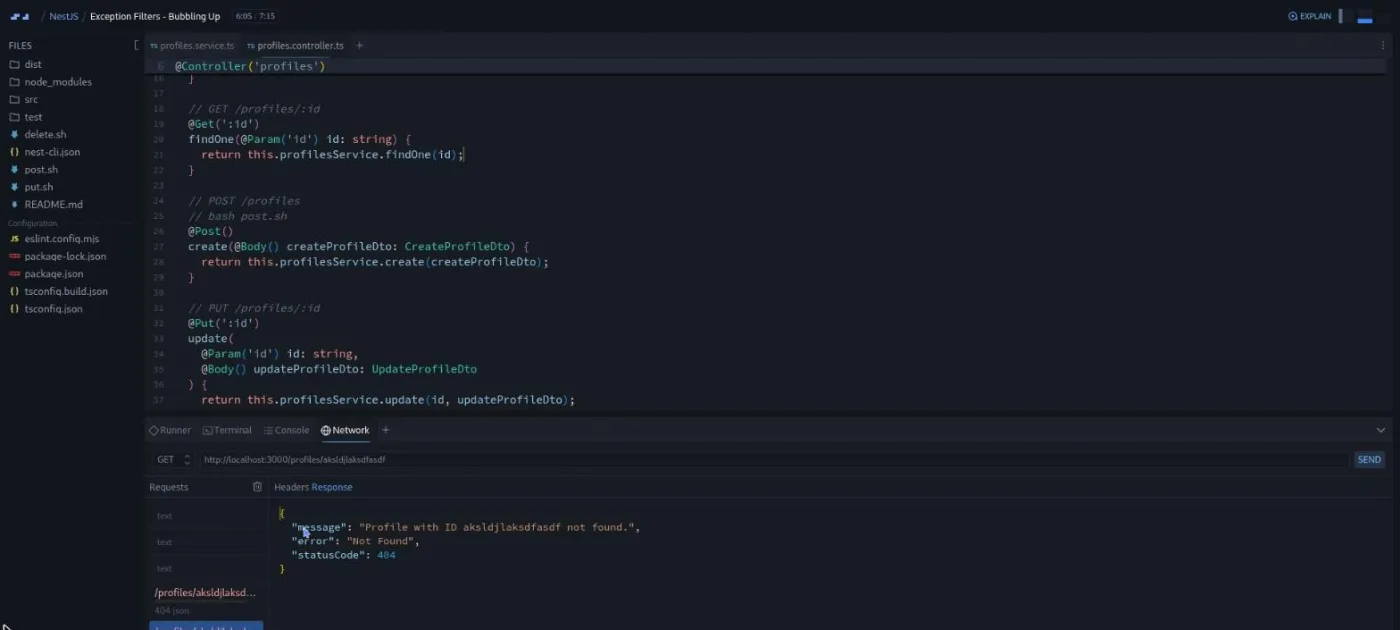
"Exception Filters - Challenges" (4:23) is the practice Don promises at the end of the previous scrim, and it carries a challenge icon.
"Handling exceptions in the controller" (3:06) shows the more conventional split. The service throws a plain Error, and the controller wraps the call in a try/catch and throws NotFoundException with the error's message. Don then sketches what a real app would do, an if (error instanceof DatabaseException) check, and admits it will not run here "because we haven't hooked up any database." His advice is to not over-engineer: "in your basic app, I think it's completely fine to throw an HTTP exception in the service layer, and I honestly would just start with that." He adds a warning about the framework itself: "Nest has a lot of depth to it, and I want you to be very careful about how deep you dive just to get a basic application up."
5. Pipes and guards (14 min, 3 scrims)
A pipe in Nest runs on a request's input before your handler sees it. Don opens "Pipes (Transformation)" (4:46) with the two jobs pipes do: "Transformation allows us to transform input data to the desired form, such as from a string to an integer. Validation ensures the input data meets certain rules before it proceeds further in the request lifecycle." This lesson does the first job: ParseUUIDPipe goes on the :id parameter, so a malformed id is rejected before your code runs.
"Pipes (Validation)" (5:41) is the one scrim whose transcript would not load for me, so here is what its finished code shows. Every :id parameter in the controller is typed as UUID from Node's crypto and guarded by ParseUUIDPipe, on PUT and DELETE as well as GET. The network tab in its final state shows a GET for a well-formed but unknown UUID returning the 404 body from the exception filters section, which is the test the lesson ends on. It carries a challenge icon, so expect to add validation yourself rather than watch it.
"Intro To Guards" (3:29) covers the layer that decides whether a request is allowed at all. Don generates a ProfilesGuard with the CLI, binds it to the delete route with @UseGuards, and flips its canActivate return between true and false to show the request going through and then getting a 403. He is upfront that this is a sketch: "if you use something like Passport.js, it provides the decorators to be able to just import the proper guard in your controller," and he leaves real authorization to the Nest docs.
6. Outro and certificate (4 min, 2 scrims)
The outro recaps what you built ("that's miles beyond the typical Hello Express app") and lists next steps in order. Connect a database with TypeORM or Prisma. Add Passport-based auth with role guards. Write Jest tests using the scaffolding Nest already generated. Add Swagger/OpenAPI docs. Deploy, with a nod that hosting on Render, Railway, or similar is easier than Nest's own deployment guide for beginners.
His last piece of advice is the same one Scrimba gives everywhere: "take one of your Express apps and convert that over to Nest. Just whatever you do, don't get trapped in tutorial hell." A one minute "How to Utilize Your Certificate" scrim and the Certificate of Completion close it out.
What a lesson feels like
These scrims run from under a minute to nine minutes; most are three to five. The IDE is Scrimba's newer workspace with a file tree and a Monaco editor. The bottom drawer has four tabs. Runner shows the Nest dev server output, including compile errors. Terminal and Console are what you expect. Network is a small request tool with a method dropdown, URL bar, and Send button. Don works in all four, and so will you. The challenges expect you to run bash post.sh in the terminal and then confirm the result with a GET in the network tab.
Challenges arrive as numbered comments in the file, the recording pauses, and you edit the same project. Every scrim has captions, a timestamped transcript under the settings menu, subtitles in ten languages, and playback speed.
Don's delivery is direct and a little conversational ("Alright. Let's go ahead and jump into the service file"). He has one habit worth knowing about: he tests everything, finds bugs on camera, and treats the runner panel as the first place to look. If you skip his testing steps you will miss half of what the course teaches.
Free or Pro: exactly what is gated
All 22 scrims, all 12 challenges, and the project are free. There are no Solo Project (PRO) items in this course; the challenges are inline and open to everyone. What Pro adds is the Certificate of Completion at the end of the list, the Backend Developer Path this course belongs to, and the Pro-only channels on Scrimba's Discord. Basic Discord access is listed as free on Scrimba's pricing page, so the server itself is not gated. See current plans (opens in a new tab) for what Pro costs in your region.
How long it takes
The 83 minutes is video. With 12 challenges that each need you to write a route or service method and test it with curl, plan for two to three times that: three to four hours, comfortably one afternoon or two evenings. The Create Profile and Exception Filters lessons are the ones to leave time for.
If you follow the outro's advice and convert one of your Express apps to Nest afterwards, that is where the real hours go. It is also the part that makes the course stick.
Who it's for, and who should skip it
It fits developers who have built an Express API or two and are curious whether a structured, TypeScript-first framework is for them. It also fits anyone on the Backend Developer Path who wants a short, complete tour of Nest's building blocks before reading the official docs. Career changers who worry that "another Express CRUD app" will not stand out will appreciate that Don raises that exact point in the first lesson.
Skip it if you have not done Node yet; start with Learn Node.js and Learn Express.js. Skip it if you need databases, authentication, or testing covered; none of those is in here. And skip it if you want a full-length build. At 22 scrims this is an orientation with a working API at the end, not a capstone.
Start Intro to NestJS for free (opens in a new tab)Prerequisites
Node fundamentals and an Express project of your own. TypeScript helps but is not required. Don says "we won't be diving that deep into TypeScript, and you'll still be able to learn how to use Nest," though Scrimba's course page recommends Learn TypeScript first.
You do not need to install anything; the project runs in the browser. If you rebuild it locally, the second scrim says you need Node 20 or newer, and the project's package.json pins NestJS 11 and TypeScript 5.7.
Where it fits
Intro to NestJS sits at the structured end of Scrimba's backend options, after Learn Node.js and Learn Express.js. Scrimba's teacher card credits Don with contributing to the Backend Developer Path, where this course lives; it is not part of the Frontend Developer Path or the Fullstack Developer Path. The natural pair for it is Learn TypeScript, since Nest leans on TypeScript classes and decorators throughout.
Strengths and limits
What it does well: it is free and short. Every lesson adds one Nest concept to a single real project, and the CLI is used the way you would use it on the job. The 12 challenges make you write and test each route yourself, and Don debugs on camera with the runner, which teaches the workflow as much as the framework.
Where it is limited: the data is an in-memory array. Authentication and databases are named as next steps but not covered, guards get one sketch lesson, and non-GET routes are tested with bash scripts because Scrimba's network tool only supported GET when the course was recorded.
Related courses and comparisons
- All JavaScript courses, the category this course belongs to
- Learn Node.js, the prerequisite
- Learn Express.js, the lighter, unopinionated alternative and the thing Nest runs on top of
- Learn TypeScript, the language the framework assumes
- Learn Next.js, fullstack JavaScript on the frontend side
- Backend Developer Path, where this course is sequenced
Yes. All 22 scrims and all 12 challenges are free with no card required. There are no Pro-only solo projects in this course. Pro adds the certificate, the career paths, and the Pro-only Discord channels.
DonTheDeveloper, whose title card gives his name as Don Hansen. He is a content creator focused on junior developers, and Scrimba's teacher card credits him with this course and contributions to the Backend Developer Path.
The profiles feature of DevMatch, a dating app for developers: a NestJS module, a controller with GET, POST, PUT, and DELETE routes, a service holding an in-memory array of profiles, DTOs, 404 handling with NotFoundException, ParseUUIDPipe on every id parameter, a validation-pipe challenge, and a guard on the delete route.
Yes. The second lesson says to treat this as the next step after building a few basic Express apps. Take Learn Node.js and Learn Express.js first if you have not.
It helps, and Scrimba recommends its Learn TypeScript course first, but Don says the course does not go deep into TypeScript and you can follow with JavaScript knowledge. Decorators and classes are explained as they appear.
No. The Nest project runs inside Scrimba's browser IDE with a terminal, a runner, and a network tab. If you rebuild it locally you need Node 20 or newer; the project uses NestJS 11 and TypeScript 5.7.
GET requests use Scrimba's built-in network tab. POST, PUT, and DELETE are sent with small bash scripts (bash post.sh and so on) that run curl from the terminal, because the network tool only supported GET when the course was recorded.
83 minutes of video, but plan for three to four hours with the 12 challenges, or one afternoon. Converting one of your own Express apps to Nest afterwards, as the outro suggests, takes longer and is worth it.
No. Profiles live in an array in the service. The outro points you to TypeORM or Prisma for persistence and to Passport for authentication, and the guards lesson is an introduction only.
The course shows both. Exception Filters throws NotFoundException from the service and lets it bubble up; Handling exceptions in the controller shows the try/catch version in the controller. Don's advice for a first app is to throw the HTTP exception in the service and keep it simple.
Yes. Every scrim has captions, a timestamped transcript panel under the settings menu, and subtitles in ten languages.