Intro to Astro
James Q Quick teaches this Pro course on Astro, the framework for content sites, in about two hours across 37 scrims. You build one project: a personal portfolio with a header, a projects section, a Markdown blog with dynamic post pages, a contact page, and a Netlify deploy. It is a tight, worthwhile two evenings if you already write HTML, CSS, and basic JavaScript.
Reviewed inside the course with a Pro account, September 2026.
Quick answer
It fits you if you want a fast portfolio, blog, or docs site and already write HTML, CSS, and basic JavaScript. The catch: it ships zero client-side JavaScript, so islands, framework integrations, and server endpoints only get named in the wrap-up as next steps. Want an interactive app instead? Learn React is the better starting point.
Intro to Astro
ProTaught by James Q Quick (opens in a new tab)
Build a personal site with Astro components, a Zod-typed content collection, a Markdown blog with dynamic routes, and a Netlify deploy.
View on Scrimba (opens in a new tab)This course has no chapter title cards to show you: it is a single flat list of scrims with no module headers, and the intro opens on a slide of the finished site rather than a cover slide.
Is it worth your time?
Yes, if Astro is on your list and you learn by typing. Eighteen of the 37 scrims are challenges, and they are not toy exercises. You build the section wrapper, the button component, the blog schema, the blog card, and two whole pages yourself, then watch James's solution. The dev server is already running when each scrim opens, so you save the file and the preview on the right re-renders.
James is a clear teacher with a habit I found useful: he leaves his own slips in. He imports container with a lowercase c and gets an error, names a file HeaderSection when he meant SectionHeader ("do as I say, not as I do"), forgets to mention the post link in one challenge brief and says so ("that's my fault"). You see how a working developer reads an Astro error message and fixes it, which a polished recording would hide.
Scope stays tight: two hours covers components, styling, data, content collections, routing, and deploy, and nothing more. There is no interactivity: as James says in the wrap-up, "all the JavaScript that we wrote was only executed on the server, not in the actual browser." Want React islands, a contact form that sends email, or API routes? This course points you at them and stops.
What you'll learn
Scrimba presents this course as one flat list with no modules. The grouping below is mine, made from the scrim order and what each one covers, so you can see where the time goes.
Course curriculum
37 scrims, about 2 hours 8 minutes, counted from the expanded table of contents in September 2026.
- Setup and the starter code
- Components, props, and scoped styles
- JSON data, routing, navbar and footer
- Content collections and the blog
- Deploy and wrap-up
My count is 37 scrims, adding up to 2 hours 8 minutes; without the two generic Scrimba outro clips (the Scrimbassador pitch and "How to Utilize Your Certificate") it is 2 hours 5 minutes, which matches the 2.1 hours on the listing. Scrimba's structured data says 45 lessons, a figure that counts something other than the scrims you click on. When other pages on this site quote 45 lessons, that is Scrimba's number.
Inside the course, section by section
1. Setup and the starter code (12 min, 3 scrims)
The first four scrims are free samples, so you can watch this whole section without Pro. The intro is James's case for Astro: "Astro by default does not ship any JavaScript to the browser," and, on content, "Astro is the best framework by far that I found for managing content." He also says the course "is actually in collaboration with the Astro team." Then he tours the finished site you will build: a landing page with header, projects, and blog sections, a projects page, a blog list, a blog post page, and a contact page.
"Project setup" is the only place local setup is covered, in two minutes: npm create astro@latest, then npm run dev. On Scrimba the runner is already serving the site at localhost:4321 when each scrim opens. "The starter code" walks the tree: package.json with Astro as the only dependency, a config file the course never touches, a public/ folder pre-loaded with a placeholder headshot, resume PDF, project images, and social icons, and src/ with a Layout (global styles and CSS variables) and pages/index.astro. Frontmatter fences and file-based routing get their first mention here.
2. Components, props, and scoped styles (55 min, 15 scrims)
This is the core of the course and where most of the challenges are. The pattern repeats: a two- to four-minute explainer, then a challenge that applies it.
The first challenge, "Create the header section," is plain HTML inside index.astro: an h1 with an accented span, a description, two links (/projects and /resume.pdf with the download attribute), and an image from public/. Then "Intro to reusable components" creates a throwaway Test.astro to show the import path, and the next challenge has you move the header into Header.astro. James sets the expectation for every refactor challenge to come: "hopefully what we see is nothing changes because we didn't change anything visually."
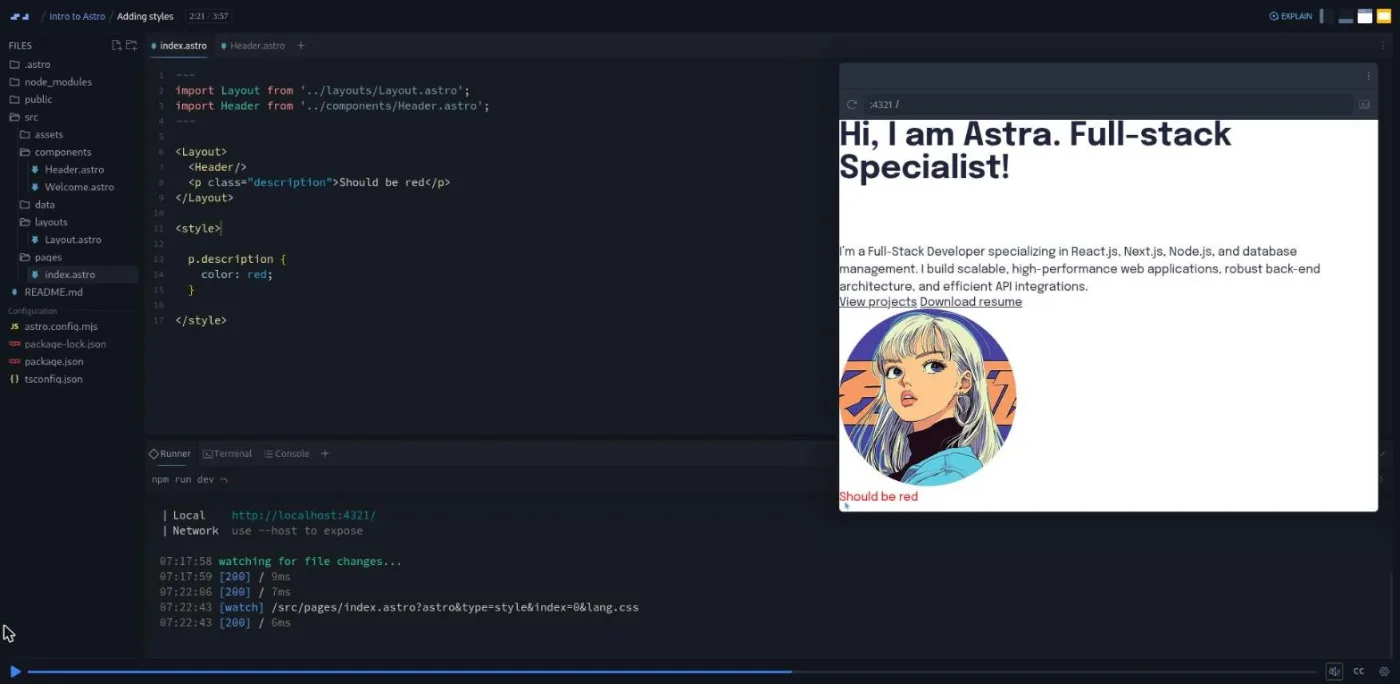
"Adding styles" is the lesson to watch if you know React or Vue. James puts a <style> in index.astro, targets a paragraph inside the Header component, and nothing happens, because Astro scopes styles to the component they are written in. The fix is either the is:global directive (already used in Layout.astro) or moving the style into the component, which is the convention the course follows. Two styling challenges then have you fill in nested CSS for the header, a .container with a max width and margin: 0 auto, and a media query written with the & nesting selector.
"TypeScript in Astro" introduces the only TypeScript you will write: an interface Props for a ButtonLink component (href, text, an optional variant of 'primary' | 'secondary', an optional isDownload), read from Astro.props with a default. The challenge that follows has you finish the component: render the download attribute only when asked, build the class from a template literal, move the button styles in, and swap the header's raw links for <ButtonLink>.
"Slot component" explains <slot /> in one line: "In React, you hear these called children. In Astro, this is called the slot." The "Create section component" challenge, which James flags as "a little bit bigger than the ones we've done in the past," has you build a Section wrapper with a dark boolean prop, vertical padding, and the Container nested inside it. The section ends with "Frontmatter templating" (mapping an array to <li> elements, the same syntax as JSX) and two challenges that build the projects grid and a reusable SectionHeader.
3. JSON data, routing, navbar and footer (16 min, 5 scrims)
"Importing data from JSON files" moves the skills array into src/data/skills.json and imports it like a component. James hits the single-quotes error on camera and shrugs it off: "JSON doesn't use single quotes, it only uses double quotes." The "Move Project Data to JSON" challenge has you do the same for the projects array. "File based routing" is the routing lesson: pages/index.astro is /, a new contact.astro is /contact, links are ordinary <a> tags with no special component, and dynamic routes such as /blog/[slug] are previewed for later. Two challenges then build the Navbar (logo plus three links, mounted in Layout above the slot) and the Footer (four icon links inside a dark Section, mounted below the slot).
4. Content collections and the blog (36 min, 10 scrims)
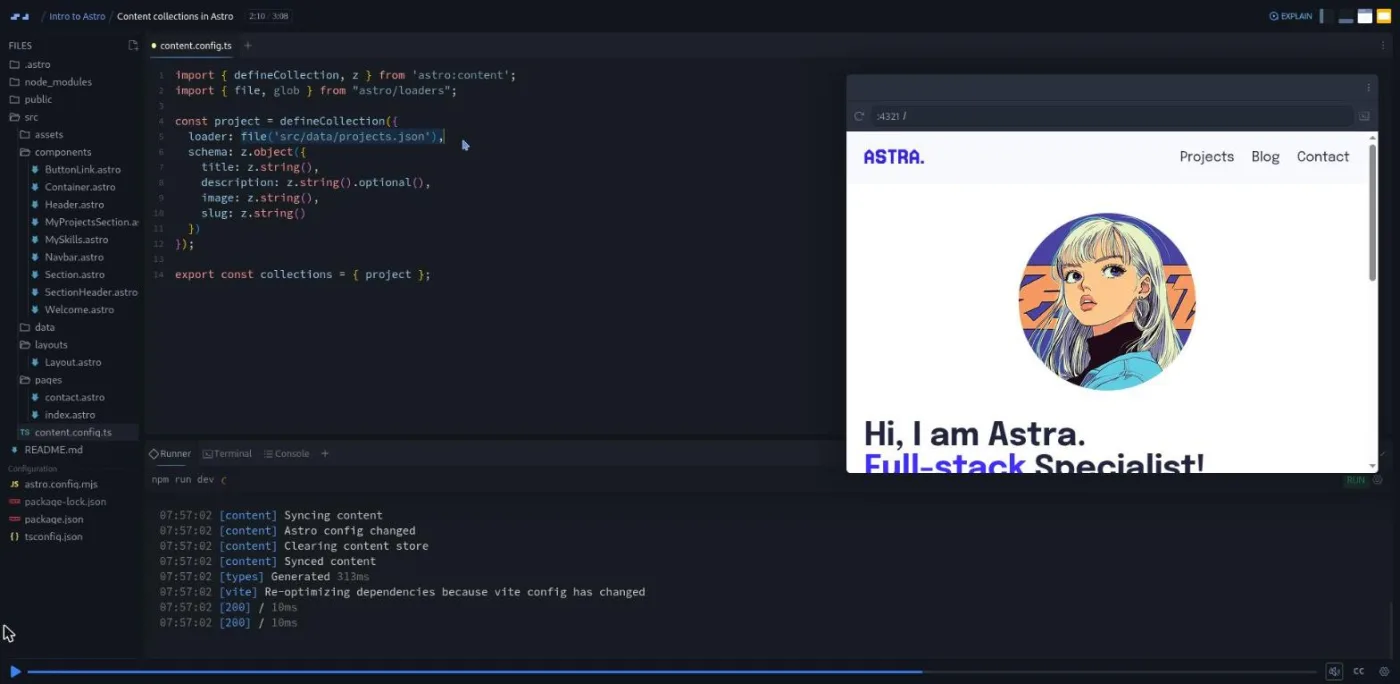
This is the section James is most excited about ("one of my absolute favorite features of Astro") and the reason to take the course rather than skim the docs. It uses the newer content layer syntax: a src/content.config.ts file, defineCollection with a file() loader pointed at projects.json, and a Zod schema describing each entry. The "Building the blog schema" challenge has you write the blog collection yourself: a glob() loader over src/data/blog/**/*.md and a schema with title, description (James adds .max(200)), date as z.string().date(), tags as z.array(z.string()), and image.
"Markdown Intro" is a four-minute primer (headings, lists, links, images, code fences, and the fact that a .md file dropped in pages/ becomes a page). It also opens the three sample posts, which James admits are "kind of AI generated, so don't put a lot of stock in the content itself." "Querying content collections" introduces getCollection() and a gotcha James walks straight into: the fields you defined live under entry.data, so the projects grid renders empty until project.image becomes project.data.image.
Four challenges then build the blog: the homepage BlogSection (query, map, link to /blog/${post.id}, and a provided HorizontalSeparator), a BlogCard component, and the /blog list page. "Dynamic Blog Pages" is the lesson where Astro's static generation clicks: a pages/blog/[slug].astro file exporting getStaticPaths(), which returns one { params, props } object per post, typed with CollectionEntry<"blog">. James frames it well: "what if this blog is really, really big? We have hundreds and hundreds of posts. We don't wanna create each one of these pages individually." "Displaying Blog Content" finishes the post page with const { Content } = await render(post) and a <Content /> tag, and the last challenge builds the /projects page from the same parts.
5. Deploy and wrap-up (10 min, 4 scrims)
"Deploy to Netlify," which James calls "the most exciting video of this series," is slides, not code: right-click the Scrimba sidebar and choose Download as Zip, push it to a GitHub repo, sign in to Netlify with GitHub, import the repo, pick a unique site name, and watch the build. It assumes you already know how to create a repository. "Wrap up and next steps" is a four-minute list of extensions (a timeline, an HTML resume page, a "now" page, a "uses" page, blog search) and the Astro topics the course skipped: island architecture and framework integrations, client-side scripts, server endpoints for a real contact form. The last two scrims are Scrimba's standard outros from Per Borgen about the affiliate program and the certificate.
What a lesson feels like
Scrims run from under a minute to 5:46; the median is about 3:30. James talks over a live editor with the file tree on the left and the running site on the right, and every scrim opens with the runner already serving the project, so you never wait for a dev server. Challenges arrive as a slide with the requirements plus comment placeholders in the code (<!-- header goes here -->, // title, description, date (hint: z.string().date())), then the line "pause the video, see how you do, and then we'll come back and do it together." Solutions typically take one to two minutes.
The challenges are checked by you looking at the preview, not by an automated grader; I saw no "Challenge with Instant Feedback" icons in this course's table of contents. Every scrim has captions, a timestamped transcript under the settings menu, subtitles in ten languages, and playback speed. Slides can be toggled with Cmd+Y or Ctrl+Y, which James points out in the intro because you will want the requirements slide open while you work.
Free or Pro: exactly what is gated
The first four scrims (the intro, project setup, the starter code, and the first header challenge, about 16 minutes) are marked SAMPLE and open without Pro. Everything from "Intro to reusable components" onward is Pro only, which is all 15 remaining challenges, the content collections and blog section, and the deploy lesson. There are no separate Solo Project items in this course; the gate is the course itself.
Pro also unlocks the Certificate of Completion listed at the end of the table of contents and the Pro-only Discord channels. Basic Discord access is on the free plan according to Scrimba's pricing page, so the server alone is not a reason to upgrade. See current plans (opens in a new tab) for what Pro includes in your region.
How long it takes
Two hours is video runtime. With 18 challenges to attempt before watching the solution, plan for four to six hours, or two or three evenings. The components section is where pausing pays off most, since every later challenge reuses Section, Container, ButtonLink, and SectionHeader. Replacing the placeholder headshot, resume, projects, and posts with your own, which James asks you to do more than once, adds two to four hours. Actually deploying adds an hour the first time for the GitHub and Netlify signup dance.
Who it's for, and who should skip it
It fits you if you know HTML, CSS, and enough JavaScript to read array.map() and an async function, and you want a personal site, blog, or docs site that loads fast and is edited in Markdown. It is an especially good fit if you already know React or Vue; the course keeps comparing Astro's scoped styles, slots, and content collections to what you know. It is also a gentle first contact with TypeScript and Zod, since the only types you write are a props interface and a schema.
Skip it, for now, if you have never built a webpage: the course assumes you can read HTML and CSS and does not teach them. Do Learn HTML and CSS and Learn JavaScript first. Skip it if what you need is an interactive app; this course ships zero client-side JavaScript on purpose, and Learn React or Learn Next.js is the better tool. And if you already use Astro's content collections and dynamic routes, there is nothing new here; the course stops before islands, SSR, and endpoints.
Try the free Intro to Astro sample scrims (opens in a new tab)Prerequisites
HTML, CSS, and basic JavaScript, including import, array.map(), template literals, and await. Scrimba's listing asks for comfort with npm and the command line, but inside the course the runner handles that; you only need a terminal, Git, and a GitHub account if you deploy. No prior Astro, TypeScript, or Zod is assumed.
Where it fits
Scrimba's course page does not place Intro to Astro in a career path; its structured data tags it as Fullstack. On this site it sits with Intro to Vite and Learn Markdown as a tooling course, and it is a natural second step after Build and Deploy Your Portfolio if you want a framework under that portfolio. James also teaches Build a React Project: Movie Search App on Scrimba, and Learn TypeScript is the follow-on if the Zod schema was the part you liked.
Strengths and limits
What it does well: it teaches current Astro (content layer loaders, render(), getStaticPaths()), half the scrims are challenges that build pieces you keep, the scoped-styles and .data gotchas are shown as live mistakes rather than warnings, and the finished site is something you can deploy and put on a resume.
Where it is limited: it is Pro only after the first four scrims. It never runs JavaScript in the browser, so there are no islands, no integrations, and no client scripts. The contact page is a stub, the deploy lesson is slides that assume you know Git, and the sample blog posts are AI-generated filler. I also could not confirm the pinned Astro version from the dependencies panel, so check against the current docs if something behaves differently.
Related courses and comparisons
- Intro to Vite, the other modern frontend tooling course
- Learn Markdown, if the blog section made you want to know Markdown properly
- Learn Next.js, the React-based alternative for sites that need interactivity
- Learn JavaScript, the language foundation Astro builds on
- Learn React, if your work leans toward interactive apps
- All JavaScript courses, the full category hub
- Scrimba vs Udemy, if you are comparing platforms
Only the first four scrims (about 16 minutes: the intro, project setup, the starter code, and the first header challenge) are free samples. The other 33 scrims, including all the content collection and blog lessons, need Scrimba Pro. There are no separate solo projects; the gate is the course itself.
James Q Quick, a developer educator who, per his Scrimba teacher card, works as a Developer Educator at Cloudflare in 2026. He recorded the course while at Makeswift, and says in the intro it was made in collaboration with the Astro team. The last two scrims are standard Scrimba outros from Per Borgen.
One project: a personal site with a header, projects grid, and blog section on the homepage, a /projects page, a /blog list, a dynamic /blog/[slug] page for each Markdown post, a contact page, a navbar and footer, and a Netlify deploy. The placeholder content (headshot, resume, three AI-written posts) is meant to be replaced with yours.
.astro components and frontmatter, props typed with a TypeScript interface, scoped styles and is:global, slots, JSON imports, file-based routing, content collections with file and glob loaders and a Zod schema, getCollection(), getStaticPaths() for dynamic routes, and render() for Markdown content. It does not cover islands, framework integrations, client scripts, SSR, or API endpoints.
Not inside Scrimba: every scrim opens with the dev server already running at localhost:4321. You need Node, npm, Git, and a GitHub account only if you download the zip and follow the Netlify deploy lesson.
Very little. You write a Props interface for two components and a Zod schema for the blog collection; James explains the syntax as it appears. The starter comes with a tsconfig and TypeScript is optional in Astro.
No. The 18 challenges pause the recording with a requirements slide and comment placeholders; you write the code, check the live preview, then watch James's solution. I saw no instant-feedback challenge icons in this course.
About 2 hours of video. Plan four to six hours if you attempt every challenge, plus two to four more to personalize the content and deploy it.
Yes. Every scrim has captions, a timestamped transcript under the settings menu, subtitles in ten languages, and playback speed control.