Command Line Basics
Ajo Borgvold teaches this free command line course in 101 minutes across two sections: a hands-on terminal built into Scrimba, then slides once the browser terminal can't run what's taught. You organize a fictional startup's messy file system through seven graded challenges, and it's the right first stop if you have never typed a command.
Reviewed inside the course with a Pro account, September 2026.
Quick answer
It fits complete beginners: section one drills real terminal commands with graded challenges, and by the end of the first 46 minutes the fear that makes Learn Git and GitHub feel harder than it is starts to lift. The catch is section two, which drops the Scrimba terminal for slides and only pays off if you set up a terminal on your own machine. Already comfortable moving around a terminal? Skip straight to Git and GitHub.
Command Line Basics
FreeTaught by Ajo Borgvold (opens in a new tab)
Navigate, create, read and write files in a real terminal, then learn the search, replace, move and sort commands that make the command line worth using.
Start free on Scrimba (opens in a new tab)Is it worth your time?
For a complete beginner, yes, and mostly because of the first 46 minutes. Ajo hides Scrimba's file sidebar at the start of the first real lesson ("in a command line course, that will basically be cheating") and makes you find every file by typing. Each challenge is a numbered brief in a challenge.md file, and the solution walkthrough is where the teaching happens: you watch the wrong command fail, read the error, and see the fix. That loop is the thing most terminal tutorials skip.
Section two is the weak half. Ajo says it plainly in its intro: "Many of the commands that I'll be teaching you in this section are unfortunately not supported by the shell that we can run in the Scrimba terminal," and that the workaround the team "settled on was to make this section focused on theory rather than practice." There are no challenges in that hour. You get a project zip, setup instructions for Mac and Windows, and slides with screenshots of Ajo's own terminal. If you skip the local setup, the second half is a lecture.
The course is also limited by design. It is file management: moving around, creating, reading, searching, sorting. There is no shell scripting, no environment variables, no permissions, no package managers. Ajo lists those as reasons the command line matters and then says the focus "will be on file management." Take it as a foundation and nothing more.
What you'll learn
Course curriculum
2 modules · 23 lessons
- Command Line Fundamentals
- Command Line Power Tools
Lesson counts are the scrims I counted in each expanded module, plus a 56 second "How to Utilize Your Certificate" scrim that sits outside both, for 24 in total. Scrimba's own figures measure something else: the module headers read "0/7" and "0/5", which is the number of challenge checkpoints in each section (the small badge next to a scrim's duration shows a "Challenge" tooltip), and the course's structured data says 26 lessons.
Inside the course, module by module
1. Command Line Fundamentals (46 min, 10 scrims)
The intro scrim is two and a half minutes of setup for the running story. Ajo has a startup idea (a geography quiz game, "the next Minecraft or Candy Crush, I assure you"), spent a night brainstorming on post-its, and made "a bit of a mess of the file system." You are offered an unpaid internship to sort it out. It is silly on purpose, and it gives every challenge a reason.
"Demystifying the command line" is the theory lesson: what a command line is, why Scrimba calls it the terminal, and a side-by-side of the same project folder in Finder and in a terminal ("kind of like the screwdriver and the power drill"). It ends by showing how to open a terminal inside Scrimba: click the plus next to "Runner" at the bottom of the editor and choose "add a terminal."
Then the drills start. "Getting Oriented" teaches pwd, ls, cd and clear, and its challenge asks you to do exactly what Ajo just did, after Ajo clears the screen "because now you cannot just copy paste my code." "Relative Paths" introduces .. with a tree metaphor (in the file tree "we are not birds and we are not monkeys either. Actually, we are much more like tiny tiny ants"), and its challenge sends you hunting for three files that were saved in the wrong folders. "Creating and Deleting Files" brings in touch and rm; the challenge is to find and delete a virus.exe that Ajo's uncle left behind after borrowing the laptop.
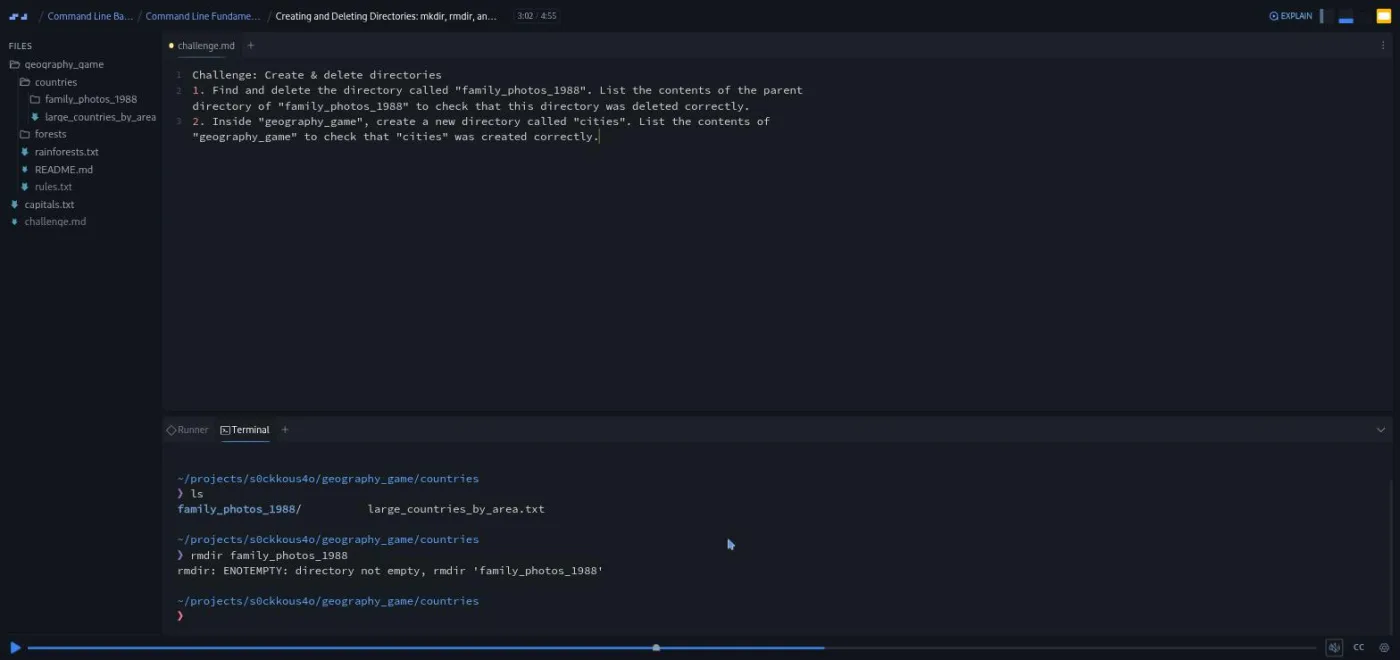
"Creating and Deleting Directories" covers mkdir, rmdir and rm -r, and the solution deliberately runs rmdir on a folder that is not empty so you see the error before the fix.
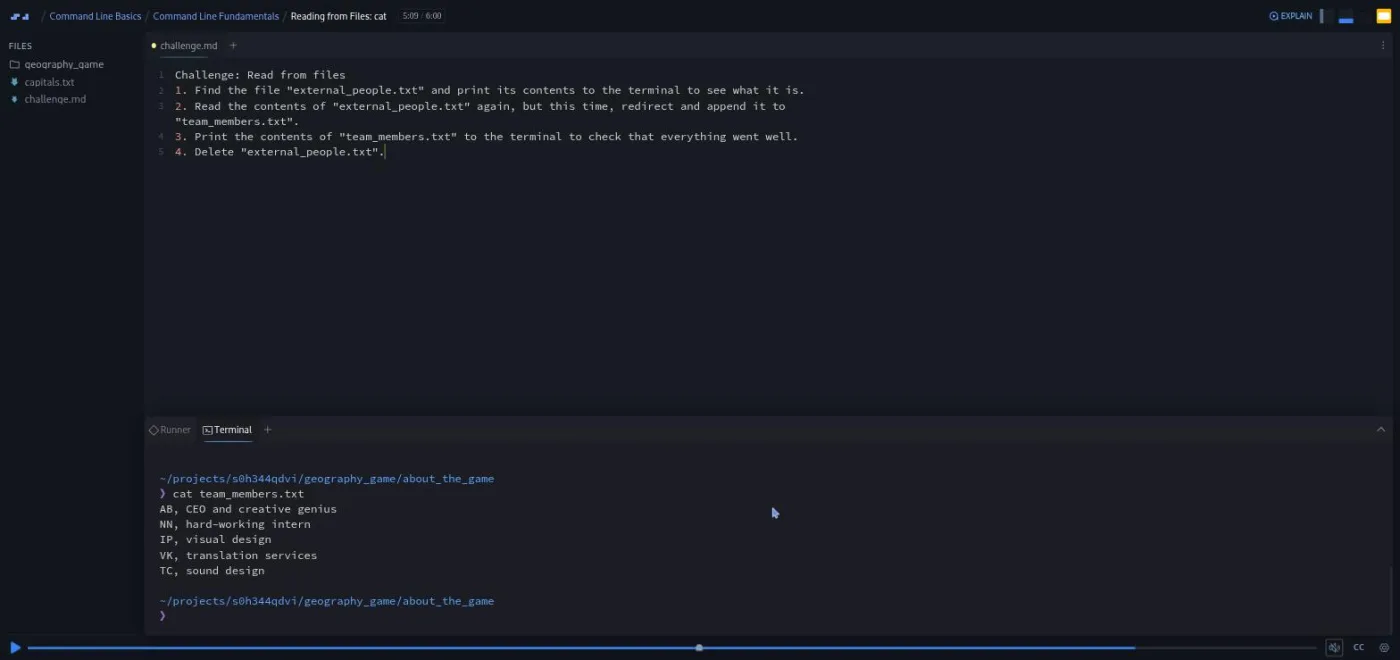
"Writing to Files" is the longest scrim at seven minutes and has two challenges: a warm-up with echo 'Hello, name!', then creating an about_the_game folder, writing a team file with > and appending yourself to it with >>. Ajo also flags a Scrimba quirk here: "there is an issue in the Scrimba IDE" where echo creating a new file "does not always work as expected," so you touch the file first. "Reading from Files" introduces cat (with a dog-versus-cat mnemonic that Ajo admits may not land), and its challenge chains everything: read a file, append it to another with a relative path, print the result, delete the original.
The section closes with a short outro (you are named employee of the month) and a two minute Scrimbassador promo from Per Borgen that has nothing to do with the terminal. One line in the outro explains the shape of the course: "At the time of recording this scrim, section two of this course is still in the making." Section two was added later, and it shows.
2. Command Line Power Tools (57 min, 13 scrims)
The intro sets expectations, and I would watch it before deciding whether to continue. Ajo explains that the Scrimba shell cannot run most of what follows, that "the whole section is slide based," and that "there won't be any actual challenges for you to solve." The alternative is to follow along locally, and Ajo is direct about the stakes: "Listening to me and watching my examples is not enough if you really want to master this."
"Terminology crash course" is seven minutes on three words: Linux, shell and command line interface. The shell is "a program that lets you interact with the operating system," and the CLI "is a concept. It is not a technology and it is not a specific app." It is more theory than the rest of the course, but it answers the question beginners actually have, which is why Mac Terminal, VS Code's terminal and Git Bash all seem to do the same thing.
"Local Setup" is the practical hinge of the section. You download the project as a zip from the settings wheel, unzip it into your dev folder, and open a terminal: on a Mac the built-in Terminal app is enough (Ajo has you run echo $0 to check you are on bash or zsh), on Windows you install VS Code and Git and pick "Git Bash" from the terminal dropdown. The five badge icons on this scrim in the table of contents are pause points for those steps, not graded challenges.
From there it is one command per scrim. "Aside: Options" explains -r and ls -l and the short-versus-long dash convention ("The short one is faster to type and the long one is more readable"). "Finding Files" covers find . -name 'forest*', -iname, -type f and -type d, with a warning that searching from / or ~ "is a very expensive operation." "Terminating a Process" is three minutes on the quote> prompt you get after a missing closing quote and why Ctrl+C "should be your new best friend."
"Rename, move and copy" teaches mv for both renaming and moving, with the trap spelled out: if the destination folder does not exist, "it will be renamed" instead of moved. Copying a folder needs cp -r, which gets what Ajo calls a "mini lecture on recursion."
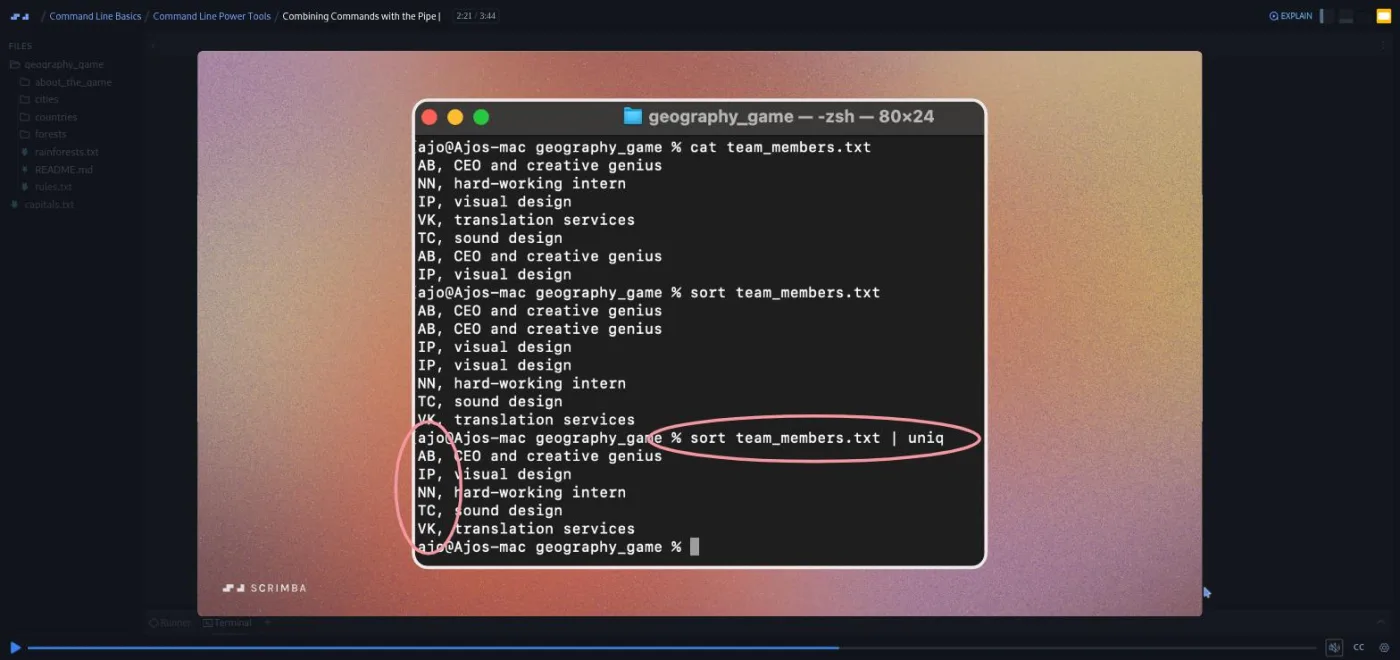
The text tools follow. grep gets -n, -i and -r. sed 's/,/:/' swaps commas for colons, with the g and I flags placed after the last slash, and Ajo recommends redirecting the output to a new file rather than editing in place because "we are all just human beings and we do tend to make silly mistakes." wc -l counts team members by counting lines. sort gets -r and -n (so eleven does not sort before two), and uniq only removes duplicates that sit next to each other, which is why the two need combining.
The pipe lesson ties the last three together with sort team_members.txt | uniq > sorted_team.txt, shown as a screenshot of Ajo's own zsh terminal.
The outro recaps every command and the five options used across the section (r, n, g, I, l), and the course ends with a generic 53 second scrim on how to use the certificate.
What a lesson feels like
In section one, a scrim is two to seven minutes of Ajo talking over a live Scrimba terminal, with the brief in a challenge.md tab above it. When the recording reaches the challenge, you type your own commands in the same terminal, then press play and watch the solution. Ajo's solutions always verify: after every rm, touch or mkdir you run ls because "the terminal does not provide us with any kind of user message to tell us how this went." That habit is the best thing you take away from the course.
Section two scrims are slides. Ajo draws on them (circles, underlines) and pastes in screenshots from a Mac terminal. There is a Scrimba terminal in the project, but nothing in these lessons asks you to use it. Every scrim has captions, a timestamped transcript panel under the settings menu, and subtitles in ten languages.
The voice is warm and a little goofy. The uncle who keeps borrowing the laptop, the CEO who is "terrible with names" and writes your initials as NN, the "moment of truth" before every cat. If that grates, the transcript panel lets you skim.
Free or Pro: exactly what is gated
The whole course is free: both sections, all seven challenges, the downloadable project and the transcripts. There are no Solo Projects and no Pro-only scrims. The only gated item is the certificate of completion at the end, which is a Pro feature across Scrimba. Scrimba's pricing page lists basic access to the Discord community as free and the Pro-only channels as Pro, so the Discord itself is not gated either. See current plans (opens in a new tab) if the certificate matters to you.
How long it takes
The runtime is 101 minutes. Section one has seven challenges and you should stop and type for each one, so budget about two hours for it. Section two takes as long as the local setup takes: on a Mac, ten minutes; on Windows with VS Code and Git to install, maybe half an hour, plus the hour of slides and however long you spend running the commands on the downloaded project yourself. Call it three to five hours total across two or three sittings, or an evening and a morning.
Who it's for, and who should skip it
It fits people who have never opened a terminal, or who have copied commands from tutorials without knowing what cd .. does. That includes most beginners and a fair share of CS students who learned theory before tooling. It is a sensible warm-up before Learn Git and GitHub, whose local sections assume you can navigate a terminal.
Skip it if you already use grep and find without thinking, or if you want scripting, permissions, SSH or package managers; none of those are here. Also skip section two if you cannot or will not install anything on your machine, because without a local terminal it is an hour of slides.
Prerequisites
None. No programming, no prior terminal use, no installs for section one. Section two wants a computer where you can install VS Code and Git (Windows) or open the Terminal app (Mac). Linux users are not addressed in the setup lesson, but any bash or zsh shell works for what is taught.
Where it fits
This is a tooling course rather than a language course. It sits before Learn Git and GitHub (which lives in the terminal from its third section) and before Learn Node.js, where you start running your own code from a command line. The Backend Developer Path draws on part of this course for its own 103 minute "Command Line Interface" module, and Ajo's teacher card mentions work on that path, so backend learners are the intended audience. Frontend learners can take it any time; it does not depend on Learn JavaScript.
Strengths and limits
What it does well: section one drills the basics in a real terminal with verification after every step, the challenges build one file tree across the whole section so nothing is abstract, the errors are shown on purpose, and the local setup lesson is the clearest Mac-and-Windows terminal setup I have seen in a beginner course.
Where it is limited: section two has no challenges and depends entirely on you setting up locally, the scope stops at file management, the echo bug in Scrimba's IDE is still worked around rather than fixed, and one of the ten scrims in section one is a promo for the referral program.
Related courses and comparisons
- Learn Git and GitHub, the natural next step
- Learn Node.js, where terminal fluency starts to matter
- Learn JavaScript, the language foundation
- Backend Developer Path, which draws on part of this course for its own module
- All JavaScript courses, the full category hub
- Scrimba for beginners, if you are just starting out
Yes. Both sections, all seven challenges and the downloadable project are free with no card required. The only Pro item is the certificate of completion.
Ajo Borgvold, a Scrimba Frontend Path graduate and teacher talent program graduate who works as an IT engineer in Denmark. The course page's teacher card also credits Ajo with Build a Memory Game in React.
Not for section one, which runs in a terminal inside Scrimba. Section two asks you to download the project zip and use a local terminal: the Terminal app on a Mac, or VS Code with Git Bash on Windows.
Seven in section one, spread over six scrims (the echo lesson has two). Each is a numbered brief in a challenge.md file that you solve in the Scrimba terminal before watching Ajo's solution. Section two has no challenges because the Scrimba shell cannot run most of its commands.
No. The badge next to those scrims reads Challenge, not Challenge with Instant Feedback. You compare your result with the solution walkthrough yourself.
Nothing that runs. You organise the file tree of a fictional geography quiz game: creating folders like cities and about_the_game, writing a team_members.txt with echo, merging files with cat, and in section two sorting and de-duplicating them locally.
pwd, ls, cd, clear, touch, rm, mkdir, rmdir, rm -r, echo with > and >>, cat, find, grep, sed, mv, cp, wc, sort, uniq, the pipe, and Ctrl+C. It does not cover shell scripting, permissions, environment variables or package managers.
Yes. Every scrim has captions, a timestamped transcript under the settings menu, and subtitles in ten languages.
101 minutes of video. Plan on about two hours for section one with the challenges, and three to five hours in total if you do the local setup and run the section two commands yourself.