Data Structures and Algorithms: Merge Sort
Jonathan Lee Martin's Data Structures and Algorithms: Merge Sort is a 64 minute Pro course that has you write one sorting algorithm seven ways in JavaScript, from a raw imperative version to a queue, a cursor and an ArrayView wrapper, each one graded out loud on readability and cost. It is a tight, well-built hour for anyone who already codes.
Reviewed inside the course with a Pro account, September 2026.
Quick answer
It fits developers who already write JavaScript comfortably and want to practise one algorithm well, not survey other data structures. The catch: it leans on Binary Search, whose ArrayView helper arrives here as a finished file you did not write. Finish this one, then move to JavaScript Interview Challenges to put the algorithm under time pressure.
Data Structures and Algorithms: Merge Sort
ProTaught by Jonathan Lee Martin (opens in a new tab)
Merge sort written six ways in JavaScript against a test suite, from an imperative version to queues, cursors, and an ArrayView, each a design lesson.
View on Scrimba (opens in a new tab)Is it worth your time?
Yes, if you fit the audience Jonathan describes in the first minute: a bootcamp graduate or self-taught developer who is good at building things and feels the gap where a computer science course would have been. The course is not about memorising merge sort. It is about writing it once the textbook way, then refactoring it five more times, each time trading readability against performance and learning a small design pattern along the way. By the end you have written a queue-style merge with shift, a cursor data structure with peek, shift and length, and a version that wraps the array in a view so no copies are made.
It is short and narrow on purpose: one algorithm, one test file, no data structures beyond arrays and the two tiny helpers you build. It also leans on the binary search course. The ArrayView helper is dropped in as a finished file with the words "let's just go ahead and use the implementation we wrote in binary search." You can follow without that course, but you will be reading someone else's helper rather than your own.
Despite the Intermediate label and the "software craftsmanship" framing, the course does teach the concept from zero. Lesson two spends ten minutes sorting a list on paper, counting lookups for selection sort, and building up to merge sort's n log n runtime with diagrams. You do not need to know merge sort before starting. You do need to be fluent in JavaScript.
What you'll learn
Course curriculum
11 scrims, no modules; grouping below is mine
- The idea: selection sort, merging, and n log n
- Seven implementations, five of them challenges
- Wrap up and the certificate clip
Scrimba presents the course as one flat list of eleven scrims plus a certificate item, and its catalog data counts 12 lessons. The three groups above are my own reading order, and the 64 minutes in the course header is the sum of the eleven scrims. The listing says "six different merge sort algorithms" while the wrap-up says "you've written merge sort seven times". There are seven named functions in the final file, two of which are one line wrappers that add the ArrayView, so both numbers are defensible.
Inside the course, module by module
1. Intro and the merge sort explanation (17 min, 2 scrims)
Both of these scrims are marked SAMPLE, so you can watch them without a subscription. The intro is six minutes of Jonathan setting expectations. He says the course is "designed for developers who are already great craftsmen and want to step up their software design by thinking algorithmically, but who don't have a background in CS," and warns that if you do have a CS degree you will mainly get "different approaches to implementing classic algorithms." He also sets the rule the whole course runs on: "rather than me write the solution, you'll actually write it first."
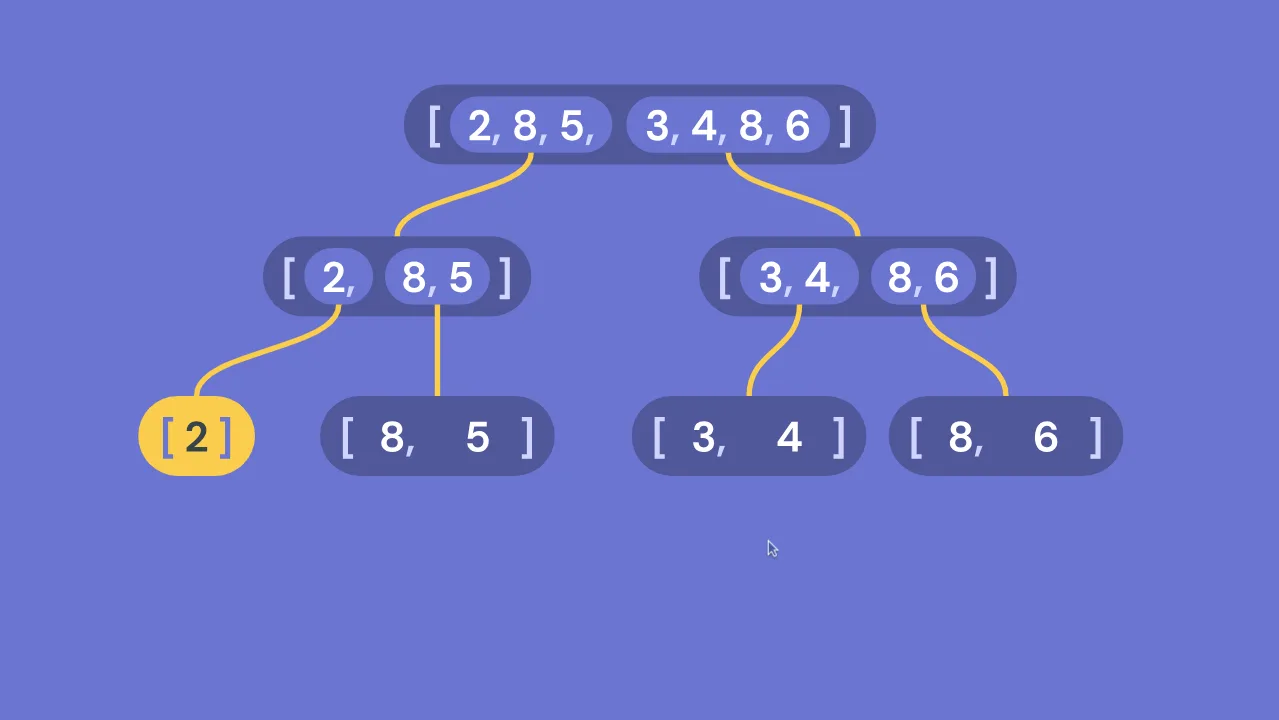
The second scrim is the conceptual lesson and it is the best ten minutes in the course. You are asked to pause and sort a seven element list on paper while counting how many times your eye touches an element. That becomes selection sort, forty nine lookups for seven items, a parabola, big O of n squared.
Then a detour: merging two already sorted lists by walking two arrows takes only m plus n steps. Then, as he puts it at 5:33, "now we get to discover the power of wishful thinking": split the list in half, ask someone else to sort the halves, and merge the results.
The recursion bottoms out at one element lists, which are sorted by definition. The lesson closes by counting the merge work per level (n) times the number of levels (log n) to arrive at n log n, plotted against selection sort. No code yet; that starts next.
2. Seven implementations, five of them challenges (44 min, 7 scrims)
Every lesson in this block uses the same files: merge-sort.js, where you write the code, and merge-sort.test.js, a small test suite that goes red when you change the export and green when your version works. Each new lesson adds a new function to the same file and repoints the default export at it, so by the end you can read all seven versions side by side. Scrimba's table of contents does not badge these as challenges, but five of them are. Jonathan writes an empty function signature, explains the constraint, and says "pause the lesson, and once the tests are passing, resume the lesson, and we'll walk through the problem together."
Imperative (8:46, challenge)
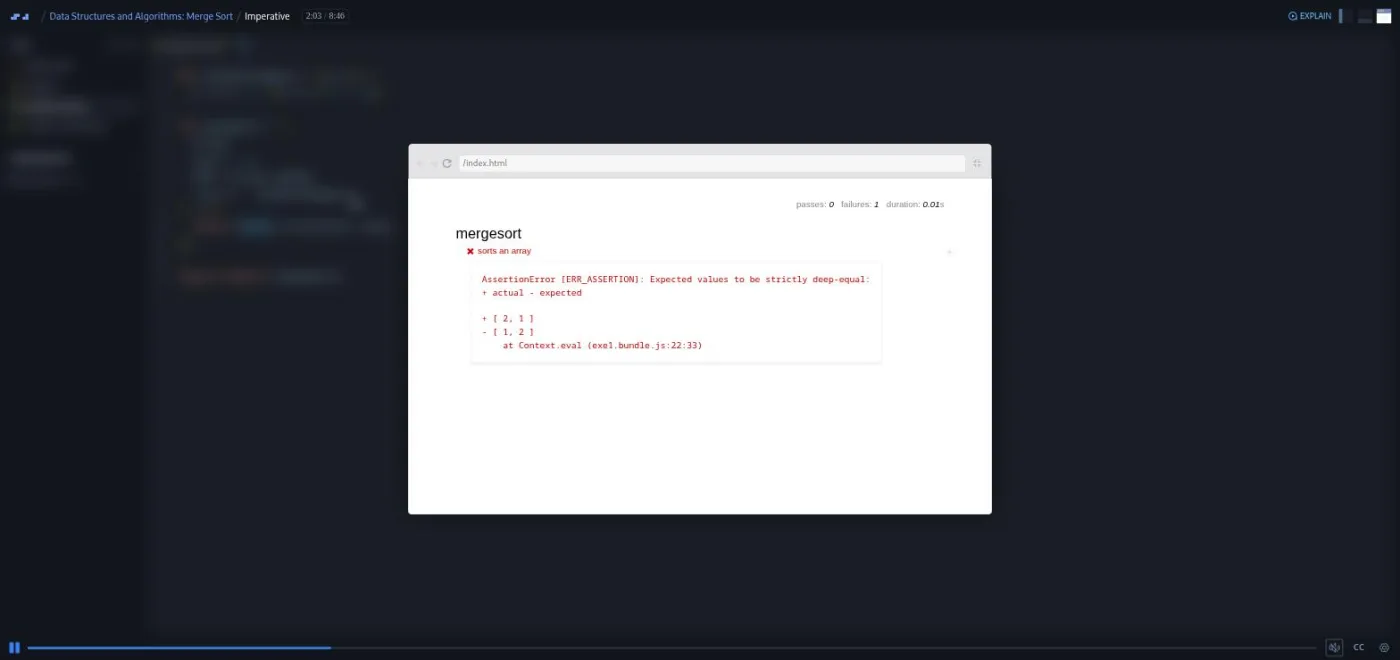
The starting file is a mergesort(array, start = 0, end = array.length, compare = defaultCompare) stub that returns array.slice(start, end). The brief: recursive, must not mutate the input, and must use the start and end indices instead of slicing at every level, "that's a lot of extra copying." His walkthrough names the three parts of any divide and conquer algorithm (divide, conquer, combine) and warns that the combine step "can produce some really gnarly edge cases if your implementation isn't quite right." The solution is a base case on end - start <= 1, a pivot at the midpoint, two recursive calls, and a for loop with i and j pointers that pushes the smaller head into a sorted array. It works and it is ugly, which is the point.
Array Splitting (4:55, challenge)
Rewrite the same algorithm as mergesortArraySplit(array, compare) with no index arguments, slicing the array in half at each recursion. The code gets shorter and the base case becomes array.length <= 1. The cost is a copy at every level.
Array View (3:39, walkthrough)
He drops in array-view.js from the binary search course, wraps the input in ArrayView before calling the split version, and changes one line in the base case to call toArray(). The tests stay green and the copying is gone. It is one of two lessons in the block where you do not write code yourself; as he says, "the changes we need to make for adding array view support are so small, we're actually going to just step through this together."
Queue (7:24, challenge)
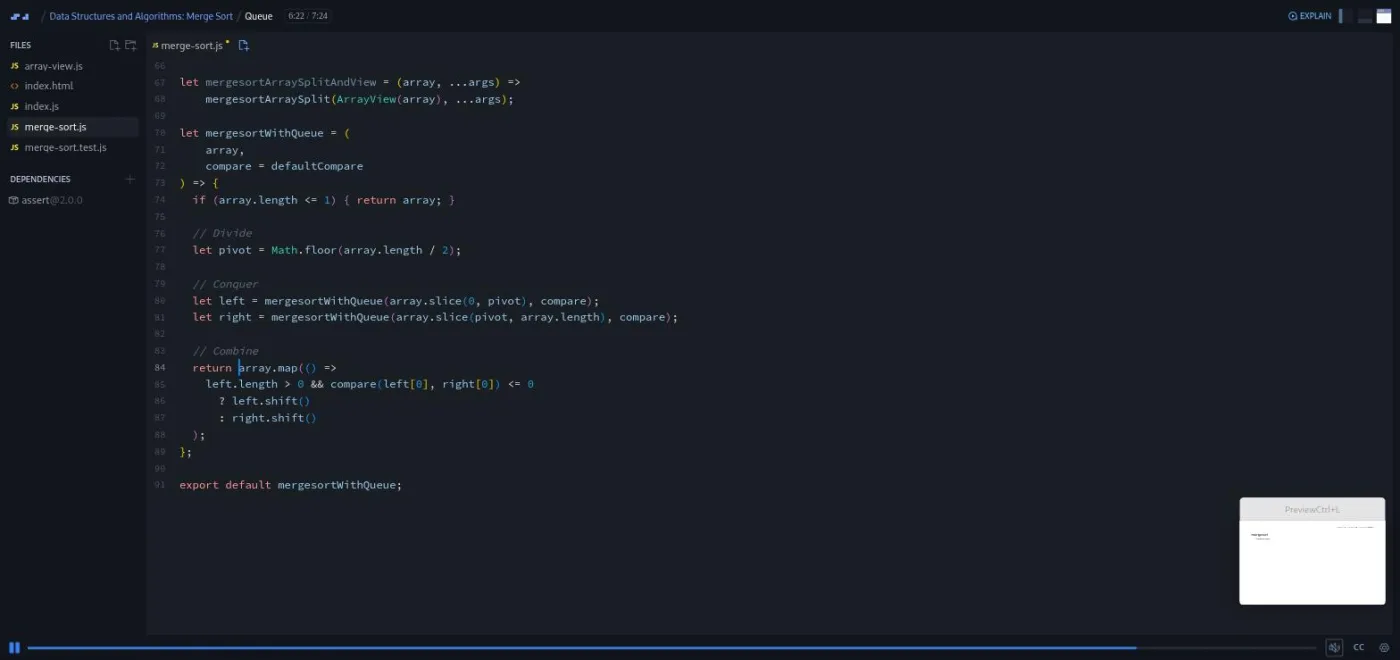
The target is the merge loop. Treat left and right as queues: replace the for loop with array.map, ignore the mapped element, and use a ternary that calls left.shift() or right.shift(). The i, j and k counters disappear. He names the cost: shift moves every remaining element one slot left each call, so "this solution is not as efficient as the previous one. But the conceptual model is great."
Cursor (7:15, challenge)
The fix for shift: a tiny data structure that remembers how far you have advanced without touching the array. He writes the merge as if the cursor already existed (left.peek(), left.shift(), left.length()), then hands you the empty cursor(array, pointer = 0) function and asks you to implement the three methods. The solution is about ten lines; shift is array[pointer++], and he spends a minute on why the postfix increment returns the old value.
Cursor + ArrayView (4:10, walkthrough)
Combining the two helpers breaks array.map, because an ArrayView has no map. Rather than teach the view to imitate more of the array API ("something about this just starts feeling wrong to me"), he installs lodash.times (version 4.3.2 in the dependencies panel) to loop n times without an array. This is the only dependency in the course.
Simple (7:59, challenge)
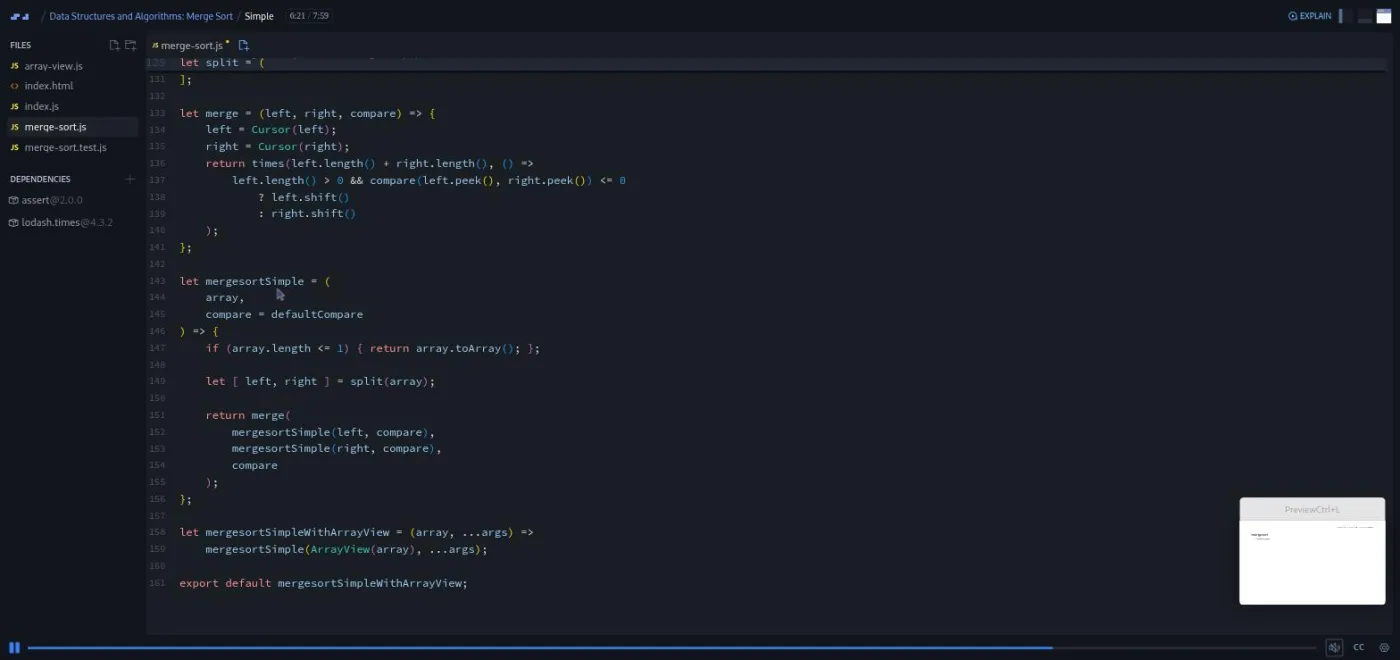
The last one turns on the previous six. Define split(array, mid), merge(left, right, compare), and a five line mergesortSimple that calls them, using whichever earlier implementation you like inside. His closing point is the one to remember: "the one design pattern that is not going to let you down is to simply split up functions into smaller functions." He adds: "before you go too far down the rabbit hole of design patterns, make sure you've tried splitting up the function into smaller ones first."
3. Wrap up and the certificate clip (3 min, 2 scrims)
Two minutes of Jonathan restating the lesson: "personally, I think splitting the code into smaller functions did a lot more for our code than some of the design patterns that we tried." He asks for feedback through a linked form and points to his site and YouTube channel. Then the generic one minute "How to Utilize Your Certificate" clip that closes most Scrimba courses (add it to LinkedIn, connect with the speaker), followed by the certificate item itself.
What a lesson feels like
Each implementation scrim is four to nine minutes. Jonathan talks over the editor without hurrying, names the constraint, writes the empty signature, and stops. You edit merge-sort.js in the same editor, save, and watch the test file go red or green. When you press play again, his solution types itself out over yours, usually starting from the previous lesson's code ("this might feel a bit like cheating, but I'm actually gonna just start with our solution from the previous implementation"). The browser preview only ever shows the test runner's pass and fail counts, so the output you care about is a green tick next to "sorts an array".
Two things make the format work here. First, the challenges are cumulative, so the code you wrote in lesson three is the code you refactor in lesson four. Second, he grades his own solutions out loud. Every version gets a verdict on readability and on runtime, and two of them are explicitly called worse than what came before. Captions, a timestamped transcript panel, and subtitles in ten languages are available on every scrim, and playback speed is adjustable.
The conceptual lesson is different: it is slides, not code, with the arrows and recursion tree drawn on screen while he narrates. It is the one scrim I would watch rather than skim.
Free or Pro: exactly what is gated
The course is Pro. Two scrims are marked SAMPLE and open without a subscription: the intro and the ten minute merge sort explanation. That is 17 minutes and covers the whole conceptual lesson, so a free account can learn how merge sort works and why it is n log n. It cannot open any of the seven implementation lessons, the test file, or the wrap up.
There are no Solo Projects in this course, so there is nothing else to gate. Pro also unlocks the certificate, the career paths Scrimba lists this course under, and the Pro-only channels on Scrimba's Discord; the pricing page lists basic Discord access as free. See current plans (opens in a new tab) for what Pro costs in your region.
How long it takes
The 64 minutes is video runtime, and about 44 of those are the implementation lessons. Five of them stop and wait for you. Write each version before watching the solution, which is the only way this course does anything, and plan two to three hours. The imperative version alone can take twenty minutes of edge case debugging if you have not written a merge before, and the cursor lesson takes longer to understand than to type. One sitting of two hours, or two of one hour, is realistic. If you only watch, it is an hour, and you will have learned very little.
Who it's for, and who should skip it
It fits self-taught and bootcamp trained developers who already ship JavaScript and want the algorithm thinking they skipped, and anyone preparing for interviews who wants to write merge sort from memory rather than recognise it. It is also a good fit if you took Binary Search and liked the format, because this is the same format with a harder combine step.
Skip it if you are still learning JavaScript; the intro says plainly that "if your JavaScript is rusty or dated, you may find it hard to follow along," and the solutions use arrow functions, destructuring, default parameters, and ES module exports without explanation. Skip it too if you want breadth: the broad Data Structures and Algorithms course covers more ground in less depth. And if you have a CS degree, the algorithm will be old news; only the design pattern refactors are new.
Start Data Structures and Algorithms: Merge Sort on Scrimba (opens in a new tab)Prerequisites
Fluent JavaScript, including recursion, slice, map, shift, and arrow functions. The binary search course is not required but is assumed: the intro calls this "a follow-up," the ArrayView helper arrives pre-written from it, and the analysis of runtime picks up where that course's big O explanation left off. Nothing to install; the test suite and the one lodash dependency run in the browser.
Where it fits
This is the second course in Jonathan Lee Martin's algorithm series on Scrimba, after Binary Search. The intro and the wrap up both call it a series with "more on the way," but Scrimba's catalog data lists only these two courses under his name as of September 2026. Scrimba's catalog data lists it under the Frontend Developer Path and the Fullstack Developer Path. The natural order is the broad Data Structures and Algorithms course for coverage, then Binary Search, then this, then JavaScript Interview Challenges to apply it under time pressure.
Strengths and limits
What it does well: the conceptual lesson is a model of how to explain a recursive algorithm, and the challenges are real and cumulative. Every solution is judged out loud on both readability and cost, and the final lesson undercuts the fancy patterns with the plain advice to extract small functions.
Where it is limited: it is one algorithm in one file, and it assumes the binary search course more than the listing admits. Only two of eleven scrims are free, the course dates from December 2020, and the certificate clip is a generic Scrimba insert rather than part of the course.
Related courses and comparisons
- Data Structures and Algorithms, the broad foundation to take first
- Data Structures and Algorithms: Binary Search, the first course in this series, same instructor and format
- JavaScript Interview Challenges, for broader interview practice
- All JavaScript courses, the full category
No. It is a Pro course. Two scrims are marked SAMPLE and open free: the six minute intro and the ten minute explanation of how merge sort works. The seven implementation lessons, the wrap up, and the certificate need a subscription.
Yes. The second scrim starts from sorting a list on paper, derives selection sort and its n squared cost, then builds merge sort from the merge step up and explains the n log n runtime with a recursion diagram. You do not need to know the algorithm before starting.
Seven functions end up in merge-sort.js: an imperative version with start and end indices, an array splitting version, the same wrapped in an ArrayView, a queue version using shift, a cursor version, cursor plus ArrayView using lodash.times, and a final version split into split, merge, and mergesortSimple. Five of those lessons are challenges you write yourself first.
No. There are no AI-checked challenges in this course. Each lesson ships a small test file, merge-sort.test.js, and you know you are done when the tests pass.
It helps. The intro calls this course a follow-up, and the ArrayView helper is reused from the binary search course as a finished file. You can follow without it, but you will be using a helper you did not write.
Jonathan Lee Martin (@nybblr on Scrimba), who introduces himself as a web educator, author, and speaker.
64 minutes of video. If you write each of the five challenges before watching the solution, plan two to three hours.
No. Everything runs in Scrimba's browser editor, including the test file and the one dependency, lodash.times, which is added in the Cursor + ArrayView lesson.
Yes. Every scrim has captions, a timestamped transcript panel under the settings menu, and subtitles in ten languages.