Frontend Interview Tips
Dylan C. Israel's Frontend Interview Tips is a short Pro course for developers about to sit a technical screen: 104 minutes across 24 scrims, more than half of it code. Fourteen scrims answer screener questions like falsy values, promises and CSS selectors in the editor, then three teardowns fix your GitHub, LinkedIn and resume. Worth an afternoon before an interview.
Reviewed inside the course with a Pro account, September 2026.
Quick answer
It fits developers about to interview for a first or second frontend role who have never sat on the hiring side. The catch: the technical answers are two to five minutes each and shallow by design, so they sharpen what you already know rather than teach it. If your JavaScript fundamentals are still shaky, work through Learn JavaScript first instead.
Frontend Interview Tips
ProTaught by Dylan C. Israel (opens in a new tab)
Fourteen technical screen questions answered in the editor, plus the interview conversation, resume, LinkedIn, GitHub and a job search plan, from a developer who has hired.
View on Scrimba (opens in a new tab)Is it worth your time?
The useful part is the framing, not the answers. Every technical scrim starts with the question as an interviewer would ask it and then says why they ask it. In the intro Dylan calls falsy values "an actual question that I asked for candidates when I'm interviewing them to see if they actually know JavaScript, a very basic question, but one that's unique to JavaScript." That context is the product. The interviewer does not want a definition; they want you to volunteer the six falsy values, say why you avoid relying on them, and mention that a linter can enforce that.
Two caveats. The answers are two to five minutes each and shallow by design, so if you do not already know what a promise is, this course will not teach you. It will not fix weak JavaScript. And it was recorded in 2020, which shows in places. Dylan says the year on camera in the spread operator lesson, the job search lesson mentions COVID keeping meetups shut, the "questions to ask" lesson treats Internet Explorer 11 support as a red flag, and the GitHub lesson shows his 2020 contribution graph. The advice still holds, the examples have aged.
What you'll learn
Scrimba lists this course as a flat run of 24 scrims with no modules. The groupings below are mine, based on what each scrim is about, so the page has something to navigate by.
Course curriculum
5 modules · 24 lessons
- Course introduction
- Technical screen questions (JavaScript, CSS, Git, Agile)
- The interview conversation
- GitHub, LinkedIn, resume and job search
- Scrimba wrap-up scrims
I counted 24 scrims and 107.5 minutes by adding the per-scrim durations. Scrimba's header says 104 minutes and its structured data says 1h 44m 53s, which is the course without the two Scrimba-added scrims at the end (the Scrimbassador pitch and the certificate scrim). Scrimba's lesson count of 24 matches mine.
Inside the course, module by module
1. Course introduction (2 min, 1 scrim)
Under two minutes, and it sets the loop for everything technical that follows. You see a question, pause, spend "about five to ten minutes researching an answer," then come back for Dylan's. The step most people will skip is the last one: fork the scrim, record yourself answering, and listen back. As Dylan puts it, "a lot of these technical screens, it's not about so much what you know, so much as how confidently and how clearly you can communicate what you know." His test is "do I believe me when I answer that?"
He calls this "the front end interview questions portion of the course," and a later lesson refers to "when we looked at map and filter earlier," which never happens here. The scrims were recorded as part of something bigger and packaged on their own. It does not hurt the content, but it explains the abrupt start.
2. Technical screen questions (47 min, 14 scrims)
Fourteen scrims, each with an index.html and index.js (or index.css for the CSS one) that Dylan types into while he answers. Ten are JavaScript, the others cover CSS selectors, responsive design, Git and Agile. Only the intro and the falsy values scrim are marked SAMPLE for free preview.
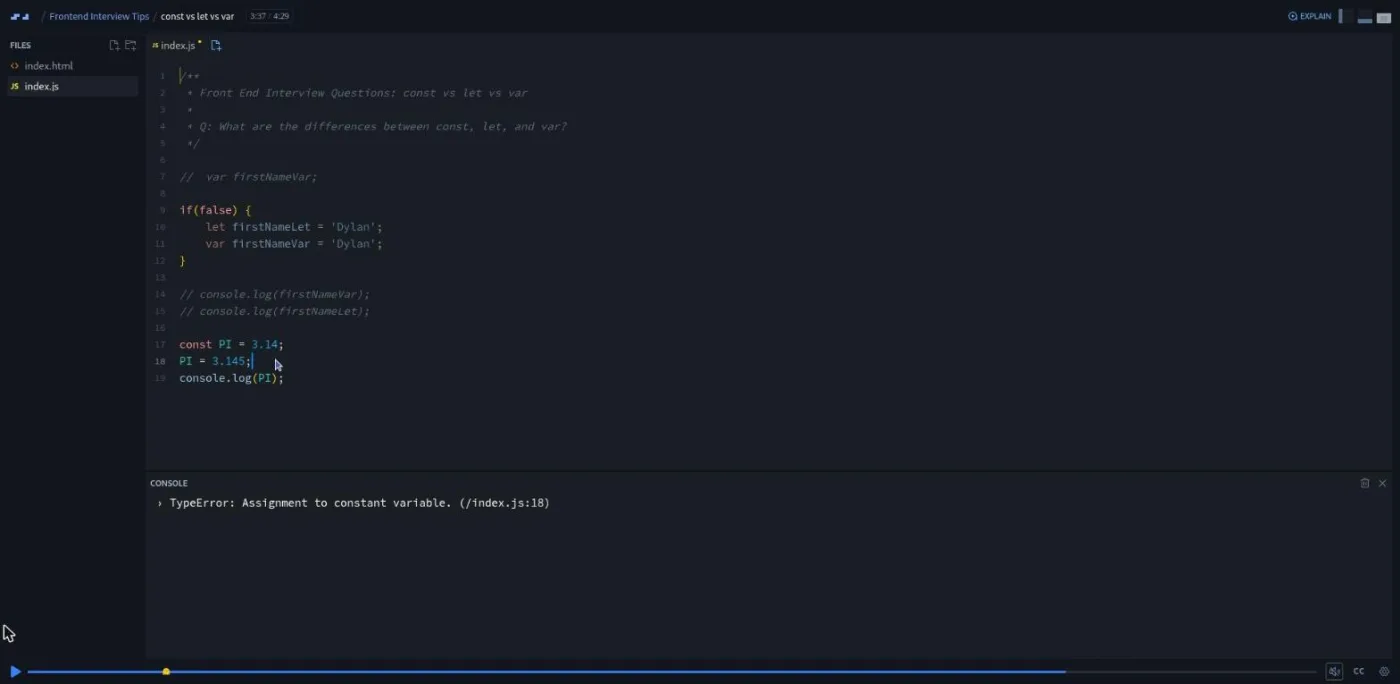
The JavaScript ones are the strongest. In const vs let vs var he declares var firstName inside an if (false) block, logs it outside and gets undefined (hoisting), then repeats it with let and gets a reference error. He reassigns a const pi to trigger "assignment to a constant variable," then mutates a const user object to show that const does not mean frozen. It also has the aside that makes the course likeable: "My mother called me and said, Dylan, I wanna see on the Internet that you're referring to yourself as d money." Double vs triple equals compares 5 == '5' with 5 === '5' and comes with a warning: "if you don't answer, for whatever reason you don't know the answer, you're probably gonna get eliminated from a lot of JavaScript roles."
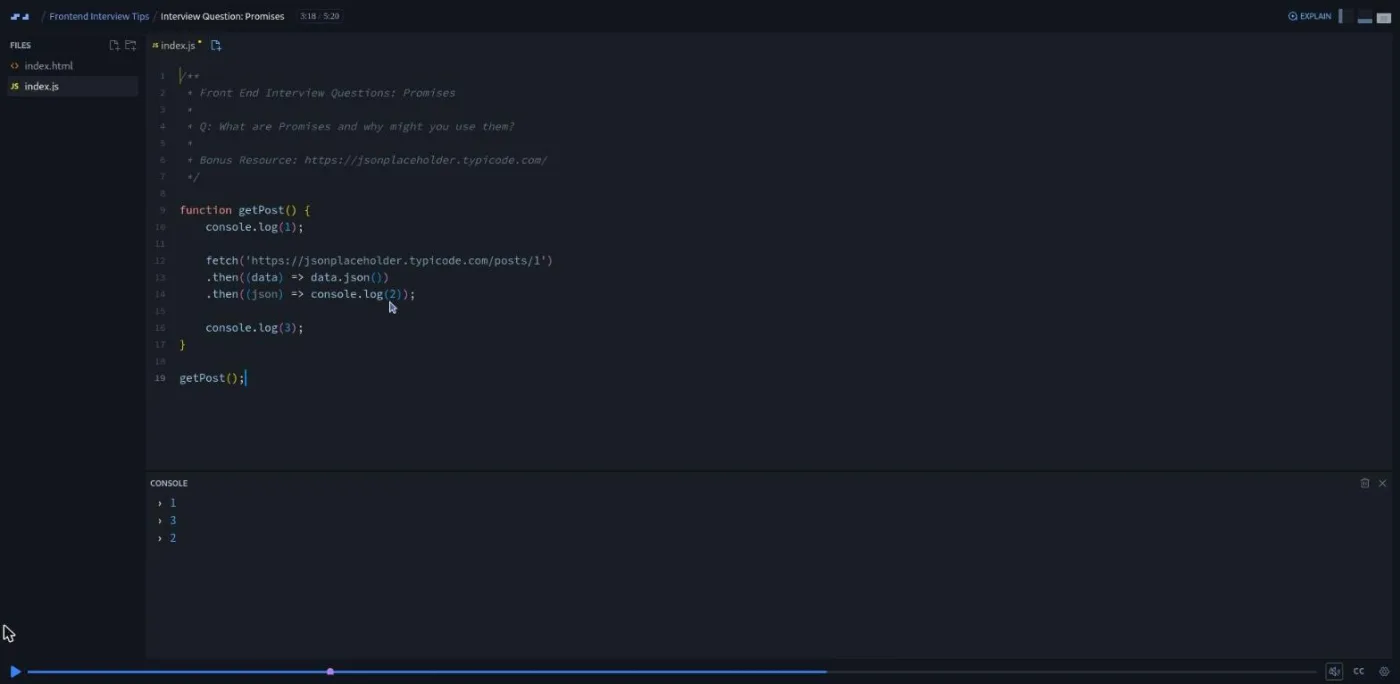
The promises scrim is the longest of the fourteen at 5:20 and the one I would send someone to first. Dylan logs 1, fires a fetch to jsonplaceholder, logs 3, and puts 2 inside the .then chain, so the console prints 1, 3, 2. Then he rewrites it with async/await in a try/catch and the order comes right. The story behind it: he has sat in interviews where a candidate could not explain a GET call, the hiring manager decided they needed someone comfortable with REST services, and "they've ended the interview."
The rest is lighter. CSS selectors shows why h1:hover cannot override an #red id and #red:hover can, and opens with a tactic worth keeping: "answer the next question or a follow-up question while answering a current question because it shows your mastery of the subject." Responsive design is a two minute talk (media queries, flexbox and grid, rem units) that points you to Scrimba's responsive design course for the real material. Git fundamentals lists branch, add, commit, pull and push, with the detail that at his first dev job the team "were passing around code on a USB drive." Agile and Scrum is four and a half minutes with no code, on sprints, standups and retrospectives, framed as a "somewhat unfair" question for people who have never worked on a team; "it's okay to speak to the tenets" if you have no experience to draw on.
After this section you should be able to give a ninety second answer to each of the 14 questions, with a code example for the JavaScript ones, and know which follow-up the interviewer is fishing for.
3. The interview conversation (18 min, 3 scrims)
Three talking-head scrims with slides and no code. "Five questions to be prepared for" covers how you stay up to date, why you, why us, your biggest professional achievement, and why you are leaving. The "why you" part has the most useful admission in the course: "I was interviewing for Nintendo, and I was sort of stunned. And I gave kind of a crappy answer, and I think this cost me the job in all honesty." On "why us" he is blunt: "answering this question because I have a mortgage or because I don't like poverty or hunger isn't a good answer."
"Five preparation tips" is eye contact, rehearsing answers out loud to a rubber duck, business casual even for a relaxed workplace, a short video introduction attached to your resume, and arriving early with a technical book in hand. That last one will strike some people as a gimmick. Dylan's reasoning: "You know who also reads programming books? Other developers."
"Got any questions for me?" is the best of the three and, at 6:20, one of the longer scrims. His four questions: what team and project will I be on, what code quality standards does the organization follow, what is the best part of working here, and, as an exit, why are you interested in hiring me. The second is a "death march" detector (if the manager squirms and admits they push straight to master with no tests, you have learned something), and the third is a red flag detector: "having somebody who actually works there in front of you struggle to answer this question is the biggest red flag that there could be." He ends every interview with a closing statement, because "they're gonna remember that fifty, but that last ten is gonna be very profound."
4. GitHub, LinkedIn, resume and job search (38 min, 4 scrims)
The second biggest block by runtime and the part most interview prep skips. Three of the four scrims are screen recordings of Dylan's own profiles, which were those of a senior engineer with a YouTube channel, so expect to translate the ideas down to a junior profile yourself.
GitHub tips (4:08): pin the repos you want seen, keep a pinned repo that holds your certificates as images, fill in the profile fields, commit consistently. From his interviewing: "they ask them if they work on personal projects, and they say yes. And I pull up their GitHub, and they have maybe three commits in the last year."
LinkedIn tips (11:28) walks his profile top to bottom: banner, photo, open-to-work titles, an About line that makes a recruiter look you up, a Featured section, experience written as a skills checklist that mirrors the wording of job ads, then bullets with numbers. The rule is to write for the recruiter first: "the skills that job apps are looking for" should be "the very first thing in your experience." He also fills in the sections most people leave blank, from volunteering (code.org) to the LinkedIn skills quiz.
Resume tips (14:38) is the longest scrim in the course and the most concrete. His layout, top to bottom:
- Top of the page: contact details with a "willing to relocate" line, a photo, and an opening statement that is not "aspiring developer looking for a passionate team."
- Body: technical skills straight after the contact block, projects with full URLs because resumes still get printed, and four to six bullets per job with numbers ("test coverage from zero to sixty five in three sprints"). Bold the keywords. Keep it to one page in two columns until you have earned a second.
- Cut list: soft skills, skill percentage bars, links without the address, generic templates.
His own lesson was writing "version control" instead of "Git": he "was getting eliminated from interviews because I didn't have experience with Git on my resume." The reason it all matters, in his words: "Average recruiter, average hiring manager looks at your resume for about ten seconds."
Job search strategy (8:00) closes the course with a daily rule: apply every day to postings under a day old, because week-old ones already have dozens of applicants, and treat the search as a job ("expect to put about two to four hours a day into this"). Shotgun for the first role and snipe later, lean on domain knowledge from a previous career, and do not let money block the first offer. Some of it is more American than universal (relocating across states, government contracting for ex-military), so read it as one person's playbook.
5. Scrimba wrap-up scrims (3 min, 2 scrims)
Two scrims Scrimba appends to most courses: Per Borgen's two minute pitch for the Scrimbassador referral program, and a 53 second "How to Utilize Your Certificate" scrim about linking the certificate from your resume and LinkedIn. Neither is by Dylan and neither is in the 104 minute figure.
What a lesson feels like
The technical scrims share one shape: 20 to 40 seconds stating the question and why it gets asked, an explicit "go ahead, pause the video," then two to four minutes of Dylan typing an example into index.js and reading the console. You can pause, edit the code and run it at any point. There are no challenge scrims with a written brief and no AI-checked "instant feedback" challenges; the challenge is the research pause and the recording you make of yourself.
The talking scrims are slides with narration. Every scrim has captions and a timestamped transcript panel under the settings menu, and Scrimba lists subtitles in ten languages, so you can read the answers faster than you can watch them. Dylan's delivery is casual and a little rambling (the transcripts are full of "you know" and "right?"), with self-deprecating stories about Nintendo, his cats on a resume photo, and being an introvert who had to practice eye contact.
Free or Pro: exactly what is gated
This is a Pro course. Only the first two scrims are free previews (the intro and falsy values, both marked SAMPLE); the other 22, including all the profile teardowns, need a Pro subscription. There are no solo projects, so nothing else is gated inside it. The Certificate of Completion at the end of the list is Pro too.
Pro also unlocks the Frontend Developer Career Path this course sits in, and the Pro-only channels on Scrimba's Discord (the pricing page lists basic Discord access as free, so the server itself is not gated). See current plans (opens in a new tab) for what Pro costs in your region.
How long it takes
The 104 minutes is video. If you follow the intro's instructions, each of the 14 technical scrims costs five to ten minutes of research plus a recorded answer, so budget three to four hours for that block alone. The profile scrims cost nothing to watch and an evening to act on. A realistic total is four to six hours over a week, about three times the runtime. Watched straight through, it is a long lunch break and you will keep very little of it.
Who it's for, and who should skip it
It fits people about to apply for a first or second frontend role who have never seen the hiring side: self-taught developers and career changers who have the code but no idea how a technical screen or a ten second resume scan works. It is also a quick check for anyone getting interviews but not offers.
Skip it if you cannot yet answer "what is a promise" with an example; Learn JavaScript covers that first. Skip it if your problem is algorithm rounds; JavaScript Interview Challenges and Data Structures and Algorithms cover that. And skip the profile lessons if you have several years of experience; the advice is aimed a rung below you.
Start Frontend Interview Tips on Scrimba (opens in a new tab)Prerequisites
Enough JavaScript to follow short examples with objects, arrays, fetch and async/await, and enough CSS to know what a selector is. There is nothing to install and no coding beyond editing the examples. Scrimba rates it Intermediate, which is about right for the technical half.
Where it fits
Scrimba's course page lists it under the Frontend Developer Career Path. On this site it pairs with JavaScript Interview Challenges for hands-on questions and React Interview Questions for React roles. Dylan also teaches Introduction to Clean Code, which the destructuring lesson leans on, and the Git scrim assumes what Learn Git and GitHub teaches properly. If the resume lesson makes you want to fix your projects first, read our portfolio projects post next.
Strengths and limits
What it does well:
- Every technical question comes with the reason it gets asked and the follow-up the interviewer hopes for.
- The promises and const/let/var lessons show the bugs in the console instead of describing them.
- The "questions for me" scrim gives you four questions that expose a bad workplace.
- The resume and LinkedIn walkthroughs are specific down to which section goes first.
Where it is limited:
- It was recorded in 2020 and its examples have aged.
- The technical answers are too short to teach a concept you do not already know.
- The profile teardowns use a senior engineer's accounts.
- The job search advice is US-centric.
- Only two of 24 scrims are free.
Related courses and comparisons
- JavaScript Interview Challenges, the coding half of prep
- React Interview Questions, for React-specific roles
- Introduction to Clean Code, more from Dylan Israel
- Data Structures and Algorithms, for the technical-screen side of interviews
- Learn Git and GitHub, if the Git question caught you out
- Frontend interview prep on Scrimba, our wider guide to the interview courses
No. It is a Pro course. The course introduction and the falsy values scrim are free previews (marked SAMPLE); the other 22 scrims and the certificate need a Pro subscription.
Partly. Fourteen of the 24 scrims are technical screen questions answered in a live editor (falsy values, const vs let vs var, promises, spread and rest, destructuring, CSS selectors and so on). The rest is the interview conversation, GitHub, LinkedIn, resume and job search advice. It does not teach JavaScript from scratch.
Dylan C. Israel, whose Scrimba teacher card describes him as an engineering manager at ClickUp with a coding YouTube channel. He also teaches Introduction to Clean Code and Introduction to Unit Testing on Scrimba. The two closing scrims are Scrimba's own.
It was recorded in 2020; Dylan says so on camera, and examples such as IE11 support, COVID and meetups, and his 2020 GitHub graph date it. The advice still applies, but expect dated references.
104 minutes of video. Doing the research pauses and recording your own answers for the 14 technical questions takes three to four hours, and acting on the resume and LinkedIn advice adds an evening. Plan for four to six hours over a week.
Not in the usual Scrimba sense. Each technical scrim asks you to pause, research the question for five to ten minutes, then compare your answer with Dylan's, and the intro asks you to fork the scrim and record yourself answering. There are no written challenge briefs, no AI-checked challenges and no solo projects.
Yes. Every scrim has captions and a timestamped transcript panel, and Scrimba lists subtitles in ten languages. The talking-head lessons are faster to read than to watch.
No. The examples run in Scrimba's in-browser editor with an index.html and index.js. Nothing in the course needs a local setup.