Learn Vue
Rachel Johnson's free Learn Vue runs 96 minutes across two sections and teaches Vue 3 through one project, a Vue Facts app with a header, three fact cards, and a footer built from single-file components and reactivity. It is a clean, well-paced start, but only that one project is live out of the six the welcome scrim promises.
Reviewed inside the course with a Pro account, September 2026: all 26 teaching scrims opened and transcripts read.
Quick answer
Learn Vue fits you if you already know JavaScript and want to see how Vue handles state and templates before you pick a framework, or if a job has already chosen Vue for you. The catch: the welcome scrim promises six projects and only the Vue Facts app is published so far, so you finish knowing how to display data, not how to change it. Once you want the build tool create-vue sets up for you, Intro to Vite covers it next.
Learn Vue
FreeTaught by Rachel Johnson (opens in a new tab)
Vue 3 fundamentals in 96 minutes: components, reactivity, template syntax, and assets, applied to a small Vue Facts app.
Start free on Scrimba (opens in a new tab)Is it worth your time?
Yes, if you want to find out whether Vue clicks for you, and you can spare an afternoon. Rachel's teaching loop is the best thing about it. She states it outright in the section two intro: introduce a concept, show it in context, hand you a challenge, then apply it to the project. Every scrim in section two follows that shape, so you never watch for more than a few minutes without typing.
The other thing it does well is explain the "why" behind Vue's odd-looking choices. A whole scrim, "The Concern of a Separation of Concerns," exists to answer the question every HTML-first learner asks when they see CSS and JavaScript in the same .vue file. Her answer, borrowed from the Vue docs: "Separation of concerns is not equal to the separation of file types." The component is the concern.
You finish knowing how to display data, not how to change it. There is no click handler, no v-if, no v-for, no props between components. When the Vue Facts app needs three fact cards, Rachel has you copy and paste the section three times and index into an array by hand, then says, "And you'd be absolutely right. But hold your horses," and defers the proper way (v-for) to a later section that has not been published as of September 2026, over a year after the course went live.
What you'll learn
Course curriculum
2 modules · 26 lessons
- Getting Started with Vue
- Core Concepts
Lesson counts are the scrims I counted in each expanded section in September 2026. Scrimba's own section headers show 0/2 and 0/24, and its structured data says 27 lessons, which matches my 26 scrims plus the standalone "How to Utilize Your Certificate" clip at the end.
Inside the course, section by section
1. Getting Started with Vue (27 min, 9 scrims)
The welcome scrim (the one free preview lesson) lays out the six-project plan and the prerequisites: "a basic understanding of HTML, CSS, and JavaScript." Then "Vue.js - What and Why?" is two and a half minutes of talking: Evan You, 2014, Stack Overflow and State of JS survey rankings, the companies using it. Rachel is candid that things move: "At the time of this recording, the latest stable release version is three point five point seventeen."
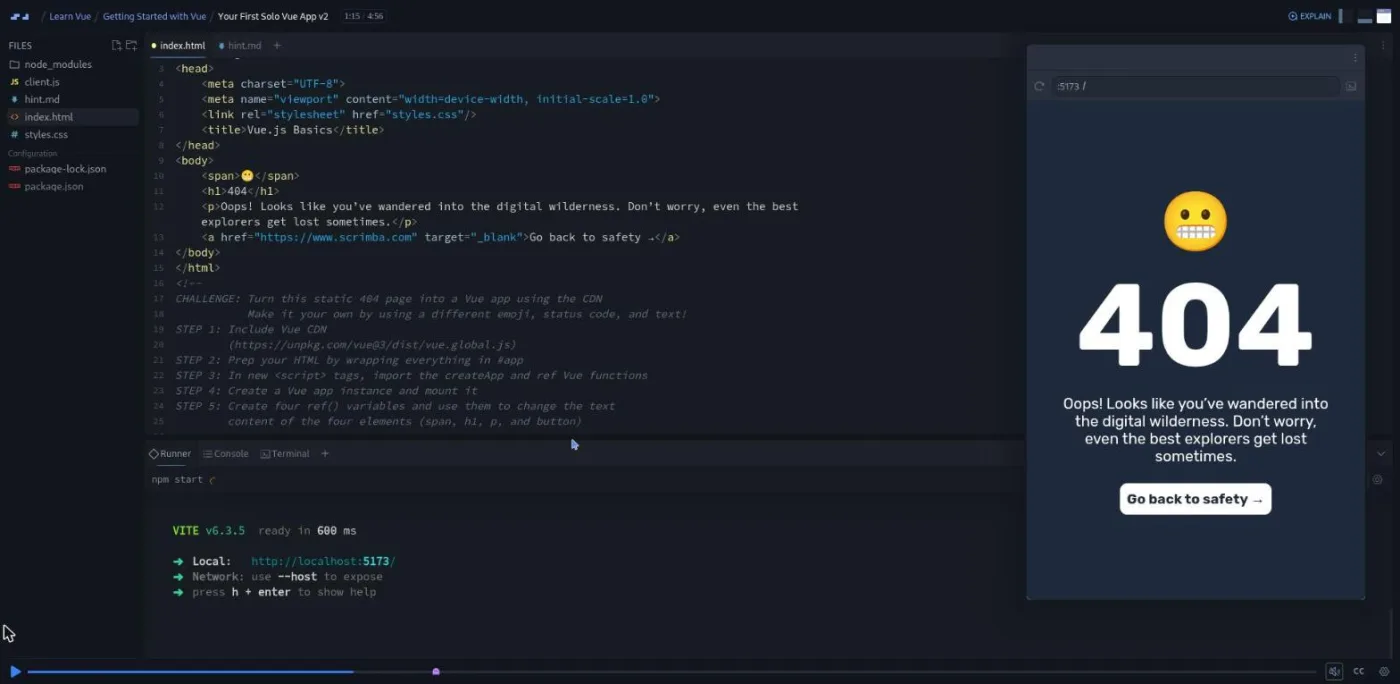
Code starts in "Your First Vue App." You add the unpkg script tag, wrap the body in a div with id="app", replace "world" with {{ name }}, and write createApp with a setup() function that returns ref('Rachel'). Rachel keeps the theory minimal: "Ref is something that we'll explore later. But for now, think of it as a view variable." The next scrim is your first proper challenge: a static 404 page with an emoji, a status code, a message, and a button, and you turn all four into refs. A hint.md file holds the exact syntax if you get stuck. Her solution swaps in a monkey emoji, a 500, and "Server is sleeping."
"Installing Vue Locally" runs npm create vue@latest inside Scrimba's terminal, walks through the prompts, and ends with npm run dev showing the starter page in the preview. She warns about the @latest: without it, "npm might actually resolve to a cached or outdated version." "Using create vue" is a 90 second challenge to do the same yourself, and "Vue Project Anatomy" tours the generated folders: src/assets, src/components, App.vue ("the heart of your application"), main.js, index.html, and vite.config.js, where she deletes the Vue DevTools plugin for now.
The section ends with a recap and a two minute ad for Scrimba's referral program, recorded by Per Borgen. Skip that one.
2. Core Concepts (70 min, 17 scrims)
The section intro names the project, a "very simple Vue facts app" with the Vue logo and three facts, built across three PROJECT scrims that sit between the concept lessons.
Scrims 2 to 8 cover components. "Vue Component Basics" rebuilds the section one page as App.vue and shows how much boilerplate <script setup> removes. The first mini challenge: make the copyright year a ref (she picks 2014) and turn it blue. After the separation-of-concerns aside, "Layout Components" is the meatiest scrim in the course at nearly eight minutes. Rachel extracts a Header.vue from App.vue (script, template, <style scoped>), and the moment she saves, the header vanishes from the preview because nothing imports it yet. You then do the same for Main.vue and Footer.vue. "The @ Alias" explains the three lines in vite.config.js that map @ to src, with a challenge to convert every relative import.
The two-part "Vue Components Challenge" is what she calls "a mix between a tutorial and a challenge." You scaffold a fresh project, strip the starter files, then turn a provided HTML and CSS mockup of a Quote Generator into three components. Part 2 has the lesson I would keep: base styles belong in src/assets/main.css (imported by main.js), because a scoped style block in App.vue "has nothing to select." She also shows why long selectors shrink inside a scoped component, then admits, "I'm really over exaggerating here." "PROJECT - Vue Components" applies all of it to the Vue Facts mockup, with the logo img commented out until the assets lesson.
Scrims 9 to 13 cover reactivity and template syntax. "Vue Reactivity Basics" is the clearest definition in the course: "When something is made reactive in Vue, like a variable, Vue watches it. If the value of a reactive variable changes like this, Vue will automatically rerender parts of the UI as needed." You create refs for the quote, author, title, and year in the Quote Generator, and they do nothing yet. "Text Interpolation" renders them with mustache syntax and explains the .value rule: you write title.value in the script, but "Vue automatically unwraps the dot value property for us when we use refs inside of the template."
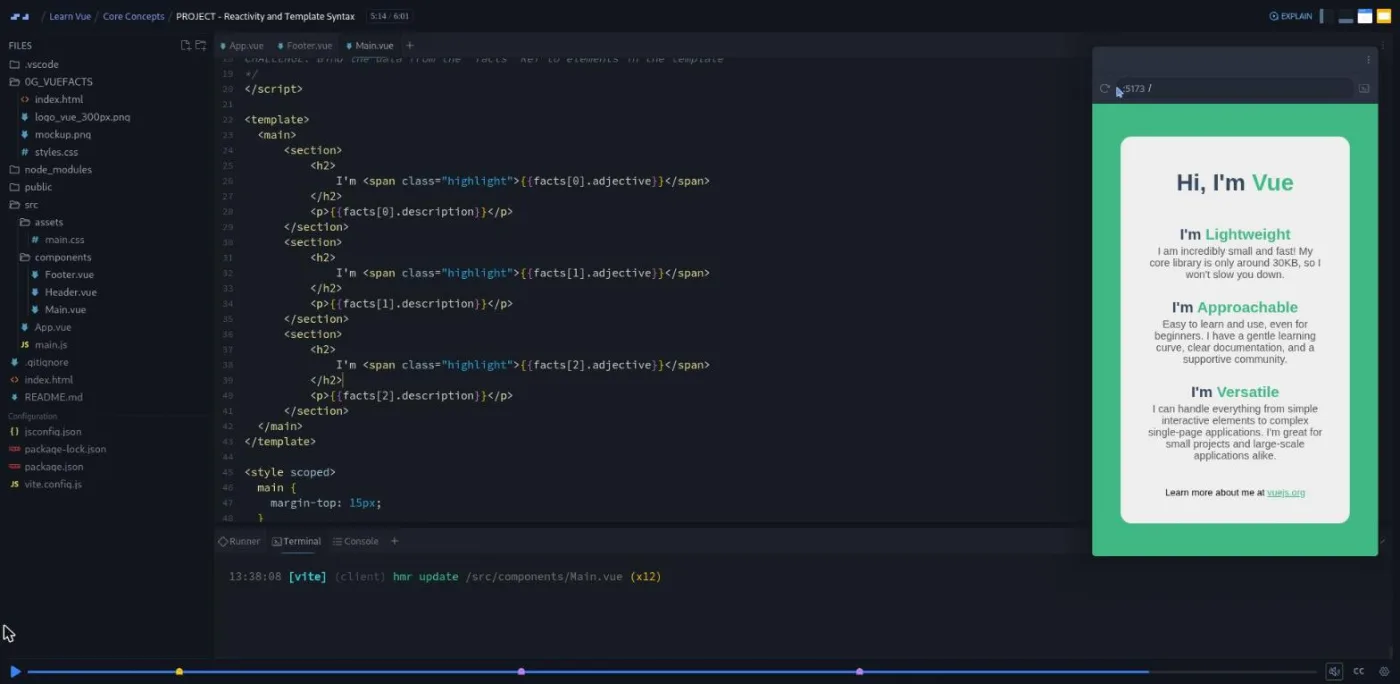
"Attribute Binding" shows why href="{{ href }}" fails (the browser gets the literal braces) and introduces v-bind:href, your first directive. "v-bind - Booleans Attributes and Shorthands" disables a Share button with :disabled="isButtonDisabled", then teaches the : shorthand and the same-name shorthand where :href="href" becomes just :href. "PROJECT - Reactivity and Template Syntax" has the section's hardest challenge: build a facts ref holding an array of three objects with adjective and description keys, then render {{ facts[0].adjective }} and so on by hand. Rachel frames it as "a combination of your existing JavaScript knowledge and Vue."
Scrims 14 to 16 cover images and assets. "Images and Assets in Vue" uses paired cat memes to show three ways to load an image: an absolute path into public/ (served as-is, not bundled by Vite), an @/assets/... path, and an import bound with :src. It ends on a decision table she suggests you screenshot. The "Images and Assets Challenge" is a one-page ecommerce mockup where you pick a method for each of three images and justify it; she stresses the table "is meant as a general guide, not a rule book." "PROJECT - Vue Images" adds the Vue logo and declares the Vue Facts app done: a parent App.vue, three child components, text interpolation in Main.vue, attribute binding in Header.vue.
The section recap promises the next section will cover "passing data around, responding to user input, and showing just the right things at just the right time." That is exactly the list on the course page's "Still to come" section.
What a lesson feels like
Scrims run from under a minute to just under eight; most are between three and five. Rachel talks over a live editor with the preview on the right, and every concept scrim contains at least one pause where a challenge appears as a comment in the file or a challenge.md in the explorer. I counted about 25 challenge prompts across 16 of the 26 scrims. Most are one-liners ("Create a reactive variable to house the author"); the two-part components challenge and the three PROJECT scrims are the ones that take real minutes.
There is no chapter artwork. None of the Vue scrims opens on a title slide; the only slide in the course is the generic certificate clip. The npm create vue@latest and npm install steps run in Scrimba's terminal inside the scrim, so nothing needs installing on your machine.
Rachel is cheerful and a little self-mocking ("Man, I wish I typed that fast," she says while a sped-up recording types the component skeleton). Every scrim has captions, a timestamped transcript under the settings menu, subtitles in ten languages, and playback speed control.
Free or Pro: exactly what is gated
The whole course is free. All 26 teaching scrims open without a subscription, and there are no "Solo Project (PRO)" items in the table of contents; the challenges are all inside the free scrims.
What Pro adds is the Certificate of Completion listed at the bottom of the course page, the Pro-only channels on Scrimba's Discord (the pricing page lists basic Discord access as free), and the career paths, none of which include this course. See current plans (opens in a new tab) if you want the certificate.
How long it takes
96 minutes of video. Budget two to three hours if you do the challenges, so three to four hours total. The 404 page challenge, the create-vue challenge, and the three PROJECT scrims each take five to fifteen minutes of your own typing, and the components challenge needs you to copy code between files while paused. One long evening or two short ones covers it.
Who it's for, and who should skip it
It fits you if you know JavaScript and want to see how Vue handles state and templates before choosing between Vue and React, or if a job or codebase has already chosen Vue for you and you need the mental model fast. Scrimba labels it Intermediate, but Rachel calls it "a beginner friendly journey" in the first scrim, and the label is right about JavaScript, not Vue: refs, import, and arrays of objects are assumed.
Skip it, for now, if you have never written JavaScript; do Learn JavaScript first. Skip it if you need events, lists, forms, routing, or Pinia this month; nothing past attribute binding is published, and the Vue documentation will carry you further right now. And if React is your target, Learn React is 15 hours and complete.
Start Learn Vue for free (opens in a new tab)Prerequisites
HTML, CSS, and enough JavaScript to be comfortable with const, import, objects, and arrays of objects. The hardest challenge asks you to build an array of objects and index into it from a template. Familiarity with a terminal helps for the npm create vue@latest scrims, though everything runs inside Scrimba. No prior Vue or framework experience is needed.
Where it fits
Learn Vue is a standalone course, not part of the Frontend Developer Path, which is built around React. If you continue with Vue after it, the Intro to Vite course explains the build tool create-vue sets up for you. If you decide React fits better, Learn React picks up the same ideas (components, state, rendering lists) and goes far past where this course stops.
Strengths and limits
What it does well: a consistent concept, demo, challenge, project loop; clear explanations of scoped styles, the @ alias, and why refs need .value; current tooling (Vue 3.5, Vite 7, create-vue); and everything free.
Where it is limited: only two of the promised sections exist, so there is no user interaction, no conditional or list rendering, and no props; the Vue Facts app is a static page; and the course went live in August 2025 and was still two sections in September 2026, so treat the "Still to come" list as a hope rather than a schedule.
Related courses and comparisons
- Learn React, the main alternative framework
- Learn JavaScript, the prerequisite
- Intro to Vite, the build tool create-vue uses
- Learn TypeScript, if you want typed Vue components later
Yes. All 26 teaching scrims and every challenge are free, and there are no Pro-only solo projects. Pro is only needed for the certificate and the Pro Discord channels.
No. Two sections (Getting Started and Core Concepts) are published. The welcome scrim promises six projects and Scrimba's course page lists props, events, conditional and list rendering, computed properties, v-model, and four larger projects as still to come. As of September 2026 none of that is live.
Vue 3, specifically 3.5.17 with Vite 7 and the official create-vue scaffolding tool, using the script setup syntax in single-file components.
A Vue Facts page: a header with the Vue logo, three fact cards rendered from an array of objects, and a footer link. Along the way you convert a 404 page and a Quote Generator mockup into Vue apps and place images on a one-page ecommerce mockup.
No. The npm create vue@latest, npm install, and npm run dev steps all run in Scrimba's in-browser terminal. Rachel does show how to do the same locally if you prefer your own editor.
96 minutes of video; plan three to four hours with the challenges and the three project scrims.
Rachel Johnson. The teacher card and every transcript confirm it; the referral ad and the certificate clip are recorded by Scrimba's Per Borgen.
If you only want to sample Vue, this course does that in an afternoon. If you want a complete path to a first job, Scrimba's React material is far deeper and sits inside its career paths, while this course stops before user interaction.
Yes. Every scrim has captions, a timestamped transcript panel under the settings menu, and subtitles in ten languages.